Module Federation Core Web Vitals SEO: where runtime composition costs you, and a budget for every remote
A federated route rarely gets slow in one place. It gets slow in four, each one answers to a different vital, and each needs its own fix and its own owner.
Where does the module federation core web vitals SEO cost come from?#
A federated page pays in four places: a serial remote chain delays LCP, shared JavaScript taxes INP, late mounts shift layout, and client composition delays indexing. So the question is really four questions, and each one has its own owner.
The integration strategy post compares one load time for a federated app against a monolith. That number is real. But it blends four costs into one figure. Instead, what follows takes one route apart and traces each cost to the vital it hurts.
First, the load order. The Module Federation runtime API page says preloading lets you "start preloading module resources at an earlier stage to avoid waterfall requests." So the default is a waterfall. Second, the rendering. HTTP Archive's 2024 Almanac found that "fully rendering a website on the client side has a significantly negative impact on LCP". Third and fourth come the main thread and the layout. Both show up after the page looks ready, which is why a single load number misses them.
Why does it matter which vital a remote breaks?#
On mobile in 2025 only 62% of sites pass LCP and 77% pass INP, the two vitals runtime composition taxes hardest, and Google Search reads them at the 75th percentile. In other words, federation adds weight where most sites are already weakest.
Show data table
| Dimension | desktop | mobile |
|---|---|---|
| LCP | 74% | 62% |
| INP | 97% | 77% |
| CLS | 72% | 81% |
Mobile trails desktop on LCP and INP, the two vitals a federated route strains most.
Google's Core Web Vitals page, read on 27 September 2026, asks for LCP within 2.5 seconds. It asks for INP under 200 milliseconds. It also says good vitals align with "what our core ranking systems seek to reward." Meanwhile, web.dev's vitals guide says "a good threshold to measure is the 75th percentile of page loads."
That percentile is the point. A route passes or fails as one URL, whatever team owns the slow part. As a result, one team's remote can pull a shared route under the line. The other teams did nothing wrong, and yet they lose the same search standing. So the fix is a budget per remote, set by the vital each remote strains. One page number that no team owns does not work. The data behind the next section comes from the 2024 Almanac performance chapter.
Why does a federated route wait longer for its largest paint?#
Sites with good LCP spend 600 ms on TTFB and 350 ms of load delay, and a remote chain of entry, manifest and chunk adds its round trips to that delay. The HTTP Archive measured these medians at the origin p75 in July 2024.
Show data table
| Segment | Value ( ms) | Share |
|---|---|---|
| TTFB | 600 | 44.8% |
| Load delay | 350 | 26.1% |
| Load duration | 160 | 11.9% |
| Render delay | 230 | 17.2% |
Load delay beats download time in every bucket, and a remote chain adds to load delay.
Show data table
| Segment | Value ( ms) | Share |
|---|---|---|
| TTFB | 1360 | 51.1% |
| Load delay | 720 | 27.1% |
| Load duration | 270 | 10.2% |
| Render delay | 310 | 11.7% |
Load delay is 720 ms against 270 ms of load duration.
Show data table
| Segment | Value ( ms) | Share |
|---|---|---|
| TTFB | 2270 | 53.2% |
| Load delay | 1290 | 30.2% |
| Load duration | 350 | 8.2% |
| Render delay | 360 | 8.4% |
Load delay is 1,290 ms against 350 ms of load duration.
In fact, the Almanac's words are plain. It says "websites spend more time on resource load delay than on load duration, regardless of their LCP status." So bytes are rarely the first problem. Order is.
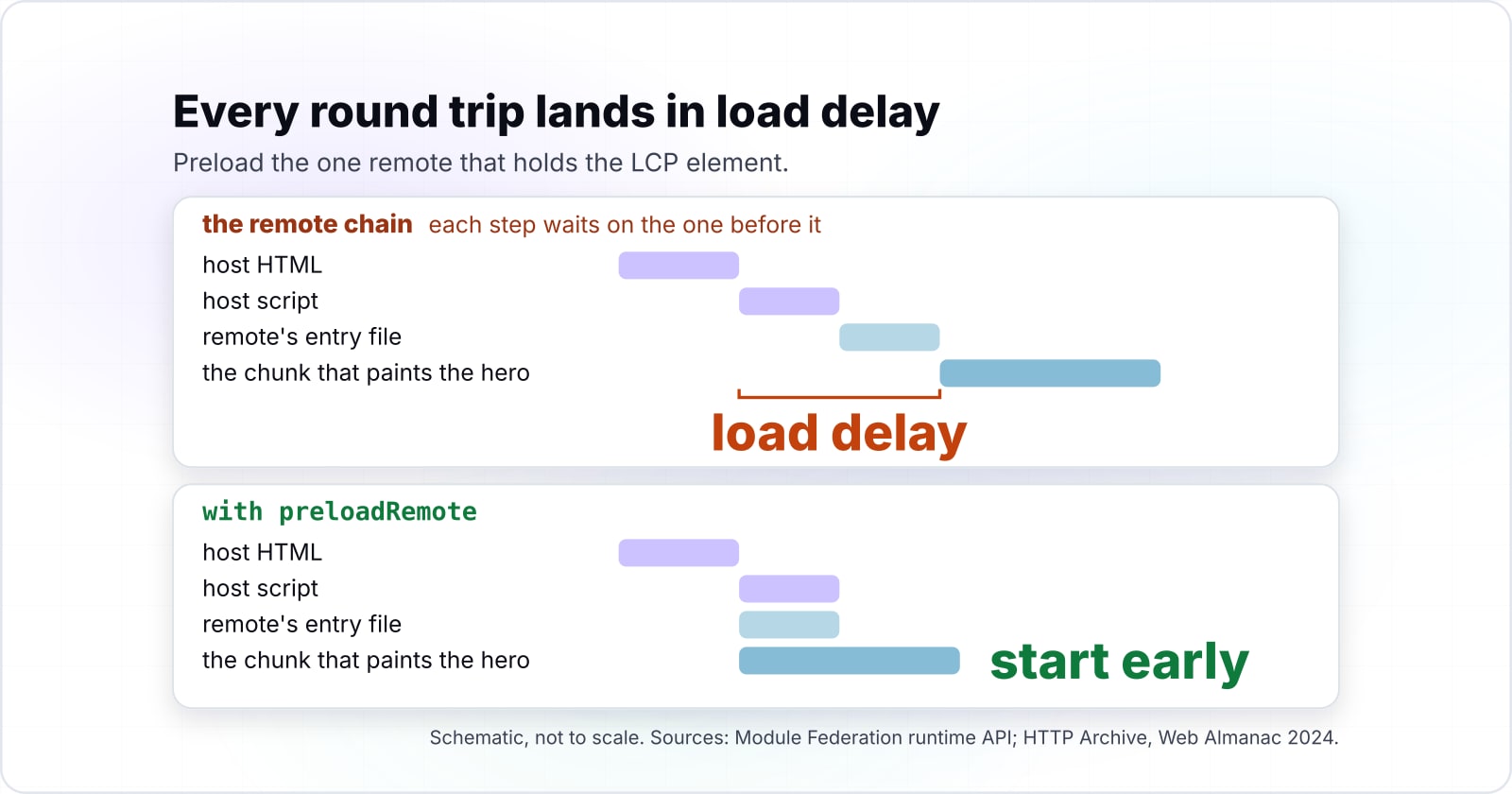
So here is how the order goes wrong. The host HTML arrives, and then the host script asks for the remote's entry file. Only then does the runtime learn which chunk the remote exposes. Next it checks the shared scope. After that, the chunk that paints the hero starts to load. Because each step waits on the one before it, every round trip lands in load delay.
So the fix is to start early. The runtime API page documents preloadRemote, which loads a remote's entry and chunks before the code asks for them. Also, webpack's performance page lists an opt-in asyncChunkWaterfalls check among its hints. It flags a lazy chunk that asks for the next one only once it runs. Preload the one remote that holds the LCP element, and leave the rest lazy.
How much does composing remotes in the browser cost LCP?#
Mobile sites keep about 60% good LCP until 70% of their HTML is generated on the client, then fall to 40% when the page is rendered entirely there. The HTTP Archive's 2024 performance chapter drew that curve from real Chrome data.
about 60%
Up to 70% of HTML generated on the client
40%
Fully rendered on the client
Mixing server and client HTML costs little; building it all in the browser costs a third of the passing share.
| Option | % of mobile websites with good LCP (HTTP Archive, 2024) |
|---|---|
| Up to 70% of HTML generated on the client | about 60% |
| Fully rendered on the client | 40% |
The 2024 Almanac reads the curve for you. In its words, "a combination of server- and client-side generated content doesn't significantly impact how fast the LCP element gets rendered." However, a page built wholly in the browser does suffer. That drop is the gap between 60 and 40.
For a federated host, this draws a clear line. A host that renders its LCP region on the server and federates the rest keeps its LCP. By contrast, a host that composes every remote in the browser gives up a third of its passing share. So ask one thing of each route: which remote holds the largest element on first view? That remote, or at least its first frame, belongs in the server HTML. Then every other remote can load after it without hurting LCP.
How do shared singletons and eager sharing reach INP?#
The median mobile page already ships 558 KB of JavaScript with 206 KB unused at load, and every mismatched shared version or eager share adds to it. Those medians come from the HTTP Archive's 2024 JavaScript chapter.
Show data table
| Item | Kilobytes per page, median mobile |
|---|---|
| JavaScript shipped | 558 KB |
| of which unused at load | 206 KB |
The Almanac counts 44% of the script bytes a phone receives as unused at load.
Shared dependencies decide how much script the main thread parses before it can answer a tap. That is why version drift and eager sharing show up as INP, not as load time. web.dev's INP guide counts the time from a tap to the next paint. And a thread that is busy parsing script cannot paint.
The shared config page names three settings to audit. With singleton off and versions that differ, "each side will load its own dependencies." So two copies of one library run. With requiredVersion set too low, a remote may pull in a version the other remotes do not use. And with eager on, the page warns that it "will package the shared dependencies into the entry file." It adds that this "may result in a large entry file size."
In practice, check all three the week INP rises after a remote ships. Also, webpack's opt-in duplicatePackages check flags two copies of the same package in one build. The goal is a single shared React, loaded once and lazily. Two copies of React on one route is a common cost, and a load test never shows it.
Where does layout shift come from when a remote mounts after first paint?#
A remote that mounts into an unsized slot after the host paints pushes content down, and CLS counts that shift against a 0.1 good threshold. web.dev's CLS guide, read on 27 September 2026, sets that line, and it marks poor above 0.25.
The same guide names the cause almost word for word. Shifts happen, it says, "when resources load asynchronously or DOM elements are dynamically added to the page before existing content." That describes a remote exactly. The host paints first. Then the remote arrives and takes space the host never held for it.
So the host owns the slot a remote fills. The host reserves its size, and the remote team keeps inside it. Otherwise every late mount becomes a layout shift. In practice, the host sets a fixed height or an aspect ratio on each slot. Then the remote's own skeleton fills that exact box while it loads.
| Moment | What fills the slot | Size rule |
|---|---|---|
| Before the remote loads | The remote's own skeleton | Fills the exact box the host reserved |
| After the remote loads | The remote | Keeps inside the reserved size |
| When the remote fails | The errorLoadRemote fallback | Matches the slot's size, or the page shifts twice |
Failure needs the same rule. The runtime hooks page documents errorLoadRemote, which runs when a remote fails and can return a fallback. So that fallback should match the slot's size. If it does not, a failed remote shifts the page twice. The first shift comes when the space collapses, and the second when something else fills it.
What does Google Search index from a page composed in the browser?#
Googlebot queues every 200 page for rendering, and a page may wait there for seconds or longer before any client-composed remote exists for indexing. Google's JavaScript SEO basics page says so directly. In its words, "The page may stay on this queue for a few seconds, but it can take longer than that."
So content that only exists after a remote loads in the browser is indexed on the renderer's schedule. The same page says crawling works well for "server-side rendered pages where the HTML in the HTTP response contains all content." It also calls server-side or pre-rendering "still a great idea." Its reason is that it "makes your website faster for users and crawlers, and not all bots can run JavaScript."
Therefore, sort remotes by what search needs. A product description or an article body is search content, so it renders on the server. But a cart drawer, a filter panel or a chat widget is interactive, so it can stay on the client.
Server rendering of remotes works today. The Module Federation Angular SSR guide describes the flow. When "a route points to a remote module, the host server delegates the route processing to the remote server." Also, Modern.js supports SSR with federation, though only in streaming mode. It warns that app-level modules "do not support server-side rendering", so use component-level exports for anything search must see. The rendering basics sit in the SEO friendly frontend guide.
How do you split one page budget into a budget per remote?#
Four remotes at webpack's default 250 KB warning may ship 1,000 KB of script, nearly double the 558 KB median mobile page, so the route budget is divided, not multiplied. The webpack performance page sets maxEntrypointSize to 250000 by default, and that limit applies per build.
Start from the route's LCP and script budget, and subtract the host's share. Then give each remote a slice in bytes and in milliseconds that its own build checks. web.dev's budgets primer frames it the same way, as limits a team agrees before it builds.
Here is a worked example, with illustrative numbers. Say a product page has a host shell and four remotes. Say the route may ship no more script than the median mobile page. Suppose the host shell takes 158 KB of that, an example figure. Then the four remotes share 400 KB, or 100 KB each.
Next comes time. Take the good-bucket TTFB of 600 ms from the Almanac. That leaves 1,900 ms of Google's 2.5 second LCP line for the LCP remote's entry, its chunk and its render. And the other three remotes get no LCP time at all, because they load after the hero paints.
Route at the caps: 158 KB host + 4 x 250 KB = 1,158 KB
Median mobile page: 558 KB
Remotes alone may ship, at the caps
4 x 250 KB = 1,000 KBEach remote's slice of a median-page route
(558 - 158) / 4 = 100 KBLCP time left for the LCP remote
2,500 - 600 = 1,900 msLCP time for every other remote
0 ms: they load after the hero paintsCaps overshoot the route by 600 KB
overshootsGive each remote's build a cap of about 100 KB, not 250 KB, and check the 1,900 ms time slice on the composed route. The host's share is an example figure. Sources: webpack performance configuration; HTTP Archive, Web Almanac 2024 JavaScript and Performance; Google Search Central, Core Web Vitals.
| remotes at the default cap | 4 x 250 KB = 1,000 KB |
|---|---|
| median mobile page | 558 KB |
| host shell (example) | 158 KB |
| each remote's slice | (558 - 158) / 4 = 100 KB |
| LCP time for the LCP remote | 2,500 - 600 = 1,900 ms |
Show data table
| Dimension | remotes at the default budget | median mobile page |
|---|---|---|
| 1 remote | 250 KB | 558 KB |
| 2 remotes | 500 KB | 558 KB |
| 3 remotes | 750 KB | 558 KB |
| 4 remotes | 1,000 KB | 558 KB |
| 5 remotes | 1,250 KB | 558 KB |
| 6 remotes | 1,500 KB | 558 KB |
Four remotes at the default 250 KB warning may ship 1,000 KB, nearly double the 558 KB median mobile page.
The remote's own build checks the byte slice. But the time slice is checked on the composed route, because only there does the remote meet the host. Both live beside the team's code. So a remote that grows fails its own pipeline, not a shared one. A budget per remote also becomes part of the contract each team signs, which the governance post covers.
Which documentation pages do you build the budget from?#
Four official pages cover the build: the runtime hooks for timing, the runtime API for preloading, webpack's performance hints, and Lighthouse CI assertions. Build from them in this order.
Runtime hooks: mark each remote with beforeRequest and onLoad
Runtime API: registerPlugins installs the timing plugin, preloadRemote starts the LCP remote
webpack performance: maxEntrypointSize and maxAssetSize, with hints set to error
Lighthouse CI: a user-timings assertion with maxNumericValue per remote
- The runtime hooks page:
beforeRequestruns before the remote path is resolved. ThenonLoadruns after a remote is loaded, so the pair marks each remote. - The runtime API page:
registerPluginsinstalls the timing plugin. AndpreloadRemotewithnameOrAliasstarts the LCP remote early. - The webpack performance page:
maxEntrypointSizeandmaxAssetSizeset the cap. Withhintsset to'error', the build fails past it. - The Lighthouse CI configuration page: the
user-timings:<kebab-cased-name>assertion takesmaxNumericValuein milliseconds. So it fails the route when a remote runs long.
What is the smallest code that enforces a budget per remote?#
About 30 lines enforce it: a runtime plugin that measures each remote, a webpack performance block per remote, and one Lighthouse CI assertion per measure. The byte and time values are the worked example's, so change them to fit your own route.
// host: remote-timing.ts
import { registerPlugins, preloadRemote } from '@module-federation/enhanced/runtime';
import type { ModuleFederationRuntimePlugin } from '@module-federation/enhanced/runtime';

const remoteTiming = (): ModuleFederationRuntimePlugin => ({
  name: 'remote-timing',
  beforeRequest(args) {
    performance.mark(`start:${args.id}`);
    return args;
  },
  onLoad(args) {
    performance.measure(`remote-${args.remote.name}`, `start:${args.id}`);
  },
});

registerPlugins([remoteTiming()]);
preloadRemote([{ nameOrAlias: 'product', resourceCategory: 'all' }]);

// each remote: webpack.config.js
export default {
  performance: { hints: 'error', maxEntrypointSize: 100000, maxAssetSize: 100000 },
};

// the route: lighthouserc.json
// { "ci": { "assert": { "assertions": {
//   "user-timings:remote-product": ["error", { "maxNumericValue": 1900 }]
// } } } }
First, the plugin writes one measure per remote, named after it. Then each remote's build fails once its entry passes 100 KB. Finally, Lighthouse CI fails the route when the product remote takes longer than its 1,900 ms slice. The measure spans the request to the load. So it is a floor on the remote's LCP cost, not the whole of it.
When is runtime federation the wrong tool for a search-facing route?#
If a route lives on organic search and one team owns it, build-time composition or a plain server-rendered page keeps LCP and indexing simpler than any remote budget. Federation earns its cost where teams need to deploy on their own. Where they do not, the cost buys nothing.
In short, three cases call for something else. First, a landing page or an article that one team owns is better as a plain server-rendered page. The Almanac's drop from 60 to 40 percent good LCP comes from client rendering, and a plain page skips it. Second, routes that ship together on one release train fit build-time composition. It pays its cost once, at build, and not on every visit. Third, a route may need three or more remotes before its hero can paint. If so, the split itself is the problem, and merging those remotes helps more than any budget.
| Route | Use instead | Why |
|---|---|---|
| A landing page or an article one team owns | A plain server-rendered page | The drop from 60 to 40 percent good LCP comes from client rendering, and a plain page skips it |
| Routes that ship together on one release train | Build-time composition | It pays its cost once, at build, and not on every visit |
| A route that needs three or more remotes before its hero paints | Merge those remotes | The split itself is the problem |
Whether micro frontends pay at all is its own decision, argued in are micro frontends worth the complexity. And the trade-offs between federation, single-spa, iframes and build-time composition sit in the integration strategy post.
Where to go from here#
Measure one federated route this week: map each remote to the vital it strains, then give it a budget its own build enforces. That covers the module federation core web vitals SEO work for one route. After that, each new route repeats it.
For the choice of approach, read the integration strategy post. For whether to split at all, read are micro frontends worth the complexity. The budget joins the team contract in the governance post. And a migration that adds remotes route by route should set each budget before the remote ships. The strangler migration post shows where that step fits.
For teams that want the vitals measured and fixed, there is web performance work. For wiring the budget into every remote's pipeline, there is DevOps and CI/CD. But the four documentation pages above are enough to build it yourself.