Micro-frontends with Module Federation: what they are, when they pay, and how to join the parts
Splitting a frontend is a decision about teams before it is a decision about tools. Once that is settled, every tool answers one question: where do the parts meet?
What are micro-frontends, and where does Module Federation fit?#
Micro-frontends split one web frontend into parts that separate teams build and deploy on their own, then join those parts into one page in the browser. The term comes from Cam Jackson's article on martinfowler.com, dated 19 June 2019. And it defines the style as one where independently deliverable frontend "applications are composed into a greater whole" (martinfowler.com).
In practice, each part has an owner. The single-spa docs say each microfrontend has its own git repository, its own package.json and its own build config. As a result, each one gets an independent build and an independent deploy. Yet the person using the app never sees the seams. Instead, they see one page and one address bar.
Module Federation is the piece that joins those builds again. It began as a feature of webpack, the JavaScript bundler. Webpack's concept page states the goal in one line: "Multiple separate builds should form a single application." So each build acts as a container. And each can expose code to other builds and consume theirs, at runtime, in the browser.
So the two terms sit at different levels. Micro-frontends describe how work is split between groups of people. But Module Federation is only one way to put that work back together. So you can split a frontend without it, and a single group can use the plugin inside one app. Still, most people meet the two together, so this guide treats them as a pair.
What do micro-frontends buy a team, and how many teams use them?#
The return is release independence, and in State of Frontend 2024 only 23.6% of respondents had used micro-frontends in the past year. What a group buys is the right to ship its part without waiting on a shared release. When The Software House asked that question in its 2024 survey, fewer than one in four said yes.
23.6%
Used micro-frontends in the past year
76.4%
Did not
Fewer than one in four frontend respondents used micro-frontends in the past year.
| Option | percent of State of Frontend 2024 respondents |
|---|---|
| Used micro-frontends in the past year | 23.6% |
| Did not | 76.4% |
Picture a checkout group that fixes a bug on Tuesday. If the frontend ships as one bundle, that fix waits for the catalog group's feature to pass review. But with separate builds, checkout goes live on Tuesday. Then catalog ships when it is ready. That gap between "done" and "live" is the thing being bought.
Also, the same report holds a warning beside its figure. In The Software House report, a solutions architect at AWS who builds micro-frontends notes that use fell from 75.4% of respondents in 2022 to 23.6% in 2024. Their reading is that some companies "didn't truly need micro-frontends" and learned that the split also demands organisational change. So the low figure does not mean the idea failed. Instead, it suggests the choice is now made on purpose.
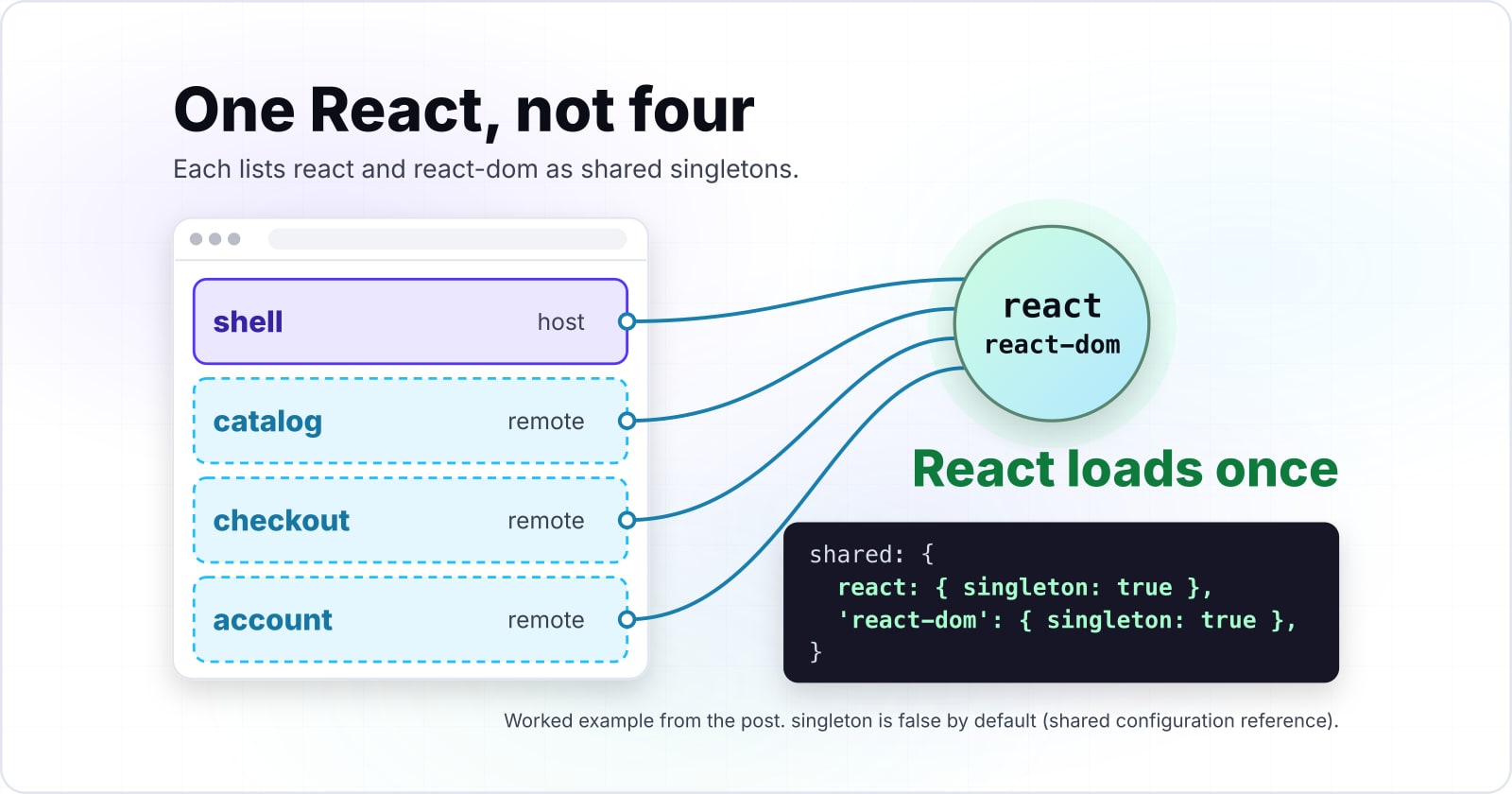
Here is a worked example to hold on to. Say a shell app loads three remotes: catalog, checkout and account. And each lists react and react-dom as shared singletons. As a result, the browser loads one React, not four. A fourth remote then adds its own code and one manifest request, but never another React.
How many copies of React does the page load?
Set how many remotes the shell loads and whether React is shared as a singleton. The defaults are the worked example: a shell and three remotes, React shared once.
Copies of React the browser downloads
1
- Remote manifest requests the page makes
- 3
An illustrative model of the singleton setting in the shared configuration docs. Modelled, not measured.
When are micro-frontends the wrong fit?#
Micro-frontends are the wrong fit when one team owns the whole frontend, because the split adds builds, version negotiation and runtime loading while removing no waiting. If the groups already release together without queuing, a modular monolith gives the same boundaries without the runtime cost.
The costs are written down in the docs. The shared configuration reference sets singleton to false by default. Without singleton mode, a host and a remote that hold different versions of a library each "load its own dependencies." Also, requiredVersion defaults to the version in each app's own package.json. So every upgrade turns into a small negotiation between owners. And Cam Jackson's article names the same two costs: payload size, and "more stuff to manage" in repositories, pipelines and domains.
Three cases point away from the split. First, one group owns the whole frontend: folders and lint rules give the boundaries for free. Second, the groups already ship daily without blocking each other: keep the single build. Third, the goal is faster pages: a split adds requests, so start with a performance budget instead.
The full test of whether the split pays lives in when micro-frontends are worth the complexity. And the discipline it asks for afterwards, from design tokens to who may bump React, is in team autonomy and governance for micro-frontends.
Where can the pieces be joined?#
Every integration option answers one question, where the parts meet: in the build, in the browser at runtime, or in a separate document inside the page. So every tool on the market sits somewhere on that line.
In the build. Each part is published as a package, and a container app lists them as dependencies. Cam Jackson's article shows this with a container package.json. Then it recommends "strongly against" the approach. The reason is the lockstep release, since a change to any part means rebuilding and shipping every part.
In the browser, at runtime. Each part deploys alone, and the page fetches it when needed. For example, webpack's concept page says remote modules "are loaded at runtime from a remote container", always behind an async load. Meanwhile, single-spa uses ES modules and import maps. Its recommended setup pairs in-browser modules with an import map, and SystemJS as the fallback loader.
In a separate document. Here an iframe holds each part in its own page. The MDN reference calls the element a nested browsing context, "embedding another document into the current one." So that gives strong isolation for styles and globals. But it has a cost, which comes up below.
This line matters because it shows what each choice gives up. The earlier the join, the more the parts share and the less each can deploy alone. When the join comes later, each group gains freedom, and the browser does more work at load.
Which integration option do teams choose, and what does each give up?#
In State of Frontend 2024, 51.8% of respondents who had used micro-frontends named Webpack 5 Module Federation as a micro-frontend solution they used, against 35.5% for single-spa. It leads because it shares libraries across separately deployed builds.
Show data table
| Item | Value |
|---|---|
| Webpack 5 Module Federation | 51.8 |
| Single SPA | 35.5 |
| Open Components | 6.3 |
| SystemJS | 6.1 |
| Bit | 5.9 |
| Qiankun | 1.8 |
| Luigi | 1.5 |
| Piral | 1.3 |
| Other | 16.7 |
Webpack 5 Module Federation and single-spa cover most answers.
Each alternative trades that sharing for something else. For example, single-spa trades it for lifecycles that work with any framework. Iframes trade it for isolation. Packages trade away independent deploys.
Module Federation shares code at runtime. A remote exposes modules, a host consumes them, and both can share React through one share scope. But its cost is coupling on library versions, because two parts that disagree on React must settle on one.
single-spa decides which parts render for which routes. Its docs list three kinds of microfrontend: applications tied to routes, parcels without routes, and utility modules. Because it is framework-neutral, a Vue part and a React part can share a page. Still, its own docs call one framework for all parts "practical and suggested."
Iframes give the cleanest isolation and the hardest joins. Cam Jackson's article says they make "routing, history, and deep-linking more complicated." Also, MDN adds that each iframe "requires increased memory and other computing resources."
Packages are the easiest to set up. However, every release becomes a joint release, which removes the main reason to split.
The deeper comparison is in choosing an integration strategy. And what a runtime join costs at load is in what runtime joins cost in Core Web Vitals and search.
Which Module Federation should you install?#
Install @module-federation/enhanced for Module Federation 2.0, which builds on the 1.5 runtime built into Rspack and adds type hints, devtools and preloading. That package runs on webpack and Rspack. Meanwhile, Vite apps use @module-federation/vite, and Angular apps can use Native Federation on import maps.
Because the version names confuse many people, the history comes first. The project's introduction page dates the idea to 2017, when the webpack team began exploring code sharing between apps. In 2018, webpack 4.20 added module hooks. Then in 2019, webpack 5 shipped it as a built-in plugin.
| Version | What it is | What it adds |
|---|---|---|
| v1.0 | Matches webpack's own plugin | No longer being iterated |
| v1.5 | Ships inside Rspack | Runtime plugins |
| v2.0 | Sits on top of 1.5; install @module-federation/enhanced | Type hints, devtools and preloading |
- 2017
The webpack team begins exploring code sharing between applications
Source: Module Federation, introduction guide.
- 2018
webpack 4.20 adds module hooks
Source: Module Federation, introduction guide.
- 2019
webpack 5 ships Module Federation as a built-in plugin
Source: Module Federation, introduction guide.
Rspack is a bundler that webpack projects can move to, so the same terms carry over. Its guide sorts the versions into a table. First, version 1.0 matches webpack's own plugin and is "no longer being iterated." Then version 1.5 ships inside Rspack and adds runtime plugins. Finally, version 2.0 sits on top of 1.5. To get it, "you need to install the additional @module-federation/enhanced plugin."
The introduction page lists what 2.0 adds over the webpack 5 plugin: type hints, a manifest, the Federation Runtime and a runtime plugin system. For daily work, the manifest matters most, since a host can point at a remote's mf-manifest.json file.
Other bundlers have their own route. Users of Vite, another build tool, install @module-federation/vite. Its README says the config "remains the same for different frameworks." Angular users can pick Native Federation instead. Its npm page calls it "the mental model of Module Federation, implemented on browser standards (ES modules and import maps)." In short, choose by bundler first, then by the features you need.
Which official pages do you build from?#
Build from four official pages in order: Rspack's Module Federation guide, the shared configuration reference, the quick start, and webpack's concept page. Together they cover the install, the shared libraries, the remote manifest and the async boundary.
- Rspack's guide: install @module-federation/enhanced and import
ModuleFederationPluginfrom@module-federation/enhanced/rspack. - The shared configuration reference: set
singleton: truefor react and react-dom, and read whatrequiredVersiondoes when versions differ. - The quick start: address a remote by its
mf-manifest.jsonURL, and note that the build plugins need Node.js 20 or higher. - webpack's concept page: move the app start into
bootstrap.jsbehindimport('./bootstrap'), the async boundary that lets sharing settle.
Each page heads off one error you would otherwise meet. For example, skip the fourth and the browser throws "Shared module is not available for eager consumption," the exact message in webpack's troubleshooting section.
Rspack's Module Federation guide
The install: @module-federation/enhanced and its Rspack plugin.
The shared configuration reference
The shared libraries: singleton and requiredVersion.
The quick start
The remote manifest: address a remote by its mf-manifest.json URL.
webpack's concept page
The async boundary: start the app behind a dynamic import of bootstrap.
How do you build micro-frontends with module federation?#
The smallest working setup is two Rspack builds: a remote that exposes one component and a host that loads it by manifest URL. Also, both share React as a singleton, and an async bootstrap lets sharing settle before the app renders. That is the whole setup for micro-frontends with module federation.
// 1. remote/rspack.config.mjs: expose one component
import { ModuleFederationPlugin } from '@module-federation/enhanced/rspack';

export default {
  plugins: [
    new ModuleFederationPlugin({
      name: 'remote',
      exposes: { './Button': './src/Button.jsx' },
      shared: { react: { singleton: true }, 'react-dom': { singleton: true } },
    }),
  ],
};

// 2. host/rspack.config.mjs: name the remote by its manifest URL
import { ModuleFederationPlugin } from '@module-federation/enhanced/rspack';

export default {
  plugins: [
    new ModuleFederationPlugin({
      name: 'host',
      remotes: { remote: 'remote@https://remote.example.com/mf-manifest.json' },
      shared: { react: { singleton: true }, 'react-dom': { singleton: true } },
    }),
  ],
};

// 3. host/src/index.js: the async boundary
import('./bootstrap');

// 4. host/src/bootstrap.jsx: start the app once sharing has settled
import { createRoot } from 'react-dom/client';
import App from './App';
createRoot(document.getElementById('root')).render(<App />);

// 5. host/src/App.jsx: load the remote component on demand
import { lazy, Suspense } from 'react';
const Button = lazy(() => import('remote/Button'));
export default function App() {
  return <Suspense fallback="Loading"><Button /></Suspense>;
}
First, serve the remote so its manifest answers at the URL the host names. Then start the host. Once it loads, the button on screen comes from a different build served from a different address. And React loads once, because both sides share it as a singleton.
Two settings carry most of the weight. The shared block is what stops the payload problem Cam Jackson's article warns about. Meanwhile, the import('./bootstrap') line gives the runtime a moment to agree on one React before any component renders. If you would rather not wire it by hand, the quick start's npm create module-federation@latest command scaffolds a provider and a consumer.
Where should you go next?#
Each deeper question has its own post: whether the split pays, how teams stay coherent, how to migrate, which strategy fits, and what runtime composition costs. This guide covers what, when and which. But the five below go further.
- Is the split worth it for your groups? Read when micro-frontends are worth the complexity.
- How do separate owners stay one product? Read team autonomy and governance for micro-frontends.
- How do you move a live monolith over without a rewrite? Read an incremental strangler migration to micro-frontends.
- Which join fits your stack? Read choosing an integration strategy.
- What does a runtime join cost at load? Read what runtime joins cost in Core Web Vitals and search.
The same trade shows up on the server, and microservices versus a monolith walks through it there. When a frontend has outgrown one codebase, our page on how we split and scale it explains that work. And if you need frontend software engineers to build the shell and its remotes, that page says how we staff it.
Still, the four official pages above are enough to build micro-frontends with module federation on your own. Two builds, one shared React and a button from somewhere else are a working start.