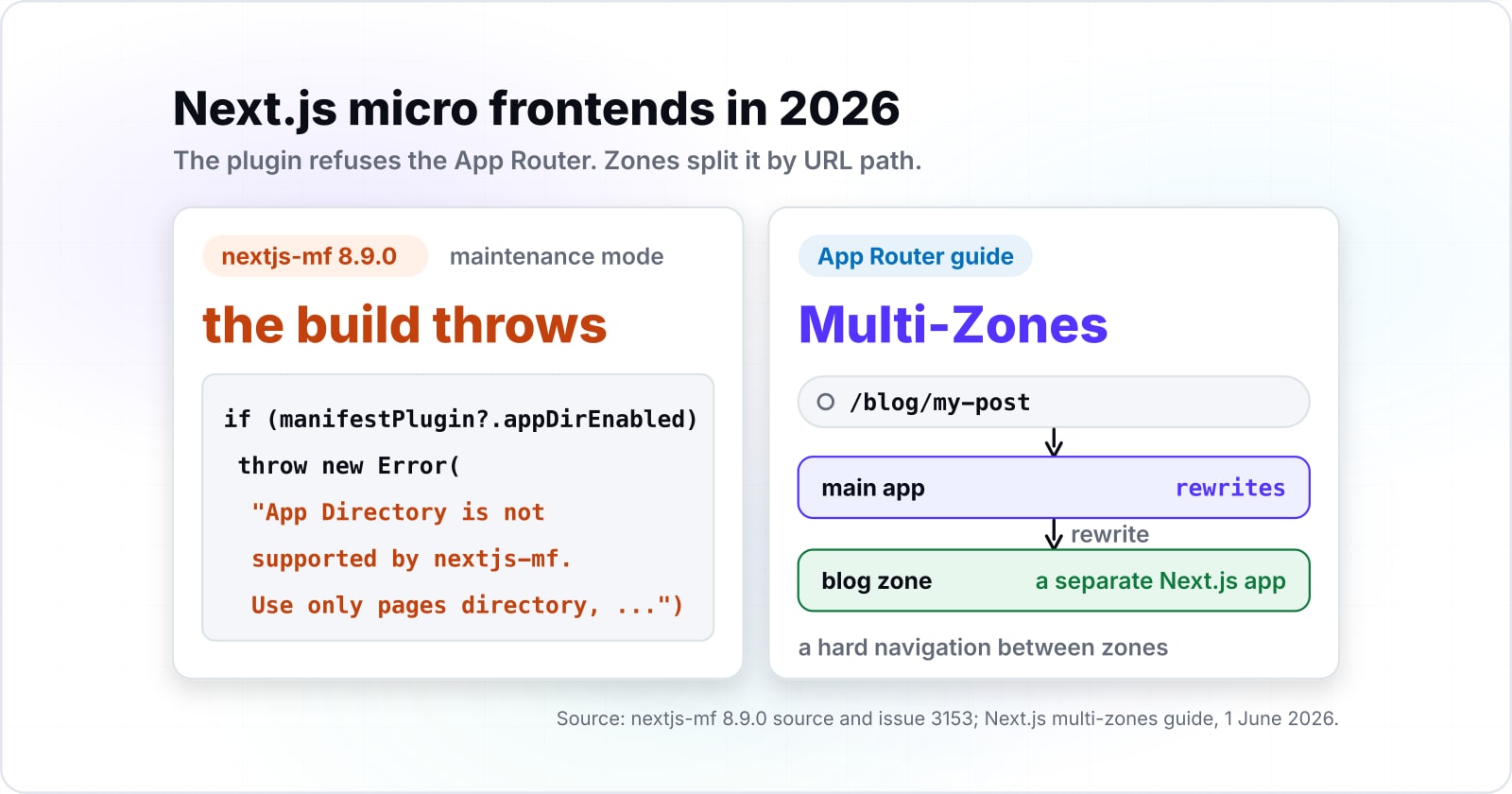
Next.js micro frontends in 2026: Multi-Zones, Module Federation or a different host
You lead frontend on a Next.js app that several teams now share, and the plugin you meant to split it with is retiring. Here is what still works, what each route costs, and how to move one path at a time.
Which way should you split Next.js micro frontends in 2026?#
Split Next.js micro frontends with Multi-Zones behind rewrites, because nextjs-mf refuses the App Router and runtime Module Federation now has a better host in Modern.js.
In Multi-Zones, each zone is a separate Next.js app that owns a set of paths. A rewrite, a Next.js rule that acts "as a URL proxy", serves those paths from the zone while the address bar stays the same. Module Federation is the other pattern: it lets apps built apart share code at runtime.
"App router is entirely unsupported", the maintainers write in GitHub issue 3153, opened on 1 November 2024. Then the Thoughtworks Technology Radar of 15 April 2026 says "the Module Federation core team now recommends Modern.js". And Next.js keeps an App Router guide to zones, last updated 1 June 2026. So pick by one test:
- An App Router app split by URL path: Multi-Zones behind rewrites.
- The same split on Vercel, with prefetch across zones: Vercel Microfrontends.
- Components that load at runtime from apps deployed apart: Modern.js with Module Federation.
- A Pages Router app already on nextjs-mf: keep it running and plan the move now.
- One team, or one release train: monorepo packages and no split.
What does each extra zone cost a team each month?#
Vercel's Pro plan includes two microfrontend projects and bills $250 a month for each project after that, per its docs read in November 2026.
So the third zone is the first one that costs money, and each zone after it adds the same step.
Show data table
| Item | Value |
|---|---|
| 3 zones | 250 USD |
| 4 zones | 500 USD |
| 5 zones | 750 USD |
| 6 zones | 1,000 USD |
Each zone past the second adds a fixed $250 project fee a month.
For example, say you split one app into four zones: marketing, catalog, checkout and docs. On Vercel's Pro rates, the two extra projects come to $500 a month. Then Vercel bills $2 per million routed requests, which is $60 a month at 30M requests.
Your monthly microfrontends fees on Vercel Pro
Set your number of zones and routed requests. The defaults are the worked example: four zones and 30M requests a month.
Microfrontends fees per month
$560
- Project fees per month
- $500
- Routing fees per month
- $60
An estimate from Vercel's published Pro rates, read 12 November 2026, not a quote. Source: Vercel, microfrontends limits and pricing. Modelled, not measured.
Plain Multi-Zones carry no routing fee of their own, because the rewrite runs in your main app. But you give up the managed prefetch across zones, so each move between zones stays a full page load.
Can you still run Module Federation in Next.js in 2026?#
Only on the Pages Router, because nextjs-mf 8.9.0 throws an error when the App Router is on and its maintainers expect it to work only until mid to end of 2026.
The refusal sits in the plugin's own code. When the published 8.9.0 package finds the App Router, it throws "App Directory is not supported by nextjs-mf. Use only pages directory". It also stops unless NEXT_PRIVATE_LOCAL_WEBPACK is true. That flag makes Next.js use a local copy of webpack, the bundler the plugin hooks into.
The dates come from the maintainers too. Since 1 November 2024, issue 3153 has carried the title "Next.js Support is in maintenance mode". It says to "expect nextjs-mf to remain as functional as it is today until mid to end of 2026". And it adds that "Around the end of 2026, nextjs-mf unit tests will be removed from continuous integration".
In short, an App Router app has no runway on Next.js Module Federation. A Pages Router app has weeks of tested support left, so plan its move now.
- 1 November 2024
Next.js Support is in maintenance mode
Issue 3153 has carried this title, and "App router is entirely unsupported".
- 15 April 2026
The Module Federation core team now recommends Modern.js
Per the Thoughtworks Technology Radar of 15 April 2026.
- Mid to end of 2026
nextjs-mf expected "to remain as functional as it is today"
The maintainers expect it to work only until mid to end of 2026.
- Around the end of 2026
nextjs-mf unit tests will be removed from continuous integration
Per issue 3153.
What are Next.js Multi-Zones, and which splits do they handle well?#
A zone is a normal Next.js application with its own assetPrefix, and the main app's rewrites send each path to the zone that owns it.
The Next.js guide calls Multi-Zones "an approach to micro-frontends". Each zone is one of the "smaller Next.js applications that each serve a set of paths". Its example puts /blog/*, /dashboard/* and the rest into three apps. Then assetPrefix puts each zone's JavaScript and CSS under its own path, so assets never clash.
Zones split well along URL paths a user rarely crosses in one session. Think of a blog, docs or a dashboard. The guide says the pattern suits "collections of pages unrelated to the other pages in the application". As a result, each zone builds faster and ships alone.
Two rules bound the design. First, "URL paths should be unique to a zone", per the same guide. Second, Server Actions, the Next.js functions that run on the server, need the public domain listed in allowedOrigins, since one domain now fronts several apps.
What does a cross-zone navigation cost the user?#
Every move from one zone to another is a hard navigation that reloads the page, so pages visited together belong in the same zone.
Per the Next.js guide, "Navigating from a page in one zone to a page in another zone" is "a hard navigation". So the browser unloads the current page and loads the next one from scratch. Inside one zone, the same click is a soft navigation with no reload.
The guide's rule follows: "Pages that are frequently visited together should live in the same zone to avoid hard navigations". So draw the zone map from the paths your users travel together, not from the team chart. If most sessions jump between product pages and the cart, those two share a zone.
Links change as well. The guide asks for a plain a tag, not the Next.js Link component. That is because Link tries to prefetch and soft navigate. For what loading remotes into one page costs instead, see Module Federation and Core Web Vitals.
| Click | Navigation | Page reload | Link element | Prefetch |
|---|---|---|---|---|
| Inside one zone | Soft navigation | No reload | Next.js Link | Link tries to prefetch |
| Across zones | Hard navigation | The browser loads the next page from scratch | A plain a tag | None on plain Multi-Zones |
What does Vercel Microfrontends add over plain Multi-Zones?#
Vercel Microfrontends adds a shared microfrontends.json and path routing on its network, and each zone becomes its own Vercel project that deploys on its own.
In Vercel's routing docs, the network reads microfrontends.json within the same request, so "there is no additional network hop". Its navigation guide adds a Link from @vercel/microfrontends/next/client that prefetches links to other zones. But the same page warns that "all paths from the microfrontends.json file will be visible on the client side".
Show data table
| Item | Value |
|---|---|
| 10M requests | 20 USD |
| 30M requests | 60 USD |
| 100M requests | 200 USD |
Routing fees grow with traffic at $2 per million requests.
In short, the routing moves out of next.config.js into a layer Vercel runs and bills. Also, an app hosted elsewhere joins only through a Vercel project that rewrites to it, per the routing docs.
| Route | App Router | Where routing lives | Move between parts | Fee of its own | Ties you to |
|---|---|---|---|---|---|
| Multi-Zones | Yes, with its own guide | Rewrites in the main app, or any HTTP proxy | Hard navigation, no prefetch | None | Next.js only |
| Vercel Microfrontends | Yes, set up in layout.tsx | microfrontends.json on Vercel's network | Hard navigation, prefetched | $250 per project past two, $2 per 1M requests on Pro | A Vercel project per zone |
| nextjs-mf | No, the build throws | Webpack config in each app | Components load into one page | None | Pages Router, webpack, maintenance mode |
| Modern.js | Not Next.js | Modern.js host and its plugin | Components load into one page | None | A new host, thinner docs outside ByteDance |
Source: Next.js multi-zones guide (1 June 2026), Vercel microfrontends docs read 12 November 2026, nextjs-mf 8.9.0 source, Thoughtworks Technology Radar (15 April 2026).
When is Modern.js a better host for Module Federation?#
Pick Modern.js when the app must share components at runtime, because the Module Federation core team now recommends Modern.js, per the Thoughtworks Radar of April 2026.
Modern.js is a React framework from ByteDance. Its Module Federation docs say the plugin "automatically handles build configurations and adds runtime code". It also works in SSR, or server-side rendered, apps. Bridge is the API that loads a whole app as a module. However, the Radar of 15 April 2026 calls Bridge "unusable in SSR scenarios" for now.
So Modern.js fits only when separately deployed apps must share components at runtime. In that case, plan for thinner docs, since the Radar says the ecosystem outside ByteDance "is still maturing". The blip is not on the November 2026 edition. Still, the Radar says an entry from a recent edition "is likely that it is still relevant". For the Module Federation mechanics, read the micro frontends hub.
When are micro frontends the wrong tool for a Next.js app?#
If one team ships the whole app, a monorepo with shared packages gives the code boundaries without splitting the deploy or reloading pages between paths.
Vercel's own microfrontends docs say they "may add additional complexity". As alternatives, it names monorepos with Turborepo, a build system for monorepos, plus feature flags and Turbopack. So match the tool to the pain. When builds are slow, try Turbopack, the Next.js bundler, first. When teams step on each other's code, give each team a package with an owner in one monorepo. And when releases must line up, use feature flags in one deploy.
Before any split, run the team count and release test in are micro frontends worth the complexity.
| The pain | The better tool than a split |
|---|---|
| Slow builds | Turbopack, the Next.js bundler |
| Teams step on each other's code | A package with an owner in one monorepo |
| Releases must line up | Feature flags in one deploy |
Which Next.js docs do you build a zone setup from?#
Build from the Next.js Multi-Zones guide for the layout, then the assetPrefix page for the second zone, then the rewrites page for the main app.
What is the smallest working config for two zones?#
Two zones need two config changes: an assetPrefix in the second zone, and rewrites in the main app that send its paths and assets there.
This follows the Next.js guide, and BLOG_DOMAIN holds the blog zone's URL with its scheme.
// Step 1. Blog zone, next.config.js: prefix its assets
/** @type {import('next').NextConfig} */
const nextConfig = {
  assetPrefix: '/blog-static',
}
module.exports = nextConfig
// Step 2. Main app, next.config.js: send blog paths and assets to the zone
module.exports = {
  async rewrites() {
    return [
      { source: '/blog', destination: `${process.env.BLOG_DOMAIN}/blog` },
      { source: '/blog/:path+', destination: `${process.env.BLOG_DOMAIN}/blog/:path+` },
      { source: '/blog-static/:path+', destination: `${process.env.BLOG_DOMAIN}/blog-static/:path+` },
    ]
  },
}
// Step 3. Main app pages: link to the other zone with a plain a tag
// <a href="/blog">Blog</a>, not <Link href="/blog">
On Next.js 15 and later, the guide says the extra asset rewrite of older versions is no longer needed. In local development, BLOG_DOMAIN can point at your own machine.
How do you move a Next.js monolith to zones one path at a time?#
Move one path at a time: build the new zone, add its rewrite to the main app, and route through a proxy with a feature flag while both versions run.
The main app keeps every path until a rewrite hands one over, so one config change rolls a move back. The Next.js guide prefers rewrites for low latency. But "if you are using a feature flag to decide where a path should be routed such as during a migration, you can use proxy."
Start with the path users cross least, such as docs or a blog. Then watch errors and load times before you move the next one. Since zones ship at different times, the guide adds that "feature flags can be useful" here. The method behind this is in the strangler pattern for micro frontends.
Build the new zone
Start with the path users cross least, such as docs or a blog.
Add its rewrite to the main app
The main app keeps every path until a rewrite hands one over, so one config change rolls a move back.
Route through a proxy with a feature flag while both versions run
If you are using a feature flag to decide where a path should be routed such as during a migration, you can use proxy.
Watch errors and load times
Watch errors and load times before you move the next one.
What should you read before you split the app?#
Read the micro frontends hub for the integration options, the strangler post for the migration method, and the complexity test before you split anything.
The micro frontends hub compares the other ways to join parts. Then the strangler migration post covers moving a live app in steps. For hands on the work, see frontend software engineers or React and Next.js software engineers. Still, the three Next.js pages above are enough to build your first two zones alone.