React rendering on Cloudflare Workers: SSR, SSG or client-only, decided route by route
Most of a React app never needs a server to render it. The few routes that do can be found with two numbers: what a render costs in CPU, and what the route waits on.
How do you choose React rendering on Cloudflare, route by route?#
Prerender every route whose HTML is the same for everyone, render in a Worker only the routes that need the request, and ship the rest client-only. That is the whole rule, and it works because Workers can serve both kinds of route from one deploy.
Astro is a web framework that prerenders pages and hydrates React components in the browser. And it makes the switch per file. Its on-demand rendering guide, read on 7 October 2026, says to add export const prerender = false to a page, and then "The rest of your site will remain a static site". So the default stays static, and each dynamic route opts out on its own.
Our own site is the worked example. In our 7 October 2026 count of the atyantik.com source, which runs Astro on Workers, 256 route files are prerendered. Only 22 render on demand in the Worker. In short, fewer than one route in ten needs the request to build its HTML.
Those 22 include the search page, the form and newsletter endpoints, and the team and careers pages, which read D1 at request time. Everything else, including every blog post, was built once and is served as a file.
What does each rendering choice cost on Workers?#
Requests to static assets are free and unlimited on Workers, while every server-rendered request spends a billed request and CPU milliseconds against your plan. That gap is the business case for prerendering whatever you can.
Cloudflare's Workers pricing page, updated 2 October 2026, states it plainly: "Requests to static assets are free and unlimited." Also, the same page gives the Paid plan 10 million included requests a month. It also includes 30 million CPU milliseconds a month. Beyond that, Cloudflare's page lists $0.30 per extra million requests and $0.02 per extra million CPU milliseconds, as of 2 October 2026.
| Item | milliseconds of CPU time per HTTP request |
|---|---|
| Average Worker | 2.2 |
| Workers Free limit | 10 |
| Workers Paid default | 30000 |
| Workers Paid maximum | 300000 |
Cloudflare's own pricing example, on that 2 October 2026 page, takes 15 million monthly requests where 12 million serve static assets. And those 12 million add nothing to the bill. Therefore every route you move from SSR to SSG leaves both the request count and the CPU budget.
But the limits matter more than the price on the Free plan. Cloudflare's limits page, updated 5 September 2026, caps CPU at 10 ms per HTTP request on Free. On Paid, the default is 30 seconds, and you can raise it to 5 minutes. So a static route can never hit a CPU limit, while a rendered route always can.
What do SSR, SSG and edge rendering mean on Cloudflare Workers?#
On Workers, SSG is HTML files served as static assets before your code runs, and SSR is your Worker's fetch handler rendering React per request. Edge rendering is simply SSR that runs in the Cloudflare location nearest the person asking.
First, Cloudflare's static assets page, updated 3 July 2026, says you can upload "HTML, CSS, images and other files" with a Worker. Then Cloudflare caches and serves them. Second, the Worker script routing page, updated 18 August 2026, adds the key setting. When run_worker_first stays at its default of false, a request that matches an asset never reaches your code.
So React SSR and SSG on Cloudflare Workers share one Worker and one deploy. For example, a request for /blog/post/ that matches blog/post/index.html gets the file. But a request for /account/ that matches no file reaches the fetch handler. Then the handler renders React and returns a response.
This also answers an old question. Cloudflare Pages server side rendering was once the usual way to pair static files with server code on Cloudflare. However, Cloudflare's April 2025 announcement says static assets on Workers were "previously only possible on Cloudflare Pages". So the same split now lives in one Worker, and the docs describe that path.
How much CPU does a React server render use on Workers?#
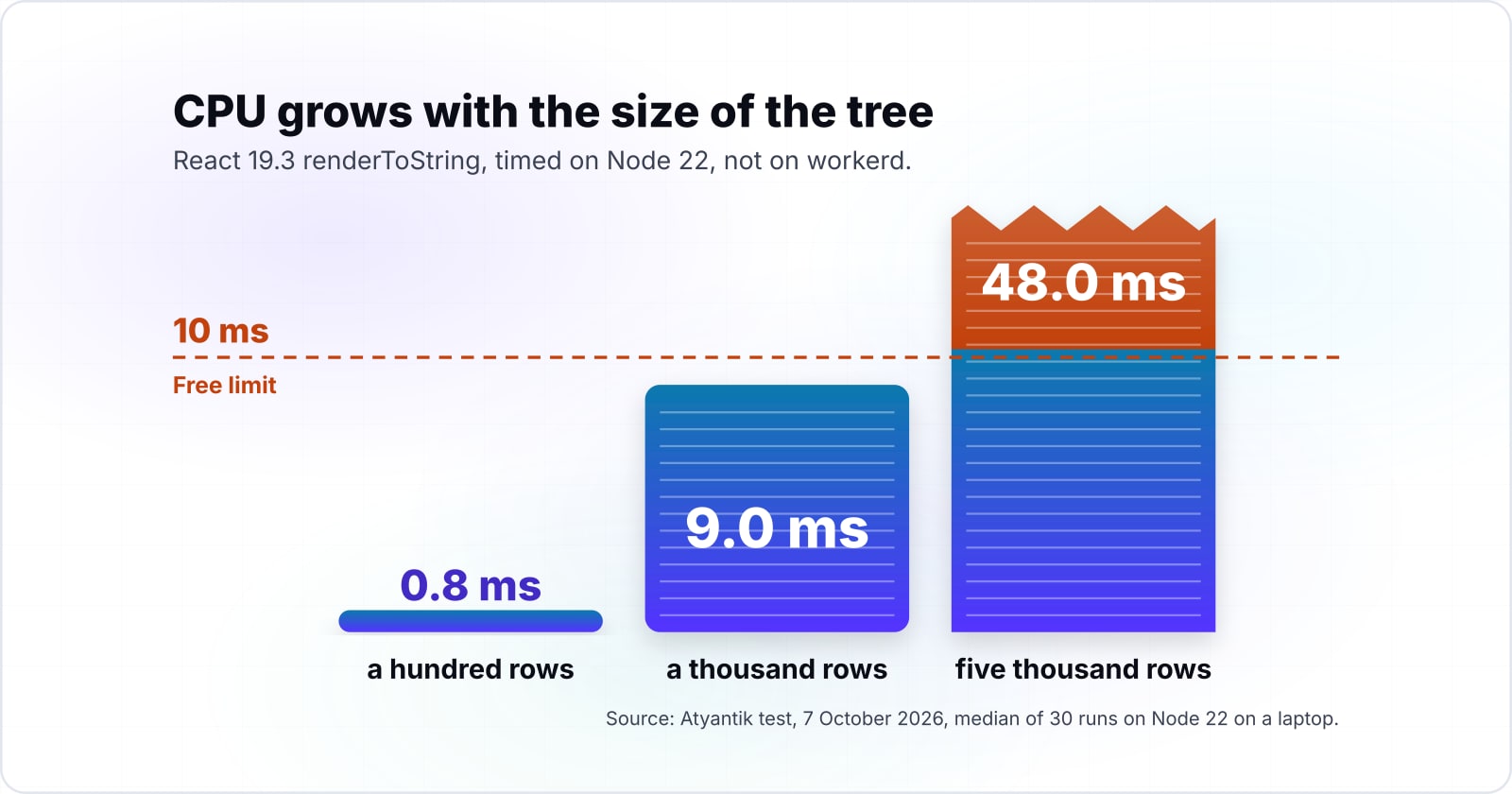
In our 7 October 2026 measurement, React 19.3 rendered a table of a thousand rows in 9.0 ms of CPU with renderToString, close to the Free plan's 10 ms limit. We ran it on Node 22 on a laptop, not on workerd, so a Worker's figure will differ.
So React server rendering CPU time on Workers grows with the size of the tree. In that 7 October 2026 test, a hundred rows took 0.8 ms and five thousand rows took 48.0 ms. Each figure is the median of 30 runs after 10 warm-up runs.
Show data table
| Dimension | renderToString | renderToReadableStream |
|---|---|---|
| 100 rows | 0.8 | 1 |
| 1,000 rows | 9 | 10.4 |
| 5,000 rows | 48 | 65 |
Render CPU grows with the tree, and a thousand rows already sits near the 10 ms Free limit.
Check your route against the CPU limit
Enter how many rows a route renders and your plan's CPU limit; it projects render CPU in milliseconds from our 7 October 2026 measurement.
Share of the CPU limit used
90%
- Projected render CPU
- 9
- Headroom left under the limit
- 1
A projection from one Node 22 test, not a Workers measurement.
However, waiting is not the cost here. Cloudflare's limits page, updated 5 September 2026, says "Waiting on network requests (such as fetch() calls, KV reads, or database queries) does not count toward CPU time." So a route waiting on a slow database spends only its render on the meter.
The same page, dated 5 September 2026, puts the average Worker at about 2.2 ms per request. It also says workloads that do "server-side rendering" typically use 10 to 20 ms. Our numbers agree, since a mid-sized React page alone reaches the Free limit.
Is a Worker-rendered route slower than a prerendered one?#
Not by itself: on 7 October 2026 a prerendered atyantik.com post measured a 93 ms median TTFB, and a Worker-rendered page with one D1 query 98 ms. D1 is Cloudflare's SQLite database, which a Worker reads through a binding.
Instead, the data a route waits on decides its speed. In that 7 October 2026 test, our /careers/ page reads its openings from D1 and measured a 431 ms median. Each figure is the median of 20 requests from one office network in Ahmedabad, served by the Mumbai location, on one day.
Show data table
| Item | Value |
|---|---|
| Prerendered post served as a static asset | 93 |
| Worker-rendered page with one D1 query (/team/) | 98 |
| Worker-rendered page with D1 reads (/careers/) | 431 |
The light Worker page sat beside the static file; the route with heavier D1 reads did not.
Those two Worker pages are Astro pages, not raw React, so the gap between them is not render time. It is the database work each route does before it can answer. Meanwhile, the static post and the light Worker page sat 5 ms apart in that 7 October 2026 test.
In practice, a slow server-rendered route is almost always a data problem first. So look at what the route reads, and where that data lives, before you blame the render. If the data can be read at build time, the route was never a good SSR candidate.
Which routes should be SSG, SSR or client-only?#
Ask three things of each route: does its HTML change per request, does a crawler or first paint need that HTML, and does it read data at request time? Then the answers place every route in one of three columns.
- SSG when the HTML is the same for everyone. Blog posts, docs, marketing pages and most product listings fit here. That holds even when the data changes daily, because a rebuild is cheap.
- SSR when the HTML depends on the request and must arrive rendered. A page that varies by cookie, query or user belongs here, if a crawler or a fast first paint needs it.
- Client-only when nothing outside the signed-in user needs the HTML. Dashboards and settings screens fit, because no crawler should index them.
256
Prerendered at build (SSG)
22
Rendered on demand in the Worker (SSR)
Fewer than one route in ten needs the request to build its HTML.
| Option | route files in the source tree |
|---|---|
| Prerendered at build (SSG) | 256 |
| Rendered on demand in the Worker (SSR) | 22 |
Source: Atyantik count of the atyantik.com source tree, 7 October 2026
Also, frameworks now expose this choice per route. For instance, TanStack Start, a React framework, documents selective SSR with ssr: true, ssr: false or 'data-only' on each route. Similarly, React Router, the routing library with a framework mode, lists prerender paths beside ssr: true in its config.
For the client-only column, Cloudflare's single-page application routing page, updated 25 August 2026, sets not_found_handling to serve index.html. With a recent compatibility date, navigation requests then skip the Worker entirely. As a result, those routes cost no Worker invocation either.
When a route sits between two columns, pick the cheaper one and measure. For example, a product page with a live stock count can be SSG with the count fetched in the browser. Then only that one number costs a request, not the whole page.
Which docs do you build the split from?#
Build in this order: the Workers static assets binding, run_worker_first routing, your framework's per-route prerender switch, then React's renderToReadableStream. In short, each page answers one part of the setup.
- Static assets configuration and bindings, updated 4 September 2026: set
assets.directoryto your build output and name theASSETSbinding. - Worker script routing, updated 18 August 2026: pass
run_worker_firstan array of the paths your Worker renders. - Astro on-demand rendering or React Router pre-rendering: mark which routes prerender at build.
- renderToReadableStream on react.dev: the server call that streams HTML from a Worker.
If you use Astro, its Cloudflare adapter guide wires steps one and two for you. Otherwise, the four pages above cover a plain React and Vite build. Vite is a front-end build tool, and its own SSR guide covers the server entry.
Static assets binding
Produces HTML files served as static assets before your code runs.
run_worker_first routing
Produces the split: a request that matches no file reaches the fetch handler.
Per-route prerender switch
Produces the build: every prerendered route is built once and served as a file.
renderToReadableStream
Produces the fetch handler that streams React for that pattern.
What is the smallest Worker that serves SSG pages and renders one route?#
One wrangler config with an assets directory and a run_worker_first pattern, plus one fetch handler that streams React for that pattern, is the whole split. Wrangler is Cloudflare's command-line tool, and it bundles this TypeScript file, JSX included, when you deploy.
// Step 1, wrangler.jsonc: serve the prerendered build as static assets.
//   "main": "./worker/index.tsx",
//   "assets": { "directory": "./dist/", "binding": "ASSETS",
// Step 2, same block: send only the dynamic path to the Worker.
//               "run_worker_first": ["/account/*"] }
// Step 3, worker/index.tsx: stream React for that path.
import { WorkerEntrypoint } from "cloudflare:workers";
import { renderToReadableStream } from "react-dom/server";

interface Env {
  ASSETS: Fetcher;
}

function Account({ path }: { path: string }) {
  return (
    <html>
      <body>
        <h1>Rendered in the Worker for {path}</h1>
      </body>
    </html>
  );
}

export default class extends WorkerEntrypoint<Env> {
  async fetch(request: Request) {
    const url = new URL(request.url);
    if (!url.pathname.startsWith("/account/")) {
      return this.env.ASSETS.fetch(request);
    }
    const stream = await renderToReadableStream(<Account path={url.pathname} />);
    return new Response(stream, {
      headers: { "content-type": "text/html" },
    });
  }
}
Meanwhile, every other path matches a file in dist/ and never wakes the Worker. In Astro, the same split is export const prerender = false at the top of the one dynamic page. Then the adapter writes the config for you.
Should a Worker stream with renderToReadableStream or call renderToString?#
Stream with renderToReadableStream in a Worker, because renderToString does not support streaming or waiting for data, even though streaming cost slightly more CPU in our test. React's own docs make the case.
The renderToString page, read 7 October 2026, says "renderToString does not support streaming or waiting for data." By contrast, its streaming sibling "renders a React tree to a Readable Web Stream". And a Web Stream is what a Worker returns. So the first bytes, such as the page shell and its styles, leave before slow data resolves.
Still, the price is small. In our 7 October 2026 test on Node 22, the stream took 10.4 ms for a thousand rows against 9.0 ms for the string. At five thousand rows, that same test measured 65.0 ms against 48.0 ms.
| renderToString | renderToReadableStream | |
|---|---|---|
| Supports streaming or waiting for data | No | Yes |
| Returns | A string of HTML | A Readable Web Stream |
| CPU at a thousand rows (Node 22) | 9.0 ms | 10.4 ms |
| CPU at five thousand rows (Node 22) | 48.0 ms | 65.0 ms |
Because both numbers grow with the tree, the real fix for a costly render is a smaller tree, not the other API. For crawlers and static output, react.dev notes you can await stream.allReady before returning. That sends the full HTML at once.
When is server rendering on Workers the wrong tool?#
Server rendering in a Worker is the wrong tool when one render needs more CPU or memory than the plan allows, or when the data lives far away. In each case a better tool exists.
- The render outgrows the CPU limit. If a page lists thousands of rows, prerender it at build time or move the list to the client with pagination. Cloudflare's limits page, updated 5 September 2026, returns an error when a Worker exceeds its CPU time.
- The render outgrows memory. That same 5 September 2026 page caps each isolate, the sandbox one Worker runs in, at 128 MB. So a huge server-side data set belongs in a regional service, not in the render.
- The data sits in one distant region. Then rendering at the nearest location means a long trip to the database on every request. Our 431 ms
/careers/reading on 7 October 2026 shows how waits dominate. So keep that route on a server near the data, or cache its reads.
So none of this argues against Workers. Instead, it argues for SSG first, and for SSR only where the request really changes the page.
Where should you go next?#
If the split raises the wider question of what runs at the edge, or your TTFB is the real problem, these pages pick up from here.
For the wider call on which work belongs in a Worker at all, read what belongs at the edge. To see how TTFB feeds the metrics Google reports, read what Web Vitals are. For a worked Astro build that mixes static and on-demand routes, see the Supabase and Astro blog series. And if a route may not need React at all, compare htmx and React.
For help moving a React app onto Workers, see Cloudflare development. If TTFB or largest contentful paint (LCP) is the problem to fix, see web performance. Still, the four official pages above are enough to build React rendering on Cloudflare on your own.