htmx vs React: one search built both ways, the bytes measured, and when each one wins
Most comparisons end with a shrug. Build one small feature both ways, weigh what each sends to the browser, and the choice turns into a set of questions you can answer for every screen you own.
htmx vs React: which one should you pick?#
htmx vs React comes down to who owns UI state, the server or the browser, and in our 7 October 2026 build of one search box React shipped 4.0 times the JavaScript. With htmx, the server renders HTML and the browser swaps the fragment into place. With React, the browser holds the state, fetches data as JSON (a plain data format) and renders the rows itself.
Show data table
| Item | Value |
|---|---|
| React 19.3.0 and react-dom, Vite 7.3.7 build of the search | 69,323 |
| htmx 2.0.11 htmx.min.js | 16,906 |
| htmx 4.0.0 htmx.min.js | 13,085 |
The React build is the tallest bar by far, and both htmx files sit at a fraction of it.
So pick htmx for a screen where the server already knows everything the next view needs. Pick React for a screen where many parts of the page change each other between clicks. However, most apps hold both kinds of screen. So whether you ask it as htmx vs React or React vs htmx, the honest answer comes per screen. That is why the rest of this guide gives a test per screen, not one verdict for the app. First, though, here is what each side cost in our 7 October 2026 test.
What does each one cost a team to ship?#
For the same search, the htmx page needed 17,153 gzipped bytes in total against 69,323 for the React build, and the cost moves into server templates instead of disappearing. In our 7 October 2026 test, the htmx total is the 16,906-byte library plus the page markup. The React total is one Vite bundle: Vite is the build tool that bundles and minifies the app for production.
69,323 B
React 19.3 build
17,153 B
htmx 2.0.11 plus markup
The bytes drop on every first visit, while the work moves to whoever writes the templates.
Atyantik test, 7 October 2026: React 19.3 Vite build against htmx 2.0.11 plus page markup, gzipped.
| Option | gzipped bytes for the search |
|---|---|
| React 19.3 build | 69,323 B |
| htmx 2.0.11 plus markup | 17,153 B |
Source: Atyantik test, 7 October 2026, method in the on-the-wire section
The next figures use our 7 October 2026 totals. For example, at an illustrative 10,000 first visits a month, the bigger build sends about 693 MB of JavaScript and the smaller page about 172 MB. A returning browser usually loads both from cache. So the gap matters most on a first visit and a slow phone.
But the saving is not free. Because every swap needs a server endpoint that returns a ready HTML fragment, the UI now lives in server templates. If one team owns the server and the screens, that is a simpler job. If a separate front-end team owns the UI, htmx moves its work into a codebase it does not own. In short, the bytes drop on every first visit, while the work moves to whoever writes the templates. Next comes the code we measured on 7 October 2026, written both ways.
How does the same search look written in each?#
The React version of the search took 26 lines of client code with useState, useEffect and an AbortController; the htmx version took 6 lines of HTML attributes. In our 7 October 2026 test, both versions wait 500 ms after the last keystroke. Then they ask the server for matching contacts. Also, both handle the same race: a slow early reply must not overwrite a newer one.
Show data table
| Item | Value |
|---|---|
| React src/main.jsx | 26 |
| htmx index.html | 6 |
The React file spells the search out in code, while the htmx page names it in attributes.
Here is the React file. It needs a bundler, so we built it with npx vite build. The useState reference covers the query state. The effects guide covers the cleanup that cancels a stale fetch. AbortController is the browser API that cancels a request in flight.
import { useEffect, useState } from 'react';
import { createRoot } from 'react-dom/client';
function ContactSearch() {
  const [query, setQuery] = useState('');
  const [results, setResults] = useState([]);
  useEffect(() => {
    const controller = new AbortController();
    const timer = setTimeout(() => {
      fetch(`/api/contacts?q=${encodeURIComponent(query)}`, { signal: controller.signal })
        .then((r) => r.json())
        .then(setResults)
        .catch(() => {});
    }, 500);
    return () => { clearTimeout(timer); controller.abort(); };
  }, [query]);
  return (
    <>
      <input type="search" value={query} onChange={(e) => setQuery(e.target.value)} placeholder="Search contacts" />
      <table><tbody>
        {results.map((c) => (<tr key={c.id}><td>{c.name}</td><td>{c.email}</td></tr>))}
      </tbody></table>
    </>
  );
}
createRoot(document.getElementById('root')).render(<ContactSearch />);
Here is the htmx page. It needs no build step, only a server route at /contacts/search that returns table rows as HTML.
<!doctype html><html><head><script src="/htmx.min.js"></script></head><body>
<input type="search" name="q" placeholder="Search contacts"
       hx-get="/contacts/search" hx-trigger="input changed delay:500ms, keyup[key=='Enter']"
       hx-target="#results" hx-sync="this:replace">
<table><tbody id="results"></tbody></table>
</body></html>
The trigger comes from the htmx active search example, which adds "the delay:500ms modifier to the trigger to delay sending the query until the user stops typing". The race is handled by hx-sync, whose replace strategy will "abort the current request, if any, and replace it with this request". So the two files do the same job. The React one spells the job out in code, while the htmx one names it in attributes.
How big are htmx and React on the wire?#
Measured on 7 October 2026, htmx 2.0.11 is 16,906 bytes gzipped, htmx 4.0.0 is 13,085, and the React 19.3 search bundle is 69,323. Gzip and brotli are the two compression formats browsers accept, and brotli usually comes out smaller. A size quoted with no version and no date cannot be checked, so the table below names both.
| File | Raw bytes | Gzip bytes | Brotli bytes |
|---|---|---|---|
| htmx 2.0.11 htmx.min.js | 52,182 | 16,906 | 15,259 |
| htmx 4.0.0 htmx.min.js | 36,716 | 13,085 | 11,736 |
| React 19.3 search bundle (Vite) | 223,068 | 69,323 | 59,897 |
On brotli, the ratio in our 7 October 2026 test barely moves: 59,897 bytes for React against 15,259 for htmx 2.0.11. Because the React figure is a whole app bundle, it includes react-dom, the package that renders React into the browser page. A real React app adds a router, a data layer and its own components, so the 69,323 bytes from our 7 October 2026 build is a floor. Meanwhile, an htmx app adds server templates, which cost the browser nothing to download.
To redo this on your own versions, download the htmx file from unpkg and run your React build. Then compress each output with gzip -9 and count the bytes. The Vite build guide covers the production build we ran on 7 October 2026.
Does sending HTML instead of JSON cost more per request?#
For 10 contacts, the HTML fragment htmx swaps in was 135 gzipped bytes and the JSON React parses was 168, so the per-request cost is a wash. Before compression the replies were also close in that 7 October 2026 test, with HTML the smaller. While the HTML repeats tags, the JSON repeats field names, and gzip folds both kinds of repetition away.
168 B
JSON for React
135 B
HTML fragment for htmx
The first-load saving is not paid back on every keystroke.
Atyantik test, 7 October 2026: one search reply for 10 contacts, gzipped.
| Option | gzipped bytes per reply for 10 contacts |
|---|---|
| JSON for React | 168 B |
| HTML fragment for htmx | 135 B |
Source: Atyantik test, 7 October 2026, method in the on-the-wire section
So the first-load saving is not paid back on every keystroke. However, this holds for small fragments that replace one region. If a screen swaps a large block for every small change, the HTML reply grows with the block. The fix in htmx is a narrower target. That is also the htmx essay's own advice for nested screens.
What happened when a real app moved from React to htmx?#
The htmx.org essay of 29 September 2022 reports the Contexte port cut code from 21,500 to 7,200 lines and JS dependencies from 255 to 9. Contexte is a media app built on Django, the Python web framework. Per the 2022 essay, the port took about two months, and web build time fell from 40 seconds to 5.
| Measure | Before (React) | After (htmx) |
|---|---|---|
| code base, lines of code | 21,500 | 7,200 |
| Python, lines of code | 500 | 1,200 |
| JS dependencies | 255 | 9 |
| web build time, seconds | 40 | 5 |
| memory, MB | 75 | 45 |
The same 2022 essay reports first-load time to interactive falling from 2 to 6 seconds to 1 to 2. It also reports that memory use fell from 75 MB to 45 MB. The 2022 essay also shows Python code growing from 500 to 1,200 lines: the cost moved to the server. Also, the team changed shape. Before the port it had a hard back-end and front-end split. Afterwards, every developer worked across the whole stack.
Still, the essay sets its own limits, and they belong beside the numbers. It calls them "eye-popping numbers" and says they reflect that Contexte "is extremely amenable to hypermedia". It then adds: "We would not expect every web application to see these sorts of numbers."
Was that port a one-off?#
A second port on htmx.org, dated 20 September 2023, reports code down from 31,237 to 12,044 lines and files down from 588 to 163. The app is OpenUnited, again a Django app, and both its old and new code are public on GitHub. The 2023 essay also reports file types falling from 18 to 11.
31,237
Before, React
12,044
After, htmx
A second content-focused app moved the same way, as reported by the htmx project itself.
| Option | lines of code, before and after the port |
|---|---|
| Before, React | 31,237 |
| After, htmx | 12,044 |
Source: htmx.org, Another Real World React to htmx Port, 20 September 2023
So the direction repeats, but read who is reporting it. Also, both essays are published by the htmx project, and both describe content-focused apps that show text and images. The second essay says so itself: OpenUnited, "like Contexte, it is a content-focused application". And the 2023 essay marks its claim that work felt five times faster as subjective. Therefore, these two ports show what is possible for the best-fitting kind of app, not what is typical.
When does htmx win and when does React win?#
htmx wins when the UI is mostly text, CRUD forms and nested blocks that update in place; React wins when many parts of the screen depend on each other between clicks. CRUD means create, read, update and delete: forms that save to a database. The tests come from the htmx project's own essay When Should You Use Hypermedia?, dated 23 October 2022.
htmx fits this screen
A UI of text and images is one of the four good fits the essay names, and no misfit applies.
htmx fits answered yes: 4 of 4. React misfits answered yes: 0 of 2.
Tests from htmx.org, When Should You Use Hypermedia?, 23 October 2022. Modelled, not measured.
| Test | A yes favours | Your answer |
|---|---|---|
| Mostly text and images? | htmx | Yes |
| Mostly CRUD forms? | htmx | Yes |
| Updates stay inside well-defined blocks? | htmx | Yes |
| Needs deep links or fast first render? | htmx | Yes |
| Must work offline? | React | No |
| State changes many times a second, or many cells depend on each other? | React | No |
The essay names four good fits. They are a UI of text and images, a CRUD-style UI, and a "nested" UI where updates stay within blocks. The fourth is a need for deep links and fast first render. It also names the misfits. These are many dynamic links between parts of the screen, offline use, and state that changes very often. In its words: "If your UI state is updated extremely frequently", a server round trip between a mouse move and the update "will not work well".
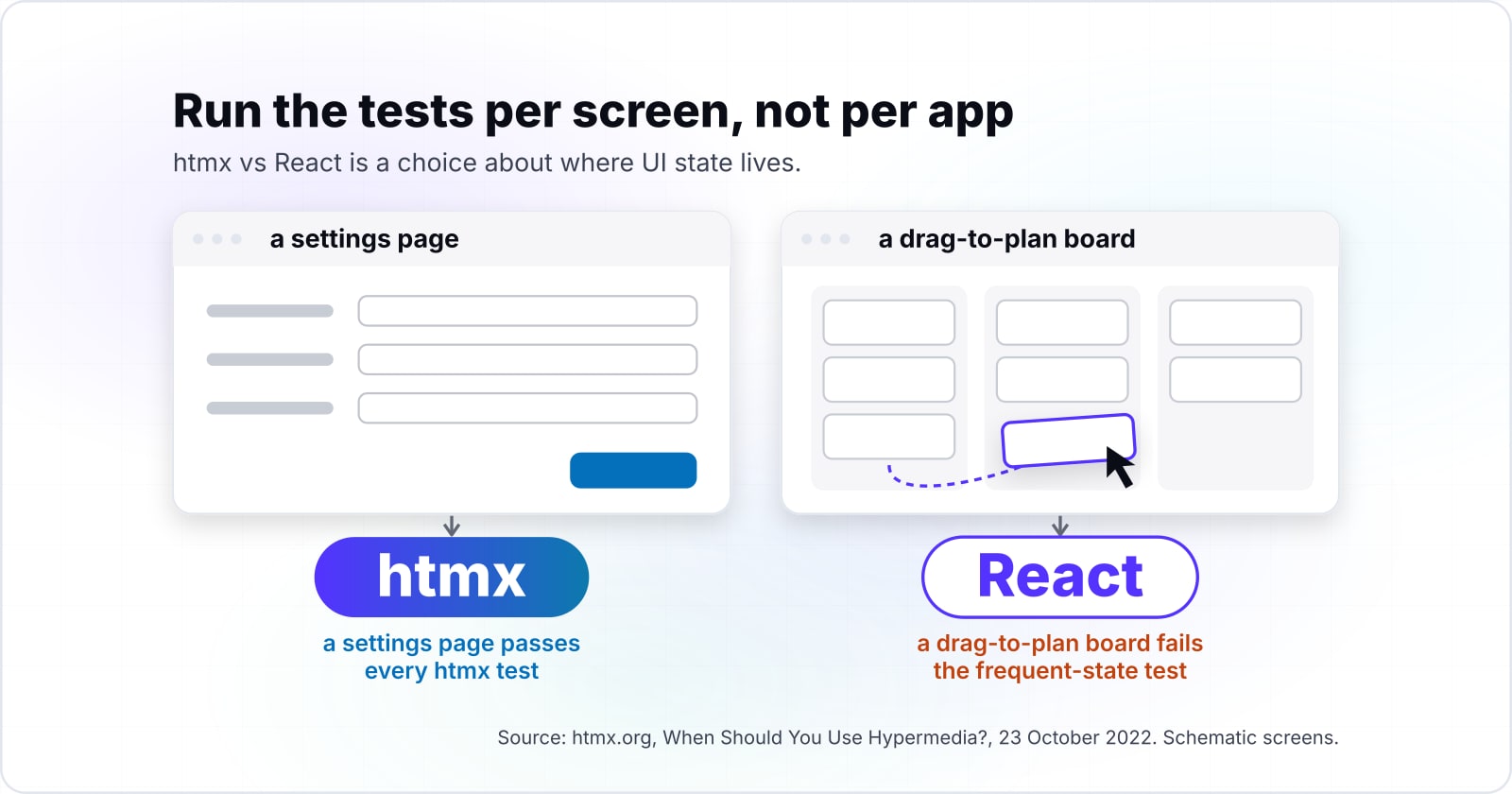
So in htmx vs React, run the tests per screen, not per app. For example, a settings page passes every htmx test, while a drag-to-plan board fails the frequent-state test. The essay itself suggests mixing, and notes it is "typically easier to embed SPA components within a larger hypermedia architecture, than vice-versa". An SPA is a single-page app rendered in the browser.
Do htmx 4 and React Server Components change the answer?#
htmx 4.0.0, tagged next on npm, measured 13,085 gzipped bytes on 7 October 2026, while React 19 Server Components move rendering to the server without dropping React. That makes htmx 4 about 23% smaller than htmx 2.0.11 in our 7 October 2026 test. The htmx 4 docs list three behaviour changes, including that attribute inheritance is "explicit by default".
Meanwhile, React 19 shipped Server Components as stable on 5 December 2024. The React 19 release post describes them as rendering components "ahead of time, before bundling", either at build time or per request. Also, the Creating a React App guide now says "we recommend starting with a framework". So the React side now renders more on the server too, through a full-stack framework.
Neither change moves the deciding question. Server Components help a React screen that mostly displays data. Yet a screen whose parts react to each other between clicks still needs client state, in React or by hand. In practice, the fit tests from the last section still decide, and htmx 4 only makes the small side smaller.
- 29 September 2022
Contexte port essay on htmx.org
Code from 21,500 to 7,200 lines and JS dependencies from 255 to 9.
- 23 October 2022
When Should You Use Hypermedia?
The essay behind the fit tests in this guide.
- 20 September 2023
OpenUnited port essay on htmx.org
Code from 31,237 to 12,044 lines.
- 1 February 2024
htmx sucks
The project's satirical essay of common complaints.
- 5 December 2024
React 19 ships Server Components as stable
Rendering components ahead of time, before bundling.
- 7 October 2026
Our measurement
htmx 4.0.0 at 13,085 gzipped bytes, htmx 2.0.11 at 16,906, the React 19.3 search bundle at 69,323.
When is htmx the wrong tool?#
htmx is the wrong tool for offline-first apps, spreadsheet-like screens with many dependent cells, and teams whose skills and code live in React already. Here are the three cases, each with the better tool.
- The app must work offline. The htmx essay is direct: if an app "requires full functionality in an offline environment, then the hypermedia approach is not going to be an acceptable one". Use React, or another client library, with local storage and a sync layer.
- State changes many times a second, or cells depend on each other. The same essay names Google Sheets and Google Maps as apps hypermedia cannot serve. Use React, or a canvas or game library, for that screen, and keep htmx for its settings pages.
- Your team and components are already React. The essay lists "If your team is not on board" as a real reason. It also notes that copy-and-paste component kits built for React do not work with htmx. If you share components with a React Native mobile app, staying on React keeps one component model.
Also, read the project's satirical essay htmx sucks, dated 1 February 2024, before you commit. It collects the common complaints about the library in the project's own voice.
How do you move one React screen to htmx?#
Start with one CRUD screen: render its HTML on the server, add the htmx script, and replace the fetch and state with hx-get, hx-target and hx-swap. Pick a screen that passes every fit test, such as a list with a search box or a settings form. Then the React screens you have not moved keep running beside it.
Build it in this order, one documentation page per step:
- htmx documentation: install with one script tag, then wire hx-get, hx-target and hx-swap to the server route.
- Active search example: the debounced trigger pattern.
- hx-sync attribute: the replace strategy, so a stale reply never wins.
- createRoot reference: keep React mounted on its own root element for the screens not yet moved.
- Vite build guide: measure the bundle before and after, so the saving is a number.
Then have the server route return the same rows the React component used to render. Once the htmx screen matches, delete the component and its data hook. Finally, rebuild and compare the bundle size, and move the next screen only if the first one paid off.
Where should you go from here?#
For screens that move to htmx, the server language now carries the UI. So PHP vs JavaScript is the next choice to weigh. And building an SEO-friendly frontend explains why server HTML helps what a crawler sees.
If you want a team for either path, we build React apps and Python and Django back ends. And when the bytes are the problem, we work on web performance. However, the htmx docs, react.dev and the Vite guide hold everything this guide used, and they are enough on their own.