Million.js React optimization: how block diffing works, when it helps, and where the project stands in 2026
A slow React screen has one of two problems, and Million.js only fixes one of them. Here is how to tell which you have, what the compiler does to a component, and what its quiet repository means before you add it to a build.
What does Million.js React optimization actually change?#
Million.js swaps React's element-by-element diff for a block diff that compares only a component's dynamic values, which pays off on static-heavy lists and barely moves dynamic-heavy trees. The Million.js introduction puts the claim plainly. It says the library "turns React reconciliation from O(n) (linear) to O(1) (constant time)." In other words, the cost of an update stops growing with the number of elements in the component. Instead, it grows with the number of values that can change.
10,000 nodes
Element by element
2,000 values
As blocks
The saving comes from the static nodes a block never compares, so it shrinks as more of a row changes.
| Option | comparisons per update |
|---|---|
| Element by element | 10,000 nodes |
| As blocks | 2,000 values |
That is a real change, but it has a condition attached. The project's own virtual DOM article states it in one line. "Block virtual DOM is best used when there is a lot of static content with little dynamic content." So a Million.js React setup is a bet on the shape of your components. A product grid with fixed labels and a few prices fits the bet. But a live editor where every node changes on each keystroke does not.
Before going further, two words matter for the rest of this guide. Rendering is React calling your component function to get a new snapshot of the tree. Reconciliation, or diffing, is React comparing that snapshot with the last one to find what changed. And Million.js leaves rendering to React while it replaces the diffing with something cheaper.
How much update work does block diffing remove from a 1,000-row table?#
On a 1,000-row table with 10 nodes per row and 2 dynamic values, an update walks 10,000 nodes element by element but compares only 2,000 values as blocks. The saving tracks the share of static nodes per row. So the number of dynamic values per row is the variable that decides the gain. The 1,000-row size comes from the Million.js For documentation, and the 10-node row is a modelled example.
Show data table
| Item | Value |
|---|---|
| element-by-element diff, 10 nodes per row | 10,000 |
| block diff, 2 dynamic values per row | 2,000 |
With 2 of 10 nodes dynamic, a block update compares a fifth of what an element-by-element diff walks.
For a team lead, the outcome to report is simple. On a table where only a price and a status change per row, the update work drops to a fifth. As a result, the main thread gets time back on every sort, filter or live tick. However, the same arithmetic works against you as rows get busier. In a modelled row where 8 of 10 nodes change, the illustrative count is 10,000 against 8,000. That is barely worth a new compiler in the build.
Update work on your list
Set your rows, nodes per row and dynamic values per row. Raise the dynamic values toward the node count and watch the cut shrink.
Values compared as blocks
2,000
- Nodes compared element by element
- 10,000
- Cut in update work (times)
- 5
Modelled, not measured. The 1,000 rows come from the Million.js For documentation; the 10-node row is an example.
But the calculator does not measure time, and that is on purpose. It counts comparisons, because comparisons are what block diffing changes. Real time also depends on rendering, layout and paint. And Million.js does not touch any of those three.
How does block diffing differ from React's reconciliation?#
React compares every element in the old and new tree on each update, while a Million.js block records its dynamic holes once and compares only those on every update. Static analysis turns a component into a template plus an edit map of its dynamic holes. As a result, an update becomes a comparison of a few values that point straight at their DOM nodes.
The Million.js virtual DOM article splits the method into two steps. First, static analysis pulls the dynamic parts of the tree into an "Edit Map." That map ties each changing value to the node it fills. Then dirty checking compares the state, not the tree. When a value changes, the block updates its node directly through the map. The article sums it up in five words: "Diff the data, not the DOM."
For example, take the counter from the introduction page. React walks six checks on each click: the div, the p tag, its text, the button, its onClick and its label. A block knows that only the count can change, so it checks one value and writes one node. Because the static nodes never enter the comparison, they cost nothing on update.
However, the holes are strict about what they hold. The internals page for block() says props are "an immutable object with primitive or Block values." Also, a hole cannot be combined with other values inside the block. As a result, props.count + 1 inside the template breaks the rule, while {props.count} keeps it. In short, that strictness is the price of skipping the diff.
Which of your components will block diffing actually speed up?#
A component gains from Million.js when it has one deterministic return, renders DOM elements rather than components, avoids changing spreads, and keeps most of its nodes static. Four checks decide whether Million.js React blocks fit, and the compiler skips or degrades any component that fails one.
Run these four questions on one slow component:
- One stable return. The block() rules say "there can only be one return statement at the end of the block that returns a stable tree." So an early
if (loading) return <Spinner />fails this test. - DOM elements, not components. The same page warns that components "will cause degraded performance" inside a block. It names UI libraries such as Material UI and Chakra UI. A row built from
<Stack>and<Text>fails, while a row built from<div>and<p>passes. - No spreads that change. Spread attributes or children "that change" are not supported safely. So
{...props}on a node fails unless the object never changes. - Mostly static nodes. Count the nodes and the values that can change. Two of ten passes easily. But eight of ten gains little, as the previous section showed.
Then there is the list itself. The block() rules flag Array.map() inside a block and point to the <For /> component instead. Even so, the For documentation has a catch. It says that "with 1000 items, it will recreate 1000 blocks." Its memo prop reuses them, but only when each row depends on nothing except its own item. So a long list needs both the right row and the right list wrapper.
What happens to a component that fails? The block() page calls the behaviour "progressive degradation." An unsupported feature falls back to normal React rendering, and the app still works. In practice, a failed check costs you the gain, not the screen.
Meanwhile, automatic mode adds its own filter. The automatic mode page describes a threshold that decides whether a component is converted, with a default of 0.1. It also offers a skip list for hook or variable names. And when a component errors at runtime, a // million-ignore comment leaves it to React.
| Check | Passes | Fails |
|---|---|---|
| One stable return | One return statement at the end of the block | An early if (loading) return <Spinner /> |
| DOM elements, not components | A row built from <div> and <p> | A row built from <Stack> and <Text> |
| No spreads that change | {...props} on an object that never changes | {...props} on an object that changes |
| Mostly static nodes | Two of ten nodes dynamic | Eight of ten nodes dynamic |
Where do the Million.js speed figures come from?#
The 2022 paper reports 133% to 300% faster rendering and 2347% faster load against other virtual DOM libraries, measured on benchmarks rather than on your screens. Every published Million.js figure was measured on a benchmark or one migrated app. So each one states the ceiling for static-heavy work, not the gain on any given component.
Show data table
| Item | Value |
|---|---|
| rendering, low end of the reported range | 133 |
| rendering, high end of the reported range | 300 |
| load | 2,347 |
Every figure here comes from benchmarks against other virtual DOM libraries, so each one is a ceiling, not a forecast.
The arXiv paper by Aiden Bai, revised on 1 January 2023, adds one real-world result. Its abstract says a real-world app "loaded 35.11% faster after migrating from React." That is one app and an informal user study. So it shows the method can work outside a benchmark, but it does not tell you what your app will gain.
The "up to 70% faster" line on the Million.js README links to the js-framework-benchmark. However, that benchmark is narrow by design. Nolan Lawson wrote about it in a post from 13 October 2024. He describes the core test as rendering a table "with up to 10k rows" and then adding, mutating and removing rows. He also notes that it "does not measure server-side rendering (SSR) or hydration." And the Million.js article says much the same about its own result. In its words, the benchmark "is not necessarily representative of real world applications."
Therefore, read every figure here as a ceiling. A big table of static rows is exactly the shape where blocks win. Your screen may look like that, or it may not. Only a measurement on your own code can say which.
Does your slow screen need Million.js or the React Compiler?#
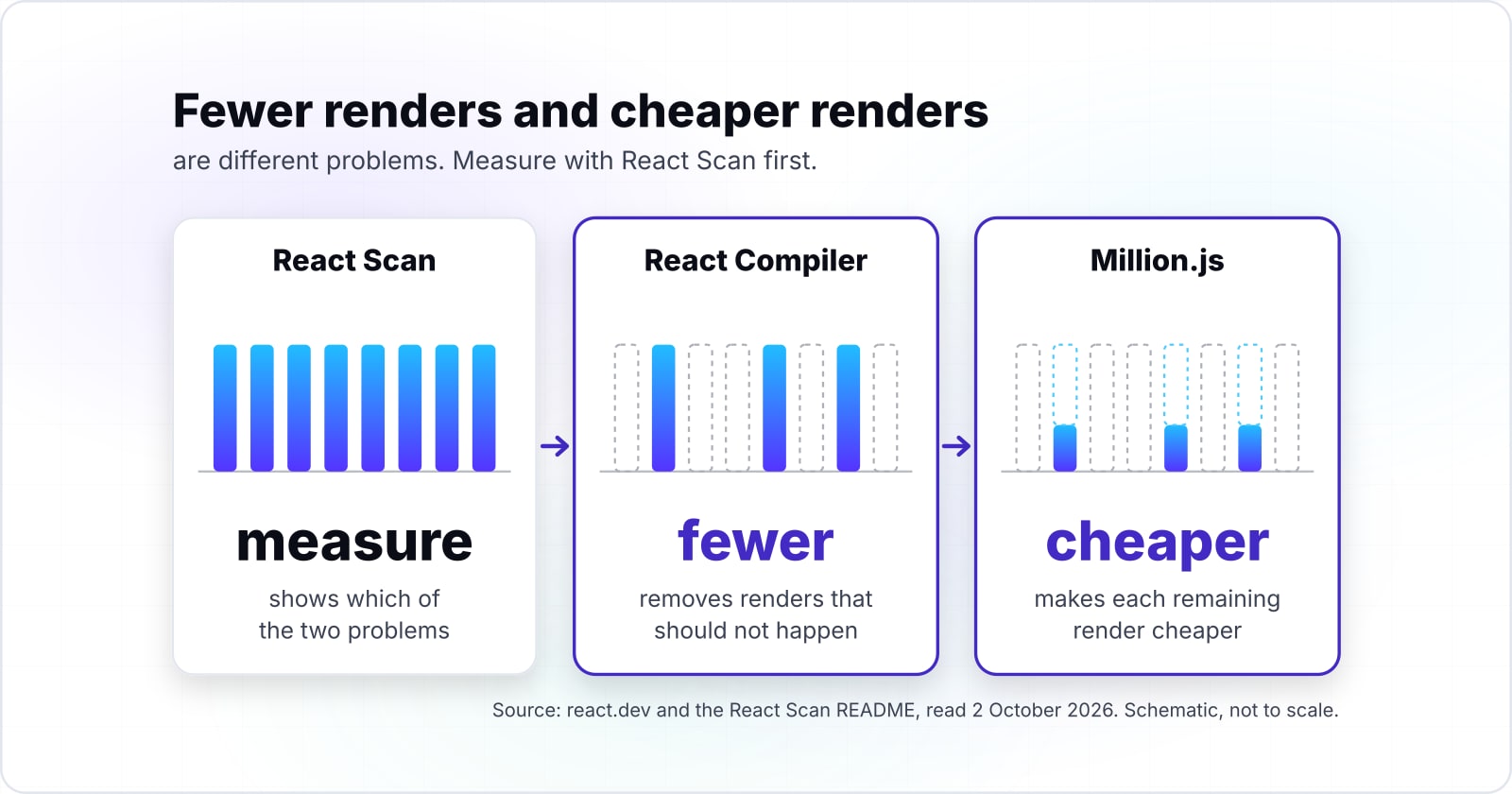
The React Compiler removes renders that should not happen, Million.js makes each remaining render cheaper, and React Scan shows which of the two problems a slow screen has. Fewer renders and cheaper renders are different problems. So the order is to measure with React Scan, let the React Compiler remove wasted renders, and reach for Million.js React blocks only where necessary renders stay slow.
Start with the React side. The React Compiler introduction says "React Compiler is a new build-time tool that automatically optimizes your React app." It adds the memoization you would otherwise write by hand with memo, useMemo and useCallback. The React team released version 1.0 as stable on 7 October 2025. Also, the installation page says it works best with React 19 but supports React 17 and 18 too.
Next, see what memoization actually does. The memo reference says it "lets you skip re-rendering a component when its props are unchanged." So the React Compiler cuts the number of renders. But it does not make one render of a 1,000-row table cheaper once that render is needed. That is the gap Million.js was built for.
Then find out which problem you have. The React Scan README says "React Scan automatically detects performance issues in your React app." In its own words, it "Highlights exactly the components you need to optimize." If it flags a row on every keystroke in an unrelated input, you have wasted renders, and the React Compiler is the fix. If the table renders once per real change and is still slow, you have a render-cost problem. In that case, Million.js is a candidate.
Can you run both? Neither project's documentation describes the two compilers running together in one build. So test it on a branch before you rely on it.
Which pages do you set Million.js up from, in order?#
Four official pages cover the whole setup: the Million.js install page, automatic mode, the block() rules, and the React Scan README for measuring before and after. Use them in this order:
- Installation. Take the
npm install millionstep and themillion.nextwrapper frommillion/compiler, withauto: true. The page also states the floor: React 16 and above, and Node 18 and above. - Automatic mode. Take the
thresholdandskipoptions and the// million-ignorecomment for a component that errors. - block() rules. Read the four rules before you write a manual block. Then import
blockfrommillion/react, never frommillion. - React Scan README. Take the
npx -y react-scan@latest initcommand. Then record the slow screen before the change and after it.
Installation
npm install million and the million.next wrapper, with auto: true.
Automatic mode
The threshold and skip options, and the // million-ignore comment.
block() rules
The four rules, before you write a manual block.
React Scan README
Record the slow screen before the change and after it.
What is the smallest working Million.js setup?#
The smallest working setup is two steps: install the million package, then wrap your build config with the Million.js compiler and auto set to true. The code below shows a Million.js React setup for a Next.js app. It then adds two optional steps: skip a component that fails, and wrap one stable row in block() by hand.
// Step 1, in a terminal: npm install million

// Step 2: next.config.mjs
import million from "million/compiler";

/** @type {import('next').NextConfig} */
const nextConfig = { reactStrictMode: true };

export default million.next(nextConfig, {
  auto: { threshold: 0.1, skip: ["useBadHook"] },
});

// Step 3: leave a component that errors to plain React
// million-ignore
function LiveEditor() {
  return <textarea />;
}

// Step 4: one stable row as a manual block
import { block } from "million/react";

function StockRow({ symbol, price, change }) {
  return (
    <div className="row">
      <span>{symbol}</span>
      <span>{price}</span>
      <span>{change}</span>
    </div>
  );
}

const StockRowBlock = block(StockRow);
export default StockRowBlock;
In short, each step maps to one page. Steps 1 and 2 come from the install page, step 3 from automatic mode, and step 4 from the block() rules. In particular, StockRow passes all four fit checks. It has one return, only DOM elements, no spreads, and three holes in a static frame. In a real app, steps 3 and 4 live in their own component files.
Is Million.js still maintained in 2026?#
The latest tagged Million.js release is 28 months old as of October 2026, and the last two commits on main sit 23 months apart. The repository still shows a commit in May 2026. But tagged releases stopped in May 2024, and million.dev now promotes React Scan and React Doctor.
Show data table
| Item | Value |
|---|---|
| since the latest tagged release (v3.1.7) to 2 October 2026 | 28 |
| between the last two commits on main | 23 |
Both gaps run close to two years, so plan to patch or remove the compiler yourself after an upgrade.
Here is what each record shows. The GitHub releases feed lists v3.1.7 on 30 May 2024 as its newest tag. Next, the commit history shows a commit on 6 June 2024 and then a long gap. Then the next commit, on 20 May 2026, is titled "fix: removed github actions." Also, the npm registry entry lists 3.1.11 as the latest version, published on 4 June 2024 without a GitHub tag.
Meanwhile, the company's attention has moved. The million.dev home page describes its open-source tools as "React Doctor and React Scan." Even the React Scan README now opens with "You can still use React Scan, but we recommend React Doctor."
So what does that mean for a decision? Adopting Million.js React blocks today means taking on a build-time dependency with no release since June 2024. If a React or Next.js upgrade breaks its compiler, your team patches it or removes it. That is fine for a contained screen you can drop it from in an afternoon. But it is a harder sell for a codebase you expect to run for years.
When is Million.js the wrong tool?#
Million.js is the wrong tool when a screen re-renders too often, when most nodes change on every update, or when a component returns different trees. In each case a better answer exists, and it needs no new compiler in the build.
- The screen renders too often. If React Scan shows components rendering when nothing they show has changed, use the React Compiler. It removes those renders, which beats making each one cheaper.
- Most nodes change on every update. The Million.js article says block diffing is best "when there is a lot of static content with little dynamic content." So for a dense, busy list, render fewer rows instead. Virtualise it, so only the visible rows exist.
- The component returns different trees. A loading branch, an error branch and a data branch break the rule of "one return statement at the end of the block." Split the branches into small components, or leave the component to React.
- The codebase must last. The last tagged release came out on 30 May 2024. So a long-lived product is better served by the React Compiler, which the React team ships and maintains.
| Case | Use instead |
|---|---|
| The screen renders too often | The React Compiler, which removes those renders |
| Most nodes change on every update | Virtualise the list, so only the visible rows exist |
| The component returns different trees | Split the branches into small components, or leave it to React |
| The codebase must last | The React Compiler, which the React team ships and maintains |
Where should you go from here?#
Measure first, fix wasted renders second, and treat Million.js as one targeted tool for the stable, static-heavy screens that are still slow after that. The next step depends on what the measurement shows.
If the question is whether the screen needs React at all, our htmx and React comparison covers that choice. If first load is the slow part, diffing speed is not the lever. In that case, the post on rendering React on Cloudflare covers where the HTML is built. For components shaped to keep a stable return, read the guide to building scalable UI components. And to check that a faster render moved a field metric such as Interaction to Next Paint (INP), see the site optimization guide for 2026.
If you want a second pair of hands on the work, our web performance page and the page on hiring React developers describe how we help. Either way, the official pages listed above are enough on their own. With them, you can run the fit test, try a Million.js React build on a branch and measure the result yourself.