SEO friendly frontend architecture: what a crawler sees in your first HTML response
Your site looks finished in the browser, yet search shows half of it. The cause is usually the distance between what your server sends and what JavaScript builds later, and you can measure that distance in five minutes.
What is frontend SEO?#
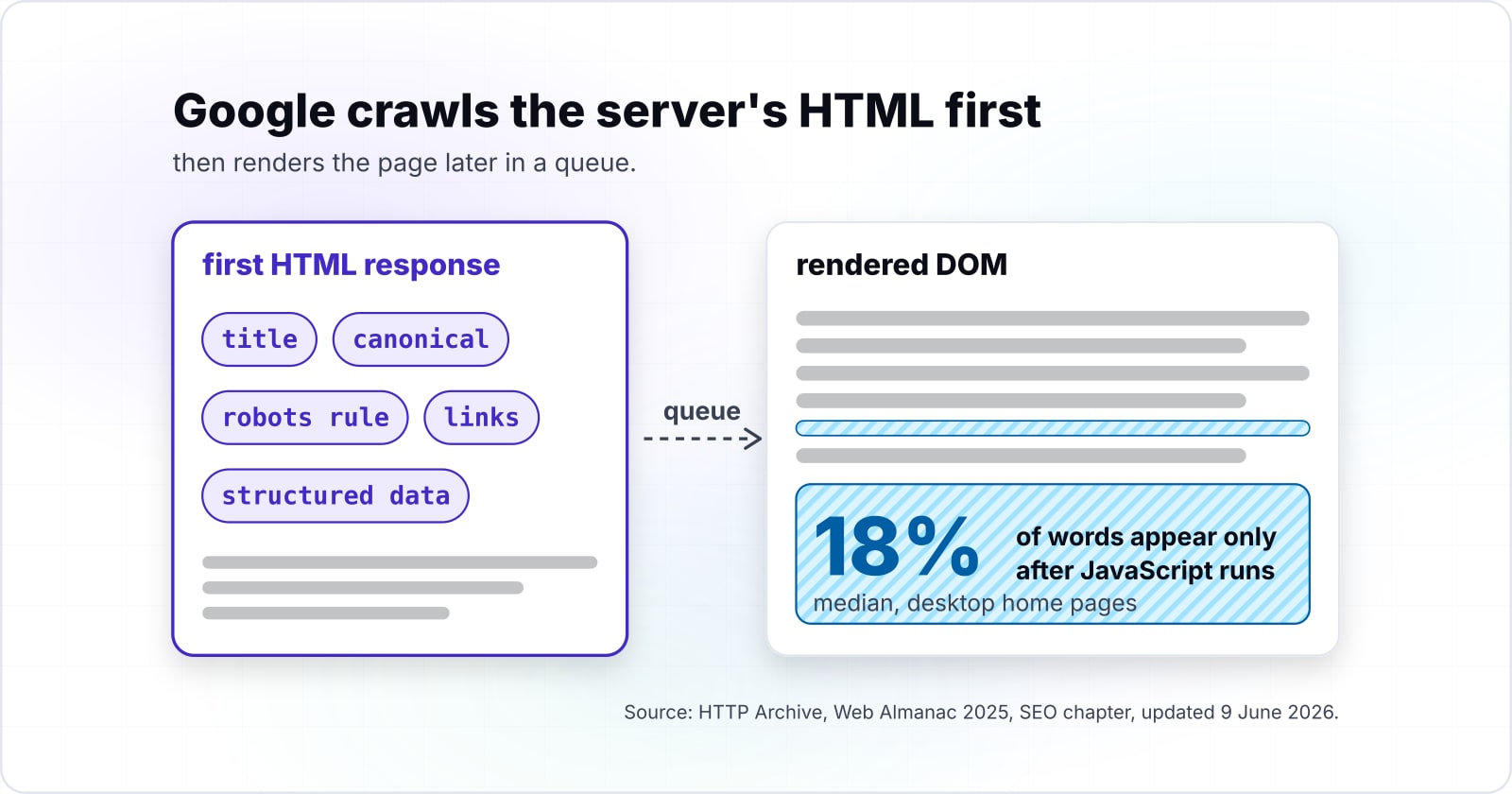
Google Search Central's JavaScript SEO basics, updated 4 March 2026, splits the work into crawling, rendering and indexing. Therefore a frontend has two outputs to judge, not one. First comes the HTML the server returns, which the crawl phase reads at once. Second comes the rendered DOM, which a headless browser builds later.
Google renders JavaScript, so a client-built page can still be indexed. However, the same guide adds that "server-side or pre-rendering is still a great idea", because it makes a site faster and not all bots can run JavaScript. In short, SEO for frontend developers is the habit of comparing those two outputs and closing the gap between them. That habit is the core of SEO friendly web development: the server sends the signals, and JavaScript adds to them.
How much of a typical page exists only after JavaScript runs?#
HTTP Archive's Web Almanac 2025 counts a median 18% gap between rendered and raw word counts on desktop home pages, as of June 2026, and every word in that gap waits for rendering. The chapter was published on 15 January 2026 and updated on 9 June 2026.
In practice, every word, link and signal that exists only in the rendered DOM is indexed only after rendering. So the size of the gap is the share of a page whose indexing timing you no longer control.
In particular, the gap is widest at the 10th percentile and narrows toward the 90th.
Show data table
| Dimension | home pages | inner pages |
|---|---|---|
| 10th percentile | 33% | 37% |
| 25th | 23% | 25% |
| 50th | 18% | 17% |
| 75th | 17% | 12% |
| 90th | 16% | 10% |
The gap is widest at the 10th percentile and narrows toward the 90th.
For example, a short page built from a few components may load most of its text from an API call. Meanwhile, a long article tends to ship its words in the HTML and add widgets on top. For instance, take HTTP Archive's Web Almanac 2025 medians for desktop home pages: 340 raw words and 413 rendered words. Then 73 words, about 18% of the rendered page, arrive only after JavaScript runs.
Now picture an illustrative app shell whose first response carries 20 visible words and whose rendered page carries 900. Its gap is 880 of 900 words, about 98%, far past every percentile the 2025 edition prints. As a result, nearly all of that page waits for the render queue before Google can index a word of it.
How does Googlebot read a JavaScript page?#
Googlebot crawls the HTML, queues every page with a 200 status for rendering, and indexes from the rendered HTML once a headless Chromium has run the JavaScript. Google Search Central's JavaScript SEO basics, updated 4 March 2026, lays out those three phases in order.
First, Googlebot takes a URL from the crawl queue and checks robots.txt. If the URL is allowed, it fetches the HTML and parses it for links in href attributes. Also, those links join the crawl queue at once, before any script runs.
Then the page waits. According to Google Search Central, "The page may stay on this queue for a few seconds, but it can take longer than that." Once Google's resources allow, a headless Chromium (Google Search runs JavaScript with an evergreen version of Chromium) runs the JavaScript. Finally, Google parses the rendered HTML for more links and uses it to index the page.
In short, that order explains the cost. The crawl phase works well for server-rendered pages, because their HTML already holds the content. Meanwhile, a client-rendered page gives the crawl phase an empty shell, so its content and its links wait for the render step. Every link found late is a page discovered late.
Does Google render JavaScript, and where does it stop?#
Google renders JavaScript, but Google Search Central's Googlebot page, updated 3 February 2026, fetches only the first 2MB of each HTML, CSS or JavaScript file. Rendering is a capability with documented edges, not a guarantee.
First, consider blocking. JavaScript SEO basics states that "Google Search won't render JavaScript from blocked files or on blocked pages." So a robots.txt rule that blocks a script folder also blocks the content that script would build.
Second, consider size, and the limits differ by file type.
| File | MB fetched per file |
|---|---|
| HTML, CSS or JavaScript file (each fetched separately) | 2 |
| PDF file | 64 |
In particular, each resource is fetched on its own, and the limit applies to uncompressed bytes. Past it, Googlebot stops the fetch and indexes only what it already downloaded. Therefore a large bundle that inlines the content of a page can lose its tail, even though the browser shows it all.
Finally, there is a third, quieter edge. Google parses the rendered HTML only after the queue, so rendering can be correct and still late. Because of that, the safe design treats rendering as a backup for the signals that matter, never their only source.
Which signals must be in the first HTML response?#
Put the title, meta description, canonical link, robots meta tag, crawlable a href links, one H1 and JSON-LD in the server's response, not in client JavaScript. Each one a script adds or changes is a signal Google reads late or reads twice.
Here is the checklist to run against any page that must rank:
<title>: names the page, unique per URL.<meta name="description">: says what the page gives.<link rel="canonical">: points at the URL you want indexed.<meta name="robots">: present only when you need a rule, such asnoindex.<a href="...">: every navigation and content link, never a click handler alone.<h1>: one per page, with real text in it.- JSON-LD: the script block that holds structured data, in the
<head>or<body>.
The web already gets the first item right and the rest less often.
Show data table
| Item | Value |
|---|---|
| title element | 98.6% |
| H1 present | 71% |
| canonical tag | 68% |
| meta description | 67.7% |
| non-empty H1 | 66% |
The web already gets the first item right and the rest less often.
Google's own pages give the reason for each line. The crawlable links guide, updated 10 December 2025, says Google can generally crawl a link only if it is an <a> element with an href attribute. For example, <a onclick="goto('https://example.com')"> is on its list of formats it does not recommend. Likewise, the robots meta tag page, updated 24 March 2026, defines the rules that control indexing and snippets.
Structured data is the one signal with real slack. Google's structured data introduction, updated 10 December 2025, says Google can read JSON-LD that JavaScript injects. Still, other bots may not run that script, so the server's response is the safer home.
How often do canonicals and hreflang change after rendering?#
HTTP Archive's Web Almanac 2025 counts a canonical tag on 64.4% of desktop pages in raw HTML and on 66% after rendering, as of June 2026. A signal that differs between raw HTML and the rendered DOM is a signal Google may read two ways.
Both signals gain a little after rendering, and that gain is the part set by script.
Show data table
| Dimension | raw HTML | rendered DOM |
|---|---|---|
| canonical tag | 64.4% | 66% |
| hreflang | 20.3% | 20.8% |
Both signals gain a little after rendering, and that gain is the part set by script.
In HTTP Archive's Web Almanac 2025, a changed canonical after rendering shows up on 2.71% of desktop sites. However, that small share is where the risk sits, because a script that rewrites a canonical sends two answers. As the 2025 edition puts it, "a static, server-side canonical tag is generally the safer option".
Also, Google says the same thing in its own words. JavaScript SEO basics advises against using JavaScript to change the canonical to anything other than the URL in the original HTML. In practice, a router that rewrites the canonical on every client navigation is one way it happens. Instead, render the canonical on the server for every route and leave it alone in the browser.
Hreflang, the tag that maps language versions of a page, follows the same rule. It belongs in the server's HTML, so that the first read and the second read agree.
SSR, SSG or CSR: which rendering mode suits a page that must rank?#
Use static generation or server rendering for every page that must rank, and keep client rendering for views behind a login that never need to. Rendering mode is a per-route decision, not a choice made once for a whole app.
The three modes differ in where the HTML is made. First, static site generation (SSG) builds the HTML once, at build time. Second, server-side rendering (SSR) builds it on each request. Finally, client-side rendering (CSR) sends a near-empty document and builds the page in the browser.
Each mode also has a cost. In Rendering on the Web, generating pages on the server takes time, which can increase TTFB, the time to first byte. Static rendering, in turn, must generate a file for every possible URL, which is hard when those URLs cannot be predicted ahead of time. Client rendering's main downside, per the same guide, is the amount of JavaScript it sends.
| Mode | Where the HTML is built | What the first response carries | Fits |
|---|---|---|---|
| SSG | at build time | the full content and every signal | docs, blog posts, landing pages |
| SSR | on each request | the full content and every signal | product, search and listing pages |
| CSR | in the browser | an app shell, often with no content | dashboards and views behind a login |
The table is a summary of the trade-offs set out in web.dev's Rendering on the Web, updated 5 January 2026, and of Google's crawl, render and index phases.
web.dev's Rendering on the Web, updated 5 January 2026, encourages developers to consider server-side rendering or static rendering over a full rehydration approach. Also, it notes that you can use server rendering for some pages and not others. For instance, it describes Netflix server-rendering its relatively static landing pages while prefetching the JavaScript for heavier pages.
That is the shape of an SEO friendly frontend in a modern framework. The marketing pages, docs and product pages render on the server or at build time. Then the logged-in app renders in the browser, because a settings screen never needs to rank. A single-page app can still rank this way, as long as its public routes send real HTML first.
How do you test what the crawler sees on your own page?#
Fetch the page with curl, count the words and links in that response, then compare them with the rendered HTML that URL Inspection shows. The test is a diff between two counts, and the gap places your page against the field percentiles.
Google Search Central's guide to fixing search-related JavaScript problems, updated 18 December 2025, names the tools: the Rich Results Test or the URL Inspection Tool in Search Console. Both show the rendered HTML Google built. Then you need the other half, the raw response, which curl gives you.
# 1. Save the first HTML response, exactly as the server sends it
curl -s https://example.com/your-page/ -o raw.html
# 2. Rough visible word count: drop script and style blocks, then all tags
perl -0pe 's/<(script|style)\b.*?<\/\1>//gis; s/<[^>]+>/ /g' raw.html | wc -w
# 3. Crawlable links in the first response
grep -o '<a [^>]*href=' raw.html | wc -l
Next, copy the rendered HTML from URL Inspection into rendered.html and run steps 2 and 3 on it. The word gap is the rendered count minus the raw count, divided by the rendered count. Although the counts are rough, both files are measured the same way, so the gap is fair.
Your page's word gap
Enter the counts from the curl test. The defaults are HTTP Archive's Web Almanac 2025 medians for desktop home pages.
Word gap, share of the rendered page
18%
- Words that wait for rendering
- 73
- Links found only after rendering
- Add both counts
A model of the test above, not a measurement of your page.
Read the result against the field. A gap near 18% sits at HTTP Archive's 2025 desktop median for home pages, which is normal for a page with a few widgets. Meanwhile, a gap of more than half the page means the content itself is client-built. Also compare the link counts, because links found only after rendering are found late. Finally, check that the title, canonical and robots tag read the same in both files.
Which Google documentation should a frontend build from?#
Build from the Google Search Central pages in this order: JavaScript SEO basics, crawlable links, the robots meta tag, structured data, then the JavaScript debugging guide. Five official pages, read in build order, cover every signal on the checklist and the way to debug it.
- JavaScript SEO basics: the crawl, render and index phases, titles, canonicals and client routing.
- Make your links crawlable: which link formats Google can parse and which it cannot.
- Robots meta tag, data-nosnippet and X-Robots-Tag: every indexing and snippet rule, and where it may appear.
- Introduction to structured data: why JSON-LD is the recommended format.
- Fix search-related JavaScript problems: URL Inspection, the Rich Results Test and a checklist of common failures.
What does an SEO friendly frontend response look like in HTML?#
The smallest correct response is one HTML document whose head carries the title, description, canonical, robots and JSON-LD, and whose body carries an H1 and a href links. One server-rendered document with seven signals in place is the minimum an SEO friendly frontend sends.
<!doctype html>
<html lang="en">
<head>
  <!-- 1. Title and meta description (JavaScript SEO basics) -->
  <title>Trail running shoes, size guide | Example Store</title>
  <meta name="description" content="How trail shoes should fit, with a size chart for every model we stock.">
  <!-- 2. Canonical, rendered by the server and never changed by script -->
  <link rel="canonical" href="https://example.com/guides/trail-shoe-sizes/">
  <!-- 3. Robots rule, only when one is needed (robots meta tag page) -->
  <meta name="robots" content="max-snippet:-1">
  <!-- 5. Structured data as JSON-LD (structured data introduction) -->
  <script type="application/ld+json">
  {"@context": "https://schema.org", "@type": "Article", "headline": "Trail running shoes, size guide"}
  </script>
</head>
<body>
  <h1>Trail running shoes, size guide</h1>
  <!-- 4. Links as a href elements (crawlable links page) -->
  <nav><a href="/guides/">All guides</a> <a href="/shoes/trail/">Trail shoes</a></nav>
  <p>The guide's content ships here, in the first response.</p>
</body>
</html>
In practice, every framework can produce this document, whether it renders at build time or on each request. The test from the previous section then confirms it: the raw and rendered counts should match closely. Whatever the client adds later, such as filters or a cart, sits on top of a page that already ranks. So the answer to how to implement SEO-friendly JavaScript is mostly to keep it out of the first response's job.
When is server rendering not a fit?#
Server rendering is not a fit for dashboards, admin tools and any view behind a login, because those pages never need to rank. For those views, client rendering is the right tool.
First, a dashboard changes with every user, and Google cannot log in to see it anyway. JavaScript SEO basics suggests a 401 code for pages behind a login, so the crawler gets a clear answer. Then the app can render however it likes.
Finally, a small widget does not justify a rewrite. A comment box or a live stock count that loads after the page is fine, as long as the content that must rank is already in the HTML.
Where should a frontend go next?#
Read the rendering, PWA and performance posts next, or bring in frontend developers or a web performance team when the gap needs fixing as a project. The next step is either a deeper post on one rendering decision or help fixing the gap on a live site.
For one rendering choice made concrete, see rendering React on Cloudflare. For a server-first alternative to a client app, compare htmx and React. If your site is a progressive web app, read what a PWA changes for SEO. For the speed half of the same frontend, see site optimization in 2026. And if your frontend is split into micro-frontends, read about module federation and Core Web Vitals.
When the fix is a project of its own, you can hire frontend developers or ask for web performance work. Still, the five Google pages above are enough to run the test and close the gap yourself.