PWA SEO impact: what Googlebot sees in a progressive web app
A service worker makes a return visit fast and an offline visit possible. Googlebot is never a return visitor, so the parts of a PWA that decide its search results are older and plainer than the parts that make it an app.
What is the real PWA SEO impact?#
PWA SEO impact runs through the HTML your server sends each URL, which Googlebot renders as a stateless first visit, and through field Core Web Vitals, never the service worker. Google explains the first half on its page about fixing JavaScript problems in Search, updated 18 December 2025. There it says "WRS does not retain state across page loads". WRS is the Web Rendering Service, the headless Chromium that renders pages for Google. Also, local storage, session storage and cookies are all cleared between loads.
Meanwhile, Google's page experience page covers the second half. Updated 22 September 2026, it states that "Core Web Vitals are used by our ranking systems." So a PWA has exactly two channels into search. The first is what the server returns for each URL. The second is how fast and stable real visits are, measured in the field. In the end, those two channels alone set the SEO implications of progressive web apps.
In short, progressive web app SEO is not a separate discipline. It is JavaScript SEO plus one extra layer, the service worker, and that layer sits outside both channels. In practice, a PWA can rank as well as any site, or vanish from the index, for reasons that have little to do with being a PWA.
What does a PWA change in search traffic?#
Worked example: if 40 percent of page loads are first visits that all take 3.4 seconds, field LCP fails the 2.5 second line however fast the cached repeat visits are. The figures are illustrative. Say the other 60 percent are cached repeat visits at 1.2 seconds, and every first visit is slower than every cached one. Sorted by time, the 75th percentile load lands in the first-visit group. So field LCP reads 3.4 seconds, and that result depends on the assumption that no first visit is faster than a cached one.
Does your field LCP pass?
Set the share of page loads that are first visits and the two load times; it finds the 75th percentile LCP and its distance from the 2.5 second good line.
Field LCP at the 75th percentile, in seconds
3.4
- Seconds under the 2.5 second good line (below zero fails)
- -0.9
Arithmetic from the web.dev Web Vitals guide and LCP page. Modelled, not measured.
Now say first visits fall below a quarter of loads. Under the same assumption, the 75th percentile load is a cached one, and field LCP reads 1.2 seconds, a pass. Real first visits vary, so caching still lowers field LCP somewhat above a quarter. Even so, the share of first visits mostly decides whether a service worker helps search, more than the cache hit rate does.
The business value sits in that split: work on per-URL server HTML, real status codes and first-visit LCP reaches every crawl and most field loads. But the cache, the install prompt and push reach people who already found you. That work can pay for retention, but on a search-led site it will not move rankings much.
Does Googlebot ever run your service worker?#
No: a service worker controls a page only after the first visit, and Google's renderer keeps no state between page loads, so every render is a first visit. The web.dev course on service workers was published 3 December 2021. It says that on a first visit, "requests go directly to your server because the service worker doesn't have" control yet. Then Google's crawler post of March 2026 adds that "WRS operates statelessly". It clears local storage and session data between requests.
Put those two lines together and each Googlebot render looks like a new visitor's first page load. The service worker may register during the render. However, nothing it stores survives to the next URL. Also, Google's JavaScript page says to expect Googlebot to decline user permission requests, which covers push.
| PWA part | A returning visitor | Googlebot's render |
|---|---|---|
| Service worker | Controls the page after the first visit | Never controls the page; every render is a first visit |
| Cache Storage | Serves the shell and files from the device | Holds nothing from earlier loads |
| Offline fallback page | Shown when the network fails | Never shown; every request goes to the server |
| Install prompt and push | Can accept them | Declines permission requests |
| Server HTML, status code, title, canonical, links | Sees them on the first visit only | Sees them on every URL |
Source: Google Search Central, Fix Search-related JavaScript problems, 18 December 2025; web.dev, Service workers, 3 December 2021.
Googlebot does cache, but only its own copies of your files. The same Google page warns that WRS may ignore caching headers and run outdated JavaScript or CSS. Its fix is content fingerprinting. That is a file name such as main.2bb85551.js that changes whenever the file does.
Which PWA build choices break indexing?#
Five choices do: an empty app shell, a catch-all route that answers 200 for missing URLs, hash routes, one shared title and canonical, and links without an href. Each is a server or router decision, and each breaks a rule Google publishes. These are the real SEO challenges with PWAs. Because the five need no service worker, plain single-page apps share them too.
Also, a service worker's offline page cannot cause a soft error in Search, since Googlebot never gets it. The catch-all rewrite does.
How does service worker caching move Core Web Vitals?#
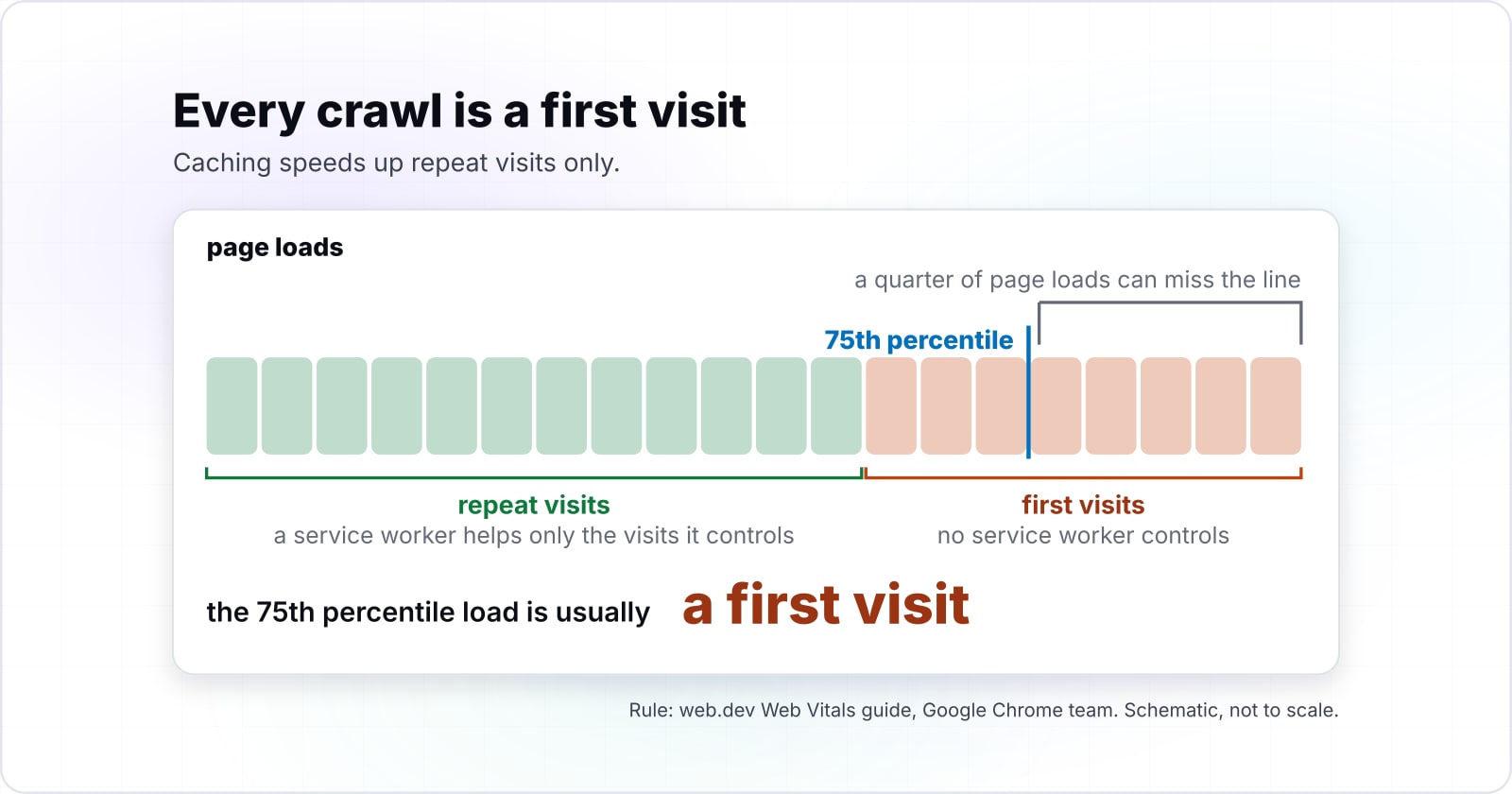
Field data is judged at the 75th percentile of page loads, so when more than about a quarter of loads are first visits, the 75th percentile load is usually a first visit. That rule comes from web.dev's Web Vitals guide by the Google Chrome team, first published 4 May 2020. A page passes when it meets the targets at the 75th percentile for all three metrics, so a quarter of loads may miss. Real first visits are not all slower than cached ones, so this is a tendency rather than a hard cutoff.
Show data table
| Item | Value |
|---|---|
| page loads that must meet the threshold | 75 |
| page loads that may miss it and the page still passes | 25 |
A quarter of page loads can miss the line and the page still passes, so first visits tend to decide field LCP once they pass about a quarter.
Google's Core Web Vitals page calls these metrics a measure of "real-world" experience. So they come from real Chrome visits, not from a test run. As a result, a service worker helps only the visits it controls. The web.dev guide to rendering on the web puts it plainly. App shell caching with a service worker can improve "perceived performance on repeat visits".
So caching earns its place when most traffic comes back, as with a signed-in tool or a news app with loyal readers. However, a site that lives on search traffic is mostly first visits. There, LCP is set by the server response, the HTML and the hero image, before the service worker runs.
Can an app shell hurt layout stability?#
Yes: a shell that paints a skeleton and then injects content of a different size shifts the layout, and a CLS score above 0.25 is poor. The web.dev CLS page, dated 12 April 2023, sets good CLS at 0.1 or less and poor at greater than 0.25. It also advises that when a request takes a while, "it's best to create some space right away".
0.1
Good, at or below
0.25
Poor, above
A shell that injects content of a different size moves the score from the good line towards the poor one.
| Option | layout shift score, at the 75th percentile of page loads |
|---|---|
| Good, at or below | 0.1 |
| Poor, above | 0.25 |
An app shell is built for speed: the frame appears at once and the content arrives after. But the content rarely matches the skeleton's size. For example, six placeholder cards that become nine real ones push everything below them down. So does a banner that appears above the fold. That shift counts on every first visit, which is the visit search traffic brings.
Because the fix is cheap, do it early. Give the skeleton the real content's size, and set width and height on images. Then reserve a fixed slot for anything that loads late. After that, the shell keeps its speed and stops costing CLS.
What did older PWA SEO advice get wrong?#
Older PWA SEO advice still cites FID, dynamic rendering and mobile as a ranking factor, and current Search Central documents retire or reject each of them. First, web.dev's INP page says "INP is the successor metric to First Input Delay (FID)". While FID measured only the delay of the first interaction, INP watches every interaction on a page.
Show data table
| Item | Value |
|---|---|
| good, at or below | 200 |
| poor, above | 500 |
INP judges every interaction against the 200 millisecond line, where FID timed only the first.
Second, Google's dynamic rendering page, updated 10 December 2025, is blunt. It says "Dynamic rendering is a workaround and not a recommended solution". Dynamic rendering means sending crawlers a server-rendered copy while people get the client-side app. Instead, Google points to server-side rendering, static rendering or hydration.
Third, Google's mobile-first indexing page was updated 10 December 2025. It says Google uses the mobile version of a site's content for indexing and ranking. That tells you which version gets judged, not that being mobile earns a boost. For a responsive PWA, both versions are the same page, so the rule asks nothing new.
Finally, a checklist that promises a fixed cut in load time from adding a PWA cites no published source. So measure your own first-visit and repeat-visit loads instead.
How do you test a PWA URL the way Googlebot sees it?#
Per template, fetch the raw HTML with JavaScript off, request a URL that should not exist, and read the rendered HTML in URL Inspection. Run all three on one URL of each page type, such as a product page, a category page and an article.
- The raw HTML. Run
curl -s https://example.com/products/42and read what comes back. The title, the canonical, the main text and real a href links should all be in it, not only a root div. - A missing URL. Request /products/does-not-exist and read the status code. It should be 404 (not found) or 410 (gone), two of the client error codes on Google's HTTP status page. A 200 means the catch-all rewrite is live.
- The rendered view. In Google Search Console, the URL Inspection tool's live test shows a screenshot of the page as Google-InspectionTool sees it. Google's URL Inspection help page notes the screenshot exists only in a live test.
The service worker cannot change any of the three checks, because none is a controlled visit. Also, a throttled Lighthouse or DevTools run is a lab test of one load on your machine. It helps you find a slow file. But it is not the crawler, and it is not the field data that ranks.
The raw HTML
Title, canonical, main text and real a href links, not only a root div.
A missing URL
It should answer 404 or 410; a 200 means the catch-all rewrite is live.
The rendered view
The URL Inspection live test shows the page as Google-InspectionTool sees it.
Which pages should you build an SEO-safe PWA from?#
Build in this order: server rendering from web.dev, Google's JavaScript SEO rules, the service worker lifecycle, then the Workbox offline fallback recipe. Here, Workbox is the Chrome team's set of service worker libraries, documented on Chrome for Developers.
- Rendering on the web, web.dev: choose server-side or static rendering so every URL has its own HTML.
- JavaScript SEO basics, Google Search Central: History API routing, the noindex and redirect strategies for missing pages, and the canonical in the HTML.
- Service workers, web.dev: registration, scope, and why the first visit goes to the server.
- Managing fallback responses, Chrome for Developers: the offline fallback recipe, which serves offline.html only when a request fails.
Since each step assumes the one before it, the order matters. Without server HTML first, the rest is polish on a page Google may not read.
- Step 1
Rendering on the web, web.dev
Choose server-side or static rendering so every URL has its own HTML.
- Step 2
JavaScript SEO basics, Google Search Central
History API routing, the noindex and redirect strategies for missing pages, and the canonical in the HTML.
- Step 3
Service workers, web.dev
Registration, scope, and why the first visit goes to the server.
- Step 4
Managing fallback responses, Chrome for Developers
The offline fallback recipe, which serves offline.html only when a request fails.
What is the smallest SEO-safe service worker setup?#
The server answers 404 for unknown routes, the router adds noindex on its error view, and Workbox serves the offline page only when the network fails. Set the server part in your host's routing rules. Send index.html only for routes the app knows, and a real not-found status for the rest. Then the browser code below covers the router and the service worker.
// 1. app.js: an error view the server could not catch tells Google not to index it
function showNotFound() {
  const metaRobots = document.createElement('meta');
  metaRobots.name = 'robots';
  metaRobots.content = 'noindex';
  document.head.appendChild(metaRobots);
}

// 2. app.js: change views with the History API, never a #fragment
function goTo(hrefUrl) {
  window.history.pushState({}, document.title, hrefUrl);
  renderView(hrefUrl); // your router's render function
}

// 3. app.js: register the service worker once the page already works without it
if ('serviceWorker' in navigator) {
  navigator.serviceWorker.register('/serviceworker.js');
}

// 4. serviceworker.js: load Workbox with no build step, go to the network,
//    and serve offline.html only when the network fails
importScripts(
  'https://storage.googleapis.com/workbox-cdn/releases/6.4.1/workbox-sw.js'
);

workbox.routing.setDefaultHandler(new workbox.strategies.NetworkOnly());
workbox.recipes.offlineFallback();
The first step is Google's own noindex sample, and the second follows its History API sample. The last step is the recipe from Chrome for Developers, which expects a file named offline.html at your server's root. It loads Workbox through workbox-sw, which needs no bundler. That page says the workbox namespace gives the service worker access to all of the Workbox modules, so the file runs as written. Because the offline page only answers a failed request, it never stands in for a missing page.
When is a PWA the wrong fit for search?#
When the pages that need to rank cannot be rendered on the server, a plain server-rendered site without a service worker serves search better than a PWA shell. Here are three cases where the PWA layer is the wrong tool, and what to use instead.
In short, a PWA is a good fit for the visits after search has done its job. But it is a poor substitute for HTML that search can read on the first try.
Where should you go next?#
For the general crawler view, the React build guide and the field Core Web Vitals loop, the related posts below go deeper than this one. Each covers one layer in more depth.
Start with how to build an SEO-friendly frontend for the crawler's view of any JavaScript site. Then read how to build a React progressive web app for the service worker setup itself. For field metrics, the site optimisation guide walks the Core Web Vitals loop. Also, accessible single-page applications covers what a client-side router does on a route change.
If you want a PWA built with server-rendered URLs from the start, see mobile and PWA development. And if your PWA fails field Core Web Vitals, see web performance work. Either way, the four official pages above are enough to get this right on your own.