What a website performance audit includes, and what you get from one
A score screenshot is the cheapest thing an audit can hand over and the least useful one. These are the parts that let you act on the findings, shown on our own site's numbers.
What does a website performance audit include?#
A website performance audit includes field data from real visitors, repeated lab runs on every page template, the element behind each failure, and a ranked list of fixes. In short, each of the four answers a question that a score cannot. First, field data says how real visitors on real phones used the site. Google's Chrome UX Report API documentation was updated on 13 October 2026. It calls that data a "28-day rolling average of aggregated metrics."
Second, lab runs repeat one controlled test, so a change can be compared fairly. The Lighthouse team's variability guide was read in October 2026. It says "The median Lighthouse score of 5 runs is twice as stable as 1 run." Third, the element behind a failure turns a metric into a task. Cloudflare's Web Analytics documentation describes a Debug View for this. It lists "the top five elements with a negative impact on each metric." Finally, the ranked fix list orders the work by how many visits each fix touches.
So when a proposal promises a website speed audit, ask which of the four it will hand over. A proposal that names only a score, a tool or a page count has described a test. It has not described a deliverable.
Why is one Lighthouse score not an audit?#
A Lighthouse score is one lab run on one page, a weighted blend of lab metrics, and it can move between runs with no code change at all. Lighthouse is Google's open-source tool that loads a page on a simulated phone or desktop. Google's performance scoring page gives the Lighthouse 10 weights, read in October 2026. Total Blocking Time (TBT), the time a page is too busy to answer a tap, carries 30%. On Google's scoring page, read in October 2026, LCP and CLS carry 25% each. First Contentful Paint (FCP) and Speed Index, both early loading measures, carry 10% each.
In short, more than half of the score comes from two numbers taken once, on one machine.
Show data table
| Item | Value |
|---|---|
| Total Blocking Time | 30 |
| Largest Contentful Paint | 25 |
| Cumulative Layout Shift | 25 |
| First Contentful Paint | 10 |
| Speed Index | 10 |
More than half of one Lighthouse score comes from two numbers taken once, on one machine.
The score also moves when nothing on the site changed. The Lighthouse variability guide gives the reason in its own words. Scores "will change due to inherent variability in web and network technologies, even if there hasn't been a code change." In practice, network noise, a busy server and the test machine itself all shift the result. Therefore, as the Lighthouse guide read in October 2026 advises, a real audit reports the median of five runs. A screenshot of one run is a sample of one, and tomorrow's run may disagree. Our guide to Lighthouse performance audits explains how the score is built.
Which numbers decide the verdict, lab or field?#
Field data from real visitors decides the verdict; on atyantik.com the share of good LCP loads swung between 60% and 100% over 8 days to 27 October 2026. Those shares come from the Cloudflare beacon on our own site, in our 28 October 2026 reading. The beacon is a small script that reports each visit's timings. Also, they count human visits only. Lab data is one simulated visit, while field data is what real browsers recorded. Google's web.dev article on why lab and field data differ makes the point directly. Your lab data can say a site performs great while your field data says it needs work.
A single day of field data swings too far to judge, so the window is what turns it into a verdict.
Show data table
| Stage | Value |
|---|---|
| 20 Oct | 60% |
| 21 Oct | 78% |
| 22 Oct | 86% |
| 23 Oct | 73% |
| 24 Oct | 83% |
| 25 Oct | 100% |
| 26 Oct | 82% |
| 27 Oct | 68% |
A single day of field data swings too far to judge, from 60% to 100% over 8 days.
That is why Google's web.dev guide, updated 31 October 2024, reads its pass marks at the 75th percentile of page loads. That guide also splits them by mobile and desktop. Then CrUX, per its October 2026 documentation, averages 28 days of visits, so one bad Tuesday cannot decide the result. Our guide to what Core Web Vitals measure covers each metric and the percentile. A report should also name its field source. That means CrUX, the Search Console report, or a real user monitoring (RUM) beacon on the site itself.
Which pages have enough traffic to judge?#
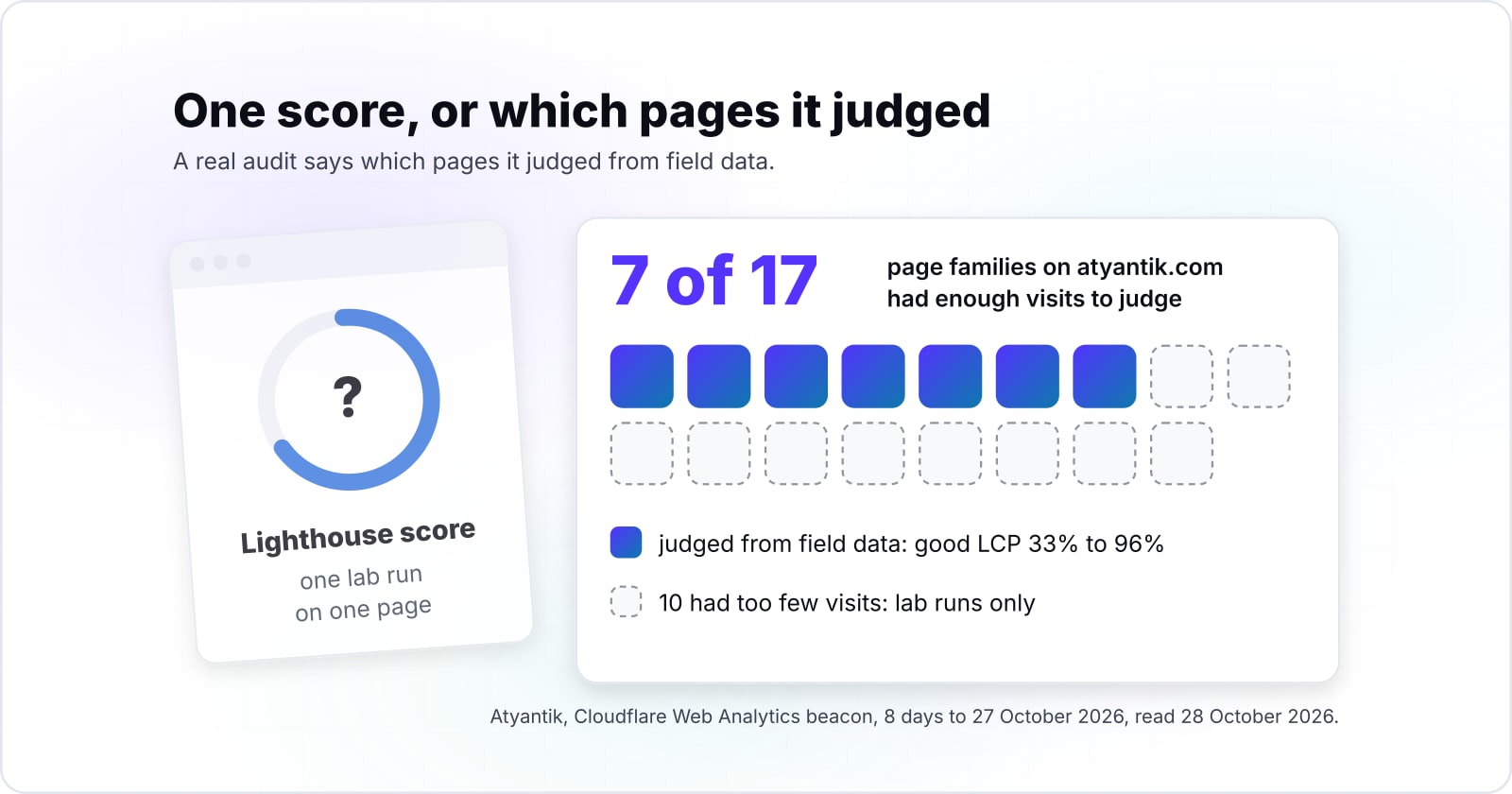
Only pages with enough real visits can be judged from field data: on atyantik.com, 7 of 17 page families reached 100 rated loads in 8 days to 27 October 2026. In our 28 October 2026 reading, the other 10 families printed no share at all. Our beacon tool shows a share only from 100 rated loads up. Google draws a similar line in its own tools. Its Search Console help covers a URL group, a set of similar pages, that "does not have a minimum amount of reporting data for both LCP and CLS." That group is left out.
Even among families with enough data, our 28 October 2026 reading put the good LCP share between 33% and 96%. So one site-wide number hides the weak section.
Show data table
| Item | Value |
|---|---|
| careers | 93 |
| thank-you | 96 |
| hub | 85 |
| team | 80 |
| blog | 77 |
| internship | 64 |
| for-companies | 33 |
Among the 7 page families with enough data, the good LCP share ran from 33% to 96%.
So an honest audit lists which pages it judged from field data. It also lists the pages it could only test in the lab. When a busy page and a quiet one are averaged together, the quiet one disappears. Instead, the auditor should say a page family had too few visits and lean on lab runs there. That one line tells you how much of the verdict rests on real visitors.
Why must an audit test every template, not just the home page?#
Home pages and inner pages behave differently: HTTP Archive's 2025 Web Almanac counts good Core Web Vitals on 45% of mobile home pages and 56% of secondary pages. On desktop, the same 2025 Web Almanac counts 47% of home pages and 61% of secondary pages passing. Its authors suggest that secondary pages gain from files already cached. Meanwhile, home pages change more often and carry more varied parts, they add.
The home page passes less often than the pages behind it on both devices, so testing it alone skews the picture.
Show data table
| Dimension | Home pages | Secondary pages |
|---|---|---|
| Mobile | 45% | 56% |
| Desktop | 47% | 61% |
The home page passes less often than the pages behind it on both devices.
A template is the layout a family of pages shares, such as a product page, a blog post or a checkout. Since pages on one template share most of their code, one address per template stands for the family. Then each one runs on mobile and desktop, because Google reads its pass marks per device. For example, say a site has six templates. One address each, on two devices, at five runs per median, is an illustrative 60 lab runs.
Lab runs for your own site
Set your template count, the devices you test and the runs per median; the defaults are the six-template example above.
Total lab runs
60
- Template and device pairs to check against field data
- 12
An illustrative planning aid from the Lighthouse variability guide, read October 2026. Modelled, not measured.
How does an audit find the element behind a failure?#
A useful finding names the element, not just the metric: Cloudflare Web Analytics reports the CSS selector behind the layout shift on each page load it samples. A CSS selector is the style code's address for one part of a page. Cloudflare's documentation says a developer can paste it into the browser console to find that part. Our 28 October 2026 reading covered 28 days of Cloudflare data on our own site. About 8,700 rated loads had good CLS in that window, and about 100 needed improvement. In that same 28 October 2026 reading, every one of those 100 loads pointed to the same element, the hero section at the top of the page.
One selector explained every layout shift that missed the mark, so the fix had one owner instead of a vague metric.
about 8,700
CLS good
about 100
CLS needs improvement, all on one hero section selector
About 8,700 rated loads had good CLS and about 100 needed improvement, and one hero section selector explained all 100.
| Option | rated page loads, sampled and extrapolated |
|---|---|
| CLS good | about 8,700 |
| CLS needs improvement, all on one hero section selector | about 100 |
Source: Atyantik, Cloudflare Web Analytics, read 28 October 2026
A finding that only says CLS needs work on product pages leaves your team to hunt for the cause. However, a finding that names the element, the template and the visits it touches is a task someone can own. So ask the auditor to name an element for every failure. Also ask whether the attribution came from real visitors or a single lab trace, because the two can disagree.
How long does a website speed audit take?#
The lab work takes days, but confirming a fix takes weeks, because Chrome UX Report field data is a 28-day rolling average (Chrome for Developers, read October 2026). Lab work grows with the template count. In the six-template example above, that is 60 runs plus the reading and the write-up. However, field work cannot be hurried. Since CrUX averages 28 days of visits, per its October 2026 documentation, a fix shipped today shows its full effect only once that window has rolled over. Search Console reads from the same CrUX data, so it lags in the same way.
So plan two dates: the report itself, then a field check once the 28-day window after the fixes has passed, per the CrUX documentation read in October 2026. A per-page monitor gives an early signal, though not the verdict. On our own site, a nightly job reads per-page vitals from the beacon and warns us when a page turns poor. That job does not replace the 28-day verdict. Instead, it tells you which page to look at first while the window fills.
- Days
The report itself: lab runs on every template, plus the reading and the write-up.
- Nightly
A per-page monitor gives an early signal, though not the verdict.
- 28 days
A field check once the 28-day window after the fixes has passed.
What should the audit report contain before you act on it?#
Before acting on a report, check that it carries field and lab numbers, every template on both devices, a named element per failure and a ranked fix list. The same checks apply whether the proposal says core web vitals audit, page speed audit or site speed audit. Use this list on a proposal before you sign it, then again on the finished report:
- Field data: the source (CrUX, Search Console or a RUM beacon), the window, and the 75th percentile for each metric and device.
- Lab data: the median of five runs per template, on mobile and desktop, with the test settings written down.
- Coverage: which templates were judged from field data and which only in the lab.
- Cause: the element behind each failure, and where that attribution came from.
- Order: fixes ranked by the visits they touch, with the date of the field check.
Not yet a full audit
2 of 5 checks present, 3 missing.
Send back the questions below before any fix work starts.
| Missing | Ask the auditor |
|---|---|
| Coverage | Which templates did you judge from field data, and which could you only test in the lab? |
| Cause | Which element is behind each failure, and did that attribution come from real visitors or a single lab trace? |
| Order | How many visits does each fix touch, and when will you check the field data again? |
Next, compare the lab and field numbers with each other. When they disagree, the report should explain the gap rather than quote the kinder number. Then send back whatever is missing before any fix work starts. A report with no named element and no field window is a test result. That is a fine start, but it is not yet a website performance audit.
When is a full audit the wrong tool?#
A full audit is the wrong tool for a small site with too little traffic for field data; repeated Lighthouse runs on each template are enough there. Search Console shows a "No data available" screen when CrUX holds too few visits for your site. So no audit can invent those visits. Instead, take the median score of 5 runs on each template, which the Lighthouse team's variability guide, read in October 2026, calls twice as stable as 1 run.
Second, when a known problem already has a known cause, such as an oversized hero image, fix it first. An audit taken afterwards measures what is left, not what everyone knew. Third, when the site is about to be rebuilt, test the new templates on a staging copy of the site with repeated lab runs. Then let field data build up after launch, because an audit of the old site describes code that is about to go.
Where do the metrics and the fixes go deeper?#
The metrics, the fixes for each metric and the Lighthouse scoring each have their own deeper guide on this site, and carrying out the fixes is separate work. If a report's metric names are new, start with what Core Web Vitals measure. Once an audit has ranked the fixes, the site optimization guide walks through the usual fix for each metric. For one architecture choice that moved the vitals, read the module federation write-up.
When you want the ranked fixes carried out, our website speed optimization services describe that work. After the fixes ship, website maintenance and support keeps watching the field data, so a slip is caught early. Still, the Google and Cloudflare documentation linked above is enough to scope a website performance audit on your own.