Edge vs origin: what belongs at the edge comes down to the sequential round trips
A fast edge can still make a page slower. The cause is rarely the kind of work a route does. It is how many times the route waits on a distant database, one trip after another.
What belongs at the edge, and what stays at the origin?#
Work belongs at the edge when a request makes zero or one sequential round trip to its data; at two or more, it runs faster beside its database. That is the whole rule, and it holds whatever the route does.
The edge is the data center nearest the user. The origin is where the data lives, usually one database in one region. Because of that, an edge Worker saves the user's first hop. Then it pays the full distance to the database on every query. Cloudflare's placement docs, updated 23 April 2026, name the gain: "Reducing round-trip latency from 20 to 30 milliseconds per query to 1 to 3 milliseconds". Therefore the count of chained trips decides where a route runs.
What does the wrong placement cost a database-backed route?#
In a worked example (assumption: five sequential queries at a 25 ms midpoint), the edge route waits 125 ms on data and the placed route 35 ms, a 90 ms loss.
Those figures use the midpoints of the band in Cloudflare's 23 April 2026 placement docs. The placed route pays 10 ms across five local queries, then one 25 ms hop to the database region. At ten chained queries, Cloudflare's April 2026 band gives 250 ms at the edge and 45 ms placed.
That gap lands on every request, before the page draws anything. In practice, it is time a team can measure and take back with one line of config. Also, checking costs nothing, because the count comes from reading the handler.
125 ms
At the edge, far from the database
35 ms
Placed beside the database
The same five-query route waits 125 ms at the edge and 35 ms placed beside its database.
| Option | ms of data wait, one 25 ms hop included when placed |
|---|---|
| At the edge, far from the database | 125 ms |
| Placed beside the database | 35 ms |
Source: arithmetic from Cloudflare, Workers placement docs, updated 23 April 2026. Modelled, not measured
Why do the edge vs origin category lists never settle it?#
Category lists sort work by its kind, yet the same auth check is edge work with a signed token and origin work when it reads a session table.
Most guides print a list: auth and redirects at the edge, the database and heavy logic at the origin. However, the list breaks on the first real route. A token check that verifies a signature makes zero trips, so it belongs at the edge. Meanwhile, an auth check that reads a session row makes one trip. Then the handler loads the user, the plan and the permissions in a chain. That is four trips, and it belongs beside the database. In short, one kind of work can make zero trips in one design and three in another.
| Design | Trips to data | Where it runs |
|---|---|---|
| Token check that verifies a signature | 0 | At the edge |
| Session row read, then user, plan and permissions in a chain | 4 | Beside the database |
How do sequential round trips turn a fast edge into a slow page?#
Cloudflare's placement docs (23 April 2026) put a query from a distant Worker at 20 to 30 ms and a placed one at 1 to 3 ms, so each sequential trip multiplies the gap.
Show data table
| Item | Value |
|---|---|
| Worker far from the database, low end | 20 |
| Worker far from the database, high end | 30 |
| Worker placed near the database, low end | 1 |
| Worker placed near the database, high end | 3 |
A distant query costs 20 to 30 ms and a placed one 1 to 3 ms, so every chained trip repeats the gap.
The docs give their own case: a user in Sydney and a database in Frankfurt. In Cloudflare's words, "The latency from multiple round trips between Sydney and Frankfurt adds up." Each query waits for the one before it. Because of that, each pays the full distance again. As a result, the edge saves one short hop while every chained query pays the long one. However, parallel queries share one wait, so they do not add up this way.
Where is the break-even depth between edge and origin?#
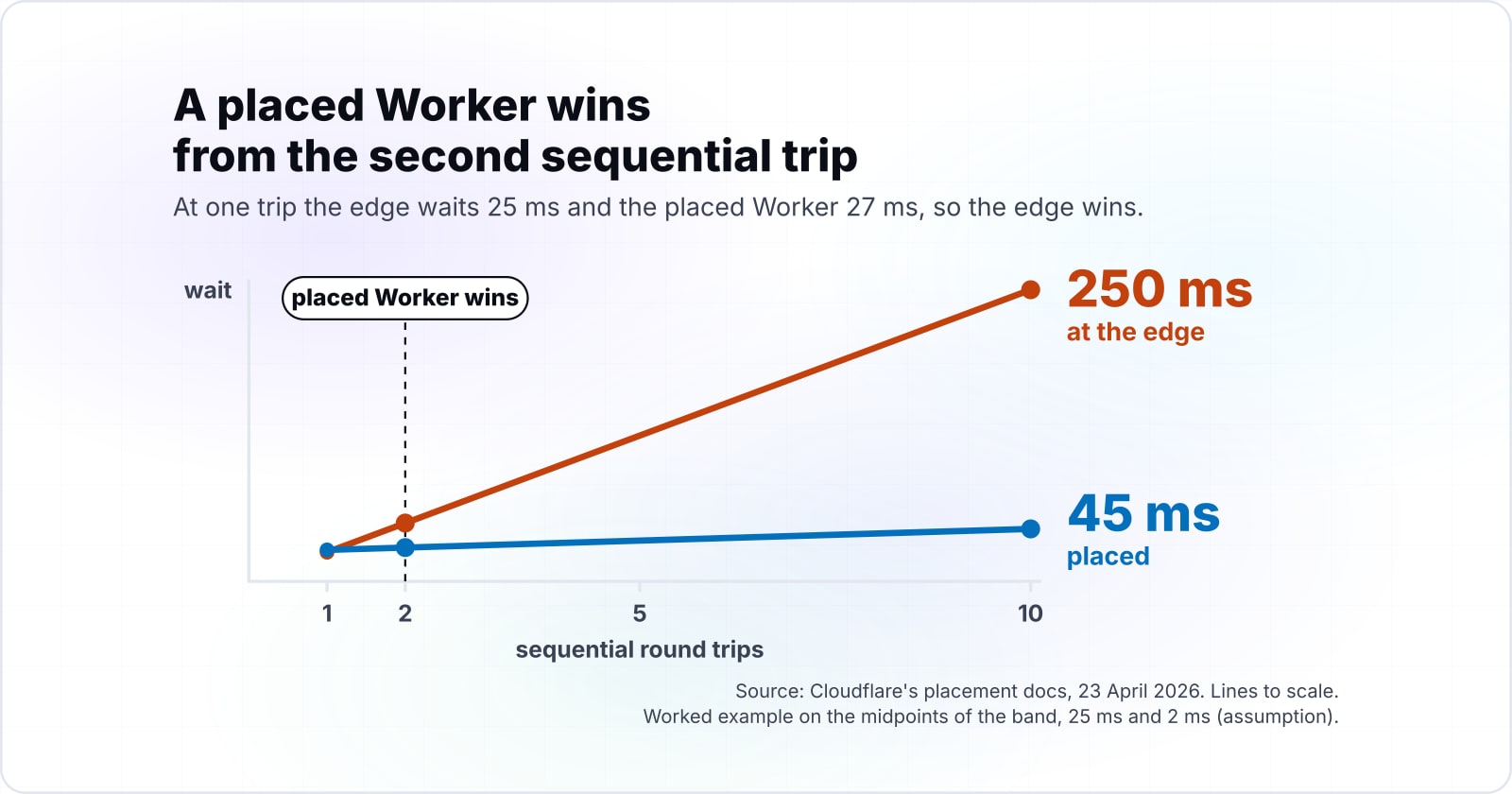
At the band midpoints of 25 ms and 2 ms (assumption), a placed Worker wins from the second sequential trip, and at ten trips it waits 45 ms against 250 ms.
Those midpoints come from Cloudflare's 23 April 2026 placement docs. Unplaced wait grows by 25 ms a trip, while placed wait starts with one 25 ms hop and grows by 2 ms a trip. On Cloudflare's April 2026 band, at one trip the edge waits 25 ms and the placed Worker 27 ms, so the edge wins. At two trips, the edge waits 50 ms and the placed Worker 29 ms. Also, the crossing stays at two trips across the whole published band.
Show data table
| Dimension | far from the database | placed near the database |
|---|---|---|
| 0 trips | 0 | 25 |
| 1 trip | 25 | 27 |
| 2 trips | 50 | 29 |
| 3 trips | 75 | 31 |
| 4 trips | 100 | 33 |
| 5 trips | 125 | 35 |
| 6 trips | 150 | 37 |
| 7 trips | 175 | 39 |
| 8 trips | 200 | 41 |
| 9 trips | 225 | 43 |
| 10 trips | 250 | 45 |
The placed series drops below the edge series at two trips, and the gap widens with every trip after.
Set one endpoint, then flip the placement switch
0 sequential trips
Signed token verified locally
Prefers this placement0 mson this placement
Better here by 25 ms
5 sequential trips
5 sequential queries
Prefers the other placement125 mson this placement
Worse here by 90 ms
Placement off: every crossing is a full round trip
The chain is payingThe zero-trip route resolves at the user's edge for 0 ms. The 5-trip route pays 125 ms, because every one of its 5 crossings costs the full 25 ms. Placing this Worker would move about 115 ms of data wait off the chained route, 90 ms net of the hop it adds, and it would cost the zero-trip route a forward hop it currently avoids.
| Route | Sequential trips | Unplaced | Placed |
|---|---|---|---|
| /api/session | 0 | 0 ms | 25 ms |
| /api/dashboard | 5 | 125 ms | 35 ms |
How do you count the sequential depth of a route in your own code?#
Count every awaited data call whose input depends on the result before it; calls that run together under one Promise.all count as a single trip.
Sequential depth is the longest chain of dependent calls, not the total number of calls. For example, a handler that loads a user, then the team, then the projects has a depth of three. Instead, loading the user, the settings and the menu at once has a depth of one. Then a cache hit counts as zero. Finally, a write after a read counts as one more.
Waiting is easy to miss in a profile. Cloudflare's limits page, updated 5 September 2026, says waiting on queries "does not count toward CPU time". As a result, a chained route can look cheap in CPU and still be slow.
What do Smart Placement and placement hints actually do?#
Smart Placement, per Cloudflare's placement docs of 23 April 2026, measures request duration across locations and may take up to 15 minutes before it moves a Worker.
Smart Placement is the automatic mode. It forwards a request only when a location is faster, hop included. Also, those 23 April 2026 docs say "By default, 1% of requests are not routed with Smart Placement" as a baseline. Instead, a placement hint is the manual mode. You name the cloud region or the host of your back end. Meanwhile, Vercel's region docs, updated 11 August 2026, run functions in a region close to your data source. Finally, Fastly's Compute page, dated 31 March 2026, runs code at the Fastly edge and reaches origins as backends.
Build from these pages, in this order:
- Workers placement: the
mode,region,hostandhostnamekeys, and thecf-placementheader. - Hyperdrive: the binding a placed Worker uses to reach Postgres or MySQL.
- Vercel function regions: the
regionskey that pins a function near its data. - Fastly Compute: how code runs at the edge and calls a backend.
| Platform | How it gets near the data |
|---|---|
| Cloudflare Workers | Smart Placement measures and moves the Worker; a placement hint names the region or host |
| Vercel Functions | The regions key runs a function in a region close to the data source |
| Fastly Compute | Code runs at the Fastly edge and reaches origins as backends |
What is the smallest config that runs a Worker beside its database?#
One placement block in the Wrangler config, either mode smart or a region hint, is the whole change, and the cf-placement header confirms where each request ran.
Wrangler is the Workers command line tool, and its config file sets the placement. First, pick smart mode for steady traffic, or a region hint for a known database region:
Second, deploy and read the header on a live response:
// wrangler.jsonc
{
  "name": "dashboard-api",
  "main": "src/index.ts",
  "compatibility_date": "2025-02-04",
  "placement": { "mode": "smart" },
  // or pin it: "placement": { "region": "aws:us-east-1" },
  "hyperdrive": [{ "binding": "HYPERDRIVE", "id": "<YOUR_HYPERDRIVE_ID>" }]
}curl -sI https://dashboard-api.example.workers.dev/ | grep -i cf-placement
# remote-LHR: routed by placement to London; local-EWR: ran in the default locationOn Vercel, Vercel's region docs (11 August 2026) make it one key in vercel.json: "regions": ["iad1"], near the database.
When does lowering the count beat moving the compute?#
Hyperdrive pools connections near the database and D1 read replicas serve reads from regions closer to clients, so both cut the cost of a trip without moving the Worker.
Hyperdrive is Cloudflare's service that speeds up queries to an existing database. Its how-it-works page, updated 5 July 2026, says a new connection may need "multiple round trips". Because Hyperdrive keeps a pool near the database, those setup trips go away. Also, D1 is Cloudflare's own SQL database. Its read replication page, updated 10 August 2026, adds read-only copies in regions closer to clients. Therefore, cut the depth first: merge queries, run independent ones together, and cache what repeats. In short, placement moves the waits, while a lower count removes them.
When does edge rendering make a page slower?#
Edge rendering makes a page slower when the render waits on chained trips to one distant region, and web.dev (18 November 2025) counts a TTFB above 1.8 seconds as poor.
Time to first byte (TTFB) is how long the browser waits before the response starts. A server render at the edge pays every data trip before that first byte. As a result, a chained render shows up in TTFB. The web.dev guide, updated 18 November 2025, says "Good TTFB values are 0.8 seconds or less".
0.8 s
Good, at or below
1.8 s
Poor, above
A chained edge render pays every data trip before the first byte, the number these thresholds grade.
| Option | seconds before the response starts |
|---|---|
| Good, at or below | 0.8 s |
| Poor, above | 1.8 s |
Source: web.dev, Time to First Byte, updated 18 November 2025
Vercel reached a similar place. Its edge runtime page, updated 3 August 2026, says "We recommend migrating from edge to Node.js" for performance. In short, an edge render of a chained page is a slow origin request with extra steps.
When is the round-trip count the wrong tool?#
The count is the wrong tool when CPU time, data residency or a runtime limit decides first, and Cloudflare's limits page (5 September 2026) sets the subrequest cap per plan.
- A route that burns CPU. That 5 September 2026 page sets the lower CPU limit at 10 ms per request. A heavy render can hit it before any trip matters, so profile CPU first.
- Data that must stay put. When law or a contract keeps data in one place, that rule picks the region. Then set a placement hint there and use the count to tune.
- A route that fans out. The same 5 September 2026 page sets 50 subrequests per request at the lower limit. At the higher limit it is 10,000. Instead of a new location, such a route needs batching or a queue.
| Limit | Subrequests per request |
|---|---|
| Lower subrequest limit | 50 |
| Higher subrequest limit | 10,000 |
Where does the edge vs origin decision go next?#
Decide each route by its count, confirm the placement with the cf-placement header, and fix the data path before you move the compute.
For how this plays out in React rendering, read React rendering on Cloudflare. For multi-step jobs that chain calls by design, see Cloudflare AI workflows. And to cut the cost of each query, start with common MySQL performance bottlenecks.
For help placing routes on Workers, see Cloudflare development. If TTFB is the number to fix, see web performance. Still, the four official pages above are enough to make this call on your own.