Module federation integration strategy: choosing between webpack Module Federation, single-spa, iframes, and build-time composition
Four approaches let teams split frontend code across separate deployments. Each handles shared dependencies, runtime overhead, and independent shipping differently.
Module Federation integration strategy: how it compares to single-spa, iframes, and build-time composition?#
Module Federation, single-spa, iframe-based composition and build-time composition each solve the problem of splitting frontend code across teams, with different tradeoffs in how they share dependencies and scale. Webpack's Module Federation documentation shows how to compose apps at runtime, a feature that shipped in webpack 5.0.0 on 10 October 2020. Single-spa.js.org documents a library for micro frontend code; its latest release, 6.0.3, is dated 29 September 2024. Cam Jackson's article on Martin Fowler's site, published in installments that finished on 19 June 2019, covers composition approaches including iframes. Build-time composition bundles all applications before deployment, as explained in freeCodeCamp's September 2026 guide.
Each approach answers the same question: how can teams ship code on their own without version conflicts? Because each approach answers it differently, each trades off isolation, delay, and team freedom. So understanding these tradeoffs is key for your organization.
Why does the choice of micro frontend integration strategy matter for team independence?#
The right strategy lets teams ship independently without dependency conflicts that slow integration and multiply deployment coordination work. Without a micro frontend approach, all teams share one codebase, so when Team A upgrades React to version 19, all teams must test it before anyone can ship. At a company with 50 software engineers and five teams, one upgrade blocks four teams.
A CODERCOPS case study from September 2026 measured this tradeoff. A traditional app loaded in 1.8 seconds, but the same app split into four federated bundles took 3.4 seconds, a 1.6-second cost. Yet in exchange, four teams could deploy independently. Team A shipped improvements three times weekly without waiting, Team B shipped twice weekly on their own schedule, and Team C shipped once weekly without needing approval. Because no deployments required coordination, this approach created independence by removing the shared codebase. Before federation, one team's version upgrade could block all others for days.
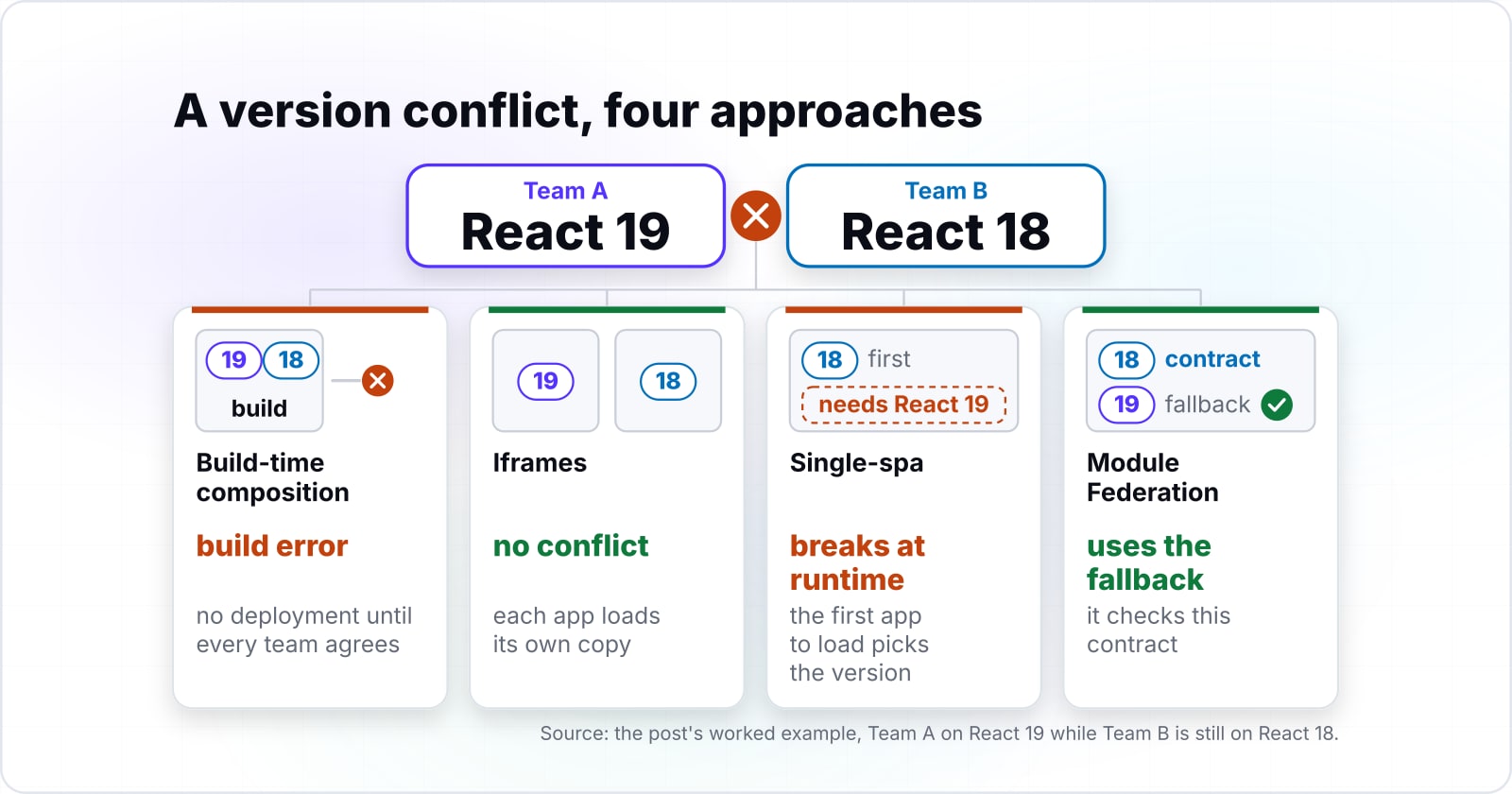
Single-spa offers similar freedom but needs team care. If Team A ships React 19 and Team B is still testing React 18, the first app to load picks the version, so Team B's app may fail. However, build-time setup prevents this by forcing teams to agree on versions before bundling. But that needs someone to lead the work before each release. Iframes skip version conflicts by loading each app in its own space because each iframe carries its own copy of every package, so conflicts are impossible. However, this isolation costs in file size and memory.
1.8s
Monolith (traditional)
3.4s
Module Federation (unoptimized)
A traditional app loaded in 1.8 seconds; the same app split into four bundles using Module Federation took 3.4 seconds, a 1.6-second cost.
| Option | initial page load time |
|---|---|
| Monolith (traditional) | 1.8s |
| Module Federation (unoptimized) | 3.4s |
Source: CODERCOPS, September 2026
What are the four architectural tradeoffs that separate each micro frontend approach?#
Dependency management, runtime overhead, build complexity and deployment isolation are where the four approaches diverge most. These four dimensions determine which approach fits your constraints. Build-time composition forces teams to agree on versions before bundling, which spots conflicts at bundle time, not at runtime. Since all code ships in one bundle, you get zero runtime delay. But the cost shows up at release time because every team must sync before the build starts. Since one team cannot deploy until all teams agree on every version, this blocks freedom.
Iframes load each app in a fully separate context, so conflicts are impossible because each iframe carries its own copy of React, utilities, and packages. Therefore, no shared code can conflict. However, this isolation costs in duplication: a page with three iframes runs three copies of React, tripling memory and slowing load time. According to Martin Fowler's 2026 article, "iframes add overhead and make apps hard to compose together."
Single-spa and Module Federation both share packages in the browser at runtime. Martin Fowler's 2026 article names the risk directly. It says shared runtime builds "create tension: without team care, different versions cause breaks that are hard to spot." So single-spa assumes your team keeps discipline through careful package control. But in contrast, federation builds version control into the design. So you declare which versions are shared, and when conflicts come up, it enforces deals at runtime and uses fallback bundled versions.
| Tradeoff | Module Federation | Single-spa | Iframes | Build-time composition |
|---|---|---|---|---|
| Dependency isolation | Explicit contracts, runtime fallback | Shared scope, no management | Full isolation, own copy | Strict unity at build |
| Runtime overhead | About 1.6s, unoptimized | Under 0.5s | Highest: memory triples | Zero runtime cost |
| Build complexity | Moderate: webpack config | Simple: lifecycle manager | Simple: add iframe tags | High: full team sync |
| Team independence | Deploy independently | Ship alone, needs discipline | Fully independent | Blocked until agreement |
How does each approach isolate or amplify shared dependency version conflicts?#
Build-time composition forces strict version unity; iframes completely isolate; single-spa and federation both share dependencies but handle conflicts differently. With build-time composition, a version conflict is a build error. One team tries to add React 19 while another needs React 18, so the build fails and no deployment happens until teams agree. This is safe but blocks shipping, so every team waits.
Iframes skip conflicts because each app loads in its own space. Because one iframe runs React 18 and another runs React 19, they do not share code or state. So the cost is in memory and file size, not team sync. According to Martin Fowler's 2026 update, "iframes are valid but pricey for full split."
Single-spa loads all JavaScript into one shared place and does not manage your code as a framework, so you must ensure all apps can coexist at runtime. When Team A loads React 18 first and Team B needs React 19, Team B's code breaks at runtime. Because single-spa gives no backup or version help, your team work is the only guard against breaks.
Module Federation gives you explicit control. You declare: "React must be version 18.2 or higher, but not 19." When federation loads apps, it checks this contract. If an app needs React 19 and only React 18 is available, it uses the fallback version bundled inside that app, which prevents failures. With explicit contracts, you remove the dependency on team discipline alone.
- Build-time composition: a version conflict is a build error. No deployment happens until every team agrees.
- Iframes: no conflicts are possible. Each app loads its own copy in its own space.
- Single-spa: conflicts break at runtime. Team discipline is the only guard.
- Module Federation: an explicit version contract, with a fallback bundled version if the contract cannot be met.
What is the runtime overhead and page load impact of Module Federation versus alternatives?#
Module Federation added 1.6 seconds of overhead to initial page load in one unoptimized case, while single-spa added less and iframes added the cost of complete isolation and duplicate dependencies. Understanding this cost, and which Core Web Vital each part of it strains, is key when choosing your approach.
The CODERCOPS case study from September 2026 gives numbers. A plain monolith loaded in 1.8 seconds, but the same app split into federated bundles took 3.4 seconds, a 1.6-second increase. The source names finding remotes, fetching remote bundles and parsing remote code as the general causes of this runtime cost, without breaking out how much each one contributes. You can trim the total through caching, code splitting and pre-loading.
Show data table
| Item | Value |
|---|---|
| Monolith | 1.8 |
| Module Federation (unoptimized) | 3.4 |
Single-spa adds less cost than federation. According to freeCodeCamp's September 2026 guide, single-spa is mainly a lifecycle manager, so apps still load one by one with cost that is mainly routing. Typically, cost is less than half a second. Build-time setup has zero runtime cost because all code is bundled before release. So the cost shows up at release time as team sync work, not at load time.
However, iframes have the most cost because each iframe runs in its own space. Martin Fowler's 2026 article names this directly. It says iframes "need each app to load and parse its own packages, making memory and asks grow." With three iframes, each carrying React and shared code, memory use can triple. So first load time grows because the browser must get, parse, and run three split bundles.
So the cost shows up where it hits users: for a page where top content comes from many teams, federation's 1.6-second increase is significant. However, for pages where most content loads below the fold or on user press, lazy load can hide most of this cost. So the right choice rests on whether this cost is worth the freedom gain.
Where should I start reading to implement Module Federation?#
Start with webpack's federation documentation for technical setup, then the community guide for architecture context and design principles. Webpack's official documentation, current for webpack 5.111.1 (released on 18 September 2026), explains configuration and shared dependencies in detail. Webpack.js.org's Module Federation documentation explains the basics. So it covers how to configure shared dependencies and expose modules from your application. The Module Federation community guide provides higher-level architecture patterns and design guidance. Both are essential before implementing this approach.
What is the minimum code to set up Module Federation?#
A working setup needs webpack config, container app that loads remotes, and remote apps that expose components.
First, configure webpack to share libraries and expose modules. A remote app declares what it shows and which libraries are shared:
// webpack.config.js - remote application
const ModuleFederationPlugin = require('webpack').container.ModuleFederationPlugin;

module.exports = {
  plugins: [
    new ModuleFederationPlugin({
      name: 'checkout',
      filename: 'remoteEntry.js',
      exposes: {
        './CheckoutForm': './src/components/CheckoutForm',
      },
      shared: {
        react: { singleton: true, strictVersion: false },
        'react-dom': { singleton: true, strictVersion: false },
      },
    }),
  ],
};
Second, the container states which apps are remotes and which packages to share:
// Container app webpack.config.js
new ModuleFederationPlugin({
  name: 'container',
  remotes: {
    'checkout': 'checkout@http://localhost:3001/remoteEntry.js',
    'catalog': 'catalog@http://localhost:3002/remoteEntry.js',
  },
  shared: {
    react: { singleton: true, strictVersion: false },
    'react-dom': { singleton: true, strictVersion: false },
  },
})
Third, pull remote parts in the container using live import:
const CheckoutForm = React.lazy(() => import('checkout/CheckoutForm'));
const CatalogBrowser = React.lazy(() => import('catalog/CatalogBrowser'));
Each remote app must run on its set port and give remoteEntry.js at the stated URL. So the container finds remoteEntry.js at each remote URL, gets the package list, and loads the asked for module. When packages clash, the style uses your stated version deal to fix them.
When is Module Federation the right choice for your team and application?#
Choose based on team size, application complexity, and whether you can tolerate shared dependencies and their overhead costs. Because federation wins when you have teams (five or more per vertical) that ship on different schedules and value freedom more than they dislike the 1.6-second cost.
A team of 50 software engineers building an online store shows the standard case. Team A owns checkout, Team B owns stock, and Team C owns hints. These teams move at different rates: Team A ships twice a week, Team B ships once a week, and Team C ships twice a month. Without a style like this, all three teams must sync before each release because one team's work stops another. But with Module Federation, each team owns a remote app and can ship on its own. Shared packages (React, shared tools) are set once in the container and used by all teams.
Module Federation
Explicit version contracts with a fallback on conflict. About 1.6 seconds of overhead, unoptimized, for independent shipping.
Full decision table
| Situation | Recommended strategy |
|---|---|
| Team under 15 | Monolith |
| Together, zero-tolerance conflicts | Build-time composition |
| Together, small risk OK | Single-spa |
| Independent, isolation critical | Iframes |
| Independent, contracts sufficient | Module Federation |
This picker follows the same decision tree drawn above. Adjust the answers to match your team and see which strategy the tree recommends.
Single-spa is right when you have 15 or more software engineers who release together, accept a small risk of version conflicts, and keep version care through careful package control. Below 15, the flowchart and the picker above both point to a monolith, for the reasons in the next section. But iframes are right when split is worth more than speed. Use iframes when adding third-party tools or apps with fully other tech stacks. Build-time setup is right when all teams can sync at release time and freedom is less key than cutting runtime cost.
When is a micro frontend strategy the wrong fit, and a monolith the right one?#
When you have a small team that can share a codebase and coordinate deployments, monolith simplicity wins over micro frontend overhead. For organizations smaller than approximately 15 developers, any micro frontend approach likely slows you down more than it helps. This includes Module Federation, single-spa, iframes, or build-time composition. So a monolith with strict module boundaries gives you independent software engineers and code organization without this approach's cost.
For small teams, sync work is low: one talk each week covers all release work. Shared code keeps bundle size small because there is no copy, and all folks know the whole app design so code check is easier. The 1.6-second cost of Module Federation would hurt more than the freedom helps.
- Your team is under approximately 15 developers.
- One weekly sync already covers all release coordination.
- A shared bundle keeps download size small; every duplicate copy would cost more than it saves.
- The whole team already knows the full app design, so code review does not need a hard boundary.
Next steps: shared state management and deployment coordination#
Your choice between approaches cascades into three downstream decisions: how you share state, manage dependency versions, and choreograph team deployments. First, you must pick how state flows from container to remotes. Context APIs work well for simple state used by just a few remotes. Shared stores work for hard state that must match across many remotes. Event lines work when apps are loose and do not need now sync.
Second, build a version style for shared code that lets teams move at their own pace. By-the-book versions help teams work with no constant sync: a shared code at ^18.0 lets any 18.x but not 19.x. Teams can go up within a big step with no breaks to others, giving teams freedom while stopping big step clashes.
Third, pick how much each team can ship. Can remotes ship on their own with no sync to the container? Can the container ship with no re-ship of all remotes? Can teams ship to live on their own time? These picks set whether your teams are truly free. Your choice leads to these design asks, so plan for shared tools, state styles, and ship plans before you start. These are not part of the blend choice itself but are a must to make the blend work at scale. They give the freedom gains that pay for the 1.6-second cost.
Learn more about scaling frontend architecture in our posts on building scalable UI components and accessible single-page applications. For teams evaluating micro frontends to solve scale problems, our scale and optimize service helps evaluate whether independent deployments will solve your current bottlenecks. For questions about custom software delivery with distributed teams, see custom software development.