How to choose a CRM: three trial tests for run cost, fit and exit
Every CRM looks alike on a feature grid. Three checks you can run inside a free trial tell them apart before the contract is signed, and none of them needs a sales demo.
How to choose a CRM: which three tests decide it?#
Choose a customer relationship management (CRM) system by running three tests in the trial: the run cost over 36 months, one real deal recorded as it happened, and a full export. Each test answers one question a feature grid cannot. First, what will the system cost to run once every line is counted? Second, does your own process fit it without workarounds? Finally, can you leave with your data whole?
Most selection guides list a dozen criteria and stop at a shortlist and a free trial. That advice is not wrong, but it leaves the trial with no task. So the three tests give the trial a job. Then each one ends in a number you can bring back to the table.
The run cost test uses the limits each vendor publishes. The fit test uses one of your own deals. And the exit test uses the export button, opened as a file rather than trusted as a feature. None of the three needs a sales demo, and all three fit in a two-week trial.
What does a CRM cost to run beyond the seat price?#
The seat price is one line of the run cost; add-ons, storage, integrations, admin time and the API calls every sync spends make up the rest. Pipedrive, which sells a CRM, lists licence fees, add-ons and premium features, and implementation costs in its September 23, 2026 guide. Its implementation line covers onboarding, data migration, custom setup and training.
Two more lines rarely make the list. The first is admin time: someone has to keep fields, stages and user rights tidy, and that work grows with every workaround. The second is capacity, because the licence tier often decides how much the system can do as well as what it costs.
Microsoft's request limits page, updated 2026-09-22, gives a Dynamics 365 Enterprise or Professional user 40,000 requests per 24 hours. Meanwhile, a Team Member user gets 6,000. In short, the cheaper licence carries a smaller share of what the platform will process for that person.
40,000
Enterprise or Professional user
6,000
Team Member user
The cheaper licence carries a smaller share of what the platform will process for that person.
| Option | requests per 24 hours |
|---|---|
| Enterprise or Professional user | 40,000 |
| Team Member user | 6,000 |
So model the run cost line by line over the full contract term. A 36-month view is long enough to catch a renewal and a tier change. For each line, write down who pays it, how it grows with seats, and what happens when you hit its ceiling.
How far does a CRM's daily API allowance stretch?#
Salesforce's limits reference, updated September 11, 2026, sets an Enterprise Edition org's daily API request pool at 100,000 + (number of licences x 1,000). The same reference works an example: an org with 15 licences gets 115,000 requests. Every app, sync and script that talks to the org shares that pool. The reference adds that purchased API call add-ons raise it.
The same document is blunt about why this matters. In its words, "A product that makes inefficient use of the API incurs unnecessary costs for your company". In other words, an API call is a unit of spend, even when no invoice shows it.
Take a 25-seat sales team on Enterprise Edition. Under Salesforce's September 11, 2026 formula, that org gets 100,000 + (25 x 1,000), which is 125,000 requests a day.
Now take an illustrative sync of your own. Say it pushes 10,000 changed records an hour and spends one call per record. That sync alone would need 240,000 calls a day, close to twice the pool.
How far your daily API pool stretches
Set your Enterprise Edition licences and one sync of your own; it computes the daily pool, the calls the sync spends and the share of the pool it uses.
Share of the daily pool the sync uses
192%
- Daily API pool, requests
- 125,000
- Calls the sync spends a day
- 240,000
The sync figures are an illustrative worked example. Change them to your own.
The fix is rarely more seats. Instead, it is batching, syncing only what changed, or buying an add-on. Also, each of those is a line in the run cost. So ask how many syncs you plan, how often each runs, and how many calls each spends. Do it before the contract fixes the pool.
Show data table
| Item | Value |
|---|---|
| 10 licences | 110,000 requests a day |
| 15 licences | 115,000 requests a day |
| 25 licences | 125,000 requests a day |
| 50 licences | 150,000 requests a day |
| 100 licences | 200,000 requests a day |
The 100,000 base dominates the pool, and each licence adds only 1,000 requests a day.
Does the API allowance follow the seat, the account or the tier?#
Each CRM meters API calls on its own unit, per licence, per account or per tier, so the same integration can sit comfortably in one allowance and run short in another. Salesforce counts a pool for the whole org that grows by licence. Microsoft gives each Dynamics 365 user an allowance. Meanwhile, it keeps a separate tenant pool for identities that sign in for no person.
| Vendor | What the allowance follows |
|---|---|
| Salesforce | A pool for the whole org that grows by licence |
| Microsoft Dynamics 365 | An allowance for each user, plus a separate tenant pool for identities that sign in for no person |
| HubSpot | A daily limit per account, set by tier, with a burst limit per ten seconds for each app |
HubSpot works by tier and by account. Its API usage guidelines, read in October 2026, set a daily limit per account for privately distributed apps. It is 250,000 calls on Free and Starter, 625,000 on Professional and 1,000,000 on Enterprise. Those guidelines add that the daily limit "is shared across all apps within the same HubSpot account". However, a burst limit per ten seconds applies to each app on its own.
Show data table
| Item | Value |
|---|---|
| Free and Starter | 250,000 calls a day |
| Professional | 625,000 calls a day |
| Enterprise | 1,000,000 calls a day |
The tier, not the seat count, sets the ceiling, and every app on the account shares it.
These figures do not rank the vendors, because they count different things. A per-account tier stays flat as the team grows, until you move up a tier or buy an increase. Meanwhile, a per-licence pool rises with every seat, and a per-user allowance follows the person, not the sync.
So before comparing two numbers, write down the unit each one is measured in. Then run your own sync plan through each unit. The same question applies to any other CRM on your shortlist: find the unit first, then read the number.
How do you test whether a CRM fits your sales process?#
Record one real deal from first call to signed order inside the trial, exactly as it happened, and count every field, stage and workaround it needed. Pick a deal that closed in the last quarter and had at least one twist. A second contact, a revised quote or a pause all count. Then rebuild it in the trial system, step by step, from your own notes and emails.
As you go, keep three counts. First, the fields you had to add, because each one is setup work and later admin. Second, the stages you had to bend, rename or skip. Third, the workarounds: a note field holding structured data, a spreadsheet beside the system, or a task copied by hand.
Pick a deal
Pick a deal that closed in the last quarter and had at least one twist.
Rebuild it
Then rebuild it in the trial system, step by step, from your own notes and emails.
Keep three counts
The fields you had to add, the stages you had to bend, rename or skip, and the workarounds.
Compare
If two products tie on fields and stages, the one with fewer workarounds is cheaper to run.
Selection research often works the other way. For example, a 2021 study in Information and Knowledge Management by Masum and colleagues scored CRM alternatives against many weighted criteria. It used multi-criteria decision methods to rank them. That approach ranks products on paper, and it is useful for a long list. However, it cannot tell you whether your own deal fits, because no weighting holds your process.
A process fits when the deal goes in without a workaround. Each workaround you count is admin cost you will pay every month. So it belongs in the run cost from the last test. If two products tie on fields and stages, the one with fewer workarounds is cheaper to run.
How do you get your data out of a CRM?#
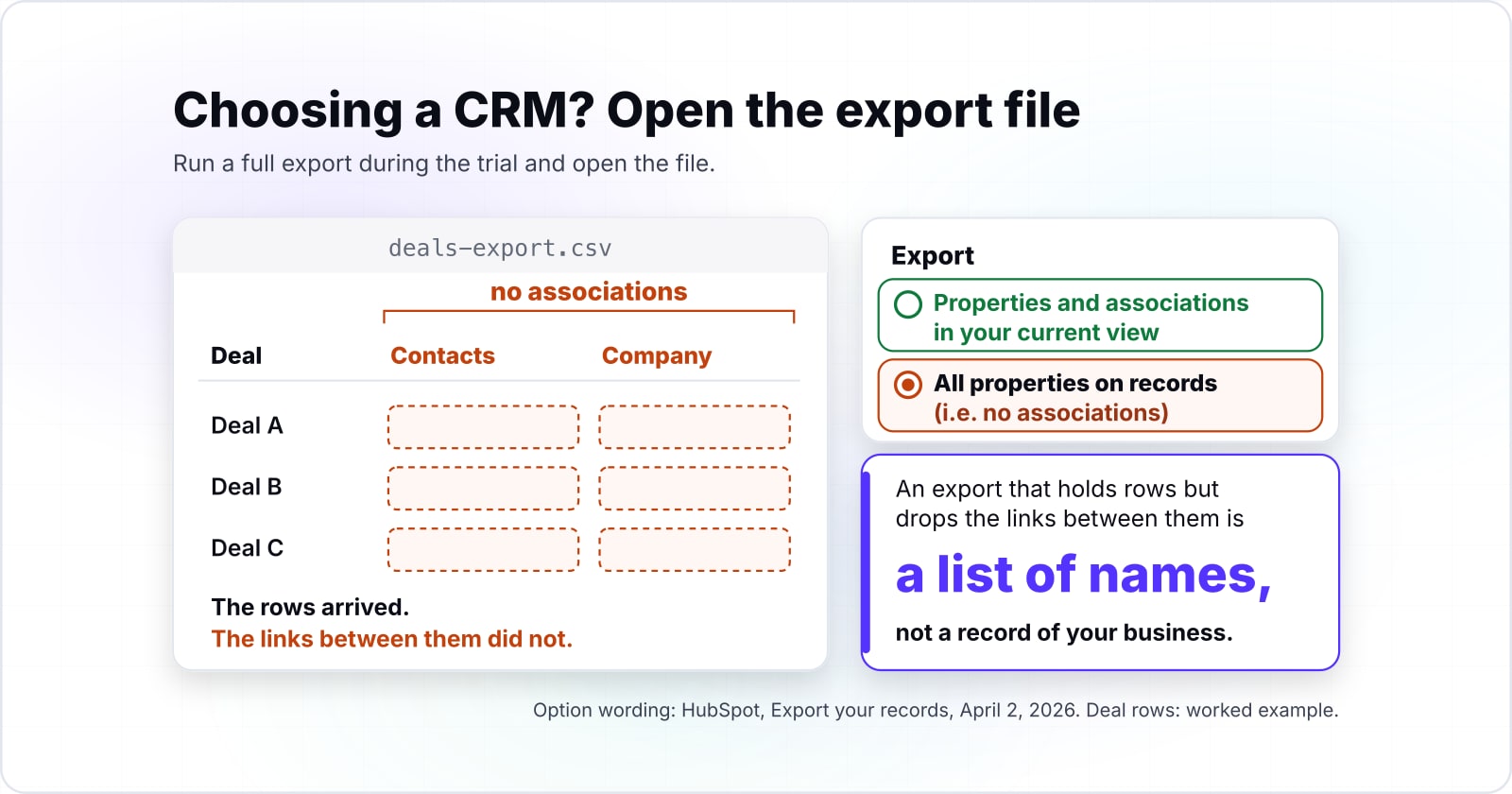
Run a full export during the trial and open the file: check that associations, activity history and custom fields arrive, not only contacts and deals. An export that holds rows but drops the links between them is a list of names, not a record of your business.
HubSpot's export guide, updated April 2, 2026, shows why the check matters. Its default export carries the properties and associations in your current view, with up to 1,000 associated record IDs per association column. But one of its options, "All properties on records", is described as "(i.e. no associations)", so the widest-looking choice drops the links. Calls and notes are exported through a separate route.
| Item | documented limits on a record export from the HubSpot app (count of exports or rows; days for the link) |
|---|---|
| exports per rolling 24 hours | 300 |
| CSV or XLSX rows before the file splits | 1,000,000 |
| XLS rows before the file splits | 65,535 |
| days a download link lasts | 30 |
The same guide, updated April 2, 2026, allows up to 300 exports in a rolling 24 hours, with three at a time. It splits CSV or XLSX files past 1,000,000 rows into several files in a zip. And it says plainly that "Download links to export files will expire after 30 days". Meanwhile, HubSpot's exports API guide, read in October 2026, allows thirty exports a day, one at a time.
So the exit test has three checks. Open the file and find one deal's contacts and company through the IDs. Then count the activity history against what the trial holds. Finally, note how many files arrived and how long the link lasts, so the real exit has a plan.
Why is a bulk export through the API paced rather than instant?#
Microsoft's service protection limits, updated 2026-01-10, allow 6,000 requests per user in any five-minute window, so a bulk export runs at a paced rate. The same service protection page caps combined execution time at 20 minutes, or 1,200 seconds, in that window. It also lists the concurrent request limit as "52 or higher".
| Item | limit per user per web server within a five-minute sliding window |
|---|---|
| requests | 6,000 |
| combined execution seconds | 1,200 |
| concurrent requests | 52 or higher |
When a client goes over, Dataverse returns a 429 Too Many Requests error with a Retry-After header. The client then has to wait that long. The ceiling above is the one set in that page's January 10, 2026 update. For example, 6,000 requests per five minutes multiplies out to at most 72,000 an hour for one user under that limit alone. Say an export reads 1,000,000 records one request at a time. At that ceiling it would need about 14 hours.
Batching changes that figure, and a vendor's bulk tools change it again. But the shape holds on any platform that throttles: a large exit takes planned time. As a result, the exit plan needs a schedule, an owner and a test run. A file format alone is not a plan.
Does GDPR data portability let a business leave its CRM?#
No: the right to data portability belongs to individuals, so a company's way out of its CRM is the contract and the export, not the regulation. The UK Information Commissioner's Office explains the right under the UK GDPR, which mirrors Article 20 of the EU GDPR.
The ICO's guidance, read in October 2026, says the right lets individuals receive personal data they provided "in a structured, commonly used and machine readable format". It also says the right only applies when the lawful basis is consent or a contract and the processing is automated. So the right serves the person the data is about. In particular, it covers their personal data, not your pipeline, your notes or your reports.
That is why a business writes its exit into the contract. Ask for the export format, how long you keep access after notice, and when the vendor deletes your data. This is general information, not legal advice, so have your own counsel read the exit terms for your jurisdiction.
What should you ask a CRM vendor before signing?#
Ask each vendor in writing for the API allowance and its unit, the export format and limits, the exit terms, and what happens to your data after cancellation. Written answers turn a demo into a record you can compare side by side.
Send the same questions to every vendor on the shortlist:
- What is the daily API allowance on our tier, and does it follow the seat, the account or the tier?
- What does an increase cost, and which of our planned syncs would need one?
- Which licence types carry less capacity, and which users would we put on them?
- What does a full export include: associations, activity history, attachments and custom fields?
- How many exports a day are allowed, how large can a file get, and how long does a download link last?
- Is the bulk API throttled, and at what rate?
- How long do we keep access after notice, and when is our data deleted?
Then put the answers next to the three test results. If a written answer and a test result disagree, the test wins, and the vendor owes you an explanation. Also, if you already write a request for proposal, these questions slot into its technical section.
| Question | Test it backs | What answers it |
|---|---|---|
| Daily API allowance and its unit | Run cost | A daily pool per org, per user or per account |
| Cost of an increase | Run cost | Purchased API call add-ons |
| Licence types with less capacity | Run cost | Requests per 24 hours by licence |
| What a full export includes | Exit | Associations, activity history, attachments and custom fields |
| Exports a day, file size, link life | Exit | Exports per rolling 24 hours, rows before a file splits, days a link lasts |
| Bulk API throttling | Exit | Requests per user in a five-minute window |
| Access after notice, deletion date | Exit | The exit terms in the contract |
When is the three-test method the wrong fit?#
The three tests are the wrong fit for a small team on a free tier, where a week of real use and one export answer the question faster. Use the product for a week, run one export from the exit test, and open the file.
Capacity is rarely the issue at that size. HubSpot's guidelines, read in October 2026, give even Free and Starter accounts 250,000 API calls a day, so a small team will rarely meet the ceiling.
The method is also the wrong fit when no product passes the fit test twice. Say two trials both need a spreadsheet beside them for the core of your process. Then a third trial will likely end the same way. In that case, compare the cost of building against buying instead. Then read the export limits as the data you will carry across.
Finally, the method is too much when a parent company has already chosen the CRM for the group. Then only the exit test is yours to run. It is still worth running, because it tells you what you can take with you later.
Where do you go once the CRM is chosen?#
Once the three tests are run, the next questions are adoption, the case for custom software, and how integrations live inside the allowance you measured. Before the choice, how a CRM improves business performance sets out what the system is for. After it, CRM best practices for a live system covers adoption and the conditions that keep it healthy. And why CRM projects fail reads the failure numbers with care.
If the fit test failed twice, custom software versus off-the-shelf software weighs the build route, and what custom software costs prices it. And to send the vendor questions as a formal request, the software development RFP template gives a filled-in example.
Two service pages describe the same ground: CRM development for a system built around a process, and API integrations for syncs that live inside a measured allowance. However, the vendor documentation linked above is enough on its own to know how to choose a CRM.