Custom software vs off-the-shelf software: when tailor-made software development pays off
Most comparisons pit one whole custom system against one whole product. Split your workflow into slices instead, and the build question shrinks to the one slice your customers would notice.
Custom software vs off-the-shelf software: which should you choose?#
Buy off-the-shelf software for the commodity slices of a workflow, build custom software only for the slice that differentiates, and let break-even arithmetic decide when. In short, you rarely face one big choice. Instead, you face a small choice for each part of the work.
Public guidance points the same way. The GOV.UK Service Manual page on choosing technology was last updated on 15 October 2024. It tells teams to map their parts "to learn what you’ll need to build and what you can buy or get for free". Also, the same page asks teams to keep the total cost of ownership low. It also warns against long contracts that lock a team in to one tool.
So the useful question is not "custom software vs off the shelf" for the whole business. Instead, it is which slice, if any, earns a build. For most firms that is one slice, such as a quoting rule, a pricing model or a dispatch step. As a result, everything around it stays bought.
Then the timing comes from plain arithmetic. In short, a build pays off in the year its running total of removed spend passes its build cost plus upkeep. In particular, seat count moves that year more than anything else. That is because a seat-priced product grows with your team, while a build mostly does not.
$15,000
Year 1 spend
$86,261
Running total by year 5
In this modelled example, 50 seats cost $15,000 in year 1 and reach $86,261 by year 5.
| Option | US dollars, 50 seats at $25 per user per month rising 7% a year, modelled |
|---|---|
| Year 1 spend | $15,000 |
| Running total by year 5 | $86,261 |
What are tailor made software solutions, and how do they differ from readymade software?#
Tailor made software solutions are built for one organisation's workflow, while readymade software is a standard product sold to many customers under a nonexclusive licence. Tailored software, then, is software written to your own specification. You usually own it, or you hold a broad licence to it.
The University of California San Diego's custom software overview, updated 1 May 2026, says custom software "is created by a developer using specifications you provide". Its off-the-shelf software page, from 25 February 2026, says readymade software "refers to standard (not custom) software applications".
The IRS gives a sharper test. In its 2025 depreciation guide, software counts as off the shelf when three things hold. It is readily available to the general public, it is sold under a nonexclusive licence, and it has not been substantially modified.
Also, both kinds are mainstream spend. The U.S. Bureau of Economic Analysis, in its May 2018 methods paper, counts three types as business investment: prepackaged, custom and own-account software. In the Bureau's custom software series on FRED, US firms invested $279.052 billion in custom software in 2025. Its prepackaged series on FRED shows $372.394 billion in readymade software that year.
Show data table
| Dimension | prepackaged | custom | own-account |
|---|---|---|---|
| 2015 | 127.011 | 130.372 | 58.877 |
| 2020 | 215.263 | 187.67 | 75.266 |
| 2025 | 372.394 | 279.052 | 99.89 |
Prepackaged and custom software both grew from 2015 to 2025, so both kinds are mainstream business spend.
What are some tailor made software examples?#
Most useful tailor made software examples are one slice of a business, such as a quoting engine, a dispatch rule set or a pricing model, wrapped around bought tools. For example, a distributor might buy its accounting, email and customer records. Then it builds only the rule that prices a rush order across three warehouses.
For instance, other examples follow the same shape. A clinic network buys its scheduling product but builds the triage step that routes a patient to the right site. Similarly, a freight firm buys its fleet tracking but builds the logic that bundles loads. Also, a training company buys its video host but builds the progress rules its clients pay for.
| Business | Buys | Builds |
|---|---|---|
| A distributor | Its accounting, email and customer records | The rule that prices a rush order across three warehouses |
| A clinic network | Its scheduling product | The triage step that routes a patient to the right site |
| A freight firm | Its fleet tracking | The logic that bundles loads |
| A training company | Its video host | The progress rules its clients pay for |
In each case the build is small next to the bought stack. However, it is the part a customer feels. A faster quote, a better match or a fairer price is what wins the next order.
Meanwhile, government guidance describes this order of work. The Digital Scotland Service Manual, read in October 2026, says "Reuse before you buy or build". It then says to "Buy ready-made tools or build new ones only if needed".
The UCSD overview also lists two kinds of custom contract: creating original software and customising existing software. In practice, the second kind is often the slice around a bought tool. For a wider list of types, the guide on custom software types and examples sorts them by route and size.
Which slices of a workflow should you buy, and which should you build?#
Buy every slice a competitor runs the same way, configure the slices that differ only in settings, and build the one slice customers would notice if it changed. That single test sorts most stacks in an afternoon.
First, list each step a job passes through, from first enquiry to paid invoice. Then put each step in one of three lanes:
- Buy: payroll, email, file storage, accounting. A customer never sees how you run these.
- Configure: your customer records, your help desk, your project board. They differ from a rival's only in fields and steps a product already lets you set.
- Build: the step a customer would feel if it got worse, such as how fast you quote or how well you match a job to a crew.
The Local Digital guide to build, buy or share, from the UK housing ministry and read in October 2026, uses the same idea. It plots each capability by how mature it is, from "custom" to "commodity and utility". For the mature end, it suggests "purchasing off-the-shelf solutions". Meanwhile, newer parts specific to the organisation go to an interdisciplinary team.
However, one warning applies to the configure lane. Heavy changes to a bought product can stop you taking its upgrades. So keep changes inside the settings the vendor supports. If a slice needs more than that, it belongs in the build lane.
What are the advantages of tailor made software, and the disadvantages of tailored software?#
The advantages of tailor made software are fit, ownership and no per-seat bill; the disadvantages of tailored software are upfront cost and the upkeep that follows launch. Both halves matter, so here they are side by side.
| Advantages of tailor made software | Disadvantages of tailored software |
|---|---|
| It fits the one slice that sets you apart | You pay the build cost before any value arrives |
| You can own the code, per the contract | You fund every fix, update and security patch |
| No per-seat charge rises as the team grows | The team that built it holds key knowledge |
| You set the order of new features | A product's roadmap and support come with the licence |
In particular, ownership is a contract term, not a given. The UCSD overview tells departments to settle "Who owns the software?" before they sign. It also asks them to plan warranty and maintenance up front. By contrast, readymade software stays under a nonexclusive licence by the IRS test, so many firms share one product and its upkeep.
Because of that, upkeep is the largest disadvantage. The April 2026 arXiv review "The Buy-or-Build Decision, Revisited" says operations, maintenance, enhancement and retirement take most of the lifecycle cost. Its cited estimates "range from 40% to 80%" of the total.
These are the custom made software advantages and disadvantages to weigh before any break-even math. Next comes the money, using Salesforce's published $25 per user list price and the 7% yearly cap in VendorBenchmark's 2026 contract data.
Show data table
| Item | Value |
|---|---|
| low end of the cited estimates | 40 |
| high end of the cited estimates | 80 |
Most of an application's lifecycle cost, 40% to 80% in the cited estimates, lands after launch.
When does tailor-made software pay off?#
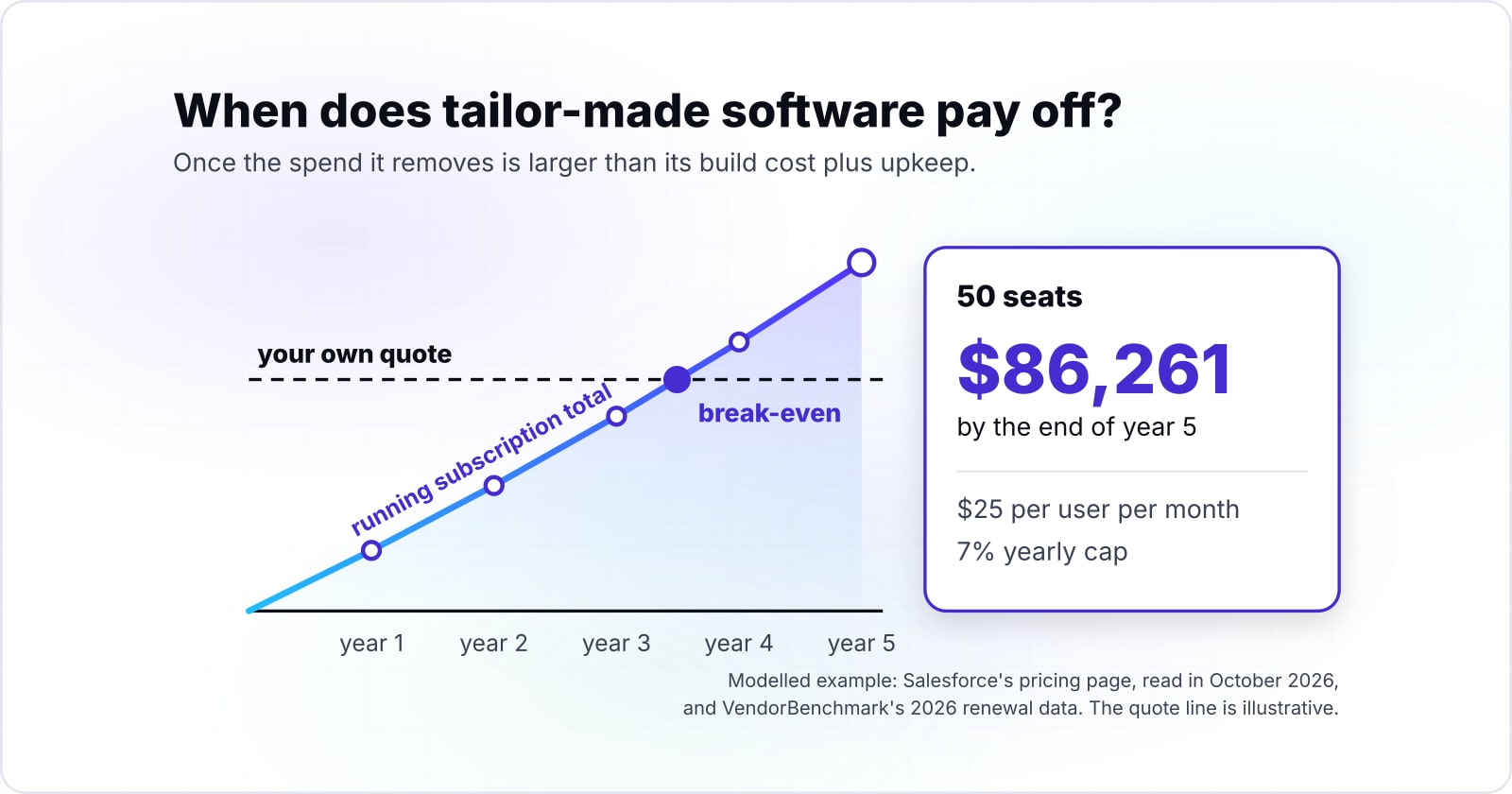
Tailor-made software pays off once the spend it removes exceeds its build cost plus upkeep; 50 seats at $25 a month rising 7% a year cost $86,261 over five years. That second number, on 2026 list prices, shows how fast seat-priced spend grows.
Here is the worked example. The Salesforce pricing page, read in October 2026, lists the Starter Suite at $25 per user per month. Also, VendorBenchmark's 2026 escalation benchmark lists Salesforce contract cap language of 7% a year.
In this modelled example, 50 seats cost $15,000 in year 1 and $16,050 in year 2. By year 3 the modelled running total is $48,224. By year 5 it reaches $86,261.
When your build would pay off
Set your seats, the price per seat and its yearly rise, then enter your own build quote and yearly upkeep to see the running subscription total against them.
Running total by year 5
$86,261
- Subscription spend in year 1
- $15,000
- Running total by year 3
- $48,224
- Year 5 running total minus build cost and five years of upkeep
- Enter your build quote and upkeep
- First year the running total passes build plus upkeep
- Not within five years, or no quote entered yet
A model of the worked example above, not a measurement or a quote.
Show data table
| Item | Value |
|---|---|
| year 1 | 15,000 |
| year 2 | 31,050 |
| year 3 | 48,224 |
| year 4 | 66,599 |
| year 5 | 86,261 |
At the defaults, the running subscription total climbs from $15,000 in year 1 to $86,261 by year 5.
However, notice what the example does not say. A customer record system is a commodity slice, so it stays bought. Instead, ask the break-even question of the one slice you would build. Add up what that slice removes: a seat-priced add-on, the spreadsheet hours, the workaround tool. Then compare that running total with your build quote plus yearly upkeep.
In particular, seat count moves the answer most. Because a seat-priced product grows with headcount, doubling the seats doubles the yearly bill. Meanwhile, a build's upkeep stays closer to flat. The guide on how much custom software development costs covers where a build quote comes from.
However, upkeep belongs in the total too. The arXiv review of 29 April 2026 puts 40% to 80% of lifecycle cost after launch.
How long is customised software good for?#
Customised software is good for as long as its upkeep is funded, because 40% to 80% of an application's lifecycle cost lands after launch. There is no expiry date in the code itself. The range is from an arXiv review dated 29 April 2026.
Also, that review cites long-standing studies on software upkeep. It also warns that faster building with new tools does not remove the running share. In its words, the share "does not disappear simply because the development share shrinks".
Meanwhile, tax rules give one rough marker, though not a lifespan. IRS Publication 946 for 2025 tells firms that buy off-the-shelf software to "use the straight line method over a useful life of 36 months". That is a write-off period for bought software. It is not a promise about how long the software works.
In practice, tailored software stays useful while three things hold. First, someone owns its fixes and security patches. Second, the slice it serves still sets you apart. Then, its links to bought tools keep working as those tools change. When any of these lapses, the software ages fast. Therefore, plan its upkeep as a yearly line in the budget, never as a surprise.
Someone owns its fixes
Someone owns its fixes and security patches.
The slice still sets you apart
The slice it serves still sets you apart.
Its links keep working
Its links to bought tools keep working as those tools change.
How does tailor made software development run, and what does it cost after launch?#
Tailor made software development runs as discovery, a first slice in production, then funded upkeep, and the upkeep is the larger share of the total cost. Each stage has its own job.
Discovery writes the specification. The UCSD overview lists what a contract must define first: services, deliverables, milestones and key people. It also wants "Acceptance testing" criteria set "BEFORE you pay for it". Finally, it asks teams to plan for "Mission creep" with a process to change requirements and price.
The first slice goes live small. Build the one step that sets you apart, and connect it to the bought tools around it. Then measure it with real users, and extend it only where the numbers say so. The guide on the custom software development timeline shows how long each stage tends to take.
Upkeep never ends while the software is in use. It covers fixes, security updates, changes in the tools it connects to, and new rules from the business. Since the arXiv review of 29 April 2026 puts 40% to 80% of lifecycle cost here, the build quote is the smaller number. So ask any vendor for a yearly upkeep estimate beside the build quote.
Do US tax rules change when custom software pays off?#
In the US, Section 174A lets a business deduct domestic software development spend in the year paid, or elect to amortise it over at least 60 months. As the statute read in October 2026, the rule shifts when cash comes back, not which slice is worth building.
Under 26 U.S. Code 174A, as published by Cornell's Legal Information Institute and read in October 2026, any amount paid to develop software counts as research spend. Subsection (a) allows the deduction "during the taxable year". Subsection (c) lets a business choose instead to spread it over "not less than 60 months".
However, bought software follows a different clock. IRS Publication 946 for 2025 sets a 36-month straight-line life for off-the-shelf software that meets its three tests. By contrast, a subscription is a running cost paid each year.
Show data table
| Item | Value |
|---|---|
| off-the-shelf software, straight-line life (IRS Publication 946) | 36 |
| domestic research spend if amortised instead of deducted, minimum (26 U.S.C. 174A(c)) | 60 |
Bought software is written off over 36 months, while amortised development spend takes at least 60 months.
So in the US, a build's tax timing can be quick if you deduct in the year paid. Still, that changes the cash curve, not the slice test. This is general information about US federal rules, not tax advice; check the treatment with a tax adviser before you plan around it. Outside the US, local rules apply instead.
When is custom software the wrong fit?#
Custom software is the wrong fit when no customer would notice the slice change, when nobody will fund its upkeep, or when a configured product already covers it. In each case a better route exists.
The slice is commodity. If a rival runs payroll or email the same way you do, a build only adds upkeep. Instead, buy the product, as the Scottish manual's "Buy ready-made tools or build new ones only if needed" advises.
The upkeep is unfunded. If no budget line covers fixes after launch, the build decays. The April 2026 arXiv review puts 40% to 80% of lifecycle cost after launch, so an unfunded build is a liability. Keep the subscription until the upkeep has an owner.
Configuration already solves it. If the gap is a missing field, report or approval step, most products let you add it in settings. So configure first, and rebuild only when settings run out.
| When | Better route |
|---|---|
| The slice is commodity | Buy the product |
| The upkeep is unfunded | Keep the subscription until the upkeep has an owner |
| Configuration already solves it | Configure first, and rebuild only when settings run out |
As a result, these tests guard against a common mistake. That mistake is building because the current tool annoys you, not because the slice sets you apart.
Where should you go next?#
Start with the route decision, price the build, then test the break-even on your own seat count before anyone writes code. Also, each step has a page that answers it.
- First
The route decision
The guide on custom software types and examples sorts them by route and size.
- Second
Price the build
The guide on how much custom software development costs covers where a build quote comes from.
- Third
Test the break-even
Run the break-even on your own seat count before anyone writes code.
If you are still sorting terms, what custom software development means defines the build and who owns it. For the route, see custom software types and examples. For the money, read the cost of custom software development. Finally, for larger estates, the enterprise software development guide takes a five-year view.
If you cannot yet tell which slices are commodity, a product discovery phase maps them before anyone commits. If one slice clears the break-even and you want it built, this is what a custom software development company does.
In short, you may not need either. The slice test, the break-even math and the upkeep check above can settle custom software vs off-the-shelf software for most teams on their own.