What is custom software development, and what do you own when you build it?
A business can buy its software, have its own staff write it, or pay a firm to build it. The middle route has a name, a measured size and a contract clause that decides who owns the result.
What is custom software development?#
Custom software development is designing, building and maintaining software for one organisation's own processes, whether an outside firm writes the code or the organisation's own staff do. The BEA, which keeps the US national accounts, draws the same line. Its handbook chapter on private fixed investment was updated in December 2024. It counts purchases of "customized software from companies that are primarily engaged in software development" as one kind of software investment.
The same agency also names the in-house case. Its glossary entry on own-account investment was last changed on 26 April 2018. It describes a business that "develops or improves its own software rather than purchasing custom-made software" from a software firm. So both routes build something made to fit, and they differ only in who writes the code.
In short, two tests make software custom. First, it is made for one business and its way of working, not for a market of many. Second, the business pays for the build itself, through a contract with a firm or through the wages of its own staff. A product you license fails the first test, even after heavy setup. And bespoke software is the same idea under its British name.
The word development is wider than coding, too. The international standard on the subject, ISO/IEC/IEEE 12207, published in November 2017, is titled "Software life cycle processes", and a 2026 edition has since replaced it. In plain terms, the work takes in the design, the build, the tests, the release and the years of fixes after launch. That last part matters most, because a business keeps paying for it long after the build is done.
Where does custom software sit between buying and building?#
US national accounts split business software three ways: prepackaged software bought off the shelf, custom software commissioned from a developer, and own-account software an organisation's staff build. The BEA began counting all three as investment in 1999, during a full revision of the accounts. A BEA note on how software is estimated, posted in May 2018, sets out the method.
Yet each term is plainer than it sounds. Prepackaged software is a product sold to many firms and used much as it ships, such as an accounting package. Custom software is commissioned, which means a firm builds it to your brief and is paid for the work. Own-account software is the BEA's term for software your own staff build for your own use.
Each route moves a different share of the work and the risk onto you. If you buy a product, the vendor designs it, builds it and keeps it running, and you shape your process to fit. When you commission custom software development, a firm builds to your process, and once the contract ends, the upkeep is yours to arrange. And if you build in-house, you also carry the hiring, the managing and every hour of the build.
| route | who builds it | who keeps it running | what you adapt |
|---|---|---|---|
| prepackaged, bought | the vendor | the vendor | your process, to fit the product |
| custom, commissioned | a firm, to your brief | you arrange it once the contract ends | nothing; the firm builds to your process |
| own-account, built in-house | your own staff | your own staff, with the hiring and managing | nothing; you carry every hour of the build |
However, the line between routes is not clean. The BEA's note on its method says custom software "consists of a mixture of both new and existing programs or program modules". Those include packaged parts built into the new system. In practice, most custom systems sit on top of products, open-source code and cloud services. Which route suits a given need is its own decision, and the custom versus off-the-shelf comparison works through it in full.
How much do U.S. businesses invest in each kind of software?#
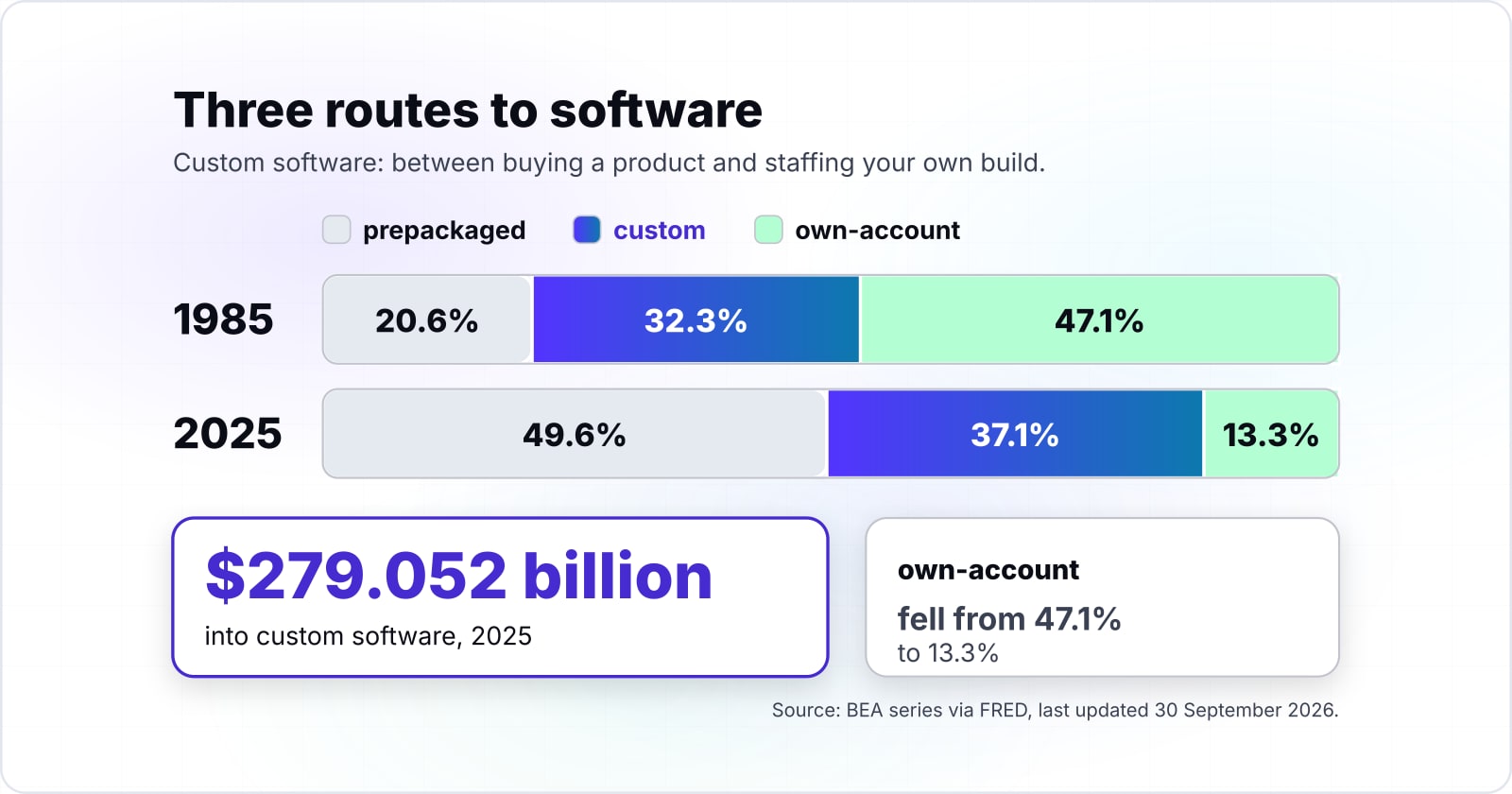
In 2025 US businesses invested $279.052 billion in custom software, $372.394 billion in prepackaged software and $99.89 billion in software built in-house, by the BEA's count. So custom software was the second largest route in 2025, behind products and well ahead of in-house builds.
Show data table
| Dimension | Prepackaged (bought) | Custom (commissioned) | Own-account (built in-house) |
|---|---|---|---|
| 1985 | 4.888 | 7.686 | 11.188 |
| 1990 | 13.337 | 14.199 | 17.871 |
| 1995 | 22.208 | 24.664 | 18.605 |
| 2000 | 56.471 | 63.923 | 36.412 |
| 2005 | 75.105 | 65.809 | 37.719 |
| 2010 | 80.262 | 100.366 | 45.755 |
| 2015 | 127.011 | 130.372 | 58.877 |
| 2020 | 215.263 | 187.67 | 75.266 |
| 2025 | 372.394 | 279.052 | 99.89 |
In 2025 custom software sat between products and in-house builds, at $279.052 billion.
These figures are not a market forecast. Instead, they are the BEA's own annual series for private fixed investment in software. They are served through FRED, the data service of the Federal Reserve Bank of St Louis. The custom software series was last updated on 30 September 2026, as were the prepackaged and own-account series.
Also, the custom route has grown with the rest. In the same BEA series, custom software investment rose from $7.686 billion in 1985 to $279.052 billion in 2025. Even so, products grew faster since 1985, and that shift is what the next section measures.
Two limits apply to every figure here. First, the series covers US businesses only, so it says nothing direct about other countries. Second, the values are in current dollars, so they carry inflation as well as more software. As a result, part of any rise since 1985 is just higher prices, and the shares in the next section are the fairer comparison.
How has the split between buying and building changed since 1985?#
Own-account software fell from 47.1% of US business software investment in 1985 to 13.3% in 2025, while prepackaged rose from 20.6% to 49.6%. Over the same years the custom share moved far less, from 32.3% in 1985 to 37.1% in 2025, by the same BEA arithmetic.
| Route, 1985 to 2025 | 1985 share (%) | 2025 share (%) |
|---|---|---|
| Prepackaged (bought), 1985 to 2025 | 20.6 | 49.6 |
| Custom (commissioned), 1985 to 2025 | 32.3 | 37.1 |
| Own-account (built in-house), 1985 to 2025 | 47.1 | 13.3 |
Own-account (built in-house) fell the most since 1985
down 33.8 pointsPrepackaged (bought): 20.6% in 1985, 49.6% in 2025 (up 29 points)
Custom (commissioned): 32.3% in 1985, 37.1% in 2025 (up 4.8 points)
Own-account (built in-house): 47.1% in 1985, 13.3% in 2025 (down 33.8 points)
Grey bar: 1985. Dark bar: 2025.
| Route | 1985 | 2025 | Change |
|---|---|---|---|
| Prepackaged (bought) | $4.888bn, 20.6% | $372.394bn, 49.6% | up 29 points |
| Custom (commissioned) | $7.686bn, 32.3% | $279.052bn, 37.1% | up 4.8 points |
| Own-account (built in-house) | $11.188bn, 47.1% | $99.89bn, 13.3% | down 33.8 points |
| All three | $23.762bn | $751.336bn | current dollars |
Each share is one route divided by the sum of all three in that year. For example, the 2025 BEA figure for own-account software, $99.89 billion, is 13.3% of the $751.336 billion the three routes add up to.
But the BEA does not say why the mix moved, so read what follows as one reading of the numbers. Since 1985, businesses have stopped staffing most of their own builds. Instead, they now buy what is common and commission what is not. So payroll, email and accounting became products. Meanwhile, the work that products do not cover stayed custom, and more of it went to outside firms than to in-house teams.
That is why custom software today usually means commissioning a specialist for one part of the business. It rarely means hiring a team to build everything, so the questions that follow are about contracts and upkeep. Code is only part of it.
What do you own when you commission custom software?#
Under US copyright law, commissioned code belongs to whoever wrote it until a signed written assignment transfers it, because computer programs are not among the nine commissioned work-made-for-hire categories. A work made for hire is a legal category in which the payer, not the writer, counts as the author.
The Copyright Office spells this out in Circular 30, Works Made for Hire, revised August 2024. A commissioned work counts as made for hire only if it falls in one of nine categories:
- a contribution to a collective work
- part of a film or other audiovisual work
- a translation
- a supplementary work
- a compilation
- an instructional text
- a test
- answer material for a test
- an atlas
The work also needs a written agreement, signed by all parties, that calls it a work made for hire. The circular is blunt: "If a work fails to satisfy any of these requirements, it is not a work made for hire."
So the default sits with the writer. Section 201(a) of the Copyright Act says copyright "vests initially in the author or authors of the work". Then Section 204(a) sets the only door out. So a transfer "is not valid unless an instrument of conveyance, or a note or memorandum of the transfer, is in writing and signed by the owner of the rights conveyed".
| who writes the code | who holds the copyright by default | what moves it to you |
|---|---|---|
| your own employee, as part of the job | you, as the employer (Circular 30, part A) | nothing; it is yours already |
| an outside firm you commission | the firm, as the author (Section 201(a)) | a written assignment the firm signs (Section 204(a)) |
| an outside firm, contract says work for hire only | still the firm, since software is not one of the nine categories (Circular 30) | a signed assignment clause beside the label |
In practice, the clause to look for is an assignment of copyright in the code, signed by the firm. Paying the invoice does not move ownership, and a work-for-hire label on its own does not either. Also, check what the assignment leaves out. The firm's own tools, licensed products and open-source parts often stay under their own terms, which is the mixture of new and existing programs the BEA describes.
One limit applies here. All of this is US law as the Copyright Office prints it, and other countries set their own rules. For the other contract terms worth asking about, see the guide to choosing a custom software development company.
What are the signs a team has outgrown packaged tools?#
A team has outgrown packaged tools when the work that sets it apart runs on workarounds: data typed twice, a spreadsheet one person understands, and reports nobody trusts. Size alone is not the signal, because a large firm can run well on products while a small one cannot.
So run this check on one process at a time, and mark each line that is true for it.
- The same data is typed into two or more systems, by hand, every week.
- A spreadsheet runs a core step, and one person knows how it works.
- Reports go out only after someone checks the numbers by hand.
- You pay for a product's features you do not use, to reach the one you need.
- The product's release plan decides when your own process can change.
Then ask the question that settles it. Is this the process that sets the business apart, such as how you quote, plan or serve customers? Or is it a common one, such as payroll, email or bookkeeping?
If the marks sit on a common process, a better product or a cleaner setup usually fixes them. But if they sit on the process that sets you apart, a product cannot fit it. After all, the product was built for many firms at once. That is the case the middle route exists for. For a sense of what such systems look like, see the kinds of custom software and their examples.
If the answer is still unclear, test it before you build. A short product discovery phase maps the process, the users and the case for building before anyone writes code.
When is custom software the wrong fit?#
Custom software is the wrong fit when a packaged product already handles the process, because every commissioned line is a line someone must then maintain for years. And over the life of a system, the cost of running it can far exceed the cost of building it.
The clearest public record of that comes from the US government. The Government Accountability Office (GAO) published a report on aging federal systems on 25 May 2016. It found that about 75 percent of the fiscal year 2015 federal IT budget went to operations and maintenance.
Show data table
| Item | Value |
|---|---|
| Operations and maintenance | 75 |
| Development, modernization and enhancement | 25 |
About 75 percent of the fiscal year 2015 federal IT budget went to operations and maintenance.
Among the government's roughly 7,000 IT investments, 5,233 directed all funds to maintenance, by the same 2016 GAO count. Still, a federal budget is not a private one, so read it as the shape of the cost, not as your number. Even so, the shape holds: once software exists, keeping it running is most of what it costs.
Owning code also means owning its security. NIST's Secure Software Development Framework, published in February 2022, sets out practices to help software producers "reduce the number of vulnerabilities in released software". When the code is yours, that work is yours or your vendor's, for as long as the system runs. The framework's own page lists them.
Three cases point away from building:
- A common process. Payroll, email, bookkeeping and the like are solved problems. A packaged product fits, and its vendor carries the upkeep.
- An untested need. If you are not sure the process will last, a no-code tool or a short discovery phase tests it for a fraction of the effort. Build once the need has held for a while.
- No owner for upkeep. If the business cannot staff the upkeep of the code after launch, a hosted product with a support contract is safer than a system that ages unpatched.
In each case, the honest advice is the same. Build only the part that sets you apart, and buy or rent the rest.
Where do cost, timelines and build versus buy get answered in depth?#
Cost, timelines, the kinds of custom software and the build-versus-buy decision each have a deeper treatment, and each link below says what it settles.
- Build or buy: custom software versus off-the-shelf software walks through the choice between the routes.
- Cost: how much custom software development costs breaks down what drives the bill.
- Kinds and examples: custom software types and examples shows what gets built and why.
- Timeline: the custom software development timeline sets out how long each phase takes.
For a team that has run the check and wants a process built, the custom software development service describes how we take on that work. For a team still weighing it, product discovery is the step before.
Either way, two public documents are enough on their own to settle the core of it. The BEA's chapter on private fixed investment gives the definition, and Circular 30 gives the ownership rule.