Custom software types and examples: four public systems, their records, and the route each one teaches
If you run or equip a growing business and a process has outgrown its spreadsheet or rented tool, you have to choose: buy, configure, integrate or build. Four public systems, with their users and costs on the record, show what each choice carries.
What is custom software, and what are its four types?#
Custom software is software built for one organisation's own users and processes, and it comes in four types: customer-facing apps, integration platforms, extended packaged software and core systems of record. It is also called bespoke software, tailor-made software or a custom application. The code matters less than you might think. Instead, the types differ in three plain ways. They are who uses the software, how long it must run, and how much of it you own.
First, a customer-facing app is used by people outside the organisation, so its success is counted in sign-ups and use. Second, an integration platform is used by other software, and its job is the connection. Third, extended packaged software is a rented platform shaped to your process with settings, low-code screens or added code. Finally, a core system of record holds the data the organisation runs on. It can stay in service for decades.
Which custom software types and examples can you check yourself?#
Each of the four types has a public example with a date and a record: IRS Direct File, GOV.UK Notify, Microsoft Power Apps and the federal systems GAO audits. Unlike a made-up clinic app, each of these can be checked against its own published numbers.
| Type | Real example | What the public record shows |
|---|---|---|
| Customer-facing app | IRS Direct File, 2024 to 2025 | 296,531 returns in its second season, at $138.27 a return |
| Integration platform | GOV.UK Notify, since 2016 | 1,759 organisations and 12,823 services send messages through it |
| Extended packaged software | Microsoft Power Apps | Custom business apps on a rented platform, with a 180 second timeout on each outgoing request |
| Core system of record | GAO's 11 legacy systems, 2025 | About 23 to 60 years old, about $754 million a year to run |
Source: US Department of the Treasury, 2 October 2025; GOV.UK Notify performance page, 3 October 2026; Microsoft Learn, 12 January 2026; GAO-25-107795, July 2025.
So these examples answer what kinds exist and what each one carries. For the full definition and the question of who owns the code, see what custom software development is and what you own. Then each row of the table gets its own section below.
What did IRS Direct File, a customer-facing custom app, actually serve?#
IRS Direct File accepted 140,803 returns in its pilot and 296,531 in its second season, then the Treasury suspended it in October 2025. Those counts come from the Treasury's report to Congress dated 2 October 2025. The pilot ran in 12 states, and the second season ran in 25.
Direct File let people file a federal tax return for free, straight with the IRS. It worked as an interview in the browser. The IRS also published the code on GitHub, so the build itself is open to read. However, the same Treasury report says "Direct File had low overall participation and relatively high costs". By its count, Direct File carried less than 0.5 percent of about 146 million returns for tax year 2024.
Then the IRS stopped the service. In a report of 19 March 2026, the Treasury's tax inspector general confirmed it. Direct File was suspended after the 2025 filing season. In short, the users doubled and the service still closed, because doubling a small number left it small.
140,803
Pilot, tax year 2023
296,531
Second season, tax year 2024
Direct File returns more than doubled between seasons and still stayed under 0.5 percent of returns filed.
| Option | returns accepted by the IRS |
|---|---|
| Pilot, tax year 2023 | 140,803 |
| Second season, tax year 2024 | 296,531 |
Why does the number of users decide what custom software costs?#
Direct File cost $225.85 a return in its pilot and $138.27 in its second season, the Treasury reported in October 2025, because more returns shared a cost that grew far more slowly than use. In the Treasury's Table 4, dated 2 October 2025, the pilot cost at least $31.8 million and the second season reached $41 million.
So the total cost rose by less than a third while the returns more than doubled. As a result, each return carried a smaller share of the bill. That is the shape of most custom builds. Because the team, the servers and the support desk cost much the same at any scale, more users mean less cost per user.
The same 2025 report shows how far the plan drifted from the record. Beside its Table 4, the Treasury says the first IRS projections came to no more than about $16 a return. The exact figure depended on how many people took part. In practice, the cost per return was many times that figure. The Treasury also warns that its own numbers understate the true cost. Some IRS support offices were left out of the count. For a custom build, then, the number of users is the figure that decides whether the cost pays back.
Show data table
| Step | Change | Running total |
|---|---|---|
| Pilot | 225.85$ | 225.85$ |
| Returns doubled, same cost | -118.61$ | 107.24$ |
| Cost rose to $41M | 31.03$ | 138.27$ |
| Second season | 138.27$ |
The cost per return fell from $225.85 to $138.27 as returns grew.
How does a fixed build cost spread across your own number of users?#
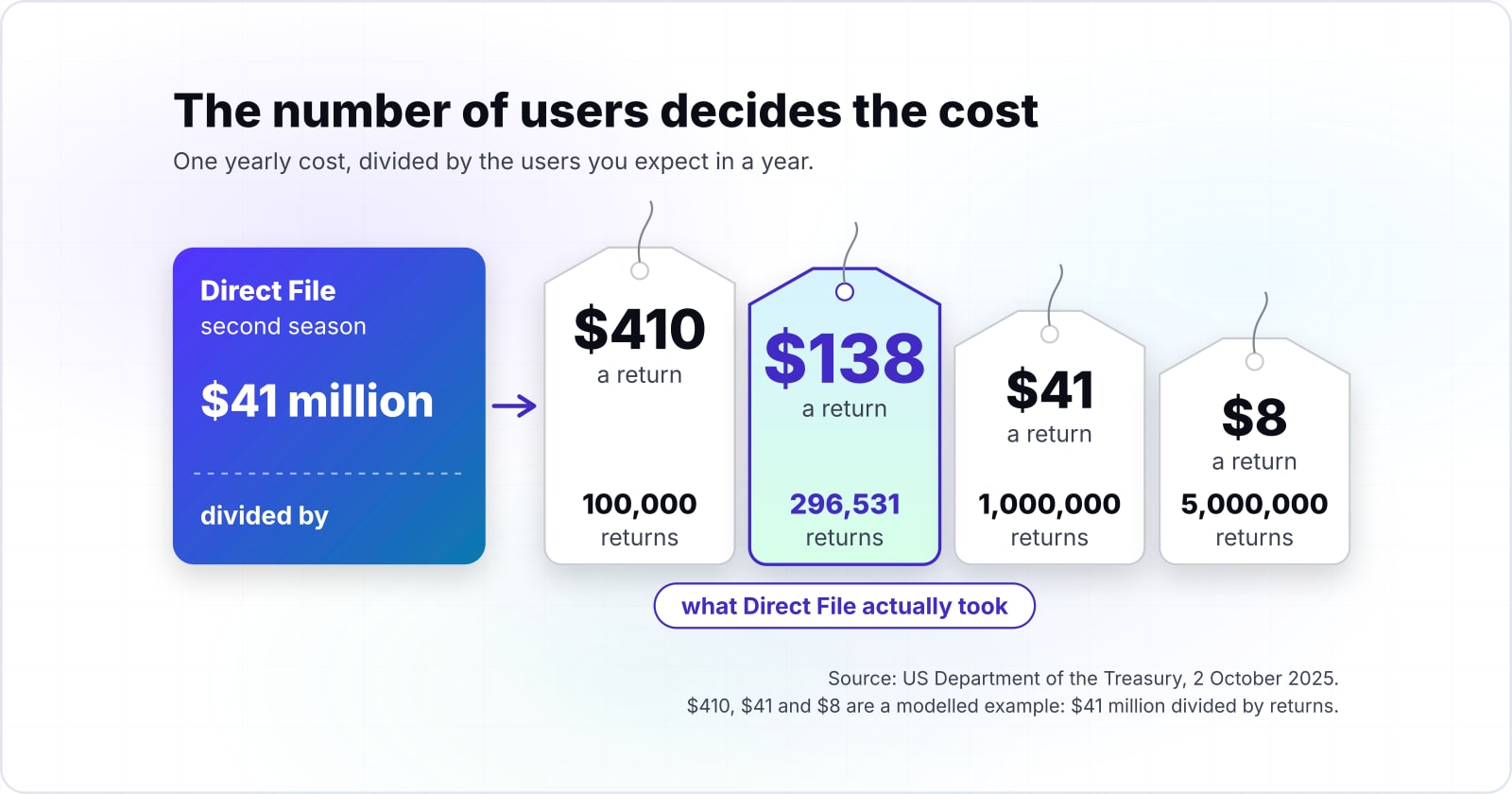
In a modelled example at the $41 million season cost the Treasury reported in October 2025, 100,000 Direct File returns would cost $410 each and 1,000,000 would cost $41 each. Those two cases are the Treasury's $41 million divided by a number of returns, not figures anyone reported.
The arithmetic is simple, and you can run it on your own case. First, take the yearly cost of building and running a system. Then divide it by the users you expect in a year. At the 296,531 returns Direct File actually took, the answer is $138, which matches the Treasury's figure. Then, in the same modelled example, 5,000,000 returns would bring the same $41 million down to $8 a return.
Then hold that unit cost against the per-seat quote for a packaged product that does the same job. In particular, check the user count you plan for, not the one you hope for. Direct File's projections assumed far more people than came.
Spread a yearly cost across your users
Put in the yearly cost of building and running a system and the users you expect in a year. The defaults are Direct File's $41 million season and its 296,531 returns.
Cost per user
$138
A modelled example built from the Treasury's $41 million figure of 2 October 2025. Modelled, not measured.
Show data table
| Item | Value |
|---|---|
| 100,000 returns | 410$ |
| 296,531 returns (actual) | 138$ |
| 1,000,000 returns | 41$ |
| 5,000,000 returns | 8$ |
The same $41 million costs $410 a return at 100,000 returns and $8 at 5,000,000.
What does custom software and integrations look like when the software is the connection?#
GOV.UK Notify sent 9,822,940 emails, 4,607,570 text messages and 96,060 letters on 1 October 2026 for services that call it over an API. An API, or application programming interface, is a set of calls one program uses to ask another for work.
Notify's public performance page, checked on 3 October 2026, counts 1,759 organisations and 12,823 services using it. The same page counts 13.6 billion messages since May 2016. The Government Digital Service's developer docs, updated 23 April 2026, sum it up. They say "GOV.UK Notify is a Government-as-a-Platform service" for clients of its API.
That is what custom software and integrations means in practice. The custom part is the software that sits between systems and moves work from one to the other. Each service team writes a few calls, and Notify owns the delivery. As a result, one build carries thousands of services. That is the scale the Direct File sums never reached. For example, most businesses meet this type as glue between a store, a customer database and an accounts package. API integration work is the same idea at business scale.
Show data table
| Item | Value |
|---|---|
| Emails | 9,822,940 |
| Text messages | 4,607,570 |
| Letters | 96,060 |
Emails made up most of the day, with text messages next and letters a small share.
When is customized software enough, and where does configuration stop?#
Customized software is a packaged platform shaped to your process, and Microsoft Power Apps is the common case: custom business apps built on a platform you rent. Microsoft's Power Apps overview, updated 18 November 2025, says you can "build custom business apps" that connect to your data.
The difference from custom software is ownership. Custom software is built for you, and the code is yours. Customized software is a rented platform set up or extended to fit, and the platform's limits stay in charge. Customised software, in British spelling, is the same thing.
Those limits are written down. For example, Microsoft's limits page, updated 12 January 2026, sets a 180 second timeout on each outgoing request. Meanwhile, the code apps overview, updated 24 September 2026, adds a code route. Developers can build in React or Vue and still run on the managed platform. Those apps reach 1,500+ connectors, and they follow the organisation's platform rules, such as app sharing limits. So you can extend a long way, but the platform still sets the walls.
| Custom software | Customized software | |
|---|---|---|
| What it is | Built for you | A rented platform set up or extended to fit |
| Ownership | The code is yours | The platform's limits stay in charge |
| Example | IRS Direct File | Microsoft Power Apps |
| A written limit | None from a rented platform | 180 second timeout on each outgoing request |
How long does a custom system of record stay in service?#
The 11 federal legacy systems GAO named in 2025 were about 23 to 60 years old, against 8 to 51 years for the 2019 list. GAO set out both lists in its July 2025 report, GAO-25-107795, on systems most in need of modernising.
Age brings a staffing problem as well as a technical one. In the same July 2025 report, GAO says eight of the 11 systems use outdated languages. Four run on unsupported hardware or software, and seven run with known security holes. For instance, both Treasury systems on the list run on COBOL, the Common Business Oriented Language, and on Assembly. GAO notes these languages have a dwindling number of people with the skills to support them.
Therefore a build decision is also a decision about who will look after the system for decades. The people who commissioned these systems have moved on. Yet the systems still support tax processing, health care and national security.
Show data table
| Item | Value |
|---|---|
| 2019 list, youngest system | 8 |
| 2019 list, oldest system | 51 |
| 2025 list, youngest system | 23 |
| 2025 list, oldest system | 60 |
The youngest system on the 2025 list is older than many on the 2019 list.
What does an ageing system of record cost to keep running?#
GAO's critical legacy systems cost about $337 million a year to operate and maintain on the 2019 list and about $754 million on the 2025 list. The two lists are not the same systems, so the rise does not track one system getting dearer. Instead, it shows what the oldest custom cores cost as a group, and that group got older and dearer.
The wider picture points the same way. In the same July 2025 report, GAO looks at planned federal IT spending for fiscal year 2025. About $83 billion of it, or 79 percent, was meant for operations and maintenance. That figure covers 24 large federal agencies.
In short, most of the money goes to keeping old software alive, not to building new software. A business with an ageing core faces the same sum at a smaller scale. Therefore the cost of keeping a system belongs in the route decision from the first day. It is also why maintenance and support is its own line of work.
about $337 million
2019 list
about $754 million
2025 list
GAO's most critical legacy systems cost about $337 million a year in 2019 and about $754 million in 2025, across two different lists.
| Option | US dollars a year, two different lists |
|---|---|
| 2019 list | about $337 million |
| 2025 list | about $754 million |
Source: GAO-25-107795, July 2025
Which route should a business take: buy, configure, integrate or build?#
Pick the route by three answers: how many people will use it, how long it must last, and whether a platform already covers most of the process. Each answer comes from one of the records above.
First, the user count. Direct File shows that a build's unit cost falls only when use grows. So a small user count favours a product you rent. Second, the life span. GAO's 2025 list shows a core system can run for 60 years. So a long life favours owning what you can maintain. Third, the platform fit. Power Apps shows how far a platform stretches before its limits decide for you.
Then read the answers together:
- Buy when the process is common to many businesses, such as payroll or email.
- Configure or extend when a platform covers most of the process and the users are few to moderate.
- Integrate when the systems you need already exist and the gap is the link between them, as with Notify.
- Build only when the user count is high, the life is long and no platform fits the process well.
The UK government's Service Manual on choosing technology, updated 15 October 2024, gives the same advice for public services. It says to map the parts of a service. Then learn what you need to build and what you can buy or get for free. Finally, when all three answers point to a build, the custom software development route sets the scope, the team and the upkeep plan.
When is custom software the wrong fit?#
Custom software is the wrong fit when the process is common, the user count is small, or nobody will own the system after launch. Each case has a better tool.
When the process is common, buy it. Direct File is the case in point. The Treasury's report of 2 October 2025 recommends that the IRS refocus on Free File. That program already "operates at little cost to the government". The packaged route was there all along.
When the users are few, configure a platform. For instance, a team app for a few dozen people fits a platform such as Power Apps. The vendor keeps the platform patched. Although the platform's limits will bind, they rarely bind a small internal tool.
When the system will have no owner, do not build. In July 2025, GAO found seven of its 11 legacy systems running with known security holes. A system with no owner ages into that list. Instead, rent a managed product and let its vendor carry the upkeep.
| Case | Better tool | What the record shows |
|---|---|---|
| The process is common | Buy it | The Treasury recommends that the IRS refocus on Free File |
| The users are few | Configure a platform such as Power Apps | The vendor keeps the platform patched |
| The system will have no owner | Rent a managed product | GAO found seven of its 11 legacy systems running with known security holes |
Where should you go next with your own custom software decision?#
For the definition and who owns the code, read what custom software development is; for cost, timeline and integration work, the pages below go deeper. The next step depends on which question the route test left open.
Weighing a product against a build? The custom software versus off-the-shelf comparison sets the two side by side. For money, what custom software development costs works through the figures. Meanwhile, the custom software development timeline covers the weeks. Also, if you run an ageing system of record, choosing a legacy modernisation partner starts from where GAO's systems are now.
You may need none of these. The four public records above are enough on their own to place your case on one route.