Custom vs off-the-shelf logistics: when to build or buy your WMS and TMS
Most build-or-buy debates treat a warehouse or transport system as one purchase. It is a stack of layers, and each layer earns its own answer once you test it against what the suite documents and price it at list.
Custom vs off-the-shelf logistics: should a 3PL build or buy its WMS and TMS?#
Buy the WMS and TMS core, configure it as far as the vendor documents, and build only the layer the suite leaves manual or sells as an add-on. The vendors say plainly where that line sits. For example, Microsoft's warehouse management overview, updated 20 November 2025, says "You must configure components for inbound and outbound warehouse process workflows". In other words, the core is meant to be shaped by settings.
By contrast, Microsoft's transportation management overview, updated 5 August 2025, marks a gap. It says you can't "automate the economic transactions between legal entities" and must handle them by hand.
Those two lines are the whole method in small. The first marks the part you configure. Then the second marks a gap the vendor has written down, so it is a fair place to consider code. Everything else sits in between, as an add-on you price or a feature you switch on.
| What the vendor documents | Where it says so | Route |
|---|---|---|
| "You must configure components for inbound and outbound warehouse process workflows" | Microsoft warehouse management overview, updated 20 November 2025 | Configure the core |
| You can't "automate the economic transactions between legal entities" | Microsoft transportation management overview, updated 5 August 2025 | A documented gap: consider code |
| Everything in between | The feature list and the add-on pages | Switch on a native feature, or price an add-on |
In practice, you stop asking "build or buy?" once for the whole system. Instead, you ask it for receiving, putaway, picking, load building, carrier tendering, freight audit and billing in turn. For example, a distributor might buy the whole warehouse core and still build a small rating service for its own contract terms. That hybrid is the common answer, and three tests decide each layer. The same per-layer view reaches the packing bench, where connecting a Zebra or Printronix USB label printer on Windows is a small integration of its own.
How common are packaged WMS and TMS platforms in warehouses today?#
In the 2026 Automation Study, 57% of operations ran a WMS and 43% a TMS, so a packaged core is the baseline any build is measured against. Peerless Research Group ran that study for Modern Materials Handling, published on 1 January 2026. Its software list ranks warehouse systems first.
Show data table
| Item | Value |
|---|---|
| Warehouse management system (WMS) | 57% |
| Parcel rating | 55% |
| Warehouse control system (WCS) | 49% |
| Transportation management system (TMS) | 43% |
| Warehouse execution system (WES) | 38% |
| Slotting software | 36% |
| Yard management system (YMS) | 30% |
A WMS leads the list at 57% of operations, while a TMS sits at 43%.
The gap between those two bars matters. Because more sites already run a WMS than a TMS, the warehouse question is often about changing a system you have. Meanwhile, the transport question is more often still open. So that is where a new build gets pitched most.
Also, a base rate keeps a team honest. Every operation feels unusual from the inside, with its own customers, SKUs and carriers. However, the 2026 study says most of your peers already run packaged warehouse software and make it work. As a result, the burden of proof in any custom vs off-the-shelf logistics choice sits with the build, not with the suite.
That does not mean the suite is always right. Instead, it means a build needs a named reason, tied to a named workflow, before anyone writes a scope.
Customized vs standard warehousing solutions: where does WMS configuration stop?#
A standard WMS is configured, not coded: wave templates, work templates, work pools and location directives carry most warehouse rules before any custom code is written. Microsoft's warehouse overview names those four as "the most important components that you must configure". Location directives decide where stock goes on putaway. Then work templates decide how a task splits into steps for the person on the floor.
So "standard" does not mean rigid. A standard WMS keeps your rules in settings that the vendor upgrades for you. By contrast, a customized WMS keeps some rules in code the vendor never sees. You must carry that code through every upgrade yourself.
The market is moving toward more choice inside the standard route. In the 2025 Warehouse/DC Operations Survey, published 3 November 2025, Peerless Research Group reports: "Use of best of breed WMS reached 23% this year". That share was 13% the year before. The same survey puts use of some type of WMS at 87%, well above the 57% in the 2026 Automation Study. The samples differ: this survey drew 101 logistics and warehouse professionals, while nearly half of the Automation Study's respondents work at sites with fewer than 100 employees.
Show data table
| Dimension | 2024 | 2025 |
|---|---|---|
| Use some type of WMS | 93% | 87% |
| Use a best of breed WMS | 13% | 23% |
| Use an on-demand or cloud WMS | 4% | 13% |
Best of breed WMS use rose from 13% to 23% in a year, and cloud WMS from 4% to 13%.
In the same 2025 survey, cloud or on-demand WMS use rose from 4% to 13%. Therefore, the usual way out of a poor fit is a better-fitting product, not a new one. Customization comes last, after the configuration levers are spent.
Which workflows are too complex for off-the-shelf WMS software?#
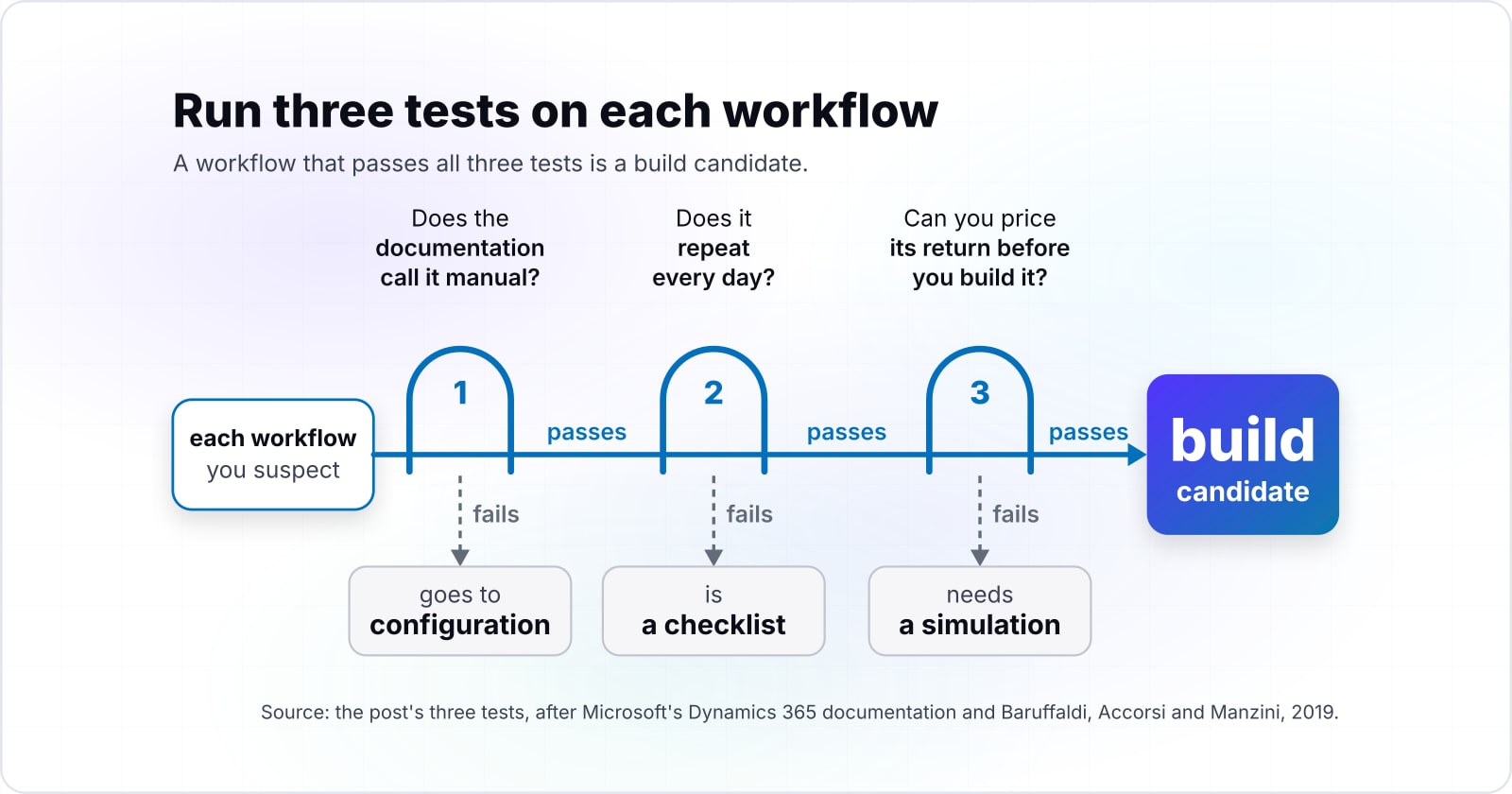
A workflow is too complex for off-the-shelf WMS software when the vendor documents it as manual, or when its return can be tested before anyone pays for a change. Run three tests on each workflow you suspect, in this order.
First, does the documentation call it manual? Microsoft's note that you can't "automate the economic transactions between legal entities" is that kind of line. A gap the vendor writes down will not close by itself next release.
Second, does it repeat every day? A manual step done once a month is a checklist item. However, the same step done on every load is a cost that grows with volume.
Third, can you price its return before you build it? That test has a published method. Baruffaldi, Accorsi and Manzini built a tool to help 3PL managers "decide on the proper warehouse management system (WMS) customization". They described it in Industrial Management & Data Systems in 2019. Their tool acts as a digital twin of a WMS and runs what-if scenarios. They tested it at a real 3PL warehouse for biomedical products, over a ten-month simulated horizon.
A workflow that passes all three tests is a build candidate. Otherwise, it belongs somewhere cheaper. A workflow that fails the first test goes to configuration. One that fails the second is a checklist. Finally, one that fails the third needs a simulation before it gets a budget.
Native platform shipping features or add-on integrations: which should you count on?#
Count on native features for the core and price every add-on separately, because a vendor's extra connector pack is a second purchase with its own limits. Native features ship with the core licence. For instance, Blue Yonder's Transportation Manager page lists four key capabilities. They are planning and optimization, carrier connectivity and tendering, freight audit and payment, and visibility and event management.
Add-ons sit outside that list. Blue Yonder says its Connect API and Expansion Pack "extends the core connectivity capabilities" of its platform. That Blue Yonder page says the pack opens "a library of 200+ certified connectors" on the MuleSoft Anypoint Exchange. It also says the standard version of Connect "handles the essential links between your supply chain and your ERP".
The lesson is about how you read a feature list. A long list of integrations on a sales page may describe the expansion tier, not the core. So ask three things of every connector you need. Is it in the base licence? Who maintains it when the other side changes? What volume limit applies?
| Question | Native in the core | Add-on connector pack |
|---|---|---|
| What it covers | Planning and optimization, carrier connectivity and tendering, freight audit and payment, visibility and event management | "extends the core connectivity capabilities" |
| Connectors | Standard Connect "handles the essential links between your supply chain and your ERP" | "a library of 200+ certified connectors" on the MuleSoft Anypoint Exchange |
| What to ask | Is it in the base licence? | Who maintains it when the other side changes, and what volume limit applies? |
Meanwhile, a connector you build yourself is a fair choice when no pack covers the system on the other side. In practice, it is often the smallest build in the whole stack. Price it the same way: build cost plus five years of keeping it working.
Is it worth building an in-house TMS or buying an off-the-shelf platform?#
Building an in-house TMS is worth it only when your rating, routing or settlement rules are your edge and no packaged TMS documents them as configurable. For most 3PLs and distributors, the answer is to buy.
The packaged side covers a lot. Microsoft's transportation overview says the module helps you "identify the fastest route or the least expensive rate for a shipment". It also offers a volume-based load building strategy. Meanwhile, Blue Yonder's TMS explainer describes tendering loads to carriers. If one carrier rejects a load, the system offers it to the next carrier in your routing guide. It also compares a carrier's invoice against the quote and flags the difference.
Find the route or the rate
Microsoft: the module helps you "identify the fastest route or the least expensive rate for a shipment".
Build loads by volume
Microsoft offers a volume-based load building strategy.
Tender the load to a carrier
Blue Yonder describes tendering loads to carriers.
Offer a rejected load to the next carrier
If one carrier rejects a load, the system offers it to the next carrier in your routing guide.
Compare the invoice against the quote
The system flags the difference.
Your edge rule set
Build only the rule set that is your edge, as a service that feeds the TMS.
So the rule is simple to state. Buy the TMS when planning, carrier selection and freight settlement match what a packaged platform documents. Then build only the rule set that is your edge, as a service that feeds the TMS.
Motomtech sells custom TMS builds, and its July 2026 guide frames the same split. In its view, a brokerage whose rating logic "wins lanes nobody else wins" may need to build. Yet a large 3PL running standard less than truckload freight should buy. Treat that as a builder's view, since the firm sells the build side. Even so, it agrees with the documents: the edge is the test, not the size of the firm.
What does five years of a packaged suite cost at list price?#
At Microsoft's list price of $210 per user a month, 40 users cost $100,800 a year and $504,000 over 5 years, before implementation or partner fees.
That price comes from Microsoft's Dynamics 365 Supply Chain Management pricing page, read on 4 October 2026, which lists it per user a month, paid yearly.
The licence line grows with every named user. As a result, headcount, not features, sets the budget a build has to beat. The sum is short. For example, 40 users times $210 is $8,400 a month, or $100,800 a year.
Show data table
| Dimension | Five years at 210 dollars | One year at 210 dollars |
|---|---|---|
| 10 users | 126,000$ | 25,200$ |
| 25 users | 315,000$ | 63,000$ |
| 40 users | 504,000$ | 100,800$ |
| 50 users | 630,000$ | 126,000$ |
| 100 users | 1,260,000$ | 252,000$ |
At 40 users, the list licence is $100,800 a year and $504,000 over five years.
Your list licence for a packaged suite
Put in the people who use the warehouse and transport screens. The price starts at Microsoft's list price of $210 per user a month.
List licence over the years you chose
$504,000
- List licence each year
- $100,800
Arithmetic from Microsoft's Dynamics 365 Supply Chain Management pricing page, accessed 4 October 2026. Modelled, not measured.
Two cautions keep the figure fair. First, list price is a ceiling, since large contracts often carry discounts that are not published. Second, the licence is not the whole buy side, because implementation and partner work come on top. Still, list price is the one number you can check yourself today, and it scales the right way.
Count only the people who need the warehouse and transport screens. Say a distributor has 200 staff and 40 of them use those screens: it pays for 40, not 200.
A small team should check the floor first. In a July 2026 Microsoft Q&A thread, a partner reports that Partner Center would not sell fewer than 20 Supply Chain Management Base licences. Microsoft's licensing guidance does not print that number. Instead, it points to the Product Terms for purchase minimums. So treat the 10-user bar as a what-if, and confirm the minimum before you price a team that small.
How much can a build cost and still beat buying?#
A build beats buying only when its cost plus five years of hosting and upkeep comes in under the licence it replaces, and the $300 Premium tier raises that ceiling.
Microsoft's pricing page, read 4 October 2026, lists Supply Chain Management at $210 and Supply Chain Management Premium at $300 per user a month, paid yearly.
$210
Supply Chain Management
$300
Supply Chain Management Premium
Each Premium user costs $300 a month instead of $210, so the licence a build must beat rises with the tier.
| Option | US dollars per user a month, paid yearly |
|---|---|
| Supply Chain Management | $210 |
| Supply Chain Management Premium | $300 |
Source: Microsoft, Dynamics 365 Supply Chain Management pricing, accessed 4 October 2026
The ceiling for a build is the licence it removes minus its own running cost. On Microsoft's Premium tier, listed on 4 October 2026, every licence total above rises, since each user costs $300 a month instead of $210. Against that, ScienceSoft, which also sells custom builds, puts a custom TMS of average complexity at $200,000 to $600,000 on its transportation software page. So a full build at the top of ScienceSoft's range would not beat the standard licence for 40 users, even before hosting and upkeep are added.
However, a build of one layer removes only part of the licence, and sometimes none of it. If you keep the suite and add a custom rating service, the licence stays on the bill in full. In that case the build has to pay for itself through the work it saves, not the licence it cancels. So price the saved hours, say 10 hours a week of manual rekeying, against the build and its upkeep. Then write both down before anyone signs.
How long does each route take to a first live warehouse or lane?#
Published timelines for a custom TMS run from 8 weeks for a first usable build to 9 to 12 months for a full system, so scope sets the date, not the route. Both ends come from firms that sell builds, so read them as sales claims.
Motomtech's July 2026 guide says traditional offshore shops quote 16 to 24 weeks for a custom TMS MVP. It says its own approach reaches a first usable build in 8 to 12 weeks. Meanwhile, ScienceSoft's transportation software page gives 9 to 12 months for custom transport management software. Those figures do not conflict. A first usable build covers one slice of a TMS, while a full system replaces the whole thing.
The buy route has a timeline too, and the same logic applies. A configure-first project is shorter because less of it is new. The screens, the data model and the carrier links already exist. In particular, the work is mapping your rules into wave templates, work templates and rate settings, then testing them on real orders.
Therefore, tie every timeline you hear to the layer it covers. A quote for one custom rating service and a quote for a whole TMS are not two prices for the same thing. Ask what goes live first, on which lane or warehouse. Then ask what still runs on the old process that day.
- 8 to 12 weeks
A first usable build
Motomtech's own approach, in its July 2026 guide. One slice of a TMS.
- 16 to 24 weeks
A custom TMS MVP from traditional offshore shops
The quote Motomtech says those shops give, July 2026.
- 9 to 12 months
Custom transport management software
ScienceSoft's transportation software page. A full system that replaces the whole thing.
When is a custom build the wrong fit?#
A custom build is the wrong fit when processes are still changing, when nobody will own the code after launch, or when the pain is a configuration nobody has finished. In each case, there is a better tool than code.
If processes are still moving, finish configuring the packaged WMS or TMS first. Code freezes a process, while settings let you change it next quarter. Microsoft's guidance that "you must configure" wave templates, work templates, work pools and location directives is the place to start.
If the code will have no owner after launch, buy. A custom layer needs someone to patch it, watch it and change it when a carrier or a customer changes. Without that owner, the build becomes the legacy system you were trying to escape. In short, a managed suite, where the vendor carries upgrades, is the kinder choice.
If the pain is a half-finished setup, hire configuration help, not a build team. Also, look at a better-fitting product before code. The 2025 Peerless survey shows best of breed WMS use rising from 13% to 23%, and cloud WMS from 4% to 13%. Switching to a product that fits is often cheaper than writing the missing parts of one that does not.
| When | Better tool than code |
|---|---|
| Processes are still changing | Finish configuring the packaged WMS or TMS first |
| Nobody will own the code after launch | Buy a managed suite, where the vendor carries upgrades |
| The pain is a half-finished setup | Hire configuration help, or switch to a better-fitting product (best of breed WMS 13% to 23%, cloud WMS 4% to 13%) |
Where should the decision go next?#
If the tests point to building one layer, scope it next; if they point to buying, price the integrations before signing. The next step depends on which column the tests filled.
For a build, what to build around a WMS and TMS covers the layers that sit beside a packaged core. To price the build side, how much custom software development costs walks through the cost drivers. For the general method outside logistics, see custom software vs off-the-shelf software. Finally, to place the WMS and TMS in the wider stack, read supply chain management software.
For outside help, two routes exist. Custom software development covers scoping and building one layer. Then API integrations covers connecting a suite to the systems around it.
Neither is needed to settle custom vs off-the-shelf logistics for your own stack. The vendor documents, the published list price and the three tests are enough to sort every workflow on your own.