Custom logistics software for 3PLs: what to build around your WMS and TMS, and what it is worth
Most 3PLs do not need a new warehouse system. They need the missing piece that carries their own rules out to partners, carriers and trucks, and a way to price it from their own week.
What is custom logistics software when you already run a WMS and a TMS?#
Custom logistics software is the layer a 3PL or distributor builds around its packaged WMS, TMS and ERP to carry its own rules to trading partners, carriers and trucks. In other words, you keep the systems that run the floor, and you build what sits between them and the outside world.
However, that outside world speaks in fixed formats. For instance, trading partners send X12 messages, a common EDI format in US trade. X12 publishes each transaction set with its purpose, in definitions current on 2 October 2026. Also, carriers expose APIs with daily quotas, while trucks report through telematics, the devices that log location and engine data.
None of this is new thinking. A 2018 arXiv study of supply chain collaboration names IT "exchanging information, optimising process through package software" as key to how partners work together. However, each 3PL has its own mix of partners and rules, so no package fits all of them.
So the build is not a new warehouse system. Instead, it is the glue, written to your billing rules, your partner list and your carriers. That glue is the part packaged tools leave to spreadsheets and email.
Which signs show your packaged TMS or WMS has stopped fitting?#
Run five tests on last month's operation: re-keyed orders, invoice lines added by hand, partners on email instead of EDI, tracking checked by hand, and truck data nobody reads. Each one is a count you can take from your own records in an afternoon.
First, count orders typed twice, once into the ERP and again into the WMS. Second, count invoice lines a person added after the system billed, such as storage, special handling and extra carrier charges. Third, list the partners who still send orders by email or spreadsheet. Then count the hours staff spend checking carrier sites for status. Finally, ask who reads the truck data you already pay for, and how often.
Count orders typed twice
Once into the ERP and again into the WMS.
Count invoice lines a person added after the system billed
Storage, special handling and extra carrier charges.
List the partners who still send orders by email or spreadsheet
Partners not on EDI.
Count the hours staff spend checking carrier sites for status
Tracking checked by hand.
Ask who reads the truck data you already pay for
And how often.
Each test stands in for a job the software should already do. For example, X12 says the 945 Warehouse Shipping Advice "is used to reconcile order quantities with shipment quantities". Therefore, if a person does that matching by hand, the link is missing.
A packaged system has stopped fitting when this work adds up to hours each week, not minutes. In practice, one test scoring high is a project, while three or more is a sign the custom logistics software layer is overdue.
What does a custom logistics layer actually connect?#
A custom logistics layer carries four connections: the ERP for orders and money, trading partners over X12 EDI, carrier APIs for labels and tracking, and telematics for trucks. Each one has a contract you cannot change, because someone else owns it. Printing those carrier labels on a local USB printer has its own snag: finding a Zebra or Printronix label printer by its Windows device GUID.
The ERP holds orders, customers and invoices. Because its data model comes from the vendor and from your own setup, the layer maps to it rather than reshaping it. Trading partners follow X12 transaction sets, and a partner can reject a file that breaks the format.
Meanwhile, carriers publish quotas. The FedEx Developer Portal's quotas and rate limits guide, as of 2 October 2026, caps each project and each capability per day.
Trucks are the fourth link, and federal law sets what they log. The electronic logging device (ELD) rule sits in 49 CFR Part 395 Subpart B of the Electronic Code of Federal Regulations. Under it, an ELD automatically records date, time, location, engine hours and vehicle miles.
Then Samsara's telematics docs expose vehicle data through three endpoints: a feed, a history report and a snapshot. Also, its compliance guide adds endpoints for driver hours of service.
As a result, integration is not one task. It is four contracts, each written by someone else, and each with its own way to fail.
| Connection | What it carries | Whose rules |
|---|---|---|
| ERP | Orders, customers and invoices | The vendor and your own setup |
| Trading partners | X12 EDI messages | X12, narrowed by each partner's guide |
| Carrier APIs | Labels and tracking | The carrier's quotas and rate limits |
| Trucks | Date, time, location, engine hours and vehicle miles | The ELD rule, then the telematics vendor's API |
Which X12 messages does a 3PL exchange, and who sends each one?#
A 3PL warehouse lives on two X12 messages: the 940, where the depositor tells the warehouse to ship, and the 945, where the warehouse confirms what actually shipped. The depositor is the brand that owns the stock. X12 says the 940 Warehouse Shipping Order lets the depositor "advise a warehouse to make a shipment, confirm a shipment, or modify or cancel" an order.
Around that pair sit the transfer and adjustment messages, plus the carrier side. The table sets out who sends what, in X12's own terms.
| Set | Name | Sent by | Sent to |
|---|---|---|---|
| 940 | Warehouse Shipping Order | Depositor | Warehouse |
| 945 | Warehouse Shipping Advice | Warehouse | Depositor |
| 943 | Warehouse Stock Transfer Shipment Advice | Depositor | Receiving location |
| 944 | Warehouse Stock Transfer Receipt Advice | Receiving location | Depositor |
| 947 | Warehouse Inventory Adjustment Advice | Warehouse or depositor | The other party |
| 856 | Ship Notice/Manifest | Shipper | Receiver |
| 204 | Motor Carrier Load Tender | Shipper | Truckload carrier |
| 214 | Transportation Carrier Shipment Status Message | Carrier | Shipper or consignee |
| 210 | Motor Carrier Freight Details and Invoice | Carrier | Party paying the freight |
Source: X12, transaction set definitions, read 2 October 2026.
The carrier side has its own limits. For example, X12 says the 204 Motor Carrier Load Tender offers a load to a truckload carrier. It also says the set "is not to be used" for a less-than-truckload bill of lading.
In practice, each partner also sends its own guide that narrows the standard, so one retailer wants a field another ignores. As a result, the custom layer translates every message to and from your WMS, and the warehouse system never has to learn each partner's habits.
What happens when a tracking job breaks a carrier's rate limits?#
FedEx allows each API project 1,400 transactions per 10 seconds, and an IP address that breaks its burst or average threshold is refused for 10 minutes. Those thresholds apply to the login token service. Therefore, a job that asks for a fresh token on every call is the one that trips them.
| Term | Value |
|---|---|
| Transactions per project per 10 seconds | 1,400 |
| Burst threshold, hits per second sustained for 5 seconds | 3 |
| Average threshold, hits per second sustained for 2 minutes | 1 |
| Penalty after a threshold breach, minutes | 10 |
The guide is plain about the cost. First, a rate limit breach returns a 429 error, and the job waits out the 10-second window. Second, a threshold breach returns 403 Forbidden for 10 minutes, and FedEx extends that penalty if the calls keep coming. Also, the guide notes that a login token lasts an hour, so it suggests using it for that full hour.
So a carrier link does not slow down gently when it is pushed. Instead, it stops. In October 2023, FedEx announced the quotas and said "The quotas and rate limits are subject to change". Therefore, the layer should read these errors and back off, and never hard-code today's numbers.
How many shipments can one tracking quota cover?#
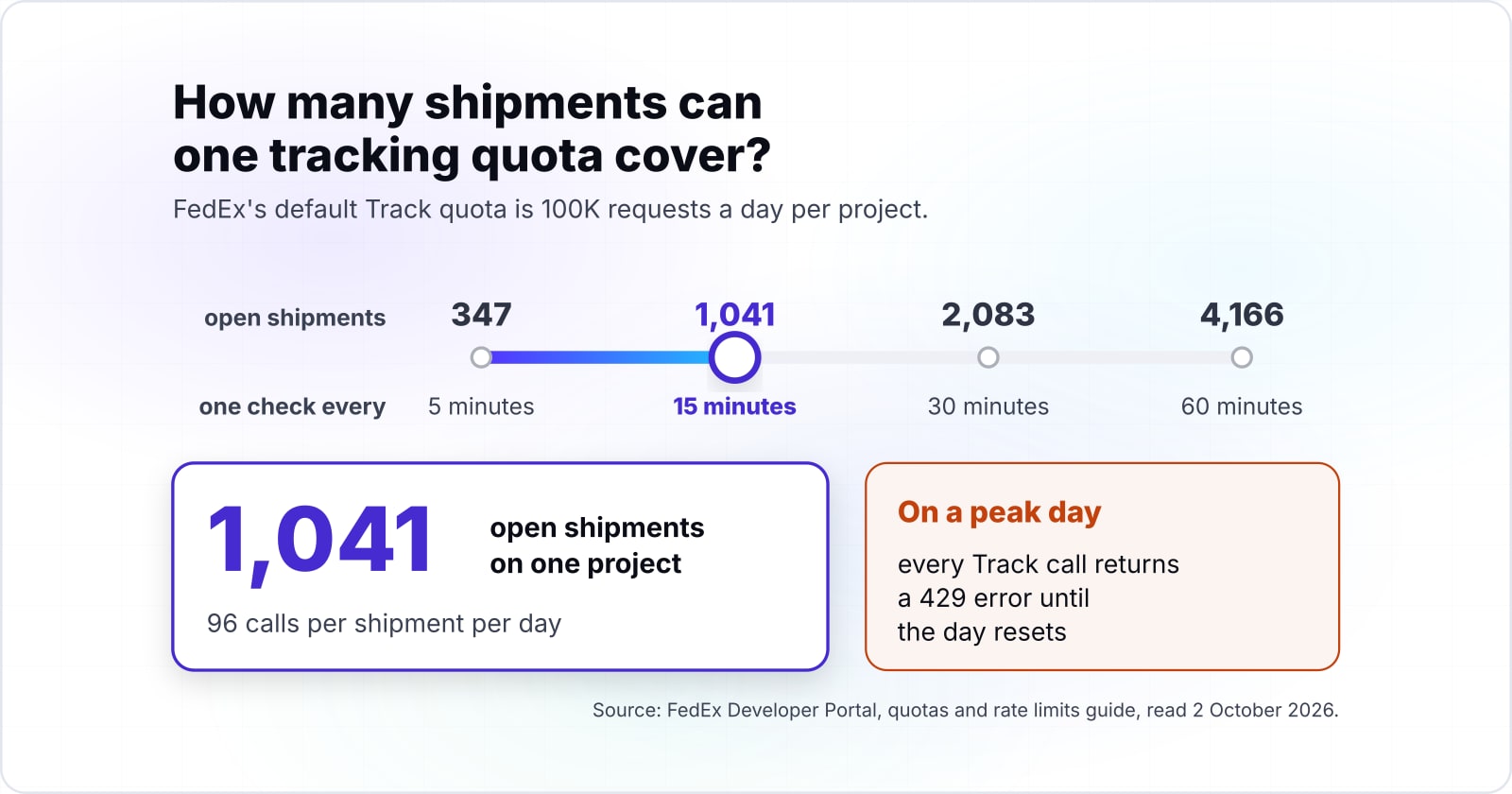
At one check every 15 minutes, FedEx's default Track quota of 100K requests a day covers 1,041 open shipments on one project, and only 347 at every 5 minutes. The sum is short, because a check every 15 minutes is four calls an hour, or 96 calls per shipment per day. Then 100K divided by 96 is 1,041 whole shipments.
How far one Track quota stretches
Set how often your job checks each open shipment and how many are open; the quota starts at FedEx's published default for one project.
Shipments one project covers
1,041
- Calls per shipment per day
- 96
- Open shipments past the quota
- 0
Arithmetic from the FedEx Developer Portal default Track quota, read 2 October 2026. Modelled, not measured.
Show data table
| Stage | Open shipments one project can poll per day |
|---|---|
| 5 min | 347 |
| 15 min | 1,041 |
| 30 min | 2,083 |
| 60 min | 4,166 |
Doubling the interval doubles the shipments one project can cover.
The quota moves in step with the interval. At 30 minutes, the same project covers 2,083 shipments, and at 60 minutes it covers 4,166, by the same sum on the published quota. However, a busy 3PL can pass those lines fast on a peak day. Then every Track call returns a 429 error until the day resets at midnight GMT.
Therefore, a good layer does not refresh every parcel on a timer. Instead, it checks only shipments still in transit, and less often once a parcel is out for delivery. Then it drops a parcel from the loop the moment it shows as delivered. Those three choices decide whether one project is enough.
What limits does a telematics feed put on fleet visibility?#
Samsara lets each API token make 150 requests per second and each organisation 200, with tighter tiers of 5 and 10 per second on some endpoints. Those ceilings come from Samsara's rate limits page, as of 2 October 2026. A breach returns a 429 error.
Show data table
| Item | Value |
|---|---|
| Samsara, per API access token | 150 requests a second |
| Samsara, per organisation | 200 requests a second |
| Samsara endpoint tier, Level Three | 10 requests a second |
| Samsara endpoint tier, Level Two | 5 requests a second |
The organisation ceiling of 200 a second binds every token together, so a second token adds no headroom.
The numbers look generous until several jobs share one organisation. In particular, a second token adds no headroom, since Samsara says an organisation may only make 200 requests per second in total. Also, its lowest tier, Level One, allows just 100 requests per minute.
That is why the docs steer you to the feed endpoint. Each time you poll the feed, Samsara says, "you'll receive all vehicle stats updates since the last time you made a call." The history endpoint is meant for back-filling. Meanwhile, the snapshot gives only last known values. So a custom layer reads the feed in small steps and stores what it gets, instead of asking for every truck again.
How is a custom logistics build sequenced so the floor keeps shipping?#
Build the layer one connection at a time, starting with the one your fit tests scored worst, and run it beside the manual process until the counts match. Meanwhile, the WMS, TMS and ERP stay live the whole time, so nothing is switched off over a weekend.
First, pick the link with the highest count from your five tests. For many 3PLs, that is partner EDI or billing. Then build it to read from the live systems without writing back. Next, run it in parallel with the person who does the job today. Compare the two outputs each day, and log every mismatch with its cause.
The 945 Warehouse Shipping Advice gives the check for free. Because it exists to match what was ordered with what shipped, the new link passes when its messages match the warehouse's own counts for a full billing cycle. Only then does the manual step stop.
After that, take the next connection. In short, each link earns its place before the next one starts. As a result, the risk stays with one partner, one carrier or one fleet at a time, and the team learns the layer while the stakes are small.
How do you put a value on the build from your own numbers?#
Value the build from the five counts you already took: hours of re-keying and manual tracking, invoice lines missed, and partner errors charged back, each priced at your own rates. That weekly figure is what the layer removes, so it is the number to set against any quote.
The sum has three parts. First, multiply hours per week by the loaded hourly cost of the people who do the work. Second, add the value of invoice lines that were missed or billed late. Third, add the chargebacks partners levied for late or wrong EDI messages. Then multiply the weekly total by 52 for a yearly figure.
- re-keying and tracking hours
- are the weekly hours spent typing orders twice and checking carrier sites by hand.
- hourly cost
- is the loaded hourly cost of the people who do that work.
- missed invoices
- is the weekly value of invoice lines missed or billed late.
- chargebacks
- is what partners levied that week for late or wrong EDI messages.
Scale tells you why small leaks matter. Penske Logistics presented the 37th CSCMP State of Logistics Report in June 2026. The report puts US business logistics costs at $2.4 trillion, equal to 7.8% of GDP. In a market that size, margins are thin, so an hour a day of hand work is real money.
Finally, set your yearly figure against the build and run cost quoted for the links your counts point to. For example, a quote for all four links when your counts point to one is a sign to scope it down.
When is a custom build the wrong fit?#
If the five tests come back near zero, or the gap is one missing connector your WMS vendor already sells, configure the packaged system instead of building. A custom layer earns its cost only when the hand work is large and no add-on closes it.
There are three cases where building is the wrong call. First, if partners already send clean EDI and billing runs without edits, there is little to remove. Second, if one carrier link is missing and your TMS vendor sells it, buy the connector. Third, the pain may sit inside the WMS itself, such as slotting or pick paths. Then the fix is setup or a better WMS, because a layer around it will not help.
For the full cost comparison between buying and building, the custom versus off-the-shelf logistics software guide walks through ownership costs over time. Also, it is the better tool when the tests came back low.
| Case | Better move |
|---|---|
| Partners already send clean EDI and billing runs without edits | Keep the packaged system; there is little to remove |
| One carrier link is missing and your TMS vendor sells it | Buy the connector |
| The pain sits inside the WMS, such as slotting or pick paths | Fix the setup or move to a better WMS |
Where should you go from here?#
For the buy-versus-build cost comparison read the custom versus off-the-shelf post, and for how ERP, WMS and TMS divide the work read the supply chain software post. The right next step depends on what your counts showed.
If the tests came back low, start with the custom versus off-the-shelf logistics comparison. Unsure where the ERP ends and the WMS begins? The supply chain management software guide maps how the systems split the work. Then, if you are moving from a decision to a project, the enterprise software development guide covers scoping and delivery.
When the gap is the links themselves, the API integrations service describes how EDI, carrier and telematics connections are built and watched. When custom logistics software is the answer, the custom software development service covers the build. Either way, the X12, FedEx and Samsara pages above are enough to run every test on your own.