Supply chain management software: how ERP, WMS and TMS fit together, and where they break
Most stock and freight disputes between systems are not bugs. They come from four shared records that no single system owns, and you can find each one with a test you run yourself.
How does supply chain management software fit together across ERP, WMS and TMS?#
ERP owns orders, money and the item master, WMS owns stock in bins, TMS owns loads and freight cost, and they work only when they share master data. Each system is the record of truth for one part of an order's life. So the joints between them matter more than any single feature.
Vendor documentation draws the same lines. For example, Microsoft's Warehouse management only mode overview, updated 20 November 2025, describes its WMS serving outside ERP systems. In that setup, the outside system handles all orders and financial processing while the WMS runs the warehouse. Meanwhile, Oracle's guide to its transportation product says Oracle Transportation Management "combines transportation planning and execution with freight payment". In other words, the TMS owns the load and the freight bill, but not the order itself.
Each owner hands its facts to the next system as messages. However, a message only works when both sides already agree on the records inside it. That is why supply chain management software is less one product than a set of agreements about ownership. The rest of this guide follows those agreements one boundary at a time.
What does a slow handoff between ERP, WMS and TMS cost you?#
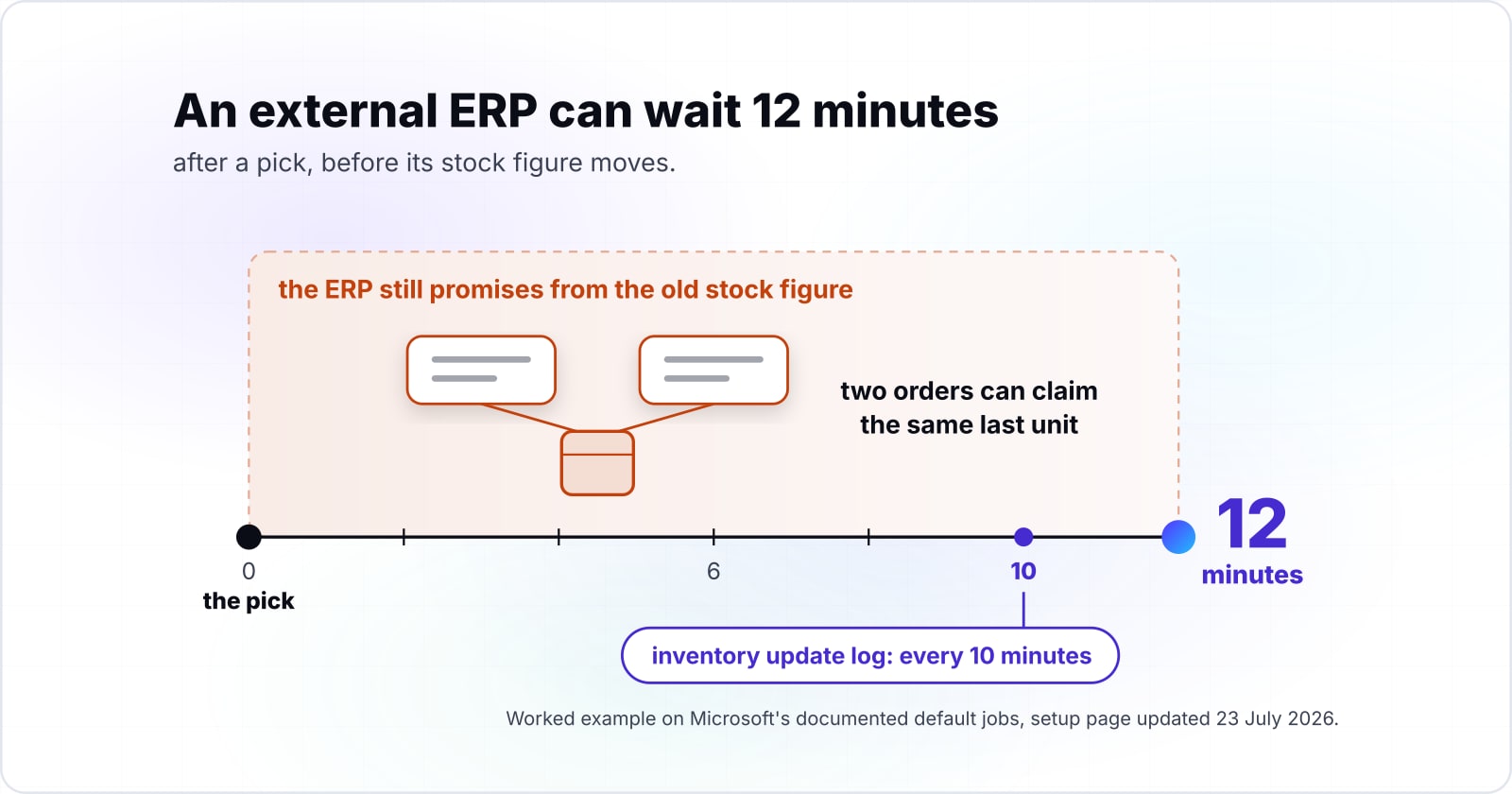
In a worked example on Microsoft's documented default jobs, an external ERP can wait 12 minutes after a pick before its stock figure moves. Because that window comes from a job setting, someone in your team can own it and change it.
Microsoft's setup page, updated 23 July 2026, lists the background jobs that start when a source system is created. By default on that July 2026 page, product messages and shipment order messages each run every minute. Meanwhile, Microsoft's inventory update log is published every 10 minutes.
Show data table
| Stage | Value |
|---|---|
| New item accepted by the WMS | 1 |
| Order for that item accepted by the WMS | 2 |
| Pick of that order visible to the external ERP | 12 |
The pick is the slow step: 10 of the 12 minutes come from the inventory log.
Here is the worked example, on those Microsoft defaults from 23 July 2026. Say your ERP creates a new item and, a moment later, a sales order for it. Then, on Microsoft's July 2026 defaults, the WMS accepts the item within 1 minute and the order within 2 minutes. After the pick, on those 2026 Microsoft defaults, the ERP can wait up to 12 minutes to see stock move. That is because Microsoft's July 2026 page has the inventory log publish every 10 minutes. Since each job is assumed to have just run before the event, each one adds its full interval.
When does your ERP see each step?
Set your three job intervals; it adds them up to show the worst case before an outside ERP sees the item, the order and the pick.
Minutes until the pick is visible to the ERP
12
- Minutes until the WMS accepts the item
- 1
- Minutes until the WMS accepts the order
- 2
A worked example on the documented defaults, not a measurement.
During those 12 minutes in Microsoft's 2026 defaults, the ERP still promises from the old stock figure. For a quiet store that gap does little harm. But for a busy one, two orders can claim the same last unit in that window. Therefore the first fix is often a shorter interval that someone chose on purpose and wrote down.
Where does SCM planning software end and execution begin?#
ASCM's SCOR model names six management processes, Plan, Source, Make, Deliver, Return and Enable, and planning software serves Plan while ERP, WMS and TMS execute. In short, planning decides what should happen and execution records what did.
The SCOR Digital Standard, published by ASCM in 2020, says the model "spans all customer interactions from order entry through paid invoice". It also says that SCOR describes processes, not functions. That is the useful part, because a module is not planning or execution by its name. Instead, it is whichever process it serves.
So supply chain planning systems and supply chain execution systems split along SCOR lines. For instance, a demand forecast or a supply plan serves Plan. Then picking, packing and loading serve Deliver, and receiving serves Source. As a result, the SCM module in ERP software is often a planning tool. Yet a TMS inside the same suite does execution. So the common question about TMS and SCM has a clean answer. A TMS is part of SCM as execution of Deliver, not as planning.
| SCOR process | Example | Plans or executes |
|---|---|---|
| Plan | A demand forecast or a supply plan | Plans: SCM planning software |
| Source | Receiving | Executes |
| Deliver | Picking, packing and loading; the TMS | Executes |
Which documents cross between ERP, WMS and TMS, and in which direction?#
Orders travel down from the ERP as shipment orders and order releases, and facts travel back up as receipts, load IDs, packing slips and freight bills. Every boundary carries an instruction one way and a confirmation the other way.
Take the ERP to WMS boundary first. Microsoft's page on WMS only mode with external ERP systems, updated 19 September 2025, sets out both flows. First, the ERP submits an inbound or outbound shipment order message to the WMS. Then the WMS sends back shipment receipts for goods received, and a shipment packing slip once loads are ship confirmed. Finally, the ERP reads those documents to invoice the purchase and sales orders behind them.
The ERP to TMS boundary works the same way. Oracle's PeopleSoft guide to integrating a TMS names two integration points. First, TMS Order Release sends orders to the TMS for load planning. Then TMS Load Notification brings back a load ID for each demand line.
Freight then closes the loop. Microsoft's page on freight reconciliation, updated 22 May 2026, says a freight bill is made when a load is confirmed. It is later matched to the carrier's invoice. So TMS integration with WMS and ERP is really three loops. And each loop ends in a confirmation that the next system treats as fact. In short, ERP WMS TMS integration means keeping all three loops closed.
Which supply chain item master data must every system agree on?#
Four records decide whether a message is accepted: the item, the location, the unit of measure and the carrier, and each needs exactly one owning system. In practice, a message is only as valid as the records both sides already hold. The same holds for orders that arrive by email, where matching incoming purchase order lines to item records by SKU, then by title, fails once the item data disagrees.
Microsoft's setup page, updated 23 July 2026, is strict about this. It says the source system name in each message "must exactly match" the name set up in the WMS. It also says every owner value an order line sends needs a mapping, an empty value included. If one is absent, in Microsoft's words, "the order message fails to process." Finally, it has a Product master source system field, which names the one system that keeps item data.
Oracle's PeopleSoft TMS guide shows the same records from the other side. Its order release carries a location and a CARRIER_ID, and it syncs customer and location data through separate integration points. It also lists updates to the customer, location, UOM and item weight tables as a task of their own. So the vendor expects those records to change.
Units need the most care of the four. Microsoft's unit of measure page, updated 1 July 2026, groups units into classes such as mass or quantity. Each class has only one base unit, and other units convert to it. So when, say, one system counts a case as 12 and another as 1, that is a missing conversion.
| Record | Where the documentation names it |
|---|---|
| Item | Microsoft's Product master source system field names the one system that keeps item data |
| Location | Oracle's order release carries a location, synced through its own integration point |
| Unit of measure | Microsoft groups units into classes, each with one base unit that other units convert to |
| Carrier | Oracle's order release carries a CARRIER_ID |
What do GTIN, GLN and SSCC fix between ERP, WMS and TMS?#
GS1 gives the item, the location and the logistic unit one shared number each: a GTIN of 8 to 14 digits, a GLN, and an SSCC of 18 digits. With one shared number, two systems need no lookup table to agree on what a message means.
GS1 defines a trade item as anything "priced, ordered or invoiced at any point in the supply chain". The GTIN names that item. The GLN names parties and locations. Meanwhile, the SSCC names a logistic unit, which GS1 says can be a case, pallet or parcel.
Show data table
| Item | Value |
|---|---|
| GTIN-8 | 8 |
| GTIN-12 | 12 |
| GTIN-13 | 13 |
| GTIN-14 | 14 |
| SSCC | 18 |
An SSCC carries 18 digits, more than any GTIN format.
GS1's check digit page, accessed 8 October 2026, sets GTIN formats at 8, 12, 13 and 14 digits and the SSCC at 18 digits. Because every format ends in a check digit, a key can be tested before it travels.
However, GS1 keys do not settle everything. They say which item, place or pallet a message is about. But they do not say how many units sit in a case, or which carrier takes a load. So the unit of measure and the carrier still need an owner inside your business. For item data shared with trading partners, GS1 also runs the Global Data Synchronisation Network.
Where do ERP, WMS and TMS integrations usually fail?#
They fail at a mapping nobody owns, a source system name, an owner value or a unit without a conversion, and at job intervals nobody set on purpose. The first kind stops a message outright. But the second lets the systems drift apart quietly.
| Failure point | How it shows |
|---|---|
| Source system name | The message stops: the name must match exactly |
| Owner mapping | The order message fails to process |
| Unit conversion | A missing conversion between two counts |
| Job intervals | The systems drift apart quietly |
| Freight match | A high count of invoices matched by hand |
Show data table
| Item | Value |
|---|---|
| Process source system product messages | 1 |
| Process shipment order messages | 1 |
| Publish warehouse inventory update log | 10 |
| Post shipment packing slips (one-day delay) | 10 |
| Post shipment receipts (one-day delay) | 10 |
Messages run every minute; the log, packing slips and receipts every 10.
Microsoft's setup page of 23 July 2026 gives the intervals. Product and shipment order messages run every minute. Then, on that 2026 Microsoft page, the inventory log, packing slips and receipts run every 10 minutes, the last two with a one-day posting delay. Each failure point has a test you can run this week on your own stack.
- Source system name. Send one test message with the name in a different case. If it passes, find out why, because the documentation says the name must match exactly.
- Owner mapping. Send an order line with an empty owner value. Microsoft's page says the order message then fails unless the empty value is mapped.
- Unit conversion. List every unit your ERP sends. Then confirm each one converts to its class base unit in the WMS.
- Job intervals. Write down each interval and the person who chose it. A default that no one chose is a gap that no one owns.
- Freight match. Count the carrier invoices matched by hand last month. Microsoft's freight page, updated 22 May 2026, offers both manual and auto matching. So a high manual count points at bad carrier or cost data.
Which documentation pages do you build the integration from?#
Build from the receiving system's own contract: its source system setup first, then its master data messages, then the order and freight documents. Each step depends on the records the one before it created.
- Enable and configure Warehouse management only mode: the source system record, the owner mapping and the job intervals.
- Warehouse management only mode with external ERP systems: what the outside ERP sends and what it reads back.
- Integrating with a transportation management system: the TMS order release and the load notification.
- Reconcile freight in transportation management: matching freight bills to carrier invoices.
Your own products may name these steps differently. Even so, the order holds, because each later message refers to records that an earlier step created.
What is the smallest master data check to run before a message is sent?#
Before a message leaves, check the GS1 check digit, the unit conversion and the owner mapping, the three refusals the receiving side would otherwise make. A short function in your integration layer is enough to catch all three.
The check digit step follows GS1's method, as printed on 8 October 2026. First weight the digits 3 and 1 from the right, then add them, then subtract the sum from the next multiple of ten. Next, the unit step follows Microsoft's rule of one base unit per class. Finally, the owner step follows the setup page's rule that every owner value needs a mapping, empty included. For the test value, the code uses the GTIN-13 example on GS1's check digit page, accessed 8 October 2026. Its weighted digits sum to 57 and give a check digit of 3.
def gs1_check_digit(body: str) -> int:
    # Steps 1 and 2: weight 3, 1, 3, ... from the rightmost digit, then add.
    total = sum(int(d) * (3 if i % 2 == 0 else 1)
                for i, d in enumerate(reversed(body)))
    # Step 3: subtract the sum from the nearest equal or higher multiple of ten.
    return (10 - total % 10) % 10
def check_line(gtin, unit, owner, conversions, owner_map):
    problems = []
    if not gtin.isdigit() or len(gtin) not in (8, 12, 13, 14):
        problems.append("GTIN has the wrong length")
    elif gs1_check_digit(gtin[:-1]) != int(gtin[-1]):
        problems.append("GTIN check digit does not match")
    if unit not in conversions:
        problems.append(f"no conversion from {unit} to its base unit")
    if (owner or "") not in owner_map:
        problems.append(f"no mapping for owner value {owner!r}")
    return problems
print(check_line("6291041500213", "case", "",
                 conversions={"case": 12, "each": 1},
                 owner_map={"": "MAIN"}))   # prints []
Run it on every order line before the message is built. When it returns an empty list, the line will pass the three documented refusals. If it does not, you know which record to fix first.
Should the WMS that integrates with your ERP and TMS come from one vendor?#
One vendor removes the master data copy, as SAP says of EWM inside S/4HANA, while a separate WMS keeps the copy and needs an owner for every mapping. So the vendor question is really a question about master data.
SAP's course on warehouse integration says, as accessed 8 October 2026, that SAP EWM and SAP TM have run inside S/4HANA since release 1709. The same SAP course says that design gave "direct access to master data without the need for replication". The upside is one item, one location and one unit across every layer. The downside is that every part moves on that one vendor's release cycle.
A mixed stack weighs the other way. For example, Microsoft's external ERP page shows a WMS that keeps the ERP you already run. Also, Oracle's guide shows a TMS added to an existing ERP. In both cases the records are copied, so each copy needs a named owner and a sync test. The upside is the freedom to pick each layer on its merits. But the downside is the mapping work above, for as long as the stack runs.
So a WMS that integrates with ERP and TMS from other vendors suits a firm with a settled ERP and a data owner. Instead, a suite suits a firm that cannot staff that owner. Many other vendors exist beyond the three named here, and none of them is ranked.
| One suite | Mixed stack | |
|---|---|---|
| Master data | Direct access, no replication | Copied; each copy needs a named owner and a sync test |
| Upside | One item, one location and one unit across every layer | Freedom to pick each layer on its merits |
| Downside | Every part moves on one vendor's release cycle | The mapping work, for as long as the stack runs |
| Suits | A firm that cannot staff a data owner | A firm with a settled ERP and a data owner |
When is a new integration layer the wrong tool?#
When two systems both claim to own the item or the location, a new layer copies the disagreement faster, so settle ownership first. Middleware moves records between systems, but it cannot decide which system is right.
ASCM's SCOR model, in its 2020 edition, keeps Enable as a process of its own beside Plan, Source, Make, Deliver and Return. So ownership work deserves its own place too. In practice that means a named person for each record and a weekly sync test. It also means a short list of who may change what. Then add the layer, if it is still needed once the owners are named.
Where should you go next with ERP, WMS and TMS?#
If the boundaries are clear, the next decision is what to build around them and what to buy, and each has its own guide. Start with whichever record failed your tests.
For what to build around a WMS and TMS, read custom logistics software. To decide layer by layer, see custom versus off the shelf logistics. Also, for the product data half of the item record, see building or buying a PIM. If orders start on a factory floor, see how machines, the manufacturing execution system (MES) and ERP fit together.
If you want help with the ERP side, our ERP development team builds ERPs as the master data source. For the links between systems, see our API integrations work. That said, the vendor pages above are enough to run every test yourself.