Website accessibility cost: size your accessibility audit cost in samples and hours
Every quote for an accessibility audit is built from the same hidden units. Count them on your own site first, and any price you hear afterwards becomes one you can check line by line.
What does a website accessibility audit cost?#
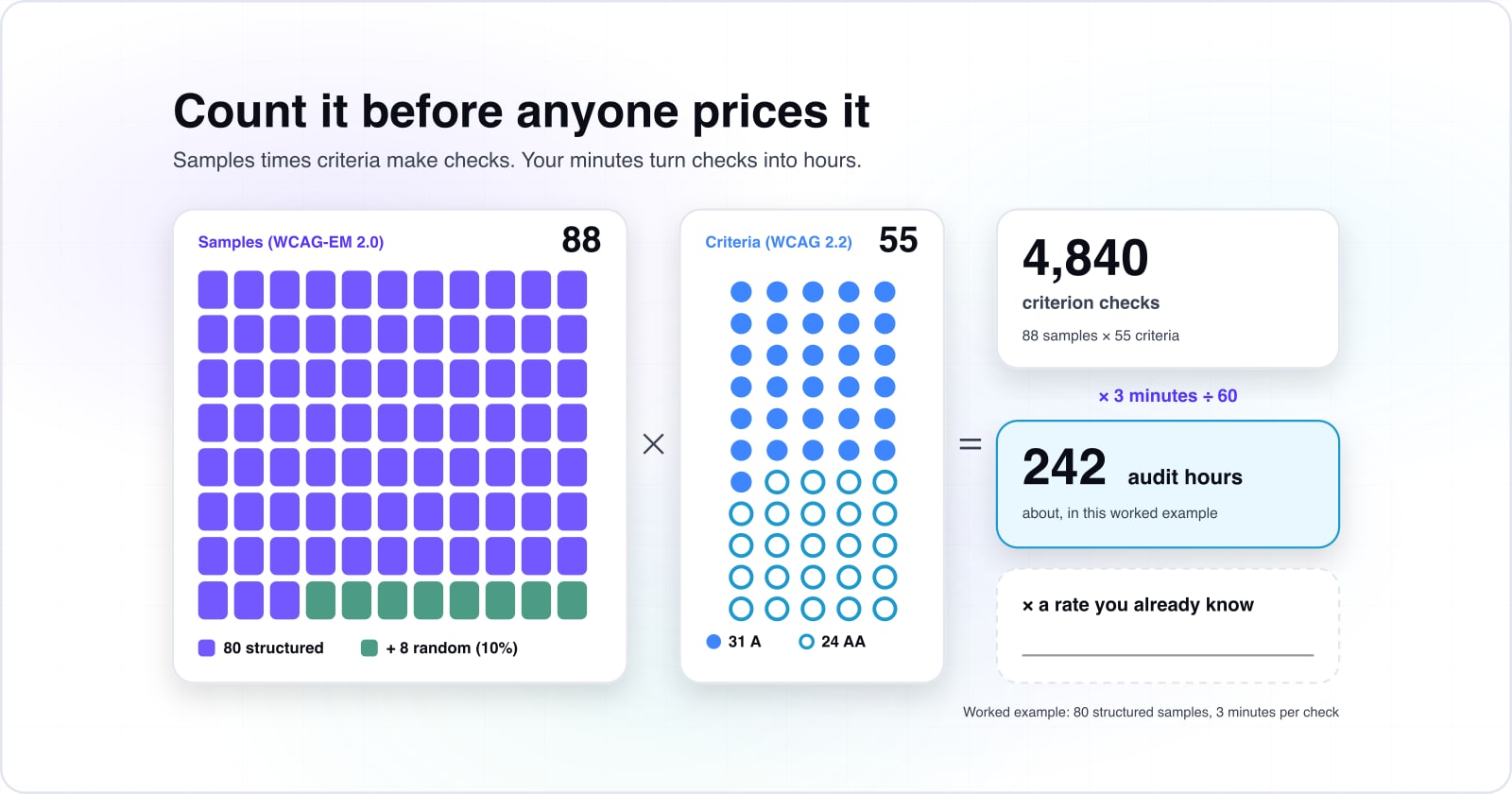
A website accessibility audit cost is set by how many samples are checked against the 55 Level A and AA criteria of WCAG 2.2, so count samples and hours before any price. The WCAG 2.2 Recommendation, published by the W3C on 12 December 2024, holds 31 Level A and 24 Level AA success criteria. Because a Level AA claim covers both sets, each sample in the audit is checked 55 times.
31
Level A
24
Level AA
Each sample in the audit is checked 55 times, so the criteria count multiplies whatever sample you take.
| Option | success criteria |
|---|---|
| Level A | 31 |
| Level AA | 24 |
Source: W3C, WCAG 2.2, 2024
That makes the accessibility audit cost for your site a count first and a price last. First, take your samples and multiply by the 55 criteria in W3C's December 2024 WCAG 2.2 to get the number of checks. Then your own minutes per check turn checks into audit hours. Last, a rate you already pay for skilled testing turns those hours into money.
Because the count comes from your own site, it stays true when a borrowed figure does not. It also shows where a quote's hours went. So website accessibility cost becomes a sum you can check. The steps that follow come with a calculator for your own numbers.
Why does no honest website accessibility cost estimate start with a price band?#
Published audit bands each assume a different site, so the unit that carries between sites is the sample and the hour, never the page count or the company size. After all, a band for an "average" site averages sites that share nothing. For example, a brochure site and a small online store can have the same page count. But the store has a cart, a login and a search, and every step of each process is a sample. So the store's audit can hold many more samples than the brochure site's.
Also, the people an audit protects are not a niche. The World Health Organization's fact sheet of 7 March 2023 puts significant disability at 1.3 billion people, or 16% of the world's population. In short, the hours are the budget line, and the rate is a number your company already knows.
How many pages does an accessibility audit check under WCAG-EM?#
WCAG-EM 2.0, the W3C evaluation method published 23 July 2026, checks a structured sample of every template, component and complete process, then adds a random sample of 10%. The method states it plainly in WCAG-EM 2.0: "The number of samples to randomly select is 10% of the structured sample set". For example, the July 2026 method's own worked example is a structured sample of 80 that gains 8 random samples, for 88 in total.
The structured sample follows what varies, not from how long the site is. In practice it holds:
- the common views, such as each page template: home, product, article and search results;
- the essential functionality, such as search, sign-in or a booking form;
- each type of sample and each technology the site relies on, such as a dialog, a video player or a map;
- every page or view in a complete process, such as each step from cart to confirmed order, because WCAG-EM requires all of them;
- then the random 10%, picked from anywhere on the site and not already in the set.
However, the W3C is careful not to fix a number. Its method says "The actual size of the sample set needed to evaluate a digital product depends on many factors". So a large catalogue on one product template can need fewer samples than a small site with many layouts. Since the random share is a fixed 10% in WCAG-EM 2.0, the total grows in step with the structured sample you count.
Show data table
| Item | Value |
|---|---|
| 20 structured samples | 22 |
| 40 structured samples | 44 |
| 80 structured samples | 88 |
| 120 structured samples | 132 |
The random 10% keeps the total in step with the structured sample you count.
How do samples turn into a web accessibility audit cost in hours?#
In this worked example 88 samples checked against 55 success criteria make 4,840 criterion checks, and your own minutes per check turn that count into audit hours. The steps are the same for any site:
- Count your structured sample: common views, essential functionality, sample types, and every step of each complete process.
- Add 10% for the random sample, as W3C's WCAG-EM 2.0 (July 2026) sets it, and round up.
- Multiply the total by 55, the Level A and AA criteria of W3C's WCAG 2.2 (December 2024), to get criterion checks.
- Turn checks into minutes with your own minutes per check, then divide by 60 for audit hours.
- Apply a rate you already know to those hours.
Say each check takes 3 minutes on average, so 4,840 checks take 14,520 minutes, or about 242 audit hours. In practice, most criteria pass quickly or do not apply on most samples. But a few take far longer, like keyboard access through a checkout. So minutes per check is the input every quote should state.
Your accessibility audit in hours
Enter the structured samples you counted and your minutes per check; it adds the 10% random sample and returns criterion checks and audit hours.
Audit hours
242 h
- Random samples (10%)
- 8
- Total samples
- 88
- Criterion checks (55 per sample)
- 4,840
An illustrative estimate of the worked example above, not a measurement.
Remediation is a second count. After the audit, sort the issues it found by the kind of fix, and give each kind your own hours. Also add a retest round, because a fix is not done until someone checks it again.
What does a web accessibility audit price cover that an automated scan does not?#
WebAIM's 2026 scan of one million home pages found 56.1 detectable errors per page, and that count is only what software detects before anyone tests by hand. In The WebAIM Million for 2026, the average rose from 51 errors per page in 2025. Also, WebAIM found that 95.9% of home pages had detected WCAG 2 failures in 2026. Even so, WebAIM warns that "not all conformance failures can be automatically detected".
51
2025
56.1
2026
A scan's count is a floor, because it leaves out the failures software cannot detect.
| Option | detected errors per page |
|---|---|
| 2025 | 51 |
| 2026 | 56.1 |
Source: WebAIM, The WebAIM Million, 2026
Meanwhile, the W3C's evaluation overview is just as direct: "no tool alone can determine if a site meets accessibility standards". Deque, which sells automated testing tools, argues on its coverage page that automation catches more than people assume. Even so, Deque describes a mix of automated and manual testing as standard practice.
| Automated scan | Audit to WCAG-EM | |
|---|---|---|
| What it checks | what code rules can detect | every sample against every Level A and AA criterion |
| Who runs it | software | a person with assistive technology, helped by tools |
| Processes | the pages you list | every step of each complete process |
| What you get | an error count | a finding per criterion, per sample |
So compare a scan's price with another scan's, and an audit's with another audit's. If you are choosing a scanner, web accessibility testing tools explains why two tools report different counts on the same page.
What do website accessibility issues like screen reader problems, pricing tables and navigation cost to fix?#
Six error types made up 96% of what WebAIM detected in 2026, and most are attribute fixes in a shared template, while broken navigation and custom widgets need rebuild hours. In WebAIM's words, "96% of all errors detected fall into these six categories". Low contrast text led WebAIM's 2026 list, on 83.9% of home pages.
Show data table
| Item | Value |
|---|---|
| Low contrast text | 83.9% |
| Missing alternative text for images | 53.1% |
| Missing form input labels | 51% |
| Empty links | 46.3% |
| Empty buttons | 30.6% |
| Missing document language | 13.5% |
Low contrast text leads, on 83.9% of home pages, and most of the six are attribute fixes.
Where a fix lives decides its hours, so sort each issue by where it lives:
| Issue | Where the fix usually lives | How the hours behave |
|---|---|---|
| Low contrast text | colour tokens or a shared stylesheet | one change, then a retest of each template |
| Missing alt text, empty links, empty buttons | templates and content entries | once per template, then per content item |
| Missing form labels | the form components | once per component |
| Screen reader problems in custom menus, tabs and dialogs | the widget's code | rebuild hours for each widget |
| Pricing tables built from layout boxes | the table markup | rebuild hours for each table pattern |
| Broken keyboard navigation and focus order | layout and scripts | rebuild hours for each navigation pattern |
So remediation hours depend on reach, not on the raw issue count. One contrast fix in a colour token can clear every instance at once. But a menu copied into every template is a fix in every template. For the slowest checks, screen reader compatibility testing shows what testing them involves. Then give each row your team's own hours, count what the audit found, and add it up.
Why do late-stage accessibility fixes cost more?#
In NIST's 2002 example table, a defect made in design costs 1X to fix there and 30X once the product is released, because finished work has to be unravelled. The National Institute of Standards and Technology printed the table in Planning Report 02-3 in May 2002 and labels it "Example Only". NIST explains that if the error is not found until system test, "it costs 10 times more to fix". That is because the software built so far "has to be unraveled and rewritten".
Show data table
| Stage | Value |
|---|---|
| Requirements and design | 1 X |
| Coding and unit test | 5 X |
| Integration and system test | 10 X |
| Beta test | 15 X |
| Post-product release | 30 X |
In the example table, the same fix costs 1X in design and 30X after release.
In NIST's 2002 example, the cost climbs at every stage, from 5X in coding to 15X in beta test. In short, accessibility defects follow the same shape, and website accessibility cost rises with it. A missing label in a design system component is one change while the design is open. After release, though, the same label is missing in every form that copied it. Then each copy has to be found, fixed and retested.
The W3C's business case page points the same way. In particular, it cites a Forrester study commissioned by Microsoft. That study found "accessibility could contribute to cost savings when it is integrated into existing and ongoing development cycles". So the cheapest audit runs on designs and a first build, not on a site that shipped years ago.
What should a quote for an accessibility audit list?#
A comparable quote names the WCAG version and level, the sample list, the assistive technologies tested, the report format, and whether a retest round is included. Send the same list to each vendor you ask, and ask for hours against each item:
Also, some sites have a legal floor. The U.S. Department of Justice's April 2024 rule under Title II of the Americans with Disabilities Act names WCAG 2.1 Level AA for state and local governments. Then the Department's April 2026 Interim Final Rule moved the date. Entities with a total population of 50,000 or more now have until April 26, 2027. This is general information about a United States rule, not legal advice for your organisation.
As a result, two quotes that answer the same list compare line by line. And a vendor who will not answer it has told you something too.
When is a full accessibility audit the wrong tool?#
A site of only a few pages needs no sampling at all, and a site about to be rebuilt gets more from fixing its design system and auditing the new build. WCAG-EM 2.0 says so itself: "On websites with a few pages, all pages can be evaluated and the sampling procedure can be skipped". Three cases call for a different first step:
- A site of a few pages. Check every page against the criteria directly, and skip the sampling.
- A site about to be replaced. Fix the design system's components and audit the new build. NIST's 2002 example puts a design-stage fix at 1X against 30X after release.
- A team that first wants to know where it stands. Run an automated checker and a keyboard-only pass on the main templates. Accessibility testing lays out that pass, and the audit is scoped from what you learn.
In each case the hours method still holds, because only the sample count changes: it is smaller, or it comes later.
Where to go next on accessibility testing and WCAG scope?#
Pick the WCAG version and level first, run the layered testing pass on your samples, and bring the hours you computed to any audit conversation. WCAG 2.0 vs 2.1 vs 2.2 settles which version and level binds you, which sets the criteria count. Inaccessible website consequences weighs the cost of not auditing at all.
For the audit and fixes done to a WCAG and ADA target, the WCAG and ADA compliance service describes that work. The accessibility testing service runs the testing pass on your own samples. Either way, the website accessibility cost counts work the same with any vendor, or with your own team.