Accessibility testing methods: the layered pass that finds what WCAG 2.2 scanners miss
A green scan tells you what a machine could check, and nothing about the rest. Count the rest, then work through it in the order that costs the least.
How much of WCAG can accessibility testing automate?#
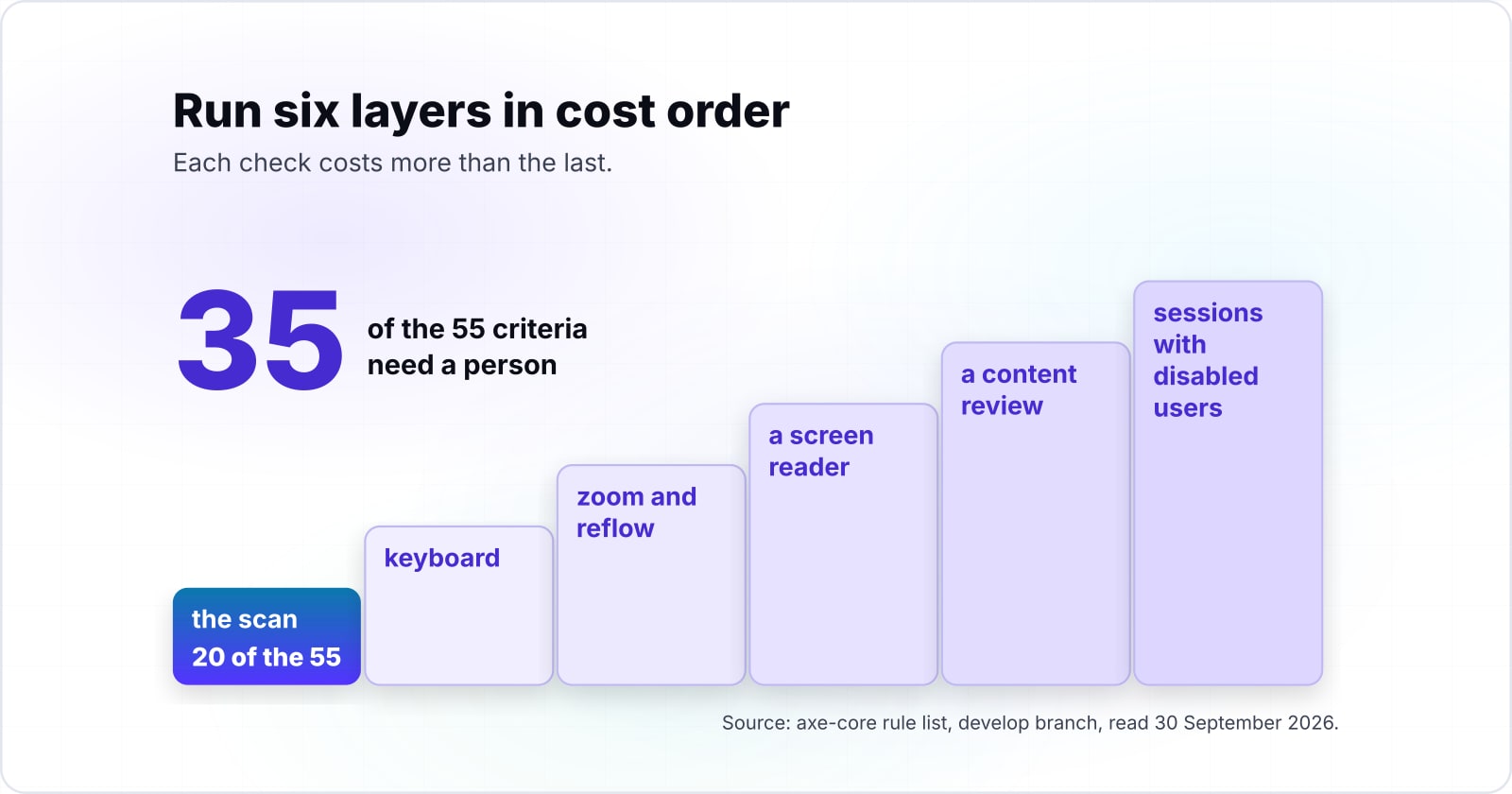
An axe-core scan has a rule for 20 of the 55 WCAG 2.2 A and AA success criteria, so a green report leaves at least 35 criteria for a person to settle. Axe-core is the open-source rules library that Deque Systems publishes, and Playwright can run it in CI. Its rule list, read on the develop branch on 30 September 2026, tags each rule with the criteria it checks.
First, count the distinct criteria in its A and AA sections for WCAG 2.0, 2.1 and 2.2. You get 21 tags. However, one of them is 2.1.3 Keyboard (No Exception), which the WCAG 2.2 text lists at Level AAA, so 20 are A or AA criteria. Then count the WCAG 2.2 Recommendation, last updated by the W3C on 12 December 2024. It has 31 criteria at Level A and 24 at Level AA, so 55 in all.
20
An axe-core rule is tagged with it
35
No axe-core rule is tagged with it
A green report leaves at least 35 of the 55 criteria for a person to settle.
| Option | WCAG 2.2 Level A and AA success criteria |
|---|---|
| An axe-core rule is tagged with it | 20 |
| No axe-core rule is tagged with it | 35 |
Show data table
| Segment | Value (success criteria) | Share |
|---|---|---|
| Level A | 31 | 36% |
| Level AA | 24 | 27.9% |
| Level AAA | 31 | 36% |
A Level AA target is the first two parts, 55 criteria.
There is also a catch inside the 20. The rule list, read in September 2026, says its WCAG 2.2 rules "are disabled by default". The only one is target-size, for 2.5.8. So a scan run with no options reaches 19 criteria. Check that target-size shows up in your results before you count 2.5.8 as covered.
Also, a rule tagged with a criterion does not settle it. For example, a rule for 1.1.1 can find an image with no alt text. But it cannot tell you whether the alt text that is there makes sense. The W3C puts it plainly on its guide to selecting tools: "Web accessibility evaluation tools can not determine accessibility, they can only assist in doing so."
In short, 20 is a ceiling on what the scan can reach in 2026. It is not a floor on what it proves.
What does trusting a green scan cost a team?#
WebAIM's 2026 scan of a million home pages found detectable failures on 95.9% of them, and those are only the failures a machine can see. The WebAIM Million ran in February 2026 with the WAVE engine. It found an average of 56.1 errors per page.
Also, the same six failure types lead the report every year. In the 2026 report, low contrast text was on 83.9% of home pages, and missing alt text on 53.1%. As a result, WebAIM says 96% of all detected errors fall into these six categories.
Show data table
| Item | Value |
|---|---|
| Low contrast text | 83.9 |
| Missing alternative text for images | 53.1 |
| Missing form input labels | 51 |
| Empty links | 46.3 |
| Empty buttons | 30.6 |
| Missing document language | 13.5 |
Low contrast text alone was on more than four in five home pages.
Even the machine-detectable failures are nearly universal, so the undetectable ones ship unseen unless a person looks for them. WebAIM draws the same line about its own 2026 number. Since it counted only failures a tool can find, it says full conformance "was certainly lower than 4.1%".
Deque's coverage report, read in September 2026, makes the cost point directly. "The higher the number of issues that can be caught and addressed in earlier stages of product development, the lower the overall cost." For instance, a barrier found in a component review is one fix. But the same barrier found after launch is a fix on every page that reused it.
So the real cost of a green scan is not the scan. Instead, it is the release that goes out on the belief that green means done. The worked example below shows which layers close which part of that gap.
Why do automated coverage figures range so widely?#
Deque's own audit data gives 57.38% when it counts issues and 32% when it counts criteria, because a few failure types repeat thousands of times. Both numbers come from the same report, read in September 2026. It pooled more than 2,000 audits run with axe-core and a manual method.
Counted by criteria, Deque writes: "we found automated issues for 16 out of the 50 Success Criteria under WCAG 2.1 Level AA." That is 32%. Counted by issues, automated tests found 57.38% of the total. However, one criterion such as missing labels can produce ten issues on one form. As a result, the issue count tracks how often a failure repeats. It does not track how many criteria a tool can reach.
32%
Measured by criteria (16 of 50)
57.38%
Measured by issue volume
The same audits read 32% or 57.38%, depending on what they divide by.
| Option | percent covered by automated tests |
|---|---|
| Measured by criteria (16 of 50) | 32% |
| Measured by issue volume | 57.38% |
Source: Deque Systems, The Automated Accessibility Coverage Report, read 30 September 2026
A third denominator comes from the UK Government Digital Service. On 24 February 2017 its accessibility blog reported a test page seeded with 143 barriers. Together, ten tools found 71% of them. Meanwhile, the best single tool found 37% on errors and warnings, or 41% counting its prompts for manual checks.
So a coverage figure is only meaningful with its denominator. In particular, criteria, issue volume and seeded barriers each answer a different question. When a vendor quotes a number, ask what it divided by first.
What can a scanner decide, and what needs a person?#
A scanner decides what is present or computable, such as a missing label or a contrast ratio below 4.5 to 1, and cannot decide whether a label means anything. That rule predicts, for any criterion, whether a machine can settle it.
First, presence is a yes or no question about the page's code. Is there an alt attribute, a label, a lang attribute? Second, computation is arithmetic on values the page exposes. Colour pairs checked against the 4.5:1 ratio in the 2024 WCAG 2.2 text are one case. But meaning and operability are different. Does the alt text describe the chart? Can a keyboard user escape the date picker? Because those need a person who reads or operates the page, no rule can answer them.
The 2017 GDS test shows where the line falls in practice. Its blog lists what no tool caught, such as "italics used on long sections of text, tables with empty cells and links identified by colour alone". In total, 42 of the 143 barriers were missed by every tool, which is 29%.
Show data table
| Item | Value |
|---|---|
| all ten tools combined | 71 |
| best single tool with manual prompts | 41 |
| best single tool, errors and warnings only | 37 |
| Google Developer Tools | 17 |
| found by no tool | 29 |
Even ten tools together missed 29% of the barriers GDS seeded.
The W3C's ACT rules, read in September 2026, give this split a shared form. Each rule is a written test that a tool or a person can run. Also, the W3C lists implementations as manual, semi-automated, automated or linter. So a criterion with no automated rule is not a gap in one vendor's product. Instead, it is a criterion whose answer lives in a person's reading of the page.
What did WCAG 2.2 change for accessibility testing?#
WCAG 2.2 added nine success criteria, six at A or AA and three at AAA, and removed 4.1.1 Parsing, and axe-core tags a rule to one of the nine. The W3C's What's New in WCAG 2.2 page, for the standard first published in October 2023, says it in one line: "WCAG 2.2 provides 9 additional success criteria since WCAG 2.1."
The six at A and AA are these:
- 2.4.11 Focus Not Obscured (Minimum), AA
- 2.5.7 Dragging Movements, AA
- 2.5.8 Target Size (Minimum), AA
- 3.2.6 Consistent Help, A
- 3.3.7 Redundant Entry, A
- 3.3.8 Accessible Authentication (Minimum), AA
Then there are three at AAA: 2.4.12 Focus Not Obscured (Enhanced), 2.4.13 Focus Appearance and 3.3.9 Accessible Authentication (Enhanced). In particular, 2.4.13 is AAA, not AA. Also, the same 2023 page says 4.1.1 Parsing "is obsolete and removed from WCAG 2.2".
Show data table
| Segment | Value (success criteria added) | Share |
|---|---|---|
| Level A | 2 | 22.2% |
| Level AA | 4 | 44.4% |
| Level AAA | 3 | 33.3% |
Six of the nine additions sit at Level A or AA, the levels most teams are held to.
Of the nine, only Target Size (Minimum) has an axe-core rule. The rule list tags target-size with wcag258, and it sits in the section that is off by default. For example, 2.5.8 asks for pointer targets of "at least 24 by 24 CSS pixels". A machine can take that measurement.
But the other eight are about behaviour over time or across pages. Will a sticky header hide the focused field? Is the help link in the same place on every page? Does the checkout ask for the address twice? Therefore the new criteria land almost entirely on the manual layers. A team that moved to WCAG 2.2 by updating its scanner has moved very little.
In what order should the accessibility testing layers run?#
Run six layers from cheapest to dearest: scan, keyboard, zoom and reflow, screen reader, content review, then sessions with disabled users, each settling criteria the last one could not. Since the order follows cost, each dearer layer only spends time on what nothing cheaper could decide.
| Layer | What it alone can settle | Who runs it |
|---|---|---|
| Scan | presence and computed values, such as labels, alt attributes and contrast | CI, on every build |
| Keyboard | focus order, visible focus, traps, focus hidden under sticky content | any developer, with Tab and Shift+Tab |
| Zoom and reflow | text at 200 percent, content at 320 CSS pixels wide, spacing overrides | any developer, with browser zoom |
| Screen reader | names, roles and states as announced, reading order, live updates | a tester trained on that screen reader |
| Content review | whether alt text, labels, headings and errors mean the right thing | a writer or designer who knows the criteria |
| Disabled users | whether the whole task can be done, including sign-in and help | people who use assistive technology daily |
Each row names criteria from the 2024 WCAG 2.2 text. For instance, 1.4.10 Reflow asks for content at "a width equivalent to 320 CSS pixels" without two-way scrolling. So that is a zoom check, not a scan check.
Here is the worked example. Say a team's only check is the axe-core scan in CI, which touches 20 of the 55 criteria. Then it adds a keyboard pass. That pass settles four criteria that no axe-core rule is tagged with. They are 2.1.2 No Keyboard Trap, 2.4.3 Focus Order, 2.4.7 Focus Visible and 2.4.11 Focus Not Obscured (Minimum). As a result, 31 of the 35 remain open. Next, a zoom and reflow pass adds 1.4.10 Reflow and 1.4.13 Content on Hover or Focus, which leaves 29.
The W3C's evaluation method sets the scope for all of this. WCAG-EM 2, published on 23 July 2026, has five steps: define the scope, explore the site, select a sample, evaluate it, and report. Also, it recommends "involving real users with disabilities during evaluation". So you do not run all six layers on every page. Instead, run the scan everywhere. Run the manual layers on a sample that covers each template and each key task.
35 of 55 criteria still open
The layers you run settle 20 of the 55 WCAG 2.2 Level A and AA criteria. Open: 17 at Level A, 18 at Level AA.
20 of the settled count come from the scan, where an axe-core rule is tagged with the criterion. A tagged rule reaches a criterion; a person still judges whether it passes.
Cheapest layer not yet run: Keyboard, which settles 4 more.
Still open: 1.2.1, 1.2.3, 1.2.4, 1.2.5, 1.3.2, 1.3.3, 1.3.4, 1.4.5, 1.4.10, 1.4.11, 1.4.13, 2.1.2, 2.1.4, 2.3.1, 2.4.3, 2.4.5, 2.4.6, 2.4.7, 2.4.11, 2.5.1, 2.5.2, 2.5.3, 2.5.4, 2.5.7, 3.2.1, 3.2.2, 3.2.3, 3.2.4, 3.2.6, 3.3.1, 3.3.3, 3.3.4, 3.3.7, 3.3.8, 4.1.3
| Layer | Who runs it | Criteria | Status |
|---|---|---|---|
| Scan | CI, on every build | 20 | Run |
| Keyboard | any developer, with Tab and Shift+Tab | 4 | Skipped |
| Zoom and reflow | any developer, with browser zoom | 2 | Skipped |
| Screen reader | a tester trained on that screen reader | 6 | Skipped |
| Content review | a writer or designer who knows the criteria | 19 | Skipped |
| Disabled users | people who use assistive technology daily | 4 | Skipped |
Which screen readers should the screen reader pass use?#
In WebAIM's survey of screen reader users, JAWS and NVDA were the primary desktop reader for 40.5% and 37.7% of respondents, so test with one of each before VoiceOver. WebAIM ran its Screen Reader User Survey #10 in December 2023 and January 2024, and it drew 1539 valid responses. Meanwhile, VoiceOver was primary for 9.7%.
Show data table
| Item | Value |
|---|---|
| JAWS | 40.5 |
| NVDA | 37.7 |
| VoiceOver | 9.7 |
JAWS and NVDA together were primary for more than three in four respondents.
So two Windows readers cover most primary desktop use in the survey. As a result, a screen reader pass that uses only VoiceOver tests the minority setup.
But region matters too. In the same 2024 survey, WebAIM reports JAWS ahead of NVDA in North America, at 55.5% against 24.0%. In Asia, though, the order flips, with NVDA at 70.8% and JAWS at 22.9%. So pick the pair that matches where your users are. Then add VoiceOver on iOS if the product is used on phones.
Which pages do you build the automated layer from?#
Three pages are enough to build the automated layer: Playwright's accessibility testing guide, the @axe-core/playwright README, and the axe-core API reference for tags and results. Playwright is a browser test framework, and the README belongs to the Deque package that runs axe-core inside it. Read them in the order the test is written, as they stood in September 2026.
- Playwright's accessibility testing guide: the test shape,
new AxeBuilder({ page }).analyze(), andwithTags()to limit the scan to WCAG A and AA rules. It also states the limit: "many accessibility problems can only be discovered through manual testing". - The @axe-core/playwright README: the install line, the
AxeBuilderconstructor, andinclude()andexclude()for scoping a scan to part of a page. - The axe-core API reference: how
runOnlyselects rules by tag, and which rules run whenaxe.run()is called with no options.
What is the smallest CI check that fails the build?#
A single Playwright test that runs AxeBuilder with the WCAG A and AA tags and expects an empty violations array is the whole automated layer. First, install the wrapper with npm install @axe-core/playwright next to Playwright Test. Then add one test file.
// 1. Import the test runner and the axe-core wrapper
import { test, expect } from '@playwright/test';
import AxeBuilder from '@axe-core/playwright';

test('home page has no detectable WCAG A or AA violations', async ({ page }) => {
  // 2. Open the page to scan
  await page.goto('https://your-site.com/');

  // 3. Run axe-core with the WCAG A and AA tags, including the 2.2 rule
  const results = await new AxeBuilder({ page })
    .withTags(['wcag2a', 'wcag2aa', 'wcag21a', 'wcag21aa', 'wcag22aa'])
    .analyze();

  // 4. Fail the build on any violation
  expect(results.violations).toEqual([]);
});
The tag list is the Playwright guide's four plus wcag22aa, which is the tag the rule list gives target-size. Run it in CI next to your other Playwright tests. While a pass means the scan found nothing it can find, it does not mean the page is accessible. That is why the five manual layers exist.
When is a layered pass not a fit?#
A full six-layer pass is the wrong spend for a prototype that will be thrown away, and for a product whose design system is untested, where fixing the components comes first. In both cases the pass finds the same things many times over.
| Case | Run instead | Why |
|---|---|---|
| A prototype that will be thrown away | the scan and one keyboard pass on the main task | it catches the barriers you would otherwise copy into the real build |
| Untested shared components | the scan and a keyboard pass on the component library first | a full pass on every page repeats the same finding |
| A formal conformance claim by a fixed date | a scoped audit to the 2026 WCAG-EM 2 method on a sample | an in-house pass may be too slow |
With a throwaway prototype, run the scan and one keyboard pass on the main task. That catches the barriers you would otherwise copy into the real build. Then stop, and save the screen reader and user sessions for the version that ships.
Untested shared components are the second case. Run the scan and a keyboard pass on the component library first, because a full pass on every page repeats the same finding. WebAIM's 2026 data backs this. In it, 96% of detected errors fall into six types that have not changed in seven years. Because those live in shared parts, they repeat across templates. So fix the button, the form field and the modal once, and every page that uses them improves.
Finally, a team that needs a formal conformance claim by a fixed date may find an in-house pass too slow. In that case, a scoped audit to the 2026 WCAG-EM 2 method on a sample is the better tool. Then add the layers to the build process afterwards.
Where do the individual layers go deeper?#
Each layer has its own depth: the tools comparison for the scan, the seven-stop keyboard walk, and the screen reader build and verify guide. The method is complete here, and each layer has a sibling post that goes further.
- Scan: the accessibility testing tools compared on one page helps you pick the engine.
- Keyboard: the seven-stop keyboard navigation and focus walk gives a pass condition at each stop.
- Screen reader: screen reader compatibility testing covers the build and verify loop.
- Scope: the WCAG versions compared settles which version you are held to before you count anything.
If you would rather have the layered pass run on your product, our accessibility testing service does that. Also, if you need a conformance claim and the fixes behind it, see WCAG and ADA compliance. Either way, the W3C pages and the three build pages above are enough to run every layer yourself.