Best WCAG compliance tools 2026: how to read what web accessibility testing tools actually tell you
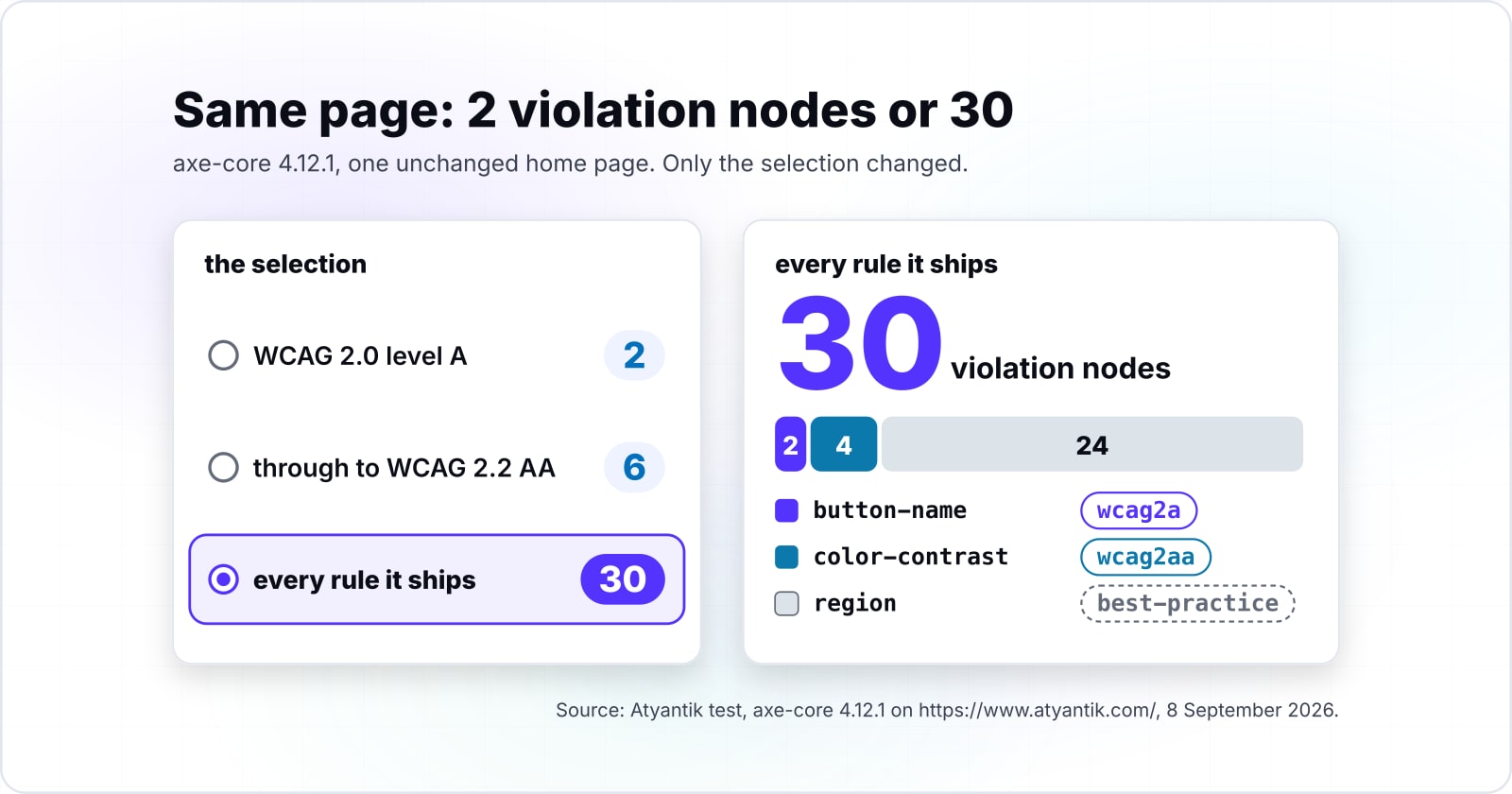
One engine at one version reported 2 violation nodes under WCAG 2.0 level A alone and 30 under every rule it ships. Nothing on the page moved between those two numbers.
Why does one page report 2 issues under one selection and 30 under another?#
Because the selection decides which rules the engine may run, and a count is only a count of the rules that ran. In the axe-core 4.12.1 run of 8 September 2026, selecting WCAG 2.0 level A alone on https://www.atyantik.com/ returned 2 violation nodes. Selecting the engine's default, every rule it ships, returned 30 violation nodes. Same unchanged page, same session, same load.
Six selections, six answers, one page#
Each row below names its own selection, because the number means nothing without it.
- WCAG 2.0 level A alone: 2 violation nodes
- WCAG 2.0 level A plus AA: 6 violation nodes
- WCAG 2.0 A and AA plus the WCAG 2.1 A and AA tags: 6 violation nodes
- The full ladder through to WCAG 2.2 AA: 6 violation nodes
- Only the rules the engine tags as best practice: 24 violation nodes
- The engine's default, every rule it ships: 30 violation nodes
Show data table
| Item | Violation nodes on one unchanged page. Only the selection changed. |
|---|---|
| WCAG 2.0 A | 2 |
| WCAG 2.0 A + AA | 6 |
| + WCAG 2.1 A + AA | 6 |
| + WCAG 2.2 AA | 6 |
| Best practice only | 24 |
| Every rule shipped | 30 |
Nobody deployed code between these six numbers. One variable accounts for the whole span, and it is the set of rule tags somebody selected.
The contact page behaves the same way and produces a different span. Selecting WCAG 2.0 level A alone on https://www.atyantik.com/contact/ returned 4 violation nodes. Selecting the engine's default, every rule it ships, returned 14 violation nodes on the same page and the same load.
Nothing else moved#
Notice what did not happen. Nobody deployed code between those runs. No content changed, no stylesheet moved, and nobody swapped a browser. The engine held constant at axe-core 4.12.1 and the date held constant at 8 September 2026. Consequently one variable accounts for the whole span, which is the set of rule tags somebody selected.
That matters because a number with no selection attached cannot be argued with. Someone reports 30 and someone else reports 2. Both are honest, and both describe the same page on the same day. In short, a count from web accessibility testing tools without its selection is only a fragment of a result.
What is actually inside a headline issue count?#
Most of a headline count can come from rules the engine does not tag as WCAG requirements at all. Specifically, on https://www.atyantik.com/ at the engine's default selection, the 30 violation nodes decompose exactly and additively into three rules. They are button-name at 2 nodes, color-contrast at 4 nodes, and region at 24 nodes. Two plus four plus twenty-four is thirty, with nothing left over.
The tag attached to each rule#
The interesting part is the classification the engine attaches to each rule. In axe-core 4.12.1, button-name carries the tag wcag2a and color-contrast carries wcag2aa. Meanwhile region carries the tag best-practice and no WCAG tag at all. Therefore 24 of those 30 nodes come from a rule the engine's own metadata does not classify as a WCAG success criterion.
Show data table
| Segment | Value | Share |
|---|---|---|
| button-name, tagged wcag2a | 2 | 6.7% |
| color-contrast, tagged wcag2aa | 4 | 13.3% |
| region, tagged best-practice, no WCAG tag at all | 24 | 80% |
24 of the 30 come from a rule the engine's own metadata does not classify as a WCAG success criterion.
The contact page decomposes the same way at the same default selection. Its 14 violation nodes are color-contrast at 6 nodes, heading-order at 1 node, label at 4 nodes, and region at 3 nodes. Six plus one plus four plus three is fourteen. Of those four rules, label carries wcag2a and color-contrast carries wcag2aa, while heading-order and region both carry best-practice.
For contrast, the WCAG 2.0 A plus AA selection on the unchanged home page returned 6 violation nodes, spread across button-name and color-contrast only. That is the same page, the same load and the same engine, with the best-practice rules simply not selected.
What triage looks like on those numbers#
Here is one disposition from that run, so the shape of the work is visible rather than described. The 24 region nodes on the home page and the 3 on the contact page are excluded entirely from a WCAG conformance report. The engine's own best-practice tag does that, before anybody opens either page. That takes a few seconds and needs no judgement, because the classification sits in the result object. Meanwhile the 4 color-contrast nodes are the only colour findings on the home page's violation list that a person has to go and look at.
Be careful with what that disposition claims. Dispositioning a rule out of a conformance report is not a statement that the rule is wrong or worthless. The region rule is real advice about landmark structure, and acting on it would improve how people navigate the page. It simply is not a WCAG success criterion by the engine's own classification. So it does not belong in the number somebody writes on a conformance report.
Nodes are not rules#
One counting convention underneath all of this is easy to miss. Every figure quoted here counts nodes, not rules. The default selection on the home page reported 30 violation nodes from exactly 3 distinct rules, and one of those rules accounted for 24 of them. Therefore a page with one repeated component can report a large number from a single cause, while a page with several unrelated faults can report a smaller one. In practice, a rule count and a node count answer different questions, and only one of them tells you how many separate things are wrong.
The claim is also bound to the violation list and stops there. The colour items the engine declined to decide are not in the 30 and not in the 4. Instead they sit in a separate array of the same result object. In practice, one honest sentence about a scan of that home page needs three numbers rather than one. They are what the conformance-tagged rules reported, what the best-practice rules reported, and what the engine could not decide.
The confusion this creates lands on web accessibility testing tools. Its mechanism sits one step earlier than the tool. Output carries tags, and reports usually carry totals.
How do you choose the ruleset your count comes from?#
Declare a conformance target first, then select the rule tags that match it, then report the target beside the number. The target is part of the result and not part of the setup. Without it, nobody who was outside the room when the scan ran can check the number.
One page's ladder, rung by rung#
The ladder from that same axe-core 4.12.1 run of 8 September 2026, on one unchanged home page, went like this. WCAG 2.0 level A alone returned 2 violation nodes and 0 needs-review nodes. Adding AA returned 6 violation nodes and 12 needs-review nodes. Adding the WCAG 2.1 level A and AA tags changed neither count on that page. Extending to WCAG 2.2 AA added 3 further needs-review nodes through the target-size rule, and added no further violations.
Read that as one page's ladder on one date, not as a law about what a rung adds. A different page with different components would climb differently. For instance, a page with no small interactive controls would not pick up target-size items at the WCAG 2.2 rung. A page with a video player might pick up rules that never fired on ours.
Two facts from that ladder are worth keeping. First, adding a rung can add nothing at all, as WCAG 2.1 did here, which is a real answer rather than a failed scan. Second, a rung can add only needs-review nodes, as WCAG 2.2 AA did here through target-size. Climbing the ladder increased the amount of human work without increasing the number of decided failures.
The tags carry more than WCAG#
A further wrinkle sits in the tags themselves. Rules in axe-core 4.12.1 carry more than WCAG tags. The button-name rule in that run also carried section508, EN-301-549 and RGAAv4 tags alongside its wcag2a tag. Consequently the same engine can be selected against several regulatory frames, and the frame you select changes which rules are eligible to run. Say the frame that matters to you is European. Then the European Accessibility Act deadline and what EN 301 549 asks for is the background that decides which target you declare in the first place.
This is general information, not legal advice. Consult a licensed attorney before relying on any conformance target, tag selection or scan output as evidence of legal compliance.
What is in the needs-review bucket, and why does a violation count leave it out?#
The needs-review bucket is testing the engine started and could not finish. It is not noise, it is not metadata, and it is not a bug. Deque Systems documents those results in one sentence in the axe-core 4.12.1 API reference, read on 8 September 2026: "Also known as "needs review," these results were aborted and require further testing."
At WCAG 2.0 A plus AA, one page returned twice as many undecided items as decided ones#
That sentence has a consequence a violation count cannot carry. For example, on https://www.atyantik.com/ at the WCAG 2.0 A plus AA selection, the 8 September 2026 run returned 6 violation nodes and 12 needs-review nodes. Same page, same load. The engine handed back twice as many items for a person to decide as it decided against us outright.
The contact page inverts that ratio, which is why one page proves nothing about a site. At the same WCAG 2.0 A plus AA selection on https://www.atyantik.com/contact/, the run returned 10 violation nodes and 1 needs-review node.
Show data table
| Dimension | Violation nodes | Needs-review nodes |
|---|---|---|
| Home page | 6 | 12 |
| Contact page | 10 | 1 |
The ratio is a property of the page, not of the site. One page proves nothing about the other.
Both halves come from the same result object. The engine puts decided failures in one array and undecided items in another. It does that in the same pass, from the same load, under the same selection. Therefore any figure taken from the violation array alone describes one of the two arrays the run produced, by construction rather than by anybody's choice.
The undecided half is the half that costs time#
A violation node names a specific element and a specific rule, so the work is a repair. A needs-review node names an element the engine could not judge, so the work is a decision. Somebody has to make that call, then either repair the element or record why nothing needs repairing. That is unglamorous, it is nobody's favourite afternoon, and somebody has to own it or it does not happen.
Teams frequently evaluate web accessibility testing tools on how few false positives they report. Judged that way, a needs-review item looks like a defect in the tool. Judged by what it actually is, an aborted test is the honest output of an engine that reached the limit of what the document could tell it. The alternative would be a guess presented as a result.
Why did the engine say it could not decide?#
Because it recorded the specific condition it hit, in a readable string attached to the node it gave up on. An undecided item is neither vague nor arbitrary. It carries a cause you can read, look up, and act on without opening a support ticket.
The exact strings this run attached#
Take https://www.atyantik.com/ at the WCAG 2.0 A plus AA selection, and equally at the engine's default all-shipped-rules selection. The 12 color-contrast needs-review nodes carried exactly two distinct messages in that 8 September 2026 axe-core 4.12.1 run. Ten of those nodes carried "Element's background color could not be determined due to a pseudo element". Two of them carried "Element's background color could not be determined due to a background gradient".
Take https://www.atyantik.com/contact/ at that same WCAG 2.0 A plus AA selection, and equally at that same default selection. Its single needs-review node carried "Element's background color could not be determined because it partially overlaps other elements". Each of those strings is the message our own run attached to our own node. Each comes verbatim from the result object rather than from a catalogue of strings the engine could have emitted.
| Message the engine attached, verbatim | Page | Needs-review nodes carrying it |
|---|---|---|
| Element's background color could not be determined due to a pseudo element | Home page | 10 |
| Element's background color could not be determined due to a background gradient | Home page | 2 |
| Element's background color could not be determined because it partially overlaps other elements | Contact page | 1 |
Why a contrast rule runs out of road#
Read those causes as mechanism rather than as complaint. A contrast rule needs two colours to divide. It reads the foreground from computed style, and it needs a background it can resolve to a single value at that point on the screen. A gradient gives it a range instead of a value. A pseudo element paints something the rule cannot attribute to the element it is testing. An overlapping element means the background at that point depends on stacking that the engine cannot resolve for you.
Consequently each of those causes is a frontend decision that made a colour undecidable to software, and each one is removable. Flatten the gradient behind the text, or paint the text on a solid layer. The same rule can then resolve the same node on the next run. That is not a fix for an accessibility defect as such, because nobody has established there is one. It is a change that lets the machine answer a question it was previously unable to answer.
One discipline point buried here costs nothing to adopt. The message names the cause of that node, and only that node. Applying a cause string to items it was not attached to produces a confident, well-worded, wrong diagnosis. The string will look perfectly plausible in a report. In practice, the safe move is to read the message on the node you are actually holding.
Where exactly does the machine stop and a person start?#
The line runs through a single success criterion rather than between categories of defect. One criterion can be half decidable and half undecidable, on the same element, at the same moment. The W3C's own rule set demonstrates it.
Two rules, one image, one criterion#
For example, two W3C ACT rules sit on the same image element and both map to WCAG success criterion 1.1.1. Rule 23a2a8, "Image has non-empty accessible name", tests whether an accessible name exists in the accessibility tree. That is an existence test, so it is evaluable from the document itself. In contrast, rule qt1vmo, "Image accessible name is descriptive", tests whether that name describes the image. By the rule's own text, its expectation is bound to no operand present in the document, so nothing in the DOM could evaluate it.
That is the whole boundary, drawn on one element. The criterion is not half automated because someone drew an arbitrary line. It is split because one of its two questions has an answer in the document and the other does not.
The W3C names the outcome for exactly this case. Section 9, Definitions, of the ACT Rules Format 1.1, a W3C Recommendation of 5 February 2026, defines it as follows: "cantTell: Whether the rule is applicable, or whether all expectations were met could not be fully determined by the tester." Its note gives the case directly: "For example, when applicability was automated, but the expectations have to be evaluated manually."
Notice that the standards body and the engine agree on the shape of the answer. cantTell in the ACT Rules Format and needs-review in axe-core 4.12.1 are the same idea wearing two names. Both exist because a well-built test is allowed to return "undetermined" instead of guessing. Automated checks and human review are two overlapping halves of one criterion rather than two separate territories. The layered audit method plus the coverage boundary between automated and manual accessibility testing is argued in full elsewhere on our blog rather than re-derived here.
When are two counts from web accessibility testing tools comparable?#
Only when somebody took both under an identical configuration against an identical page state. Change either one and the two numbers are not measuring the same thing. That holds however similar they look in a spreadsheet.
Two sources of drift that get confused#
The first source of drift appears above. Specifically, a single engine at a single version disagreed with itself across a 2 to 30 range on an unchanged page, purely from ruleset selection. Therefore a drop from 30 to 6 proves nothing on its own, because the selection alone accounts for exactly that move on our home page.
The second source of drift is distinct and gets confused with the first constantly. It is what somebody handed the engine to test. A page whose content the client renders after load presents a different document depending on when the capture happened. A page behind a login the crawler never completes presents the login screen instead of the page. As a result, two runs of an identical ruleset can return different counts because they scanned different DOMs.
Keep those two apart when you explain a change. A selection difference is a decision somebody made about rules. A capture-state difference is an accident of what the engine saw. Blending them produces a report that says a fix worked when the only thing that changed was a timing window.
| What you are comparing | Selection difference | Capture-state difference |
|---|---|---|
| What moved | The set of rule tags somebody selected | What somebody handed the engine to test |
| What did not move | The page. Nothing was deployed, the content and the stylesheet were unchanged, and the browser was the same. | The ruleset. An identical selection can return different counts. |
| Why the count changed | The selection decides which rules the engine may run, and a count is only a count of the rules that ran. | The two runs scanned different DOMs, because content rendered after load or a login was never completed. |
| How to tell them apart | Re-run the old configuration against the new page and see whether the drop survives. | Freeze the viewport, the authentication state, the wait condition and the consent state, then look again. |
Four things to freeze before you track anything#
| What to freeze | Why a count moves without it |
|---|---|
| Engine and version | Maintainers add, refine and retire rules between releases. |
| Selected rule tags | This is the variable that produced the 2 to 30 span on one page. |
| URL list | A count over five pages and a count over eight pages are different populations. |
| Page state at capture | Freeze the viewport, the authentication state, the wait condition and the consent state. |
A note on the wider claim, because it is easy to overstate. That measurement covered one engine, so it establishes nothing about how any two different products compare. The reason counts from different web accessibility testing tools are not commensurable is simpler than a benchmark and does not need one. A count is a count of the nodes flagged by one implementation of one set of rules under one selection. Unless two products run the same engine at the same version under the same selection, their totals are not the same unit.
That has a practical consequence. Treat any drop that follows a tool change, a config change or a capture change as an artefact until proven otherwise. The proof is cheap once you record the configuration. Re-run the old configuration against the new page and see whether the drop survives.
When are web accessibility testing tools the wrong instrument?#
A scanner is the wrong instrument in three situations. One is when nobody will own the needs-review queue. Another is when the pages that matter sit behind an interaction the crawler never performs. The third is when the real question is whether a person can finish the task at all.
Nobody owns the queue#
Take the queue first, because it is the one nobody plans for. That 8 September 2026 run at the WCAG 2.0 A plus AA selection returned 12 needs-review nodes on our home page. Those items sit in a separate array in the same result. Any figure derived from the violation list alone leaves all 12 out by construction. That is a property of what a violation count is, and it holds for any figure computed that way, whoever computes it.
The items also do not clear themselves. Nothing about a rerun changes the engine's inability to decide them. They close in one of two ways. Either a person decides them, or somebody removes the cause named in the message from the page, after which a rerun does resolve them. Consequently a scan that nobody owns produces a queue that ages rather than a result that improves.
The crawler never reaches the pages that matter#
The second situation is about reach. If the checkout, the authenticated dashboard or the multi-step form is where your actual risk sits, a crawler that stops at the login page has measured the marketing site instead. In that case the instrument is not wrong in principle, and somebody is pointing it at the wrong document. Scripting the interaction first, then running the engine against the resulting DOM, changes which document was measured. Switching engines, with the capture held constant, does not.
No rule expresses the question#
The third situation is the one where a count is beside the point. A page can return zero violations and still be impossible to complete with a keyboard. The question "can this person finish this task" is not a rule that fires on an element. For that question the instrument is a person attempting the task, ideally somebody who uses assistive technology daily. No selection of rules substitutes for it.
There is a fourth answer worth saying plainly. Where an off-the-shelf audit or a packaged product already fits your situation, buying that is the correct decision and running a scanner yourself is not. A team of two shipping a brochure site does not need a testing programme. It needs the defects fixed once and a habit that stops them coming back. Our post on choosing testing tools that match a project's actual risks covers the broader question of how to pick instruments for a project at all.
Finally, be honest about what a green scan buys. It buys evidence that a specific list of rules found nothing under a specific selection on a specific capture. It does not buy conformance, and it does not buy a usable product. Web accessibility testing tools measure what they were pointed at, and nothing else.
How do you turn an open scan into a defensible result?#
A defensible result is a declared configuration, a triaged violation list, and a named owner for the needs-review queue. Everything needed to produce one sits in the sections above. Work through the checklist below against a scan you have already run.
The ten steps#
- Record the engine and its version. A rule set changes between releases, so nobody can reproduce a version-less number.
- Record the exact selection. Write down the rule tags you chose, not the phrase "we ran an accessibility scan". This is the variable that moved one unchanged page from 2 violation nodes to 30.
- Record the URL list, the date and the page state at capture. Viewport, authentication state, consent state, and what the run waited for before it read the DOM.
- Split the violation list by the engine's own tags. WCAG-tagged rules go in the conformance number. Best-practice rules go in a separate improvement number. Do not merge them back together for the summary line.
- Report the needs-review count beside the violation count. They come from the same result object under the same selection, so reporting one without the other describes one of its two arrays.
- Read the message on every needs-review node. Each one names the condition that stopped the engine on that specific node. Record the cause, not just the count.
- Decide each undecided item, or remove the cause. A person judges it and records the judgement, or the frontend changes so the engine can resolve it on the next run.
- Name the owner and the date for that queue. An unowned queue ages instead of closing.
- Compare only against a count taken under the same engine, version, selection, URL list and page state. Anything else is an artefact until proven otherwise.
- State what the number does not cover. Rules that were not selected, pages that were not reached, and questions that no rule expresses.
This is general information, not legal advice. Consult a licensed attorney before relying on any conformance target, tag selection or scan output as evidence of legal compliance.
What a result assembled that way is good for#
A result assembled that way can be handed to a colleague or a client and reproduced without a caveat attached in conversation. Anyone can re-run it and get the same numbers, which is the only test of a measurement that matters. Whether it satisfies a particular regulator is a legal question, not a measurement one.
Where the work turns out to be larger than you want to carry, three onward routes go in three different directions.
For the standards context that shapes those frontend decisions, our WCAG and ADA compliance page under design and experience sets out the standards we build frontends against. Anybody who wants the foundations before that can start with our post on POUR and the first accessibility fixes worth making. It begins from the principles rather than from a tool. Where accessibility checks sit inside frontend build work, the accessibility testing page in our design and experience practice describes that part of how we build.
None of that changes the first thing on the checklist. Write down what you selected. Every number produced by web accessibility testing tools answers a question somebody configured. That configuration is the only part of it you control.