Choosing testing tools for your project, one layer of the test pyramid at a time
Most teams pick a testing tool from a list of popular names and then find out what it cannot do. Start from the layers you need to cover instead, and the right tool for each one is usually easy to find.
What does choosing testing tools for your project come down to?#
Choose one testing tool per layer of the test pyramid, judged on the criterion that decides at that layer, then confirm the shortlist with a pilot on your own code.
Pick the layer
Unit, integration and API, browser, mobile, load or accessibility.
Name its deciding criterion
Language at the bottom; what the tool can reach at the top.
Score a weighted shortlist
Decide the weights before you look at the tools.
Run a pilot
Five or ten real tests on your own code, inside your own build.
The test pyramid is the usual picture of a test suite. Because cheap tests catch most bugs, it has many small tests at the bottom and a few slow, wide tests at the top. The ISTQB Foundation syllabus v4.0.1, dated 15 September 2024, adds a useful warning: "The number and naming of the layers may differ." So treat the layers below as a working map, not a law. ISTQB is the International Software Testing Qualifications Board, the body behind the most common tester certificate.
Here is the map this guide uses. First, unit tests check one function. Then integration and API tests check that parts talk to each other. Above them, browser tests drive the real interface. Mobile tests drive a phone app. Next, load tests check speed under traffic. Finally, accessibility checks look for barriers for disabled users.
Each layer asks a different question of a tool, so one tool rarely wins everywhere. In practice, a team that picks one favourite and stretches it across every layer ends up with slow unit tests or weak browser coverage. Instead, ask the deciding question for each layer, pick the tool that answers it best, and stop there.
Then run a pilot, because a pilot is how to choose between testing tools that look equal on paper. A pilot means writing five or ten real tests on your own code with the finalist, inside your own build. So it shows the things no feature table can, such as how the tool reports a failure and how long it takes to learn.
What does a per-layer toolchain save a team?#
A per-layer choice keeps each tool small and replaceable, so swapping a browser runner or a load tool touches one layer instead of the whole suite.
The ISTQB syllabus (v4.0.1, September 2024) lists the first benefit of test automation as "time saved by reducing repetitive manual work", such as running regression tests again and again. But that benefit only arrives if the tests keep running. It also adds a blunt line: "Simply acquiring a tool does not guarantee success." After all, every tool costs effort to introduce, maintain and teach.
So a split toolchain lowers that cost in two ways. First, each tool does one job, so its setup stays small and new team members learn it faster. Second, a change stays local. When a browser runner falls behind, you replace the browser layer and leave the unit tests alone. When the load tool no longer fits, the browser tests never notice.
The same syllabus names the risks a single big tool concentrates. For example, a vendor can "go out of business, retire the tool" or give poor support. Also, an open source project can be abandoned. And a tool can be "not compatible with the development platform." Because each of those risks hits one layer at a time in a split toolchain, a bad bet costs a swap, not a rewrite.
For a QA lead, that is the outcome worth reporting upward. As a result, regression runs stay automated, and a tool problem becomes a one-layer task with a clear owner.
Which testing tool selection criteria matter, and how do you weight them?#
Seven criteria decide most choices: the layer, the project's language, the platforms to cover, CI fit, team skills, maintenance health and how results are reported.
Then use them as a checklist for your project testing tools, and score every finalist against the same list:
- Layer. Which layer is this tool for? But a tool that is strong at one layer is not a reason to use it at another.
- Language. Does it run in the language your code is written in? After all, lower layers live next to the code.
- Platforms. Which browsers, devices or operating systems must it cover? So this is a hard filter, not a score.
- CI fit. Does it run headless in continuous integration (CI), the build server that runs tests on every change, and can it fail the build?
- Team skills. Can the people who will write the tests read and fix them next month?
- Maintenance health. Is it maintained, with recent releases and docs that match the current version?
- Reporting. When a test fails, does the report tell you why without a rerun?
Next, weight the list. Because a fixed weight per criterion turns a preference into a decision someone else can check. For example, a 2021 paper in IEEE Access by Abdulwareth and Al-Shargabi gives a formal version of this. It builds a taxonomy of testing tool criteria and ranks tools with two methods. The Analytic Hierarchy Process (AHP) sets weights by comparing criteria in pairs. TOPSIS then ranks options by their distance from an ideal one.
Most teams do not need the full math. However, they do need the habit behind it: decide the weights before you look at the tools. Then select a tool only after every finalist is scored on the same sheet.
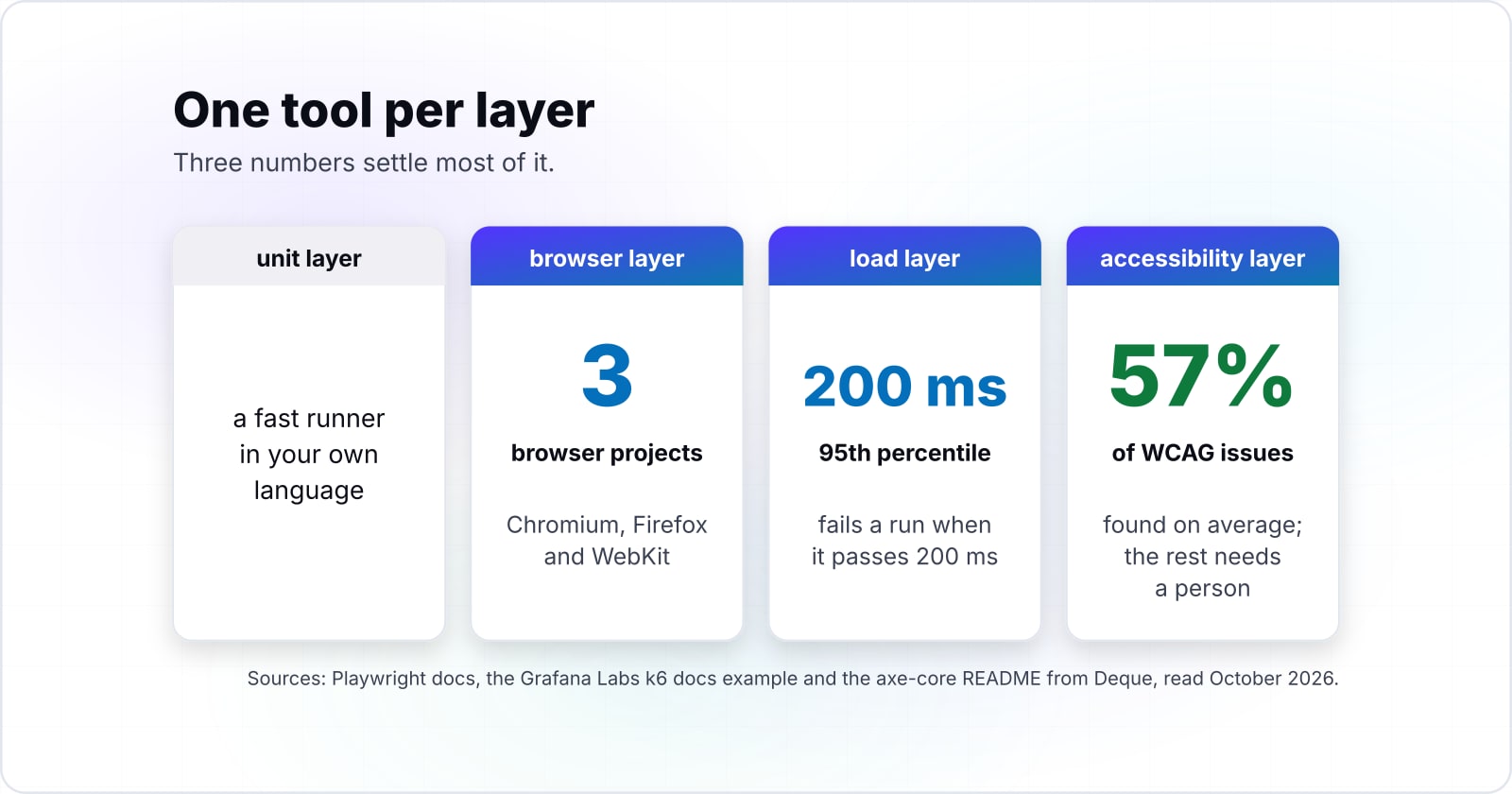
For instance, here is a worked example, with assumed inputs. Say you have a web shop built in TypeScript on Node.js with a React front end, a team of four who know JavaScript, and a checkout flow as the riskiest part. So per layer, that gives a JavaScript unit runner and an API test in the same language. Above them sit one browser runner covering Chromium, Firefox and WebKit, k6 for the checkout load with the p(95)<200 threshold from the Grafana Labs docs example, and axe-core inside the browser run. If the stack were Python or Java, the unit and integration picks would change first.
5 of 6 layers in scope
| Layer | Tool to start with | Deciding criterion |
|---|---|---|
| Unit | A runner from the TypeScript ecosystem | Language: it sits beside the code |
| Integration / API | The same runner, plus an HTTP client | Language: one report and one build step |
| Browser | Playwright: Chromium, Firefox and WebKit from one runner | Which browsers you must cover |
| Mobile | No mobile platform pickednot in scope | Your platform list: one Appium driver per platform |
| Load | k6, with a threshold such as p(95)<200 | Can it fail the build? |
| Accessibility | axe-core inside the browser run | What a machine finds: an average of 57% of WCAG issues, the rest by a person |
A worked example with assumed inputs, and a shortlist to pilot on your own code, not a ranking. Tool facts come from each project's official docs, read October 2026.
Which layer of the test pyramid needs which testing tools?#
The ISTQB Foundation syllabus v4.0.1, dated 2024-09-15, describes bottom-layer tests as small, isolated and fast and top-layer tests as slow checks of the whole system, so each layer wants a different tool.
At the bottom, the deciding criterion is language. Because unit and integration tests sit beside the code, run thousands of times a day and should fit the code's own toolset. So a Python project usually reaches for pytest, a test runner where a test is a plain function with an assert line. A Java project reaches for JUnit, the standard Java test framework. A TypeScript project uses a runner from its own ecosystem. Speed matters here, but language fit matters more, because a runner in a second language doubles the setup.
API tests sit one step up. Still, they usually run in the same runner as the unit tests, with an HTTP client added. As a result, you keep one report and one build step.
At the top, the deciding criterion changes. Because browser, mobile, load and accessibility tests drive the real system, the question becomes what each tool can reach: which browsers, which devices, which traffic shape.
So what do the standards say about picking tools? Less than people expect. ISTQB's own release notes for v4.0 say the "section on tools selection, performing pilot projects and introducing" tools into an organisation was removed from the Foundation level as too advanced. So the current syllabus explains benefits and risks but gives no selection steps. ISO/IEC/IEEE 29119-1:2022, the general part of the international software testing standard, has a published scope of general testing concepts. In short, it gives a shared vocabulary, not a tool list.
How do you choose between browser testing tools like Playwright, Cypress and Selenium?#
Decide by the browsers you must cover: the Playwright docs list a default config of 3 projects for Chromium, Firefox and WebKit, and the Cypress docs list WebKit as experimental, both read October 2026.
In practice, that one question settles more than speed or syntax does. If Safari users matter to you, WebKit coverage is a hard filter. Here the docs are direct. Playwright's browsers page, read 8 October 2026, says: "The default config when installing Playwright gives you 3 projects, Chromium, Firefox and WebKit." For context, Playwright is a browser automation library from Microsoft with its own test runner.
Cypress is a JavaScript test runner that runs tests inside the browser. The Cypress launching browsers page, read 8 October 2026, says "Cypress officially supports the latest 3 major versions of Chrome, Firefox, and Edge" and lists WebKit support as experimental. It also sets a version floor. As of 8 October 2026, the same page says Cypress cannot launch Firefox versions older than 140, and Cypress 15.0.0 through 15.18.1 set that floor at Firefox 135 (Cypress docs, read October 2026).
| Cypress release | Oldest Firefox it can launch |
|---|---|
| 15.0.0 through 15.18.1 | Firefox 135 |
| Current releases | Firefox 140 |
In short, a floor like that matters when a client locks an old Firefox build on managed machines, so check it before you commit.
Selenium WebDriver is the oldest of the three. Its documentation, read 8 October 2026, notes that "Selenium WebDriver is a W3C Recommendation", which means browser vendors ship drivers for it. Because it has bindings for many languages, it fits a Java or C# team whose unit tests already live in that language.
Each has a cost too. Playwright runs every test once per engine by default, so a suite takes longer until you trim the projects. Cypress treats WebKit as experimental. Selenium WebDriver is language bindings plus browser drivers, so you choose and wire your own test runner and reports.
Still, each tool wins somewhere. Playwright fits teams that need all three engines from one runner. Cypress fits a JavaScript team that values its in-browser debugging and can live with experimental WebKit. Selenium fits teams outside JavaScript and grids that already run it. Also, other runners exist, so keep the same criteria for any name not listed here. For the full side-by-side, read the Selenium, Cypress and Playwright comparison.
What should mobile testing tools cover for your app?#
Appium needs a driver per platform, UiAutomator2 or Espresso for Android and XCUITest for iOS, so list your target platforms before comparing mobile testing tools.
Appium is an open source framework that drives apps through the same WebDriver protocol Selenium uses. Its drivers page, read 8 October 2026, opens with a plain line: "You can't use Appium without a driver!" However, each driver covers its own targets. UiAutomator2 and Espresso target Android applications. XCUITest targets iOS. All three list native, hybrid and web modes.
So the deciding criterion at the mobile layer is your platform list. Write down every platform and every app mode first. A native Android app, a hybrid app with web views and a mobile website are three different jobs, even when one person tests all of them.
But a web runner does not cover a native app. Playwright and Cypress drive browsers, so they can test a mobile website in a small viewport, but they cannot tap through a native Android screen. If the app is native, the mobile layer needs its own tool and its own devices or emulators.
Also check how the drivers are installed and kept current. The Appium introduction treats drivers as separate packages, installed one by one with appium driver install. That gives flexibility, but it means one more version to track per platform.
How do you pick a load testing tool such as k6 or Apache JMeter?#
Pick the load tool that can fail a build: the Grafana Labs k6 Thresholds page, read October 2026, sets p(95)<200 in its example and the example run passes at 148.21 ms.
A load test that only produces a chart is a one-off event. But a load test with a threshold is a gate. Grafana k6 is a load testing tool where tests are JavaScript files. In its thresholds docs, read 8 October 2026, thresholds are "the pass/fail criteria" for test metrics. When one fails, k6 exits with a non-zero exit code, and a CI job reads that as a failed build.
Show data table
| Item | Value |
|---|---|
| threshold set in the docs example, p(95)<200 | 200 |
| p(95) measured in the docs example run | 148.21 |
The example run passes because 148.21 ms is under the 200 ms threshold.
In short, the example passes with room to spare, and the same file would fail the build the day the 95th percentile crossed the line.
Apache JMeter is the older choice, a Java desktop tool for building load tests. Its getting started guide, read 8 October 2026, says to build the test plan in GUI mode. Then you run the load test in CLI mode, and the guide adds "Don't run load test using GUI mode !" It can also write results to a CSV file and an HTML report.
Both can gate a build, so the difference is where the test lives. A k6 test is code that sits in the repository next to the app. In contrast, a JMeter plan is an XML file built in a desktop tool. Pick k6 if your team reviews tests as code. Pick JMeter if testers who do not write code own the load layer, or if a JMeter suite already exists.
How much can an accessibility testing tool find on its own?#
The axe-core README from Deque Systems lists an average of 57% of WCAG issues found automatically, as of October 2026, so the rest still needs a person.
axe-core is an open source accessibility rules engine from Deque Systems. Once a page renders, it checks it against rules mapped to WCAG, the Web Content Accessibility Guidelines. The axe-core README, read 8 October 2026, says "you can find on average 57% of WCAG issues automatically".
Show data table
| Segment | Value (%) | Share | Source |
|---|---|---|---|
| Found automatically by axe-core | 57 | 57% | Deque Systems, axe-core README, read 8 October 2026; 43% is arithmetic (100 minus 57) |
| Left for manual review | 43 | 43% | Arithmetic: 100 minus the 57% the README prints |
axe-core finds 57% of WCAG issues on average; 43% is left for manual review.
The takeaway is to split the work. An automated checker belongs in every browser test run, because it is cheap and it catches regressions the moment they land. Then a manual review covers the rest, such as whether alt text makes sense or whether a keyboard path is usable.
Playwright's own accessibility testing guide agrees. It says many accessibility problems "can only be discovered through manual testing." For the manual half and the wider tool set, read the guide to web accessibility testing tools.
Which official docs do you build the first per-layer suite from?#
Build from the Playwright intro, then its browsers page and accessibility testing guide, then the k6 Thresholds page, in that order.
Use the official pages, not a tutorial. Because they match the current version, and they are what you will reread when something breaks.
- 1
Playwright intro
Install, write a first test, run it.
- 2
Playwright browsers
Trim the projects to the browsers you need.
- 3
Playwright accessibility testing
AxeBuilder inside a test.
- 4
k6 thresholds
A threshold that fails the run.
- Playwright intro: install with
npm init playwright@latest, write a first test and run it withnpx playwright test. - Playwright browsers: the default projects for Chromium, Firefox and WebKit, and how to trim them to the browsers you need.
- Playwright accessibility testing: the
@axe-core/playwrightpackage and theAxeBuilderclass that runs axe-core inside a test. - k6 thresholds: a threshold on
http_req_durationthat fails the run, and the exit code your CI reads.
Finally, your unit layer comes from your own language's runner page, such as the pytest getting started page or the JUnit user guide.
What is the smallest test that covers two layers at once?#
A Playwright test that loads a page and runs axe-core through AxeBuilder checks the browser and accessibility layers together.
After npm init playwright@latest, add the @axe-core/playwright package to the project. Then save this file in the tests folder:
import { test, expect } from '@playwright/test';
import AxeBuilder from '@axe-core/playwright';

test('home page has no detectable accessibility issues', async ({ page }) => {
  await page.goto('https://your-site.com/');
  const results = await new AxeBuilder({ page }).analyze();
  expect(results.violations).toEqual([]);
});
Run it with npx playwright test. With the default config, the same test runs once per browser project, so one file covers three engines. The four steps come straight from the Playwright docs: import the test runner and AxeBuilder, open the page, run the scan, and expect no violations.
When is a per-layer toolchain the wrong fit?#
A short-lived prototype or a solo project is a wrong fit for a full per-layer toolchain; a unit runner plus manual checks is the better start.
The ISTQB syllabus (v4.0.1, September 2024) lists a risk that applies here: "Using a test tool when manual testing is more appropriate." Three cases fit that warning.
First, a prototype that will be thrown away in weeks. Because the setup never pays back, write unit tests for the tricky logic and click through the rest by hand.
Second, a solo developer on a small site. Here, one unit runner plus a manual pass before each release covers most of the risk. Add a browser runner when the same manual check has bitten you twice.
Third, exploratory work on a new feature. Because scripts only check what someone already thought of, a person exploring finds what no script was told to check. For that layer, read exploratory testing with Rapid Reporter.
| Case | The better start |
|---|---|
| A prototype thrown away in weeks | Unit tests for the tricky logic; click through the rest by hand |
| A solo developer on a small site | One unit runner plus a manual pass before each release |
| Exploratory work on a new feature | A person exploring, not a script |
Where do you go from here?#
Start with the layer that hurts most today, then take the browser automation comparison or the accessibility tools guide for the next decision.
If flaky browser tests are the pain, read the Selenium, Cypress and Playwright comparison. When audits keep finding the same barriers, read the accessibility testing tools guide. And for AI features in test tools, read AI and ML in software testing.
If you want people to run a layer with you, see QA specialists you can hire, CI and CD pipeline work or accessibility testing. Still, the docs linked above are enough on their own to start.