Selenium Cypress or Playwright: choosing the right automation testing tool by how it drives the browser
Feature tables disagree because they list results, not causes. Where the test code runs and which wire carries each command explain every limit you will hit, from a second tab to Safari.
Which is better, Selenium Cypress or Playwright?#
Because each tool documents how it reaches the browser, that is where the answer comes from. First, Selenium's components page puts it plainly: "WebDriver talks to a browser through a driver." Next, Cypress's own Why Cypress page says "Cypress is executed in the same run loop as your application." Then Playwright's browsers page says "Each version of Playwright needs specific versions of browser binaries to operate."
So those three lines predict most rows of any Cypress vs Playwright vs Selenium table. If a tool lives inside the page, it can touch the app directly, but it cannot easily leave the page. In contrast, a tool that drives the browser from outside can open tabs and use any language with a client. Then a tool that ships its own browser builds can promise the same behaviour on every machine. However, it can only promise that for the builds it ships.
What does picking by mechanism save a test team?#
A framework picked by feature list costs a rewrite the day the suite needs a second tab, Safari or Java, and the drive mechanism predicts that day before the first test. So the saving in any Playwright vs Cypress vs Selenium choice is the rewrite you never start.
For example, take one team, with the assumptions stated up front. Say a team writes its tests in Java, must cover Safari, and has a checkout that opens a payment page in a second tab. But Cypress is out twice, by its own trade-offs page. It says "The only language we'll ever support is the language of the web" and "Cypress does not support controlling more than 1 open browser at a time." So the real choice is Selenium vs Playwright, since both have Java clients.
Then Safari decides it. Selenium's browser docs list Safari among the browsers it drives. Playwright instead runs its own WebKit build, which its config names "Desktop Safari" as a device profile. So if the team must sign off on the Safari app itself, Selenium fits. If the WebKit engine is enough, Playwright fits and adds its retries.
In practice, each team can list its language, its browsers and its tab needs before the first test is written. Once each item is a yes or no check against a mechanism, the pick stops being a matter of taste.
Selenium passes every requirement
Selenium: passes
W3C WebDriver commands through a browser driver, from outside the browser
Cypress: Ruled out by language, browsers, tab needs
"The only language we'll ever support is the language of the web" (trade-offs page)
Playwright: Ruled out by browsers
"Each version of Playwright needs specific versions of browser binaries to operate." (browsers page)
| Tool | Limit | Documented line | Rules it out now |
|---|---|---|---|
| Cypress | language | "The only language we'll ever support is the language of the web" (trade-offs page) | Yes |
| Cypress | browsers | "Cypress has experimental support for WebKit, Safari's browser engine." (launching browsers) | Yes |
| Cypress | tab needs | "Cypress does not support controlling more than 1 open browser at a time. You can test multiple tabs, however, using our @cypress/puppeteer plugin." (trade-offs page) | Yes |
| Playwright | language | Its languages page lists JavaScript and TypeScript, Python, Java and .NET | No |
| Playwright | browsers | "Each version of Playwright needs specific versions of browser binaries to operate." (browsers page) | Yes |
How does each tool actually drive the browser?#
Selenium sends W3C WebDriver commands through a browser driver, Cypress runs test code inside the browser beside the app, and Playwright speaks its own protocol to browser builds pinned per release. So those are three different places for the test code to live.
Selenium: commands from outside the browser#
First, start with Selenium. The W3C WebDriver draft of 2 July 2026 opens with "WebDriver is a remote control interface". There, your test runs in its own process, in any language with a Selenium client. Then each step becomes a request to a driver, such as the one for Chrome or Firefox, and the driver tells the browser what to do. As a result, the test sees the page the way a user does, one command at a time.
Cypress: code inside the page#
But Cypress turns that around. Its Why Cypress page says that most tools "operate by running outside of the browser", while Cypress runs in the same loop as the app. Also, a Node server process works beside it for anything the page cannot do. Because the test shares the page's run loop, it can read the app's state, stub its network calls and see each change as it lands.
Playwright: its own protocol and pinned builds#
Playwright sits outside the browser like Selenium, but it does not use the W3C wire. Instead, it talks to the browser over its own protocol, and each release pins exact browser builds. But for Chromium it can also attach over the Chrome DevTools Protocol. Its BrowserType reference says that route is "only supported for Chromium-based browsers" and calls it "significantly lower fidelity" than its own protocol.
What does each mechanism make easy, and what does it rule out?#
Where the test code runs sets the limits: Cypress, living inside the page, drives one browser at a time in JavaScript, while Selenium and Playwright drive tabs and windows from outside it. So the table below sets out each limit next to the mechanism that causes it.
Cypress's trade-offs page states its limits openly. For example, each test is bound to one superdomain, and the cy.origin command lets a test cross to another origin. On tabs, it says "You can test multiple tabs, however, using our @cypress/puppeteer plugin." Also, its browser list covers Chrome-family browsers, Edge and Firefox, with WebKit marked experimental.
In contrast, Playwright's model is built for many pages. Its pages guide says "Each browser context can host multiple pages (tabs)." Also, each test gets its own browser context, which the docs describe as an incognito-like profile. And its languages page lists JavaScript and TypeScript, Python, Java and .NET.
Finally, Selenium keeps the widest language list, because the W3C wire is language-neutral. Its first-script docs carry examples in Java, Python, C#, Ruby, JavaScript and Kotlin.
Selenium vs Cypress vs Playwright, side by side#
| Requirement | Selenium | Cypress | Playwright |
|---|---|---|---|
| Where test code runs | Its own process, outside the browser | Inside the browser, beside the app | Its own process, outside the browser |
| Wire to the browser | W3C WebDriver through a driver; BiDi adds a WebSocket | Same run loop as the app, plus a Node server process | Playwright protocol; CDP attach for Chromium only |
| Test languages | Java, Python, C#, Ruby, JavaScript, Kotlin | JavaScript and TypeScript only | JavaScript and TypeScript, Python, Java, .NET |
| Browsers | Chrome, Edge, Firefox, Safari, through each vendor's driver | Chrome family, Edge, Firefox; WebKit experimental | Chromium, Firefox, WebKit builds pinned per release; Chrome and Edge channels |
| Second tab or window | Yes, from outside | One browser at a time; tabs through the @cypress/puppeteer plugin | Yes, many pages per browser context |
| Second origin in one test | Yes | Through cy.origin | Yes |
Source: Selenium, Cypress and Playwright documentation pages linked in this guide, read 8 October 2026.
How long does each tool wait for an element by default?#
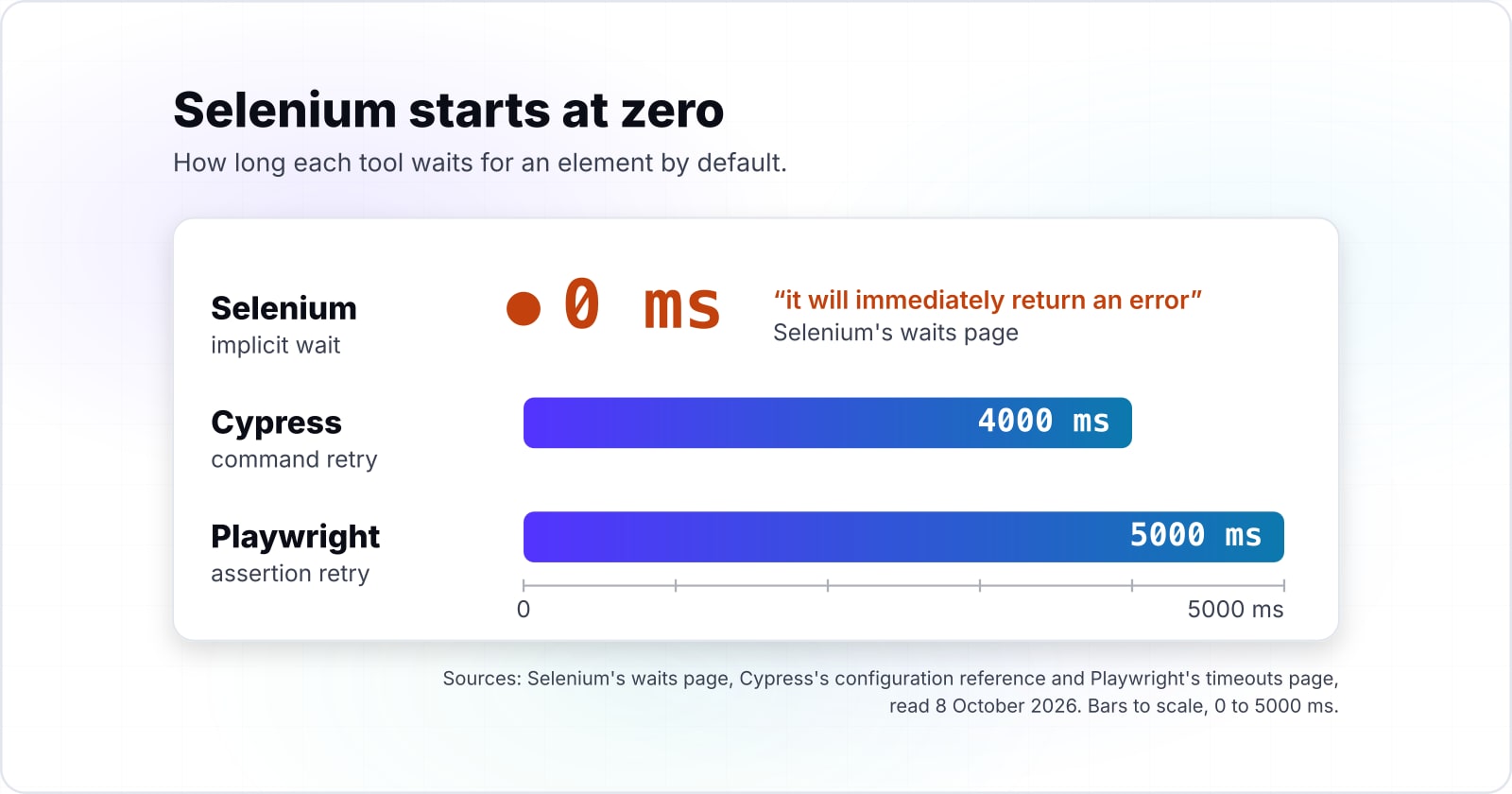
Selenium's docs set the implicit wait to 0 ms, while Cypress's docs retry a command for 4000 ms and Playwright's docs retry an assertion for 5000 ms, as printed in October 2026. So that gap explains much of what teams call flakiness.
Selenium's waits page is direct about it: "The default value is 0, which means that if the element is not found, it will immediately return an error." So an outside driver that waits for nothing leaves every wait to the test author. Then explicit waits fix it, but someone has to write each one.
But the two other tools retry by default. Cypress's configuration reference sets defaultCommandTimeout to 4000 milliseconds. And Playwright's timeouts page gives auto-retrying assertions "5 seconds by default" and each test 30 seconds. Since both retry while the page settles, they absorb most of the small timing gaps that make a test fail now and then.
Show data table
| Item | Value |
|---|---|
| Cypress command timeout | 4,000 |
| Playwright assertion timeout | 5,000 |
| Playwright test timeout | 30,000 |
| Cypress page load timeout | 60,000 |
Cypress and Playwright start with a retry budget of a few seconds, while Selenium's implicit wait starts at 0.
Flakiness, then, is partly a default you can change. So a Selenium suite with a sound explicit-wait helper can be as steady as the others. However, Selenium starts at zero, and the other two start with a budget.
What does WebDriver BiDi change for Selenium?#
WebDriver BiDi adds a WebSocket to a W3C WebDriver session, so Selenium can stream console, network and error events that once needed the Chrome DevTools Protocol. As a result, it closes the oldest gap between Selenium and the protocol-based tools.
Selenium's BiDi page says "It adds a WebSocket connection to WebDriver". Once it is on, scripts can react to network requests, console messages and JavaScript errors as they happen. And a test turns it on with the webSocketUrl capability. Before BiDi, each command was a request and a reply, and live events needed the Chrome DevTools Protocol, which Selenium's page calls BiDi's cross-browser replacement.
Still, the standard keeps moving. The W3C WebDriver BiDi draft is a Working Draft dated 8 October 2026. Meanwhile, WebdriverIO's protocol docs say it starts a local session "using the WebDriver Bidi protocol" by default. In short, the event gap is closing on a shared standard rather than on one vendor's protocol.
How many teams install each tool?#
npm counts 418,027,999 playwright downloads, 26,211,545 cypress and 8,480,303 selenium-webdriver from 5 September to 4 October 2026, and a download is an install, not a team. So those are npm's counts for that 30-day window, read from its downloads API.
In npm's counts for 5 September to 4 October 2026, playwright was downloaded about 16 times as often as cypress and about 49 times as often as selenium-webdriver. And that is our arithmetic on npm's figures. However, it is not market share. Because every CI run that installs a package adds a download, a package pulled in by another tool counts too.
Show data table
| Item | Value |
|---|---|
| playwright | 418,027,999 |
| puppeteer | 48,129,992 |
| cypress | 26,211,545 |
| webdriverio | 11,338,452 |
| selenium-webdriver | 8,480,303 |
playwright leads the JavaScript installs by a wide margin, and npm sees only Selenium's JavaScript client.
Also, the count misses most Selenium users. Selenium's Java, Python and C# clients live in other registries, so npm sees only its JavaScript client. For that reason, the number shows where JavaScript projects are moving. But it cannot rank the tools for a Java team.
What are Playwright's pros and cons, and what are the alternatives?#
Playwright gives one API across Chromium, Firefox and WebKit in JavaScript, Python, Java and .NET, and its cost is browser builds pinned to each release plus a weaker Chromium-only attach. So the Playwright pros and cons both come from owning its protocol and its browsers.
First, the pros follow from that ownership. Its intro page says it "supports Chromium, WebKit and Firefox on Windows, Linux and macOS". And it bundles a test runner, assertions, isolation and parallel runs. Then the pinned builds mean a test behaves the same on a laptop and in CI.
But the cons come from the same place. First, you test Playwright's browser builds, not the exact Safari app your users run. Second, attaching to a running Chromium over CDP is "significantly lower fidelity", in its own words. Third, its Selenium Grid page marks that link as experimental. It "only works for Google Chrome and Microsoft Edge", and it relies on a CDP socket that Selenium may drop.
The alternatives to Playwright are the other two mechanisms, plus two more tools. First, Selenium is the choice for real Safari, a Grid you already run, or a language Playwright lacks. Then Cypress fits a JavaScript app tested one tab at a time, where reading the app's own state helps. Beyond those, WebdriverIO runs on WebDriver and BiDi. Puppeteer is the name in Cypress's own multi-tab plugin, @cypress/puppeteer. In npm's counts for 5 September to 4 October 2026, puppeteer had 48,129,992 downloads and webdriverio 11,338,452.
What does a first test look like in each tool?#
The same check, open a page and confirm what it shows, fits in one short file per tool, and the shape of each file shows its mechanism. Each file below comes from that project's own first-test docs.
// 1. Selenium WebDriver (npm install selenium-webdriver): an explicit driver session
const { Builder, Browser } = require('selenium-webdriver');
const assert = require('assert');

(async function firstTest() {
  const driver = await new Builder().forBrowser(Browser.CHROME).build();
  try {
    await driver.get('https://www.selenium.dev/selenium/web/web-form.html');
    assert.equal('Web form', await driver.getTitle());
  } finally {
    await driver.quit();
  }
})();

// 2. Cypress (a spec file in the Cypress app): commands queued inside the browser
describe('My First Test', () => {
  it('finds the content "type"', () => {
    cy.visit('https://example.cypress.io');
    cy.contains('type');
  });
});

// 3. Playwright Test (tests/example.spec.ts, after npm init playwright@latest)
import { test, expect } from '@playwright/test';

test('has title', async ({ page }) => {
  await page.goto('https://playwright.dev/');
  await expect(page).toHaveTitle(/Playwright/);
});
When you read the shapes, the mechanism shows. Selenium opens and closes a driver session by hand. Cypress queues commands, and cy.contains fails on its own if the text never shows. And Playwright hands the test a page and waits inside the assertion.
Which official pages should the first suite be built from?#
Build from the project's own docs in order: install, first test, browsers, then waits or timeouts, because those four pages decide whether the first suite is stable. Each list below is in build order.
- Step 1
Install
Playwright: Installation, npm init playwright@latest, then npx playwright test.
- Step 2
First test
Playwright: Writing tests. Cypress: Introduction to Cypress. Selenium: First script.
- Step 3
Browsers
Playwright: Browsers. Cypress: Launching browsers. Selenium: Grid, across machines and browsers.
- Step 4
Waits or timeouts
Playwright: Timeouts. Cypress: Configuration. Selenium: Waits.
For Playwright:
- Installation: npm init playwright@latest, then npx playwright test.
- Writing tests: the test and expect pair, page.goto and auto-waiting.
- Browsers: the pinned builds and the Chrome and Edge channels.
- Timeouts: the test and assertion budgets.
For Cypress:
- Introduction to Cypress: cy.visit, cy.contains and how commands retry.
- Launching browsers: which browsers it runs, and which are experimental.
- Configuration: defaultCommandTimeout and the other budgets.
For Selenium:
- First script: a session, a page, a check and quit.
- Waits: implicit and explicit waits, set before the suite grows.
- Grid: running the same tests across machines and browsers.
When is each one the wrong tool?#
Cypress is the wrong tool for a flow that drives two browsers at once, and Playwright is the wrong tool for a suite that must run on an existing Selenium Grid beyond Chrome and Edge. Selenium has its own wrong case too.
First, take a chat app where two users talk in two browsers. Cypress's trade-offs page, read in October 2026, rules it out: "Cypress does not support controlling more than 1 open browser at a time." So use Playwright, which opens two contexts in one test, or Selenium with two drivers.
Next, take a team with a large Selenium Grid that runs Firefox and Safari nodes. The Playwright automation tool links to a Grid only for Chrome and Edge, and it marks that link experimental. So keep that suite on Selenium, and add BiDi where you need live events.
Finally, take a small JavaScript team that wants waits handled for them and has no time to write a wait helper. Selenium's implicit wait starts at 0, so every timing gap is theirs to close. Cypress or Playwright will serve them better, because both retry by default.
Where to go from here#
For tool selection beyond the browser, read the guide to choosing testing tools; for the suite itself, QA software engineers and a CI pipeline are the next two steps. And each route below stands on its own.
The wider question of which tools a project needs is in choosing the right testing tools for your project. Deciding what to automate at all comes before any framework, and how manual testing improves automation quality covers that. For accessibility checks inside the chosen framework, see web accessibility testing tools. Where AI-assisted testing sits beside a scripted suite is in AI and ML in software testing.
If you want people to build the suite, QA software engineers can write and run it. To run it on every pull request, a CI and CD pipeline is the next step. Either way, the docs listed above are enough to pick Selenium Cypress or Playwright and ship a first suite on your own.