A web accessibility introduction: WCAG 2.2, the laws that cite it, how to make a website accessible, and a checklist
Most sites fail the same few checks, and the standard behind them is smaller than its reputation. Here is how big it is, which laws point to it, how to make a site accessible in order, and a checklist for design and code.
What belongs in a web accessibility introduction for a product team?#
Web accessibility means sites people with disabilities can use, per the W3C, yet WebAIM detected WCAG 2 failures on 95.9% of one million home pages in 2026.
The W3C puts it plainly in its introduction to web accessibility: websites and tools should be "designed and developed so that people with disabilities can use them". In practice, that means people can perceive a page, find their way around it, and use its controls. And they can do so by sight, by sound, by keyboard or by voice.
WCAG, the Web Content Accessibility Guidelines, is how the W3C turns that goal into tests. Each test is a statement you can check as true or false on a page. Because the tests are fixed, two teams can check the same page and reach the same answer.
Yet the measured state of the web is not close. The WebAIM Million 2026 report found detected WCAG 2 failures on 95.9% of one million home pages, up from 94.8% in 2025. So nearly every site starts from the same place, with work to do.
94.8%
WebAIM Million 2025
95.9%
WebAIM Million 2026
Share of one million home pages with detected WCAG 2 failures: 94.8% in 2025 and 95.9% in 2026.
| Option | share of one million home pages |
|---|---|
| WebAIM Million 2025 | 94.8% |
| WebAIM Million 2026 | 95.9% |
Source: WebAIM, The WebAIM Million 2026
A good web accessibility introduction therefore covers a few things. First, it says who the work serves. Then it shows how WCAG is built, how much of it a target asks for, and which laws point to it. Finally, it says how to make a website accessible, in order, with a short checklist for design and code. Each section below takes one of them in turn.
Who does web accessibility serve, and how many people is that?#
The WHO estimated in 2023 that 1.3 billion people, 16% of the world's population, experience significant disability, and temporary or situational limits widen that audience further.
The World Health Organization's fact sheet on disability and health, dated 7 March 2023, states it directly: "An estimated 1.3 billion people experience significant disability". That is about one person in six. Some are blind or have low vision. Others are deaf, have limited movement in their hands, or process text differently.
However, the group is wider than permanent disability. The W3C lists people with "temporary disabilities" such as a broken arm or lost glasses. It also lists people with "situational limitations", such as bright sunlight or a place where they cannot play audio. For example, anyone reading a phone outdoors at noon is helped by good contrast. Likewise, anyone on a quiet train is helped by captions on video with sound.
So the case a team takes to its budget holder is simple: accessible sites reach more people, and the errors are countable. WebAIM's 2026 report found an average of 56.1 detected errors on each home page in its sample. As a result, a team can state its starting count, fix it, and report the new count. That is a result anyone can check.
Also, the W3C's business case page makes the wider point. It treats accessibility as a product decision as well as a legal one. In short, the work is funded for the same reason any other product work is: more people can use what you built.
How do WCAG's principles, guidelines and success criteria fit together?#
The W3C's WCAG 2.2 layers four principles over 13 guidelines and 86 testable success criteria, and the Operable principle holds the most, at 34.
At the top sit the four principles. The W3C's Understanding WCAG 2.2 page defines each one in a single line:
- Perceivable: "Information and user interface components must be presentable to users in ways they can perceive."
- Operable: "User interface components and navigation must be operable."
- Understandable: "Information and the operation of user interface must be understandable."
- Robust: content must work reliably across "a wide variety of user agents, including assistive technologies."
Under the principles sit 13 guidelines, such as text alternatives or keyboard access. But the guidelines are goals, so they are not tested directly. Instead, each guideline holds success criteria, and those are the tests. For example, a criterion such as 1.1.1 Non-text Content is either met on a page or it is not.
When you count the WCAG 2.2 Recommendation of 12 December 2024, the weight is uneven. Operable and Perceivable hold most of the tests, while Robust holds only two.
Show data table
| Item | Value |
|---|---|
| Perceivable | 29 |
| Operable | 34 |
| Understandable | 21 |
| Robust | 2 |
Operable and Perceivable hold most of the tests, while Robust holds only two.
That shape tells a team where the work sits. Most of it is about whether people can see and hear content, and whether they can move through it by keyboard, pointer or voice. Meanwhile, the Robust tests mostly ask that the page's code expose names and roles that assistive software can read.
How much of WCAG 2.2 does a Level AA target actually cover?#
A Level AA target under the W3C's WCAG 2.2 means meeting 55 of its 86 success criteria, the 31 at Level A plus the 24 at Level AA.
Each success criterion carries one of three levels: A, AA or AAA. And the levels stack. So a page that meets Level AA meets every Level A criterion as well. Therefore a contract or law that says "AA" asks for two levels, not one.
Show data table
| Segment | Value (success criteria) | Share |
|---|---|---|
| Level A | 31 | 36% |
| Level AA | 24 | 27.9% |
| Level AAA | 31 | 36% |
A Level AA target is the first two parts, 55 criteria.
Level AAA is rarely a target for a whole site. The WCAG 2.2 Recommendation advises against requiring it as a general policy. After all, some content cannot meet every AAA test. In practice, AA is the level that contracts and laws name.
Also, WCAG 2.2 changed the count. The W3C's What's New in WCAG 2.2 says it "provides 9 additional success criteria since WCAG 2.1". It also states that "4.1.1 Parsing is obsolete and removed from WCAG 2.2". So a team moving from a 2.1 target adds nine tests and drops one.
The dates matter for the same reason. The W3C's WCAG overview records that WCAG 2.2 was published on 5 October 2023, with an update on 12 December 2024. Since each version adds to the one before, a site that meets 2.2 at AA also meets 2.1 at AA, apart from the removed Parsing test.
Which laws cite which WCAG version, and from when?#
The US Justice Department's ADA Title II rule names WCAG 2.1 Level AA from April 26, 2027, while EU law points to the EN 301 549 v3.2.1 standard.
What follows describes what the rules say. It is not legal advice, so confirm your own scope with counsel.
In the United States, the Justice Department's ADA Title II web rule covers state and local governments. Its page says: "Version 2.1, Level AA is the technical standard for state and local governments". Then an Interim Final Rule, published on April 20, 2026, amended the deadlines. Under that rule, the Justice Department page gives April 26, 2027 for public entities with a population of 50,000 or more. Smaller entities and special district governments have until April 26, 2028.
Note the version. The rule names 2.1, not 2.2. But a team that meets 2.2 at AA also meets what the rule asks, because 2.2 contains 2.1's tests apart from Parsing.
In the European Union, two laws matter. First, the Web Accessibility Directive covers public sector websites and apps. The European Commission's web accessibility page says the EU's legal requirements rest on technical criteria in the "harmonised European standard EN 301 549 v3.2.1". And that standard carries the WCAG tests for web content.
Second, the European Accessibility Act reaches a set of private products and services. According to the European Commission's page on the Act, Member States had to bring it into national law by June 2022. The Act itself, Directive (EU) 2019/882, says those national rules apply from 28 June 2025, so the obligations are in force now.
Still, the legal risk of an inaccessible site goes deeper than a version number, and what an inaccessible website can cost covers it. For the version detail, 2.0 against 2.1 against 2.2, read the WCAG versions compared.
| Law | Who it covers | What it points to | Date |
|---|---|---|---|
| ADA Title II web rule (US) | Public entities with a population of 50,000 or more | WCAG 2.1 Level AA | April 26, 2027 |
| ADA Title II web rule (US) | Smaller entities and special district governments | WCAG 2.1 Level AA | April 26, 2028 |
| Web Accessibility Directive (EU) | Public sector websites and apps | EN 301 549 v3.2.1 | See the Commission page |
| European Accessibility Act (EU) | A set of private products and services | See the Commission page | National law by June 2022; applies from 28 June 2025 |
How do you make a website accessible?#
Per the W3C, you make a website accessible in four steps: set WCAG 2.2 Level AA as the target, run its Easy Checks, fix the commonest failures, then build from its tips.
Each step has a W3C page behind it, and the order matters because each step sets up the next one.
- Set the target. The W3C's guide to accessibility policies says "The generally accepted level of conformance in many countries is Level AA". So write WCAG 2.2 Level AA into the policy. Name the version too, because the count of tests changes with it.
- Take a first look. The W3C's Easy Checks give "step-by-step instructions to get a rough idea" of how accessible a page is. Run them on the home page, one form and one long content page, and write down what fails.
- Fix the commonest failures first. WebAIM's 2026 scan found that six failure types made up 96% of detected errors, so those six lead the backlog. The next section ranks them and names who fixes each one.
- Build new work from the tips. The W3C's design and develop overview splits its getting-started tips into writing, designing and developing. Hand each list to the people who do that work, so new pages arrive accessible instead of joining the backlog.
Then run the loop again after each release. Because step two is rough by design, it finds problems but never proves they are gone. In practice, that is fine for a first month, which is all a web accessibility introduction should plan. The section on the wrong tool says when a team needs more.
Which six failures should a team fix first, and who owns them?#
WebAIM's 2026 scan found 96% of detected errors fall into six types, led by low contrast text on 83.9% of one million home pages.
The WebAIM Million 2026 report puts it in one line: "96% of all errors detected fall into these six categories". So the first sprint writes itself. Fix the six types in order of how common they are, and most detected errors go away.
Show data table
| Item | Value |
|---|---|
| Low contrast text | 83.9 |
| Missing alternative text for images | 53.1 |
| Missing form input labels | 51 |
| Empty links | 46.3 |
| Empty buttons | 30.6 |
| Missing document language | 13.5 |
Low contrast text leads, on 83.9% of home pages, so the first sprint starts with the colour palette.
Each failure has a natural owner, and naming the owner is what makes a sprint move. For instance, the W3C's guide to accessibility policies suggests a policy say "who or what departments are responsible". A split that fits most teams looks like this:
- Design owns low contrast text, because contrast is set in the colour palette.
- Development owns missing alt text, missing labels, empty links, empty buttons and missing document language. Each is a markup fix.
- Content owns the words inside alt text and link text, because only the author knows what an image is for.
A worked example with WebAIM's averages#
An average home page carries 56.1 detected errors, per the WebAIM Million 2026. If 96% of those fall into the six types, clearing all six addresses about 53.9 errors on that example page. That leaves about 2.2 detected errors of other kinds.
The errors your first sprint clears
Put in your page's detected error count and the share of errors in the failure types you fix; it returns the errors cleared and the errors left.
Errors those types account for
53.9
- Errors that remain
- 2.2
The defaults are an example built on the WebAIM Million 2026 averages and the 96% share.
But note what the tools cannot see. WebAIM's own report warns that "not all conformance failures can be automatically detected". So a clean scan is a starting point, not a finish line. That limit comes back in the section on the wrong tool for the job.
In every case, the base of a fix is plain, correct HTML. MDN's accessibility guide builds on semantic markup, and its HTML lesson says to use "The right element for the right job". Then most fixes become small edits rather than new features.
What goes on a short accessibility checklist for designers and developers?#
A short accessibility checklist splits the W3C's 27 getting-started tips by who acts on them: 10 for designers, 10 for developers and 7 for whoever writes the content.
The W3C's own tips pages, read on 3 October 2026, already hold the split. So two lists of ten cover the design and code work.
Show data table
| Segment | Value (tips) | Share |
|---|---|---|
| Designing | 10 | 37% |
| Developing | 10 | 37% |
| Writing | 7 | 25.9% |
Designers and developers each get ten tips, and whoever writes the content gets seven.
The number after each item is the WCAG 2.2 success criterion it helps meet. Look any of them up in the W3C's How to Meet WCAG quick reference.
A checklist for designers#
These ten come from the W3C's designing tips.
| Designer checklist item | WCAG 2.2 success criterion |
|---|---|
| Text contrast. "Foreground text needs to have sufficient contrast" with its background, buttons and text on images included. | 1.4.3 Contrast (Minimum) |
| Colour is never the only signal. In the W3C's words, "color should not be the only way information is conveyed". | 1.4.1 Use of Color |
| Links and buttons look interactive, with a visible focus style. | 2.4.7 Focus Visible |
| Navigation keeps the same names and places on every page. | 3.2.3 Consistent Navigation |
| Every form field has a visible label beside it. | 3.3.2 Labels or Instructions |
| Errors and confirmations are easy to spot. | 3.3.1 Error Identification |
| Headings and spacing group related content. | 1.3.1 Info and Relationships |
| Layouts work on a phone and in a zoomed window. | 1.4.10 Reflow |
| The design leaves room for captions, transcripts and text beside icons. | 1.1.1 Non-text Content |
| Carousels, video and sound that start on their own have a stop control. | 2.2.2 Pause, Stop, Hide |
A checklist for developers#
These ten come from the W3C's developing tips.
| Developer checklist item | WCAG 2.2 success criterion |
|---|---|
| "Associate a label with every form control". | 3.3.2 Labels or Instructions |
| Every informative image has alt text, and decoration has alt="". | 1.1.1 Non-text Content |
| The page language is set on the html element. | 3.1.1 Language of Page |
| Headings, lists and tables use real markup. | 1.3.1 Info and Relationships |
| Error messages say where the problem is and how to fix it. | 3.3.1 Error Identification |
| Code order matches reading order. | 1.3.2 Meaningful Sequence |
| Text still works at 200% zoom. The W3C puts it this way: "When font size is increased by at least 200%, avoid horizontal scrolling and prevent any clipping of content". | 1.4.4 Resize Text |
| Custom widgets expose a name and a role. | 4.1.2 Name, Role, Value |
| Every control works by keyboard alone. | 2.1.1 Keyboard |
| CAPTCHA is avoided where possible, or has an alternative. | 1.1.1 Non-text Content |
Where to start on the lists#
Start with contrast on the design list. On the code list, start with labels, alt text and page language. Together, those cover four of the six common failures. In short, those four items are where a web accessibility introduction turns into a team's first tickets. Meanwhile, the people who write the content get the W3C's seven writing tips, from page titles to link text.
Which documentation pages should the first fixes be built from?#
Build the first fixes from MDN's accessibility guide, then its pages on the lang attribute, the img element and the label element, and check them with the W3C's first review.
Open them in the order a build uses them:
- MDN's accessibility guide, read with its lesson HTML: A good basis for accessibility. Take one rule from them: use the correct element before reaching for anything else.
- MDN's page on the lang attribute. Take the page language, set once on the html element. The page notes that WCAG Success Criterion 3.1.1 asks for it.
- MDN's page on the img element. Take the alt attribute as "a clear and concise text replacement for the image's content", and
alt=""for decoration. - MDN's page on the label element. Take the
forattribute, matched to the input'sid. - Finally, the W3C's Easy Checks, a first review, to check the page by hand once the fixes are in.
For images and forms, the W3C's own tutorials go further. Its images tutorial sorts images by purpose, while its labels tutorial shows each way to name a control.
What does the smallest correct fix look like in code?#
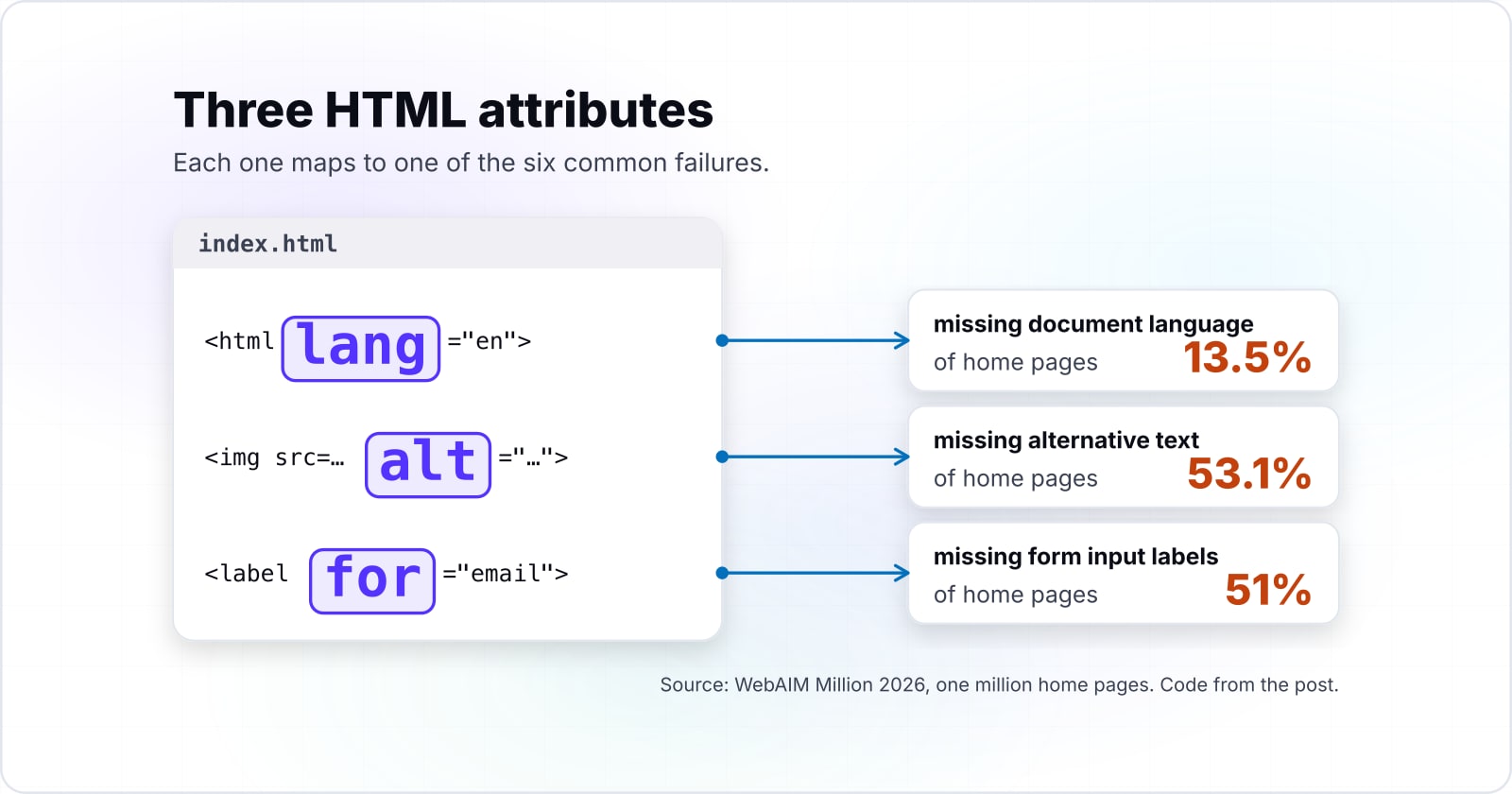
The smallest correct fix is three HTML attributes: lang on the html element, alt on every image, and a label tied to each input through for and id.
Each step below maps to one of the six common failures, and each is plain HTML with no script.
<!-- Step 1: declare the page language on the html element -->
<html lang="en">
  <body>
    <!-- Step 2: an informative image gets a text replacement -->
    <img src="team.jpg" alt="Five people reviewing a printed site map at a desk">

    <!-- Step 2, continued: a decorative image gets an empty alt -->
    <img src="divider.svg" alt="">

    <!-- Step 3: tie the label to the input by matching for to id -->
    <label for="email">Email address</label>
    <input type="email" id="email" name="email">
  </body>
</html>
First, lang="en" fixes missing document language. MDN notes that it lets assistive software pick the correct pronunciation when reading the page aloud. Second, the two alt values fix missing alternative text. The first describes what the image shows, while the empty one tells the browser the image can be skipped.
Third, the label with for="email" fixes a missing form label. As a result, the label is read when the field gets focus, and clicking the label moves focus into the field.
Yet forms go deeper than one label, with groups, errors and instructions. For those, read how to build accessible forms.
When is a six-failure first sprint the wrong tool?#
A six-failure sprint is the wrong plan when a law or contract needs proof of conformance, because that proof takes a review of all 55 Level A and AA criteria.
There are three cases where this plan is the wrong tool, and each has a better one.
When you need proof. The six types are what tools detect, not what WCAG asks. The W3C says of its own first review that "It is not a complete evaluation of accessibility". So if a law, a tender or a contract asks you to show conformance, commission a full evaluation against every Level A and AA criterion. Then read how to test web accessibility for what tools catch and what a person must check.
When someone offers an overlay. An overlay is a script that claims to fix a site from the outside. But the European Commission is direct about it: tools that do not ensure the site itself meets the standard "are not an appropriate solution". Instead, fix the markup, the colours and the content at their source.
When the site is about to be rebuilt. Fixing six failure types on a site that will be replaced next quarter spends effort twice. In that case, write the Level AA target into the new design system and templates, and test each component as it is built. Before you budget it, what website accessibility costs covers what to count.
| Case | Why the sprint falls short | What fits instead |
|---|---|---|
| You need proof of conformance | The six types are what tools detect, not what WCAG asks | A full evaluation against every Level A and AA criterion |
| Someone offers an overlay | It claims to fix a site from the outside | Fix the markup, the colours and the content at their source |
| The site is about to be rebuilt | Fixing six failure types now spends effort twice | Write the Level AA target into the new design system and templates |
Where to go next#
The next reads cover how WCAG versions differ, what testing tools catch and miss, and how to label a form, each one step deeper than this. The last one shows these checks on live sites.
- For the version question, read the WCAG versions compared.
- To test a site, read how to test web accessibility.
- For forms, read how to build accessible forms.
- To see these checks on live sites, read accessible website examples you can verify in a minute.
Some teams want a second pair of hands. If that is you, there is help with meeting WCAG and ADA requirements and with accessibility testing. Still, none of that is needed to start. The W3C's pages and MDN's references above are enough to plan and ship the first sprint, and this web accessibility introduction is only the first step on them.