Accessible website examples, checked one mechanism at a time
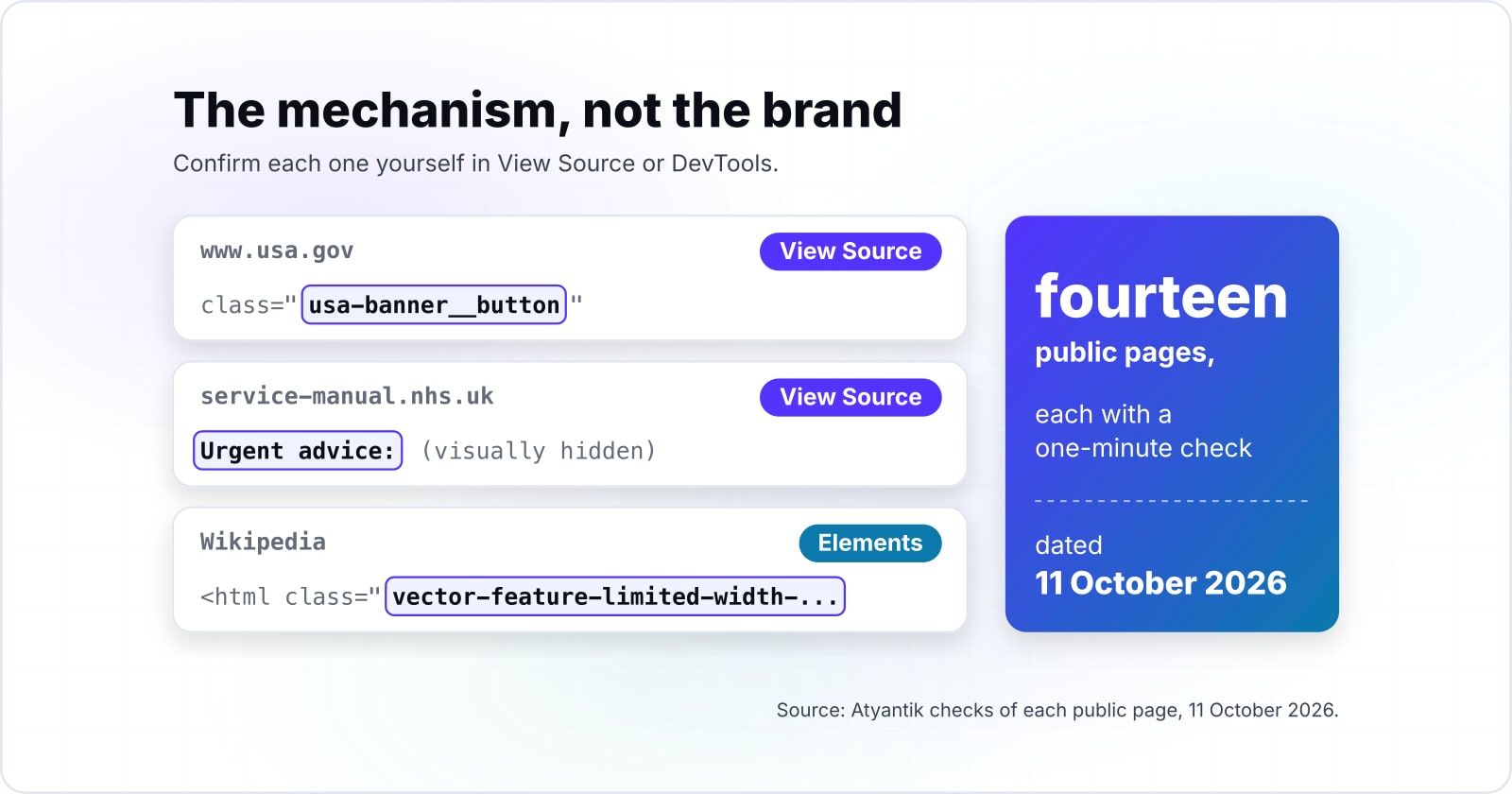
These accessible website examples are fourteen public pages, each showing one feature you can confirm in View Source or DevTools. Every check is dated, so you test the page instead of trusting a reputation.
What are accessible website examples you can actually verify?#
Accessible website examples are useful only when each one names a mechanism you can confirm yourself, so every site here comes with a one-minute check dated 11 October 2026. Each example has four parts: the page, the mechanism, the move that shows it, and the date it was last true.
The first four get a full section each. First, the U.S. Web Design System (USWDS) banner identifies official government websites. Second, the GOV.UK Design System character count shows a feature only a screen reader user hears. Then the NHS care cards show urgency carried in words as well as colour. Finally, Wikipedia shows reading preferences you can see in the markup.
After those come ten more sites in a gallery. Together they span government, health, education, commerce, media and a design system. In practice, most of their checks take one View Source search or one press of the Tab key.
Because these are live pages run by other people, any of them can change after 11 October 2026. Therefore, treat the date as part of the claim. If you look and find something else, either the page changed or the check was wrong, and both are worth knowing.
Why does a checkable example beat a list of praised sites?#
WebAIM counted detected WCAG 2 failures on 95.9% of the top 1,000,000 home pages in February 2026, so a famous name alone proves nothing about the page you open. WebAIM, Utah State University's web accessibility group, runs that count every year. Meanwhile, the share rose from 94.8% in its 2025 report, so the trend is not improving on its own.
94.8%
2025 report
95.9%
2026 report
The share of home pages with detected failures went up between the two reports, not down.
| Option | % of home pages with detected WCAG 2 failures |
|---|---|
| 2025 report | 94.8% |
| 2026 report | 95.9% |
Because almost every popular home page carries detected failures, copying a famous site copies its defects too. Instead, copy one mechanism you have checked. WebAIM's own method note in its 2026 report draws the same line: "Absence of detected errors does not indicate that a page is accessible or conformant."
In practice, that sentence cuts both ways. A clean automated scan does not make a site a model. However, a page with failures elsewhere can still hold one pattern worth copying. So the unit worth borrowing is the mechanism, not the brand.
For a team, the gain is time. Because a checked pattern comes with its markup and its reasoning, it saves a design and build cycle. However, a reputation comes with neither, so it saves nothing.
How does the USWDS banner tell you a .gov site is official?#
On USA.gov, checked 11 October 2026, the U.S. Web Design System banner sits above everything else and a button expands it to explain what .gov and HTTPS prove. The USWDS banner page says banners "identify official websites of government organizations in the United States."
In short, the banner turns trust into text. Collapsed, it reads "An official website of the United States government" with a "Here's how you know" button. Expanded, it explains that a .gov address belongs to an official government organisation. It also says that the lock or https:// means a secure connection to that site.
Here is the one-minute check. Open USA.gov, then open View Source and search for usa-banner. In our 11 October 2026 View Source reading, the page carried usa-banner, usa-banner__button and the "Here's how you know" text.
Next, look at the button itself. The USWDS banner markup gives it aria-expanded="false" and aria-controls pointing at the banner content. As a result, a screen reader announces a button that is collapsed, and the open state is spoken as well as shown.
While you are there, search View Source for Skip to. In the same reading, USA.gov had two skip links: "Skip to main content" and "Jump to all topics and services". That second link is a useful idea for any large site with a long topic list.
How does the GOV.UK character count talk to a screen reader?#
The GOV.UK Design System character count keeps a visually hidden polite live region, and screen reader users hear the count announcement when they stop typing. The GOV.UK Design System's character count page, read on 11 October 2026, states it plainly: "screen reader users will hear the count announcement when they stop typing."
As a result, there are two counts. Sighted users see a message under the textarea that updates as they type. Meanwhile, screen reader users get a separate message, held back until they pause. Therefore the announcement never talks over the person typing.
In particular, the pause is short. In our 11 October 2026 reading of the govuk-frontend script on its main branch, the hidden count element carries aria-live="polite". The script updates the announcement once no key has been released for 1000 ms.
Also, the component never blocks input. The page says users can type past the limit and are told they have entered too many characters. Because of that, a person can paste a full answer and then edit it down. If JavaScript is off, users see a static line saying how many characters they can enter.
To check it in under a minute, open the character count page and type into an example. Then open the Elements panel and look for the hidden element with aria-live="polite" next to the textarea. The live regions post explains why polite, not assertive, is the right choice here.
Step 1: type
Sighted users see a message under the textarea that updates as they type.
Step 2: pause
The script updates the announcement once no key has been released for 1000 ms.
Step 3: hear
Screen reader users hear the count announcement when they stop typing.
Step 4: keep typing
Users can type past the limit and are told they have entered too many characters.
How do NHS care cards show urgency without relying on colour?#
Each NHS care card heading starts with visually hidden text such as Urgent advice, so a screen reader announces the level of urgency that the colour shows on screen. The NHS care cards page gives the reason in one line: people with visual disabilities "may not recognise care cards by their colour".
There are three levels. A blue non-urgent card tells people to contact a professional such as their GP. A red urgent card is for acting quickly when it is not an emergency, for example contacting NHS 111. Finally, a red and dark grey emergency card tells people to call 999 or go to A&E.
Instead, the words do the work. In the NHS markup, the urgent card's heading starts with a span of class nhsuk-u-visually-hidden that reads "Urgent advice:". Likewise, the non-urgent card reads "Non-urgent advice:" and the emergency card reads "Immediate action required:".
| Level | Colour | Visually hidden heading text | Use |
|---|---|---|---|
| Non-urgent | Blue | Non-urgent advice: | Contact a professional such as their GP |
| Urgent | Red | Urgent advice: | Act quickly when it is not an emergency, for example contacting NHS 111 |
| Emergency | Red and dark grey | Immediate action required: | Call 999 or go to A&E |
This is WCAG 2.2 success criterion 1.4.1 applied to a health decision. The W3C's Understanding Use of Color states that colour "is not used as the only visual means of conveying information". The NHS cards meet that with text, so the colour only repeats it.
For the one-minute check, open the care cards page and search View Source for nhsuk-card--care--urgent. Then read the first span inside its heading. If your own site marks status by colour alone, the same fix applies.
Where does Wikipedia keep your text width, size and theme choices?#
On Wikipedia's Vector 2022 skin, checked 11 October 2026, the html element carries class names for limited width, font size and theme, so each preference is visible in the markup. In our reading of the Web accessibility article, those classes were vector-feature-limited-width-clientpref-1, vector-feature-custom-font-size-clientpref-1 and skin-theme-clientpref-day.
In practice, the settings come from a deliberate choice. The Wikimedia Web team's Accessibility for reading page describes an appearance menu with controls for page width, typography and dark mode. It also records that in June 2024 the default font size rose for logged-out users of Vector 2022.
Also, the same page explains why. The Wikimedia Web team's page, read on 11 October 2026, notes the old default was 14 pixels and plans 16 pixels as the new default, citing readability research and WCAG advice. Since many people read long articles, a wider choice of width and size matters more here than on most sites.
To check it, open any article and inspect the html element in DevTools. Then open the Appearance menu, change the width, and watch the class list. A preference you can read in the markup is a preference you can test.
Which other web accessibility examples can you check in under a minute?#
Ten more public sites, from GOV.UK to IKEA UK, each show one mechanism you can confirm in under a minute, all checked on 11 October 2026. Each row tests a different feature, and only the skip link appears twice. The keyboard and focus post explains why skip links and focus styles matter.
| Site | Sector | Mechanism | One-minute check | Checked |
|---|---|---|---|---|
| W3C Before and After Demo | Standards body | One site shown inaccessible and then retrofitted | Open the Before and After pages and turn on the annotations | 11 Oct 2026 |
| ADA.gov | Government | Skip link to '#main-content' | Search View Source for 'Skip to' | 11 Oct 2026 |
| IKEA UK | Commerce | "Skip listing" links past its product carousels | Search View Source for 'Skip listing' | 11 Oct 2026 |
| GOV.UK | Government | A visible label tied to the search input | Search View Source for 'Search GOV.UK', then match the label's 'for' to the input's 'id' | 11 Oct 2026 |
| NASA | Science agency | Icon buttons named with 'aria-label', such as "Pause slideshow" | Inspect the slideshow pause button in the DevTools Accessibility pane | 11 Oct 2026 |
| NHS website for England | Health | Landmarks: banner, labelled primary navigation, main and footer | Open the DevTools Accessibility pane, or search View Source for 'Primary navigation' | 11 Oct 2026 |
| University of Oxford | Education | A focus indicator on news teaser links | Press Tab onto a news teaser, or search View Source for 'focus-indicator' | 11 Oct 2026 |
| BBC | Media | Navigation animation only when no reduced-motion preference is set | Search View Source for 'prefers-reduced-motion', or emulate it in DevTools Rendering | 11 Oct 2026 |
| W3C WAI Video Captions | Standards body | A captions track on the video and a text transcript | Search View Source for '<track', then find the Text Transcript heading | 11 Oct 2026 |
| Carbon Design System | Design system | 'aria-current="page"' on the side navigation link | Search View Source for 'aria-current' | 11 Oct 2026 |
Pages checked: W3C Before and After Demo, ADA.gov, IKEA UK, GOV.UK, NASA, NHS website for England, University of Oxford, BBC, W3C WAI Video Captions, Carbon Design System.
Source: Atyantik Technologies View Source reading of each page, 11 October 2026; W3C WAI pages as linked.
Which mechanisms do these website accessibility examples share?#
The basics are common and the extras are rare. In our 11 October 2026 View Source reading, all nine gallery pages set a page language and a main landmark, while only one served a captions track.
Show data table
| Item | Value |
|---|---|
| Skip link to a same-page id | 7 |
| Page language on the html element | 9 |
| A main landmark | 9 |
| A navigation landmark with a label | 7 |
| A label tied to an input with for | 8 |
| A button named with aria-label | 5 |
| aria-current on a link | 2 |
| prefers-reduced-motion in the served HTML | 1 |
| A captions track on a video | 1 |
Page language and a main landmark were on all nine gallery pages, while a captions track was on one.
The chart is not a score. Instead, it shows which checks will find something on almost any public site and which need the right page. For example, a captions track only exists where there is a video, and only the W3C WAI page had one.
The low counts are also a floor. In that reading, only the BBC printed prefers-reduced-motion in its HTML, but other sites may keep it in a stylesheet the count did not open. Therefore, use DevTools Rendering emulation before calling a site's motion handling absent.
What do the Carbon and W3C rows add?#
The Carbon row names a standard to test against, and the W3C row shows the repairs side by side. The Carbon accessibility overview says its components follow the IBM Accessibility Checklist, "which is based on WCAG AA" and other standards. As a result, you know what to test a Carbon component against.
Finally, the W3C Before and After row teaches by contrast. The Before and After Demonstration "shows an inaccessible website and a retrofitted version of this same website", with annotations for each barrier and repair.
Which official pages should you build these patterns from?#
Build from the design systems that publish these patterns: the GOV.UK character count, the USWDS banner and the NHS care cards, each with its own markup and guidance. Each page prints working code beside the reasons for it, so a team starts from tested markup rather than a screenshot.
- Page 1
GOV.UK Design System character count: take the markup, the data-maxlength and data-maxwords options, and the guidance on when to use a limit at all.
- Page 2
USWDS banner: take the banner markup and its .gov and .mil variants, including the button with aria-expanded.
- Page 3
NHS care cards: take the three card variants and the visually hidden urgency text inside each heading.
- Page 4
W3C Understanding Use of Color: take the test any colour signal must pass before it ships.
The four pages: GOV.UK Design System character count, USWDS banner, NHS care cards, W3C Understanding Use of Color.
For accessible website design, start with the pattern your own site needs most. For example, a form-heavy service gains most from the character count, while a public body gains most from the banner.
What is the smallest accessible markup to start from?#
The smallest useful start is the GOV.UK character count markup: a labelled textarea, a data-maxlength value and a message element the script turns into a live count. The markup below follows the example on the GOV.UK Design System page, with the limit set to 200 characters.
<!-- 1. The wrapper: data-module and data-maxlength set the limit -->
<div class="govuk-form-group govuk-character-count" data-module="govuk-character-count" data-maxlength="200">
  <!-- 2. A real label tied to the textarea, and aria-describedby pointing at the message -->
  <label class="govuk-label" for="with-hint">Can you provide more detail?</label>
  <textarea class="govuk-textarea govuk-js-character-count" id="with-hint" name="withHint" rows="5" aria-describedby="with-hint-info"></textarea>
  <!-- 3. The message the script turns into a live count -->
  <div id="with-hint-info" class="govuk-hint govuk-character-count__message">
    You can enter up to 200 characters
  </div>
</div>
First, the markup works on its own as a plain textarea with a stated limit. Then, once the GOV.UK Frontend script runs, the message becomes a live count and the hidden polite region is added. Because the page states that a static message shows when JavaScript is off, the static line is the fallback, not a bug.
Test it the way you tested the original. First type a sentence, then pause, then listen with a screen reader for the count.
When is a list of ADA compliant website examples the wrong tool?#
No public body certifies a website as ADA compliant, and the Justice Department's Title II rule names WCAG 2.1 Level AA, so an example proves a mechanism, never compliance. So a list of ADA compliant website examples cannot answer a legal question about your own site.
In particular, the rule is specific. Under 28 CFR part 35 subpart H, as printed in the eCFR in October 2026, a state or local government with 50,000 or more people must meet "Level A and Level AA success criteria" in WCAG 2.1 from April 26, 2027. Smaller entities and special district governments follow from April 26, 2028.
For businesses open to the public, the U.S. Department of Justice's web guidance, read in October 2026, says they "have flexibility in how they comply". Also, the U.S. Department of Justice points to WCAG and the Section 508 Standards as helpful technical guidance. This is general information, not legal advice; for a decision about your own obligations, ask a lawyer.
So here are three cases where an example list is the wrong tool, and what to use instead:
| You need | Use instead |
|---|---|
| You need to know whether your site conforms. | Use a full audit of your own pages against WCAG 2.1 or 2.2 Level AA, with manual and screen reader testing. |
| You need evidence for a complaint or a contract. | Use a dated audit report and an accessibility statement, not a list of other sites. |
| You need to choose a tool. | Read a comparison of testing tools, because no example can tell you what a scanner misses. |
In short, an example shows that a mechanism can work. Only testing shows whether it works on your pages.
How do you run the same checks on your own site?#
Start with the six failures WebAIM found most often in February 2026, led by low contrast text on 83.9% of home pages, and check each with the same one-minute moves. WebAIM's 2026 report adds that 96% of all detected errors fall into these six types.
Show data table
| Item | Value |
|---|---|
| Low contrast text | 83.9 |
| Missing alternative text for images | 53.1 |
| Missing form input labels | 51 |
| Empty links | 46.3 |
| Empty buttons | 30.6 |
| Missing document language | 13.5 |
Low contrast text leads the six most common failures, on 83.9% of home pages.
Each failure maps to a quick check. The W3C Web Accessibility Initiative's Easy Checks page, read in October 2026, offers such checks to get "a rough idea" of a page, as a first review:
- Contrast. Check body text and button text with a contrast checker. The colour contrast post covers the ratios.
- Alt text. Inspect each meaningful image for an
altthat says what the image is for. - Labels. Click each form label and confirm the cursor lands in its field.
- Link text. Tab through the page and listen for links with no name.
- Button names. Inspect icon buttons for visible text or an
aria-label. - Document language. Read
langon thehtmlelement, which all nine gallery pages in the chart above set.
Then add the four checks from the deep examples. Press Tab once for a skip link, look for a polite live region on any counter, look for text beside every colour signal, and look for reading preferences that persist.
Where to look
View SourceString to find
usa-bannerLast checked
11 October 2026What to check on USA.gov
The USWDS banner says the site is an official government website, with a button that explains .gov and HTTPS
The move: Open View Source and search for the banner class
Only this site of the 14 is checked with this string.
| Page | Where to look | String to find |
|---|---|---|
| USA.gov | View Source | usa-banner |
| GOV.UK character count | DevTools | aria-live="polite" |
| NHS care cards | View Source | nhsuk-card--care--urgent |
| Wikipedia | DevTools | vector-feature-limited-width-clientpref-1 |
| W3C Before and After Demo | The page | No string: read the page |
| ADA.gov | View Source | Skip to |
| IKEA UK | View Source | Skip listing |
| GOV.UK | View Source | Search GOV.UK |
| NASA | DevTools | Pause slideshow |
| NHS website for England | View Source | Primary navigation |
| University of Oxford | View Source | focus-indicator |
| BBC | View Source | prefers-reduced-motion |
| W3C WAI Video Captions | View Source | <track |
| Carbon Design System | View Source | aria-current |
What should you read next?#
For the mechanisms underneath these examples, read on about live regions, keyboard focus and colour contrast, or bring in a team for a full audit. The live regions post goes deeper on the GOV.UK pattern. Also, the keyboard and focus post covers skip links, and the colour contrast post covers the most common failure.
When the one-minute checks are done, the testing tools comparison covers what scanners find and miss. For a team that wants its own site taken to WCAG 2.2 AA, there is WCAG and ADA compliance work. For manual and assistive technology testing, there is accessibility testing.
Still, the design system pages above are enough on their own to start building accessible websites. Each prints its markup and its reasons, free to read and copy.