Ecofyre low-carbon design theme for Figma: what each design choice costs in bytes, grams and access
A design file settles most of a page's image and font weight long before any code ships. Here is what those choices cost on every view, and the accessibility floors they still have to clear.
What is the Ecofyre low-carbon design theme?#
Ecofyre is a Figma UI kit for general purpose and e-commerce websites, and its cover carries a WCAG 2.2 AA badge beside a low CO2 emission badge. The Ecofyre Figma file names it "General Purpose & E-Commerce Website UI Kit". Its cover also reads "Powered by Atyantik Technologies".
0.379 g
Median mobile home page, 2,559 KB
0.312 g
Same page, image bytes halved, 2,104 KB
The image budget a theme sets moves the carbon of every view, before any code ships.
Worked example: arithmetic from SWDM Version 4 and the HTTP Archive Web Almanac 2025. Modelled, not measured.
| Option | grams CO2e per view |
|---|---|
| Median mobile home page, 2,559 KB | 0.379 g |
| Same page, image bytes halved, 2,104 KB | 0.312 g |
Source: Sustainable Web Design, Version 4, and HTTP Archive Web Almanac, 2025
In practice, low carbon website design starts in the theme, since every page inherits its defaults. So each default is a lever on two things at once. It sets how many bytes a page sends, and it sets who can use the page. Then each lever gets its own cost, from image bytes to focus rings.
What does the Ecofyre Figma file contain?#
The Ecofyre Figma file shows desktop screens for a home page, a product catalogue and a product detail page, set on warm off-white surfaces. The home screen opens with a full-width photograph of a living room. After that hero come a Why Choose Us row and a Best Selling Products row.
The catalogue screen is a grid of product cards, each with a photograph, a sale tag and a rating. Then the detail screen shows a large armchair photograph, four thumbnails and a reviews list. In short, these are image-heavy layouts. According to its Figma page data, the file was created on 15 October 2024. It was last changed on 31 July 2025. Also, no dark screen appears on its cover.
Where do the bytes of a typical web page go?#
On the median mobile home page in the 2025 HTTP Archive Web Almanac, images take 911 KB and JavaScript 632 KB, while fonts take 122 KB. The 2025 Web Almanac page weight chapter puts the whole median mobile home page at 2,559 KB.
Show data table
| Item | Value |
|---|---|
| HTML | 22 KB |
| CSS | 77 KB |
| Fonts | 122 KB |
| JavaScript | 632 KB |
| Images | 911 KB |
Images are the largest single share, and images and fonts are the bars a theme decides.
So images are the largest single share of that page. But JavaScript comes from the build, not from the design file. However, the photograph slots, their sizes and the typefaces are all set in the theme. That is why a designer holds a real share of the page weight.
How do page bytes turn into grams of CO2e?#
The Sustainable Web Design Model, version 4, prices each gigabyte a page transfers in energy at data centres, networks and devices, then in grams at the grid's carbon intensity. So grams per view are bytes times the model's 0.3 kWh per GB times grid intensity. As a result, a byte cut in the theme is a gram cut on every view.
Show data table
| Segment | Value (kWh per GB) | Share |
|---|---|---|
| User devices | 0.161 | 53.7% |
| Networks | 0.072 | 24% |
| Data centres | 0.067 | 22.3% |
User devices draw more than half of the energy each gigabyte costs.
In the Sustainable Web Design Model, Version 4, the six segment figures add up to 0.3 kWh per GB. Then the model applies a global grid default of 494 g per kWh. That gives 148.2 g of CO2e per GB. Also, the model lets a team swap in its own regional grid figure. As a result, the same page weighs less in carbon where the grid is cleaner.
How much does an image budget change a page's carbon?#
In this worked example, halving the 911 KB of images on the median mobile home page takes its estimate from about 0.379 g to 0.312 g of CO2e per view. HTTP Archive's 2025 Web Almanac puts that page at 2,559 KB. Under Version 4 of the Sustainable Web Design Model, it comes to about 0.379 g per view.
Show data table
| Item | Value |
|---|---|
| Whole median mobile home page (2,559 KB) | 0.379 g |
| Images (911 KB) | 0.135 g |
| JavaScript (632 KB) | 0.094 g |
| Fonts (122 KB) | 0.018 g |
| CSS (77 KB) | 0.011 g |
| HTML (22 KB) | 0.003 g |
| Whole page with image bytes halved (2,104 KB) | 0.312 g |
Images alone weigh more than JavaScript, fonts, CSS and HTML in grams per view.
In the same model, the 2025 Web Almanac page's 911 KB of images account for about 0.135 g on their own. Say a theme halves the image bytes as an illustrative budget, so the page drops to 2,104 KB. That brings it to about 0.312 g per view.
Grams of CO2e for your page
Put in your page's image, font and other bytes and your grid's carbon intensity; it applies the Sustainable Web Design Model's 0.3 kWh per GB.
Grams of CO2e per 1,000 views
379
- Page weight in KB
- 2,559
- Grams from images per 1,000 views
- 135
The defaults are the worked example above. Modelled, not measured.
For Ecofyre's photo-led screens, that means a size cap per image slot. And the cap is set in the file, beside the slot itself.
Do dark surfaces actually save energy?#
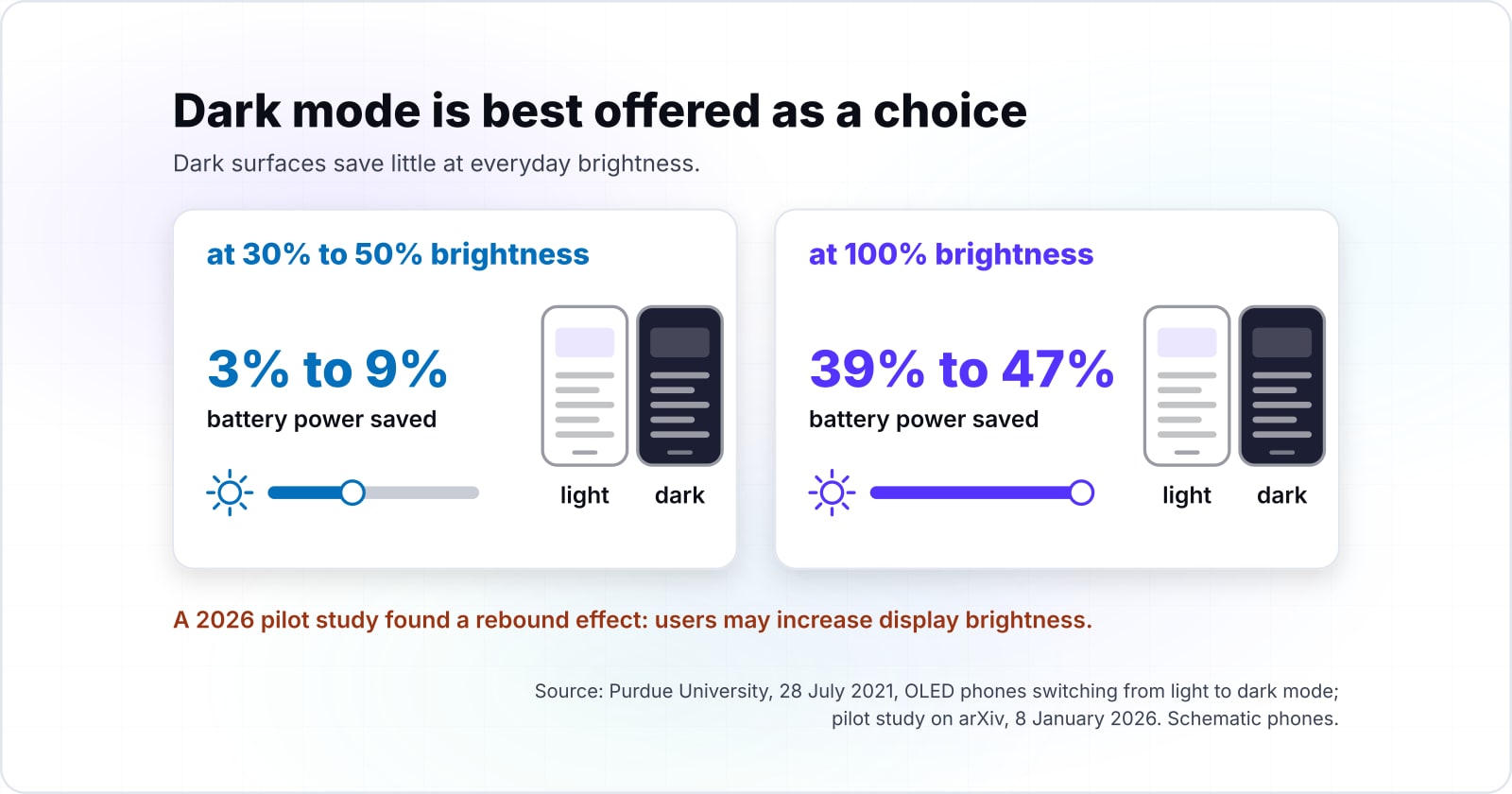
Dark surfaces save little at everyday brightness: a Purdue University study measured 3% to 9% battery savings on OLED phones at 30% to 50% brightness. Purdue University published that study on 28 July 2021. At 100% brightness, the same Purdue study found savings of 39% to 47%.
Show data table
| Dimension | Low end | High end |
|---|---|---|
| 30% to 50% brightness | 3% | 39% |
| 100% brightness | 9% | 47% |
Dark mode saves real power only at full brightness, which few people use all day.
However, a pilot study on arXiv from 8 January 2026 points the other way. It found a rebound effect "wherein users may increase display brightness when interacting with dark-themed web pages". So a light theme like Ecofyre's gives up little, and dark mode is best offered as a choice. The W3C Web Sustainability Guidelines, in the 24 September 2026 Draft Note, ask designers to honour the prefers-color-scheme query.
Which typography choices cut font bytes?#
System fonts download nothing, and the W3C Web Sustainability Guidelines ask designers to use them or to subset any web font they keep. The W3C Web Sustainability Guidelines Draft Note is dated 24 September 2026. It says: "Use system fonts or other pre-installed fonts to reduce font downloads and improve performance."
The same Draft Note asks teams to remove unused font styles, weights and character sets. In the 2025 Web Almanac, fonts take 122 KB of the median mobile home page. Under Version 4 of the Sustainable Web Design Model, that is about 0.018 g per view. So fonts matter less than images. But a brand face with six weights is still the easiest cut a designer can make.
0.135 g
Images, 911 KB
0.018 g
Fonts, 122 KB
Trim the image budget first; dropping unused font weights is the smaller, easier cut.
Arithmetic from SWDM Version 4 and the HTTP Archive Web Almanac 2025. Modelled, not measured.
| Option | grams CO2e per view |
|---|---|
| Images, 911 KB | 0.135 g |
| Fonts, 122 KB | 0.018 g |
Source: HTTP Archive Web Almanac, 2025, and Sustainable Web Design, Version 4
Which WCAG 2.2 thresholds must a low-carbon theme still meet?#
A lighter page still owes WCAG 2.2 contrast of 4.5:1 for body text and 3:1 for large text, interface components and the graphics that carry meaning. Under WCAG 2.2, body text needs a contrast ratio of at least 4.5:1, and large text needs 3:1.
| Criterion and level | Minimum contrast ratio |
|---|---|
| Body text, 1.4.3 (AA) | 4.5:1 |
| Large text, 1.4.3 (AA) | 3:1 |
| Interface components and graphics, 1.4.11 (AA) | 3:1 |
| Body text, 1.4.6 (AAA) | 7:1 |
| Large text, 1.4.6 (AAA) | 4.5:1 |
| Focus indicator, focused against unfocused, 2.4.13 (AAA) | 3:1 |
The same 3:1 applies to interface components and graphics that carry meaning. For focus, the AAA criterion sets a minimum indicator area. It must be at least a "2 CSS pixel thick perimeter of the unfocused component". Finally, motion from interactions can be disabled, as a reduced-motion guard in anime.js does, which also saves work on the device. So a pale grey text colour is no gain if it fails the WCAG 2.2 ratio of 4.5:1.
How can a design team measure its own pages?#
CO2.js, the Green Web Foundation's open source library, takes a byte count and returns an estimate of grams of CO2e, so a team can price each theme decision on its own pages. The CO2.js overview says it "takes an input of data, in bytes, and returns an estimate of the carbon emissions".
First, record the bytes each key screen sends today. Then apply the image and font budgets, and record again. The overview also says CO2.js runs in Node.js and in the browser. So a team can add a carbon budget check to its deploy steps.
When is a theme the wrong tool for cutting carbon?#
A theme cannot fix a page whose weight comes from video, third-party scripts or a heavy JavaScript bundle, so measure first and cut where the bytes are. In the 2025 Web Almanac, JavaScript alone takes 632 KB of the median mobile home page.
HTTP Archive's 2025 Web Almanac puts QuickTime video at 976 KB on the median mobile home page that serves it. When a page carries video like that, compress or remove the video first. For a heavy bundle, a build audit and a performance budget will beat any theme change. The W3C Web Sustainability Guidelines ask for that performance budget too. And for third-party tags, the fix is a tag review. In each case, the weight lives outside the design file.
| Where the weight sits | The better fix |
|---|---|
| Video, such as QuickTime at 976 KB where a page serves it | Compress or remove the video first |
| A heavy JavaScript bundle, 632 KB on the median page | A build audit and a performance budget |
| Third-party tags | A tag review |
Where should a design team go from here?#
Start with the image budget and the type stack, check contrast and focus against WCAG 2.2, then measure the result with CO2.js before and after.
Set the image budget and the type stack
A size cap per image slot, and system fonts or a subset web font.
Check contrast and focus against WCAG 2.2
4.5:1 for body text, 3:1 for large text and interface components.
Measure with CO2.js before and after
Record the bytes each key screen sends, then convert them to grams.
For the palette, see colour contrast in accessible design and WCAG in UI and UX design. For focus states, read keyboard navigation and focus management. Page weight also moves load speed, covered in what Web Vitals are. For teams that want the work done, there is sustainable software development and a WCAG and ADA compliance audit. The Ecofyre low-carbon design theme, the WCAG 2.2 text and the CO2.js docs are enough on their own. So a team can run the first pass without outside help.