How to use anime.js in v4, and guard the motion you add
The v4 API change costs you an afternoon. The reduced-motion guard is the part that decides whether your motion is usable.
Why does an anime.js example fail at the import line?#
Because v4 has no default export and no callable global anime({...}) form. Code written against the v3 call signature fails at the import line rather than in the animation. Consequently the error rarely looks like an animation problem at all. You get an undefined value, or a "not a function" thrown before a single frame runs.
The entry point in v4 is a named import, and the anime.js documentation covers the install and import shape:
import { animate } from 'animejs'; CommonJS takes the same shape:
const { animate } = require('animejs'); Also worth knowing if you load from a CDN as an ES module:
import { animate } from 'https://esm.sh/animejs'; The UMD build still exposes a global called anime, and that is where the confusion completes itself. In v4 that global is a namespace object you destructure, not a function you call:
const { animate } = anime; Therefore a paste of the older form fails twice over. There is nothing to default-import, and the global is not callable. Once you know that, the fix is mechanical rather than diagnostic.
Which anime.js version should you write against?#
Write against v4. On the npm registry, the latest dist-tag resolves to 4.5.0, published 2026-06-22. Every code sample in this post runs on that release. Version 4.0.0 opened the v4 line on 2025-04-03. Meanwhile the last v3 release is 3.2.2, published 2023-11-28, and the licence is MIT.
There is also a v5 build in circulation, and it is a beta. 5.0.0-beta.2 was published 2026-08-17. Moreover it is available under the beta dist-tag only, never under latest. Therefore it is not what npm install animejs gives you, and none of the code here targets it. There is no v3 dist-tag on the registry at all.
- 2023-11-28
3.2.2, the last v3 release
The end of the v3 line. There is no v3 dist-tag on the registry at all, so nothing resolves to it by name. Licence: MIT.
- 2025-04-03
4.0.0 opens the v4 line
The release that removed the default export and the callable anime({...}) form, and introduced the named-import entry points this post teaches.
- 2026-06-22
4.5.0, the latest dist-tag
What npm install animejs gives you today, and the release every code sample in this post runs on.
- 2026-08-17
5.0.0-beta.2, beta dist-tag only
Available under the beta dist-tag and never under latest, so it is not what a plain install returns. None of the code here targets it.
Those release dates are the whole of what the registry tells you. Read them and draw your own line. In short, the v4 line has moved and the v3 line has a last release date. Anything beyond that, including any claim about the project's plans, is not something the registry supports. Therefore this post will not invent it.
In practice the decision is simple. New work starts on 4.5.0. Existing v3 code has one conversion ahead of it, and the next section is that conversion. Since every answer to how to use anime.js depends on which major you are holding, settle this first. Then the rest of the API stops surprising you.
How to use anime.js from zero, and convert v3 code in the same pass#
Start with one import and one call. Here is a complete first animation on 4.5.0, straight from the documentation:
import { animate } from 'animejs';
animate('.square', {
rotate: 90,
loop: true,
ease: 'inOutExpo',
}); Notice the argument shape. Targets are the positional first argument, not a targets: key inside the options object. Everything else is the second argument: properties to animate, plus timing and easing.
That call is also the right-hand side of the conversion map. Each v3 shape below has exactly one v4 equivalent. Below are the forms this post uses, plus the ones a converted v3 timeline hits first:
| v3 | v4 |
|---|---|
| anime({ targets: '.el', ... }) | v4animate('.el', { ... }) |
| anime.timeline({...}) | v4createTimeline({...}) |
| .add(params, offset) | v4.add(targets, params, position) |
| easing: | v4ease: |
| easeInOutExpo | v4inOutExpo |
Two of those deserve a sentence each. First, the property is ease in v4, not easing. Second, the curve names lost their ease prefix, so easeInOutExpo becomes inOutExpo. Parameterised power easing is written as a call inside the string, 'inOut(3)'. Moreover v4 adds an outIn direction alongside in, out and inOut. The bundle carries inQuad, outQuad, inOutQuad and outInQuad. Also present are the same four directions through Cubic, Quart, Quint, Sine, Circ, Expo, Bounce, Back and Elastic. Beyond those there are easing factories: linear, irregular, steps, cubicBezier, and spring through createSpring. For the full list of curve names, the anime.js documentation carries the ease property and its easing reference.
How do you sequence animations with createTimeline()?#
A timeline in v4 is built with createTimeline(). Its control lives in the position argument you pass alongside each added animation. The anime.js documentation covers createTimeline, .add(), .label() and the position argument in one place. You are not chaining callbacks, and you are not stacking delays by hand.
import { createTimeline } from 'animejs';
const tl = createTimeline({ defaults: { duration: 750 } });
tl.label('start')
.add('.square', { x: '15rem' }, 500)
.add('.circle', { x: '15rem' }, 'start')
.add('.triangle', { x: '15rem', rotate: '1turn' }, '<-=500'); Three position forms appear there, and they are the three you need. An absolute millisecond value, 500, places the animation at that point on the timeline. A label name, 'start', places it at a marker you created with .label(). A relative offset, '<-=500', anchors to the previous animation, in this case starting 500ms before it would otherwise have.
The timeline also carries .add(), .sync(), .call() and .label() as its methods. .label() is the one worth reaching for early. A named marker survives you inserting an animation above it, whereas a hand-counted millisecond offset does not. The argument order is the silent failure a converted v3 timeline hits first. In v4 it is .add(targets, params, position), where v3 was .add(params, offset). Nothing throws when you get that wrong. The targets argument simply receives an options object. Then the sequence plays in an order you did not ask for.
What does stagger() actually return?#
It returns a function, not a number. stagger() produces a StaggerFunction. Then the library calls that function once per target with that target's index. That single fact is the whole mechanism. Consequently a stagger value can drive any animatable property rather than only delay.
You can check it in the published artifact. The type declaration lives at dist/modules/utils/stagger.d.ts inside the 4.5.0 package. There the export is overloaded four ways, and every overload returns StaggerFunction<number> or StaggerFunction<string>. The simplest of them reads:
export function stagger(val: number, params?: StaggerParams): StaggerFunction<number>; The familiar shape puts it in a delay slot, which is how the anime.js documentation introduces stagger usage:
import { animate, stagger } from 'animejs';
animate('.card', { opacity: [0, 1], delay: stagger(40) }); Show data table
| Item | Delay before this target starts |
|---|---|
| Card 1 (index 0) | 0 ms |
| Card 2 (index 1) | 40 ms |
| Card 3 (index 2) | 80 ms |
| Card 4 (index 3) | 120 ms |
| Card 5 (index 4) | 160 ms |
| Card 6 (index 5) | 200 ms |
| Card 7 (index 6) | 240 ms |
| Card 8 (index 7) | 280 ms |
| Card 9 (index 8) | 320 ms |
| Card 10 (index 9) | 360 ms |
| Card 11 (index 10) | 400 ms |
| Card 12 (index 11) | 440 ms |
The returned function is called once per target with that target's index, so the delay is index times 40 and nothing else. It runs 0ms on the first card to 440ms on the twelfth, in an exact straight line. The delay slot is incidental to the mechanism: the same per-target value can drive scale, opacity, rotation or duration, and the range form stagger([1.1, 0.75]) produces this same linear ramp running the other way.
However the slot is not part of the mechanism. Because stagger returns a per-target value generator, it can sit anywhere a value can:
animate('.card', { scale: stagger([1.1, 0.75]) }); That range form hands the first target 1.1 and the last target 0.75. Every target in between gets a value along that range. In short, read stagger() as "a value that depends on which target this is" rather than as "a delay helper". Then translateY, opacity, rotation and duration are all open to it. For instance a list that fades in can also fan out slightly, with one call and no per-item bookkeeping. That works because the index the library passes is the only thing either property needed.
What moves on first paint, and what waits for the reader?#
First paint gets the one thing a new arrival needs to orient on, and everything further down waits for the scroll. Decide it per element, because motion means different things at different points in a page. onScroll() ties an animation's start to the reader's scroll position. Therefore a reveal can happen where it belongs in the reading order, rather than all at once at the top.
import { animate, onScroll } from 'animejs';
animate('.panel', {
opacity: [0, 1],
y: [24, 0],
duration: 600,
autoplay: onScroll({ enter: 'bottom-=100 top' }),
}); The question that decides it is what the reader is looking at. Motion at first paint is aimed at someone who has just arrived and is orienting. Motion further down is aimed at someone already reading. In practice it works when it marks a transition they are moving through, rather than announcing itself. Therefore a hero that introduces a page and a statistics band halfway down are two different jobs. Attaching both to page load collapses them into one.
This is a structural decision before it is a code decision. Therefore it usually belongs with whoever owns the page layout. Sometimes that conversation happens on a design surface rather than in a component file. In that case our UI and UX design practice is where we do that work. Still, the mechanism is the same wherever it is decided: one animation, one trigger, chosen deliberately.
What happens when an animation outlives its component?#
It keeps running against nodes that are no longer in the document. An animation created on mount holds references to its targets, and unmounting the component does not stop it. Consequently you get a timer still ticking, still writing values, against detached elements nobody can see.
createScope() is the documented disposal boundary. You create your animations inside a scope, and you keep the scope. Then you revert it when the owning component goes away. Here that is written as a React effect with its cleanup return:
import { useEffect, useRef } from 'react';
import { createScope, animate } from 'animejs';
function Panel() {
const root = useRef(null);
useEffect(() => {
const scope = createScope({ root }).add(() => {
animate('.card', { opacity: [0, 1], duration: 600 });
});
return () => scope.revert();
}, []);
return <div ref={root}><div className="card" /></div>;
} The framework is incidental. Whatever you are using, the rule is that whatever creates the animation owns it. Then, the moment that owner is torn down, the scope is reverted. A Vue watcher, a Svelte lifecycle hook and a plain component setup function transpose the same two lines. The scope is worth creating even for a single animation. It costs one line at setup. Besides, it removes the question of whether this particular tween needed teardown.
createScope() also takes a mediaQueries option, typed as Record<string, string>, and it calls window.matchMedia for each entry. That option is the hook the next act turns on, so note it now. Our introduction to building accessible websites covers the practice this guard sits inside.
Why does your reduced-motion reset not touch a JavaScript tween?#
Because the reset declares two properties that a JavaScript tween never uses. Here is the reset:
@media (prefers-reduced-motion: reduce) {
*, *::before, *::after {
animation-duration: 0.01ms !important;
transition-duration: 0.01ms !important;
}
} Read what it actually declares. animation-duration takes effect where a CSS animation exists. transition-duration takes effect where a CSS transition exists. A JavaScript tween is neither of those things. Instead it writes a discrete value to transform or opacity on every frame. Therefore those two declarations have nothing to act on. Nothing is overridden, because nothing is competing.
That distinction is category, not precedence, and the difference matters. An !important author declaration genuinely does beat a normal inline declaration of the same property. Therefore any story about the inline style winning the cascade would be wrong. The true version is also the one you can check. Open devtools on a page with a running tween and look at the element. Then you will see an inline transform on one side and two duration declarations on the other. They are about different things. Consequently a stylesheet that has covered your CSS motion correctly for years tells you nothing about the JavaScript motion you added last week.
The library leaves this decision to you. createScope()'s mediaQueries option is the documented place to bind the query, and the next section is the guard itself.
How do you write a reduced-motion guard that holds?#
Read the MediaQueryList, listen for its change event, and resolve to the animation's end state rather than removing anything. window.matchMedia('(prefers-reduced-motion: reduce)') returns an object carrying both a boolean .matches and that event. MDN documents MediaQueryList, .matches and the change event together. Using the event is what makes the guard hold when someone changes the setting while your page is open.
import { animate, stagger, utils } from 'animejs';
const reduced = window.matchMedia('(prefers-reduced-motion: reduce)');
if (reduced.matches) {
utils.set('.card', { opacity: 1, y: 0 });
} else {
animate('.card', {
opacity: [0, 1],
y: [24, 0],
duration: 600,
delay: stagger(50),
ease: 'out(3)',
});
} Read the MediaQueryList once, at setup.
window.matchMedia('(prefers-reduced-motion: reduce)') returns an object, not a boolean. Keep the object, because the fourth step needs it.
Branch on .matches before you create the animation.
The preference comes from the operating system rather than from your page, so it is available before your first frame runs.
Set the finished values rather than removing anything.
utils.set writes the end state directly. Someone who asked for less motion gets the same layout everyone else ends up with.
Bind the change event so a mid-session toggle is respected.
This is the step authors skip. A guard that reads the preference once at load only ever handles half of what the preference can do.
Look at the if branch. It does not delete the cards and it does not skip their content. Instead it sets the finished values directly. Then a reader who asked for less motion gets the same layout everyone else ends up with. That is the correct reading of the setting.
Wire the same query through the change event so a mid-session toggle is respected:
reduced.addEventListener('change', (event) => {
if (event.matches) utils.set('.card', { opacity: 1, y: 0 });
}); prefers-reduced-motion is documented by MDN Web Docs. Its reference page for the media feature describes it as detecting whether a user has requested the system minimise non-essential motion (MDN Web Docs, accessed 13 September 2026). Because that request comes from the operating system rather than from your page, it is available before your first frame runs. Moreover it can change afterwards. A guard that reads it once at load only ever handles half of that.
What does a stagger step cost you in seconds?#
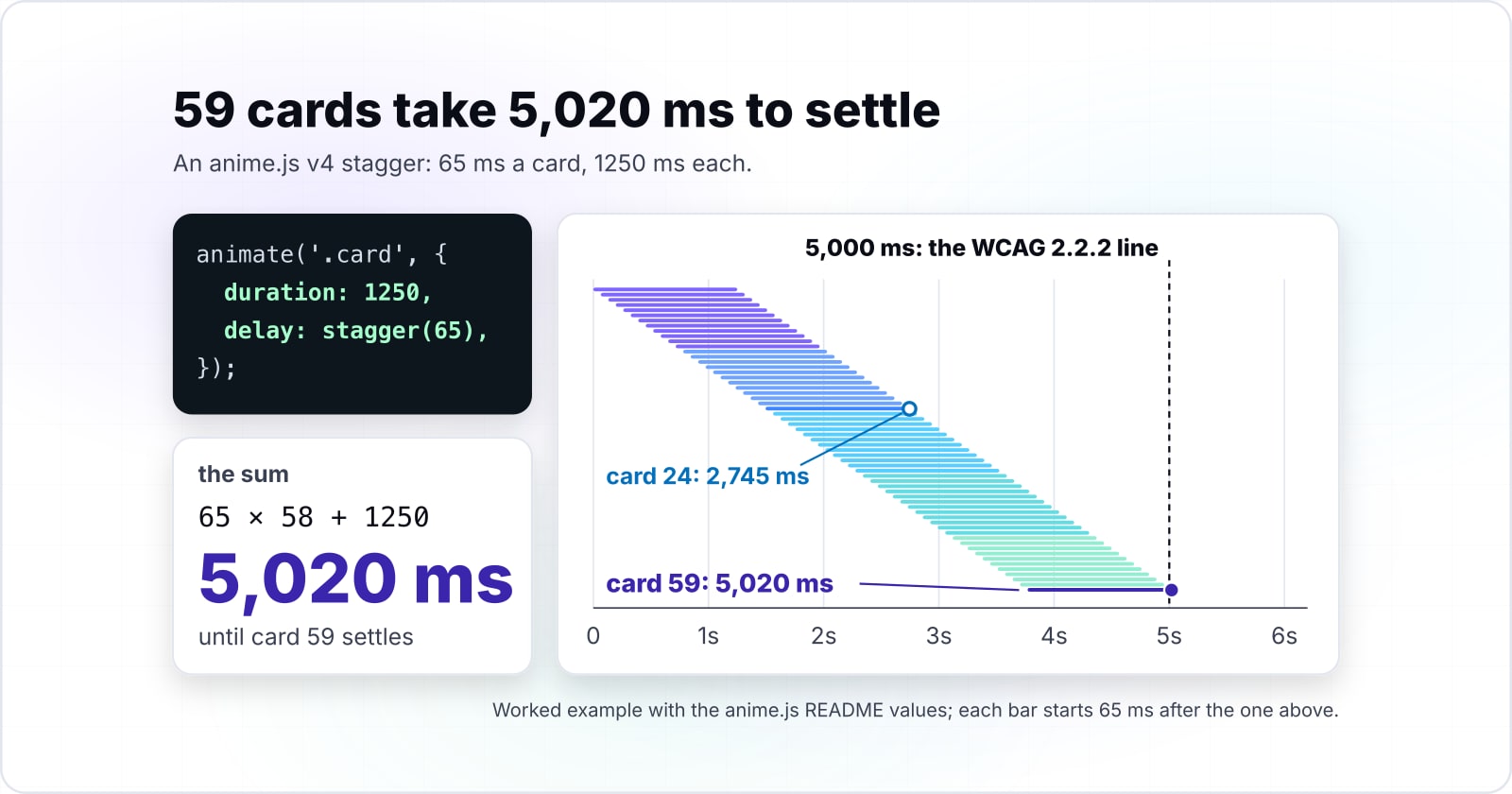
More than you would guess, and the arithmetic is worth doing before you ship. First, the criterion this feeds into. SC 2.2.2 Pause, Stop, Hide, in the WCAG 2.2 Recommendation, applies where all three of its conditions hold together: the moving content starts automatically, it lasts more than five seconds, and it is presented in parallel with other content. The arithmetic below settles exactly one of those, the duration. Therefore it is an input to the question, not a conformance verdict.
Where the last target lands#
[+] UnderThis reports a duration against a threshold, not a conformance verdict. SC 2.2.2 has three conjunctive conditions, and duration is only one of them: the content must also start automatically and be presented in parallel with other content.
Threshold from SC 2.2.2 Pause, Stop, Hide, WCAG 2.2 Recommendation, W3C. The criterion reads more than five seconds, so a duration equal to the mark is not past it.
| Case | Targets | Step | Total | Against the mark | The arithmetic |
|---|---|---|---|---|---|
| Twelve cards at a 50ms step | 12 | 50 ms | 1,150 ms | [+] Under | 11 x 50 = 550ms of delay, plus its own 600ms duration, finishing at 1150ms. |
| Twelve cards at a 400ms step | 12 | 400 ms | 5,000 ms | [=] At the boundary | 11 x 400 = 4400ms, plus 600ms, landing on 5000ms exactly. At the boundary and still outside it. |
| Thirteen cards at a 400ms step | 13 | 400 ms | 5,400 ms | [!] Over | 12 x 400 + 600 = 5400ms. One more card at the same step takes it past the mark. |
| Twelve cards at a 401ms step | 12 | 401 ms | 5,011 ms | [!] Over | 11 x 401 + 600 = 5011ms. One millisecond on the step does the same thing. |
Twelve cards at a 50ms step#
Take the guard's own example, on a grid of twelve cards. stagger(50) multiplies the step by the target index. Therefore card 12 is index 11 and carries 11 x 50 = 550ms of delay. Adding its own 600ms duration, the sequence finishes at 1150ms, or 1.15 seconds. That is not a duration worth worrying about.
Where the same grid reaches the boundary#
Now change one number. At a 400ms step the same twelve cards give 11 x 400 = 4400ms of delay on the last card. Then its own 600ms duration takes the total to 5000ms. 5000ms is exactly five seconds, and the criterion's threshold is more than five seconds. Therefore at that value the criterion is not engaged. The sequence sits precisely at the boundary and still outside it.
What puts it over is one more card at that step, since 12 x 400 + 600 = 5400ms. Alternatively a step of 401ms does it with the same twelve cards, because 11 x 401 + 600 = 5011ms. In other words a single design change you would make without thinking moves the page across a line. Still, that line is one you were not measuring.
One more distinction. Where the reveal is something the reader started by scrolling, its automatic-start condition is genuinely arguable. Instead SC 2.3.3 Animation from Interactions, in the WCAG 2.2 Recommendation, is the criterion whose subject is motion triggered by interaction. Reserve SC 2.2.2's full three-condition reading for motion that runs at first paint without the reader doing anything. Either way, the number is one the author needs.
Which WCAG criteria cover motion, and at what levels?#
Three of them, and their levels are worth getting right because a misquoted level weakens the argument you are making. All three are stated in the W3C's Web Content Accessibility Guidelines 2.2 Recommendation, published by the W3C.
| Success criterion | Level | What engages it | Which motion here |
|---|---|---|---|
| SC 2.2.2 Pause, Stop, Hide | LevelA | What engages itAll three together: the content starts automatically, lasts more than five seconds, and is presented in parallel with other content. Where all three hold, it needs a mechanism to pause, stop or hide it. | Which motion hereMotion that runs at first paint without you doing anything. |
| SC 2.3.1 Three Flashes or Below Threshold | LevelA | What engages itNothing flashes more than three times in any one second period. | Which motion hereAny flashing content, whatever triggered it. |
| SC 2.3.3 Animation from Interactions | LevelAAA | What engages itHonouring a motion preference for animation you triggered. | Which motion hereMost of the scroll-driven work in this post. |
SC 2.2.2 Pause, Stop, Hide is a Level A criterion. It covers moving content that starts automatically, lasts more than five seconds and is presented in parallel with other content. Where all three hold, that content needs a mechanism to pause, stop or hide it.
Also at Level A sits SC 2.3.1 Three Flashes or Below Threshold. Its threshold is that nothing flashes more than three times in any one second period.
Meanwhile SC 2.3.3 Animation from Interactions sits at Level AAA, not AA. This is the criterion about honouring a motion preference for animation the reader triggered. Also, it is the one that covers most of the scroll-driven work in this post. In contrast, SC 2.2.2 is the one that covers motion starting automatically, which is the first-paint case.
Pairing those two the other way round is the same error wearing different clothes, so match each criterion to the kind of motion it actually covers. A WCAG level is a conformance target rather than a duty owed by every site. Whether any of it binds a particular project depends on a jurisdiction, an instrument and a commitment this post does not name. Besides, the guard stands on its own merits. Someone who has asked for less motion and got a page that ignores the request does not need a level number to tell you it went wrong.
Perhaps you want the levels laid out beside each other rather than three at a time. In that case our comparison of the WCAG guidelines does exactly that.
When should you not use anime.js at all?#
When the job is a hover, a fade, or a single declared state change with no sequencing and no cleanup. That belongs in CSS. The reason is the mechanism from two sections ago, read in the other direction. A CSS transition is exactly what the reduced-motion reset acts on. Declare the motion in CSS and the guard you would otherwise write by hand comes free.
On size, here is exactly what exists. The anime.js documentation on when to use the Web Animation API, accessed 13 September 2026, states that "Initial page load time is critical and every KB counts (3KB gzip vs 10KB for the JavaScript version)", comparing its waapi.animate() entry point against animate().
7,086 bytes
3.2.2, lib/anime.min.js
40,592 bytes
4.5.0, dist/bundles/anime.umd.min.js
Both are the whole library in one file rather than a tree-shaken application build, and v4 carries features v3 did not have. Read those two numbers as what they are and not as an argument for an older major. The documentation's 3KB against 10KB figure quoted above is a different comparison from a different source, between two entry points inside v4, and does not share this scale.
| Option | bytes, gzip level 9, measured by Atyantik on the published packages |
|---|---|
| 3.2.2, lib/anime.min.js | 7,086 bytes |
| 4.5.0, dist/bundles/anime.umd.min.js | 40,592 bytes |
Separately, we measured each major's minified single-file UMD build ourselves at gzip level 9: lib/anime.min.js in 3.2.2 is 7,086 bytes, and dist/bundles/anime.umd.min.js in 4.5.0 is 40,592 bytes. Both are the whole library in one file rather than a tree-shaken application build, and v4 carries features v3 did not have. Read those two numbers as what they are and not as an argument for an older major.
For CSS state work done carefully, our post on focus and focus-visible without the headache is the same discipline applied to a different problem.
What on your page must never move?#
Answer that before you write the animation, not after. By this point the post has opened three structural questions, and they close together. Those are what animates on first paint, what waits for a scroll, and what must never move at all. The third one is the easiest to leave implicit. Yet it is the one that decides whether a page feels considered.
So work through them in order on your own page. First, name the one thing that should move when someone arrives, and accept that it is one thing. Second, place every other reveal behind the scroll position where it belongs in the reading order. Third, list the regions where motion is never appropriate. They are anything holding an error, anything the reader is typing into, anything they came to read.
Then write the guard on the same day as the animation. That is the single commitment this post asks for. A reduced-motion branch added later is a separate task, and a separate task can slip. Written beside the tween it costs four lines, and you already have them above. In the end that is most of what knowing how to use anime.js well amounts to. The calls are small, the sequencing is explicit, and the guard is yours to write.
Finally, perhaps you would rather have an existing site checked than work through this yourself. In that case our accessibility testing service tests a site against WCAG 2.2. Either way the decision is the same one, and it belongs to whoever ships the page.