ARIA live regions: how to make screen readers announce dynamic content
A save message nobody hears and an error that cuts off every sentence share one root cause. Both come down to the value the browser resolves and the moment the region appeared, and both are fixed in the markup you ship first.
How do ARIA live regions announce dynamic content?#
An ARIA live region is an element a screen reader watches, speaking each change without moving focus, at the politeness its role or its aria-live attribute resolves to. The W3C Understanding page for WCAG 2.2 success criterion 4.1.3 names the goal. A status message must be "presented to the user by assistive technologies without receiving focus". In other words, focus stays where the user is working, and the message still arrives.
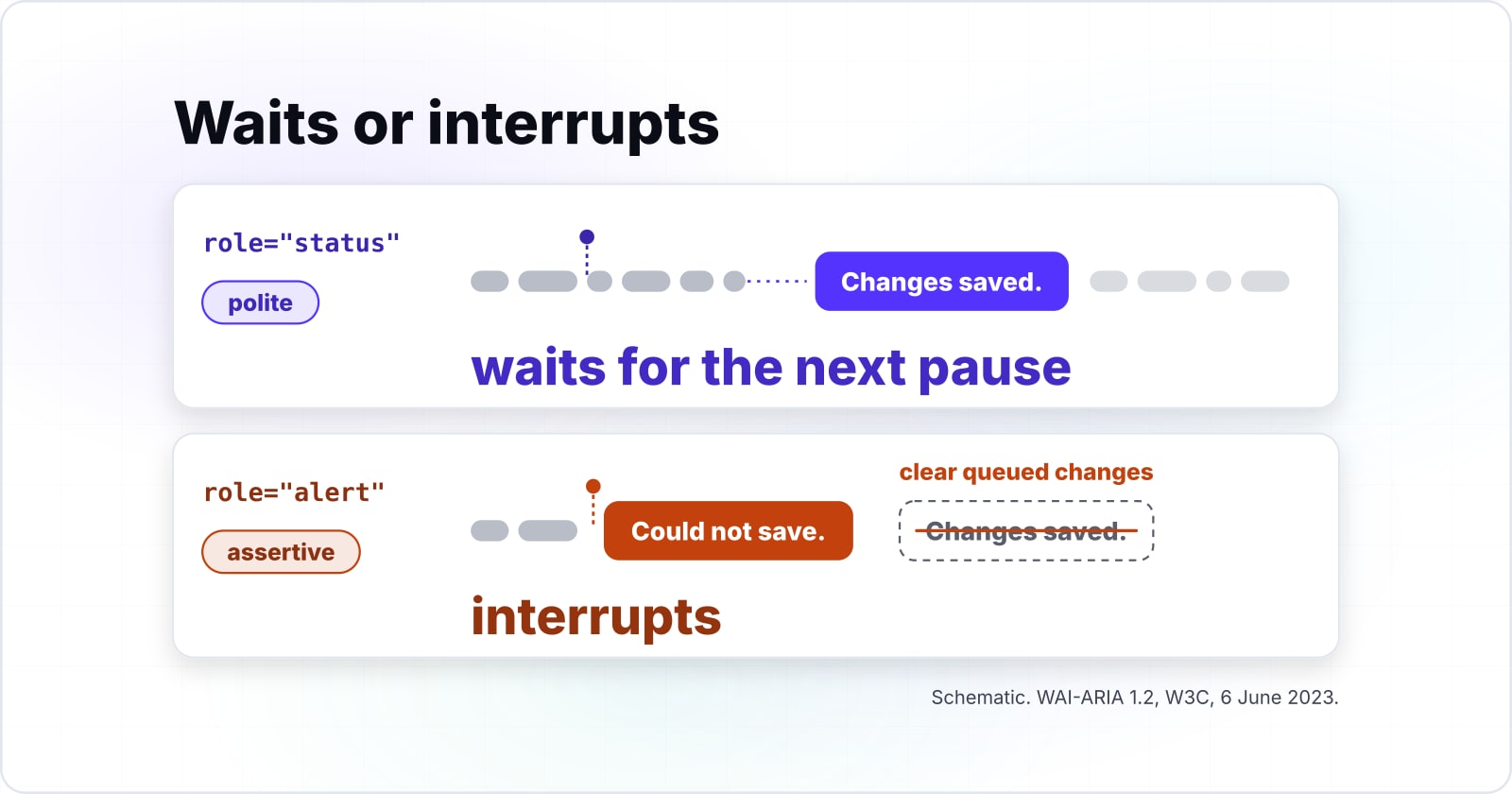
Three things decide what happens. First, the element must be a live region before its content changes. Second, the politeness it resolves to decides whether the update waits for a pause or interrupts. Third, the aria-atomic value decides whether the whole region is spoken or only the changed part. The W3C defines all three in the WAI-ARIA 1.2 specification, published 6 June 2023. Then each later section takes one of them apart.
In practice, check the first point first, because a region that was never registered says nothing at all. That is why the build section starts with an empty container in the initial markup. It does not start with an attribute.
What does a silent status message cost?#
A silent status message fails WCAG 2.2 success criterion 4.1.3 at Level AA for the 40.5% of surveyed respondents on JAWS and the 37.7% on NVDA alike. Those shares come from WebAIM's survey report of early 2024. There, JAWS and NVDA were the two most common primary desktop screen readers.
Show data table
| Item | Share of respondents |
|---|---|
| JAWS | 40.5% |
| NVDA | 37.7% |
| VoiceOver | 9.7% |
| Dolphin SuperNova | 3.7% |
| ZoomText/Fusion | 2.7% |
| Orca | 2.4% |
| Narrator | 0.7% |
JAWS at 40.5% and NVDA at 37.7% were the two most common primary desktop screen readers, so a silent message fails both groups alike.
The W3C Understanding page for 4.1.3 lists failure F103. It covers status messages "that cannot be programmatically determined through role or properties". So a save confirmation that only appears on screen is a conformance failure, not a polish item.
Because 4.1.3 is a Level AA criterion, the failure counts against any WCAG 2.2 AA conformance claim. And because the message usually lives in a shared component, one fix clears every screen that reuses it. That holds whichever screen reader the user runs.
For example, a toast component used on forty screens is one fix, not forty. The same holds for a search result count, a cart badge or a "saving" indicator. So the work scales with the number of components that emit messages. It does not scale with the number of pages that show them.
Which role fits which message: status, alert or log?#
Use role status for advisory updates, role alert only for urgent errors, and role log for appended history, because each role carries its own implicit politeness. The WAI-ARIA 1.2 text is direct: "Elements with the role status have an implicit aria-live value of polite and an implicit aria-atomic value of true."
| Role | Implicit aria-live | Implicit aria-atomic | Use it for |
|---|---|---|---|
| status | polite | true | a save confirmation, a result count |
| alert | assertive | true | a form error that blocks the task |
| log | polite | not set (false) | a chat transcript, an event history |
| marquee | off | not set (false) | a ticker that need not be spoken |
| timer | off | not set (false) | a countdown or stopwatch readout |
Source: W3C WAI-ARIA 1.2 role definitions for alert, log, marquee, status and timer, 6 June 2023.
So for ARIA live regions, the message type picks the role. Then the role brings its implicit politeness and atomic value from the specification. Alert is assertive and atomic, and status is polite and atomic. Log is polite, while marquee and timer are off. Therefore the habit of reaching for role alert on every message is the wrong default.
The W3C also publishes a sufficient technique for each common case. ARIA22 uses role status for status messages. Meanwhile ARIA19 uses role alert or a live region for input errors. And ARIA23 uses role log for "sequential information updates" such as a chat. When no role fits, a bare aria-live attribute is the fallback, for instance a polite region around a filter summary.
Which politeness value wins when role and aria-live disagree?#
An explicit aria-live on the element wins, then the nearest ancestor that sets one, then the role's default, and the screen reader may still override all three. When the property is not set, WAI-ARIA 1.2 says "the politeness level is the value of the nearest ancestor that sets the aria-live attribute". Next, implementations "will also consider the default level of politeness in a role" when no ancestor sets one.
But the same section calls politeness levels "a strong suggestion to user agents or assistive technologies". It adds that the value "may be overridden by user agents, assistive technologies, or the user". For example, a change made in response to a key press may be read at once. So the value you type is a request, and the value the user hears can differ.
The specification also rations assertive in plain words: "authors SHOULD NOT use the assertive value unless the interruption is imperative". In addition, it lets assistive technologies "clear queued changes when an assertive change occurs". As a result, one assertive message can wipe out the polite messages waiting behind it. So keep assertive for the error that stops the task. Everything else can wait for the next pause.
What do aria-atomic and aria-relevant change?#
The aria-atomic attribute decides whether the whole region or only the changed node is spoken, and aria-relevant decides which kinds of change count, defaulting to additions and text. When no ancestor sets aria-atomic, WAI-ARIA 1.2 says "assistive technologies will only present the changed node to the user".
The MDN live regions guide shows the cost with a clock. When the time moves from "17:33" to "17:34", the guide expects only "34" to be announced. That means nothing on its own. Setting aria-atomic="true" makes the whole value speak again. Since status and alert imply aria-atomic true, they read the full region by default.
However, the W3C's ARIA22 technique adds a caution. It says role status "is currently not treated as atomic by default in some environments". So it advises an explicit aria-atomic="true" when the whole container should be read. Adding it costs nothing and removes the doubt, so the code below sets it.
The aria-relevant attribute takes additions, removals, text or all. Its default is "additions text", so a removal is ignored unless you ask for it. The specification gives two examples. An entry removed from the top of a log means nothing, while a name leaving a buddy list does. It also says removals or all "are to be used sparingly". In practice, leave aria-relevant alone unless a removal carries meaning. Then set it on that one region.
| Token | Counted by default? | When to set it |
|---|---|---|
| additions | Yes, part of the default additions text | Leave the default |
| text | Yes, part of the default additions text | Leave the default |
| removals | No, ignored unless you ask for it | Sparingly, only when a removal carries meaning |
| all | No, it names all three | Sparingly, only when a removal carries meaning |
Why does a live region stay silent?#
A region stays silent when it is created together with its message, hidden from the accessibility tree, or replaced instead of updated, so it must exist before it speaks. The MDN live regions guide, updated 11 September 2026, states the rule: "Establish the live region before updating its content."
The first cause is timing. The same MDN guide notes that assistive technologies "will generally only announce dynamic changes in the content of a live region". So a toast inserted with its text already inside can say nothing. The region and the change arrived together. Instead, start with an empty region. And if a script creates the region, the guide advises deferring the update to a later task with setTimeout().
The second cause is hiding. The MDN alert role page warns that display:none hides a container "even from assistive technologies". Then changes inside it go unheard. Adrian Roselli's January 2026 demo tests the HTML hidden attribute, aria-hidden and display:none against live regions. Check it for current behaviour before relying on any of them.
The third cause is replacement. When a component framework re-renders the region, it swaps the old element for a new one. Then the browser sees a new element with text already in it, which is the first cause again. So keep the container mounted for the life of the page and change only its text.
Timing.
The region and the change arrived together. Start with an empty region, and if a script creates it, defer the update to a later task.
Hiding.
display:none hides a container even from assistive technologies, so changes inside it go unheard.
Replacement.
A re-render swaps the old element for a new one with text already in it. Keep the container mounted and change only its text.
Which documentation should the build follow?#
Build from four pages in order: the MDN live regions guide, the MDN status and alert role references, and the W3C technique ARIA22 for status messages. The guide gives the timing rule, and the two role references give markup and limits. Then ARIA22 gives the test procedure that proves 4.1.3.
- MDN live regions guide: establish the region first, then update it, and use the clock example for aria-atomic.
- MDN status role reference: the markup for advisory messages, and the rule not to move focus to a status.
- MDN alert role reference: text content only, never links or buttons, and never display:none on the container.
- W3C technique ARIA22: the procedure, which checks that the container has role status "before the status message occurs".
For instance, keep the first page open while writing a shared component, and the fourth while writing its test. Meanwhile the WAI-ARIA 1.2 specification settles any question the four pages leave open.
- First
MDN live regions guide
Establish the region first, then update it.
- Second
MDN status role reference
The markup for advisory messages.
- Third
MDN alert role reference
Text content only, and never display:none on the container.
- Fourth
W3C technique ARIA22
The test procedure that proves 4.1.3.
What is the smallest live region that works?#
The smallest working pattern is an empty role status container in the initial HTML whose textContent a script sets after the event it reports. Ship the empty container with the page, and set its textContent when the event happens. Then keep a separate role alert container for errors.
<!-- Step 1: ship both regions empty in the initial HTML -->
<div id="save-status" role="status" aria-atomic="true"></div>
<div id="form-error" role="alert"></div>

<script>
  // Step 2: set the status text after the event it reports
  function onSaved() {
    document.getElementById("save-status").textContent = "Changes saved.";
  }

  // Step 3: errors go to the separate alert region, as text only
  function onSaveFailed() {
    const error = document.getElementById("form-error");
    error.textContent = "";
    error.textContent = "Could not save. Check your connection and try again.";
  }
</script>
Each step traces to a saved page. The empty status container follows the MDN status role reference and ARIA22, which adds the explicit aria-atomic. Next, setting textContent after the event follows the MDN live regions guide. Finally, clearing the alert before writing follows the reuse example on the MDN alert role page. That way the same error can be announced twice in a row.
If the regions must be invisible, use a visually hidden class rather than display:none, as the MDN alert role page shows. Also keep both containers outside any component that re-renders, so they are never replaced.
Which screen reader and browser pairs do people actually use?#
In WebAIM's survey of 1539 respondents, JAWS with Chrome at 24.7% and NVDA with Chrome at 21.3% are the two most common screen reader and browser pairs. WebAIM counts 1539 valid responses, and each share is of those who answered that question. Announcement behaviour depends on the pair, not the screen reader alone. So the survey ranks the pairs a test plan should start from.
Show data table
| Item | Share of respondents |
|---|---|
| JAWS with Chrome | 24.7% |
| NVDA with Chrome | 21.3% |
| JAWS with Edge | 11.4% |
| NVDA with Firefox | 10% |
| VoiceOver with Safari | 7% |
| NVDA with Edge | 5% |
JAWS with Chrome at 24.7% and NVDA with Chrome at 21.3% are the two most common screen reader and browser pairs.
The browser matters because, in the words of WAI-ARIA 1.2, accessibility APIs and the DOM "provide events to allow the assistive technologies to determine changed areas of the document". Then the screen reader decides what to say about them. As a result, a region that speaks in one pair can behave differently in another. Adrian Roselli's January 2026 support notes record such differences pair by pair. That is why a screen reader test result should always name its pair and its date.
WebAIM gathered the survey from screen reader users who chose to respond, between December 2023 and January 2024. So treat the shares as a guide to ordering a test plan. They are not a census of any one product's users.
How many pairs should a test plan cover?#
Testing the two most common pairs reaches 46.0% of surveyed respondents, four pairs reach 67.4%, and adding VoiceOver with Safari brings the plan to 74.4%. That arithmetic adds the WebAIM survey's 2024 combination shares in descending order. Anyone can redo it from the survey page.
Show data table
| Stage | Cumulative share of respondents |
|---|---|
| 1 pair | 24.7% |
| 2 pairs | 46% |
| 3 pairs | 57.4% |
| 4 pairs | 67.4% |
| 5 pairs | 74.4% |
| 6 pairs | 79.4% |
Coverage rises steeply for the first four pairs and flattens after.
Coverage rises steeply for the first four pairs and flattens after. So a plan of four or five pairs covers most surveyed respondents, and each added pair is a deliberate choice.
Take a worked example. A team checks its role status save confirmation and its role alert form error on JAWS with Chrome and NVDA with Chrome. In WebAIM's table, those two pairs add 24.7% and 21.3% for 46.0%. Then WebAIM's next two, JAWS with Edge at 11.4% and NVDA with Firefox at 10.0%, raise it to 67.4%. And VoiceOver with Safari at 7.0% takes it to 74.4% by the same WebAIM count.
46.0% of surveyed respondents covered
2 of 6 pairs tested. 54.0% of surveyed respondents use a pair this plan skips or one outside the table.
Included: JAWS with Chrome, NVDA with Chrome.
Largest pair not yet tested: JAWS with Edge, at 11.4%.
The table comes from the survey's desktop questions, so mobile pairs are not in it. WebAIM reports that 91.3% of respondents use a screen reader on a mobile device.
| Pair | Share | In the plan |
|---|---|---|
| JAWS with Chrome | 24.7% | Tested |
| NVDA with Chrome | 21.3% | Tested |
| JAWS with Edge | 11.4% | Skipped |
| NVDA with Firefox | 10.0% | Skipped |
| VoiceOver with Safari | 7.0% | Skipped |
| NVDA with Edge | 5.0% | Skipped |
The sixth pair in the WebAIM table, NVDA with Edge at 5.0%, adds less than any before it. Also, the table comes from the survey's desktop questions, so mobile pairs are not in it. Yet WebAIM reports that 91.3% of respondents use a screen reader on a mobile device. So a plan adds a mobile pair by choice, not by rank.
When is a live region the wrong tool?#
A live region is the wrong tool when the message needs a response, which belongs in a dialog that takes focus, or when it holds links or buttons. A message that asks for a decision belongs in a dialog or alertdialog that receives focus. And role alert is for text only, so interactive content does not belong there.
The MDN alert role page is direct about both. It says the role "should only be used for text content, not interactive elements such as links or buttons". It also says that if the user is expected to close the alert, the alertdialog role fits instead. Likewise, the W3C Understanding page for 4.1.3 treats a dialog that takes focus as a change of context. So it sits outside the criterion, and focus already announces it.
Here is the friendly version of that advice. If the message says "Session expires in two minutes, stay signed in?", build a dialog and move focus to it. If the message is a list of errors with links to each field, move focus to the error summary. The post on keyboard navigation and focus management covers that choice. Finally, if the content is on screen when the page loads, it is not a dynamic update. Then no live region is needed.
Where should you go from here?#
Pair this with the posts on accessible forms, keyboard focus and testing tools, or the accessibility testing and WCAG compliance pages when a team wants the testing done. Each next step has its own post, and two service pages cover teams that want the work done.
For the field side of an error message, read building accessible forms. To see what automated checkers can and cannot report, read web accessibility testing tools. And to check which WCAG version binds your product, read the WCAG guidelines comparison.
When announcements need testing on real screen reader and browser pairs, accessibility testing covers that work. For conformance across the rest of WCAG 2.2 AA, see WCAG and ADA compliance. Still, the MDN guide, the two role references and ARIA22 are enough on their own to build ARIA live regions that speak.