What happens if your website is not accessible? Inaccessible website consequences under the ADA, the EAA and Section 508
If your website is not accessible, the cost rarely arrives as a single lawsuit. Different parties can act on the same broken buttons and missing labels, and the markets you sell into decide which of them can reach you.
What happens if your website is not accessible?#
If your website is not accessible, six different parties can act on the same defects: a private plaintiff, the Justice Department, a public-sector deadline, an EU authority, a federal buyer and a customer. Each one has its own reach, its own remedy and its own clock. But they all feed on the same defects, such as low contrast text or a form field with no label.
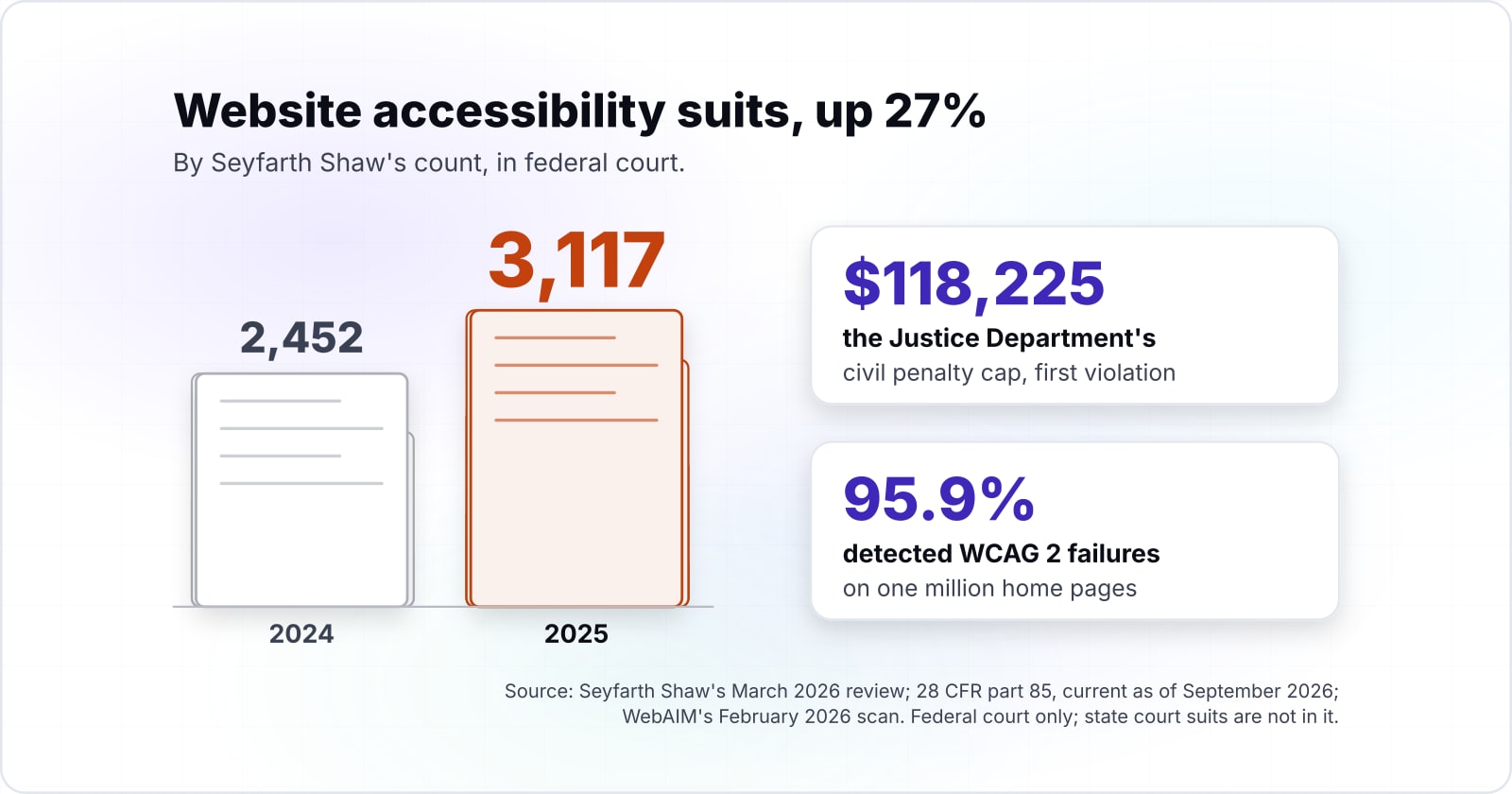
Take one online store as an example. It sells to US consumers, ships to customers in the EU, and resells to a US federal agency. So one set of defects exposes it three ways. First, it faces a private suit under Title III of the Americans with Disabilities Act (ADA). That would be one of the 3,117 federal website filings Seyfarth Shaw counted in 2025. Second, a national authority can apply the European Accessibility Act (EAA) to its e-commerce service. Third, a federal agency will not consider the purchase without an accessibility report. And if the Justice Department acts as well, its rules in 28 CFR part 85, current as of September 2026, cap the civil penalty at $118,225 for a first violation.
That is why a single "are we compliant?" question misses the point. In practice, the useful question is which triggers your site faces, and which one to close first. The rest of the answer takes the triggers one at a time.
What are the consequences of an inaccessible website: legal, commercial and the people it shuts out?#
The consequences come in three kinds: legal action from a plaintiff or a regulator, lost sales and lost contracts, and disabled people shut out of a service everyone else can use. Each of the six triggers sorts into one of those three kinds of inaccessible website consequences, and each kind is measured differently.
In practice, the human kind comes first, because the other two are counted from it. For scale, the World Health Organization's disability fact sheet, dated 7 March 2023, estimates 1.3 billion people, 16% of the world's population, experience significant disability. It puts it as "1 in 6 of us." A site that one of them cannot use has excluded a person before any law is involved.
Next, the legal kind covers four triggers: a private suit, a Justice Department action, the Title II deadline for public bodies and the EU's national authorities. Each one rests on a statute or a rule. Below, each is taken in turn. For instance, the Justice Department's introduction to the ADA describes a law that bars discrimination against people with disabilities in public life.
Finally, the commercial kind covers the last two triggers. First, a federal buyer under Section 508 will not consider a product without an accessibility report. Second, a customer who cannot finish simply leaves. Neither one shows up in a court count, so both are easy to miss.
| Kind | Triggers | How it is measured |
|---|---|---|
| Human | Disabled people shut out of a service everyone else can use | 1.3 billion people, 16% of the world's population, experience significant disability |
| Legal | A private suit, a Justice Department action, the Title II deadline for public bodies and the EU's national authorities | Each one rests on a statute or a rule |
| Commercial | A federal buyer under Section 508, and a customer who cannot finish | Neither one shows up in a court count |
What happens if your website is not ADA compliant?#
If your website is not ADA compliant, a private plaintiff can sue for a court order, and the Justice Department can seek a civil penalty capped at $118,225 for a first violation. The two routes sit side by side in Title III of the ADA, at 42 U.S.C. 12188.
A private plaintiff gets injunctive relief, a court order to make the service usable. The department's introduction to the ADA also lists "authorizing courts to award attorneys' fees to the winning party in a lawsuit under the ADA" among its tools. However, only the Attorney General can seek the civil penalty. The statute, enacted on July 26, 1990, sets its base at "not exceeding $50,000 for a first violation" and $100,000 for any later one, before the department adjusts both for inflation.
Does the ADA reach a website at all? In Robles v. Domino's Pizza, filed January 15, 2019, the Ninth Circuit held that it reaches Domino's website and app. The court found their alleged inaccessibility "impedes access to the goods and services of its physical pizza franchises." That link to a physical place carried the ruling. It also explains why courts in different states read online-only sites differently.
| Violation | Maximum before the adjustment | Maximum after July 3, 2025 |
|---|---|---|
| First violation | $115,231 | $118,225 |
| Subsequent violation | $230,464 | $236,451 |
Many pages still quote older maximums. The current text of 28 CFR part 85 is up to date as of 25 September 2026. It sets $118,225 for a first violation and $236,451 for a later one, for penalties assessed after July 3, 2025. But these are ceilings, not typical outcomes. For a private plaintiff, the pressure comes from the cost of the fix and the legal fees. This section summarises the statute and one court record; it is not legal advice for any case.
How often are businesses sued over an inaccessible website?#
Seyfarth Shaw counted 3,117 federal website accessibility lawsuits in 2025, up 27% from 2,452 in 2024, the highest count after 2022. The law firm's ADA Title III blog was published in March 2026. It says filings "bounced back from their two-year decline" last year.
Private suits are the trigger most owners have heard of, and the count shows why.
| Stage | Value |
|---|---|
| 2017 | 814 |
| 2018 | 2,258 |
| 2019 | 2,256 |
| 2020 | 2,523 |
| 2021 | 2,895 |
| 2022 | 3,255 |
| 2023 | 2,794 |
| 2024 | 2,452 |
| 2025 | 3,117 |
Filings peaked at 3,255 in 2022, fell for two years and rose again to 3,117 in 2025.
Two caveats keep the figure honest. First, it is one law firm's count of the cases it could find. Second, it covers federal court only, so state court suits are not in it. Even so, the trend is clear enough to plan on. By Seyfarth Shaw's count, website cases made up 36% of all federal ADA Title III suits in 2025, 3,117 out of 8,667.
Where are website accessibility lawsuits filed?#
In 2025, New York federal courts took 1,021 of the 3,117 website accessibility suits Seyfarth Shaw identified, Florida 961 and Illinois 585, while California took four. Those counts come from the firm's March 2026 review of the year.
So three venues took about four fifths of the filings, and where you do business shapes your exposure.
Show data table
| Segment | Value (suits) | Share | Source |
|---|---|---|---|
| New York | 1021 | 32.8% | Seyfarth Shaw LLP, ADA Title III blog, March 2026 |
| Florida | 961 | 30.8% | Seyfarth Shaw LLP, ADA Title III blog, March 2026 |
| Illinois | 585 | 18.8% | Seyfarth Shaw LLP, ADA Title III blog, March 2026 |
| All other states | 550 | 17.6% | Arithmetic from Seyfarth Shaw LLP, March 2026: 3,117 minus New York, Florida and Illinois (2,567) |
New York, Florida and Illinois took about four fifths of the 3,117 filings.
The reason is the courts, not the sites. Seyfarth notes that appeals courts in California have found online-only businesses are not covered by the ADA. Meanwhile, most district judges in New York who have ruled on it have found that they are. As a result, plaintiffs file where the law favours them. So a store with no shop front that sells into New York carries more of this trigger than the same store selling only in California.
How common are the defects a complaint would point to?#
WebAIM's February 2026 scan found detected WCAG 2 failures on 95.9% of one million home pages, with low contrast text on 83.9% of them. In its own words, "95.9% of home pages had detected WCAG 2 failures", up from 94.8% in 2025.
Six ordinary defect types lead the list, so most sites carry the raw material for every trigger here.
Show data table
| Item | Value |
|---|---|
| Low contrast text | 83.9 |
| Missing alternative text for images | 53.1 |
| Missing form input labels | 51 |
| Empty links | 46.3 |
| Empty buttons | 30.6 |
| Missing document language | 13.5 |
Low contrast text leads the list, found on 83.9% of the home pages scanned.
None of these defects is exotic. A button with no text name tells a screen reader user nothing. And a form field with no label leaves them guessing what to type. Also, WebAIM counted only failures a tool can detect, so the real rate of full conformance is lower still. The yardstick for every trigger below is the Web Content Accessibility Guidelines. The current version is WCAG 2.2, published by the W3C in December 2024.
When must state and local government websites comply with the ADA Title II rule?#
After an April 2026 extension, public entities serving 50,000 people or more must meet the Title II web rule by April 26, 2027, and smaller ones by April 26, 2028. The Justice Department's interim final rule "extends by one year the compliance dates" it set in April 2024.
This trigger binds public bodies, not private stores. However, it reaches past the agency itself. The rule sits in 28 CFR part 35, subpart H. It covers the web content and apps a public entity provides "directly or through contractual, licensing, or other arrangements." So a vendor that builds or runs a city's portal builds to the rule's standard too, which is WCAG 2.1 Level AA.
If you read that the deadline was April 2026, that date no longer holds. Special district governments share the 2028 date with the smaller entities. And the department gave its reasons in the same notice. Covered entities lacked the resources, and the technology had not arrived as it expected.
- April 2026
The interim final rule
The Justice Department "extends by one year the compliance dates" it set in April 2024.
- April 26, 2027
Public entities serving 50,000 people or more
They must meet the Title II web rule, whose standard is WCAG 2.1 Level AA.
- April 26, 2028
Smaller entities and special district governments
Special district governments share the 2028 date with the smaller entities.
What does the European Accessibility Act change for a site that sells into the EU?#
The European Accessibility Act covers e-commerce and banking services among others, and national market surveillance authorities take part in its application, so the EU trigger is a regulator rather than a plaintiff. The European Commission's EAA page lists e-commerce, banking services and e-books among the covered services.
For a site that sells to EU consumers, that adds a trigger separate from anything in US law. According to the Commission, Member States had to write the Act into their national law by June 2022. As a result, the detailed rules are set country by country, and the party acting on them is a national authority.
This changes how the risk arrives. A US case starts with a plaintiff and a lawyer. By contrast, an EU case can start with a regulator, whether or not anyone has complained. What national regulators have done with the Act so far is covered in our post on how the European Accessibility Act is enforced.
| A US case | An EU case | |
|---|---|---|
| Who starts it | A plaintiff and a lawyer | A regulator: a national authority |
| Does it need a complaint? | Yes | No: whether or not anyone has complained |
| Where the detailed rules are set | US law | Country by country, in national law |
How does an inaccessible website lose a federal contract, and customers who leave?#
Section508.gov says it is not voluntary to complete an ACR if you wish the government to consider purchasing your product, so a missing report ends a sale before any evaluation. The General Services Administration's ACR and VPAT FAQ puts it plainly: "it is not voluntary to complete an ACR if you wish the government to consider purchasing your product."
An Accessibility Conformance Report (ACR) documents how a product meets the Section 508 standards. Under the Rehabilitation Act, federal agencies must make the technology they develop, procure, maintain or use accessible. So that duty passes to the vendors who sell to them. No court is involved in this trigger, and no complaint is filed. Instead, a contracting officer simply moves on to a vendor who has the report.
The customer trigger works the same quiet way. A person who cannot complete a task simply leaves, and usually says nothing. Those lost orders come from a large pool. The WHO's March 2023 fact sheet estimates 1.3 billion people with significant disability.
The W3C's Web Accessibility Initiative makes the same point in its business case. It says the market of people with disabilities "is large and growing as the global population ages." It also counts reduced legal risk among the benefits of acting early. For example, a checkout button with no text name stops a screen reader user at the last step. That lost order never appears in a legal count. So owners who track only lawsuits tend to miss both of these triggers entirely.
Which inaccessible website consequences apply to your site?#
Which triggers apply depends on who the site serves: US public customers, a US state or local government, EU consumers, or US federal buyers each switch on a different set. So the first fix to make is the one that closes the triggers your own markets switch on.
Markets switched on
3 of 4Triggers that apply
5 of 6- [x] AppliesA private Title III suitStarted by: A private plaintiff3,117 federal website accessibility suits in 2025 (Seyfarth Shaw LLP, March 2026)
- [x] AppliesA Justice Department actionStarted by: The Justice DepartmentCivil penalty capped at $118,225 for a first violation (28 CFR part 85)
- [ ] Not switched onThe Title II web ruleStarted by: A public-sector deadline
- [x] AppliesThe European Accessibility ActStarted by: An EU national authorityDetailed rules set country by country (European Commission)
- [x] AppliesA lost federal saleStarted by: A federal buyerAn Accessibility Conformance Report, or no sale (Section508.gov)
- [x] AppliesCustomers who leaveStarted by: A customer1.3 billion people, 16% of the world's population, experience significant disability (World Health Organization, 7 March 2023)
5 of 6 triggers apply
3 of 4 marketsYet the same defects sit behind each one. Because of that, fixing low contrast text, missing labels and empty buttons closes part of every trigger at once.
Pick the markets your site serves to see which triggers switch on, who starts each, and the figure attached to it.
| Trigger | Started by | Applies because | Figure |
|---|---|---|---|
| A private Title III suit | A private plaintiff | US public | 3,117 federal website accessibility suits in 2025 (Seyfarth Shaw LLP, March 2026) |
| A Justice Department action | The Justice Department | US public | Civil penalty capped at $118,225 for a first violation (28 CFR part 85) |
| The Title II web rule | A public-sector deadline | Not switched on | Not switched on |
| The European Accessibility Act | An EU national authority | EU consumers | Detailed rules set country by country (European Commission) |
| A lost federal sale | A federal buyer | US federal agencies | An Accessibility Conformance Report, or no sale (Section508.gov) |
| Customers who leave | A customer | Every site | 1.3 billion people, 16% of the world's population, experience significant disability (World Health Organization, 7 March 2023) |
Here is how the map reads for each market:
- US public: a private Title III suit, plus a possible Justice Department action.
- US state or local government: the Title II web rule and its 2027 or 2028 date.
- EU consumers: a national authority applying the European Accessibility Act.
- US federal agencies: an ACR, or no sale.
- Everyone: customers who leave.
For the example store, three market toggles light up. Yet the same defects sit behind each one. Because of that, fixing low contrast text, missing labels and empty buttons closes part of every trigger at once. Then the order of the rest comes from your own traffic and contracts, not from the loudest headline.
When is this map the wrong tool?#
This map sorts triggers and is not legal advice: once a demand letter or a regulator's notice arrives, a lawyer for that jurisdiction is the right next call. Rules differ between states and between EU countries. And a letter has deadlines of its own.
So a map of inaccessible website consequences helps before a complaint, but not after one. Once a letter is in hand, a lawyer who knows that court or that country is the better tool.
Second, a scan is not a fix. WebAIM counted only failures a tool can find. And in its April 2026 notice, the Justice Department wrote that technology "does not yet reliably automate the remediation of inaccessible content at scale." So a plug-in that promises instant compliance is the wrong tool too. Instead, manual testing with real assistive technology, followed by fixes in the code, is the better one.
Third, if your site serves only one market, you do not need all six rows. Read the one that applies, and go straight to its rule.
| Situation | The wrong tool | The better one |
|---|---|---|
| A demand letter or a regulator's notice has arrived | This trigger map | A lawyer for that jurisdiction |
| You need to know what to fix | A scan, or a plug-in that promises instant compliance | Manual testing with real assistive technology, followed by fixes in the code |
| Your site serves only one market | All six rows | The one that applies, and its rule |
Where should you go next?#
If the map showed a trigger your site faces, the next reads are what closing the gap costs, how to test for the defects, and which WCAG version binds you. Each is a short step from here.
Start with what website accessibility costs to size the fix against the triggers above. Then read how accessibility testing works to find the defects before a plaintiff does. Next, our WCAG versions comparison shows which version each rule binds you to. And for the EU side, how the European Accessibility Act is enforced covers what regulators have done so far. To see what a site that avoids these defects looks like, read accessible website examples you can verify in a minute.
If you would rather have the work done, our pages on WCAG and ADA compliance and accessibility testing describe how we approach it. Still, the rules and guidelines linked above are enough on their own to decide which trigger to close first.