WordPress vs Laravel which to choose in 2026, scored on eight questions and measured throughput
A marketing site and a customer portal want different engines. Score your own project, check what the benchmarks really compare, and know when to run both.
WordPress vs Laravel which to choose in 2026?#
Choose WordPress when the job is publishing content, Laravel when the job is custom application logic, and both when one site needs each. In practice, most sites lean hard one way, and WordPress holds the content side by a wide margin. W3Techs reported in October 2026 that WordPress runs 40.1% of all websites and 58.6% of the sites whose CMS it can detect.
40.1%
Share of all websites
58.6%
Share of websites with a known CMS
W3Techs reported in October 2026 that WordPress runs 40.1% of all websites and 58.6% of the sites whose CMS it can detect.
| Option | percent of websites |
|---|---|
| Share of all websites | 40.1% |
| Share of websites with a known CMS | 58.6% |
Source: W3Techs, October 2026
Because of that reach, the content case is strong. Editors, themes, roles and revisions come ready on day one, and people who know them are easy to hire. But Laravel starts from the other end. It gives you routing, a database layer, queues and auth, then waits for you to write the product. Also, Laravel's release notes say Laravel 13 "continues Laravel's annual release cadence", so a new major version arrives each year.
So the honest answer depends on the job the site does. For example, a blog, a brochure site or a news desk is a WordPress job. In contrast, a booking engine, a billing portal or a workflow tool is a Laravel job. When a content site grows a member area, it is both, and that is where the hybrid earns its place.
What does each path take from a team over three years?#
In this illustrative worked example of a content site with a member area, 3 years take 36 team weeks on WordPress, 34 on Laravel and 44 on the hybrid. These figures are not measurements, but a modelled case that shows which number matters most over time.
In this illustrative case, WordPress takes 6 weeks to build and 10 weeks a year of plugin and core upkeep. Then Laravel takes 16 weeks to build and 6 weeks a year, because the team owns fewer moving parts. Finally, the hybrid takes 20 weeks to build and 8 a year, since two codebases both need care.
| Path (illustrative) | Build weeks | Upkeep weeks a year | Three-year total |
|---|---|---|---|
| WordPress | 6 | 10 | 36 |
| Laravel | 16 | 6 | 34 |
| Headless WordPress plus Laravel | 20 | 8 | 44 |
Illustrative example, not a measurement: build weeks plus three years of upkeep weeks.
As a result, the fastest build is not the lightest path in this illustrative case. In this illustrative case, WordPress launches 10 weeks sooner. But the member area keeps leaning on add-ons, so Laravel catches up by year three. Therefore the number to estimate for your own team is the yearly upkeep, not the build.
Three-year team weeks per path
Set build weeks and upkeep weeks a year for each path; it adds the build to three years of upkeep.
WordPress, three-year team weeks
36
- Laravel, three-year team weeks
- 34
- Hybrid, three-year team weeks
- 44
An illustrative worked example in team weeks, not a measurement.
Which eight questions decide between WordPress and Laravel?#
Score your project on eight axes, from how much of it is content to how much custom logic and concurrent traffic it carries, and count which side wins. Each answer pushes toward WordPress, toward Laravel, or toward the hybrid. Then the side with the most answers is your lean.
- Content share: if editors publish most days and need no developer, that points to WordPress.
- Custom logic: if the product is rules, states and calculations, that points to Laravel.
- Users: accounts with roles, plans and private data point to Laravel, while a few editors point to WordPress.
- Integrations: many outside systems with retries and webhooks point to Laravel and its queues.
- Concurrency: heavy logged-in traffic that a page cache cannot absorb points to Laravel.
- Launch date: a fixed date weeks away points to WordPress, because ready-made themes ship fast.
- Team skills: a team fluent in the WordPress admin and theme code points to WordPress, and one that writes tested PHP points to Laravel.
- Upkeep: count plugin updates against a yearly framework upgrade, as the section on security shows.
Leading path
Hybrid
Choose both when one site needs each.
Run headless WordPress for the editors and Laravel for the application when one site needs both editorial publishing and custom logic behind a login.
| Path | Answers | Lead |
|---|---|---|
| Hybrid | 5 | leads |
| WordPress | 3 | |
| Laravel | 0 |
A decision aid built on the eight axes above. Each answer counts one toward a single path; the defaults are a content site with a member area.
For example, a marketing site with weekly posts scores six of eight for WordPress. In contrast, a customer portal with billing scores six of eight for Laravel. When content and custom logic both score high, the count lands on the hybrid instead. Then the next three sections test the hardest axis, concurrency, with published numbers.
Is Laravel faster than WordPress under high concurrency?#
Kinsta's December 2025 benchmark at 15 concurrent requests measured 148.3 requests per second for plain WordPress 6.8.0 and 700.33 for the Laravel 12 Welcome page. But that comparison is not like for like. Kinsta's own write-up says the Welcome page runs "no database queries, authentication, or application logic". Meanwhile, the WordPress page reads its database on every request.
Show data table
| Item | Value |
|---|---|
| WordPress 6.8.0, no plugins | 148.3 |
| Easy Digital Downloads 3.5.2 on WordPress 6.8 | 86.52 |
| WooCommerce 10.2.2 on WordPress 6.8.0 | 71.02 |
| Laravel 12.33.0 Welcome page | 700.33 |
The Laravel bar is the tallest, but it is a Welcome page with no database work, so it is not like for like.
So the fair reading uses Kinsta's second Laravel run, also from 13 December 2025. That API test used Sanctum, Laravel's token login package, and Eloquent, its database layer, with validation and JSON output. In Kinsta's December 2025 results, it held 430 to 445 requests per second across PHP 8.2 to 8.5. So even with real database work, the Laravel API kept a wide lead over the uncached WordPress page at 148.3.
In Kinsta's December 2025 test on the same rig, WooCommerce 10.2.2, the store plugin, measured 71.02 requests per second. And Easy Digital Downloads, another store plugin, measured 86.52. Because each add-on hooks into every uncached request, throughput falls as add-ons pile up. Also, Kinsta's December 2025 test ran ApacheBench, a load tool that fires a set number of requests, on a 30 vCPU machine.
How many requests an hour does one server handle on each?#
By the hour, Kinsta's December 2025 throughput comes to 533,880 requests for plain WordPress 6.8.0 and 1,548,000 for a Laravel 12 API workload on the same rig. The sum is simple, since each figure is Kinsta's per-second result multiplied by the seconds in an hour.
Show data table
| Item | Value |
|---|---|
| WordPress 6.8.0, no plugins | 533,880 |
| WooCommerce 10.2.2 | 255,672 |
| Laravel 12 API workload | 1,548,000 |
On the same rig, a Laravel 12 API workload comes to 1,548,000 requests an hour against 533,880 for plain WordPress 6.8.0.
For WooCommerce, Kinsta's December 2025 figure of 71.02 per second gives 255,672 an hour. In practice, that is the figure a store team should plan a sale day against. Because a spike can last an hour, it lands very differently on each line.
However, these numbers come before any page cache, and a cached WordPress page skips PHP almost entirely. So anonymous traffic barely touches these limits. Instead, for high concurrency Laravel vs WordPress turns on requests a cache cannot serve, such as carts, logins, dashboards and search. And that is exactly the traffic a member area or a portal brings.
Why does Laravel Octane hold more concurrent traffic than WordPress?#
Laravel's Octane documentation says Octane boots your application once, keeps it in memory, while WP-Cron, by the WordPress handbook, is only triggered on page load. Octane is Laravel's package for long-running app servers such as FrankenPHP, Swoole and RoadRunner. In Laravel's words, "Octane boots your application once, keeps it in memory", and that is the core of the gap.
Under PHP-FPM, the default PHP process manager, every request loads the framework again, while Octane pays that boot once. For example, Deploynix's 2026 benchmark measured 850 requests per second for PHP-FPM with 10 workers and 2,600 for Octane with Swoole and 4 workers. Still, that is one publisher's measurement on its own app and rig, run with wrk, a load tool, at 100 connections. So trust the mechanism first and the multiple second.
Show data table
| Item | Value |
|---|---|
| PHP-FPM, 10 workers | 850 |
| Octane with FrankenPHP, 4 workers | 2,100 |
| Octane with RoadRunner, 4 workers | 2,350 |
| Octane with Swoole, 4 workers | 2,600 |
In one publisher's test, Octane with Swoole measured 2,600 requests per second against 850 for PHP-FPM.
Then Laravel Queues add the second half of the mechanism. The queue docs describe "a unified queueing API across a variety of different queue backends". As a result, slow work leaves the request and runs on a separate worker. But WordPress works the other way. Its handbook says WP-Cron "is only triggered on page load", so scheduled tasks ride along inside a page view.
Still, WordPress can narrow the gap with two settings it already supports. Its optimization handbook says caching plugins store posts as static files. It also says "Using a persistent Object Cache helps speed up page load times". Because an object cache keeps repeat database reads in memory, the two steps together close most of the distance.
When should headless WordPress and Laravel run together?#
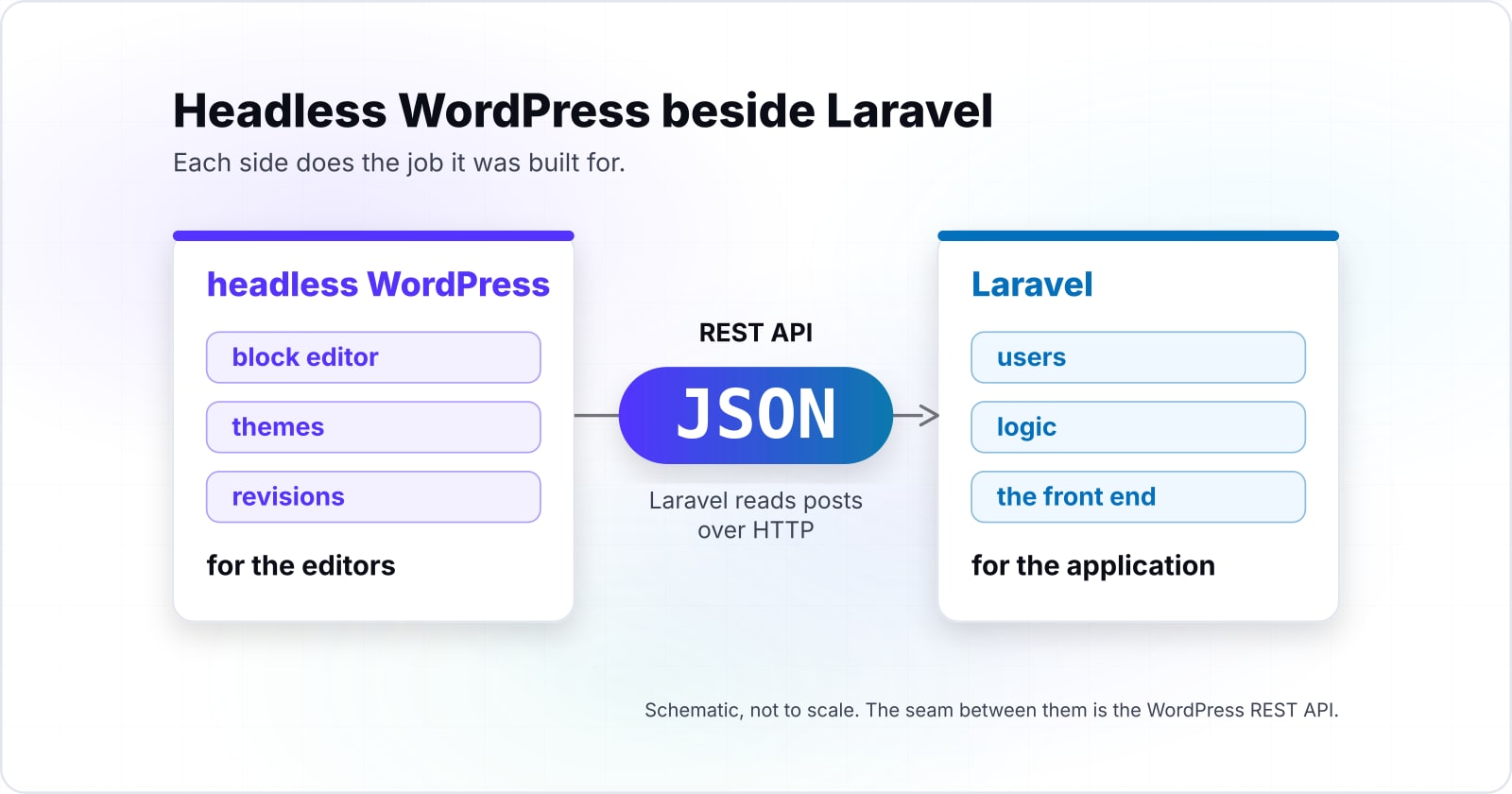
Run headless WordPress for the editors and Laravel for the application when one site needs both editorial publishing and custom logic behind a login. Then each side does the job it was built for, and neither has to fake the other's.
The seam between them is the WordPress REST API. Its handbook says it lets applications interact with your site "by sending and receiving data as JSON". So editors keep the block editor, while Laravel reads posts over HTTP and owns users, logic and the front end. For private calls, the authentication page notes that "As of 5.6, WordPress has shipped with Application Passwords".
430
Lowest run
445
Highest run
Kinsta's December 2025 API test held 430 to 445 requests per second across PHP 8.2 to 8.5.
| Option | requests per second, PHP 8.2 to 8.5 |
|---|---|
| Lowest run | 430 |
| Highest run | 445 |
Source: Kinsta, 13 December 2025
That application side is the load Kinsta's December 2025 API test measured at 430 to 445 requests per second. Meanwhile, WordPress only answers content calls, and Laravel can cache those. But the trade is two deploys, two update cycles and one more seam to watch. So a headless CMS setup pays only when both halves are real.
Which documentation pages do you build the hybrid from?#
Build the hybrid from four official pages, in order: the WordPress REST API handbook, its authentication page, the Laravel HTTP client and Laravel Queues.
- Step 1
/wp-json/wp/v2/ routes
- Step 2
Application Passwords
- Step 3
Http::get and json()
- Step 4
ShouldQueue job and queue:work
- WordPress REST API Handbook: the
/wp-json/wp/v2/routes for posts, pages and terms. - REST API authentication: Application Passwords for drafts and private content.
- Laravel HTTP client:
Http::getand thejson()method that reads the reply. - Laravel Queues: a
ShouldQueuejob and thequeue:workworker.
Then read two more pages when you need them. The Laravel cache docs cover Cache::put and Cache::get, and the Octane docs cover octane:start once traffic grows.
What is the smallest Laravel code that reads WordPress content?#
A Laravel route that calls Http::get on the WordPress posts endpoint and returns the JSON is the smallest working piece of the hybrid. The block below also adds a queued refresh, so a page view never waits on WordPress.
<?php
// Step 1: app/Jobs/RefreshPosts.php, a queued job that reads WordPress
namespace App\Jobs;

use Illuminate\Contracts\Queue\ShouldQueue;
use Illuminate\Foundation\Queue\Queueable;
use Illuminate\Support\Facades\Cache;
use Illuminate\Support\Facades\Http;

class RefreshPosts implements ShouldQueue
{
    use Queueable;

    public function handle(): void
    {
        $posts = Http::get('https://cms.example.com/wp-json/wp/v2/posts')->json();
        Cache::put('wp_posts', $posts);
    }
}

// Step 2: routes/web.php, serve the cached posts and queue a refresh
use App\Jobs\RefreshPosts;
use Illuminate\Support\Facades\Cache;
use Illuminate\Support\Facades\Route;

Route::get('/articles', function () {
    RefreshPosts::dispatch();
    return Cache::get('wp_posts', []);
});

// Step 3: in a terminal, start a worker
// php artisan queue:work
First, replace cms.example.com with your WordPress host. Since the route only reads the cache, a slow WordPress host never slows the page. In production, dispatch the job on a schedule or when an editor publishes, rather than on every request.
How do security and upkeep differ between plugins and a framework?#
Laravel's 13.x release notes, read in October 2026, give each major version 18 months of bug fixes and 2 years of security fixes. Because a new major ships each year, a Laravel team plans one upgrade a year inside that window.
Show data table
| Item | Value |
|---|---|
| bug fixes | 18 |
| security fixes | 24 |
Each Laravel major version gets 18 months of bug fixes and 2 years of security fixes.
But WordPress upkeep has a different shape. Core updates are routine, while every plugin is its own release stream with its own author. The WordPress optimization handbook says "Deactivating and deleting unnecessary plugins is a significant way to improve performance". Also, the same pruning shrinks what you must patch. So the honest comparison is not secure against insecure, but many small updates you do not control against one yearly upgrade you do.
In short, a WordPress site with five plugins is light to keep current. But one with forty plugins carries forty update streams. For more on that side, see WordPress features, advantages and disadvantages.
When is a migration the wrong tool for the problem?#
A WordPress to Laravel migration, or the reverse, is the wrong move when the pain is slow plugins, weak hosting or no page cache rather than the platform's job.
Try the smaller fixes first, because each one takes days rather than months. When WordPress is slow, add a page cache and a persistent object cache, then prune plugins, as the optimization handbook advises. If one heavy feature hurts, move only that feature to a small Laravel service beside WordPress. And when a Laravel app is mostly marketing pages, put those pages in a CMS rather than moving the app.
A full rebuild carries every URL, redirect and search ranking with it. So it is a large risk to take for speed alone. Therefore migrate only when the eight questions above give a different answer than they did at launch. For example, a blog that grew into a subscription product has changed its job, but a slow blog has not.
Where do you go next once the choice is made?#
Go deeper on the side you chose with the posts below, or talk to a Laravel or WordPress team if the build needs more hands than you have.
- CMS types compared shows where WordPress sits among content systems.
- Laravel queues at scale covers the workers behind the hybrid.
- Laravel performance optimization helps once Laravel is chosen.
- Laravel Folio covers file-based page routing for the content pages a Laravel build takes on.
- The WordPress request lifecycle explains why every uncached request boots the whole stack.
If you need builders, see Laravel developers or WordPress developers. Otherwise, the four official pages above are enough to build the hybrid on your own.