Laravel Folio in 2026: when it was released, how file-based routing works, and when to skip it
If you are the software engineer or tech lead who owns a Laravel app's upgrades and routing, a Blade file becoming a URL is the easy part. The hard part is which Folio release your Laravel version needs, and which pages should stay in routes/web.php.
When was Laravel Folio released, and is it still maintained?#
Laravel Folio shipped its first beta on 25 July 2023, reached a stable 1.0 on 23 August 2023, and released v1.2.0 on 13 August 2026. Laravel announced it on its blog in the week of Laracon US 2023. The post says: "Today, we are releasing the first beta of Laravel Folio." Seven betas shipped in four weeks, and v1.0.0 landed the same day as beta 7.
The Folio changelog, read on 2 October 2026, lists 31 tagged releases. They come in a burst at launch, a quiet 2024 and 2025, then a second burst in 2026.
Show data table
| Item | Value |
|---|---|
| 2023 | 14 |
| 2024 | 4 |
| 2025 | 3 |
| 2026 to 2 October | 10 |
Folio's releases came in a burst at launch, a quiet 2024 and 2025, then a second burst in 2026.
The 2026 releases are not cosmetic, because they track the framework. For example, v1.1.14 on 5 March 2026 is titled "Laravel 13.x Compatibility", and v1.2.0 adds support for selecting Folio page mounts. Also, the package's composer.json, read on 2 October 2026, accepts Laravel at ^10.19|^11.0|^12.0|^13.0 with PHP ^8.1. In short, Folio is maintained, and what remains is fit.
What does Folio save a Laravel team, and where does the saving stop?#
For a content page, Folio replaces a route line, a controller method and a view binding with one Blade file in resources/views/pages. Because Blade is Laravel's template language, the Laravel 13.x Folio docs say "generating a route becomes as effortless as creating a Blade template". So an about page, a docs page or a simple list needs one file, not three.
The page can also load its own data, through a render function the docs show inside the page. It receives the view and any bound model, so it can add data with $view->with(...) or return another response, such as a 403.
Meanwhile, the saving stops at a clear line. Say a controller, a queued job or a test must also call a page's rules, which now sit inside a view file. As a result, you copy them or move them to a class, and the page is back to two files. Therefore the variable that matters is page type, not app size. A marketing site gains a lot, while a product screen full of rules gains little.
| Page | With plain routes | With Folio |
|---|---|---|
| A content page | A route line, a controller method and a view binding | One Blade file in resources/views/pages |
| A page whose rules a controller, job or test also calls | A route, a controller and a service class for the rules | A page file plus a class for the rules: two files again |
How does Laravel Folio file-based routing work today?#
Folio turns each Blade file under resources/views/pages into a URL, bracketed file names into route parameters, and a model name in brackets into route model binding. In short, the file name is the route definition, and the 13.x docs give each pattern with the folio:page command that creates it.
- A plain name:
pages/answers atgreeting.blade.php /greeting. - An index file:
pages/is the root of its folder,users/ index.blade.php /users. - One parameter:
pages/answers atusers/ [id].blade.php /users/1with$id. - Many segments:
pages/answers atusers/ [...ids].blade.php /users/1/2/3with an$idsarray. - A model:
pages/binds an Eloquentusers/ [User].blade.php Usermodel and hands the page$user.
Two variations cover most real cases in a typical app. First, [Post:slug].blade.php binds by the slug column instead of the id; on Windows the docs use a hyphen, [Post-slug].blade.php. Second, Folio looks for models in app/Models by default, so a model elsewhere goes in the file name in full, as [.App.Models.User].blade.php.
Soft deleted models are skipped by default, as with plain routes. In practice, a page that must show them calls withTrashed() at the top of the template. Also, php artisan folio:list prints every page and its URL. It is the one place you see the whole map.
How do middleware, named routes and route caching work in Folio?#
Folio declares middleware and route names inside the page with the middleware() and name() functions, or for a whole directory on Folio::path, and it caches with route:cache. For one page, the docs show middleware(['auth', 'verified']) in a PHP block at the top of the template. For a group, the service provider calls Folio::path(resource_path('views/. Its keys are URL patterns, such as 'admin/*', and closures work as inline middleware.
Names work the same way, and they live in the page too. A page calls name('users.index'), and then route('users.index') builds its URL anywhere in the app, with parameters passed as an array.
For caching, the docs say "Folio listens for the route:cache Artisan command". So page definitions and names are cached with the rest. However, this path has broken before, since the changelog entry for v1.1.19, 23 June 2026, reads "Fixed route caching breaking Folio". So run route:cache after any Folio upgrade, then check a named page still resolves.
The trade is placement. Every routing need has a Folio form, but the rules live across page files and one provider, not in one routes file.
| Need | Where it is declared | How it is used or checked |
|---|---|---|
| Middleware | middleware() in the page, or Folio::path()->middleware() in the service provider | Keys are URL patterns such as 'admin/*'; closures work as inline middleware |
| Route names | name('users.index') in the page | route('users.index') builds the URL anywhere in the app |
| Route caching | Nothing to declare: Folio listens for route:cache | v1.1.19, 23 June 2026, fixed route caching breaking Folio; run route:cache after an upgrade |
Which Laravel versions does Folio support in October 2026?#
As of October 2026, Folio's composer.json accepts Laravel 10.19 through 13, but a team on Laravel 13 needs Folio v1.1.20 or later for folio:list to work. Laravel's 13.x release notes give each major 18 months of bug fixes and 2 years of security fixes. So the binding question is which Laravel version still gets fixes, not which one Folio accepts.
In particular, Folio's constraint outlives Laravel's own support, so versions 10 and 11 are past their last security fix, while 12 and 13 are still covered.
| Laravel | Released | Bug fixes until | Security fixes until |
|---|---|---|---|
| Laravel 10 | February 14th, 2023 | August 6th, 2024 | February 4th, 2025 |
| Laravel 11 | March 12th, 2024 | September 3rd, 2025 | March 12th, 2026 |
| Laravel 12 | February 24th, 2025 | August 13th, 2026 | February 24th, 2027 |
| Laravel 13 | March 17th, 2026 | Q3 2027 | March 17th, 2028 |
For example, take a team on Laravel 12, which lost bug fixes on 13 August 2026. It plans the move to Laravel 13, which shipped on 17 March 2026. Folio's changelog shows Laravel 13 compatibility in v1.1.14 on 5 March 2026, before the framework shipped. But folio:list only worked there from v1.1.20, dated 5 August 2026. So that team requires v1.1.20 at least, and v1.2.0 is the sensible target.
Earliest Folio release
v1.1.10That release is dated
26 January 2025Laravel bug fixes until
August 13th, 2026Laravel security fixes until
February 24th, 2027Laravel 12 needs Folio v1.1.10 or later, with 4 months of security fixes left
Plan the upgradeFrom the Folio changelog: Supports Laravel 12, dated 26 January 2025.
Moving to Laravel 13 means Folio v1.1.20 or later, the release that fixed folio:list there, and v1.2.0 is the sensible target.
| Laravel | Earliest Folio release | Bug fixes until | Security fixes until |
|---|---|---|---|
| Laravel 10 | v1.0.0 | August 6th, 2024 | February 4th, 2025 |
| Laravel 11 | v1.1.5 | September 3rd, 2025 | March 12th, 2026 |
| Laravel 12 | v1.1.10 | August 13th, 2026 | February 24th, 2027 |
| Laravel 13 | v1.1.20 | Q3 2027 | March 17th, 2028 |
Do Folio and Livewire Volt still go together, and do the starter kits use them?#
Folio and Livewire Volt still combine into single-file pages, but Laravel's Livewire starter kit in October 2026 requires Livewire 4 and neither Folio nor Volt. Livewire is Laravel's library for interactive pages written in PHP. The Volt README calls Volt a functional API for Livewire. It supports single-file components, "allowing a component's PHP logic and Blade templates to coexist in the same file". So Volt writes the component, and Folio gives it a URL.
The pairing is documented, but only in older docs. For instance, the Volt docs still show how to take a model from Folio's binding. Yet that page carries a banner: "You're browsing the documentation for an old version of Livewire." Meanwhile, the Livewire 4 pages docs route a full page from routes/web.php with Route::livewire('/posts/create', 'pages::post.create').
Laravel's own starter kit follows Livewire 4 as well. The Laravel 13.x starter kits page says the kit is "built with Livewire 4, Tailwind, and Flux UI." Its composer.json, read on 2 October 2026, requires livewire/livewire ^4.1 and laravel/framework ^13.17, and it lists no Folio and no Volt. Therefore Folio is now a choice you make, not a default you inherit.
Volt is installed more than ten times as often as Folio. Packagist, the PHP package registry, counted 8,082,415 installs for livewire/volt on 2 October 2026, against 775,815 for laravel/folio.
8,082,415
livewire/volt
775,815
laravel/folio
Volt is installed more than ten times as often as Folio.
| Option | installs as printed on each package page |
|---|---|
| livewire/volt | 8,082,415 |
| laravel/folio | 775,815 |
Source: Packagist package pages for livewire/volt and laravel/folio, read 2 October 2026
If your team has not yet settled on Livewire at all, Livewire versus traditional Laravel covers that choice first.
Which official pages should a Folio build start from?#
Build from four official pages in order: the Folio docs for install and pages, the changelog for the version, the release notes for support, and the Volt docs if pages hold components. Each one answers a single setup question, so open them as you reach that step.
Laravel 13.x Folio docs
The install, folio:install, Folio::path, and the page functions middleware, name, render and withTrashed.
Folio changelog
The lowest release your Laravel version needs.
Laravel 13.x release notes
How long your Laravel version gets bug and security fixes.
Volt docs for Livewire 3
Only if your pages hold Volt components.
What is the smallest working Laravel Folio example?#
The smallest working Folio app is two commands and one Blade file: composer require laravel/folio, php artisan folio:install, then resources/views/pages/greeting.blade.php. The commands below come from the Folio docs, and they run in any Laravel 10.19 to 13 app.
composer require laravel/folio
php artisan folio:install
php artisan folio:page greeting
php artisan folio:list
Then put this in resources/views/pages/greeting.blade.php, the docs' own first page:
<div>
    Hello World
</div>
Open /greeting and the page renders. Also, folio:list shows the route, which proves Folio registered it. For a bound page next, run php artisan folio:page "users/[User]" and print {{ $user->id }} in it.
When is Folio the wrong tool, and when do plain routes win?#
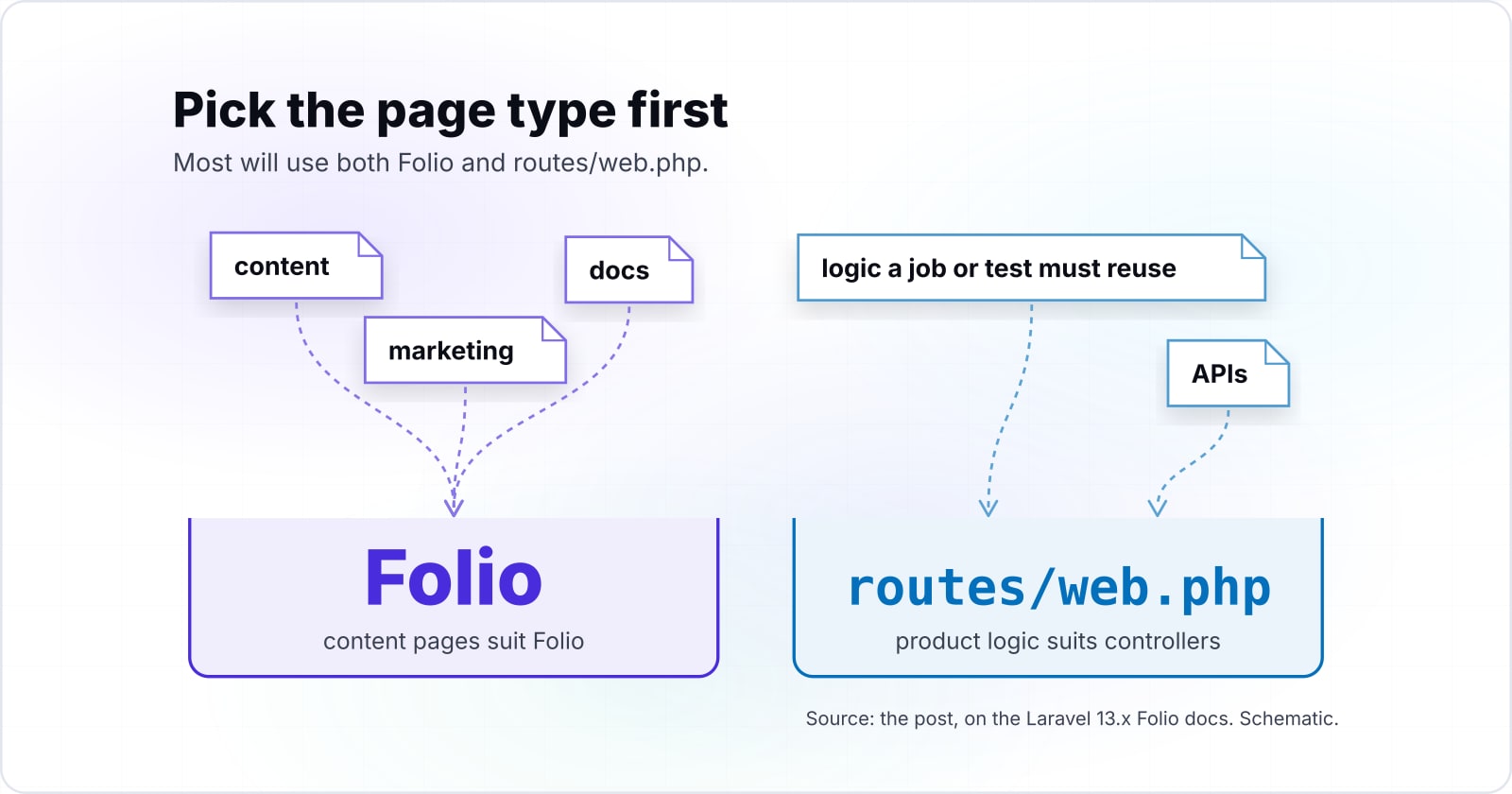
Plain routes in routes/web.php are the better choice for APIs, for pages whose logic a job or test must reuse, and for teams who audit every route in one file. Folio fits content, marketing, docs and simple record pages, since it serves Blade views from a pages folder.
First, an API returns data, not Blade pages, so give it routes and controllers in a route file. Folio's docs describe pages and templates only, and the render hook is a page tool.
Second, keep a page out of Folio when its rules must run elsewhere. Say a queued job, a console command or a test calls the same logic. Put it in a service class, call it from a controller, and route that in routes/web.php, so every caller shares one tested path.
Third, some teams review routes as one list in code review. For them, routes/web.php shows every URL, middleware and name in one file, while Folio spreads them across pages. And if your screens are Livewire components, the Livewire 4 Route::livewire method keeps them in routes/web.php with no second router.
Because most screens in a subscription product hold business rules, Laravel for SaaS maps the packages that do the work.
Where should a Laravel team go from here?#
Pick the page type first, then the router: content pages suit Folio, product logic suits controllers, and Livewire 4 pages suit component-heavy screens. Most apps hold more than one page type, so most will use both Folio and routes/web.php.
If interactive screens dominate, read Livewire versus traditional Laravel and then the Livewire release history, the version Volt launched beside. If business rules dominate, Laravel for SaaS is the next read.
Also, for a team that wants Laravel software engineers to build or upgrade its pages, there is hiring Laravel developers. And for a team that wants the whole application built, there is custom software development. But the Folio docs and the changelog are enough to ship your first page today.