Laravel Livewire vs Blade, decided one feature at a time
If you are the software engineer or tech lead who has to decide whether a Laravel feature needs a Livewire component, the useful question is not which tool is newer. It is what each update sends to your server, and which Livewire major the advice you are reading describes.
What is Laravel Livewire, and how is it different from plain Blade?#
Blade is the other half of the comparison. Laravel's Blade documentation calls it "the simple, yet powerful templating engine that is included with Laravel", and it compiles each template to plain PHP. So a Blade view renders on the server, goes to the browser as HTML, and is done. After that, nothing about it talks back.
Livewire keeps the Blade view and adds a PHP class behind it. In fact, the Blade docs point to it directly, under the heading "Supercharging Blade With Livewire". Livewire's hydration guide explains the trick. It works by "taking "snapshots" of the PHP component after each server-side update", and then it rebuilds the component from that snapshot on the next request.
So the real question is never "Livewire or Blade" for a whole application. Instead, it is a smaller one, asked per feature. Does this piece of the page need state that travels to the server, and what does that state cost each time?
What does deciding one feature at a time save a Laravel team?#
On one search field, the binding chosen decides whether typing a seven-letter term sends no request, one request or seven requests to your server. That is the saving in plain terms. Because the choice is made per field, not per project, it sets how often each component calls home.
For example, take the word "laravel", typed into a search box. With the default wire:model, Livewire's wire:model documentation says it only updates "when an "action" is submitted", so typing alone sends nothing. With wire:model.live, the same page says "Livewire adds a 150 millisecond debounce to server updates". In other words, it waits until typing pauses for that long.
Then typing speed decides the count. If keys arrive closer together than Livewire's documented 150 milliseconds, one request goes after the last key. But someone typing slower sends one per key, so seven for "laravel".
Show data table
| Item | Value |
|---|---|
| one key every 100 ms | 1 |
| one key every 140 ms | 1 |
| one key every 200 ms | 7 |
| one key every 300 ms | 7 |
Below the 150 ms debounce one request goes after the last key; slower typing sends one per key.
For a tech lead, that is a number to report upward. A search box on the deferred default costs nothing until the form is sent. On the live binding, it costs between one and seven requests per word, set by the person typing. And once you multiply that by every field on every page, the binding choice becomes a capacity decision.
What crosses the wire on each Livewire update, and why does its size set the cost?#
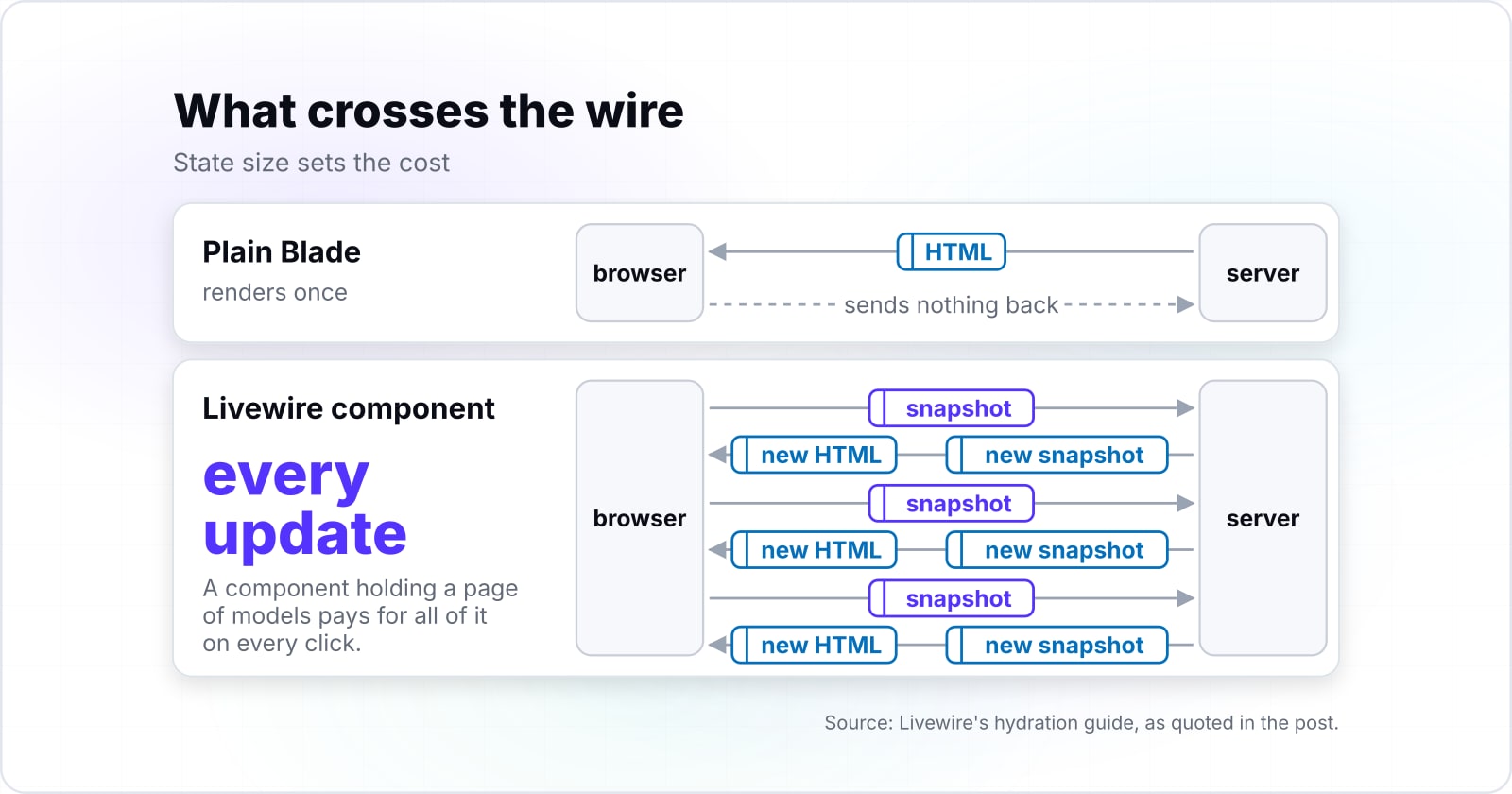
Every Livewire update posts the component's snapshot of public state to the server and returns new HTML with a new snapshot, so state size sets the cost. Because the server does not hold the component between requests, nothing is kept in memory for it. Livewire's hydration guide calls each request "stateless". So Livewire "must re-create the last-known state of a component before making any updates."
The snapshot has two parts. In Livewire's hydration guide, the memo part identifies the component. Meanwhile, the state part "stores the values of all the component's public properties." On first render, "Livewire stores the snapshot as JSON inside an HTML attribute called wire:snapshot", so the browser carries it from the start.
That JSON is not just raw values. For example, the guide shows a Laravel collection stored with extra metadata. The reason it gives is that "JSON alone has no way of representing Laravel collections." So every public property you add makes that snapshot larger, and so does every model or collection you hold. Then it travels up and back on every update.
Two more facts shape the bill. First, Livewire's security guide says "Livewire generates a "checksum" of each snapshot to go along with it". So the server can check that the snapshot was not altered. Second, its Isolate page says "Every component update in Livewire triggers a network request." When several components update at once, "they are bundled into a single request."
Livewire publishes no byte figure for a typical snapshot, and none is offered here. Still, the rule is simpler than a number. A component holding three strings is cheap to send. But a component holding a page of models pays for all of it on every click.
Why must a Livewire claim name the version it describes?#
Livewire's stable majors arrived 35 and then 28 months apart, and defaults changed between them, so an undated claim may describe a framework nobody installs now. Packagist dates 2.0.0 to 7 September 2020, 3.0.0 to 24 August 2023 and 4.0.0 to 14 January 2026.
Show data table
| Item | Value |
|---|---|
| Livewire 2.0.0 to 3.0.0 | 35 |
| Livewire 3.0.0 to 4.0.0 | 28 |
Livewire's stable majors arrived 35 and then 28 months apart.
Those are long gaps. So a tutorial written in 2022 describes Livewire 2, even if it still shows up in search. Also, the GitHub release notes mark each jump plainly. The 3.0.0 note opens with "Official release for Livewire 3.0". Then the 4.0.0 note says "Livewire 4.0 is finally here."
In practice, this means one habit. Before acting on a Livewire claim, check which major it describes, and then check the major your composer.lock pins. If the two differ, the claim may be about a default that no longer exists, and the next section shows the most common case.
Does Livewire still send a request on every keystroke?#
Not by default since Livewire 3: wire:model waits for a submitted action, and typing only syncs when you opt in with wire:model.live. The request-per-keystroke warning is real, but it describes Livewire 2.
The Livewire 3 upgrade guide states the change in one line: "In Livewire 3, wire:model is "deferred" by default". Also, to get the Livewire 2 behaviour back, it says "you must use wire:model.live." And Livewire 4 keeps the deferred default, per its current wire:model page.
The opt-in has a cost you choose. Livewire's wire:model page sets a 150 millisecond debounce on wire:model.live by default. It also shows how to change it with .debounce.250ms. Meanwhile, the Livewire 4 upgrade guide adds that wire:model.live requests "now run in parallel". As a result, fast typing waits less for results.
So the honest answer depends on the version. On Livewire 2, yes, a bound input could send a request per key. But on Livewire 3 and 4, it sends nothing until an action, unless you ask for live updates.
| Major | Default wire:model | Live updates |
|---|---|---|
| Livewire 2 | sends updates as the user types | default |
| Livewire 3 | deferred: waits for an action | wire:model.live, 150 ms debounce |
| Livewire 4 | deferred: waits for an action | wire:model.live, 150 ms debounce, requests run in parallel |
Why is every public property on a Livewire component untrusted input?#
A Livewire component's public properties and action parameters can be changed in the browser, so each one is request input to validate and authorise. The properties guide says to "always treat public properties as user input", and the security guide says the same of action parameters.
The security guide shows the classic mistake. A component holds a $postId and a delete action. Because the action does not authorise that ID, a user can change it in the browser and then delete a post they do not own. The fix it shows is $this->authorize('delete', $post) inside the action.
There is also the #[Locked] attribute, which throws an error when a user tries to change a locked property. However, the same guide warns that a locked property "can still be changed in the back-end", so your own code still has to keep bad input out.
A Blade view has none of this surface, because nothing posts back. So this is real work to budget for. Each component needs the validation and the policy checks a controller would apply to the same request.
Which three questions decide whether a feature becomes a Livewire component?#
Ask what state the feature holds, whether that state must reach the server, and how large it is once serialised; the answers decide the feature. Each question has a plain test.
- What state does it hold? If the answer is none, because the feature only shows data, it is a Blade view.
- Must that state reach the server? If the state only changes what the browser shows, such as an open menu, it can stay in the browser.
- How large is it once serialised? If it is a few strings, the snapshot is small. If it holds many models, every update carries them all.
Now run the questions on a search input that filters products on the server. First, it holds one piece of state, the search term. Second, that term must reach the server, because the filtering happens in a database query. Finally, it serialises to one short string, so the snapshot stays small.
So it is a good Livewire component. Then the only choice left is the binding. On the deferred default, the term is sent when the person presses search. But on wire:model.live, results follow the typing, at a cost of one to seven requests for a seven-letter word, as the chart above shows.
How many requests does your typing send?
Set the term's length, your time between keystrokes and the debounce; it counts the requests sent while typing on each binding.
Requests on wire:model.live
1
- Requests on the deferred wire:model while typing
- 0
- Requests per 100 searches typed this way on wire:model.live
- 100
Modelled from the documented 150 ms debounce at a steady typing interval, not measured.
Then change one input. If the same box also held every matching product as a public property, question three would fail. Instead, keep the results out of public state and query them in the render method, so that only the term travels.
When were Livewire 3 and Livewire 4 released, and how do you upgrade?#
Livewire 3.0.0 shipped on 24 August 2023 and Livewire 4.0.0 on 14 January 2026, and the upgrade follows the official guide with no automated command. Packagist's release times give both dates. Also, the GitHub releases page matches them.
Some pages give July 2023 for Livewire 3, because that is the beta. Per Packagist, v3.0.0-beta.1 is dated 20 July 2023, 35 days before the stable release. Meanwhile, Livewire 4 had a longer beta. Packagist dates v4.0.0-beta.1 to 28 October 2025, 78 days before 4.0.0.
Show data table
| Item | Value |
|---|---|
| Livewire 3: beta.1 to 3.0.0 | 35 |
| Livewire 4: beta.1 to 4.0.0 | 78 |
Livewire 4 had a longer beta: 78 days from beta.1 to 4.0.0, against 35 for Livewire 3.
Livewire 3 has not been dropped. Packagist shows v3.8.10 and v4.4.7 both published on 28 September 2026, and both require PHP 8.1 or later. So a Livewire 3 application still gets patches while it plans the move.
To upgrade from Livewire 3 to Livewire 4, follow the upgrade guide in this order:
- Run
composer require livewire/livewire:^4.0, the guide's first step. - Clear the caches with
php artisan optimize:clear, as the guide says to do next. - Update
config/livewire.php. The guide's high-impact list renames keys, for examplelayoutbecomescomponent_layout, now pointing tolayouts::app. - Move full-page routes to
Route::livewire(). The guide says the oldRoute::get()form "still works but not recommended." - Check
wire:modelon container elements, which now ignores child events unless you add.deep. - Check
.blurand.changemodifiers. From v4.1 they control when the browser syncs, so add.livebefore them to keep the old timing.
In short, the guide says most applications "can upgrade to v4 with minimal changes." It also names one shortcut: "You can use Laravel Shift to help automate your application upgrades."
Which Livewire major should a new component be built on in October 2026?#
Build new components on Livewire 4: its daily installs passed Livewire 3 in May 2026, though 3.x still receives patch releases. Packagist's monthly averages show Livewire 4 at 66,178 daily installs in May 2026 against 64,669 for Livewire 3.
Show data table
| Dimension | Livewire 2 | Livewire 3 | Livewire 4 |
|---|---|---|---|
| Oct 2025 | 8,250 | 73,376 | 42 |
| Nov 2025 | 8,766 | 73,679 | 281 |
| Dec 2025 | 9,334 | 74,435 | 450 |
| Jan 2026 | 7,325 | 79,005 | 9,315 |
| Feb 2026 | 8,321 | 76,574 | 30,253 |
| Mar 2026 | 8,398 | 71,349 | 45,847 |
| Apr 2026 | 7,081 | 66,432 | 56,866 |
| May 2026 | 6,992 | 64,669 | 66,178 |
| Jun 2026 | 7,033 | 68,728 | 83,978 |
| Jul 2026 | 6,182 | 71,594 | 100,740 |
| Aug 2026 | 6,082 | 73,405 | 122,073 |
| Sep 2026 | 6,596 | 85,970 | 163,302 |
Livewire 4 daily installs passed Livewire 3 in May 2026.
The gap has grown since. In Packagist's September 2026 figures, Livewire 4 averaged 163,302 daily installs and Livewire 3 averaged 85,970. Livewire 2 sat at 6,596 in that same month, so older applications still run it.
Therefore, start new work on 4, where the docs, the defaults and most new installs now are. But an application on Livewire 3 does not need to rush. Since 3.x was still patched on 28 September 2026, it can upgrade when the team has room for the six checks above.
How do you add one Livewire component to a Laravel application that already ships?#
Install the package, generate one component with Artisan, and render it inside an existing Blade view; the views around it keep rendering as before. Nothing else in the application has to change. That is because the component rebuilds from its own snapshot, and the Blade views around it never post back.
These steps come from the installation guide and the components guide for Livewire 4:
composer require livewire/livewire
php artisan make:livewire post.create
The second command creates a single-file component at resources/views/components/post/⚡create.blade.php. The components guide shows it like this:
<?php

use Livewire\Component;

new class extends Component {
    public $title = '';

    public function save()
    {
        // Save logic here...
    }
};
?>

<div>
    <input wire:model="title" type="text">
    <button wire:click="save">Save Post</button>
</div>
Then render it inside any Blade view you already have:
<livewire:post.create />You do not have to add script tags. The installation guide says Livewire will "automatically inject its assets into pages that contain Livewire components". Still, @livewireStyles and @livewireScripts give you control over where they go. Also, Livewire bundles Alpine.js, so remove any second copy of Alpine from those pages.
Before shipping, apply the security section above to save(). Then validate $title, and authorise the action as you would in a controller.
When not to use Livewire, and when should a component come back out?#
A feature that only displays data belongs in plain Blade, and a component whose state has outgrown its interactions should be taken back out. In fact, Livewire is the wrong tool in three ordinary cases, and each has a better one.
First, a table, card or list that only shows data needs no state, so use a Blade view or a Blade component. Second, a menu, tab or modal that only changes what the browser shows needs no server. So use Alpine.js, which Livewire's installation guide says it already bundles. Finally, when the whole front end is a rich client in Vue or React, compare the options in Livewire vs Splade vs Inertia first.
Also, a component should come out when it carries data it never reacts to, or when it no longer has an action. One founder on Notes on Laravel, writing on 10 February 2026, reported a campaigns table built as eleven components, one parent and ten rows. Then turning the rows into Blade views gave, in their words, "7 files changed, 63 lines added, 267 lines removed."
63
Lines added
267
Lines removed
That is one reported case, not a benchmark.
Show data table
| Option | lines in one reported diff |
|---|---|
| Lines added | 63 |
| Lines removed | 267 |
Source: Notes on Laravel, 2026
That is one reported case, not a benchmark. Still, the shape is easy to spot. Row components that only display data pay the full lifecycle on every page, and they give nothing back for it.
Go and look at the feature in front of you#
Open the feature you are deciding about, check which Livewire major your composer.lock pins, and run the three questions on it. The answer will be specific to that feature, because that is the point.
If the feature stays in plain Blade and needs a URL, Laravel Folio covers file-based routing for those pages. For an admin panel, Filament on Laravel is built on Livewire and shows the same choices at scale. And when an action is slow, move the work off the request with Laravel queues, because every Livewire update waits on it.
If you want a second pair of hands, our Laravel team builds and measures components in applications that already carry traffic. For the system around one feature, see enterprise software work. Either way, the Laravel Livewire documentation and the upgrade guide are enough to make this call on your own.