Laravel queues at scale: the timer order and worker sum that stop double runs
Jobs that run twice and queues that fall behind usually come from two sums that were never written down. Both fit on one screen, and you can check both against your own config before the next traffic peak.
What keeps Laravel queues at scale reliable?#
Laravel queues at scale stay reliable when every job timeout sits below retry_after, every job is safe to run twice, and the worker count comes from average job time. The Laravel 13.x queue documentation, read on 7 October 2026, is blunt about the first check. If the worker timeout is longer than retry_after, "your jobs may be processed twice."
Then the second check follows from the first. No timer can promise that a job runs exactly once, because a worker can crash halfway through. So every job that charges, emails or writes needs a key that makes a second run harmless.
The third check is arithmetic. Since a worker runs one job at a time, its hour holds 3,600 seconds of job time at most. In practice, most queue trouble at scale traces back to one of these three checks, not to a missing package.
Three names recur. Redis is an in-memory data store, and it is one of the queue backends Laravel supports. Horizon is Laravel's dashboard and configuration system for queues powered by Redis. And Supervisor is a process monitor for Linux that restarts worker processes when they stop.
How many queue workers does a workload need?#
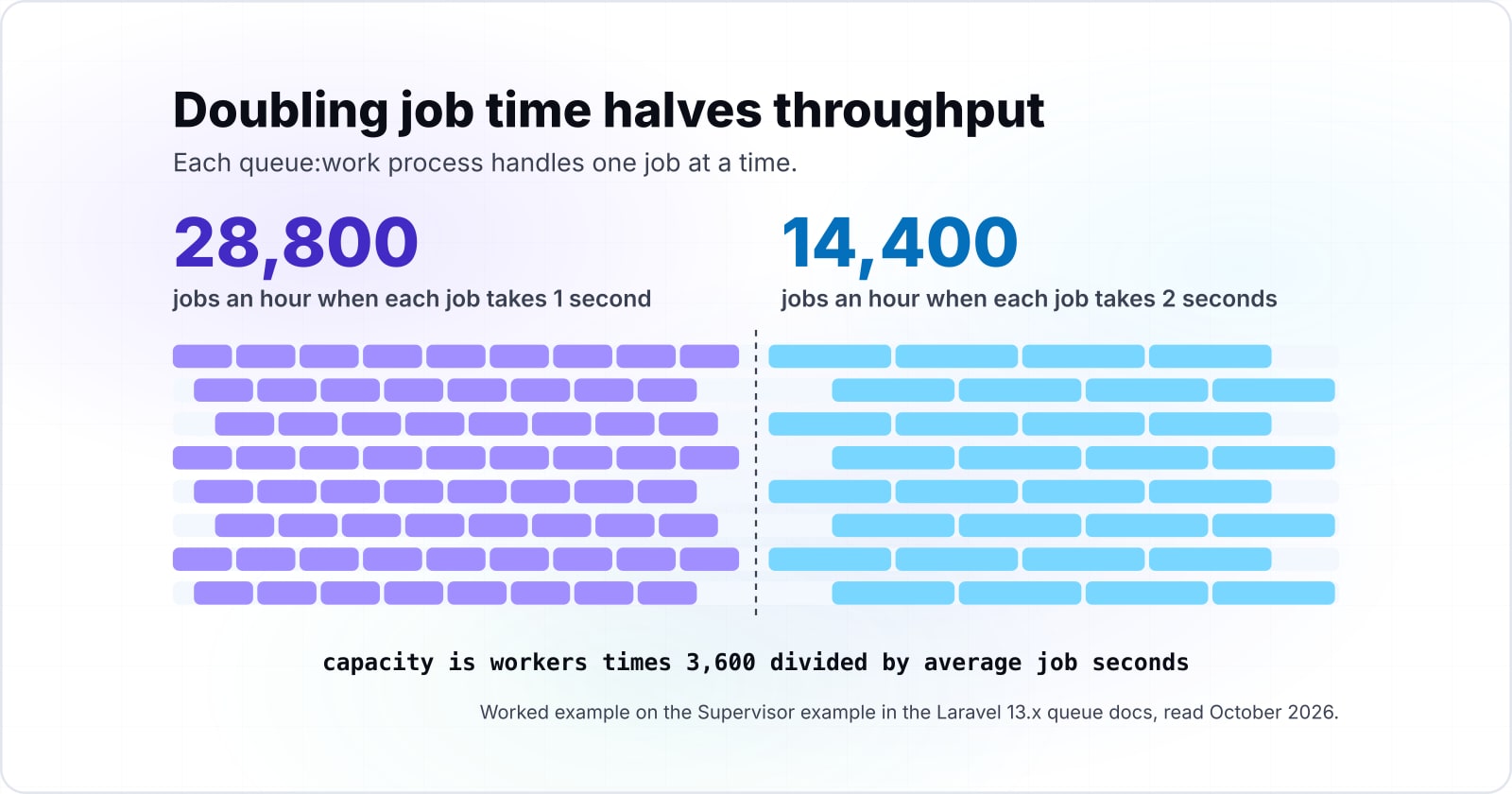
In a worked example, eight workers clear 28,800 one-second jobs an hour, and only 14,400 once the average job slows to 2 seconds. So capacity is workers times 3,600 divided by average job seconds, and doubling job time halves throughput.
Jobs per hour for your worker pool
Put in your worker count and your measured average seconds per job. The default eight workers come from the Supervisor example in the Laravel 13.x queue docs.
Jobs per hour, at most
28,800
Arithmetic on the Laravel 13.x Supervisor example, October 2026. Modelled, not measured.
Show data table
| Item | Value |
|---|---|
| 0.2 s per job | 144,000 |
| 0.5 s per job | 57,600 |
| 1 s per job | 28,800 |
| 2 s per job | 14,400 |
| 5 s per job | 5,760 |
Doubling job time halves throughput: eight workers clear 28,800 one-second jobs an hour and 14,400 two-second jobs.
The eight comes from the Supervisor program in Laravel's 13.x queue docs, read in October 2026, which sets numprocs=8. Because each queue:work process handles one job at a time, the arithmetic is simple. Therefore the ceiling is the worker count times the seconds in an hour, divided by how long one job takes.
Then run the same sum the other way to size a pool. So workers needed equals jobs per hour times average job seconds, divided by 3,600. For example, say a shop dispatches 40,000 jobs an hour at 1.5 seconds each, an illustrative load. That needs 40,000 times 1.5 divided by 3,600, about 16.7, so 17 workers before any headroom.
But the sum is a ceiling, not a target. Workers also poll, sleep and restart, so plan to run well under it. And average job time moves without any change to the queue, when a payment API slows down or a query grows. As a result, measure job time rather than guess it. The Horizon docs, read in October 2026, describe a metrics dashboard that shows job and queue wait times and throughput.
Why does a Laravel job run twice?#
A Redis job runs twice when it is still processing after retry_after seconds, because the queue releases it to another worker while the first one is still working. Laravel's 13.x queue docs, read in October 2026, give the case directly. With retry_after at 90, a job that has been processing for 90 seconds is released back onto the queue.
So with the 2026 defaults, a worker timeout of 60 seconds leaves 30 seconds of margin. But the docs' own #[Timeout(120)] job against the same retry_after has minus 30.
30 s
--timeout 60 s against retry_after 90 s
-30 s
Timeout(120) against retry_after 90 s
With the default worker timeout the job is killed 30 seconds before release; the docs' Timeout(120) job is still running 30 seconds after it.
| Option | seconds of margin, retry_after minus job timeout |
|---|---|
| --timeout 60 s against retry_after 90 s | 30 s |
| Timeout(120) against retry_after 90 s | -30 s |
The worker timeout is the kill switch. In the October 2026 docs it should be several seconds shorter than retry_after. That way, "a worker processing a frozen job is always terminated before the job is retried." When that order flips, nothing stops the first worker in time. Instead, under the 2026 default, a second worker picks up the same job at second 90, and both run it until the first one ends.
And the trap sits inside the docs' own examples. Their timeout section shows a job class marked #[Timeout(120)]. Yet the default retry_after shown in the same docs is 90 seconds. So if you copy both as they stand, that job can run twice on every long run.
Two smaller traps make it worse. First, the docs say job timeouts need the PCNTL PHP extension installed. Second, they warn that sockets and outgoing HTTP calls may not respect the timeout. So set a timeout on the HTTP client as well.
In what order should every queue timer sit?#
Set the job timeout lowest, the Horizon supervisor timeout above it, retry_after above both, and Supervisor stopwaitsecs above the longest job. The defaults in the 2026 docs already sit in the safe order, with 60 seconds of worker timeout under 90 seconds of retry_after.
Show data table
| Item | Value |
|---|---|
| retry_after on the redis connection | 90 |
| queue:work --timeout default | 60 |
| queue:work --sleep in the docs example | 3 |
| block_for in the docs example | 5 |
The shipped defaults already sit in the safe order, with the 60 second worker timeout under the 90 second retry_after.
Here is the ladder, lowest rung first, with illustrative values from the 2026 docs for a queue whose longest job takes under 50 seconds:
- The job timeout, say 50 seconds, set with a Timeout attribute on each job class.
- The Horizon supervisor timeout, 60 in the Horizon docs example, which must sit above every job timeout.
- The connection's retry_after, 90 by default, which must sit a few seconds above the Horizon timeout.
- Supervisor's stopwaitsecs, 3600 in both the queue and Horizon docs, which must outlast the longest job.
Also, each rung has a source. The Horizon documentation, read on 7 October 2026, says "Always ensure the Horizon timeout is greater than any job-level timeout" and wants that timeout a few seconds under retry_after. Meanwhile, the queue docs say stopwaitsecs must be greater than your longest running job, or Supervisor may kill the job mid-run.
Yet raising retry_after is not free. It is also how long a job from a crashed worker waits before anyone retries it. So one long report job should not set the delay for every quick email. Instead, give long jobs their own redis connection with a larger retry_after, since each connection in config/queue.php carries its own value.
Then check your own config in the same order: the job classes, config/horizon.php, config/queue.php and the Supervisor program file.
Should you run Horizon or queue:work under Supervisor?#
Run Horizon when the queues live on Redis and you want auto balancing and a dashboard; run queue:work under Supervisor for any other driver. The Horizon docs, read in October 2026, say Horizon requires Redis and does not yet work with Redis Cluster.
| Setting | Horizon docs value | What it controls |
|---|---|---|
| Supervisor timeout | 60 seconds | When a worker running one job is killed |
| Long-wait threshold, redis:default | 60 seconds | When Horizon reports a queue as waiting too long |
| balanceCooldown | 3 seconds | How often auto balancing may add or remove a worker |
| maxTime | 3600 seconds | When a worker restarts to release memory |
Source: Laravel 13.x Horizon documentation, example values, read in October 2026.
When balance is set to auto, Horizon moves workers between queues as load shifts. The autoScalingStrategy option picks how. Then time assigns workers by the estimated time to clear each queue, and size goes by the number of jobs. Also, log goes by the logarithm of the job count. After that, minProcesses and maxProcesses bound the pool. In the 2026 docs example, a balanceMaxShift of 1 and a balanceCooldown of 3 mean one process is created or destroyed every three seconds. By contrast, the simple strategy splits a fixed number of processes evenly and does not scale.
Auto balancing also explains the timer ladder. During scale down, the docs say, Horizon treats in-progress workers as hanging and kills them after the Horizon timeout. That is why the Horizon timeout must sit above every job timeout.
Yet restarts matter as much as the choice. Because workers keep the booted app in memory, they miss new code until they restart. For plain workers, php artisan queue:restart tells each one to finish its current job and exit, and Supervisor starts a fresh one. For Horizon, php artisan horizon:terminate does the same during a deploy. In both cases, stopwaitsecs must outlast the longest job, or the process manager kills it halfway.
Finally, recycle workers on purpose. The 2026 queue docs show --max-jobs=1000 and --max-time=3600. Horizon's maxJobs, maxTime and memory options do the same, with memory at 128 megabytes by default.
How do you make a job safe to run twice?#
Make a job idempotent by keying its side effect, then add ShouldBeUnique to stop duplicate dispatch and WithoutOverlapping to stop concurrent runs of the same key. Here idempotent means a second run leaves the same result as the first. For a payment job, that means checking whether this payment already went through before charging again.
Still, timers reduce duplicates but cannot remove them. A worker can die after charging a card and before deleting the job, and then the retry charges again. So the key belongs in your own data, for example a unique column for the external payment ID.
Then Laravel's guards sit on top of that key. According to the queue docs, read in October 2026, a job that implements ShouldBeUnique takes a lock on its uniqueId when dispatched. While that lock is held, a new dispatch with the same key is not queued. The UniqueFor attribute sets how long that lock lasts, 3600 seconds in the docs example.
WithoutOverlapping works later, at run time. It stops two jobs with the same key from running at once, for instance two credit score updates for the same user. However, an overlapping job is released back to the queue, and that release counts as an attempt. Its releaseAfter option sets the wait before the retry, and expireAfter frees a lock that a crashed job never released.
Both guards need a cache driver with atomic locks, which the docs list as memcached, redis, dynamodb, database, file and array. If you run many servers, they must also share one central cache. Separately, set after_commit to true on the connection, so a job dispatched inside a database transaction waits for the commit. Otherwise a worker can run it before the rows it needs exist.
What should happen when a job fails?#
Give every job explicit tries, a backoff array and a MaxExceptions cap, then prune the failed_jobs table on a schedule so real failures stay visible. By default, Laravel's 13.x queue docs say, a job is attempted only once.
Give every job explicit tries.
By default a job is attempted only once.
Cap unhandled exceptions with MaxExceptions.
The 2026 docs pair Tries(25) with MaxExceptions(3) for a job that is released many times.
Space the retries with a backoff array.
A Backoff of [1, 5, 10] waits one second, then five, then ten before each retry.
Fail fast on timeouts where a job should never repeat.
FailOnTimeout fails the job at once, whatever the tries.
Prune the failed_jobs table on a schedule.
queue:prune-failed deletes failed job records older than 24 hours by default.
But that default rarely fits at scale. Middleware such as WithoutOverlapping uses up attempts when it releases a job, so a job that uses it needs more tries. For that case the 2026 docs pair #[Tries(25)] with #[MaxExceptions(3)]. The job may be released many times, but it fails after three unhandled exceptions.
Then backoff spaces the retries out. In the October 2026 docs, a Backoff attribute of [1, 5, 10] waits one second before the first retry and five before the second. After that, it waits ten seconds before each retry. That gives a flaky API time to recover, which an instant retry never does.
Timeouts also count. A job that times out uses up one attempt and is released, unless it carries FailOnTimeout, which fails it at once whatever the tries. In short, fail fast on timeouts for jobs that should never repeat, and retry the rest with backoff.
After that, keep the failure list short enough to read. The command php artisan queue:prune-failed deletes failed job records older than 24 hours by default, according to the 2026 docs. Its --hours option changes the window. If you schedule it, the failed_jobs table holds this week's real problems rather than last year's noise.
Which Redis settings stop queued jobs from disappearing?#
Run the queue's Redis with maxmemory-policy set to noeviction and AOF persistence on, because an evicting policy is allowed to delete queued jobs to free memory. The Redis eviction docs, read on 7 October 2026, describe noeviction plainly: "Keys are not evicted but the server will return an error" when a command would cache new data past the limit.
Still, that error is what you want. A failed dispatch shows up in your logs, while an evicted job simply vanishes. Yet the same Redis docs call allkeys-lru, which evicts the least recently used keys, a good default. That advice suits a cache, not a queue. So when one Redis serves both cache and queue, the queue inherits the cache's policy. Give the queue its own Redis instance, or set noeviction on the shared one.
Next, persistence decides what a crash loses. AOF, the append only file, logs every write so Redis can replay it at startup. Its appendfsync setting picks the trade. With everysec, the 2026 Redis persistence docs warn: "you may lose 1 second of data if there is a disaster." With no, the same docs say Linux normally flushes about every 30 seconds.
Show data table
| Item | Value |
|---|---|
| appendfsync everysec | 1 |
| appendfsync no (Linux flush interval) | 30 |
With appendfsync everysec a crash can lose about one second of writes; with no, about thirty.
For a queue, one second of lost dispatches is usually acceptable. But thirty seconds rarely is. So turn the AOF on with appendonly yes and keep everysec.
Which documentation pages do you build this from?#
Build from four official pages in this order: the Laravel queues guide, the Horizon guide, the Redis eviction reference and the Redis persistence reference. Each one holds settings named earlier.
- Laravel 13.x queues: retry_after, the worker timeout, the Supervisor program, tries, backoff, ShouldBeUnique, WithoutOverlapping and queue:prune-failed.
- Laravel 13.x Horizon: balance, autoScalingStrategy, the supervisor timeout and horizon:terminate.
- Redis key eviction: the maxmemory-policy values and what noeviction does.
- Redis persistence: appendonly and the three appendfsync policies.
Read them in that order, since you will configure things in that order.
What is the smallest correct configuration?#
The smallest correct setup is a redis connection with retry_after above the job timeout, one Horizon supervisor, and a job class that declares its own timeout, tries and backoff. Every key below comes from the Laravel 13.x docs as read in October 2026, and the values follow the ladder.
<?php
// config/queue.php
'redis' => [
    'driver' => 'redis',
    'connection' => env('REDIS_QUEUE_CONNECTION', 'default'),
    'queue' => env('REDIS_QUEUE', 'default'),
    'retry_after' => env('REDIS_QUEUE_RETRY_AFTER', 90),
    'block_for' => 5,
    'after_commit' => true,
],

// config/horizon.php
'environments' => [
    'production' => [
        'supervisor-1' => [
            'connection' => 'redis',
            'queue' => ['default'],
            'balance' => 'auto',
            'autoScalingStrategy' => 'time',
            'minProcesses' => 1,
            'maxProcesses' => 10,
            'timeout' => 60,
            'tries' => 3,
        ],
    ],
],

// app/Jobs/SendInvoice.php
namespace App\Jobs;

use Illuminate\Contracts\Queue\ShouldBeUnique;
use Illuminate\Contracts\Queue\ShouldQueue;
use Illuminate\Foundation\Queue\Queueable;
use Illuminate\Queue\Attributes\Backoff;
use Illuminate\Queue\Attributes\Timeout;
use Illuminate\Queue\Attributes\Tries;
use Illuminate\Queue\Attributes\UniqueFor;

#[Timeout(50)]
#[Tries(3)]
#[Backoff([1, 5, 10])]
#[UniqueFor(3600)]
class SendInvoice implements ShouldQueue, ShouldBeUnique
{
    use Queueable;

    public function __construct(public int $invoiceId) {}

    public function uniqueId(): string
    {
        return (string) $this->invoiceId;
    }

    public function handle(): void
    {
        // Skip if already sent; else send and mark it sent.
    }
}
Note that the three PHP parts live in three files, as the comments say. The fourth piece is the Supervisor program that keeps Horizon running, from the Horizon docs:
[program:horizon]
process_name=%(program_name)s
command=php /home/forge/example.com/artisan horizon
autostart=true
autorestart=true
user=forge
redirect_stderr=true
stdout_logfile=/home/forge/example.com/horizon.log
stopwaitsecs=3600
Now read it against the 2026 ladder: 50 under 60 under 90, with 3600 above the longest job. Then add php artisan horizon:terminate to your deploy script.
When is a Laravel Redis queue the wrong tool?#
A Redis-backed Laravel queue is the wrong tool for work that runs for hours, must survive a lost Redis node without any loss, or needs a durable multi-step workflow. Each case has a better home.
| Work | Why the Redis queue struggles | Better home |
|---|---|---|
| Runs for hours | A crashed job waits hours for its retry | Short jobs, or a dedicated process that reports progress |
| Cannot lose a single dispatch | A lost Redis node can lose jobs | Amazon SQS, or the database driver |
| Many steps that must resume | A queue does not remember where a long process stopped | A workflow engine |
First, work that runs for hours fights the ladder. A retry_after of several hours means a crashed job waits hours for its retry. Instead, split the work into short jobs, or run it as a dedicated process that reports its progress.
Second, work that cannot lose a single dispatch is better on a managed queue such as Amazon SQS, the AWS Simple Queue Service. Laravel's queue docs, read in October 2026, note that SQS has no retry_after. Instead, it retries jobs on its Default Visibility Timeout, set in the AWS console. Alternatively, the database driver keeps jobs in tables that your backups already cover.
Third, some processes have many steps and must resume after a failure, such as an order that waits days for a shipment. Those need a workflow engine. Because a queue runs single jobs well, it suits short tasks. Still, it does not remember where a long process stopped.
None of this is a reason to drop Redis queues for ordinary work. In practice, email, webhooks, image resizing and search updates fit them well.
Where should you go from here?#
Check the four timers first, then size workers from measured job time, then add idempotency keys to every job that sends, charges or writes. That order fixes the double run before the backlog, and the backlog before the rare duplicate.
For the code around the queue, Laravel performance optimization covers moving slow work out of the request. The deploy that restarts workers and Horizon is walked through in deploying Laravel on DigitalOcean with Forge. For multi-tenant apps that lean on queues for mail and billing, see Laravel for SaaS. And to notice a duplicate run when it happens, activity logging with Spatie in Laravel shows how to record what each job did.
If you would rather have help running the fleet, you can hire Laravel software engineers for the jobs or DevOps software engineers for Redis, Supervisor and the deploy. Still, the four official pages above are enough on their own.