WordPress Composer PSR-4 npm: how to structure a large plugin estate, and what the autoloader really buys
Past a few dozen classes, require_once chains and copied vendor folders start to fight each other. Two dependency graphs, one for PHP and one for JavaScript, end most of that, and a timed test shows which tuning step is worth the effort.
How do you structure a large WordPress codebase with Composer and PSR-4?#
Give each plugin or theme one PSR-4 namespace mapped to a src folder, let Composer generate the autoloader, prefix bundled vendor code, and build assets with npm scripts.
So that is four parts, and each one fixes a separate failure. First, the namespace map replaces long require_once chains. Composer's schema reference says that under the psr-4 key "you define a mapping from namespaces to paths, relative to the package root". Second, Composer turns that map into one file, vendor/autoload.php, which the plugin requires once.
Next, prefixing stops two plugins from loading two copies of one library under the same name. Finally, the JavaScript half gets its own graph in package.json. The WordPress.org reference for @wordpress/scripts calls it a "collection of reusable scripts tailored for WordPress development". So the build needs no hand-written webpack setup.
The rest of this guide takes each part in turn. Also, it shows, with timed numbers, which of Composer's speed options matter.
What does this structure buy a team that maintains many plugins?#
It buys fewer fatal errors from clashing libraries and a deploy step with a known gain; in our 9 October 2026 test, 800 missing lookups fell from 1,600 to 123 microseconds.
The first gain is plain. When a library clashes, the fatal error shows up on a live site. Often it follows an update to a plugin you do not own. Once each plugin's copy has its own namespace, that error class goes away.
The second gain needs numbers, so we timed it. In our 9 October 2026 test, a generated 800-class plugin with eight folders ran under each autoloader mode. Each mode ran in 31 fresh processes.
The test machine was an Apple M3 Pro with PHP 8.2.31 and Composer 2.9.2. Also, OPcache was off except in the preload run.
So in that test, dump -o ran 1.06 times faster on loads, and dump -a ran 13.01 times faster on misses. Then preload gave 355 times.
Show data table
| Item | Value |
|---|---|
| dump -o, loading 800 classes | 1.06 |
| dump -a, loading 800 classes | 1.06 |
| dump -a, 800 missing lookups | 13.01 |
| dump -a plus OPcache preload, loading | 355 |
The class map is a small win, while the authoritative map pays off on misses and preload on loads.
So the report to a lead is honest and short. The class map is a free, small win. But the large wins depend on how often your code asks for missing classes. They also depend on whether your PHP process stays alive between requests.
Your autoload time per request
Put in how many classes a request loads and how many lookups miss; each mode scales its measured time from the 800-class test.
Plain PSR-4, microseconds
17,236
- Class map, dump -o, microseconds
- 16,293
- Authoritative, dump -a, microseconds
- 14,851
- dump -a plus OPcache preload, microseconds
- 167
Arithmetic from the Atyantik test of 9 October 2026. Modelled, not measured.
How does a PSR-4 namespace map to folders and files in a plugin?#
PSR-4 strips a namespace prefix, maps it to a base directory, and turns each remaining namespace segment into a folder and the class name into a file.
As a result, the folder tree is the namespace tree, so a misnamed folder is a class that never loads.
The PSR-4 specification from PHP-FIG sets the rule. A leading part of the class name, the namespace prefix, points to a base directory. Each name after the prefix becomes a subfolder, and "The terminating class name corresponds to a file name ending in .php".
For example, take a plugin with the prefix Acme\Shop\ mapped to src/. The class Acme\Shop\Admin\Settings then lives in src/Admin/Settings.php. Composer's schema reference gives the same example: a class Foo\Bar\Baz with prefix Foo\ pointing at src/ loads from src/Bar/Baz.php.
| Class name | Prefix and base directory | File path |
|---|---|---|
| Acme\Shop\Admin\Settings | Acme\Shop\ to src/ | src/Admin/Settings.php |
| Foo\Bar\Baz | Foo\ to src/ | src/Bar/Baz.php |
Also, case matters. The specification says "The subdirectory name MUST match the case of the sub-namespace names", and the file name must match the class name's case. A folder named admin works on a laptop with a case-blind disk, then fails on a Linux server. In practice, most "class not found" reports after a deploy come down to this one rule.
Next, the prefix needs a trailing backslash. Composer's schema reference explains that Foo would match classes in the FooBar namespace, while Foo\\ and FooBar\\ stay distinct. Meanwhile, the WordPress.org plugin best practices page asks for a unique prefix on everything global, because "Prefixes prevent conflicts with other plugins". So a namespace is that prefix, applied to every class at once.
Why do two plugins that bundle the same library break each other?#
PHP can declare a class name only once per request, so when two plugins ship different versions of one library, whichever plugin loads first wins.
Because each plugin runs composer install on its own, each one ships its own vendor folder. Composer keeps the two copies apart on disk, but not in memory. Both autoloaders claim the same class names, and the first one asked supplies the class for the whole request.
That is fine when both copies are the same version. However, when plugin A ships an old release and plugin B needs a newer method, B calls a method that the loaded class lacks. The result is a fatal error inside B, caused by A. And it can appear or vanish when someone changes plugin load order.
The WordPress.org best practices page names the trap from the other side. It warns that a class_exists() guard "sounds like a great idea until you realize the fatal flaw". If the other plugin's code loads first, yours breaks.
The fix is to move each plugin's bundled copy into its own namespace before it ships. Roots, which publishes open source WordPress tooling, recommends PHP-Scoper for this, so Psr\Log becomes something like AcmeShop_Vendor\Psr\Log. It is one example, not the only choice: the same page says "Tools like PHP-Scoper exist to solve this problem". Then the two copies can live side by side in one request.
What do composer dump-autoload -o and -a change when you measure them?#
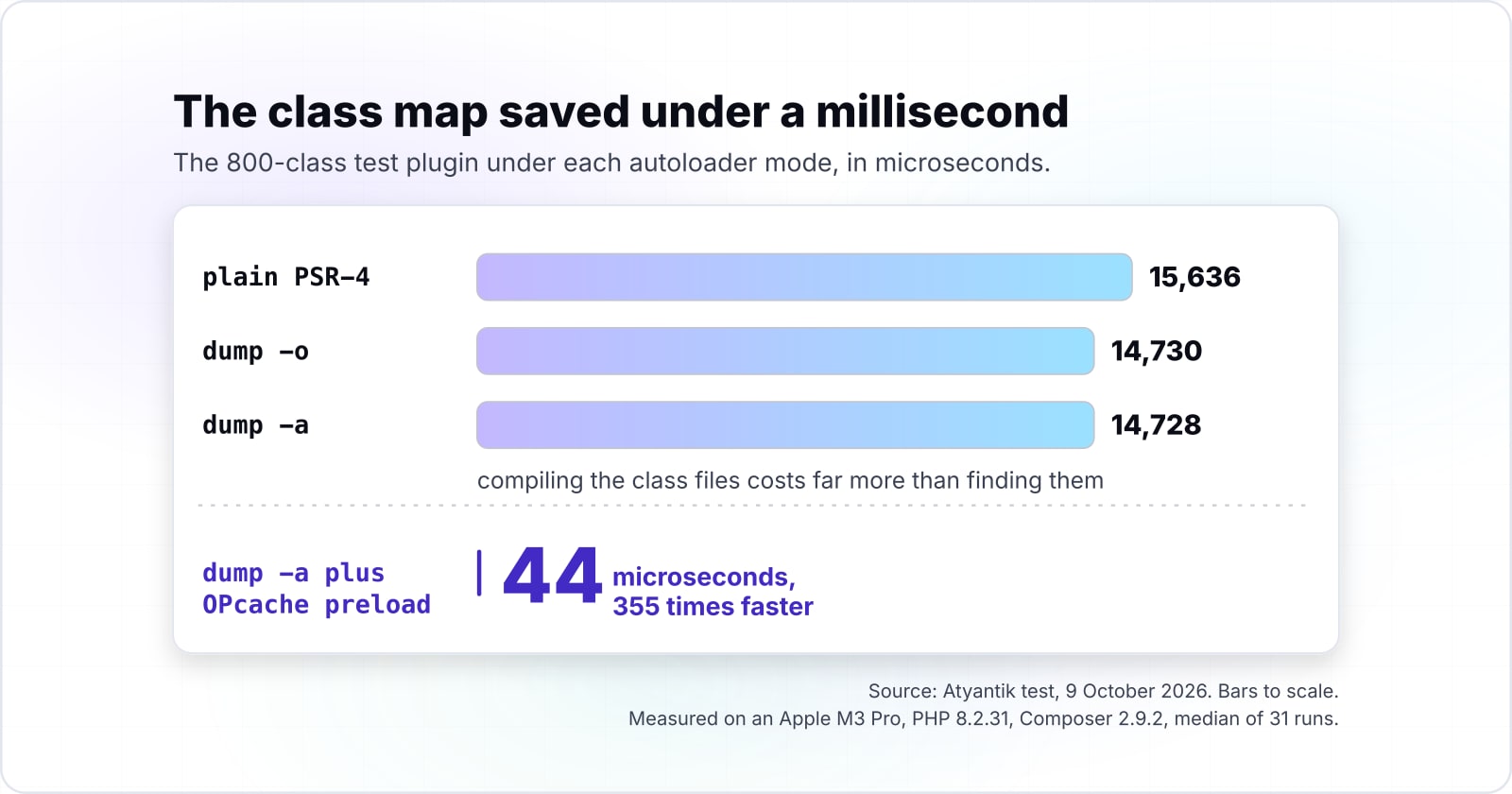
In our 9 October 2026 test, the 800-class plugin loaded in 15,636 microseconds with plain PSR-4, 14,730 with dump -o and 14,728 with dump -a, so the class map saved under a millisecond.
In short, on a cold request the class map barely moves load time, because compiling the class files costs far more than finding them.
Composer's command reference says -o will "Convert PSR-0/4 autoloading to classmap to get a faster autoloader". Then -a goes further: "Autoload classes from the classmap only." The autoloader optimization guide calls these Level 1 and Level 2/A.
| Flag | Command reference | Optimization guide |
|---|---|---|
| dump-autoload -o | Convert PSR-0/4 autoloading to classmap to get a faster autoloader | Level 1 |
| dump-autoload -a | Autoload classes from the classmap only. | Level 2/A |
Show data table
| Item | Value |
|---|---|
| PSR-4, unoptimised | 15,636 |
| Class map, dump -o | 14,730 |
| Authoritative, dump -a | 14,728 |
| Authoritative plus OPcache preload | 44 |
On a cold request the class map barely moves load time, because compiling the class files costs far more than finding them.
Why so small? Plain PSR-4 checks the disk for each file, and the class map skips that check. But each class file must still be read and compiled, and with OPcache off that work dominates. The finding step was never the heavy part.
So run composer dump-autoload -o on every production build anyway. The optimization guide says of Level 1 that it "should always be enabled in production". Still, do not expect it to rescue a slow site on its own.
Where do the authoritative class map and OPcache preload actually win?#
In our 9 October 2026 test, 800 missing lookups fell from 1,600 to 123 microseconds with dump -a, and OPcache preload cut the load to 44 microseconds.
So the authoritative map wins on lookups that miss, and OPcache preload wins on loads, but preload only helps a persistent PHP process.
A miss is a class_exists() call for a class that is not in the plugin. WordPress code does this a lot, to check whether another plugin is active. With plain PSR-4 or dump -o, Composer still searches the disk before it gives up. Instead, with dump -a it trusts the map and answers at once.
In our 9 October 2026 test, plain PSR-4 spent 1,600 microseconds on those misses. In that test dump -o spent 1,563 and dump -a spent 123, which is 13 times faster.
Show data table
| Item | Value |
|---|---|
| PSR-4, unoptimised | 1,600 |
| Class map, dump -o | 1,563 |
| Authoritative, dump -a | 123 |
With dump -a Composer trusts the map and answers a miss at once, instead of searching the disk.
Preload attacks the compile cost instead. In our 9 October 2026 test with dump -a, OPcache preload cut the full load from 15,636 to 44 microseconds. That gain comes from code compiled once and kept in memory, not from the autoloader at all.
Still, there is a condition. The PHP manual's preloading page says "preloading is only useful when there is a persistent process from one request to another". In practice, that means a PHP-FPM pool you control and can restart on deploy. On shared hosting, where you cannot set opcache.preload, the class map is the gain you can actually reach.
What does @wordpress/scripts run through npm, and how does it sit beside Composer?#
@wordpress/scripts gives npm scripts such as build, start, format and plugin-zip, so assets build from package.json while PHP loads from composer.json, two graphs side by side.
So the JavaScript half is a second dependency graph with its own lockfile.
The reference for @wordpress/scripts, the WordPress scripts npm package, lists the scripts a plugin wires into package.json: build, start, format, lint-js, plugin-zip and more. Each one runs as npm run build or npm run start. In particular, build writes production bundles to the build folder by default, and start rebuilds while you edit.
| Script | Run it as | What it does |
|---|---|---|
| build | npm run build | Writes production bundles to the build folder by default |
| start | npm run start | Rebuilds while you edit |
| plugin-zip | npm run plugin-zip | Packs the plugin for release |
| prebuild | runs before npm run build | A check before every build, through npm pre and post commands |
npm's scripts guide explains why the commands need no global install. Executables from dependencies "will be added to the PATH for executing the scripts", so wp-scripts resolves from node_modules/.bin. The guide also says "Pre and post commands with matching names will be run for those as well". So a prebuild step can run a check before every build.
Keep the two graphs apart on purpose. composer.json and composer.lock describe PHP, while package.json and package-lock.json describe JavaScript. Because neither tool reads the other's files, a front-end upgrade cannot change which PHP classes load. For the language side of that build, our ECMAScript 2026 guide covers what the bundler compiles.
Which docs do you build a WordPress Composer PSR-4 npm setup from?#
Build from six pages in order: the PSR-4 specification, Composer's schema, its command reference, its autoloader optimization guide, the @wordpress/scripts reference and npm's scripts guide.
- The PSR-4 specification: how a class name becomes a file path, case rules included.
- Composer's schema reference: the
autoloadkey withpsr-4andclassmap. - Composer's command reference: the Composer commands,
dump-autoloadabove all, with-o,-aand--no-dev. - The autoloader optimization guide: which level suits production, and the trade-off of each.
- The @wordpress/scripts reference: what
build,startandplugin-zipdo. - npm's scripts guide: how
npm runfinds commands, and the pre and post hooks.
What is the smallest working setup for one plugin?#
The smallest working setup is a composer.json with one psr-4 entry, one require of vendor/autoload.php in the main plugin file, and a package.json whose build script runs wp-scripts build.
First, map the namespace in composer.json, then run composer dump-autoload -o for a production build:
{
  "name": "acme/shop",
  "autoload": {
    "psr-4": { "Acme\\Shop\\": "src/" }
  }
}
Second, require the autoloader once from the main plugin file, which sits in the plugin root:
<?php
/**
 * Plugin Name: Acme Shop
 */
require_once plugin_dir_path( __FILE__ ) . 'vendor/autoload.php';
Then run npm install @wordpress/scripts --save-dev and add the scripts to package.json:
{
  "scripts": {
    "build": "wp-scripts build",
    "start": "wp-scripts start",
    "plugin-zip": "wp-scripts plugin-zip"
  }
}
After that, npm run build writes bundles to build/, and npm run plugin-zip packs the plugin for release.
How do you move a live plugin from require_once chains to Composer without breaking it?#
Move one folder at a time: add the psr-4 mapping, keep the old require_once lines until each class resolves through Composer, then delete them and ship.
So the old includes stay as a fallback until each class provably loads through Composer.
Add the psr-4 mapping
Require vendor/autoload.php above the old includes. Nothing changes yet.
Keep the old require_once lines
They stay as a fallback until each class provably loads through Composer.
Move one folder at a time
Rename files and folders so each path matches its namespace, case included.
Delete that folder's require_once lines
Load a page that uses those classes; staging shows a fatal error at once.
Ship each folder as its own release
If one breaks, the rollback is one commit.
First, add the psr-4 mapping and require vendor/autoload.php above the old includes. Nothing changes yet, because the old require_once lines still load every class first.
Then move one folder at a time. Rename files and folders so each path matches its namespace, case included. Next, delete that folder's require_once lines and load a page that uses those classes. If a class does not resolve, staging shows a fatal error at once, before the live site sees it.
Old code that never had namespaces can stay where it is for a while. Composer's schema reference says the classmap key builds its map "by scanning for classes in all .php and .inc files in the given directories". So a legacy folder can sit under classmap while new code moves to psr-4.
Ship each folder as its own release. If one breaks, the rollback is one commit, and our post on Git and GitFlow branching shows a branching model that keeps those lockfile changes reviewable.
When not to optimise the autoloader or split code into Composer packages?#
Skip dump -o and dump -a in development, since the Composer guide advises against them while classes are being added or removed, and skip the package split for a small plugin.
In short, optimisation belongs to production builds and the package split belongs to shared code.
Skip -o and -a in development. The Composer guide says to "not enable any of these optimizations in development as they all will cause various problems when adding/removing classes". With a class map in place, a new class stays invisible until the next dump.
Next, skip -a if any dependency creates classes at runtime. The optimization guide warns that with an authoritative map, a class "generated at runtime for some reason" cannot be autoloaded. In that case, Level 2/B, the APCu cache, gives fast misses without that risk, where APCu is installed.
Also skip the package split for a small plugin. The plugin best practices page says "small, single-purpose plugins" gain little from complex classes. Unless the plugin will grow, one namespace and one src folder is enough. Splitting it into packages there only adds release work.
Finally, skip preload on shared hosting or a short-lived CLI job. The PHP manual says preload in a CLI script is "generally pointless", and that clearing preloaded code needs a PHP restart.
| Case | Skip | Use instead |
|---|---|---|
| Development, while classes are added or removed | dump -o and dump -a | Plain PSR-4 until the production build |
| A dependency creates classes at runtime | dump -a | Level 2/B, the APCu cache, where APCu is installed |
| A small, single-purpose plugin | The package split | One namespace and one src folder |
| Shared hosting or a short-lived CLI job | OPcache preload | composer dump-autoload -o on every production build |
Where should you go next?#
Start with the branching model that keeps lockfiles reviewable, then the WordPress request lifecycle, and bring in help only if the estate is already large.
For the lifecycle, read where the bootstrap runs in a WordPress request, since that decides when vendor/autoload.php is required. If you are still choosing the platform, WordPress features, advantages and disadvantages weighs it first. For process, the GitFlow post above keeps both lockfiles under review.
If the estate is already dozens of plugins deep, WordPress developers or PHP developers who have done this migration can carry it. Even so, the six pages listed above are enough to do it yourself, one folder at a time.