Git and GitFlow branching workflow for teams
Route yourself to the right branching workflow from your context, then standardize it with a branch-naming regex, a Conventional Commits table, and the branch-protection, CODEOWNERS, and commitlint config that make the standard survive a real team.
Which branching workflow actually fits your team?#
The one that matches how your team ships. GitFlow's mechanics are rarely the hard part. Five inputs decide the model: your release model, your versioning scheme, your compliance needs, your team size and your CI/CD maturity. Find your row, read across, and pick the column that matches most of your answers.
| Your context | GitFlow | GitHub Flow | GitLab Flow | Trunk-based |
|---|---|---|---|---|
| Release model | Scheduled, versioned releases you support in parallel | Continuous deploy of one production line | Continuous, plus environment or release branches | Continuous deploy, many small merges a day |
| Versioning | SemVer with several live versions | Rolling, latest only | SemVer or rolling, release branches optional | Rolling, latest only |
| Compliance / audit | Strong: explicit release and hotfix branches | Light: pull-request history only | Medium: environment branches map to stages | Needs feature flags plus strong CI to stay auditable |
| Team size | Larger teams shipping desktop, mobile, or on-prem builds | Small to mid-size web teams | Mid-size teams with staged environments | Any size, given mature CI |
| CI/CD maturity | Works without heavy automation | Needs solid pull-request CI | Needs environment pipelines | Needs fast, trusted CI and feature flags |
If most of your answers sit in the last two columns, standardize a simpler model and skip to the migration section at the end. If they sit in the GitFlow column (versioned software, parallel supported releases, audit pressure), the sections below are your convention pack.
What are GitFlow's five branch types, and how do they merge?#
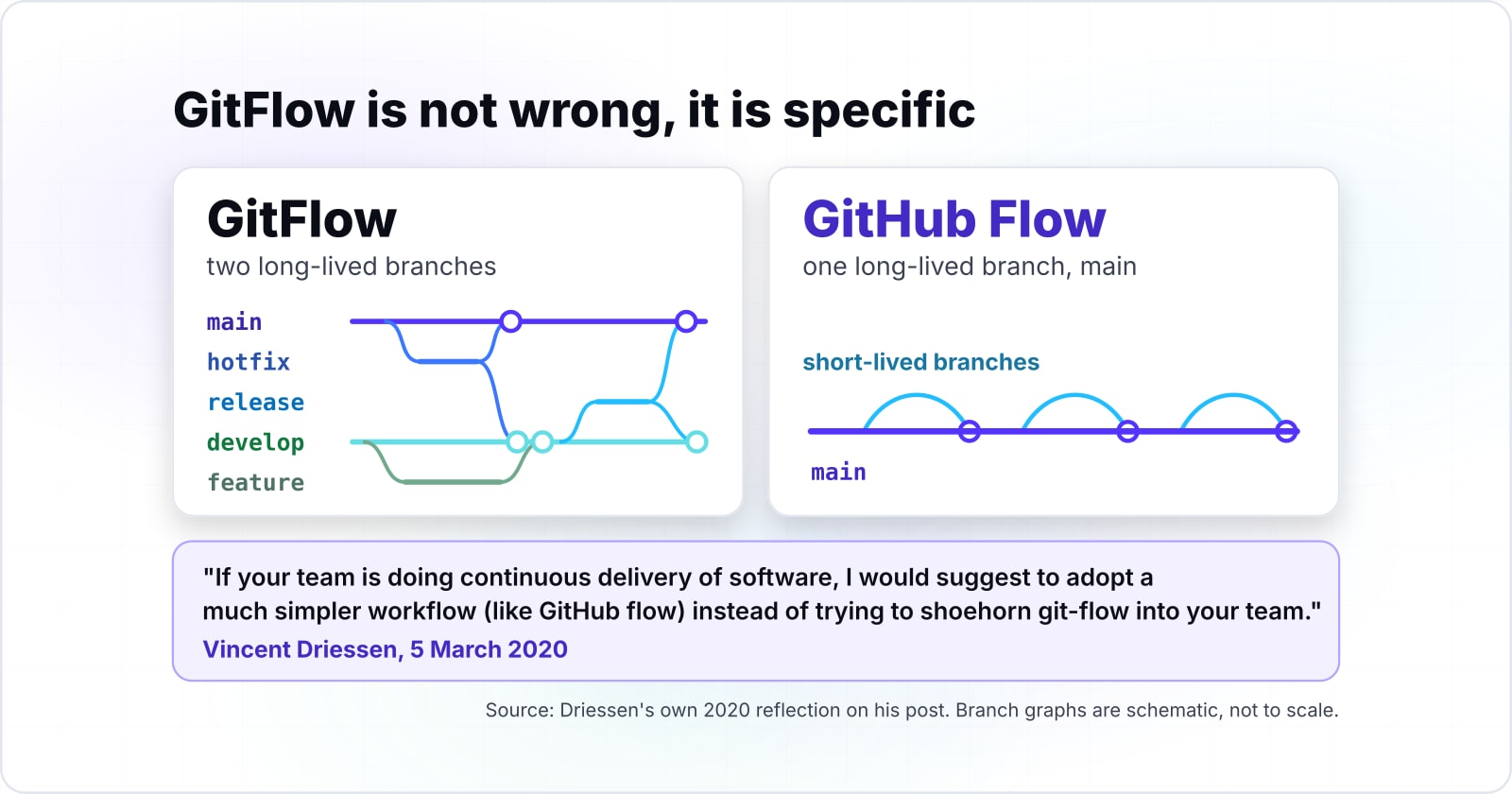
The GitFlow branching workflow has two long-lived branches and three short-lived ones. main holds released, tagged code. develop is the integration branch. feature/* branches off develop and merges back. release/* stabilizes a version, then merges to both main and develop. hotfix/* branches off main to patch production, then merges back to both. The trap is the two long-lived branches and the back-merges. That is exactly the overhead the simpler models remove.
When is the GitFlow branching workflow the wrong default?#
When you deliver continuously, and that answer comes from the person who designed it. Vincent Driessen published GitFlow on 5 January 2010 for software with explicit, versioned releases. On 5 March 2020 he added a note to the top of that same post.
So the GitFlow branching workflow is not wrong, it is specific. It earns its overhead when you support several versions in parallel and cut deliberate releases. If you deploy the latest commit to one production line all day, its long-lived branches and back-merges cost you and return nothing.
Do long-lived branches slow delivery down?#
Yes, on the evidence. DORA's State of DevOps research is the largest running study of software delivery. It keeps finding that short-lived branches integrated often beat long-lived branches integrated late. Its analysis of its 2016 and 2017 data found that teams deliver better with three or fewer active branches, merging to trunk at least once a day. The gap in change lead time between the top and bottom groups is large.
Less than one day
Elite performers
One to six months
Low performers
DORA keeps finding the same shape: teams that merge small changes to trunk frequently and keep branch lifetimes short cluster at the top. Long-lived branches, the thing GitFlow encourages, correlate with the slow end. These are DORA's figures across the industry, not Atyantik client data.
| Option | time from code committed to running in production |
|---|---|
| Elite performers | Less than one day |
| Low performers | One to six months |
How should you name branches so CI can enforce it?#
Give every branch a type prefix and a short slug, and let a regex in CI reject anything else. A naming standard is only real if a machine checks it. Below is each branch type with its prefix, an example and the regex that accepts it. The last row is one combined pattern for a CI job, so an off-standard branch fails before it wastes a review.
| Branch type | Prefix pattern | Example | Enforcing regex |
|---|---|---|---|
| Feature | feature/<description> | feature/login-rate-limit | ^feature/[a-z0-9._-]+$ |
| Bug fix | bugfix/<description> | bugfix/date-parse-offset | ^bugfix/[a-z0-9._-]+$ |
| Release | release/<version> | release/2.4.0 | ^release/[0-9]+\.[0-9]+\.[0-9]+$ |
| Hotfix | hotfix/<version>-<description> | hotfix/2.4.1-null-session | ^hotfix/[a-z0-9._-]+$ |
| Long-lived | literal names | main, develop | ^(main|develop)$ |
| Combined (for CI) | one pattern for all | any of the above | ^((main|develop)|(feature|bugfix|hotfix|release|chore)/[a-z0-9._-]+)$ |
What commit message format should a team use?#
Use Conventional Commits, because a machine can read it. Branch names solve half the problem; commit messages are the other half. Each message starts with a type that maps to a Semantic Versioning bump. Your release tooling can then compute the next version and the changelog from history alone. The format is type(scope): description, with a ! or a BREAKING CHANGE: footer for anything that breaks the public contract.
| Type | Use it for | SemVer bump |
|---|---|---|
| feat | A new feature | MINOR |
| fix | A bug fix | PATCH |
| perf | A performance improvement | PATCH |
| docs | Documentation only | none |
| style | Formatting, no code behavior change | none |
| refactor | Code change that is neither a feature nor a fix | none |
| test | Adding or correcting tests | none |
| build | Build system or dependency changes | none |
| ci | CI configuration and scripts | none |
| chore | Tooling and housekeeping, no source change | none |
| feat! or BREAKING CHANGE: | A breaking change to the public contract | MAJOR |
Try it: does your branch name pass the standard?#
Type it into the validator below and it tells you live. You can also pick an example. On a pass it highlights the two groups the regex captured, the type and the description, so you see exactly what CI accepts.
feature / login-rate-limit
Type feature, then a slash, then a lowercase, dash-separated description.
Pattern: ^(feature|bugfix|hotfix|release|chore)\/([a-z0-9]+(?:[-_.][a-z0-9]+)*)$
How do you ship a feature, a release and a hotfix in GitFlow?#
Branch features and releases off develop, and branch hotfixes off main. Conventions are easier to keep once you have run the loop once. Here is the full trace, command by command, ending with the production hotfix that has to reach both branches.
A feature. Branch off develop, commit with a Conventional Commit, and open a pull request back into develop. Nothing touches main yet.
# Start from an up-to-date develop
git checkout develop
git pull origin develop

# Branch with the naming standard
git checkout -b feature/login-rate-limit

# Do the work, then commit with a Conventional Commit
git add src/auth/rate-limit.ts
git commit -m "feat(auth): limit login attempts to 5 per minute"

# Push and open a pull request into develop
git push -u origin feature/login-rate-limit
gh pr create --base develop --fill
A release. When the scope for a version is frozen, cut a release branch off develop. Only stabilizing commits land on it. Merging it to main and tagging it ships the version. The back-merge into develop keeps any last fixes.
# Cut a release branch off develop once the scope is frozen
git checkout develop && git pull
git checkout -b release/2.4.0

# Only stabilizing commits land here: version bump, changelog, last fixes
git commit -am "chore(release): 2.4.0"

# Merge to main, tag the release, then back-merge into develop
git checkout main && git merge --no-ff release/2.4.0
git tag -a v2.4.0 -m "Release 2.4.0"
git checkout develop && git merge --no-ff release/2.4.0
git push origin main develop --tags
A hotfix. This is the flow people get wrong. Production is broken, so you branch off main, not develop, because develop may hold unreleased work. After the fix, merge to main and tag the patch. Then back-merge into develop, so the next release does not bring the bug back.
# Production is broken. Branch straight off main, never off develop
git checkout main && git pull
git checkout -b hotfix/2.4.1-null-session

git commit -am "fix(auth): guard against a null session on token refresh"

# Merge to main, tag the patch, then back-merge so develop keeps the fix
git checkout main && git merge --no-ff hotfix/2.4.1-null-session
git tag -a v2.4.1 -m "Hotfix 2.4.1"
git checkout develop && git merge --no-ff hotfix/2.4.1-null-session
git push origin main develop --tagsHow do you make a branching standard stick?#
Wire it into the repository with three layers: branch protection, CODEOWNERS and commitlint. A convention that lives in a wiki is a suggestion; one wired into the repository is a standard. Protect the branch, route the review, and lint the commit.
Protect the branch. Require a passing CI run and at least one approving review before anything merges to main. This is where you wire in the branch-name regex and the commit lint as required checks.
# Require a review and green checks before anything merges to main
gh api --method PUT repos/:owner/:repo/branches/main/protection \
  --input - <<'JSON'
{
  "required_pull_request_reviews": { "required_approving_review_count": 1 },
  "required_status_checks": { "strict": true, "contexts": ["ci/test", "ci/lint"] },
  "enforce_admins": true,
  "restrictions": null
}
JSON
Route the review. A CODEOWNERS file sends each pull request to the people who own the touched paths. Security changes reach the security group, and infrastructure changes reach the DevOps group, without anyone remembering to add them.
# .github/CODEOWNERS: route each review to the people who own the path
*                @acme/platform
/src/auth/       @acme/security
/infra/          @acme/devops
*.sql            @acme/data
Lint the commit. commitlint checks every message against the Conventional Commits contract and rejects the ones that break it. Wired to a Git hook, a bad message never reaches the remote.
// commitlint.config.js: reject commits that break the contract
export default {
  extends: ['@commitlint/config-conventional'],
  rules: {
    'type-enum': [2, 'always', [
      'feat', 'fix', 'docs', 'style', 'refactor',
      'perf', 'test', 'build', 'ci', 'chore',
    ]],
    'subject-case': [2, 'never', ['upper-case', 'pascal-case']],
  },
};#!/usr/bin/env sh
# .husky/commit-msg: run commitlint on every commit message
npx --no-install commitlint --edit "$1"With those three in place, the branch-naming regex, the commit contract, and the review routing all enforce themselves. New team members learn the standard by bouncing off it once, not by reading a document.
A branching standard only holds if the work entering and leaving a branch is disciplined too. For what has to pass before a merge is allowed, read how to allocate testing by risk rather than spreading it evenly across every branch. For how work gets routed before anyone cuts a branch, running a bug triage as a room rather than a queue covers the process this convention pack assumes.
When should you migrate off GitFlow, and how?#
Migrate when you deploy continuously to one production line. There, the long-lived branches and back-merges of the GitFlow branching workflow are pure overhead, and the DORA evidence says they slow you down. There are two lighter targets.
- GitHub Flow keeps one long-lived branch, main, plus short-lived branches that merge back through a reviewed pull request. It fits small to mid-size web teams deploying the latest commit. The same short branch and reviewed pull request is the loop you follow when you contribute to open source as a frontend developer.
- Trunk-based development goes further. Everyone integrates to trunk at least daily, branches live hours not weeks, and unfinished work hides behind feature flags. It needs fast, trusted CI and a feature-flag habit, and it is what the elite performers in the DORA data tend to run.
Migrate in low-risk steps rather than in one cut. Shorten branch lifetimes first, so branches merge in days not weeks. Add feature flags so half-finished work can sit on trunk safely. Move release cutting to a tag on main instead of a release branch. Then retire develop once nothing depends on it. Each step is reversible, and none of them requires a flag day.
The reverse is also true. Do not adopt trunk-based development if customers install your versioned software and you support several versions at once. That is the case GitFlow was built for, and forcing trunk-based development onto it trades a fit for a fashion.