WordPress advantages and disadvantages: the WordPress features and who maintains each
Most lists give every pro and con the same weight. Sort them instead by who keeps each part working, and the PHP (the language WordPress runs on) version under your own site tells you which side you are on.
What are the real WordPress advantages and disadvantages?#
WordPress advantages and disadvantages split along one line: what the WordPress project maintains for you, and what it hands to you to maintain. The WordPress.org upgrading guide, read on 1 October 2026, lists "Minor core updates, such as maintenance and security releases" among the updates a site installs on its own. That is the maintained half.
The other half starts where core stops. In 2026, Patchstack's State of WordPress Security said "91% of new vulnerabilities were found in plugins, and 9% were found in themes". Meanwhile, the PHP under the site belongs to the host or the owner. On 1 October 2026, 37.5% of WordPress sites ran a branch that no longer gets security fixes.
So the useful question is not whether WordPress is good. Instead, ask which parts of your site sit on each side of the line. Then ask who will look after the side that is yours.
What are the main features of WordPress?#
The main features of WordPress are the block editor, themes, plugins, six user roles, the REST API, multisite and revisions, and each one is maintained for you or handed to you. WordPress ran 40.2% of all websites on 1 October 2026 by W3Techs' count, and that reach is why the WordPress.org directory lists over 74,000 free plugins.
58.7%
Sites whose CMS is known
40.2%
All websites
WordPress runs 40.2% of all websites, and that reach is why plugin authors keep building for it.
| Option | % of websites, W3Techs, 1 October 2026 |
|---|---|
| Sites whose CMS is known | 58.7% |
| All websites | 40.2% |
Source: W3Techs, 1 October 2026
Each feature below is named in WordPress.org's own documentation, so each can be sorted in the project's own words.
- Block editor. The block editor guide says "Blocks are the content elements that you add to create content layouts". So editors build media-rich pages without code, and core maintains the editor. However, the same guide says the classic editor now needs the classic editor plugin, which is one more part to keep updated.
- Themes. The theme handbook says "A WordPress theme represents the design of your website". So the whole design can change without touching the content. Yet a theme is third-party code, and Patchstack counted 9% of 2025's new vulnerabilities in themes.
- Plugins. The Plugin Handbook says plugins "extend the functionality of WordPress without touching WordPress core itself". Its cardinal rule is "Don’t touch WordPress core", because WordPress overwrites core files with each update. As a result, core can update without wiping out your changes. However, every plugin is code from a separate author, shipped on that author's schedule.
- Roles and capabilities. The roles guide says "WordPress has six pre-defined roles", from Super Admin to Subscriber. So editorial access is graded out of the box. Still, the same guide gives a single site's Administrators the install_plugins capability, so every admin login can add code to the site.
- REST API. The REST API handbook says applications talk to a site "by sending and receiving data as JSON". So apps and a headless front end can read and write content. What each plugin adds to that API is still yours to review.
- Multisite. The multisite guide says the sites in a network "all share the same WordPress installation core files", and they can share plugins and themes too. So one install runs many sites. Then again, one bad plugin update reaches every site that shares it.
- Revisions. The revisions guide says WordPress "stores a record of each saved draft or published update". So any saved change can be compared and restored, and core maintains the feature in full.
Read down the list and the line appears. The editor, roles, the REST API and revisions ship in core and update with it. Themes and plugins are chosen by you, and so is the work of keeping them safe.
Which advantages does the WordPress project keep maintaining for you?#
Core largely looks after itself: minor security releases install automatically by default, and nearly three in five WordPress sites reported version 7.1 on 1 October 2026. The upgrading guide says automatic background updates arrived in WordPress 3.7 "in an effort to promote better security".
Show data table
| Item | Value |
|---|---|
| WordPress 7.1 | 59.344 |
| WordPress 7.0 | 10.07 |
| WordPress 6.9 | 7.379 |
| WordPress 6.8 | 5.668 |
| WordPress 6.7 | 2.7 |
Most WordPress sites already report the newest core, 7.1.
The release pace is steady too, year after year. Make WordPress Core's release cycle page, read in October 2026, says a cycle "usually lasts around 4 months". Also, since WordPress 5.6, new installations get major core releases automatically as well. The upgrading guide notes one exception: a site that WordPress detects in version control.
In practice, this half needs almost nothing from you. The project writes the fix, ships it and installs it. Therefore, the honest advantage of WordPress is not that it is secure. Rather, the part the project owns stays current with very little effort from the owner.
Where do the security disadvantages of WordPress actually come from?#
Of the 11,334 new WordPress vulnerabilities Patchstack recorded in 2025, 91% were in plugins and 9% in themes, with six reported in core itself. Patchstack adds that those six core issues "were low priority issues".
Show data table
| Segment | Value (% of new vulnerabilities) | Share |
|---|---|---|
| Plugins | 91 | 91% |
| Themes | 9 | 9% |
Nine in ten new 2025 flaws arrived with plugins, not core.
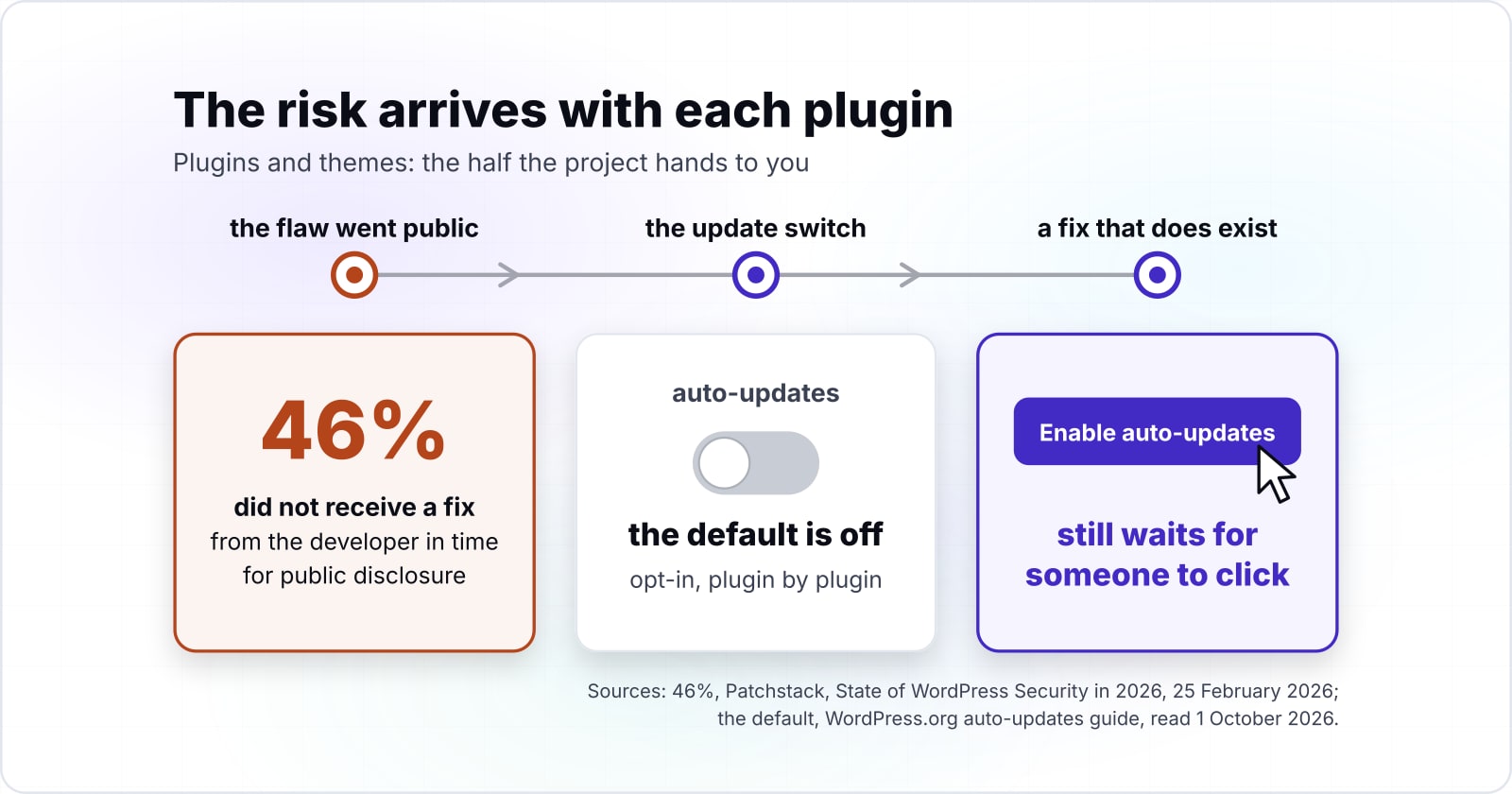
In short, the risk arrives with each plugin and theme you choose. Worse, Patchstack's State of WordPress Security in 2026 found that "46% of vulnerabilities did not receive a fix from the developer in time for public disclosure". So for close to half of 2025's flaws, no patch existed on the day the flaw went public.
Then there is the update switch. The WordPress.org auto-updates guide says administrators "can manually opt-in for automatic updates theme by theme and plugin by plugin". Because the default is off, a fix that does exist still waits for someone to click.
This is the half the project hands to you. Since it cannot pick your plugins, it cannot patch them for you either.
Which PHP versions do WordPress sites actually run?#
On 1 October 2026, about one in six WordPress sites still reported PHP 7.4, while about one in four ran PHP 8.3, the version WordPress.org recommends. The WordPress.org requirements page asks hosts for "PHP version 8.3 or greater".
Show data table
| Item | Value |
|---|---|
| PHP 7.4 | 16.631 |
| PHP 8.0 | 3.964 |
| PHP 8.1 | 11.127 |
| PHP 8.2 | 24.557 |
| PHP 8.3 | 25.728 |
| PHP 8.4 | 8.827 |
| PHP 8.5 | 3.343 |
PHP 8.3 leads, yet PHP 7.4 still holds about one in six WordPress sites.
The spread exists because PHP is a separate layer. WordPress does not upgrade it. Instead, the host installs it, and the owner or host decides when to move. As a result, many sites stay on the branch they launched with.
The requirements page is blunt about the old branches. WordPress still works on PHP 7.4, it says, but "these versions have reached their official End Of Life and may expose your site to security vulnerabilities". In particular, a Make WordPress Core post from 22 May 2026 says WordPress 6.4 and later fully support PHP 8.3. So most sites can move without waiting on core.
How many WordPress sites run PHP with no security support?#
On 1 October 2026, 37.5% of WordPress sites reported a PHP branch with no security support, and 24.6% more ran PHP 8.2, whose support ends on 31 December 2026. Together, that is most WordPress sites, on PHP that has no fixes now or loses them by the end of 2026.
Show data table
| Segment | Value (% of WordPress sites) | Share |
|---|---|---|
| Unsupported (PHP 8.1 and older) | 37.5 | 37.5% |
| Ends 31 Dec 2026 (PHP 8.2) | 24.6 | 24.6% |
| Supported into 2027+ (PHP 8.3 and newer) | 37.9 | 37.9% |
Most WordPress sites run PHP that has no fixes now or loses them by the end of 2026.
The figure comes from two public sources, both read on 1 October 2026. First, the WordPress.org stats API gives the share of sites on each PHP branch. Second, The PHP Group's supported versions page gives the date each branch stops getting security fixes. Summing every branch past that date gives 37.5%.
Because PHP sits under every plugin and theme, an unsupported branch carries risk that no plugin update can remove.
How long can a WordPress site stay on its current PHP version?#
Counted from 1 October 2026, PHP 8.2 has 2 months of security support left, PHP 8.3 has 14 and PHP 8.5 has 38, so the branch sets the next upgrade date. The PHP Group's supported versions page explains the clock. Each branch gets two years of full support, then "two additional years for critical security issues only".
For example, take a site on PHP 8.2, the second most common branch. Its security support ends on 31 December 2026. So from 1 October 2026, it has 2 whole months left. Moving to PHP 8.3 buys 14 months, to 31 December 2027. Moving to PHP 8.4 buys 26 months, to 31 December 2028. Then PHP 8.5 buys 38 months, to 31 December 2029. A site on PHP 8.1 or older has none left.
The date your PHP branch stops receiving security fixes.
Security support ends
31 Dec 2026Months left from 1 October 2026
2PHP 8.2: 2 months left
Ends soonestNo listed branch loses security fixes sooner. Plan the move to a newer branch before the end date above, and test your plugins on it first.
| PHP 8.2 | 31 Dec 2026 | 2 |
|---|---|---|
| PHP 8.3 | 31 Dec 2027 | 14 |
| PHP 8.4 | 31 Dec 2028 | 26 |
| PHP 8.5 | 31 Dec 2029 | 38 |
The lesson is that a PHP upgrade is not a one-off job. Each branch lives about four years. Therefore, a site that never moves will fall off the calendar on a date you can read today.
What upkeep does a WordPress site owner sign up for?#
Owning a WordPress site means four recurring jobs: plugin updates, plugin removal, theme updates and a PHP upgrade before each branch loses security support. Each job comes back on its own clock, so every one of them is a recurring cost.
So the decision is not "WordPress or not". Rather, it is whether a named person will do these four jobs, every month, for as long as the site runs.
When is WordPress the wrong tool for a site?#
WordPress is the wrong tool when nobody will own the plugin and PHP upkeep, or when the site is an application whose data fights posts and pages. In those cases, a framework build or a headless CMS fits better. Saying so early saves a rebuild later.
First, the site is really an application, so if the product is built on accounts, workflows and custom data, a framework fits it better. The WordPress vs Laravel comparison walks through that choice. It also covers the hybrid of a WordPress content layer and a Laravel app.
Second, the four jobs have no owner. A site whose plugins will sit unpatched is safer on a platform with fewer moving parts. The WordPress to Cloudflare EmDash migration guide shows how to count what your plugins cost in risk before you move.
Third, the site needs only a few pages that rarely change. In that case, a static site or a hosted builder carries no plugin layer at all. As a result, there is no plugin upkeep to own.
| Case | Why WordPress strains | Better fit |
|---|---|---|
| The site is really an application | Accounts, workflows and custom data fight posts and pages | A framework build |
| The four jobs have no owner | Plugins will sit unpatched | A platform with fewer moving parts |
| A few pages that rarely change | A plugin layer it does not need | A static site or a hosted builder |
How can you check an existing WordPress site against this line?#
Three numbers from a site's own admin screens place it on the line: the PHP version, the count of active plugins, and how many of them auto-update. You can read all three in an afternoon.
First, compare the PHP version with the calculator above. Anything below 8.3 is either out of support or loses support on 31 December 2026.
Second, count the active plugins, since each one is a separate author's code. Also, each one you no longer use is one the hardening guide says to delete.
Third, count the auto-updates, because the auto-updates guide shows an "Enable auto-updates" link beside each plugin whose auto-updates are off. Count how many plugins still show it.
Then read the three numbers together, side by side. A recent PHP branch, a short plugin list and most plugins on auto-update put a site well inside the maintained half. However, an old branch, a long list and few auto-updates mean the handed-over half is large. In that case, someone needs to own it.
What should you read next?#
If the handed-over half looks too large, the WordPress versus Laravel comparison and the EmDash migration post cover the two ways out of it. If you keep WordPress in 2026, structuring WordPress at scale with Composer and PSR-4 shows how a team owns plugins as dependencies.
Also, the WordPress request lifecycle and hooks explains why one plugin can slow or break every page. If you would rather hand the four jobs to someone, see WordPress developers for hire or maintenance and support.
Either way, three pages are enough on their own to run the check yourself. They are the WordPress.org requirements page, its auto-updates guide, and The PHP Group's supported versions page.