Is it time to leave WordPress? A 2026 guide to the WordPress to Cloudflare EmDash migration
Your plugins decide this, not the headlines. Count what they cost you in risk and upkeep, check which ones EmDash already covers, and the answer for your own site gets simple.
Is it time to leave WordPress for EmDash?#
For a content site whose plugins are its biggest risk and upkeep cost, EmDash 1.0 is now a credible move; for a store or a plugin-heavy site, not yet. Cloudflare's launch post of September 28, 2026 calls it "a stable, free, and open source CMS built on Astro". Its license is MIT.
That matters for trust. When Cloudflare first showed EmDash in April 2026, some people took it for a joke. However, Cloudflare's launch post says more than 175 people have now contributed across more than 1,800 commits. Also, Cloudflare moved its own blog onto EmDash in August 2026. In short, it is a real option now.
- April 2026
Cloudflare first shows EmDash
Some people took it for a joke.
- August 2026
Cloudflare moves its own blog onto EmDash
The blog runs about 75 requests per second, with spikes above 5,000.
- 28 September 2026
EmDash 1.0: stable, free and open source, MIT license
More than 175 people have contributed across more than 1,800 commits, per Cloudflare's launch post.
What is the WordPress plugin problem actually costing you?#
Patchstack counted 11,334 new WordPress vulnerabilities in 2025, and 1,966 of them carried a high risk of automated mass exploitation. That figure, from Patchstack's State of WordPress Security in 2026, is a 42% rise over 2024.
Show data table
| Item | Value |
|---|---|
| New vulnerabilities found | 11,334 |
| Serious enough to need a protection rule | 4,124 |
| High risk of mass exploitation | 1,966 |
About one new flaw in six carried a high risk of automated mass exploitation.
So about one new flaw in six is the kind attackers use at scale. Patchstack also says 4,124 of the 2025 flaws were serious enough to need a protection rule. For an owner, patching is therefore a weekly job, not a quarterly one. Meanwhile, every missed update is a door left open.
Is the risk in WordPress itself or in its plugins?#
In 2025, 91% of new WordPress vulnerabilities were found in plugins and 9% in themes, with only 6 reported in WordPress core. Those are Patchstack's 2026 figures, and they point at plugins, not WordPress itself.
Show data table
| Segment | Value (%) | Share |
|---|---|---|
| Plugins | 91 | 91% |
| Themes | 9 | 9% |
Nine in ten new WordPress flaws were in plugins, not WordPress itself.
Cloudflare's launch post explains why one weak plugin can hurt the whole site. With WordPress, "plugins run inside the same PHP process as the rest of the application". Each plugin has direct access to the database, files and network. As a result, a contact form plugin could read unpublished posts or send data anywhere. That is why WordPress's own hardening guide tells owners to keep plugins updated. So the count of plugins you run, and what each can reach, is what matters.
Do premium plugins fix the problem?#
Patchstack rated 58.6% of the vulnerabilities it found in premium WordPress components as high priority, the kind used in automated mass attacks. In other words, paying for a plugin does not buy safety. A paid plugin runs with the same access as a free one.
Show data table
| Item | Value |
|---|---|
| Low | 24.4 |
| Medium | 17 |
| High | 58.6 |
Paying for a plugin does not buy safety: most premium flaws were high priority.
Also, fixes are slow. Patchstack's 2026 report says 46% of vulnerabilities got no fix from the developer in time for public disclosure. Therefore a paid vendor does not always patch first. What limits the damage is how much a plugin can reach, not what it cost.
What does EmDash change about plugin security?#
EmDash runs each sandboxed plugin in its own isolated runtime that cannot reach content, users, secrets or the network until an administrator approves it. Cloudflare's launch post says a plugin gains more access only when it declares the need and the admin approves.
Cloudflare compares this to a phone app. In its words, "EmDash shows what the plugin wants to do before it runs." For example, a search plugin can read content and contact the search service, but it still cannot edit articles. Likewise, an image plugin can manage media, but it cannot read user content.
The EmDash docs for WordPress developers map each WordPress plugin to a "sandboxed or native EmDash plugin". So every plugin you keep gets one clear question: what would it need to be granted?
Will your site be faster on EmDash and Cloudflare Workers?#
Cloudflare's own blog, which runs about 75 requests per second with spikes above 5,000, moved to EmDash in August 2026 and kept a flat response profile under load. InfoQ reported both traffic numbers in its September 2026 story on the migration.
about 75
Typical load
above 5,000
Spikes
One site kept a flat response profile across both, but it is one site, not a benchmark.
| Option | requests per second |
|---|---|
| Typical load | about 75 |
| Spikes | above 5,000 |
Source: InfoQ, 2026
Cloudflare's team told InfoQ that the old platform had periodic latency spikes under load. The new setup, by contrast, keeps "a remarkably flat, consistent response profile." Meanwhile, the site runs on Cloudflare Workers, which the Astro Cloudflare adapter makes possible for any Astro site. However, this is one large site, tuned by the people who built the CMS. Your results depend on your own pages and cache.
What does hosting on Cloudflare Workers cost as traffic grows?#
On Cloudflare's published Workers Paid terms, request charges stay at the 5 dollar monthly minimum up to 10 million requests, then add 30 cents per million. Those terms come from Cloudflare's Workers pricing page, read in September 2026.
Show data table
| Stage | US dollars a month, request charges only |
|---|---|
| 1 million | 5 |
| 10 million | 5 |
| 25 million | 9.5 |
| 50 million | 17 |
| 100 million | 32 |
The bill stays at the 5 dollar minimum up to 10 million requests, then rises by 30 cents a million.
For example, 25 million requests a month is the 5 dollar minimum plus 15 extra millions at 30 cents. That comes to 9.50 dollars. That is only part of the bill, though. CPU time, storage and the database have their own terms, and the Workers limits page sets the runtime ceilings. Still, you can check this line against your own traffic before you move.
What does a WordPress to Cloudflare EmDash migration bring across, and what does it leave behind?#
EmDash's importer brings posts, pages, custom post types, taxonomies, authors and media across, but plugin-owned fields, shortcodes and page-builder layouts need a second pass. That split comes from EmDash's WordPress migration guide.
| What you have on WordPress | How it moves |
|---|---|
| Posts, pages, custom post types, taxonomies, authors, media | The importer |
| Menus, site settings, Yoast or Rank Math SEO fields | The EmDash Exporter plugin |
| Advanced Custom Fields values | The Exporter plugin, when the fields match |
| Shortcodes, page-builder markup, plugin blocks | Inspect by hand |
| Scheduled posts | Arrive as drafts |
The EmDash Exporter plugin goes further than a plain export file. It can carry menus, site settings and Yoast or Rank Math SEO fields. It can also copy Advanced Custom Fields values when the fields match. Meanwhile, the guide says to inspect shortcodes, page-builder markup and plugin blocks by hand. Also, scheduled posts arrive as drafts.
So the content moves by tool, and the slow work is whatever a plugin used to store or draw. The guide's own rule is simple: "Keep the WordPress site available until the imported site has passed verification."
What happens to the WordPress plugins EmDash does not have yet?#
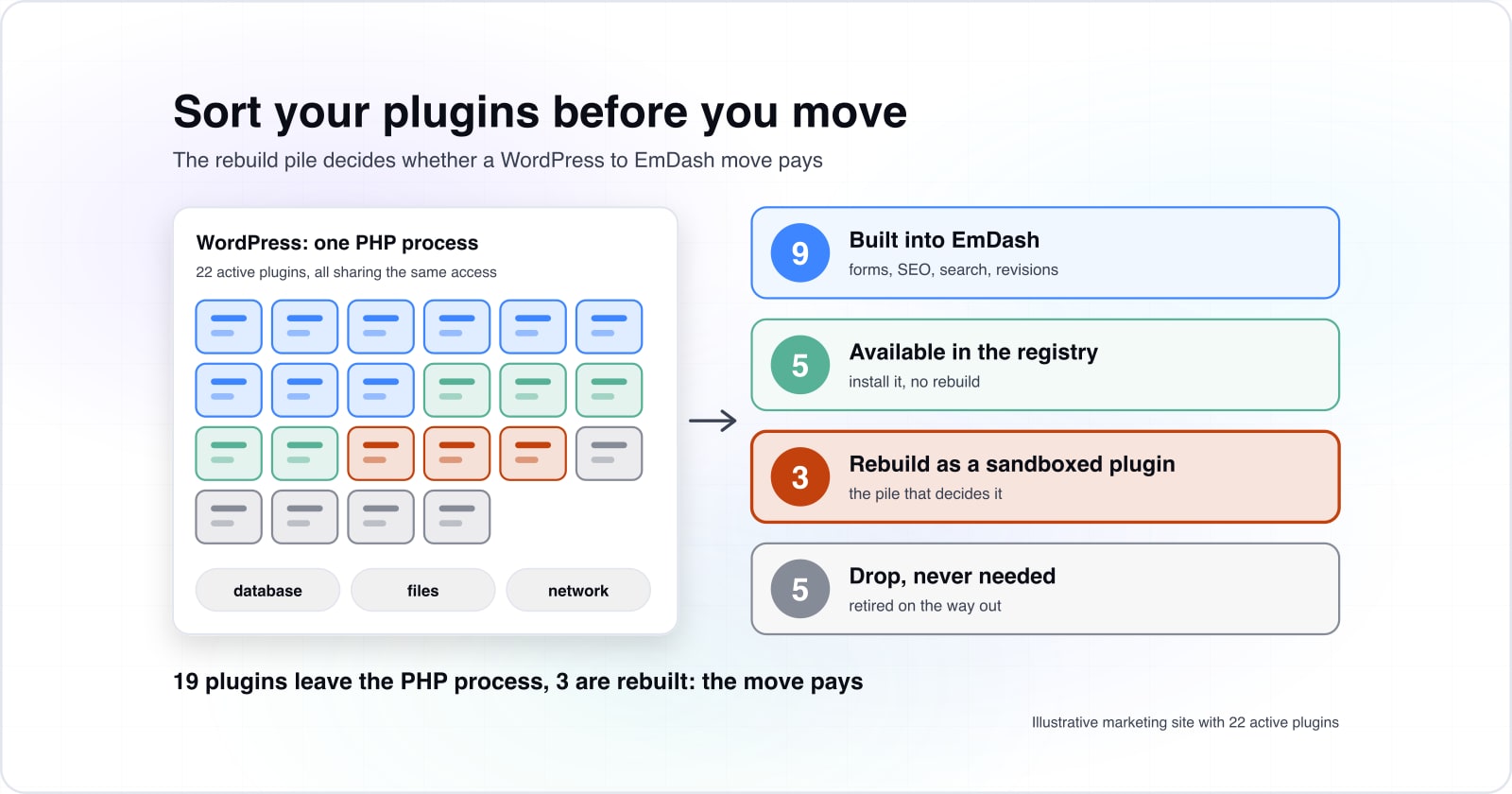
Sort every active plugin into four piles: built into EmDash, available in the registry, worth rebuilding as a sandboxed plugin, or safe to drop. The size of the rebuild pile then decides whether the move pays.
EmDash's GitHub project lists first-party plugins for forms, embeds, SEO and an audit log. Also, its collections can turn on search, scheduling, revisions and comments. So that covers much of what small sites install plugins for.
Take an illustrative marketing site with 22 active plugins. Say 9 are covered by built-in features and 5 have a registry plugin. Then 3 need a rebuild, and 5 were never needed. So that site sheds 19 plugins from its PHP process and rebuilds 3, and the move pays.
Whether the move pays for your site
Put in your active plugin count and how many fall in each pile; it returns the plugins you shed, the ones to rebuild and the margin between them.
Plugins leaving the PHP process
19
- Plugins to rebuild
- 3
- Plugins shed minus plugins rebuilt
- 16
- Plugins not yet sorted
- 0
Above zero, the plugins you shed outweigh the ones you rebuild, and the move pays.
How do AI agents change day to day editing on EmDash?#
EmDash ships a built-in MCP server, so an AI agent can read, update and save content through the same permissions an editor has. Cloudflare's launch post says agents "can work through the API, CLI, or built-in MCP server".
Its example is a bakery owner who asks, in plain words, to change the opening hours. An agent then reads, updates and saves the content. According to Cloudflare's first EmDash post, the MCP server does the same set of things as the admin.
The owner asks, in plain words, to change the opening hours
An agent reads the content through the built-in MCP server
It updates and saves the content, with the same permissions an editor has
In practice, this helps most with dull jobs, such as fixing a phrase across many pages. Still, it is a benefit of moving, not a reason to move.
When is EmDash the wrong fit, and when should you stay on WordPress?#
Stay on WordPress for now if you run a store, depend on a page builder, or would have to rebuild more plugins than you would retire. W3Techs reports, as of September 2026, that WordPress runs 40.2% of all websites, and that breadth still counts.
40.2%
Share of all websites
58.7%
Share of sites using a known CMS
That breadth still counts when you weigh staying on WordPress against a move.
| Option | share of websites |
|---|---|
| Share of all websites | 40.2% |
| Share of sites using a known CMS | 58.7% |
First, stores should wait, because Cloudflare's launch post says EmDash's first eCommerce plugin is only now arriving. Second, a page-builder site needs its layouts rebuilt, since the migration guide says to check that markup by hand. Third, if your rebuild pile is longer than the plugins you shed, the move costs more than it saves.
In those cases, the better tool is WordPress, hardened. Cut unused plugins, keep the rest updated, and follow WordPress's plugin guide. Then run the sort again once the registry has grown.
Where to go from here#
If you would rather hand the sort over, our headless CMS team runs a WordPress to EmDash Migration Readiness Audit. It also rebuilds the plugins you keep as sandboxed plugins. After the move, our Cloudflare development team can run and tune the site on Workers. That said, the EmDash docs and your own plugin list are enough to make the call yourself.