Headless CMS guide: what it is, how it works and when to skip it
Going headless takes away the part of your CMS that draws pages and gives it to your own developers. Before you decide, see what that costs in fees and in work.
Headless CMS guide: what is a headless CMS?#
A headless CMS stores your content and serves it as JSON over an API, and a front end you build and host turns that JSON into pages. The "head" is the part that draws pages: the theme, the templates and the web addresses. Because a traditional CMS such as WordPress ships with a head, publishing a post also publishes a page.
An API (application programming interface) is a set of web addresses that a program calls to read or write data. For example, the WordPress REST API handbook describes its API as an interface for "sending and receiving data as JSON". In short, JSON is a plain text format for data. So any language that can make a web request can read it.
Storyblok's technical requirements page states the split in one line. As a headless CMS, it says, Storyblok "doesn't render or host your website." Instead, the front end "is your own application, deployed to a hosting provider of your choice." So that sentence is the whole trade.
In practice, editors notice little change at first. They still log in, fill in fields and press publish. But what changes is behind them. The page they used to preview now lives in a separate codebase, and someone on your team builds it and keeps it running. So the rest of this headless CMS guide is about that move: what it costs, how it works, and when it is the wrong call.
What does a headless CMS cost a team of 8 editors each month?#
Say a team has 8 editors, 20,000 entries and 1 million API requests a month: list prices on 2 October 2026 run from $120 to $1,150 a month before any front end exists. The licence line depends on seats and record quotas more than on the product. Meanwhile, the front end you must build is a second cost that no pricing page prints.
Here is how each figure comes out, from each vendor's own pricing page as read on 2 October 2026:
- Contentful. The Contentful pricing page lists Lite at $300 a month with 20 users and 1M API calls. However, its included Starter Space holds 10,000 records. A Lite Space adds 50,000 records for $850 a month on top. So in this example, 20,000 entries come to $1,150 a month.
- Sanity. The Sanity pricing page lists Growth at $15 per seat per month, so 8 seats cost $120. Growth includes 25k documents, 1m API CDN requests and 250k uncached API requests a month. As a result, most reads must come from its CDN, the cached copy of your content.
- Storyblok. The Storyblok pricing page lists Growth at $99 a month billed monthly with 5 seats, then $15 for each extra seat. So 8 editors come to $144, with 1M API requests and 25,000 stories included.
- Strapi, self-hosted. The Strapi CMS pricing page lists Community as free under the MIT License, with unlimited entries and API calls. Its Growth plan adds Live Preview at $45 a month with 3 seats, plus $15 per extra seat. So 8 editors on Growth cost $120, plus your own servers.
- Payload and WordPress. Payload's GitHub repository carries the MIT license, and WordPress is released under the GPLv2 (or later). Since neither charges a licence fee, the whole cost is hosting and the front end.
The takeaway: at 8 editors on October 2026 list prices, three of the four paid plans sit between $120 and $144 a month, and the record quota is what pushes one plan into four figures.
Show data table
| Item | Value |
|---|---|
| Contentful (Lite plus Lite Space) | 1,150 |
| Sanity (Growth) | 120 |
| Storyblok (Growth) | 144 |
| Strapi self-hosted (Growth) | 120 |
Three of the four paid plans sit between $120 and $144 a month; the record quota pushes one into four figures.
Your monthly licence on four headless CMSs
Put in your editor seats and whether your entries pass 10,000. The prices are the list prices each vendor printed on 2 October 2026, and you can change them.
Lowest monthly licence of the four
$120
- Contentful Lite, plus a Lite Space past 10,000 entries
- $1,150
- Sanity Growth
- $120
- Storyblok Growth
- $144
- Strapi Growth, self-hosted, servers excluded
- $120
Arithmetic from Contentful, Sanity, Storyblok and Strapi pricing pages, accessed 2 October 2026. Modelled, not measured.
So the licence is rarely the large number. Storyblok's requirements page lists what you host: "The code that fetches content from the Content Delivery API and renders it." So that code is a software project. It needs a framework, a deploy and a preview setup for editors. It also needs someone who fixes it when an update breaks it. Therefore, price the build and its upkeep in your own team's time before you compare licences.
How does a headless CMS work?#
Editors fill a content model in the CMS, the CMS publishes entries through a content API, and your front end requests them and renders the HTML. Every headless CMS is the same three-part loop, whatever the vendor calls the parts.
First, the content model. This is the set of fields you define for each kind of content, such as a post with a title, a body and an author. Strapi's documentation calls Strapi "an open-source headless CMS" where editors manage content "through an extensible admin panel". And that admin panel is where editors work.
Second, the content API. Once an entry is published, the CMS makes it readable at a web address. Payload's overview opens with "Payload is the Next.js fullstack framework." Then it says one Payload Config gives you "a full Admin Panel, a database with migrations, REST and GraphQL APIs" and more. So the model you write also defines the API.
Third, the front end. This is a separate app, often built with a framework such as Astro or Next.js. The Astro guide to headless WordPress says WordPress "can also be used as a headless CMS" for an Astro project. Then the front end calls the API, gets JSON back and writes the HTML. If you would rather build the admin yourself, a Supabase Astro blog with a react-admin panel shows that route.
The front end can render each page when the site is built, or on each visit. Because a build reads every page once, a site rebuilt on publish puts little load on the API. But a page rendered on each visit calls the API every time, unless a cache sits in between. As a result, that choice shapes your hosting and your API bill.
The content model
The set of fields you define for each kind of content, such as a post with a title, a body and an author. Editors fill it in the admin panel.
The content API
Once an entry is published, the CMS makes it readable at a web address, as REST or GraphQL.
The front end
A separate app, often built with Astro or Next.js, calls the API, gets JSON back and writes the HTML.
The render choice
Render each page when the site is built, or on each visit. A page rendered on each visit calls the API every time, unless a cache sits in between.
Is a headless CMS just a REST API, and when is GraphQL better?#
A headless CMS is not a REST API; it publishes one, and most of the products named here also offer GraphQL, where one query returns exactly the fields a page needs. Since the content API is the CMS's only public surface, its style and its rate limit decide how your front end must cache.
REST gives each kind of content its own web address. WordPress serves posts at /wp-json/wp/v2/posts, Strapi at /api/:pluralApiId, and Payload at /api/{collection-slug}. When you call the address, you get back the fields the CMS sends. However, Strapi's REST reference notes that responses "only include top-level fields" by default. So a page with an author and a category may need extra parameters.
GraphQL works the other way. Instead, there is one address, and the request lists exactly the fields it wants. Payload's GraphQL overview says it is "exposed via /api/graphql" by default. Also, Strapi adds it through a plugin, installed as @strapi/plugin-graphql. Sanity uses its own query language instead: "The Query API lets you query Sanity Content Lake with GROQ."
In short, GraphQL is better when one page pulls from many linked types and you want one request. But REST is simpler when a page shows one list. It also caches well, because each address is fixed.
Then there is the limit. Contentful's Content Delivery API reference says that for requests which miss its cache, "a rate limit of 55 requests per second is enforced". Yet cache hits, it says, are unlimited. Sanity's technical limits page, read on 2 October 2026, sets a global API call rate of 500 requests per second per IP. But its limit for writes is 25 per second.
The takeaway: reads that hit the cache are free of these limits, and writes are capped far lower than reads.
500
Global API calls
25
Mutations (writes)
Reads that hit the cache are free of these limits, and writes are capped far lower than reads.
| Option | requests per second per client IP |
|---|---|
| Global API calls | 500 |
| Mutations (writes) | 25 |
Source: Sanity technical limits documentation, read 2 October 2026
So the answer to "headless CMS vs REST API" is that they are different layers. The CMS holds the content and the editor screens. Then REST, or GraphQL, is how it hands the content out. Therefore, your front end should cache every read it can, because the uncached limit is what breaks a busy launch day.
Headless CMS vs traditional CMS: what moves into your own code?#
WordPress alone runs 40.2% of all websites by W3Techs' count on 2 October 2026, and on every one the CMS also renders pages, previews and routes, which headless hands to you. Going headless moves routing, templates, preview and caching out of the CMS and into a codebase someone must keep running.
W3Techs' estimate, read on 2 October 2026, is updated daily. Also, the same estimate finds that "31.5% of the websites use none of the content management systems that we monitor." After WordPress come Shopify, Wix and Squarespace, far behind.
The takeaway: a traditional CMS with its own head is still how most managed websites run.
Show data table
| Item | Value |
|---|---|
| No CMS that W3Techs monitors | 31.5 |
| WordPress | 40.2 |
| Shopify | 5.4 |
| Wix | 4.2 |
| Squarespace | 2.4 |
| Joomla | 1.1 |
| Drupal | 0.6 |
A traditional CMS with its own head is still how most managed websites run.
Here is what the traditional CMS did for you that becomes your own work:
- Routing. The CMS turned a post's slug into a web address. Now your front end maps addresses to entries, including redirects when a slug changes.
- Templates. The theme drew every page type. Now each type needs a component in your codebase.
- Preview. Editors clicked preview and saw the page. Now a preview needs a draft API call and a front end that can show unpublished content.
- Caching and rebuilds. The CMS cleared its own cache on publish. Now a publish must trigger a rebuild or a cache purge, often through a webhook, a call the CMS sends when content changes.
- Search tags. Titles, descriptions and sitemaps came from the CMS or a plugin. Now your front end writes them.
Although none of this is hard on its own, it is five jobs that used to be somebody else's code. And online shops face the same question with commerce platforms, a separate decision covered in headless vs traditional ecommerce.
Which headless CMS examples are hosted, and which do you run yourself?#
Contentful, Sanity and Storyblok host the CMS for you; Strapi and Payload are open source under MIT and run on your servers; WordPress becomes headless through its REST API. The useful split between headless CMS examples is who runs the server, because that decides your monthly line and your operations work.
| CMS | Who runs the CMS server | Licence | Content API |
|---|---|---|---|
| Contentful | Contentful | Paid plans | REST and GraphQL |
| Sanity | Sanity | Paid plans | GROQ Query API |
| Storyblok | Storyblok | Paid plans | Content Delivery API |
| Strapi | You, or Strapi Cloud | MIT (Community) | REST, GraphQL by plugin |
| Payload | You | MIT | REST and GraphQL |
| WordPress | You, or a WordPress host | GPLv2 or later | REST at /wp-json/wp/v2/ |
Source: each product's documentation and pricing page, accessed 2 October 2026.
With a hosted CMS, the vendor patches and backs up the CMS, and you pay per seat or per plan. With a self-hosted CMS, there is no licence fee. However, you run a server and a database, apply updates and restore from backups yourself. Payload calls itself "one open-source TypeScript codebase you own and deploy anywhere", which is exactly that trade.
WordPress is the odd one out. It is a traditional CMS that is also headless whenever you want it to be. The Astro guide notes that the REST API "is available by default with any WordPress site". So a team already on WordPress can test headless without moving any content.
Which documentation pages do you build a first headless page from?#
Start with the WordPress REST API posts reference, then its global parameters page, then the Astro guide that renders those posts, in that order. A first headless page needs three official pages: the endpoint, the parameters that trim it, and the front end that renders it.
- The posts endpoint reference: the address
GET /wp/v2/postsand itsper_pageargument, which defaults to 10. - The global parameters page:
_fields, which returns only the fields you name, and_embed, which pulls in linked items. - The Astro headless WordPress guide: how a front end fetches the posts and writes
post.title.renderedinto the page.
- Step 1
The posts endpoint reference
The address GET /wp/v2/posts and its per_page argument, which defaults to 10.
- Step 2
The global parameters page
_fields returns only the fields you name, and _embed pulls in linked items.
- Step 3
The Astro headless WordPress guide
How a front end fetches the posts and writes post.title.rendered into the page.
What is the smallest working request to a headless CMS?#
One fetch call to a WordPress site's /wp-json/wp/v2/posts endpoint, trimmed with _fields, returns JSON a front end can render without a theme. The smallest headless page is one HTTP GET and one loop that writes the titles into HTML.
// 1. Ask for five posts, with only the fields the list needs
const res = await fetch("https://example.com/wp-json/wp/v2/posts?per_page=5&_fields=id,title,link");

// 2. Read the JSON array the REST API sends back
const posts = await res.json();

// 3. Write each title and link into the page
const items = posts.map((post) => `<li><a href="${post.link}">${post.title.rendered}</a></li>`);
document.querySelector("#posts").innerHTML = `<ul>${items.join("")}</ul>`;
Swap example.com for your own WordPress address, and it runs as a browser module. The Astro guide notes the API is open to reads "without authentication by default". So public posts need no key. Also, the global parameters page says _fields lets WordPress "skip unneeded fields", which makes the JSON smaller and faster to read.
In short, that is a headless page. Everything else in a real build, from routing to preview, is this loop with more care around it.
What does the 73% headless adoption figure actually measure?#
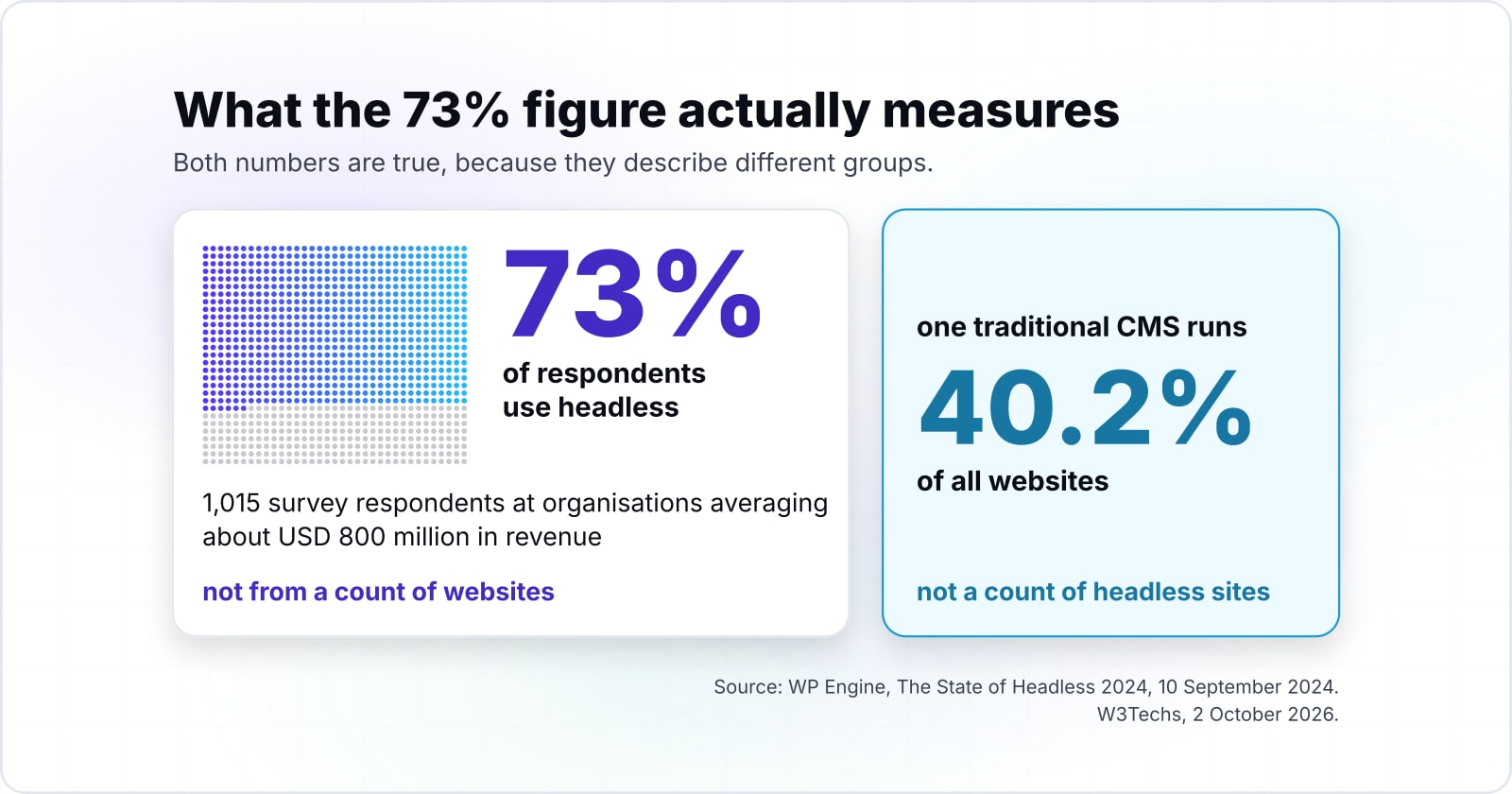
The 73% comes from WP Engine's 2024 survey of 1,015 IT and marketing professionals at organisations averaging about USD 800 million in revenue, not from a count of websites. So the widely repeated 73% describes large organisations that answered a host's survey, and a small business should weigh it against its own team size.
WP Engine's press release of 10 September 2024 says Censuswide ran the research for WP Engine in July 2024. It "surveyed 1,015 chief technology officers, chief marketing officers and IT decision makers" in the U.S., UK and Australia. And those firms averaged about USD $800 million in annual revenue.
The same release reports that 73% of respondents use headless. It also reports that 65% cite budget concerns as a barrier. And nearly 98% of non-users plan to evaluate headless within 12 months. The full State of Headless 2024 report adds that nearly 70% cite organisational hurdles.
The takeaway: among firms large enough to be in the sample, most already use headless, and most of them also name budget as a barrier.
Show data table
| Item | Value |
|---|---|
| Respondents using headless | 73 |
| Respondents citing budget concerns as a barrier | 65 |
| Non-users evaluating headless in the next 12 months | 98 |
Among firms large enough to be in the sample, most already use headless, and most also name budget as a barrier.
Now set that beside the W3Techs count for 2 October 2026, where one traditional CMS runs 40.2% of all websites. Both numbers are true, because they describe different groups. Also, WP Engine sells products and services for WordPress websites, so it has a stake in the answer. But that does not make the survey wrong. Instead, it means the figure speaks for large firms, and a team of eight should start from its own costs.
When is a headless CMS the wrong fit?#
When there is one website, no developer to own a front end, and editors need to see pages as they edit, a traditional CMS does the same job with less to run. In that case, the better tool is a traditional CMS such as WordPress with its theme.
Even the WordPress REST API handbook says you "should not feel pressured to use the REST API if your site is already working the way you expect." Here are three cases where that advice holds:
- One marketing site and no developer on staff. The five jobs listed above have no owner, so they become a contractor's job. Instead, a traditional CMS with a well-built theme gives editors preview, routing and search tags at once. The guide to WordPress strengths and limits covers what you keep.
- Editors who build pages visually. If your team drags sections onto a page and wants to see the result, a hosted site builder such as Wix or Squarespace already does that. Both appear in the W3Techs count, and the vendor runs them for you.
- A shop first, content second. If most pages are products and checkout, the choice is a commerce platform. Going headless there is its own decision with its own costs.
Headless earns its cost when the same content feeds more than one front end, such as a site and an app. Also, it fits a team that already owns a front-end codebase. Because both cases mean a developer is already on staff, the extra work has someone to do it.
Where do you go from here?#
If you decided to go headless and want it built, the headless CMS page covers how that work runs; if not, the posts below cover the neighbouring decisions. So the next step depends on the decision you just made.
- If you are going headless: headless CMS builds shows how such a project is scoped. If the gap is front-end skills, React developers covers that side.
- If you are still placing headless among other kinds of CMS: types of CMS.
- If you run a shop: headless vs traditional ecommerce.
- If you are leaving WordPress for a different stack: moving WordPress to Cloudflare.
And you may need none of these. The three documentation pages in this headless CMS guide, and the short block of code under them, are enough to try headless against your own site this afternoon.