Headless commerce vs traditional commerce: how to choose the right ecommerce architecture
Traditional and headless ecommerce are both sound architectures. They solve different problems, so the useful question is which problems your business expects to have in three to five years.
Headless vs traditional ecommerce: which should your store choose?#
Choose traditional when one storefront on a proven platform covers your plans, and choose headless when your roadmap needs several front ends, deep integrations or a storefront a platform theme cannot express.
In headless vs traditional ecommerce, both are mature choices. Shopify, BigCommerce and Adobe Commerce all support both shapes on the same commerce engine. So picking one is not picking a vendor or a quality level. It is picking who owns the storefront, and what that ownership lets you build.
Three questions sort most businesses quickly. How many storefronts, brands or channels will you run in three years? How many outside systems must the store talk to in real time? And do you have, or plan to build, a team that can own a front end? The rest of this guide works through each, with the trade-offs on both sides.
What is headless e-commerce?#
Headless e-commerce splits the storefront shoppers see from the commerce engine behind it, so the two talk only through an API instead of sharing one platform theme. So the short answer to what is headless e-commerce is a store whose front end you build and host yourself.
In a traditional store, the platform renders every page from its theme. The catalogue, cart, checkout and admin all sit on the vendor's hosting. You change the look through theme settings and apps. In a headless store, the catalogue, cart and admin stay where they were. A separate front end now asks the platform for data and draws the pages itself.
Each vendor describes the same split in its own terms. Shopify's headless documentation, accessed October 2026, says "Build custom experiences with any language and any framework. Host anywhere." BigCommerce's headless developer guide, accessed October 2026, calls its platform "a commerce backend for headless storefronts".
HTTP Archive's 2025 Web Almanac, published January 2026, adds a third group. It names headless or API-first platforms such as commercetools, where "the merchant owns the frontend experience and hosting."
Any platform can sit behind a headless front end. So a headless e-commerce platform is less a product than a role. For the content side of the same idea, the headless CMS guide covers how the content layer splits off.
Why do companies choose headless commerce?#
Companies choose headless for six things a single theme struggles to give: design freedom, omnichannel reach, complex integrations, multiple storefronts, independent scaling and front-end teams that release on their own schedule.
Design freedom#
A theme sets the limits of what a page can do. A headless storefront has no theme ceiling. Shopify's headless docs put it as "Build custom experiences with any language and any framework." Its Hydrogen kit is pitched at storefronts "tailored to your unique brand". When product pages, configurators or editorial stories are the reason people buy, that freedom is the point.
Omnichannel from one catalogue#
In a headless setup the storefront is just one client of the commerce API. BigCommerce's headless guide says the storefront "might be a CMS, native mobile app, kiosk, static site, or any other frontend solution you can imagine." So a web shop, a mobile app and in-store screens can all read the same products, prices and stock. Each new channel reuses the commerce logic instead of rebuilding it.
Complex integrations#
Larger businesses rarely sell from the commerce platform alone. ERP, PIM, search, personalisation and loyalty systems all want a say in the page. Shopify's docs say its "composable APIs can integrate into your existing infrastructure and workflows." BigCommerce describes an application layer between storefront and platform for custom logic, "like presenting discount codes based on a shopper's history or pre-filling details on the checkout page." With headless, that logic lives in code you control rather than in a stack of theme apps.
Multiple storefronts and brands#
Traditional platforms do run more than one storefront, within limits. BigCommerce's pricing page, accessed October 2026, sells extra storefronts for "multiple brands" as a paid add-on. Shopify's Plus pricing page says a company with several brands "will need a separate Shopify Plus contract per brand." Headless takes another route. One commerce engine sits behind several distinct front ends, each with its own design and release cycle. The commercetools pricing page builds its offer around this, with "unlimited catalogs, channels and storefronts".
Scaling the front end on its own#
In a headless build, the storefront and the commerce engine scale apart. Shopify's Hydrogen docs describe Oxygen as "built for hosting Hydrogen storefronts at the edge." Pages can be cached and served close to shoppers, so the commerce engine spends its effort on orders and data. HTTP Archive's 2025 Almanac adds a fair caution: "self-hosted and heavily customized stacks can perform well" when the team is disciplined. The headroom is real, and it still has to be built well.
Independent front-end development#
The storefront talks to the platform only through an API. So a front-end team can redesign, test and release without waiting on a theme cycle. Shopify's docs say Oxygen "provides multiple deployment environments, so you can preview every change before shipping it to production." Adobe's headless architecture playbook, dated 27 June 2023, adds that custom front ends let merchants try ideas such as voice commerce "without impacting their existing webstores."
How does a CTO weigh headless over three to five years?#
A CTO usually weighs headless as a bet on where the business is going, not as a saving. If the next three to five years bring new channels, brands or markets, a decoupled storefront spreads its cost across all of them.
The question shifts from "what does this cost?" to "what will we build anyway?". A retailer planning a mobile app, a wholesale portal or a second brand will build those front ends either way. With headless, each one plugs into the same commerce API. With a theme store, some of that work may mean a second platform, or a rebuild later.
Where commerce is heading supports that view. HTTP Archive's 2025 Almanac closes its ecommerce chapter with "The next chapter of ecommerce is not just which platform, but which channels: voice, live commerce, and agentic commerce are pushing stores to become faster, more accessible, and more machine-consumable." A storefront that is one client of an API is easier to extend to the next client.
Team shape matters too. Adobe's playbook says a business with in-house developers skilled in a stack such as React "can decide that it's more cost effective to build their own custom React frontend." If you already pay a front-end team, much of the headless premium in the worked example below is a cost you carry anyway.
The bet can miss in the other direction. If the channels never arrive, the business pays for flexibility it does not use. So a good three to five year plan names the channels and integrations it expects before choosing.
Why do many stores stay with traditional ecommerce?#
Traditional ecommerce gives you a working storefront fast, with hosting, checkout and updates largely handled by the platform, which suits one storefront with a standard buying journey and a small team.
Time to market is the clearest advantage. A theme store launches on work the vendor has already done. Adobe's playbook says it plainly: "Any time a merchant is building something completely custom, they may lose time-to-market advantages."
Business users also keep control. In a theme store, marketers edit pages and launch campaigns in the platform's own tools. Adobe notes that a custom front end loses "native compatibility with things like Page Builder". So a headless store usually needs a headless CMS to hand that control back.
Good speed comes by default on the best-run platforms. HTTP Archive's 2025 data shows 76% of Shopify desktop origins passing all three Core Web Vitals. App ecosystems cover many integration needs too. Shopify's Plus pricing page lists "integrating your third-party systems through APIs or our app ecosystem."
So traditional is not the timid choice. For one storefront that sells well through the platform's own journey, it is often the most efficient one.
What are the limits and risks of going headless?#
The main risks of going headless are ownership, ongoing upkeep and the jobs a theme used to do quietly. All three follow from moving the storefront, its hosting and its cart and checkout code from the platform vendor onto your own team.
Adobe's playbook names the first one. Many merchants feel unready for headless because such builds "require heavy reliance on developers". Without a named owner, a custom storefront ages fast.
The WooCommerce Store API documentation, accessed October 2026, shows the second. It notes that "the Store API is unauthenticated" and gives public endpoints for cart, checkout and product data. Your front end now handles the cart a theme used to handle.
The third is the quiet work. SEO control rises with headless, and so does the risk of a broken canonical tag a theme would have set. Server rendering, sitemaps and structured data all become your code. None of this rules headless out. It means the plan must budget for a team, not only a launch.
How does headless vs traditional ecommerce compare side by side?#
Side by side, headless leads on flexibility, integrations, omnichannel reach and technology freedom, while traditional leads on time to launch, upkeep and cost; each is the better fit for a different kind of business.
| Traditional | Headless | |
|---|---|---|
| Design flexibility | Within the theme and its settings; strong for standard buying journeys | Any design in any framework; no theme ceiling |
| Integrations | Platform APIs and an app ecosystem cover common systems | Custom logic between storefront and ERP, PIM, search or loyalty systems, in code you control |
| Omnichannel | The platform's own sales channels | Web, app, kiosk and in-store screens all read one commerce API |
| Multiple storefronts | Supported within plan limits, often per added store or per brand contract | One engine behind several distinct front ends |
| Scalability | The vendor scales the whole stack for you | Front end and commerce engine scale apart; results depend on the build |
| Technology freedom | The platform's theme language and tools | Any language, framework and hosting |
| Time to launch | Faster; builds on the vendor's theme work | Slower; a front end is built first |
| Maintenance | The vendor runs the storefront, hosting and checkout | Your team runs the storefront, hosting and cart code |
| Cost over 3 years (worked example) | $189,944 (illustrative) | $598,604 (illustrative) |
| Page speed and SEO | Good defaults on the best-run platforms | Full control, and full duty to get it right |
| Team needed | Theme setup, apps and content | Front-end development, hosting, API and cart work |
| Best-fit use cases | One storefront, standard journey, small team, fast launch | Several storefronts or brands, many channels, complex integrations, a front-end team |
Source: Shopify, BigCommerce, WooCommerce and commercetools documentation and pricing pages (accessed October 2026), Adobe's headless playbook (June 2023), HTTP Archive Web Almanac 2025 and the worked example below (illustrative figures).
Read the table as two profiles, not a score. A business that matches most of the left column will get more from a well-run theme. One whose three to five year plan reads like the right column will likely outgrow a theme. It is usually better off choosing headless on purpose than migrating under pressure later.
Is headless ecommerce faster or better for SEO?#
Not by default either way: 76% of Shopify desktop origins pass Core Web Vitals in HTTP Archive's 2025 data, and a headless build matches that only when it is built with care.
HTTP Archive's Web Almanac 2025 shows Shopify desktop origins passing far more often than WooCommerce ones. These are different store populations, so the gap is a correlation, not proof that hosting causes it.
Show data table
| Item | Value |
|---|---|
| Shopify | 76 |
| BigCommerce | 55 |
| Magento | 36 |
| WooCommerce | 33 |
Shopify passes on 76% of desktop origins, while WooCommerce passes on 33%.
Google's web.dev guide to Core Web Vitals, updated 31 October 2024, sets the bar. The largest element should load within 2.5 seconds and input should get a response within 200 milliseconds. The same guide caps layout shift at 0.1, all measured at the 75th percentile of visits.
HTTP Archive reads the gap carefully. Its Almanac says platform control "can correlate with better median outcomes, but the gap is not destiny." It also notes that "Headless implementations reduce platform detectability." So headless stores mostly drop out of these platform counts, and no field data here ranks them as a group either way.
For SEO, the same logic holds. Headless gives you full control of markup, routes and rendering, which matters for large catalogues and content-led pages. It also hands you every job a theme did quietly. Check your current store against the three thresholds before you decide speed is the reason to move.
How do Shopify, WooCommerce, BigCommerce and Magento stores go headless?#
Each platform keeps its backend and swaps the front end: Shopify through Hydrogen on Oxygen, WooCommerce through its Store API, BigCommerce through Catalyst, and Magento through PWA Studio. Your products, orders and admin stay where they are on every route.
Shopify has the cheapest route on paper. Its Hydrogen docs, accessed October 2026, state that "Oxygen is available at no extra charge on paid Shopify plans". Shopify's Plus pricing page lists a "React-based headless stack at no extra cost". So on Shopify the hosting line drops out, while the developer line does not.
WooCommerce headless ecommerce runs on the WooCommerce Store API. Its documentation, accessed October 2026, describes "public Rest API endpoints" for "customer-facing cart, checkout, and product functionality." Because WooCommerce is self-hosted, you then run two things. One is the WordPress install behind the API, and the other is the new front end.
BigCommerce's developer guide, accessed October 2026, offers starter apps and its Catalyst storefront, plus the GraphQL Storefront API for custom builds. Adobe's playbook names PWA Studio for Magento, now Adobe Commerce. It also points teams that build their own head to GraphQL APIs, which it says allow "changes that don't impact existing APIs".
Both shapes show up in our own work. In one marketplace storefront rebuild, the storefront was rebuilt with server rendering while the existing back end and admin stayed in place. By contrast, a direct-to-consumer storefront was rebuilt on WooCommerce itself, with no separate front end at all. Each followed from what that business needed.
What does a headless store cost compared with a traditional one?#
In this worked example, one BigCommerce Performance store costs $189,944 over three years built traditionally and $598,604 headless, because headless adds a developer-year to build and a full-time owner to run.
Show data table
| Item | Value |
|---|---|
| Traditional, 3 years | 189,944 |
| Headless, 3 years | 598,604 |
| Traditional, 5 years | 293,910 |
| Headless, 5 years | 907,020 |
Headless costs $408,660 more than traditional over three years in this example, and the gap is wider by year five.
The store sits on BigCommerce's Performance plan, listed at $1,499 a month on BigCommerce's pricing page in October 2026. That fee is the same under either architecture, so the licence never decides the comparison.
For hosting, the headless front end runs on Vercel Pro, listed at $20 a month on Vercel's pricing page in October 2026. That plan includes $20 of usage credit.
Each developer-year is priced at the U.S. Bureau of Labor Statistics median software developer wage, $135,980 in May 2025.
Then come the people, which are assumed. Here, the traditional store spends a quarter of a developer-year on its theme build and keeps a quarter of a developer on upkeep in each of the three years, so in year one it pays for half a developer. The headless store spends a full developer-year on its build. It then keeps one developer owning the front end every year. In year one the build developer works alongside the owner, so the headless store pays for two developers that year.
| Cost line (US$, worked example) | Traditional | Headless |
|---|---|---|
| Platform fee (36 x $1,499) | 53,964 | 53,964 |
| Front-end hosting (36 x $20) | 0 | 720 |
| Build | 33,995 | 135,980 |
| Team, 3 years | 101,985 | 407,940 |
| Total | 189,944 | 598,604 |
Check the arithmetic yourself. The platform fee is 36 months of the plan in both columns, and hosting is 36 months for headless only. The build is a quarter or a whole of the median wage. And the team is the same share each year.
What the example does not count#
Read the example for what it is. It prices what each architecture costs, not what each one buys. It assumes one web store, no app, no second brand and no front-end team already on staff. If you already employ front-end developers, or will build an app or second store anyway, the gap shrinks. If you have none of those, it may be wider. The example also skips apps, payment fees, agency margin and costs beyond a wage.
When does the headless premium pay back?#
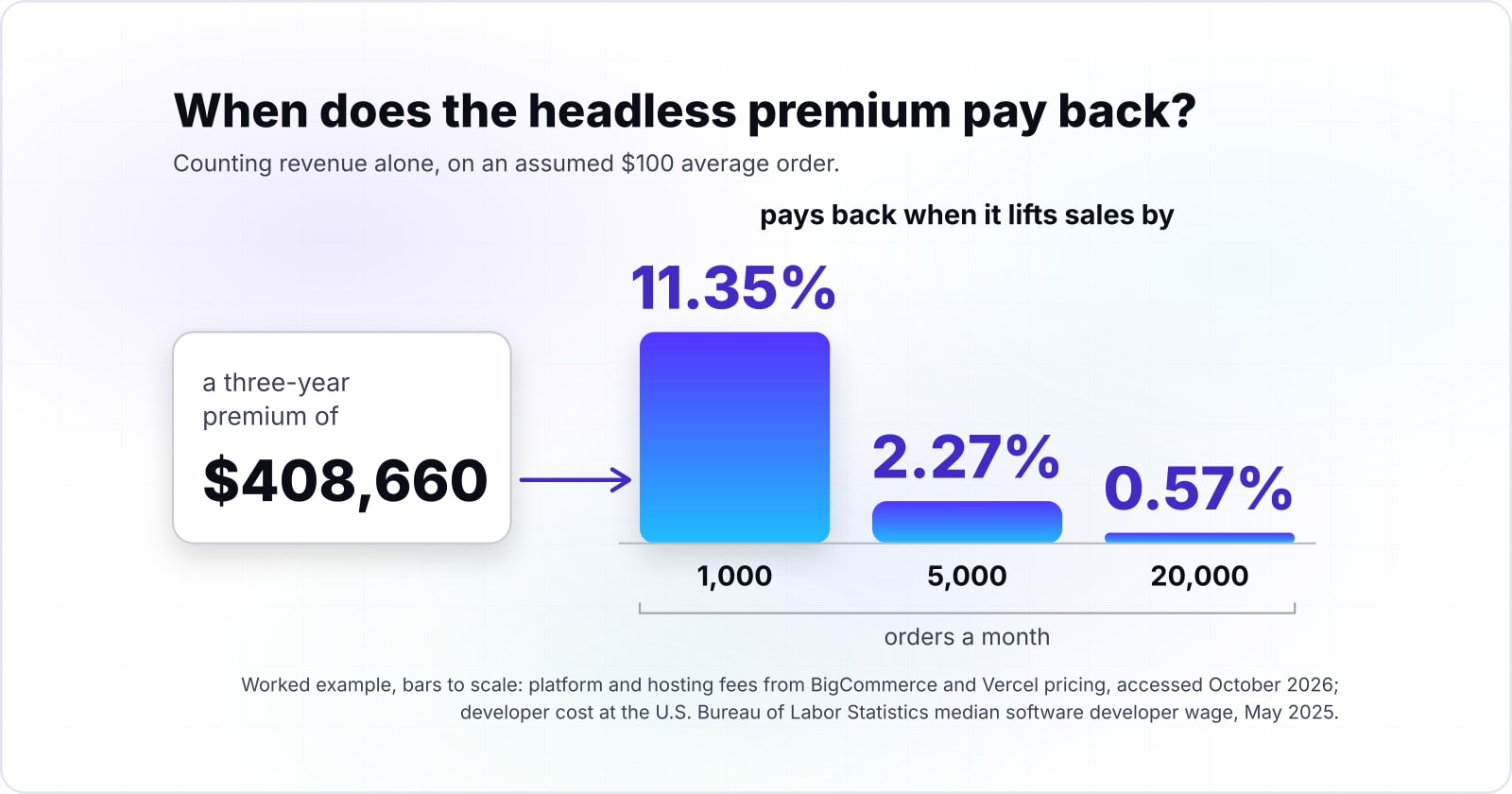
Counting revenue alone, headless pays back when it lifts sales by 11.35% at 1,000 orders a month, 2.27% at 5,000 and 0.57% at 20,000, on an assumed $100 average order in this example.
Your headless payback
Put in your orders a month and average order value; the developer cost starts at the BLS May 2025 median wage and the hosting at Vercel Pro.
Revenue lift headless must add to pay back, in percent to one decimal
2.3
- Three-year headless premium
- $408,660
- Three years of revenue at these inputs
- $18,000,000
Arithmetic from BigCommerce and Vercel pricing (accessed October 2026) and the BLS May 2025 median software developer wage. Modelled, not measured.
The method is simple division. Take the three-year premium of $408,660 and divide it by three years of revenue. Here, 5,000 orders of $100 a month make $18 million in three years. The lift needed is 2.27%. Since a store keeps only its margin on each extra sale, the real bar on that measure is higher.
Revenue lift is only the easiest return to measure. The calculator leaves out sales from channels a theme store could not open. It also leaves out integrations that save staff time, and a rebuild avoided when the business outgrows its theme. Those are often why a larger business chooses headless, and they belong in your own model next to this number.
$408,660
Over 3 years
$613,110
Over 5 years
The premium grows from $408,660 over three years to $613,110 over five, because the team recurs every year.
| Option | US$ more for headless, worked example |
|---|---|
| Over 3 years | $408,660 |
| Over 5 years | $613,110 |
Source: arithmetic from BigCommerce and Vercel pricing and the BLS median wage, 2026
Over five years the premium grows to $613,110 in this example. The team recurs every year, while the build is paid once. That makes the same point from the other side. Headless earns its keep through what the team goes on building, not through the launch alone.
When does a headless backend such as commercetools make sense?#
An API-first backend such as commercetools fits when several front ends share one catalogue and checkout, and its licence is quoted per order rather than as a share of sales.
The commercetools pricing page, accessed October 2026, describes an "order-based approach" with "unlimited catalogs, channels and storefronts". That matters when a web shop, a mobile app, in-store screens and a wholesale portal sell from one stock. One engine behind many heads saves building the commerce logic again for each.
HTTP Archive's 2025 Almanac draws the same line. For headless and API-first platforms, the vendor gives "the commerce backend as a service". The merchant owns each front end and its hosting, so every new one is one more to run.
Selling through one website but expecting more channels? A decoupled front end on your current platform is the smaller first step. It keeps the option open, because the backend can move later when the channels arrive.
When is traditional ecommerce the better choice, and when is headless?#
Traditional fits one storefront with a standard journey and no front-end team; headless fits several storefronts, many channels, complex integrations or a roadmap that will outgrow a theme.
| Your situation | Better fit | Why |
|---|---|---|
| One storefront with a standard buying journey | Traditional | The platform's theme, checkout and hosting already do the job |
| Nobody on your team can own a front end | Traditional | Headless would hand you a system with no owner |
| Your theme passes the three web.dev thresholds and speed is the only worry | Traditional | Speed is not your problem; tune content and apps first |
| Low order volume and no new channels planned | Traditional | At 1,000 orders a month the worked example needs an 11.35% revenue lift |
| Several brands, regions or storefronts on one catalogue | Headless | One engine serves every front end |
| Web, app, in-store or wholesale channels on the roadmap | Headless | Each new channel reuses the same commerce API |
| Deep links to ERP, PIM, search or personalisation | Headless | Custom logic lives in code you control |
| A front-end team that wants to ship on its own schedule | Headless | Releases do not wait on a theme cycle |
Many businesses sit in between. A common middle path keeps the platform's checkout and back office. It decouples only the parts that need freedom, such as landing pages. Adobe's playbook calls its own architecture "not an all-or-nothing proposition", and both Shopify and BigCommerce offer starter kits that shorten a first headless build.
What should you do next?#
Write down the storefronts, channels and integrations your business expects over the next three to five years, then test headless vs traditional ecommerce against that list, not against this year's budget alone.
If the list is short, a well-run theme on a strong platform is likely the right home. Spend on product pages, search and checkout content, where shoppers decide. If the list is long, plan headless on purpose: the content layer first, then the cart, then the storefront.
For that path, the headless CMS guide covers how product stories and landing pages reach a custom front end. The guide to cart updates and payment intents shows how to keep totals and payments in step. And for where headless fits among content tools, see the types of CMS.
For a second view on headless vs traditional ecommerce, our ecommerce development team builds both shapes. It starts from your roadmap, orders and team, not from a preferred architecture. Our headless CMS work covers the content side. The platform documentation linked above, from Shopify, WooCommerce, BigCommerce and Adobe, is a good place to start either way.