CMS types explained: the six kinds of CMS and how to pick yours
Your agency says headless, your developer says WordPress, and no one has asked what the site has to do. Two facts you already know settle it before any product demo.
What are the CMS types, and which one fits your site?#
There are six CMS types, traditional, headless, decoupled, hybrid, enterprise DXP and e-commerce, and two questions sort them: what draws your pages, and how many places your content must reach. The first question is about the front end, the part that turns stored text and images into the page in the browser. Then the second is about channels, such as a website, a phone app or a shop.
Adobe's guide to headless content, updated 5 June 2026, puts the old model plainly: "Traditionally a CMS has included both the backend functionality for content storage and delivery". So one system kept the words and also drew the page. Since then, every newer type has changed that bargain in some way.
TechTarget's comparison of 10 September 2025 names the split that confuses most teams: "decoupled systems offer native presentation layers, whereas headless CMSes do not". With that line in hand, the six CMS types sort like this:
| CMS type | What it does | What draws the pages |
|---|---|---|
| Traditional | One system stores the content and draws the pages. | The CMS itself |
| Headless | The system only stores content and sends it out over an API, a fixed way for other software to ask for data. | A separate front end |
| Decoupled | The system draws its own pages and also sends content out over an API. | The CMS, while apps read the API |
| Hybrid | One project draws some pages itself and sends others to apps, page by page. | The CMS for some pages, apps for others |
| Enterprise DXP | A CMS sold together with the tools that decide who sees what. | Its CMS layer |
| E-commerce | The shop platform holds the content, because the catalogue is the site. | The shop platform |
In short, the label matters less than the two answers. Below, each type gets its own section, and then the two questions become a test.
How is the web split between CMS types today?#
W3Techs' October 2026 survey finds WordPress, a traditional CMS, on 40.2% of all websites, while 31.5% run no CMS it can detect at all. Most of the measured web runs a traditional CMS or none, so headless is the exception a site has to justify rather than the default.
W3Techs' content management survey of 3 October 2026 states it in one line. "31.5% of the websites use none of the content management systems that we monitor." After that, its list runs from WordPress to Shopify, Wix and Squarespace.
Show data table
| Item | Value |
|---|---|
| No CMS that W3Techs detects | 31.5 |
| WordPress | 40.2 |
| Shopify | 5.4 |
| Wix | 4.2 |
| Squarespace | 2.4 |
| Joomla | 1.1 |
| Drupal | 0.6 |
| Adobe Systems | 0.6 |
Most of the measured web runs WordPress or no CMS W3Techs can detect.
And the shape of that chart is the point. Between them, a traditional CMS and plain sites with no CMS cover most of the web. Meanwhile, the systems most often sold as headless do not reach the top rows at all.
However, low usage does not make a type wrong. After all, a headless CMS can be the right choice for a site with three apps to serve. Instead, the survey sets the starting point. Because the common answer is traditional, the case for anything else should come from a real need, such as a second channel.
What does a traditional CMS do, and when is it enough?#
A traditional CMS such as WordPress stores the content and draws the pages in one system, and W3Techs counts 64.1% of WordPress sites on version 7 in October 2026. A traditional CMS is enough when one website is the only channel. Its cost is upkeep the owner must schedule, and the version split shows that upkeep is often put off.
Adobe's description of 5 June 2026 covers this case. There, the backend "for content storage and delivery" sits together with the front end that draws the page. For an editor, that means one login, one preview and one publish button. Also, for a small team, it means one system to host, patch and back up.
Show data table
| Segment | Value | Share |
|---|---|---|
| Version 7 | 64.1 | 64.1% |
| Version 6 | 28.9 | 28.9% |
| Version 5 | 4.8 | 4.8% |
| Versions 4 and 3 | 2.2 | 2.2% |
Most WordPress sites run version 7, and about a third have missed at least one major upgrade.
The takeaway from that chart is about upkeep, not age. W3Techs' WordPress report of October 2026 shows 28.9% of WordPress sites still on version 6 and 4.8% on version 5. In practice, each of those sites has missed at least one major upgrade. So a traditional CMS works well, but only for an owner who books the updates.
When the site is the only place your content lives, choose traditional. It also suits a team where editors, not developers, make most of the changes. For the full case for and against the most common example, read the guide to WordPress features, advantages and disadvantages.
How do headless and decoupled CMSs differ?#
A headless CMS has no front end of its own and only serves content over an API, while a decoupled CMS serves the API and keeps its own templates. That one difference decides whether editors can still preview and publish pages without a developer.
TechTarget's comparison of 10 September 2025 states the rule: "decoupled systems offer native presentation layers, whereas headless CMSes do not". Yet it adds that vendors sometimes use the two words for the same thing. Therefore, ask one question in every demo: does this system still draw a page on its own?
For instance, Contentful is a headless example. Contentful's API documentation calls its Content Delivery API "a read-only API for delivering content from Contentful to apps, websites and other media". Nothing in that line draws a page, because your developers build the front end that does.
WordPress, used with its REST API, is the common decoupled example. The WordPress REST API handbook, dated 16 January 2024, says "The WordPress REST API provides an interface for applications to interact with your WordPress site". Meanwhile, the theme still draws the website, so an app can read the same posts without a second CMS.
Still, the cost shows up in preview. TechTarget notes that headless systems lack built-in preview, so developers must build one. Also, headless needs a front-end team from the first day, while decoupled lets you add custom front ends one at a time. For cost, content models and when to skip headless, see the headless CMS guide.
What is a hybrid CMS, and why choose one?#
A hybrid CMS draws some pages with its own templates and feeds others to apps over an API, inside one project, so the choice between the two is made page by page. It lets a team keep editor-built pages where they work and add API delivery only for the channels that need it.
Adobe Experience Manager is the clearest documented case. Adobe's page on headful and headless delivery, updated 17 June 2026, says projects can use both models and "the choice is not binary". There, "headful" is Adobe's word for the traditional way, where one platform stores and draws the page.
Next, Adobe gives a case of its own. In it, a company runs its web shop as a separate app, then adds Adobe Experience Manager for promotional sites, blogs and campaign content. Then the guide lists a range of options, from sending limited content to the shop up to embedding the shop for editing.
For a growing company, hybrid often matches how the site changes. First, the marketing pages stay with the editors who already build them. Then, when an app arrives, only the content that app needs moves to API delivery. The cost is that the team now runs two ways of publishing. As a result, someone must decide, page by page, which way each one goes.
The marketing pages stay
The editors who already build them keep their templates.
An app arrives
Only the content that app needs moves to API delivery.
Each page gets a route
The team runs two ways of publishing, and someone decides which way each page goes.
When does a CMS become an enterprise DXP?#
A CMS becomes a digital experience platform when content management is sold together with personalisation, customer data and analytics, and you run all of those layers. In short, a DXP is a CMS plus the layers that decide who sees what. It pays off only when those layers will actually be staffed and used.
Adobe Experience Manager shows the content half of such a platform. Adobe's introduction to headless, updated 5 June 2026, describes content served to "any app over HTTP using GraphQL". GraphQL is a query language that lets an app ask for exactly the fields a screen needs. Also, the same product draws full pages, as its headful and headless guide of 17 June 2026 explains.
Yet the extra layers are where the cost sits. For example, rules that show a returning visitor a different home page need someone to write and test them. Customer data needs someone to keep it clean and lawful. Finally, analytics needs someone to read the numbers and act on them.
| Layer a DXP adds | The weekly work it needs |
|---|---|
| Personalisation | Someone writes and tests the rules that show a returning visitor a different home page. |
| Customer data | Someone keeps it clean and lawful. |
| Analytics | Someone reads the numbers and acts on them. |
So the test for a DXP is a staffing question, not a feature list. First, name the person who will run personalisation every week. If that person cannot be named, one of the other CMS types will serve the site just as well. Otherwise, a DXP licence bought ahead of that person mostly pays for screens that sit unused.
When is an e-commerce platform your CMS?#
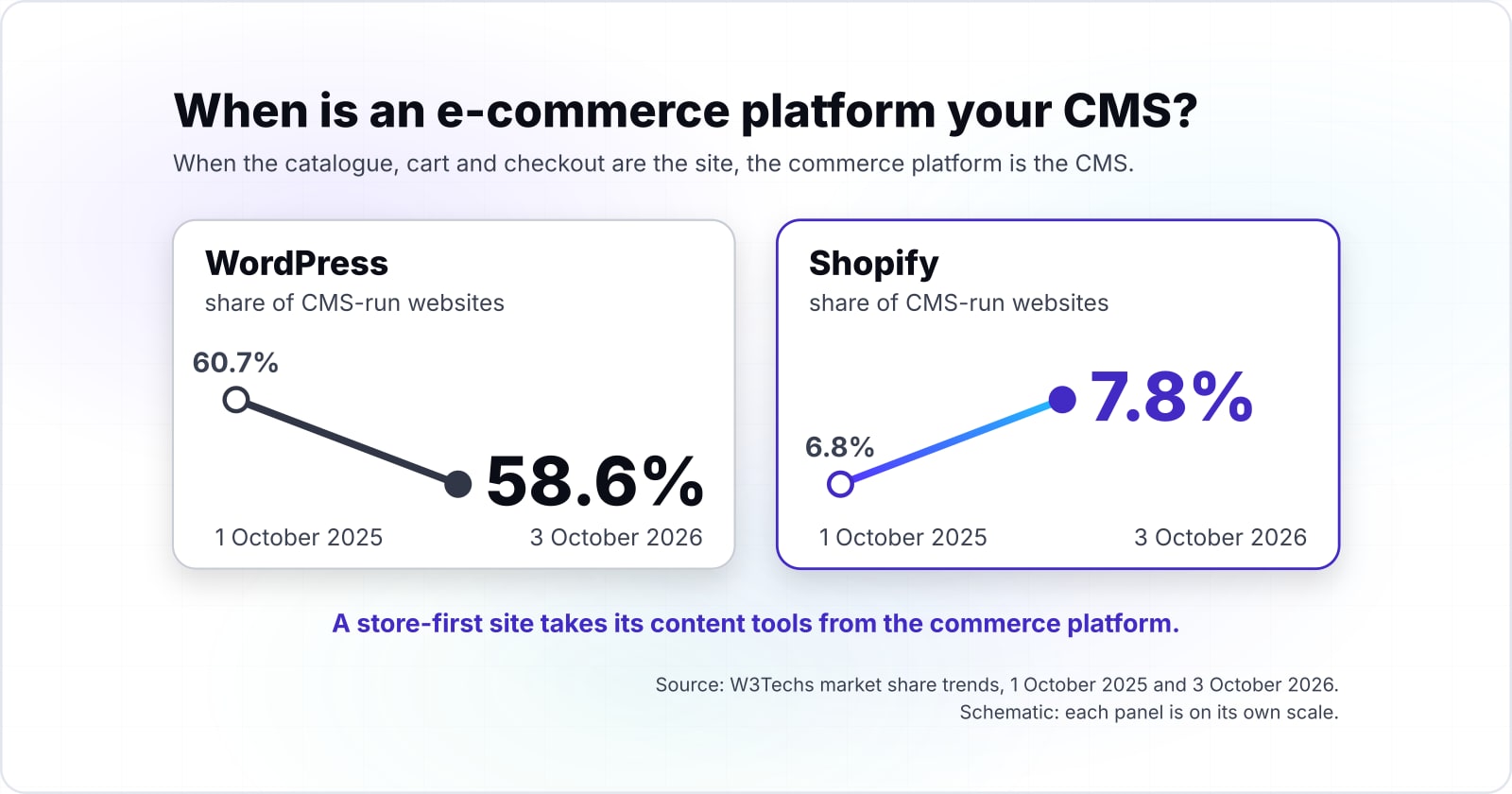
When the catalogue, cart and checkout are the site, the commerce platform is the CMS, and W3Techs counts Shopify on 7.8% of CMS-run sites in October 2026, up from 6.8% a year before. A store-first site takes its content tools from the commerce platform. It only goes headless when the storefront must reach channels the platform cannot draw.
Show data table
| Dimension | 1 October 2025 | 3 October 2026 |
|---|---|---|
| WordPress | 60.7 | 58.6 |
| Shopify | 6.8 | 7.8 |
| Wix | 5.7 | 6.1 |
WordPress slipped while Shopify and Wix grew their share of CMS-run sites.
The takeaway from that table is direction. In W3Techs' market share trends, WordPress slipped from 60.7% to 58.6% of CMS-run sites between October 2025 and October 2026. Meanwhile, Shopify and Wix both grew. So store-first and site-builder platforms are taking share from the general-purpose CMS.
Also, a store platform already carries content tools. For instance, Shopify's Help Center says its online store lets you "create webpages, publish a blog, and sell your products". WooCommerce takes the other route, because it is a plugin added to a WordPress site, so the CMS and the shop share one system. The WooCommerce REST API then connects that store to outside systems and services.
Commerce goes headless when the store must sell in places its own pages cannot reach. Shopify's Storefront API documentation says it lets you "build unique commerce experiences on any platform, including the web, native apps, games, and social media". For that choice in depth, read headless versus traditional e-commerce.
How do you choose a CMS type for your team?#
Count the channels your content must reach and the front-end developers you can keep on the site, and that pair of numbers points to one CMS type. One channel and no developer is traditional, and two or more channels with a developer is hybrid or decoupled. Many channels with a team is headless, while a store-first site starts from commerce.
Here is a worked example with illustrative numbers. Say a company has a marketing site, plans a customer app and sells from a product catalogue. It has three editors and one front-end developer.
- Today, one channel. Only the marketing site exists, and the editors make most changes. A traditional CMS fits, because one system can store and draw every page.
- Add the app, two channels. The app needs the same help articles as the site. With one developer, hybrid or decoupled fits, because the site keeps its templates and the app reads the API.
- Add the catalogue as a shop. Now the products are the site. So the commerce platform becomes the system of record, and its content tools carry the marketing pages.
- Add a third or fourth channel. A kiosk, a partner portal or a second app each need a front end. At that point a headless CMS and a small front-end team start to pay for themselves.
Traditional CMS
1 channel, 1 front-end developer, no catalogue
With 1 channel, one system can store the content and draw every page.
What would change it: A second channel with a front-end developer would point to hybrid or decoupled.
An illustrative decision aid built from the rules above, not a measured model.
In practice, the channel count is the number that changes the answer most often. Notice that the editor count never moved the result. Also, the developer count matters only once a second channel appears. Finally, when personalisation will be staffed every week, add the DXP staffing question before you shortlist products.
When is a CMS the wrong tool?#
A CMS is the wrong tool when only developers ever edit the site, when the content barely changes, or when the product is an application rather than pages. In those cases a static site generator or a custom application serves better than any of the CMS types. W3Techs' October 2026 figure of 31.5% of websites with no detectable CMS shows many sites already work that way.
Here are the three cases, with the better tool for each:
| Case | Better tool | Why |
|---|---|---|
| Only developers edit the site | A static site generator, a tool that builds plain pages from text files kept with the code | Developers already review changes that way, so a CMS login adds a step the team skips. |
| The content barely changes | A few hand-built pages on simple hosting | They cost less to run, and with nothing to edit each week there is nothing for a CMS to manage. |
| The product is an application | A web framework | Accounts, dashboards and workflows belong in a web framework, not a page tool. |
For that last fork, read WordPress versus Laravel.
So none of these is a failure to choose. Instead, each is a choice that skips a system the site does not need. A friend about to buy a CMS for a five-page site that changes twice a year would get the same advice.
Where should you go after choosing a CMS type?#
Once the type is chosen, the next questions are product, cost and build, and each has its own deeper guide or service. The type narrows the shortlist, and the guides and service pages below carry the next step.
When the answer was headless or hybrid, the headless CMS guide covers content models, preview and cost in depth. For a site where the shop is the product, headless versus traditional e-commerce weighs the two storefront paths. And if it was traditional, the WordPress guide covers what to plan for.
When the time comes to build, the pages on headless CMS development and e-commerce development describe how that work runs. Still, the two questions about CMS types and the vendors' own documentation are enough to choose a type without anyone's help.