WordPress to EmDash migration cost: what the move really costs over three years
Hosting is usually the smallest line on the bill. Your own maintenance hours decide whether the move ever pays for itself, and sometimes the honest answer is to stay where you are.
What does a WordPress to EmDash migration cost?#
Most of a WordPress to EmDash migration cost is labour, not hosting, so the move pays back only when it cuts enough monthly maintenance hours to repay the one-off work.
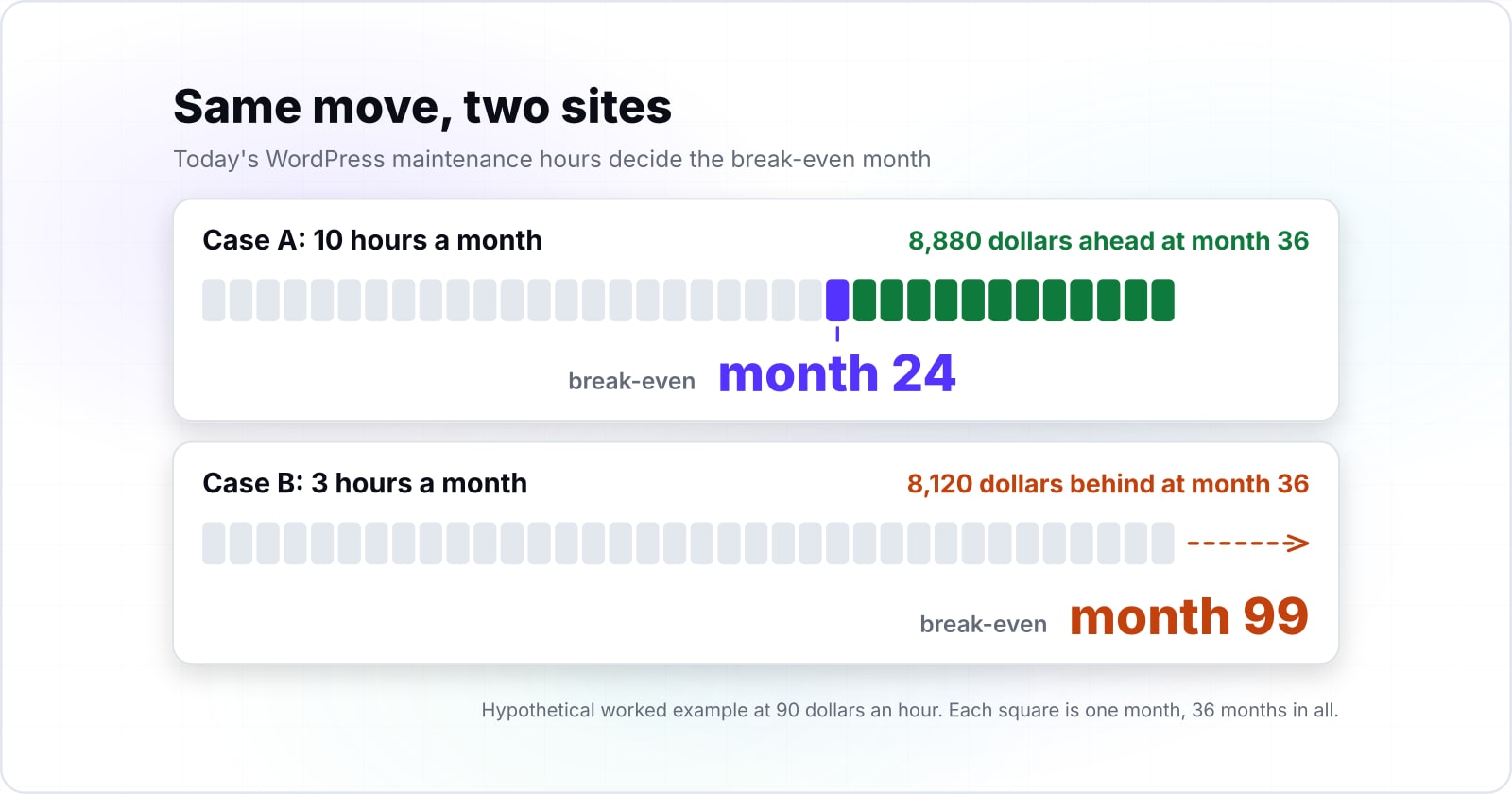
Month 24
Case A: 10 maintenance hours a month
Month 99
Case B: 3 maintenance hours a month
Inside the 36-month window only Case A repays the move; hypothetical figures, arithmetic from the worked example, modelled not measured.
| Option | month the move repays itself, at a hypothetical 90 dollars an hour |
|---|---|
| Case A: 10 maintenance hours a month | Month 24 |
| Case B: 3 maintenance hours a month | Month 99 |
Source: the hypothetical worked example in this guide, modelled not measured
EmDash is a CMS that runs inside an Astro site, and Astro is a framework for content sites. Its Cloudflare deploy guide, read 30 October 2026, puts it on Cloudflare Workers with D1 for the database and R2 for media. So the move itself is people's time, because someone audits the old site, rebuilds the theme, checks the import and replaces plugins. Hosting, by contrast, stays small for most small sites. For example, under Cloudflare's R2 pricing, updated 26 October 2026, 50 GB of stored media costs about 60 cents a month after the free 10 GB.
So the real question is not what the new CMS costs to host. Instead, ask how many maintenance hours it saves you each month. Then ask how long that saving takes to repay the move. Our guide to what the move fixes already makes the case for moving. So here we only count hours and dollars. If you are still choosing a kind of CMS at all, start with the guide to CMS types.
Which line items make up the one-off migration bill?#
Six line items make up the one-off bill: the audit, the theme rebuild, import checks, plugin replacement, the SEO and analytics move, and QA with training.
Each one is labour rather than a software licence. As a result, you can estimate every line in hours before anyone writes code.
- Audit. EmDash's migration guide, read 30 October 2026, asks you to record the permalink structure, canonical origin, redirects, menus, active post types, taxonomies and plugin-owned fields before you begin.
- Theme rebuild. Your design becomes a new Astro project, page by page. The next section explains why.
- Import checks. That same guide lists checks before cutover: count entries by post type and status, open sample content, confirm media loads from the new URLs, and check authors and taxonomies.
- Plugin replacement. Each plugin is ported, replaced or dropped, one decision at a time.
- The SEO and analytics move. SEO here means search engine optimization: the URL map, redirects, Search Console and analytics tags.
- QA and training. Quality assurance (QA) tests forms, menus and drafts. Then editors learn a new admin screen.
In practice, a brochure site with one contact form has a short audit. But a shop with custom fields and page-builder layouts has a long one. Therefore estimate each line separately, because one average figure hides the line that drifts.
What does the importer leave for a developer to do?#
The EmDash importer moves content, but the theme becomes a new Astro project and server-rendered blocks arrive as HTML blocks that show nothing.
The theme porting guide in the same docs, read 30 October 2026, describes the result. In the guide's words, it is a complete Astro project with content queries and a seed file, "not a PHP theme loaded by a theme runtime". It also notes that Astro routes are explicit files, so the WordPress template hierarchy has no automatic match. As a result, every template is rewritten, not copied.
Blocks need the same care. For instance, WordPress renders some blocks on the server, such as Latest Posts or blocks from plugins. The migration guide says these import as HTML blocks that show no content on the site. Then a developer opens each one, sees what it was, and rebuilds or removes it. Also, a WXR export (the WordPress export file) brings the standard fields, not every custom meta key. So some custom fields need a separate conversion.
Plugins follow the plugin porting guide in the same docs, read 30 October 2026. For example, a plugin with real behaviour, such as calls to an outside service, is ported as a new plugin. A plugin that only defines a custom post type or fields becomes a collection and seed file instead. However, some plugins only do a WordPress job, such as PHP page caching or rewrite rules. Those are not ported at all. Because each route is development work, the theme and plugin lines are where estimates drift most.
What does the SEO and analytics move add to the bill?#
Google Search Central's site-move guide, updated 20 August 2026, asks for a full URL map and permanent redirects kept generally at least 1 year.
The Google Search Central site-move guide, updated 20 August 2026, is plain about time. In Google's words, "Keep the redirects for as long as possible, generally at least 1 year." It also warns, "Expect temporary fluctuation in site ranking during the move." For a medium-sized site, the guide says it can take a few weeks or more before Google shows the new URLs. Meanwhile, it asks you to verify both the old and new sites in Search Console.
So this line has four parts. First, map every old URL to its new one. Second, set the redirects and keep them. Then move the analytics tags and check that key events still fire. Finally, watch for missed URLs for weeks after launch. Also, the CMS's own SEO guide, read 30 October 2026, lists redirect and gone rules plus a log of missed URLs. That log helps with the last part.
However, this work does not lift rankings on its own. A careful move keeps the search traffic you have, while the platform alone does not add more. Because the monitoring runs past launch, budget hours for the months after cutover too.
First, map every old URL to its new one.
Second, set the redirects and keep them.
Then move the analytics tags and check that key events still fire.
Finally, watch for missed URLs for weeks after launch.
What does Cloudflare hosting actually add each month?#
On Cloudflare an EmDash site bills across Workers, D1, R2 and Images, and at small-site volumes those lines stay far below the labour lines.
Cloudflare's Workers pricing page, updated 2 October 2026, sets a minimum charge of 5 dollars a month per account for the Workers Paid plan. Then usage past the included amounts is billed on top. Meanwhile, Cloudflare's D1 pricing, updated 21 April 2026, includes 25 billion rows read and 50 million rows written each month. That D1 page also includes the first 5 GB of storage. In short, 5 dollars is the floor of one line, not the total bill.
Media storage is the slowest line to grow. In Cloudflare's R2 pricing, updated 26 October 2026, even 250 GB of media costs 3.60 dollars a month.
Show data table
| Item | Value |
|---|---|
| 20 GB of media | 0.15 |
| 50 GB of media | 0.6 |
| 100 GB of media | 1.35 |
| 250 GB of media | 3.6 |
Even 250 GB of media stays under 4 dollars a month in R2 storage.
So D1 adds cost only past its included amounts. In Cloudflare's D1 pricing of 21 April 2026, its overage rates are small per unit.
| Item | US dollars per billed unit beyond the Workers Paid included allowance (unit named in each label) |
|---|---|
| Rows read, per million beyond 25 billion a month | 0.001 |
| Rows written, per million beyond 50 million a month | 1.0 |
| Storage, per GB-month beyond 5 GB | 0.75 |
For request volumes, the earlier guide's Workers chart has the numbers, so we do not repeat them.
Where do the Cloudflare free tiers stop for an EmDash site?#
EmDash's Cloudflare guide, read 30 October 2026, says the Images Free plan covers 5,000 unique transformations a month and fails new ones past that.
The CMS resizes images inside the Worker through Cloudflare Images. In that guide, each unique pairing of a source image and its settings bills once per calendar month. Repeats in the same month are free. For example, the same guide, read 30 October 2026, says 500 source images at one thumbnail size and one hero size count as 1,000 transformations. Past the 5,000 limit, cached images still load, but new ones fail with an error.
Show data table
| Item | Value |
|---|---|
| Images Free plan allowance | 5,000 |
| 500 source images at two sizes | 1,000 |
The guide's 500-image, two-size example uses a fifth of the Images Free plan.
Also, R2 has its own free tier. Cloudflare's R2 pricing, updated 26 October 2026, includes 10 GB-month of storage, 1 million Class A operations and 10 million Class B operations each month. Egress, the data sent out to visitors, has no charge on that page.
| Item | US dollars per billed unit, R2 Standard storage class (unit named in each label) |
|---|---|
| Storage, per GB-month beyond 10 GB free | 0.015 |
| Class A operations, per million beyond 1 million free | 4.5 |
| Class B operations, per million beyond 10 million free | 0.36 |
Still, Cloudflare is a choice, not a rule. its Node.js guide, read 30 October 2026, runs a site on one server with SQLite and local storage. That route swaps these lines for a server bill. Either way, set your infrastructure input from your own image sizes and media volume.
What maintenance is left after the move?#
EmDash still needs backups, a safely kept encryption key, upgrades and plugin reviews, so its maintenance line can shrink but never reaches zero.
Its backups guide, read 30 October 2026, says its JSON backups are useful for inspection, but "EmDash cannot restore them". Instead, a real recovery point is a raw database backup, and media files are backed up separately. The guide also covers EMDASH_ENCRYPTION_KEY, the key that locks plugin secrets. Its key list belongs in a separate secret store. On Cloudflare, scheduled tasks such as automatic backups need a cron trigger, a timed job.
WordPress keeps its own routine too. Its updating guide, read 30 October 2026, says most sites apply minor and security updates in the background. That has held since version 3.7. But it still advises a backup before you update. Therefore both platforms carry a monthly maintenance input, and the model needs an honest figure on each side, never zero.
How do you build a three-year cost model for the move?#
A 3-year model adds the one-off move to 36 months of running costs on each side, then finds the first month the new platform's running total drops below the old one.
The method takes four steps, and every input is yours:
- WordPress per month is hosting plus licences plus maintenance hours times your hourly rate.
- The move's one-off is migration hours times the same rate, plus training and integration costs.
- The new CMS per month is infrastructure plus its maintenance hours times the rate.
- Each three-year total is the one-off plus 36 times the monthly figure.
The break-even month is the one-off cost divided by the monthly saving, rounded up. So if the new CMS costs the same or more each month, there is no break-even at all. Likewise, a result past month 36 means the move does not pay back in the window.
Every dollar figure here is hypothetical. Load a case, then change any input to your own.
Breaks even in month 24
| Line | WordPress | EmDash |
|---|---|---|
| Per month | $1,010 | $280 |
| One-off move | None | $17,400 |
| 36-month total | $36,360 | $27,480 |
An estimate, not financial advice.
This calculator gives an estimate, not financial advice.
When does the move pay back, and when does it never?#
In a hypothetical worked example at 90 dollars an hour, a site spending 10 maintenance hours a month breaks even in month 24, and one spending 3 never does.
Case A, hypothetical, pays back. In this hypothetical case, WordPress costs 60 dollars of hosting, 50 dollars of licences and 10 hours a month. That is a hypothetical 1,010 dollars a month. Then the move takes 160 hours plus 3,000 dollars of training and integration, a one-off of 17,400 dollars. After it, the new site costs a hypothetical 10 dollars of infrastructure and 3 hours a month, which is 280 dollars. The 730 dollar monthly gap repays the one-off in month 24.
Case B, hypothetical, never pays back. In this hypothetical case, WordPress costs 30 dollars of hosting, 20 dollars of licences and 3 hours. That is a hypothetical 320 dollars a month. Then the move takes 120 hours plus 2,000 dollars, a one-off of 12,800 dollars. The new site then costs 10 dollars and 2 hours, which is 190 dollars a month. As a result, a 130 dollar gap needs 99 months to repay the move.
| Hypothetical case | WordPress, 36 months | EmDash, 36 months | Break-even month | Position at month 36 |
|---|---|---|---|---|
| A: 10 hours a month today | 36,360 | 27,480 | 24 | Move 8,880 ahead |
| B: 3 hours a month today | 11,520 | 19,640 | 99 | Move 8,120 behind |
Hypothetical figures in US dollars at a hypothetical 90 dollars an hour; change any of them in the calculator.
The same move wins for one site and loses for the other. In particular, the input that flips it is today's WordPress maintenance hours.
When is a move the wrong fit, and staying on WordPress the right call?#
Staying on WordPress is the cheaper call when its maintenance is already light, when plugins carry revenue features, or when no break-even appears inside 36 months.
First, light maintenance. Say updates already run in the background and your site needs 2 or 3 hours a month. Then little saving is left to repay a move. The better step is to tighten what you have, with a plan to cut WordPress maintenance hours.
Second, plugins that earn money. For example, a checkout, a booking flow or a members area is a plugin you would port or rebuild, not install. When that work is large, keep WordPress and revisit the move once those features need a rebuild anyway.
Third, no break-even in the window. Hypothetical Case B is that site. Keeping and optimizing WordPress there is the better financial decision, not a failure to modernize. Our WordPress strengths and limits guide covers which features carry a site and who keeps each one running.
Where do you go from your own numbers?#
Run your own hours through the calculator, then read the guide on what the move fixes before you commit budget to either platform.
If the numbers favour the move, we can assess your site and plan the build with you. But if they favour staying, the cheaper route is to cut WordPress maintenance hours instead. Either way, the CMS docs, Google's site-move guide and the calculator are enough to decide on your own.