How to update payment intent amounts in Stripe when the cart changes after the card is entered
The card is in, then the cart moves: an extra item, a coupon, a new shipping quote. Which call still works depends on one field, and it is not the amount.
Can you update payment intent amounts after the card is entered?#
You can update payment intent amounts with one call until confirmation; after authorization Stripe documents three routes: capture less, increment on eligible cards, or charge the difference on a new PaymentIntent. A narrow fourth route, overcapture, is shown below.
Stripe's PaymentIntents overview, accessed 4 October 2026, states the first case: "If the amount changes, you can update its amount." Then the hold guide covers the second: "A partial capture automatically releases the remaining amount." Finally, the increment reference covers the third, and it needs the status requires_capture.
So the first question for a cart change is not the new total. Instead, ask what status the intent is in right now.
// Read the status before you touch the amount.
const pi = await fetch(`https://api.stripe.com/v1/payment_intents/${id}`, {
  headers: { Authorization: "Basic " + btoa(process.env.STRIPE_SECRET_KEY + ":"), "Stripe-Version": "2026-08-26.dahlia" },
}).then((r) => r.json());
console.log(pi.status, pi.amount, pi.amount_capturable);
What does a mismatched hold cost the checkout?#
An unreconciled hold either releases money the order needed or expires: Stripe's capture reference (accessed 4 October 2026) cancels uncaptured PaymentIntents 7 days after creation by default. In its words, "Uncaptured PaymentIntents are cancelled a set number of days (7 by default) after their creation."
If a hold drifts from the final cart, it ends in one of three ways: a cancelled payment, a second charge the customer has to accept, or a refund. Each one is a support ticket, and the first is a lost order.
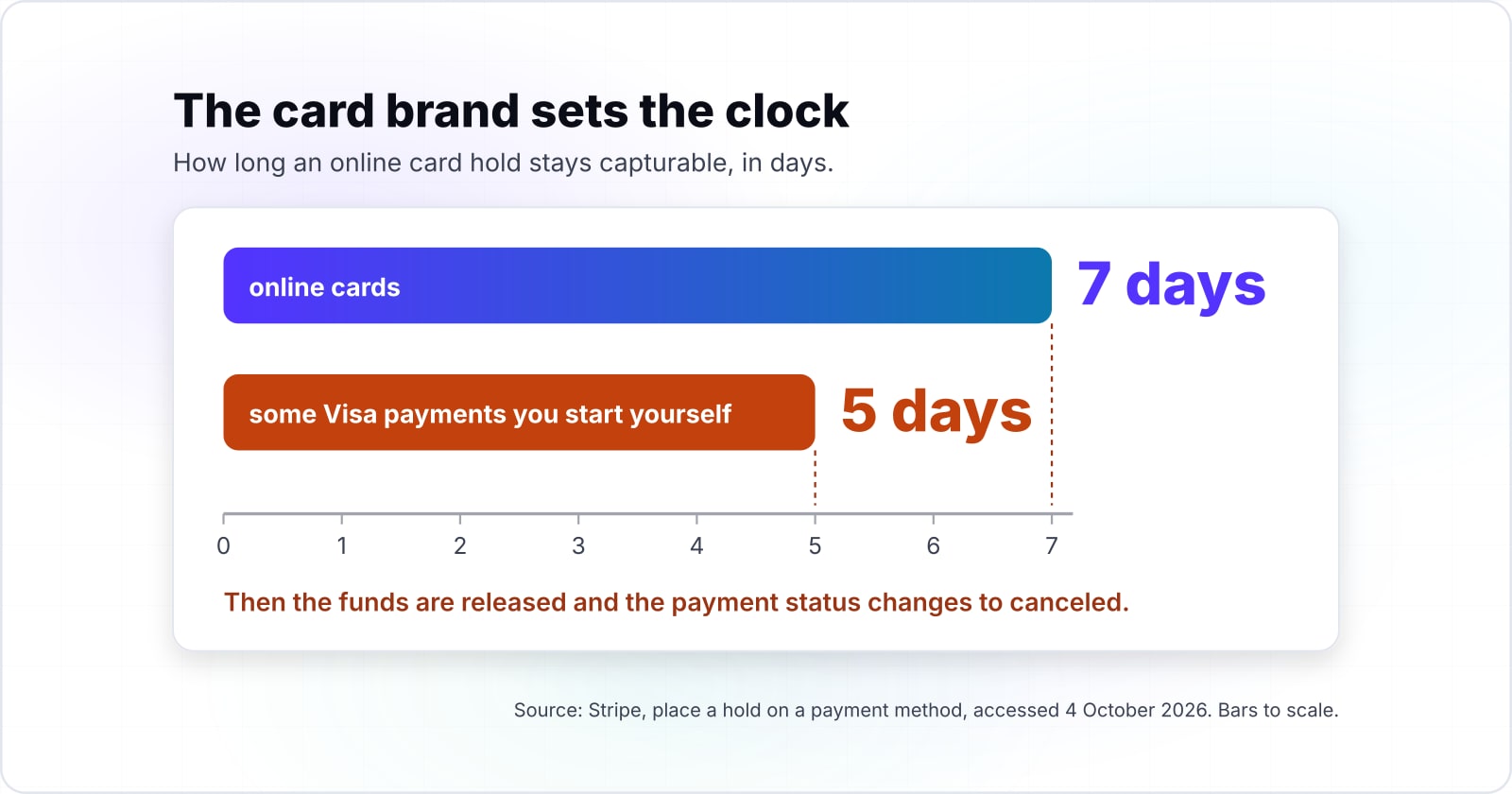
But the card brand sets the clock, and it is short. In practice, Stripe's hold guide, accessed 4 October 2026, gives about a week for online cards, and less for some Visa payments you start yourself.
Show data table
| Item | Value |
|---|---|
| Visa, customer-initiated | 7 |
| Visa, merchant-initiated | 5 |
| Mastercard | 7 |
| American Express | 7 |
| Discover | 7 |
Most online card holds last about a week, and some Visa payments you start yourself get only five days.
Also, the hold guide says what happens at the end. When the hold runs out, "the funds are released and the payment status changes to canceled." To know the exact deadline, the same guide points at the charge's capture_before field.
// When does the hold run out? Stripe puts the deadline on the charge.
const pi = await fetch(`https://api.stripe.com/v1/payment_intents/${id}?expand[]=latest_charge`, {
  headers: { Authorization: "Basic " + btoa(process.env.STRIPE_SECRET_KEY + ":"), "Stripe-Version": "2026-08-26.dahlia" },
}).then((r) => r.json());
const deadline = pi.latest_charge.payment_method_details.card.capture_before;   // Unix seconds
console.log("capture before", new Date(deadline * 1000).toISOString());
What can you change at each PaymentIntent status?#
Stripe documents a plain amount update before payment; once the status is requires_capture, the documented routes are amount_to_capture to lower it and increment_authorization to raise it, and after succeeded, a refund or a new PaymentIntent. Stripe's update reference says the call "Updates properties on a PaymentIntent object without confirming". Also, its error codes page answers a call made in the wrong state with payment_intent_unexpected_state.
Then Stripe's own pages, all read on 4 October 2026, fill in the rest of the table. For example, the lifecycle page lets you cancel "before it reaches a processing or succeeded state". Then the capture reference captures only in requires_capture. Finally, the increment reference adds: "After it's captured, a PaymentIntent can no longer be incremented."
Stripe test mode agreed on 5 October 2026. An amount update on a held intent came back payment_intent_unexpected_state, and its message listed the statuses that take one: requires_payment_method, requires_confirmation and requires_action. An update during 3D Secure went through and sent the intent back to requires_confirmation, so confirm it again. A capture above the hold came back amount_too_large.
| Status | Amount up | Amount down | Cancel | Recapture |
|---|---|---|---|---|
| requires_payment_method | update, before payment | update, before payment | yes | no hold yet |
| requires_confirmation | update, before payment | update, before payment | yes | no hold yet |
| requires_action | update, then confirm again | update, then confirm again | yes | no hold yet |
| processing | no | no | only some bank debits | no |
| requires_capture | increment_authorization if eligible, or overcapture | amount_to_capture at capture | yes, releases the hold | one capture, or multicapture |
| succeeded | new PaymentIntent | refund | no | no |
| canceled | new PaymentIntent | none needed | already canceled | no |
// Map the status to the documented way to change the amount.
function amountRoute(pi, newTotal) {
  switch (pi.status) {
    case "requires_payment_method":
    case "requires_confirmation":
    case "requires_action": return "update, then confirm again";
    case "requires_capture":
      return newTotal <= pi.amount_capturable ? "capture amount_to_capture" : "increment_authorization or new intent";
    case "succeeded": return newTotal === pi.amount_received ? "no change" : newTotal < pi.amount_received ? "refund" : "new intent for the difference";
    case "canceled": return "new intent";
    default: return "wait or cancel";   // processing
  }
}
How do you change the amount before confirmation?#
Before confirmation, send the new total to the PaymentIntents update endpoint; Stripe's update reference warns that changing the payment method means confirming the PaymentIntent again. Its words are "updating the payment_method always requires you to confirm the PaymentIntent again". So change the amount and leave the card alone, since a Stripe update payment intent call takes just the new total in the smallest currency unit, such as cents.
Keep one intent per cart, because Stripe's overview says to create it "as soon as you know the amount", then update it as the cart moves. As a result, the cart stores the intent id, and each edit before payment is an update.
curl https://api.stripe.com/v1/payment_intents/pi_123 \
  -u "$STRIPE_SECRET_KEY:" -H "Stripe-Version: 2026-08-26.dahlia" \
  -d amount=5500
How do you lower the amount after authorization?#
After authorization you lower the total at capture: pass amount_to_capture below the held amount, and Stripe's hold documentation says the remainder is released automatically. Because Stripe documents no call that shrinks a hold in place, a coupon or a removed item waits for capture.
Stripe's capture reference, accessed 4 October 2026, sets the bound: the amount to capture "must be less than or equal to the original amount". If you leave it out, Stripe takes the full amount it holds. So the one thing to get right is the final number.
5,500 cents
Held at confirmation
4,500 cents
Captured after a 1,000 coupon
A partial capture takes the final total, and Stripe releases the rest of the hold.
| Option | US cents, illustrative amounts from the worked example |
|---|---|
| Held at confirmation | 5,500 cents |
| Captured after a 1,000 coupon | 4,500 cents |
Source: Stripe, place a hold on a payment method, accessed 4 October 2026
curl https://api.stripe.com/v1/payment_intents/pi_123/capture \
  -u "$STRIPE_SECRET_KEY:" -H "Stripe-Version: 2026-08-26.dahlia" \
  -d amount_to_capture=4500
Plan for one capture. However, if an order ships in parts, Stripe's multicapture guide is built for that case.
How do you raise the amount with Stripe incremental authorization?#
Call increment_authorization with the new total while the PaymentIntent is in requires_capture; Stripe's documentation (accessed 4 October 2026) allows 10 attempts per PaymentIntent on eligible cards. In Stripe's words: "You have a maximum of 10 incremental authorization attempts per PaymentIntent."
But it is not on by default. Stripe's increment page says "It's only available with Visa, Mastercard, American Express, or Discover." Also, it offers the feature "to users on IC+ pricing", so other accounts must ask support, and Discover qualifies only in some merchant categories. Then you ask for it when you create the intent, with request_incremental_authorization set to if_available.
After payment, read the result. Then the charge marks the feature available or unavailable, and only available is worth a call.
Ask only once Stripe has turned it on. On a test account without the feature, the create took the flag, but the confirm was refused with payment_intent_invalid_parameter: "This account is not eligible for the requested card features." That was on 5 October 2026, even with if_available.
# Without request_incremental_authorization at create, Stripe answers invalid_request_error.
curl https://api.stripe.com/v1/payment_intents/pi_123/increment_authorization \
  -u "$STRIPE_SECRET_KEY:" -H "Stripe-Version: 2026-08-26.dahlia" \
  -d amount=6500
Also, each step has a cap. The same Stripe page, accessed 4 October 2026, sets it at "either 500 USD (or local equivalent) over, or 500% over the previously authorized amount (whichever is higher)".
Show data table
| Item | Value |
|---|---|
| previous authorization 50 USD | 500 |
| previous authorization 100 USD | 500 |
| previous authorization 200 USD | 1,000 |
| previous authorization 1000 USD | 5,000 |
Up to a 100 USD hold the 500 USD floor sets the cap; above it the 500% leg takes over.
What if the card cannot be incremented?#
If the increment is unavailable or declined, the original hold stays capturable; capture it and charge the difference on a new PaymentIntent, or overcapture within the card brand's percentage limit. In that case, Stripe's increment page, accessed 4 October 2026, says a failure "returns a card_declined error instead". The intent "remains capturable for the previously authorized amount", so you can still take it.
So a failed step never loses the order, because you still hold the old amount.
Then there is overcapture, the smaller way out. Stripe's overcapture page, accessed 4 October 2026, lets you take a little more than the hold, up to a brand limit. It is also an IC+ feature. You ask for it at creation with request_overcapture set to if_available, then the page says to "provide an amount_to_capture up to the maximum_amount_capturable" at capture. On the same test account, asking for it was refused with the same error, and the charge reported overcapture unavailable. Because it depends on the account, the script below does not use it.
Show data table
| Item | Value |
|---|---|
| Visa, all other merchant categories | 15 |
| Visa, lodging and cruise lines | 15 |
| Visa, restaurants (global) | 20 |
| Visa, restaurants (US) | 30 |
Overcapture leaves room for a small rise only, between 15% and 30% above the hold for Visa.
When neither fits, capture the hold and charge the gap on a second intent with the saved card. That works only if the first intent saved it: create it with a customer and setup_future_usage set to off_session, which Stripe's overview says "saves payment methods to use again in the future".
# The first intent was created with customer=cus_123 and setup_future_usage=off_session,
# so its card is saved to the customer and can be charged again.
curl https://api.stripe.com/v1/payment_intents \
  -u "$STRIPE_SECRET_KEY:" -H "Stripe-Version: 2026-08-26.dahlia" \
  -d amount=1000 -d currency=usd \
  -d customer=cus_123 -d payment_method=pm_saved \
  -d off_session=true -d confirm=true
What does one cart with three changes look like in code?#
This worked example creates one PaymentIntent, updates it for an added item, confirms it with manual capture, then reconciles a coupon and a shipping change at fulfilment. The amounts are illustrative cents: two items at 4,000, a third item to 5,500, a coupon of 1,000, then shipping.
The script calls the REST API with fetch, so it needs Node 18 or later and no other tools. For test cards, it uses pm_card_visa from Stripe's testing page. It also uses pm_card_debit_incrementalAuthAuthorized, which the increment page lists for a raise that goes through, and pm_card_credit_disableEnterpriseCardFeatures, which it lists as one that "Declines the increased authorization request". Each create, the customer included, carries an idempotency key built from the cart id, as Stripe's overview asks.
We ran it in Stripe test mode on 5 October 2026, on Node 26, against an account without incremental authorization. The first cart captured 5,000 of a 5,500 hold. The other two read the increment as unavailable, captured 5,500 and charged 1,000 on a second intent. Both test cards report unavailable on such an account, so the successful increment is Stripe's documented path, not one we saw. Set STRIPE_INCREMENTS=1 only once Stripe has enabled the feature.
// cart-three-changes.mjs  Run: STRIPE_SECRET_KEY=sk_test_... node cart-three-changes.mjs
// Add STRIPE_INCREMENTS=1 only if Stripe has enabled incremental authorization on the account.
import { randomUUID } from "node:crypto";
const KEY = process.env.STRIPE_SECRET_KEY;
const AUTH = "Basic " + btoa(KEY + ":");   // same as curl -u "$KEY:"
const VERSION = "2026-08-26.dahlia";        // pin it: an old account default renames statuses
const INCREMENTS = process.env.STRIPE_INCREMENTS === "1";
async function stripe(path, params = {}, idem) {
  const headers = { Authorization: AUTH, "Stripe-Version": VERSION, "Content-Type": "application/x-www-form-urlencoded" };
  if (idem) headers["Idempotency-Key"] = idem;          // a retry returns the same object
  const res = await fetch(`https://api.stripe.com/v1/${path}`, {
    method: "POST",
    headers,
    body: new URLSearchParams(params),
  });
  const json = await res.json();
  if (!res.ok) throw Object.assign(new Error(json.error?.message), { code: json.error?.code });
  return json;
}
const log = (step, pi) => console.log(step, pi.status, pi.amount, pi.amount_capturable, pi.amount_received);
async function runCart(testCard, shipping) {
  const cartId = randomUUID();                         // your cart's own id
  // 1. Two items: create with manual capture, and request increments if the account has them.
  //    The customer and setup_future_usage save the card for a later charge.
  const customer = (await stripe("customers", {}, `cart-${cartId}-customer`)).id;
  let pi = await stripe("payment_intents", {
    amount: "4000", currency: "usd", "payment_method_types[]": "card",
    customer, setup_future_usage: "off_session",
    capture_method: "manual",
    ...(INCREMENTS && { "payment_method_options[card][request_incremental_authorization]": "if_available" }),
  }, `cart-${cartId}`);
  log("create", pi);                                   // requires_payment_method
  // 2. Item added before confirmation: update.
  pi = await stripe(`payment_intents/${pi.id}`, { amount: "5500" });
  log("update", pi);                                   // requires_payment_method
  // 3. Confirm: the card is held, not charged.
  pi = await stripe(`payment_intents/${pi.id}/confirm`, { payment_method: testCard });
  log("confirm", pi);                                  // requires_capture
  // 4. Coupon after authorization, shipping at fulfilment: settle at capture.
  const held = pi.amount_capturable;
  const total = 5500 - 1000 + shipping;
  if (total <= held) {
    pi = await stripe(`payment_intents/${pi.id}/capture`, { amount_to_capture: String(total) });
    return log("capture less", pi);                    // succeeded
  }
  const charge = await fetch(`https://api.stripe.com/v1/payment_intents/${pi.id}?expand[]=latest_charge`,
    { headers: { Authorization: AUTH, "Stripe-Version": VERSION } }).then((r) => r.json());
  const inc = charge.latest_charge?.payment_method_details?.card?.incremental_authorization?.status;
  console.log("increment", inc);                       // "available" or "unavailable"
  if (inc === "available") {
    try {
      pi = await stripe(`payment_intents/${pi.id}/increment_authorization`, { amount: String(total) });
      log("increment", pi);                            // requires_capture
      return log("capture", await stripe(`payment_intents/${pi.id}/capture`));   // succeeded
    } catch (e) { console.log("increment failed:", e.code); }   // the hold stays as it was
  }
  // 5. Fallback: capture the hold, charge the difference to the saved card.
  log("capture hold", await stripe(`payment_intents/${pi.id}/capture`));         // succeeded
  log("difference", await stripe("payment_intents", {
    amount: String(total - held), currency: "usd", "payment_method_types[]": "card",
    customer, payment_method: pi.payment_method, off_session: "true", confirm: "true",
  }, `cart-${cartId}-difference`));                                                 // succeeded
}
await runCart("pm_card_visa", 500);                              // total 5,000: capture less
await runCart("pm_card_debit_incrementalAuthAuthorized", 2000);  // total 6,500: increment if enabled, else new intent
await runCart("pm_card_credit_disableEnterpriseCardFeatures", 2000);  // no increment: capture 5,500, new intent for 1,000
First, check the sums once by hand. In this illustrative cart, a 5,500 hold minus the 1,000 coupon leaves 4,500. With 500 of shipping, the illustrative total is 5,000, under the hold, so capture takes 5,000 and releases 500. With 2,000 of shipping, the illustrative total is 6,500, which is 1,000 over the hold. Then the script either increments or charges that 1,000 on a new intent.
Final total
5,500 held, minus 1,000 coupon, plus 2,000 shipping = 6,500Increment, then capture
incrementThe total is 1,000 over the hold and the card reports increments as available, within one step's cap of 50,000. Rules from Stripe: place a hold, capture a PaymentIntent and incremental authorization, accessed 4 October 2026. Modelled, not measured.
| Stripe call | Amount |
|---|---|
increment_authorization, amount | 6,500 |
capture | 6,500 |
| Total | 5,500 held, minus 1,000 coupon, plus 2,000 shipping = 6,500 |
|---|---|
| Call | increment_authorization amount=6500, then capture |
| Why | The total is 1,000 over the hold and the card reports increments as available, within one step's cap of 50,000. |
Which Stripe API calls does a cart integration make, in order?#
A cart integration makes its Stripe API calls in a fixed order: create, update, confirm, increment_authorization when eligible, and capture, each returning the PaymentIntent as JSON. Each request is a plain form post, and each reply is the same object with a new status.
Build it from these pages, in this order:
- PaymentIntents overview: one intent per cart, with a key that makes retries safe.
- Update a PaymentIntent: the new amount, before payment.
- Place a hold: manual capture, and capture less.
- Increment an authorization: the flag and the call.
- Capture a PaymentIntent: the capture call, and Stripe's 7-day default as of 4 October 2026.
- Testing: test cards such as
pm_card_visa.
V="Stripe-Version: 2026-08-26.dahlia"
curl https://api.stripe.com/v1/payment_intents -u "$STRIPE_SECRET_KEY:" -H "$V" \
  -d amount=4000 -d currency=usd -d "payment_method_types[]=card" \
  -d capture_method=manual
curl https://api.stripe.com/v1/payment_intents/pi_123 -u "$STRIPE_SECRET_KEY:" -H "$V" -d amount=5500
curl https://api.stripe.com/v1/payment_intents/pi_123/confirm -u "$STRIPE_SECRET_KEY:" -H "$V" -d payment_method=pm_card_visa
curl https://api.stripe.com/v1/payment_intents/pi_123/capture -u "$STRIPE_SECRET_KEY:" -H "$V" -d amount_to_capture=5000{
"id": "pi_123",
"object": "payment_intent",
"amount": 5500,
"amount_capturable": 5500,
"amount_received": 0,
"capture_method": "manual",
"status": "requires_capture"
}Pin the API version on every call. Our test account defaulted to a 2015 version, which named the first status requires_source rather than requires_payment_method. So each block in this post sends a Stripe-Version header.
So the same calls work from any language, since they are plain HTTP with JSON back. A Stripe cart API integration is these calls, in this order. Because each reply is JSON, a Stripe JSON integration only needs status and amount_capturable. For the wider pattern, see how REST and other API styles compare. If your store takes cards today and the cart code needs work, our API integrations team does that work.
How do Adyen and Braintree limit a changed amount?#
Adyen treats card payments as final authorizations by default, which cannot be adjusted, and Braintree marks an authorization expired after a window that varies by card brand. So the rule is not a Stripe quirk, though the calls differ.
For example, Adyen's adjustment page, accessed 4 October 2026, says a final hold means "it doesn't allow you to adjust the authorized amount later". Instead, you ask for a pre-auth up front, with additionalData.authorisationType set to PreAuth.
Adyen's implementation page, accessed 4 October 2026, then gives the call. You send POST /payments/{paymentPspReference}/amountUpdates with the new total, which it describes as "the sum of the original, pre-authorized amount and all later adjustments". Unlike Stripe, the change can go up or down, and the result arrives later as an AUTHORISATION_ADJUSTMENT webhook. Adyen also caps it at "a maximum of 50 adjustments". The same call with an unchanged amount is how you extend the hold: "make a /payments/{paymentPspReference}/amountUpdates request with the same amount as the current balance on the authorization".
Meanwhile, Braintree's status page, accessed 4 October 2026, marks a payment expired once it has "spent too much time in the Authorized status". For a lower total, the same page lists a payment that "was captured partially". This post has no Braintree test account behind it, so it shows no Braintree or Adyen code.
Show data table
| Item | Value |
|---|---|
| Visa, default | 8 |
| Visa, merchant-initiated recurring or unscheduled | 3 |
| Visa, lodging, vehicle rental, cruise | 28 |
| Mastercard, preauthorization | 30 |
| Mastercard, final authorization | 7 |
Braintree windows run from 3 to 30 days, so the same cart logic needs a clock per brand.
When is incremental authorization the wrong tool?#
Skip incremental authorization when the card or account is not eligible, when the hold is near expiry, or when the order ships in parts; use a new PaymentIntent or multicapture instead.
First, take a card or account that does not qualify. The flag comes back unavailable, so build the capture plus new intent path and skip the step code. Second, take a hold close to its end. Stripe's increment page says increments "don't extend the validity period", so capture now and charge the gap. Third, take an order that ships in parts. The same page says an intent "partially captured with multicapture" can no longer be raised, so multicapture fits better there.
Also, card brands bar increments where the amount "should be known at the time of authorization", in Stripe's words. Subscriptions are the usual case.
| Case | What Stripe's increment page says | Use instead |
|---|---|---|
| Card or account not eligible | the flag comes back unavailable | capture, then a new PaymentIntent |
| Hold close to its end | increments don't extend the validity period | capture now, charge the gap |
| Order ships in parts | partially captured with multicapture, no more increments | multicapture |
| Amount known at authorization | card brands bar increments, for example subscriptions | a new PaymentIntent |
// Read the charge before you increment; "unavailable" means skip straight to a new intent.
const pi = await fetch(`https://api.stripe.com/v1/payment_intents/${id}?expand[]=latest_charge`, {
  headers: { Authorization: "Basic " + btoa(process.env.STRIPE_SECRET_KEY + ":"), "Stripe-Version": "2026-08-26.dahlia" },
}).then((r) => r.json());
const inc = pi.latest_charge?.payment_method_details?.card?.incremental_authorization?.status;
console.log(inc === "available" ? "increment" : "capture, then a new PaymentIntent");
What should the cart check before every change?#
Check the status before every cart change, keep one PaymentIntent per cart, and reconcile the final total once at capture. So that one rule covers the added item, the coupon and the shipping change.
// Before every cart change: read the intent, then route by its status.
const pi = await fetch(`https://api.stripe.com/v1/payment_intents/${cart.paymentIntentId}`, {
  headers: { Authorization: "Basic " + btoa(process.env.STRIPE_SECRET_KEY + ":"), "Stripe-Version": "2026-08-26.dahlia" },
}).then((r) => r.json());
console.log(pi.status, amountRoute(pi, cart.total));   // amountRoute from the status section
If the real question is who should own the checkout, headless vs traditional ecommerce covers when the payment logic is yours to build. For card sales in a store, where holds work in a different way, read cloud POS systems for retail. If you want the whole checkout built, our ecommerce development team takes that on.
Still, the Stripe pages linked above are enough to build all of it yourself.