Build, inspect and test an HTTP/1.1 server in Node.js, connection first
An HTTP/1.1 server in Node.js, built on node:http, is a connection lifecycle wearing a request lifecycle as a costume. The confusing symptoms in a plain Node HTTP server are usually the connection layer making itself felt. Once you can see the connection, the surprises stop being surprises. That is the frame for every section below, because such a server is easy to start and awkward to stop.
This post either quotes the Node v24 documentation or reports what it observed on Node v24.21.0, darwin arm64, over loopback, on 2026-09-14. Observations are labelled as observations. They are facts about one machine and one patch version, not properties of node:http in general.
A note on the version, because the code needs to date itself honestly. The Active LTS line is v24, codename Krypton, and the current patch at the time of measuring was v24.21.0. Several things below changed inside the v18 and v19 releases, so advice written before those releases is now wrong in a specific and checkable way.
Why is the process still running after your server closed?#
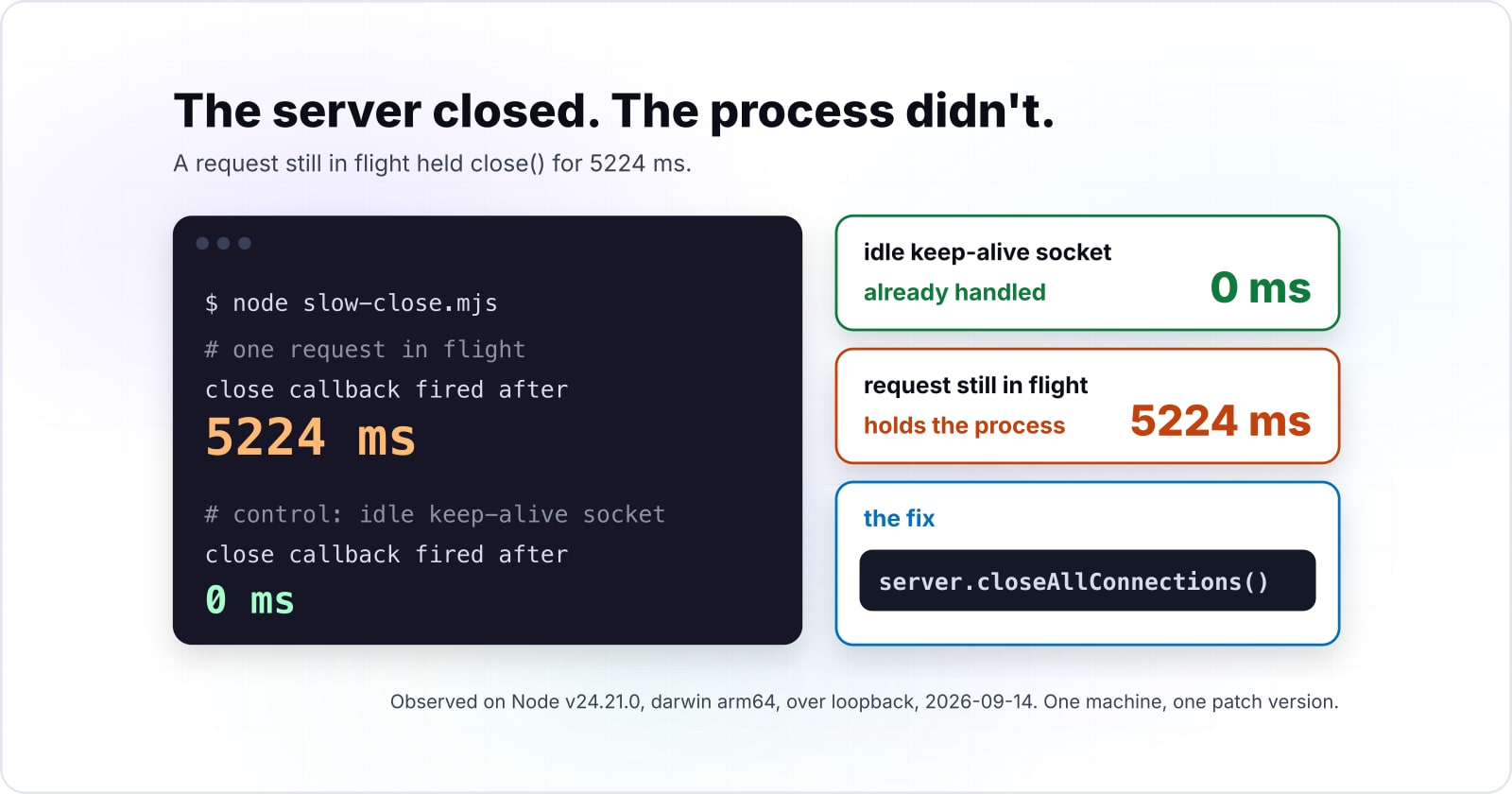
The condition that reproduces this is an unfinished request handler, not an idle keep-alive connection. That distinction matters. On v24.21.0, darwin arm64, over loopback, the idle socket cost nothing at all.
Here is the shape that reproduces. A handler responds after 2500 ms. You call server.close() 300 ms into that request and time the callback.
// slow-close.mjs  -  run with: node slow-close.mjs
import http from 'node:http';

const server = http.createServer((req, res) => {
  setTimeout(() => {
    res.writeHead(200, { 'Content-Type': 'text/plain' });
    res.end('done\n');
  }, 2500);
});

server.listen(3000, () => {
  // one request in flight
  fetch('http://127.0.0.1:3000/').catch(() => {});

  setTimeout(() => {
    const started = Date.now();
    server.close(() => {
      console.log('close callback fired after', Date.now() - started, 'ms');
    });
  }, 300);
});
On Node v24.21.0, darwin arm64, over loopback, that close callback fired after 5224 ms. The delay outlasted the response itself, which is the part that makes it feel broken rather than slow.
The control comes from the same run, on the same machine. Open a raw socket, send one HTTP/1.1 request with Connection: keep-alive, read the response, then hold the socket open and call server.close(). This time, the callback fired after 0 ms. An idle keep-alive connection did not delay the close at all.
Source: Node v24.21.0, darwin arm64, loopback, 2026-09-14
Those two numbers are the whole argument of this post in miniature. The thing holding your process open is a connection state, and you cannot reason about it from the request object alone. The fix has a name, server.closeAllConnections(), and it lands in the shutdown section further down with a full signal handler around it. First, build the server, because the fix only makes sense once you can see what the connection is doing.
How do you build an HTTP/1.1 server in Node.js with the core module?#
An HTTP/1.1 server in Node.js needs http.createServer, a listener and a listen call. That is genuinely all of it. However, the module decides persistence and framing on your behalf before your code runs, and both decisions are visible on the wire.
The smallest honest server, and what it put on the wire#
The documented signature is http.createServer([options][, requestListener]). Both arguments are optional, and the v24 node:http documentation (opens in new tab) states that it "Returns a new instance of http.Server". You pass the listener, and the module adds it to the server's request event. A server with no listener at all is legal, and it simply answers nothing.
// server.mjs  -  run with: node server.mjs
import http from 'node:http';

const server = http.createServer((req, res) => {
  res.writeHead(200, { 'Content-Type': 'text/plain' });
  res.end('hello\n');
});

server.listen(3000, () => {
  console.log('listening on http://127.0.0.1:3000');
});$ curl -sv http://127.0.0.1:3000/ -o /dev/null
< HTTP/1.1 200 OK
< Content-Type: text/plain
< Date: Sun, 14 Sep 2026 ...
< Connection: keep-alive
< Keep-Alive: timeout=5
< Transfer-Encoding: chunkedThen look at what came back, rather than at what the handler said.
That capture is an observation on Node v24.21.0, darwin arm64, over loopback, taken on 2026-09-14. It is not a documentation quote, so it ships here as what the sample put on the wire.
Three of those six lines are decisions nobody made in code. Connection: keep-alive arrived with no configuration. Keep-Alive: timeout=5 advertised a five second idle window that no line of the sample mentions. Transfer-Encoding: chunked picked a framing because the handler set no Content-Length. In short, the connection has opinions before your handler runs.
Because all of that happens before your handler, it also happens before DNS, TCP and TLS have finished being relevant. If that earlier part of the path is the bit you are unsure about, everything that happens before your server sees the connection, from DNS through TCP to TLS covers it properly.
The request object is a stream, not a parsed thing#
http.IncomingMessage extends stream.Readable. Therefore a request body arrives as chunks that you collect yourself, and node:http will not parse one for you. There is no req.body, and there is no body parser anywhere in the module.
What you do get pre-parsed is small and worth knowing exactly: req.method, req.url and req.headers. Print them and the shape of req.url becomes obvious.
// inspect.mjs
import http from 'node:http';

const MAX_BODY_BYTES = 1_000_000;

const server = http.createServer((req, res) => {
  console.log('method :', req.method);
  console.log('url    :', req.url);
  console.log('host   :', req.headers.host);

  let size = 0;
  const chunks = [];

  req.on('data', (chunk) => {
    size += chunk.length;
    if (size > MAX_BODY_BYTES) {
      res.writeHead(413, { 'Content-Type': 'text/plain' });
      res.end('payload too large\n');
      req.destroy();
      return;
    }
    chunks.push(chunk);
  });

  req.on('end', () => {
    if (res.writableEnded) return;
    const raw = Buffer.concat(chunks).toString('utf8');
    try {
      const parsed = raw.length ? JSON.parse(raw) : {};
      res.writeHead(200, { 'Content-Type': 'application/json' });
      res.end(JSON.stringify({ received: parsed }));
    } catch {
      res.writeHead(400, { 'Content-Type': 'text/plain' });
      res.end('body was not valid JSON\n');
    }
  });

  req.on('error', () => {
    if (!res.headersSent) res.writeHead(400);
    res.end();
  });
});

server.listen(3000);
Send a request to /search?q=sockets&page=2 and req.url prints as /search?q=sockets&page=2. It is a path plus a query string, as a string. It is not a URL object, it carries no origin, and anything you want out of it you parse yourself.
Two details in that handler are load bearing. First, the size guard runs on every chunk rather than after collection. A guard that waits for the end has already let the whole body into memory. Second, the malformed body path returns a status instead of throwing, since an exception in a data listener takes the process with it.
Response headers have an order, and the order is enforced#
writeHead and setHeader are not two spellings of the same thing. Headers set through writeHead take precedence over headers set earlier through setHeader, and the docs are explicit about the caching consequence of the reverse order:
If
response.writeHead()method is called and this method has not been called, it will directly write the supplied header values onto the network channel without caching internally, and theresponse.getHeader()on the header will not yield the expected result.
In practice that means writeHead wins the collision, and it also means getHeader stops being a reliable read of what you are about to send.
// headers-precedence.mjs
import http from 'node:http';

// writeHead wins over a prior setHeader
const a = http.createServer((req, res) => {
  res.setHeader('Content-Type', 'text/html');
  res.writeHead(200, { 'Content-Type': 'text/plain' });
  res.end('this is served as text/plain\n');
});

// setHeader AFTER writeHead throws
const b = http.createServer((req, res) => {
  res.writeHead(200, { 'Content-Type': 'text/plain' });
  try {
    res.setHeader('X-Late', '1');
  } catch (err) {
    console.log('code   :', err.code);
    console.log('message:', err.message);
  }
  res.end('ok\n');
});

a.listen(3000);
b.listen(3001);
The second server prints this on Node v24.21.0, darwin arm64, over loopback:
code   : ERR_HTTP_HEADERS_SENT
message: Cannot set headers after they are sent to the client
The docs describe the collision in the other direction, so this throw ships as an observation rather than a quote. They say what happens when writeHead follows setHeader.
The practical rule falls out of the precedence. Use setHeader while you are still deciding, since it caches and can be read back. Use writeHead once, at the moment you commit, and treat that call as the point of no return.
Framing: Content-Length or chunked, and you choose by what you set#
Chunked transfer encoding is the default, and one header switches it off. The docs put it in a single sentence: "Sending a 'Content-Length' header will disable the default chunked encoding." That sentence sits in the client special-headers list, so read it as Node's general outgoing-message behaviour rather than as a server-specific rule.
The corroborating anchor is trailers. Trailers only appear with chunked encoding, and Node silently discards them otherwise. That is the same fact, from the other direction.
// framing.mjs
import http from 'node:http';

const body = 'hello\n';

// no Content-Length  ->  chunked
const chunked = http.createServer((req, res) => {
  res.writeHead(200, { 'Content-Type': 'text/plain' });
  res.end(body);
});

// explicit Content-Length  ->  not chunked
const measured = http.createServer((req, res) => {
  res.writeHead(200, {
    'Content-Type': 'text/plain',
    'Content-Length': Buffer.byteLength(body),
  });
  res.end(body);
});

chunked.listen(3000);
measured.listen(3001);
The two captured header blocks differ by exactly one line each way. Port 3000 answers with Transfer-Encoding: chunked and no Content-Length. Port 3001 answers with Content-Length: 6 and no Transfer-Encoding. Both were captured on Node v24.21.0, darwin arm64, over loopback, on 2026-09-14. That 6 is the byte length of this sample's own body, not a property of node:http.
The bare server earlier was chunked for exactly this reason. Nothing chose chunked encoding. Nothing set a Content-Length, and chunked is what you get when the length is unknown. Therefore framing is a decision you make through a header, not a setting you toggle on the server.
Routing by hand on method and url#
Routing without a framework is a dispatch on method and pathname. You write it once, you can read all of it, and it is about twenty lines.
// router.mjs
import http from 'node:http';

const routes = {
  '/health': {
    GET: (req, res) => {
      res.writeHead(200, { 'Content-Type': 'application/json' });
      res.end(JSON.stringify({ ok: true }));
    },
  },
  '/echo': {
    POST: (req, res) => {
      res.writeHead(200, { 'Content-Type': 'text/plain' });
      req.pipe(res);
    },
  },
};

const server = http.createServer((req, res) => {
  const { pathname } = new URL(req.url, `http://${req.headers.host ?? 'localhost'}`);
  const handlers = routes[pathname];

  if (!handlers) {
    res.writeHead(404, { 'Content-Type': 'text/plain' });
    res.end('not found\n');
    return;
  }

  const handler = handlers[req.method];

  if (!handler) {
    res.writeHead(405, {
      'Content-Type': 'text/plain',
      Allow: Object.keys(handlers).join(', '),
    });
    res.end('method not allowed\n');
    return;
  }

  handler(req, res);
});

server.listen(3000);
The Allow header on the 405 is the part most hand-rolled dispatches skip. A client that reaches a real path with the wrong method deserves to know which methods exist there, and the branch costs one line.
Now the limit, stated as a fact about this module and nothing else. node:http provides no router and no middleware chain. Path parameters, wildcards, ordering, mounting and every precedence rule between them are yours to write and yours to maintain. That is fine for six routes. It stops being fine somewhere around the point where two people are adding routes to the same file in the same week. When a hand-rolled dispatch starts carrying third-party contracts, designing and operating API integrations is the work that follows.
How do keep-alive and timeouts govern the connection underneath the request?#
HTTP/1.1 persistence is the protocol default here, and it is governed by server.keepAliveTimeout rather than by the option that shares its name. This section is four short beats, and the first two are traps that cost real debugging time.
The keepAlive option is not the Connection header#
The bare server already sent Connection: keep-alive while its own keepAlive option was switched off. That single sentence is the whole distinction, and you can watch it in one capture.
// keepalive-option.mjs
import http from 'node:http';

const bare = http.createServer();
const tuned = http.createServer({ keepAlive: true, keepAliveInitialDelay: 7000 });

console.log('bare .keepAlive             :', bare.keepAlive);
console.log('bare .keepAliveInitialDelay :', bare.keepAliveInitialDelay);
console.log('tuned.keepAlive             :', tuned.keepAlive);
console.log('tuned.keepAliveInitialDelay :', tuned.keepAliveInitialDelay);
On Node v24.21.0, darwin arm64, that prints false, 0, true and 7. Meanwhile the bare server, the one reading back keepAlive: false, is the same server that emitted Connection: keep-alive and Keep-Alive: timeout=5 in the capture above.
Two mechanisms share a word. The keepAlive constructor option is a socket-level setting and it defaults to off. HTTP/1.1 connection persistence is the protocol's own default and is governed by keepAliveTimeout. The docs name the confusion directly, although they name it on http.Agent rather than on createServer: "Not to be confused with the keep-alive value of the Connection header."
One bound on that read-back, and it matters. Printing the property shows the option was accepted and stored on the server object. It does not show that a socket-level call was issued. What was observed is the property, so the property is what gets claimed.
The option you set is not the value you read back#
Construct a server with keepAliveInitialDelay: 7000 and the property reads back as 7. The constructor argument is milliseconds, and the property is read back in whole seconds.
Sweeping eight values on Node v24.21.0, darwin arm64, on 2026-09-14 shows what the conversion actually is:
| passed in | reads back |
|---|---|
| 0 | 0 |
| 1 | 0 |
| 500 | 0 |
| 999 | 0 |
| 1000 | 1 |
| 1500 | 1 |
| 7000 | 7 |
| 60000 | 60 |
It is a floor to whole seconds, not a divide and round. The boundary confirms it from both sides. For instance, 999 reads back as 0, and 1000 reads back as 1.
Do not generalize this to other options. This table covers eight values of one option, on one version and one platform. No other option was measured.
Prove the connection is reused instead of trusting the header#
A header claiming persistence proves nothing about what any particular client did with it. Instead, count connection events on the server and watch whether one socket serves two requests.
// reuse.mjs
import http from 'node:http';

let sockets = 0;

const server = http.createServer((req, res) => {
  res.writeHead(200, { 'Content-Type': 'text/plain' });
  res.end(`socket #${req.socket.id} client port ${req.socket.remotePort}\n`);
});

server.on('connection', (socket) => {
  socket.id = ++sockets;
  console.log('connection event, total so far:', sockets);
});

server.listen(3000);
Run it two ways. First, one curl invocation given two URLs. Second, two separate curl invocations.
# one invocation, two URLs
$ curl -s http://127.0.0.1:3000/a http://127.0.0.1:3000/b
  -> 1 connection event
  -> both responses report the SAME socket and the SAME client port

# two separate invocations
$ curl -s http://127.0.0.1:3000/a
$ curl -s http://127.0.0.1:3000/b
  -> 2 connection events
  -> the two responses report DIFFERENT sockets and DIFFERENT client ports
The shape is the evidence and the digits are not. Client port numbers differ on every machine and on every run, so the numbers from this capture would be false precision if printed as though they reproduce. What reproduces is the pattern: one connection event and one repeated port in the first case, two of each in the second.
The second case is the control, and it is what makes the first mean anything. Without it, a single connection event is just a number with nothing to compare against. The event loop is what lets one process sit on a pile of these idle sockets without a thread behind each one, which the comparison of PHP and JavaScript execution models walks through from the runtime side.
Three timeouts are one budget, and the idle one surprises people#
Read them off a fresh server instance before listen, on Node v24.21.0:
// timeouts.mjs
import http from 'node:http';

const server = http.createServer();

console.log('keepAliveTimeout:', server.keepAliveTimeout); // 5000
console.log('headersTimeout  :', server.headersTimeout);   // 60000
console.log('requestTimeout  :', server.requestTimeout);   // 300000

// set them deliberately
server.keepAliveTimeout = 65_000; // idle window, order this ABOVE anything pooling in front of you
server.headersTimeout = 66_000;   // must stay above keepAliveTimeout to be reachable
server.requestTimeout = 120_000;  // bounds the whole request; lowering it drags headersTimeout down

server.listen(3000);
Those runtime values agree with the documented defaults, which is what makes either of them trustworthy. keepAliveTimeout is documented as "Timeout in milliseconds. Default: 5000 (5 seconds)." headersTimeout is documented as "Default: The minimum between server.requestTimeout or 60000." requestTimeout defaults to 300000 and bounds receipt of the entire request. All three are documented on the v24 node:http page (opens in new tab).
Each one bounds a different stage of a single connection. headersTimeout bounds how long the client may take to finish sending headers. requestTimeout bounds the whole request, body included. keepAliveTimeout bounds how long an idle socket lives between requests. Because headersTimeout is defined as a minimum against requestTimeout, lowering requestTimeout below 60 seconds drags headersTimeout down with it, which is easy to do by accident.
On expiry of either the header or the request timeout, the server answers 408, does not call your request listener, and closes the connection. Note that the docs' own reasoning for keeping requestTimeout non-zero is denial-of-service protection when the server is deployed without a reverse proxy. That sentence is a paraphrase of their rationale and not a quotation of it.
The race with anything pooling in front of you
Then there is the race that keepAliveTimeout creates, stated as a mechanism and nothing more. Anything that pools connections in front of your server holds sockets open between requests. If your server retires an idle socket while something upstream still believes that socket is usable, a request dispatched onto it can fail through no fault of your handler. The ordering that avoids the race is to make your idle timeout longer than the idle timeout of whatever is pooling in front of you. No status code is named here, because no proxy was run, and a specific failure code would need one named intermediary and a citation to that intermediary's own documentation.
Tuning that budget properly means measuring your own traffic rather than copying numbers, and when it becomes a standing concern rather than a one-off, work on web performance under real load is where that sits.
Should you stream a file to the response with stream.pipeline()?#
Do not reach for stream.pipeline() when the destination is an HTTP response. The v24 stream documentation (opens in new tab) warns against exactly that usage, and the warning is specific rather than stylistic.
The mechanism is stated plainly: "stream.pipeline() closes all the streams when an error is raised." Applied to a request and response pair, the docs warn that this "once it would destroy the socket without sending the expected response." So the error path destroys the socket before your 500 can be written, and the client sees a dropped connection instead of a status.
That is a criticism of one destination, not of the function. The same page is clear about what pipeline is for, namely "the handling of backpressure and backpressure-related errors". It also notes that pipeline leaves dangling event listeners on the streams after its callback runs, which can leak listeners and swallow errors when a stream is reused.
The shape that works, and the two failures it survives#
The shape that works here is longer than a JavaScript one-liner and survives both failures that actually happen.
// file-server.mjs
import http from 'node:http';
import { createReadStream } from 'node:fs';
import { stat } from 'node:fs/promises';
import { extname, join, normalize } from 'node:path';

const ROOT = new URL('./public/', import.meta.url).pathname;

const TYPES = {
  '.html': 'text/html; charset=utf-8',
  '.css': 'text/css; charset=utf-8',
  '.js': 'text/javascript; charset=utf-8',
  '.json': 'application/json',
  '.png': 'image/png',
};

const server = http.createServer(async (req, res) => {
  const { pathname } = new URL(req.url, `http://${req.headers.host ?? 'localhost'}`);
  const filePath = join(ROOT, normalize(pathname).replace(/^(\.\.[/\\])+/, ''));

  let info;
  try {
    info = await stat(filePath);
    if (!info.isFile()) throw new Error('not a file');
  } catch {
    res.writeHead(404, { 'Content-Type': 'text/plain' });
    res.end('not found\n');
    return;
  }

  // Content-Length from a stat, not a guess. This also turns off chunked framing.
  res.writeHead(200, {
    'Content-Type': TYPES[extname(filePath)] ?? 'application/octet-stream',
    'Content-Length': info.size,
  });

  const source = createReadStream(filePath);

  source.on('error', () => {
    // headers already gone? then a status is no longer available.
    if (res.headersSent) {
      res.destroy();
      return;
    }
    res.writeHead(500, { 'Content-Type': 'text/plain' });
    res.end('read failed\n');
  });

  // the client hung up. destroy the source or the descriptor leaks.
  res.on('close', () => {
    if (!source.destroyed) source.destroy();
  });

  source.pipe(res);
});

server.listen(3000);
The handler makes three decisions worth naming. First, the stat happens before any header is written, so Content-Type and Content-Length are facts rather than guesses, and the framing beat above explains why that length also switches chunked encoding off. Second, the error path tests res.headersSent before deciding whether an error can still become a status code, because after the headers have gone the only honest move is to drop the connection. Third, the close listener destroys the source when the response ends early, which is what stops a client hangup from leaking a file descriptor per abandoned download.
One thing that sample is not is hardened. The path handling in it is enough to run the example, and a directory you actually serve needs a containment check on the resolved path that this post does not write.
Both headersSent and the response close event behave here as the sample shows, and neither is a line lifted from the docs. The v24 documentation does not cover this pair, so they are shown working rather than cited.
How do you test the server with nothing installed?#
The built-in test runner can start your real server on an ephemeral port, make a real request against it, and tear it down afterwards. No test framework, no request helper, nothing added to package.json. Testing an HTTP/1.1 server in Node.js this way asserts on a real response from a real socket.
A real request against a real socket, under node:test#
node:test (opens in new tab) is marked "> Stability: 2 - Stable" in its own module header, and its changes block records that "The test runner is now stable." as of v20.0.0. It is only reachable one way: "This module is only available under the node: scheme." Assertions come from node:assert, which is a separate core module. node:test does not bundle or re-export an assertion library.
// server.test.mjs  -  run with: node --test
import test, { after, before } from 'node:test';
import assert from 'node:assert';
import http from 'node:http';

let server;
let base;
let connections = 0;

before(async () => {
  server = http.createServer((req, res) => {
    if (req.url === '/health') {
      res.writeHead(200, { 'Content-Type': 'application/json' });
      res.end(JSON.stringify({ ok: true }));
      return;
    }
    res.writeHead(404, { 'Content-Type': 'text/plain' });
    res.end('not found\n');
  });

  server.on('connection', () => { connections += 1; });

  // port 0 asks the OS for a free port, so parallel test files never collide
  await new Promise((resolve) => server.listen(0, '127.0.0.1', resolve));
  base = `http://127.0.0.1:${server.address().port}`;
});

after(async () => {
  await new Promise((resolve) => server.close(resolve));
});

test('health returns ok', async () => {
  const res = await fetch(`${base}/health`);
  assert.strictEqual(res.status, 200);
  assert.deepStrictEqual(await res.json(), { ok: true });
});

test('unknown paths are 404', async () => {
  const res = await fetch(`${base}/nope`);
  assert.strictEqual(res.status, 404);
});

test('the server accepted at least one connection', () => {
  assert.ok(connections >= 1);
});
Run it with node --test, or with node --test --watch while you are working. Binding to port 0 asks the operating system for a free port, and reading server.address().port back gives you the one it picked. That pattern is shown here as a working shape rather than as a quoted rule, and it is what stops two test files fighting over 3000.
Both the top-level after() and the per-test t.after() exist on this line. Server teardown wants one of them, because a test file that leaves a listening server behind will hang the runner exactly the way the opening section hung the process.
If you are weighing the built-in runner against something larger for a project rather than for one file, how to choose testing tools that match the project rather than the trend covers that decision separately.
Load testing: what to measure, and the figure this refuses to print#
No throughput, latency or comparative figure appears in this post, because no load test was run here. A number without its hardware, operating system, Node version and tool configuration is not a measurement, and reprinting one from a machine you do not own tells you nothing about yours.
What is worth deciding before you run anything is which quantities carry information.
Latency percentiles rather than a mean. A mean hides the tail, and the tail is where a timeout misconfiguration shows up first. Watch p50, p99 and the maximum together, since a healthy p50 beside an ugly p99 is a very different story from both being bad.
Connections established against requests served. That ratio is the direct signal of whether keep-alive is doing anything. The reuse capture above already demonstrates it at a scale of two, and a load tool gives you the same signal at a scale where it matters.
Errors and timeouts separated from merely slow responses. A slow response is a tuning problem. A timeout is a budget problem. Connection errors are usually neither. Collapsing all three into one failure count destroys the one distinction you need.
For a tool, autocannon exists and describes itself on its registry entry as a "Fast HTTP benchmarking tool written in Node.js". As of 2026-09-14, the most recent release on the npm registry is 8.0.0, published 2024-10-14. That is a fact about the registry and nothing more. A gap between published releases is not a statement about whether a project is maintained, and nothing here makes one. No command form appears here, because none was run and captured on the measuring machine.
Why does server.close() leave your process running, and how do you shut down properly?#
On this LTS line, server.close() already closes idle connections, so an idle keep-alive socket is not the holder. The one measured here is a request still in flight. So the fix is to decide how long you are willing to wait for that request, then force the rest.
What close() already handles, and what it does not#
The change landed in v19.0.0, and the changelog entry is one line: "The method closes idle connections before returning." The current body of the method describes its own population precisely: "Stops the server from accepting new connections and closes all connections connected to this server which are not sending a request or waiting for a response."
Read that population carefully, because it is the whole answer. Idle sockets are already handled. Sockets with a request in flight, or waiting on a response, are not. That is exactly the pair measured at the top of this post: 0 ms for the idle socket, 5224 ms for the handler still running, both on Node v24.21.0, darwin arm64, over loopback.
server.closeAllConnections(), added in v18.2.0, is the one that takes the rest. Its documentation states that it "Closes all established HTTP(S) connections connected to this server, including active connections connected to this server which are sending a request or waiting for a response." It does not destroy sockets that were upgraded to another protocol, so WebSocket and CONNECT sockets need their own handling. There is also server.closeIdleConnections(), added in the same release. On the documented populations it covers what close() already handles, so calling it after close() is largely redundant. That reading comes from the two doc sentences, not from a capture.
A grace deadline, and the timer that must not hold the process#
// shutdown.mjs
import http from 'node:http';

const GRACE_MS = 10_000;

const server = http.createServer((req, res) => {
  setTimeout(() => {
    res.writeHead(200, { 'Content-Type': 'text/plain' });
    res.end('done\n');
  }, 2000);
});

server.listen(3000);

function shutdown(signal) {
  console.log(`${signal} received, draining`);

  // stop accepting, close idle sockets, wait on the rest
  server.close(() => {
    console.log('all connections drained, exiting cleanly');
    process.exit(0);
  });

  // force whatever is left after the grace deadline
  const deadline = setTimeout(() => {
    console.log('grace deadline reached, forcing remaining connections');
    server.closeAllConnections();
  }, GRACE_MS);

  // unref so the timer itself never holds the process open
  deadline.unref();
}

process.on('SIGTERM', () => shutdown('SIGTERM'));
process.on('SIGINT', () => shutdown('SIGINT'));
The unref() on that timer is not decoration. A referenced timer keeps the event loop alive on its own, so a shutdown path built to release the process would be the last thing holding it. In short, a ten second grace timer without unref() adds ten seconds to every clean exit.
How the delay tracks keepAliveTimeout#
One more observation, bounded carefully. With a request in flight, the close delay scales with keepAliveTimeout. Three trials on one machine, using a 500 ms handler with close() called 100 ms in, gave 410 ms of delay at a 1000 ms timeout, 1404 ms at 3000 ms, and 3406 ms at 5000 ms. Between the last two, raising the timeout by 2000 ms added 2002 ms of delay.
That supports a direction and a magnitude. It does not support a formula. Three trials on one machine are not a curve, and the lowest trial does not sit on the same line as the other two, because a 500 ms handler dominates the total at that end. Therefore the honest statement is that the delay tracks keepAliveTimeout roughly one for one in the range measured, and nothing more precise than that.
Because this whole path only runs during a deploy, it is also the path least likely to be exercised before it matters. A rollout that sends SIGTERM and waits is the thing that turns a hung close() into failed requests, and the deployment and CI/CD side of that is where the grace deadline gets chosen for real rather than guessed.
When should you not build this by hand?#
Hand-rolling on node:http is the wrong call when what you need is something this module does not contain. Three cases are common enough to name, and each is stated as what you would end up writing yourself.
Serving static assets at any scale means writing conditional requests, range requests, cache-control and content negotiation by hand. node:http contains none of them. The file handler above does exactly what a file handler does, and no more. It is not a static asset server, and the distance between the two is months of work. If the question is which of those responsibilities should sit close to the user instead of in your process, what actually belongs at the edge is the better starting point.
Wanting HTTP/2 means node:http2, which is a separate core module with its own API. It is not an option on node:http and not a flag you set on a server built here. That is the only claim this post makes about HTTP/2, since nothing further was verified.
Needing a router, a middleware chain, body parsing, sessions and validation means writing and maintaining all of them. The module provides none of those, and the ones you write will be the ones you debug at two in the morning.
Where node:http stays the right answer#
Look the other direction now, because a disqualification that only points away is a hand-off rather than advice. A small internal service, a health endpoint, a webhook receiver or a proxy shim is exactly where node:http stays the right answer. Zero dependencies means zero dependency upgrades, zero transitive advisories and a file a new person can read in one sitting.
If you have read this far and concluded the hand-built path is not yours, that is a legitimate conclusion and it is the useful one. Atyantik does this kind of backend work, and if you want backend software engineers who work inside your repositories and your cloud accounts, that is where to start. If you would rather keep your HTTP/1.1 server in Node.js as a twenty-line dispatch and never think about it again, that is a good outcome too, and this post has already given you everything it has.