Laravel for SaaS: why it works well for your product, and the defaults that decide it
A subscription product owes its customers five things a brochure site never does. Laravel has a maintained package for each of them, and each package ships one default worth checking before launch.
Why does Laravel for SaaS work so well?#
Laravel for SaaS works because the five jobs every subscription product owes its customers each have a maintained Laravel component, and each component has one default worth knowing. The five jobs are simple to name. Keep each tenant's data apart and bill it. Then show it only what its plan allows, run its slow work off the request, and give it API tokens.
| What the product owes | The component | The default that bites |
|---|---|---|
| Tenant isolation | Tenancy for Laravel | single database or one per tenant |
| Billing state | Laravel Cashier | the billable model is User, not Team |
| Plan access | Laravel Pennant | a resolved flag is stored and reused |
| Background work | Queues and Laravel Horizon | job timeout 60 s, retry_after 90 s |
| API access | Laravel Sanctum | tokens belong to users, with abilities |
Source: Laravel documentation 13.x and 12.x, Tenancy for Laravel v3 documentation, September 2026.
The map also has an order. Tenancy comes first, because every other row reads the current tenant. Next, billing and plan access hang off the same team record. Finally, the queue and the API are where tenant work leaves the request.
What does a SaaS need that a brochure site does not?#
A SaaS carries five obligations a brochure site never does, and Laravel's first-party packages cover four of them, so the team writes product code instead of billing plumbing. So the hours go to the product rather than to billing and access code.
Billing is the clearest case. Stripe's SaaS integration guide, read in September 2026, lists what a subscription business must handle. It names trials, discounts, a customer portal, and webhooks for "upgrades, downgrades, payment failures, customer updates, and other scenarios." Each of those is code someone must write and keep correct. In contrast, the Laravel 13 billing documentation says Cashier "handles almost all of the boilerplate subscription billing code you are dreading writing." In particular, it covers coupons, plan swaps, quantities, grace periods and invoice PDFs.
Isolation is the one job no package can own for you. The AWS whitepaper on SaaS tenant isolation was published on 1 August 2020. It calls isolation "one of the foundational topics that every software as a service (SaaS) provider must address." It also warns that a breach "would represent a significant and potentially un-recoverable event for a SaaS business." So Tenancy for Laravel gives you the mechanism. However, the team still owns the choice of model and the tests that prove it holds.
How does Laravel keep one tenant's data away from another's?#
Tenancy for Laravel scopes every query, cache key, file and queued job to the current tenant, in one shared database or in one database per tenant. The choice between one database and many trades devops work against code work.
The package does this with bootstrappers. Its bootstrapper documentation says they make the app tenant-aware "in such a way that you don't have to change a line of your code, yet things will be scoped to the current tenant." It ships them for the database, the cache, the filesystem, the queue and Redis. For example, the database bootstrapper switches the default connection to the tenant's own.
The two models behave differently. In single-database tenancy, tenants share one database and a tenant column keeps rows apart, as the introduction explains. In multi-database tenancy, each tenant has its own database. The single-database page states the trade in one line: "Single-database tenancy comes with lower devops complexity, but larger code complexity than multi-database tenancy."
In practice, the choice follows your customers. Many small tenants on one schema are simpler on a shared database, because one migration run covers everyone. But every primary model then needs the BelongsToTenant trait, and one model without it leaks. Larger accounts that ask where their data lives are easier to serve with a database per tenant. Then the cost moves to operations, since migrations, backups and connections run per tenant.
Because the package does the scoping, the test suite is what proves it. So write one test per primary model that creates two tenants and checks neither can read the other's rows. The full package review is in our Tenancy for Laravel review.
| Point | Single database | One database per tenant |
|---|---|---|
| How rows stay apart | A tenant column | Each tenant has its own database |
| Complexity | Lower devops, larger code complexity | Higher devops, lower code complexity |
| What each primary model needs | The BelongsToTenant trait | No trait; the database bootstrapper switches the connection |
| Migrations and backups | One migration run covers everyone | Migrations, backups and connections run per tenant |
| Fits | Many small tenants | Larger accounts that ask where their data lives |
How do Cashier, Pennant and Sanctum stay in step?#
Cashier, Pennant and Sanctum all attach to the same team model, so the plan a tenant pays for, the features it sees and the API tokens it holds live in one place. Because all three read one record, billing state, plan access and API tokens stay consistent.
Cashier's first default is the model it bills. The billing docs say Cashier "assumes your billable model will be the App\Models\User class that ships with Laravel." But a SaaS usually bills the team. So you add the Billable trait to the Team model and point Cashier at it with useCustomerModel. Also note the pinned Stripe version. The Laravel 13 billing docs say Cashier 16 uses Stripe API version 2025-06-30.basil, to prevent breaking changes.
Pennant decides what the plan unlocks. A feature can be defined against a Team rather than a User, and the Pennant documentation shows that exact pattern. Its default storage is the database driver, and that is the setting that bites. When a feature is first checked, "the result of the closure will be stored by the storage driver." After that, Pennant reads the stored value and skips the closure. As a result, a team that downgrades keeps its stored "yes" until you call forget for that feature. So put that call in the webhook handler that records the plan change.
Also watch the grace period. When a customer cancels, Cashier keeps subscribed() true until the paid period ends. That is usually right. Yet a feature defined on subscribed() stays on for those same days.
Where do API tokens fit?#
Sanctum covers API access. The Sanctum documentation says it "allows each user of your application to generate multiple API tokens for their account." Each token can carry abilities that work like OAuth scopes. In practice, tokens belong to a team's users, and each request checks two things. First comes the token's ability, then the team's plan through Pennant.
Where should a long tenant job run?#
On Laravel's defaults a request under Octane is stopped at 30 seconds, a queued job at 60, and a Redis job is handed to another worker after 90. Those three numbers decide where tenant work belongs, and anything slow belongs on a queue.
Show data table
| Item | Value |
|---|---|
| Octane request cap | 30 |
| Queue job timeout | 60 |
| Redis retry_after | 90 |
A request is stopped first, at 30 seconds, so slow tenant work belongs on the queue.
The Octane documentation sets the first limit. It says "Laravel Octane sets a maximum execution time of 30 seconds for incoming requests." Next, the Laravel 13 queue documentation sets the second: "By default, the timeout value is 60 seconds." The third is the retry_after value on the Redis connection, which the queue config sets to 90.
Take a common case. A tenant asks for a usage report that takes 75 seconds to build. Inside an Octane request it is stopped at 30 seconds, and the user sees an error. So you move it to the queue on the defaults. Now it is stopped at 60 seconds. Since the queue docs say "By default, Laravel will only attempt a job once," the report fails and is not tried again.
So slow work is not a speed problem first. Instead, it is a placement problem, governed by three numbers in the config.
When does a queued job run twice?#
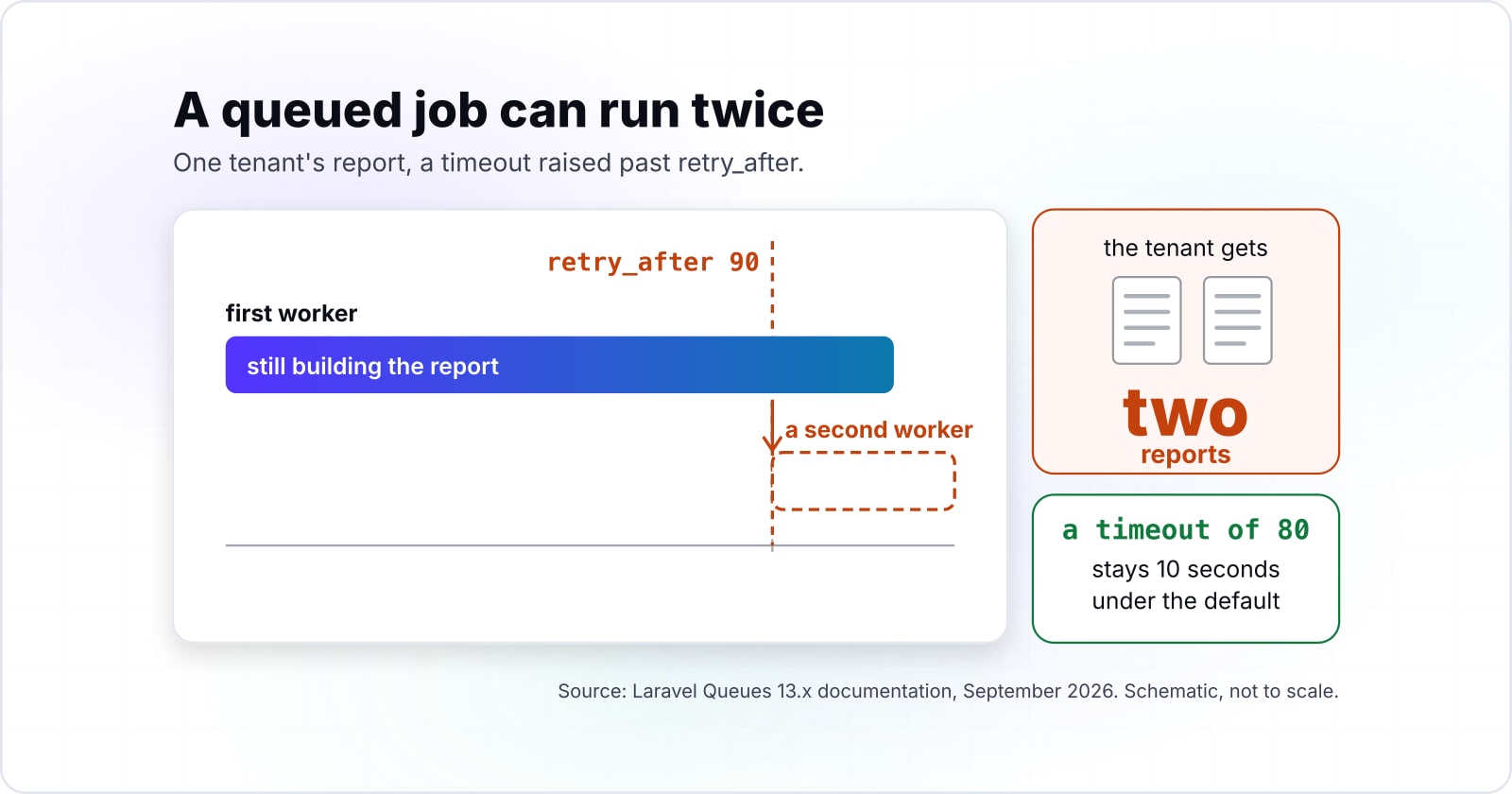
A job whose timeout is raised past the 90 second retry_after can be picked up by a second worker while the first is still running, so it runs twice. The timeout must always sit below retry_after, and Horizon is where the failures show.
Continue the 75 second report. Say the fix is to raise its timeout to 120 seconds, as the example in the queue docs does. However, retry_after is still 90. Now let one run take longer than 90 seconds, as a big tenant's report can. At the 90 second mark, the queue assumes the job is lost and releases it to another worker. The first worker is still building the report. As a result, the tenant gets two reports, or two emails, or two charges.
The queue docs state the rule plainly. A job's "timeout" "value should always be less than its" "retry after" value. They add that it should be "at least several seconds shorter," or "your jobs may be processed twice." For this report, a timeout of 80 seconds clears the 75 second build. It also stays 10 seconds under the default. And for a job that runs longer, raise retry_after first, then set the timeout a few seconds under it.
Inside an Octane request
Stopped at 30 sOn the queue
Stopped at 60 sA second worker starts it
NoStopped by the timeout, and not tried again
75 s jobThe job needs 75 s and its timeout is 60 s. By default Laravel attempts a job once, so it fails. Raise the timeout above 75 s while keeping it several seconds under retry_after (90 s).
| tenant job | 75 s |
|---|---|
| inside an Octane request | Stopped at 30 s |
| job timeout | 60 s |
| retry_after | 90 s |
| on the queue | Stopped at 60 s |
| verdict | Stopped by the timeout, and not tried again |
Then watch it. The Horizon documentation says it tracks "job throughput, runtime, and job failures." So a runtime that creeps towards your timeout shows there before it fails. Worker sizing and the other queue traps are in our guide to Laravel queues at scale.
How long does a Laravel release stay supported?#
Every Laravel major gets 18 months of bug fixes and 2 years of security fixes, so from September 2026 Laravel 12 has 5 months of security cover left and Laravel 13 has 18. A product that lives for years takes a major upgrade at least every two years, and PHP sets a second clock.
Show data table
| Item | Value |
|---|---|
| Laravel 12 | 5 |
| Laravel 13 | 18 |
| PHP 8.3 | 15 |
| PHP 8.4 | 27 |
Laravel 12 has 5 months of security cover left from September 2026, and Laravel 13 has 18.
The Laravel 13 release notes state the policy: "bug fixes are provided for 18 months and security fixes are provided for 2 years." They also give the dates. Laravel 12 shipped on February 24th, 2025. Its bug fixes ended on August 13th, 2026, and its security fixes end on February 24th, 2027. Then Laravel 13 shipped on March 17th, 2026, with security fixes until March 17th, 2028.
PHP runs on its own calendar. The PHP Group's supported versions page, read in September 2026, gives PHP 8.3 security support until 31 Dec 2027. It gives PHP 8.4 support until 31 Dec 2028. Per its release notes, Laravel 13 needs PHP 8.3 or newer. Therefore Laravel 13 on PHP 8.4 has the longest runway. Meanwhile, a team still on Laravel 12 in September 2026 gets security fixes only.
In practice, put the upgrade on the roadmap every year. Major releases land around the first quarter, so a small upgrade each spring costs less than a large one every three years.
When is Laravel Octane worth it?#
Octane boots your application once and keeps it in memory, which removes per-request boot cost but means any state a request leaves behind is seen by the next one. It pays when boot time is a large share of each request. And it demands that no request leaves tenant state in a singleton or a static.
The Octane documentation lists FrankenPHP, Open Swoole, Swoole and RoadRunner as its servers. It says "Octane boots your application once, keeps it in memory" between requests. So your service providers' register and boot methods run once per worker, not once per request.
That is a speed gain and a tenancy risk at once. The docs say Octane resets the framework's own state between requests. But it "does not always know how to reset the global state created by your application." For example, a class that caches the current tenant in a static property will hand it to the next request on that worker. In a SaaS, that is the isolation failure from the tenancy section, arriving through a speed setting.
Therefore switch Octane on only after two things are true. First, profiling shows boot time is a real share of the request. Second, a test sends two tenants' requests to one worker and proves nothing carries over. Before that, do the query and memory work in our Laravel performance guide.
Octane boots your application once and keeps it in memory between requests.
Your service providers' register and boot methods run once per worker, not once per request.
Octane resets the framework's own state, but it does not always know how to reset the global state your application creates.
A class that caches the current tenant in a static property hands it to the next request on that worker.
A test that sends two tenants' requests to one worker proves nothing carries over.
Which pages should you build from, in order?#
Build in this order: tenancy first, then billing, then plan access, then API tokens, then the queue, because each later piece reads the tenant the first one sets. Each page below gives one piece of the build.
- Tenancy for Laravel, introduction: choose single-database or multi-database tenancy.
- Single-database tenancy: the
BelongsToTenanttrait for primary models. - Laravel Cashier: the
Billabletrait on the team model anduseCustomerModel. - Laravel Pennant:
Feature::definewith a Team scope, andforgeton a plan change. - Laravel Sanctum: API tokens with abilities.
- Laravel queues: tries, timeout and
retry_after.
What is the smallest correct starting point?#
The smallest correct start is four pieces of PHP: a tenant-scoped model, a billable team, a plan-gated feature and a queued job whose timeout sits below retry_after. Every class and method below appears in the pages listed above.
<?php

// 1. app/Models/Project.php: scope a primary model to the current tenant
namespace App\Models;

use Illuminate\Database\Eloquent\Model;
use Stancl\Tenancy\Database\Concerns\BelongsToTenant;

class Project extends Model
{
    use BelongsToTenant;
}

// 2. app/Models/Team.php: the team is the billable model
namespace App\Models;

use Illuminate\Database\Eloquent\Model;
use Laravel\Cashier\Billable;

class Team extends Model
{
    use Billable;
}

// 3. AppServiceProvider::boot(): bill the team, gate a feature on its plan
use App\Models\Team;
use Laravel\Cashier\Cashier;
use Laravel\Pennant\Feature;

Cashier::useCustomerModel(Team::class);
Feature::define('usage-reports', fn (Team $team) => $team->subscribed('default'));

// 4. app/Jobs/BuildUsageReport.php: slow tenant work, timeout below retry_after (90)
namespace App\Jobs;

use App\Models\Team;
use Illuminate\Contracts\Queue\ShouldQueue;
use Illuminate\Foundation\Queue\Queueable;
use Illuminate\Queue\Attributes\Timeout;
use Illuminate\Queue\Attributes\Tries;

#[Tries(3)]
#[Timeout(80)]
class BuildUsageReport implements ShouldQueue
{
    use Queueable;

    public function __construct(public Team $team) {}

    public function handle(): void
    {
        // build the report for $this->team
    }
}
Then dispatch the job with BuildUsageReport::dispatch($team). Also call Feature::for($team)->forget('usage-reports') wherever a plan change is recorded. Finally, add the two-tenant isolation test before the first customer signs up.
When is Laravel the wrong fit for your product?#
Laravel is the wrong fit when the product is mostly thousands of long-lived connections, when the team works only in TypeScript, or when nobody can own one major upgrade a year. In each case another stack serves better, and it helps to say so early.
Show data table
| Stage | Release year |
|---|---|
| Laravel 10 | 2023 |
| Laravel 11 | 2024 |
| Laravel 12 | 2025 |
| Laravel 13 | 2026 |
A new Laravel major has landed every year, so a long-lived product plans one upgrade a year.
First, some products are mostly open live connections, such as a chat service or a live trading screen. Those fit a runtime built around long-lived processes from the start. Laravel can serve them through Octane, but the state rules from the Octane section then cover the whole product.
Second, a team that works only in TypeScript will move faster on a TypeScript backend than on PHP it is still learning. Two languages in one small team is a real cost, and no framework removes it.
Third, the release notes say major releases come "every year (~Q1)." So if the team cannot give one upgrade a year, pick a framework whose calendar fits the time you have. Or plan for help with upgrades before launch.
Where to go from here#
If the map fits your product, the next reads are the tenancy review, the queue guide and the SaaS challenges post, and two service pages exist for teams that want help. The Tenancy for Laravel review goes deeper on the isolation choice. For the internal admin screens, building a Laravel admin panel with Filament v5 covers the install and the production sign-in trap. Next, the queues at scale guide covers worker sizing. And when a checkout or billing controller gets hard to change, SOLID principles in Laravel, applied to one fat controller shows the refactor step by step.
For a team that wants the product built, there is SaaS development. For a team that wants Laravel software engineers added to its own, there is hiring Laravel developers. But the six documentation pages above are enough to build the first version on your own.