Rector PHP migrations, one reviewed pull request at a time
Rector can move old PHP code onto a supported version without a rewrite. The work goes well when the target comes from the support calendar and every change is small enough to review.
What are Rector PHP migrations, and what does Rector change?#
Rector PHP migrations use Rector, an open-source command-line tool, to rewrite PHP source by rules so code moves from PHP 5.3 up to 8.5 in reviewable steps. In practice, Rector parses PHP into a syntax tree, applies upgrade rules to it and prints the changed files. The rectorphp/rector README, read on 2 October 2026, says Rector "now supports upgrades from PHP 5.3 to 8.5". It also covers major projects such as Symfony, PHPUnit and Doctrine.
Each rule is one small class. The Rector guide to how Rector works defines it as "1 single class that modifies 1 thing", for example a class name. Rules are grouped into sets, and sets are split into levels. As a result, you choose how many rules run at once.
So the answer to "what is Rector" is short. Rector is a refactoring tool you install with Composer, configure in one PHP file and run from vendor/bin/rector. Then it writes the change, and a person reviews it like any other pull request. A design change is still a person's job, such as refactoring a fat Laravel controller one SOLID principle at a time.
How many months of security support does each PHP 8.x target buy?#
Counted from 2 October 2026, PHP 8.2 has 2 months of security support left, PHP 8.4 has 26 and PHP 8.5 has 38. Those figures come from php.net's supported versions table, read that day, and PHP 8.3 sits between them at 14. In short, the target branch decides how long the upgraded code keeps getting security fixes, which is what the upgrade is paid for.
Show data table
| Item | Value |
|---|---|
| PHP 8.2 | 2 |
| PHP 8.3 | 14 |
| PHP 8.4 | 26 |
| PHP 8.5 | 38 |
PHP 8.4 buys 26 months of security support from 2 October 2026, against 2 for PHP 8.2.
The gap matters because the loop is the same for both targets. Going to 8.4 instead of 8.2 only adds the 8.3 and 8.4 rule sets to the same process. However, the 8.2 result needs another upgrade within weeks, while the 8.4 result holds until the end of 2028.
Which PHP version should the upgrade target in October 2026?#
php.net supports each branch for two years of bug fixes and two more years of security fixes, so PHP 8.4 or 8.5 is the target that outlasts the work. Pick the newest branch your framework and hosting support, because PHP 8.2 leaves security support on 31 December 2026 and 8.3 a year later. "Each release branch of PHP is fully supported for two years from its initial stable release," says php.net. After that, a branch gets two more years of critical security fixes only.
| Branch | Initial release | Active support ends | Security support ends |
|---|---|---|---|
| 8.2 | 2022 | 2024 | 2026 |
| 8.3 | 2023 | 2025 | 2027 |
| 8.4 | 2024 | 2026 | 2028 |
| 8.5 | 2025 | 2027 | 2029 |
Therefore, for most teams in October 2026 the choice is 8.4 or 8.5. PHP 8.4 came out on 21 November 2024 and has active support until 31 December 2026. Meanwhile, PHP 8.5 buys one more year, but check that every Composer dependency allows it first. If your host or a key package stops at 8.3, take 8.3 now and plan the next step. For example, the PHP features guide lists what each version added, which helps when the team weighs 8.4 against 8.5.
How does Rector change PHP code without running it?#
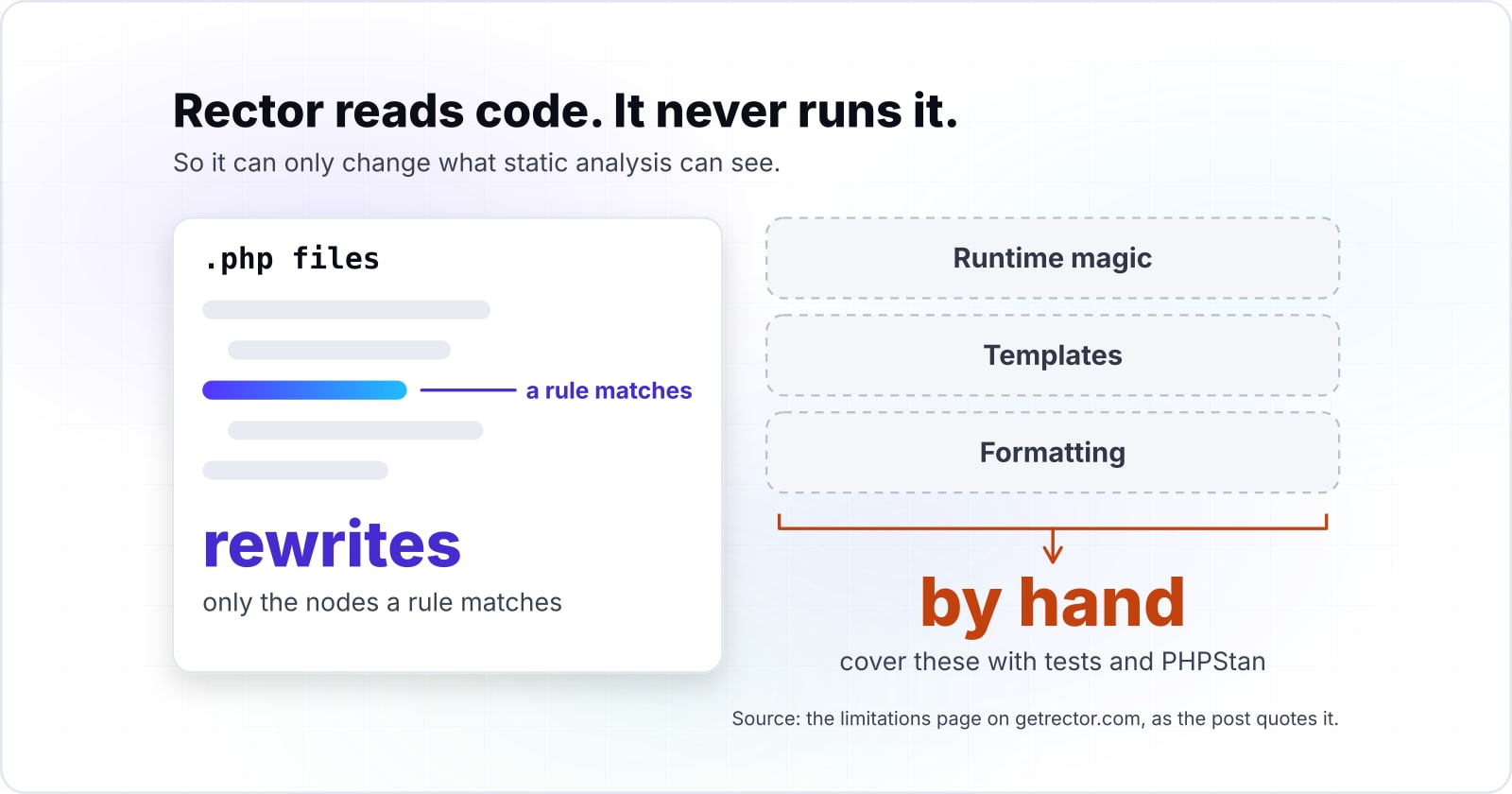
Rector reads code and never runs it: it parses each file with php-parser, resolves types through PHPStan and rewrites only the nodes a rule matches. The Rector limitations page opens with "Rector reads code, it never runs it." Because of that, it can only change what static analysis can see.
The process has three phases. First, nikic/php-parser parses each file into nodes. Then each active rule checks the node types it cares about through getNodeTypes(), and calls refactor() on every match. Finally, Rector saves the file, or with --dry-run it stores a git-like diff instead.
Also, types come from PHPStan. In the limitations page's words, "Rector sees what PHPStan sees". So if a method call sits on a mixed value, Rector cannot rename it or add a return type to it. For that reason, the new project guide, read on 2 October 2026, asks for PHPStan level 3 to 4 without a baseline before the first run. Otherwise, a baseline hides unknown types from both tools.
Which Rector documentation pages should the upgrade follow, in order?#
Five pages of the Rector documentation cover the whole upgrade: install, levels, set lists, the CI job and the limits list. Following them in build order keeps your configuration on the current API, withPhpLevel() and withPhpSets(), instead of the older constants many tutorials still show:
- Documentation home: the install command, the first run and the
--dry-runpreview. - Levels:
withPhpLevel(0)and why a level adds one rule at a time. - Set lists:
withPhpSets(), which reads the target fromcomposer.jsononce the level is complete. - Run in CI: the dry-run job, the exit code and the cache directory.
- Limitations: the list of what stays manual.
What is the smallest rector.php that starts a PHP upgrade?#
The smallest working setup is one Composer command, a rector.php with withPaths and withPhpLevel(0), and a dry run before the real run. Before you start, note that the Rector docs say that Rector itself needs PHP 7.2 or newer, and it can work on PHP 5.x and 8.x code.
<?php

use Rector\Config\RectorConfig;

return RectorConfig::configure()
    ->withPaths([
        __DIR__ . '/src',
        __DIR__ . '/tests',
    ])
->withPhpLevel(0);# 1. install Rector as a dev dependency
composer require rector/rector --dev
# 2. preview the diff, change nothing
vendor/bin/rector process --dry-run
# 3. apply the change
vendor/bin/rector processIf no rector.php exists, running vendor/bin/rector offers to generate one for you. Meanwhile, Rector reads the target from the php constraint in composer.json. The levels page says "Rector only adds rules up to the PHP version in your composer.json", so the level never runs ahead of your runtime. Finally, once the level covers every rule for that version, swap withPhpLevel() for withPhpSets() and keep it there.
How do you move a codebase one PHP level at a time?#
A codebase on PHP 7.4 has been past end of life for 46 months, so it crosses several version boundaries and each level adds one rule per reviewed pull request. So the loop is simple: raise withPhpLevel() by one, run the dry run, review the small diff, merge, and repeat. The levels page describes a level as "the first N rules of a set, sorted from the safest to the most complex". Therefore, level 0 runs one rule, level 1 runs two, and so on.
The reason is review. For instance, that same Rector new project guide, read on 2 October 2026, shows a codebase with "php": "^7.4" in composer.json. A plain withPhpSets() there would apply every set from PHP 5.3 to 7.4 at once, which the guide counts as "over 100 rules". A diff that size is hard to review well.
Here is a worked example. Say a codebase runs PHP 7.4, which reached end of life on 28 November 2022 by php.net's unsupported branches page. Since then, by 2 October 2026, it has gone 46 months without security fixes.
Show data table
| Item | Value |
|---|---|
| PHP 7.2 | 70 |
| PHP 7.3 | 57 |
| PHP 7.4 | 46 |
| PHP 8.0 | 34 |
| PHP 8.1 | 9 |
PHP 7.4 has gone 46 months without security fixes, and even PHP 8.1 is 9 months past end of life.
The team picks PHP 8.4 as the target, so the code moves through the 8.0, 8.1, 8.2, 8.3 and 8.4 rules. Then each pull request raises the level by one. When one rule touches too many files, run it alone with --only="RuleName", merge that, then go on. Also, the --max-changes=N option from the CLI options page also caps the first pull request at a size you choose.
The date the branch stops receiving security fixes.
Security support ends
31 Dec 2028Months left from 2 October 2026
26PHP 8.4: 26 months left
Longer runway3 of the 5 listed branches have a shorter runway, so an upgrade to this one outlasts them.
| PHP 7.4 | 28 Nov 2022 | -46 |
|---|---|---|
| PHP 8.2 | 31 Dec 2026 | 2 |
| PHP 8.3 | 31 Dec 2027 | 14 |
| PHP 8.4 | 31 Dec 2028 | 26 |
| PHP 8.5 | 31 Dec 2029 | 38 |
How do you stop the upgrade from slipping back in CI?#
Run vendor/bin/rector process --dry-run on every pull request, and the job fails because Rector exits with code 1 whenever it would change a file. The Run in CI page says it directly: "The exit code is 1 when Rector would change a file". As a result, every new commit stays at the level already reached, and the next upgrade is a one-line config change.
- name: Rector Cache
  uses: actions/cache@v4
  with:
    path: /tmp/rector
    key: ${{ runner.os }}-rector-${{ github.run_id }}
    restore-keys: ${{ runner.os }}-rector-

- run: mkdir -p /tmp/rector

- name: Rector Dry Run
  run: php vendor/bin/rector process --dry-run --no-progress-bar --output-format=github
Add ->withCache(cacheDirectory: '/tmp/rector') to rector.php so the path is the same on a laptop and a runner. Without it, the docs say, each job parses all code from scratch. In particular, the github output format prints the findings as inline notes on the pull request, and gitlab does the same on GitLab.
Also run a coding standard tool in the same job. Because Rector prints code through php-parser, it may leave an extra space, so its docs recommend Easy Coding Standard right after it.
How do Laravel and Symfony upgrades fit into a Rector run?#
Framework sets come after the PHP level: withComposerBased reads the installed Symfony version, and the driftingly/rector-laravel package adds laravel: true for sets up to Laravel 13. In other words, the framework upgrade follows the same reviewed loop as the PHP one. The composer-based sets page lists the keys: twig, doctrine, phpunit, symfony, laravel and drupal. Then Rector reads the installed version from vendor/composer/installed.json.
For Symfony, the rules ship inside rector/rector, so nothing extra is installed. The rector-symfony README shows ->withComposerBased(symfony: true). However, some rules also need the dumped container XML, passed with withSymfonyContainerXml().
For Laravel, the rules live in a community package, driftingly/rector-laravel.
composer require --dev driftingly/rector-laravelThen add ->withComposerBased(laravel: true) to rector.php. The package README, read on 2 October 2026, marks the older LaravelLevelSetList constants as deprecated in favour of this line. Its version sets run up to LARAVEL_130, the move from Laravel 12 to 13. Since Rector 2.6, vendor/bin/rector composer-based prints which of these rules are active, and --composer-based runs only them. Teams on Laravel can read our Laravel for SaaS post for where the framework fits after the upgrade.
| Framework | Where the rules ship | Line in rector.php | What else to know |
|---|---|---|---|
| Symfony | Inside rector/rector, nothing extra installed | ->withComposerBased(symfony: true) | Some rules also need the dumped container XML, passed with withSymfonyContainerXml() |
| Laravel | The community package driftingly/rector-laravel | ->withComposerBased(laravel: true) | Version sets run up to LARAVEL_130, the move from Laravel 12 to 13 |
When should a team write a Rector custom rule?#
Write a custom Rector rule only after checking no shipped rule covers the change; the rule is a class extending AbstractRector with getNodeTypes and refactor. A custom rule pays off for a repeated, project-specific rename that no shipped rule makes. The custom rule guide starts with "First, make sure it's not covered by any existing Rectors." Search the find rule page before writing anything.
If nothing fits, the shape is small. First, a rule is a class that extends Rector\Rector\AbstractRector. Second, it returns the node types it wants from getNodeTypes(), for example MethodCall::class. Then refactor() returns the changed node, or null to skip it. The guide's example renames every set* call to change*, so setPassword() becomes changePassword().
Register the class with ->withRules([MyFirstRector::class]), add its namespace to autoload-dev in composer.json, and run composer dump-autoload. After that, write a test. Rector's AbstractRectorTestCase runs the rule on fixture files, each with the code before and after five dashes. As a result, the rule's behaviour is pinned before it touches real code.
What can Rector not do, and when is it the wrong tool?#
Rector is the wrong tool for runtime magic, templates and formatting: it cannot see __get or container lookups, it skips Blade and Twig, and it leaves layout to a coding standard tool. Here are the cases where you should reach for something else, as listed on the limitations page:
| Case | Why Rector misses it | What to use instead |
|---|---|---|
| Runtime magic | Rector does not boot your framework or run your container. Magic __get, __call and __callStatic without docblocks, services fetched by string name, and classes built on the fly are invisible. | Cover these with tests and PHPStan, then fix them by hand. |
| Templates | Rector processes .php files only. It "does not understand Twig, Blade or Latte", so a renamed method is not renamed inside templates. | Search templates by hand or with a framework tool. |
| Formatting | Rector does not format code. | Easy Coding Standard or a similar fixer handles layout. |
| Public APIs | Many rules only touch private and final code on purpose. | If you own every caller, withTreatClassesAsFinal() lifts that limit. |
The README also lists a known drawback with files that mix PHP and HTML. In short, Rector moves the typed, plain PHP. A person still owns the rest.
Where to go after the first Rector pull request?#
Once the first level is merged, the PHP features guide shows what each version added, and the PHP or Laravel pages cover help with the review. The PHP features guide maps each feature to the version that added it. For the wider question of old code, our post on modernising legacy code with AI covers where rule-based tools sit beside other ways to change code.
If you want a second pair of hands on the review, our PHP software engineers and Laravel software engineers do this work. That said, the Rector documentation is enough on its own for Rector PHP migrations. Install it, write five lines of rector.php, and open the first pull request at level 0.