PHP features for developers in 2026: what 8.4, 8.5 and 8.6 add, and which version brought the rest
Modern PHP is no longer enums and match. It is property hooks, the pipe operator and a support calendar that decides when your next upgrade is due.
What are the PHP features for developers that matter in October 2026?#
In October 2026 PHP 8.5 is the current stable release, PHP 8.6 is due on 19 November 2026, and the features worth adopting first arrived in 8.4 and 8.5. The php.net Supported Versions table, read on 2 October 2026, lists 8.5 with an initial release of 20 November 2025. Next, the PHP 8.6 release timetable shows the second release candidate (RC2) on 24 September 2026. A release candidate is a build that should become final unless a bug turns up. Then the same timetable puts general availability (GA, the first stable release) on 19 November 2026.
So the PHP features for developers that matter now are the recent ones. First, PHP 8.4 added property hooks, which run your own code when a property is read or written. It also added asymmetric visibility, so a property can be public to read but private to write. Then PHP 8.5 added the pipe operator and a clone function that changes properties on the copy. It also added a built-in URI extension for parsing web addresses.
The older names still come up in search: enums, readonly properties, match and named arguments. However, every one of them shipped in PHP 8.0 or 8.1, and both branches are now past their end of life. The php.net end of life table shows PHP 8.1 lost security fixes on 31 December 2025. So they sit in one lookup table further down, not in long sections.
- PHP 8.4
Released 21 November 2024
Property hooks and asymmetric visibility.
- PHP 8.5
Released 20 November 2025, current
The pipe operator, clone with and a built-in URI extension.
- PHP 8.6 RC2
24 September 2026
The second release candidate; RC1 was skipped.
- PHP 8.6
GA due 19 November 2026
The first stable PHP 8.6 release.
How long does each supported PHP version keep getting security fixes?#
PHP 8.2 stops receiving security fixes on 31 December 2026, while PHP 8.5 is covered until 31 December 2029. The rule is simple. In the words of the php.net Supported Versions page, "Each release branch of PHP is fully supported for two years from its initial stable release." After that, a branch gets two more years of security fixes only. Then it reaches end of life.
Counted from 2 October 2026, that rule leaves each supported branch with a very different runway.
Show data table
| Item | Value |
|---|---|
| PHP 8.2 | 2 |
| PHP 8.3 | 14 |
| PHP 8.4 | 26 |
| PHP 8.5 | 38 |
Moving from PHP 8.2 to 8.5 turns 2 months of remaining security support into 38 months.
Take a team on PHP 8.2 today. Its branch has 2 whole months of security fixes left, because the end date is 31 December 2026. Moving to 8.5 turns 2 months of remaining security support into 38 months, so the upgrade buys three years without another forced move. In practice, that is the number a team lead takes to a planning meeting. The same arithmetic decides which PHP branch a Filament admin panel on Laravel should run on.
Moving to 8.4 instead gives 26 months. That is a fair choice when a key library does not yet support 8.5. Still, each step short of 8.5 brings the next forced upgrade a year closer.
Which PHP version do Laravel, Symfony, Drupal and WordPress require now?#
Laravel 13 requires PHP 8.3, current Symfony requires PHP 8.4, Drupal 11 requires PHP 8.3, and WordPress recommends PHP 8.3 or greater. So the framework a team runs usually sets its PHP floor before the PHP support calendar does. In fact, three of the four already sit at 8.3 or above.
Each figure comes from the project's own pages. For Laravel, the Laravel 13 release notes say: "Laravel 13.x requires a minimum PHP version of 8.3." For Symfony, the setup guide says "Install PHP 8.4 or higher". Also, the Symfony releases page lists Symfony 8.1, first out in May 2026, as needing PHP 8.4.0. Meanwhile, its long-term support branch, Symfony 7.4, still accepts PHP 8.2.
| Laravel release | Lowest PHP | Highest PHP |
|---|---|---|
| Laravel 10 | 8.1 | 8.3 |
| Laravel 11 | 8.2 | 8.4 |
| Laravel 12 | 8.2 | 8.5 |
| Laravel 13 | 8.3 | 8.5 |
For Drupal, the Drupal 11 core file sets MINIMUM_PHP to 8.3.0 and RECOMMENDED_PHP to 8.4. Its development branch for Drupal 12 already sets MINIMUM_PHP to 8.5.0. So the next Drupal major will not run on 8.4 at all.
WordPress is the gentle one. Its requirements page recommends "PHP version 8.3 or greater." But it also notes that WordPress still works on PHP 7.4, while warning that such old versions have reached their end of life. In short, a WordPress site can lag, but a Laravel or Symfony upgrade forces the PHP move with it.
What did PHP 8.4 add, and what does it deprecate?#
PHP 8.4, released on 21 November 2024, added property hooks, asymmetric visibility, lazy objects and array_find, and deprecated implicitly nullable parameter types. Property hooks and asymmetric visibility let a class drop most getter and setter boilerplate. Also, the one 8.4 deprecation most code bases meet is the implicit nullable parameter.
A property hook is a small get or set block written on the property itself. In the words of the PHP 8.4 migration guide, object properties "may now have additional logic associated with their get and set operations." When a property has only a get hook that reads other fields, it is "virtual". So it stores nothing and is worked out on every read.
Asymmetric visibility sets read and write access apart. With public private(set), any code can read the property, but only the class can change it. Before 8.4, that took a private property plus a getter method.
<?php
class Person
{
    public function __construct(
        public private(set) string $firstName,
        public private(set) string $lastName,
    ) {}

    // Virtual: worked out on every read, never stored.
    public string $fullName {
        get => $this->firstName . ' ' . $this->lastName;
    }
}

$p = new Person('Ada', 'Lovelace');
echo $p->fullName;      // Ada Lovelace
// $p->firstName = 'X'; // Error: the property is private(set)
Three smaller 8.4 additions are just as handy. First, lazy objects let a framework build an object that loads its data only when you first touch it. That works through the newLazyGhost() method of ReflectionClass. Second, the PHP 8.4 release page adds array_find(), array_find_key(), array_any() and array_all(). Each one replaces a common loop with a break. Third, the #[\Deprecated] attribute marks your own functions, methods and class constants as deprecated. So callers get the same warning PHP gives for its own old functions.
The deprecation to plan for is the implicit nullable type. The 8.4 deprecations page explains that "A parameter's type is implicitly widened to accept null" when its default is null. So function foo(T1 $a = null) now raises a warning, and the fix is ?T1 $a = null. Because older code used this form for years, it can produce a long list of warnings in an 8.4 upgrade. Also, the same page deprecates raising zero to a negative power and naming a class _.
What did PHP 8.5 add, and what does it deprecate?#
PHP 8.5, released on 20 November 2025, added the pipe operator, clone with, an always-on URI extension and #[\NoDiscard], and deprecated the backtick operator. In short, PHP 8.5 makes data pipelines and immutable objects cheaper to write. Its deprecations target old syntax such as backticks, non-canonical casts and case statements ending in a semicolon.
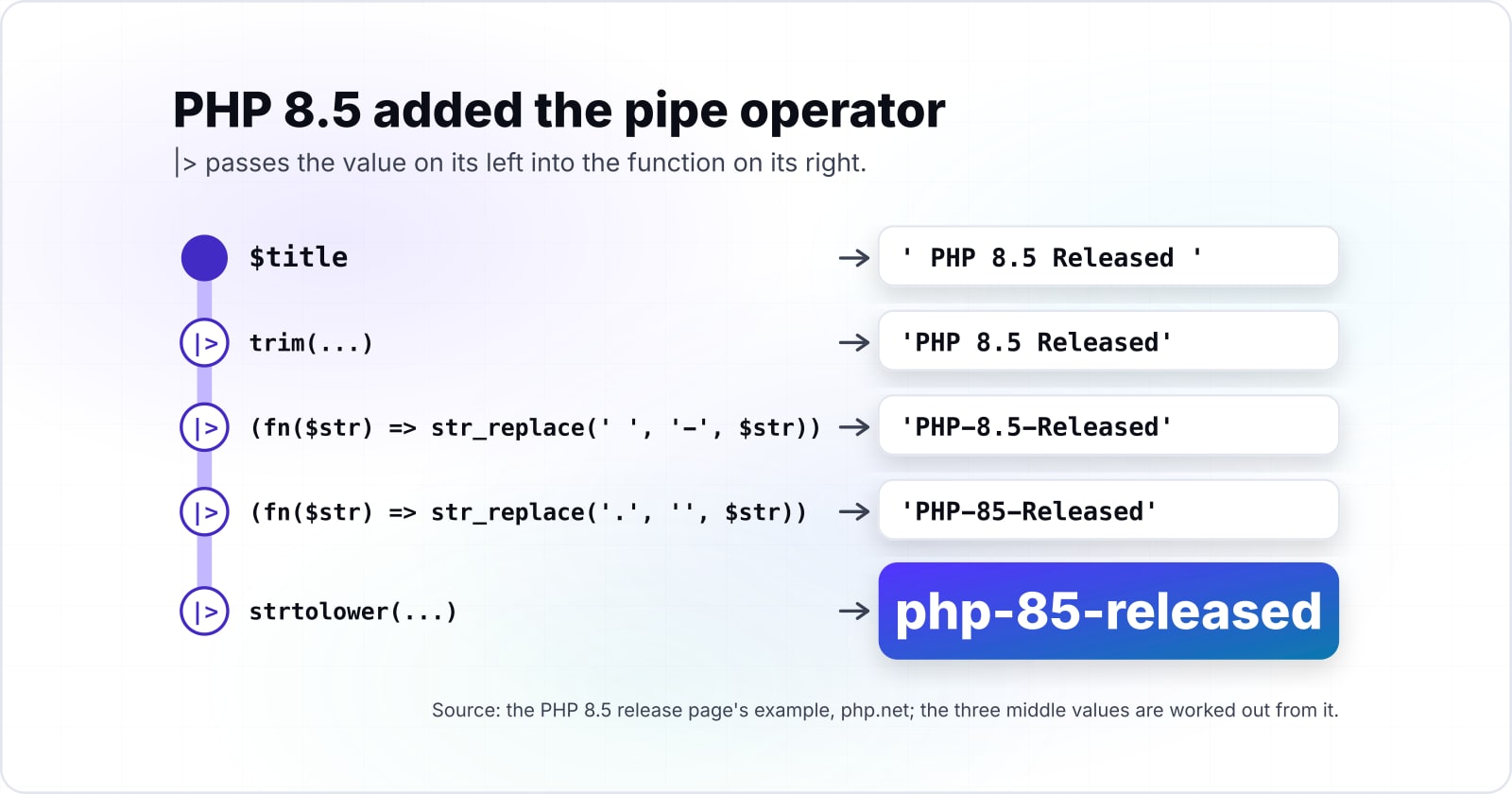
The pipe operator, |>, passes the value on its left into the function on its right. So instead of reading nested calls from the inside out, you read the steps from top to bottom. For example, the PHP 8.5 release page turns a title into a slug:
<?php
$title = ' PHP 8.5 Released ';
$slug = $title
    |> trim(...)
    |> (fn($str) => str_replace(' ', '-', $str))
    |> (fn($str) => str_replace('.', '', $str))
    |> strtolower(...);
// "php-85-released"
Clone with fixes a pain point of readonly classes. The PHP 8.5 migration guide says clone "is now a function and supports reassigning (readonly) properties during cloning." As a result, a withAlpha() method on a readonly class becomes one line: return clone($this, ['alpha' => $alpha]);.
The other headline additions are smaller but useful in daily work:
- The URI extension. The migration guide says "An always enabled uri extension is added" for URIs and URLs under RFC 3986 and the WHATWG URL standard. So
new Uri\Rfc3986\Uri($url)thengetHost()replacesparse_url()and its loose parsing. #[\NoDiscard]. PHP warns when a call's return value is thrown away, and a(void)cast marks a value you meant to ignore.array_first()andarray_last(). Both return the first or last value of an array, or null when it is empty.- Backtraces on fatal errors, such as a script that runs past its maximum execution time.
- Closures and first-class callables in constant expressions, such as attribute arguments and default values.
Then come the deprecations. First, the 8.5 deprecations page deprecates the backtick operator as an alias for shell_exec(). Second, it deprecates the cast names (boolean), (integer), (double) and (binary) in favour of (bool), (int), (float) and (string). Also, ending a case with a semicolon is deprecated, and so is null as an array offset. In practice, most of these are one search and replace in an old code base.
What is coming in PHP 8.6, and when does it ship?#
PHP 8.6 reached its second release candidate on 24 September 2026, skipped RC1, and targets general availability on 19 November 2026. It adds partial function application, clamp() and readonly property defaults. Therefore a team should test against the release candidates now but ship on the GA release.
The PHP 8.6 timetable lists RC3 on 8 October, RC4 on 22 October and RC5 on 5 November 2026. Then GA follows on 19 November 2026. The plan is "Based upon a target GA in late November." Meanwhile, builds of PHP 8.6.0RC2 are on the PHP QA site today.
Three implemented RFCs (Requests for Comments, the documents PHP uses to propose and vote on changes) stand out:
- Partial function application. A call with
?in place of an argument returns a closure that waits for the rest. Soarray_map(str_replace('hello', 'hi', ?), $arr)replaces a whole arrow function, and it fits the 8.5 pipe operator well. - clamp(). It returns a value held between a minimum and a maximum, so
clamp($percentage, min: 0, max: 100)replaces amin()inside amax(). The RFC page reads "Implemented in PHP 8.6". - Readonly property defaults. A readonly property may now declare a default value. That pairs with the interface properties added in 8.4.
The RFC index lists more 8.6 work, such as #[\Override] for class constants and function arguments shown in error messages. It also lists 8.6 deprecations, such as returning a value from __construct(). So read the 8.6 migration guide once it appears at GA.
Which PHP version introduced readonly properties, enums, match and the other features teams search for?#
Match, named arguments, constructor promotion, union types, the nullsafe operator and the JIT arrived in PHP 8.0; enums, readonly properties and string-key unpacking in PHP 8.1. So every one of these PHP features for developers has been in PHP since 8.1 or earlier. And JSON_THROW_ON_ERROR goes back to 7.3, so on any supported branch they are already there.
| Feature | Introduced in | What it does |
|---|---|---|
| JSON_THROW_ON_ERROR | PHP 7.3 | json_decode() throws an exception instead of returning null |
| Union types | PHP 8.0 | a type such as int|string |
| Named arguments | PHP 8.0 | pass arguments by name, in any order |
| Constructor promotion | PHP 8.0 | declare and assign properties in the constructor signature |
| Match expression | PHP 8.0 | a strict, value-returning switch |
| Nullsafe operator | PHP 8.0 | $a?->b() returns null instead of failing on null |
| JIT compiler | PHP 8.0 | compiles hot code to machine code inside OPcache |
| Enums | PHP 8.1 | a closed set of named values as a type |
| Readonly properties | PHP 8.1 | a property set once, then never changed |
| String-key array unpacking | PHP 8.1 | [...$a, ...$b] with string keys |
Source: the PHP RFCs for each feature on wiki.php.net and the PHP manual, read 2 October 2026.
Each row comes from the RFC or manual page that owns it. For match, the manual page says "Match expressions are available as of PHP 8.0.0." For readonly, the properties manual page dates it to PHP 8.1.0. It adds that "A readonly property can only be initialized once, and only from the scope where it has been declared." Finally, the JSON_THROW_ON_ERROR RFC is marked "Implemented (PHP 7.3)".
Security support left, in months
2Security support ends
31 December 2026PHP 8.2: 2 months of security fixes left
Plan the upgrade nowPHP 8.5 is patched for 38 months, the longest window of any supported branch.
Features you already have (10)
- JSON_THROW_ON_ERROR
- Union types
- Named arguments
- Constructor promotion
- Match expression
- Nullsafe operator
- JIT compiler
- Enums
- Readonly properties
- String-key array unpacking
Features that need an upgrade (4)
- Property hooks: PHP 8.4
- Asymmetric visibility: PHP 8.4
- Pipe operator: PHP 8.5
- Clone with: PHP 8.5
| JSON_THROW_ON_ERROR | PHP 7.3 |
|---|---|
| Union types | PHP 8.0 |
| Named arguments | PHP 8.0 |
| Constructor promotion | PHP 8.0 |
| Match expression | PHP 8.0 |
| Nullsafe operator | PHP 8.0 |
| JIT compiler | PHP 8.0 |
| Enums | PHP 8.1 |
| Readonly properties | PHP 8.1 |
| String-key array unpacking | PHP 8.1 |
| Property hooks | PHP 8.4 |
| Asymmetric visibility | PHP 8.4 |
| Pipe operator | PHP 8.5 |
| Clone with | PHP 8.5 |
Does turning on the JIT make PHP code faster?#
In the JIT's own RFC, bench.php fell from 0.32 to 0.14 seconds, so CPU-bound PHP code can run more than twice as fast. The JIT, or just-in-time compiler, turns hot PHP code into machine code while the program runs. So it pays on CPU-bound code such as numeric loops, by the RFC's own January 2019 measurement.
The JIT RFC by Dmitry Stogov and Zeev Suraski is dated 28 January 2019. It puts the result this way: "JIT makes bench.php more than two times faster". Also, on a Mandelbrot fractal test, the same RFC reports 0.011 seconds against 0.046 seconds on PHP 7.4. That is a gain of more than four times.
0.32 s
Without JIT
0.14 s
With JIT
In the JIT RFC, bench.php ran more than twice as fast with the JIT on.
| Option | seconds per run, lower is faster |
|---|---|
| Without JIT | 0.32 s |
| With JIT | 0.14 s |
0.046 s
PHP 7.4, no JIT
0.011 s
With JIT
On the RFC's Mandelbrot test, the JIT gave a gain of more than four times.
| Option | seconds per run, lower is faster |
|---|---|
| PHP 7.4, no JIT | 0.046 s |
| With JIT | 0.011 s |
Two limits matter. First, these are 2019 figures, taken while PHP 8.0 was being built. So they show the shape of the gain, not what your server does on 8.5. Second, the JIT is off unless you turn it on. It runs inside OPcache, the PHP extension that keeps compiled scripts in memory. The OPcache configuration page lists the default for opcache.jit as "disable". It notes that before PHP 8.4.0 the default was "tracing". Since opcache.jit_buffer_size defaults to 64M, setting opcache.jit=tracing on a server with OPcache enabled is enough to try it.
Which official pages should a PHP upgrade be built from?#
Build an upgrade from six official pages: the php.net support table, your framework's requirements, then the PHP 8.4 and 8.5 migration guides for deprecations and new features. Because the php.net migration guides list every deprecation and new feature per release, an upgrade plan is built from them. Release recaps come second.
- php.net Supported Versions: pick the target branch and note its security end date.
- Laravel 13 release notes or Symfony releases: confirm the PHP floor of the framework version you will run.
- PHP 8.4 deprecated features: find the implicit nullable types and the other warnings 8.4 raises.
- PHP 8.4 new features: take the exact syntax for hooks and asymmetric visibility.
- PHP 8.5 deprecated features: find the backticks, old cast names and case semicolons.
- PHP 8.5 new features: take the syntax for the pipe operator, clone and the URI classes.
Read the deprecation pages before the feature pages. That way a clean log on the new branch comes first. Then new syntax can follow one class at a time.
Pick the target branch and confirm the framework floor.
php.net Supported Versions, then the Laravel 13 release notes or Symfony releases.
Read the deprecation pages first.
PHP 8.4 and PHP 8.5 deprecated features, so a clean log on the new branch comes first.
Then adopt new syntax one class at a time.
PHP 8.4 and PHP 8.5 new features: hooks, asymmetric visibility, the pipe operator, clone and the URI classes.
What does a small PHP 8.5 class using these features look like?#
One short PHP 8.5 file can use a property hook, asymmetric visibility, the pipe operator, clone with and array_first together. So five of the new features fit in one value object and one pipeline of under forty lines.
<?php
// Runs on PHP 8.5 or later: php release.php
final class Release
{
    public function __construct(
        public private(set) string $branch,      // 8.4: read anywhere, write inside the class
        public readonly string $status = 'stable',
    ) {}

    // 8.4: a virtual property hook, worked out on every read
    public string $label {
        get => 'PHP ' . $this->branch . ' (' . $this->status . ')';
    }

    public function withStatus(string $status): static
    {
        // 8.5: clone with, reassigning a readonly property on the copy
        return clone($this, ['status' => $status]);
    }
}

$next = ['8.6', '8.5', '8.4']
    |> (fn(array $b) => array_map(fn(string $v) => new Release($v, 'RC2'), $b)) // 8.5: pipe
    |> array_first(...);                                                        // 8.5: array_first

echo $next->label, PHP_EOL;                    // PHP 8.6 (RC2)
echo $next->withStatus('GA')->label, PHP_EOL;  // PHP 8.6 (GA)
Run it with php release.php on PHP 8.5. Each step maps to one page above. The hook and the private(set) come from the 8.4 guide. Then the clone call, the pipe and array_first() come from the 8.5 guide and release page.
When is turning on the JIT or moving to PHP 8.6 early the wrong tool?#
In the same RFC, WordPress moved only from 315 to 326 requests per second with the JIT on, so a database-bound application gains more from query and cache work. For request-bound web applications, the JIT is the wrong tool and a release candidate is the wrong production target. Instead, profile queries first and wait for 8.6 GA.
The JIT RFC said so itself. It "doesn't seem to significantly improve real-life apps like WordPress (with opcache.jit=1235 326 req/sec vs 315 req/sec)." So the gain was 11 requests per second, measured in January 2019.
315
Without JIT
326
With the JIT on
In the same RFC, WordPress moved only from 315 to 326 requests per second with the JIT on.
| Option | requests per second, higher is faster |
|---|---|
| Without JIT | 315 |
| With the JIT on | 326 |
Three cases call for a different tool:
- A slow web page. Most of its time goes to the database and the network, not to PHP running loops. Profile the queries, add indexes and cache results first; the Laravel performance guide walks through that work.
- A production move to 8.6 before 19 November 2026. A release candidate can still change, and the timetable keeps three more on the plan. Run your test suite on RC2 or RC3 now, and deploy 8.6 after GA.
- A large old code base on 8.1 or 8.2. Jumping straight to the newest syntax by hand is slow and error prone. Instead, let an automated tool rewrite the mechanical parts first, then adopt hooks and pipes where they help.
Where should a PHP upgrade go next?#
For the upgrade itself, Rector automates most mechanical code changes, and the Laravel performance guide covers what the JIT will not. So the next step is the upgrade, and the posts and pages below cover it.
First, the Rector migration guide shows how to script the move between PHP versions. Then the Laravel performance guide covers queries, caching and queues. For a wider view, PHP compared with JavaScript sets out where each language fits. Also, the Tenancy for Laravel review looks at one multi-tenant package on modern Laravel.
If you want people to do the work, Atyantik has a PHP development team and a maintenance and support practice for version upgrades. Still, the six php.net and framework pages above are enough to plan and run the upgrade on your own.