Filament PHP Laravel admin panels: v5, the TALL stack and a safe production install
Filament turns a Laravel model into a working admin screen with one command. The harder choices sit under it: the major version, the PHP branch, the Laravel release, and one method that decides who can sign in once the panel leaves your laptop.
What is Filament, and what does it need in October 2026?#
Filament is an open-source Laravel framework for building admin panels in PHP, and its current v5.9.0 release needs PHP 8.2+, Laravel 11.28+, Livewire 4 and Tailwind CSS 4. The Filament overview calls it "a Server-Driven UI (SDUI) framework for Laravel". In practice, you describe forms, tables and pages as PHP objects, and the server turns them into the screen.
The Filament releases page on GitHub lists v5.9.0 on 26 September 2026. Also, Packagist lists the same package under the MIT licence, with php: ^8.2 as its PHP constraint.
The floor versions come from the Filament 5.x upgrade guide: PHP 8.2+, Laravel v11.28+, Livewire v4.0+ and Tailwind CSS v4.0+. However, the installation page asks for Tailwind CSS v4.1+, so take the higher one. But a floor is only the oldest version that installs. It says nothing about how long that version stays patched, and that gap shapes most of what follows.
What does a Filament panel save a Laravel team?#
One make:filament-resource command generates three pages for a model, List, Create and Edit, so a back-office screen becomes PHP configuration instead of a separate front end. The Filament getting started guide calls resources "CRUD UIs for models", where CRUD means create, read, update and delete. Out of the box, each resource gets a paginated List table, a Create form and an Edit form. Also, each one gets a sidebar item, which registers itself as soon as the resource exists.
The flags on the Filament resources page add more. For example, --generate builds the form and table from the model's database columns. Then --view adds a read-only View page, and --soft-deletes adds restore, force-delete and a trashed filter.
In practice, the saving is the second front end you never build. So the screen lives in the same repository and the same code review as the model it edits. As a result, a back-office change is one pull request in PHP. It is not a change split across a PHP API and a separate JavaScript app.
| Command or flag | What it adds |
|---|---|
| make:filament-resource | List, Create and Edit pages, plus a sidebar item |
| --generate | The form and table, built from the model's database columns |
| --view | A read-only View page |
| --soft-deletes | Restore, force-delete and a trashed filter |
How do Laravel, Livewire, Alpine.js and Tailwind CSS split the work?#
Filament describes each screen as PHP objects, Livewire renders them on the server and syncs state on each request, Alpine.js handles small browser interactions, and Tailwind CSS styles the result. The Filament overview says it is "Built on top of Livewire, Alpine.js, and Tailwind CSS". Each layer has one job.
- Laravel holds the models, the routes, the auth and the database.
- Livewire turns PHP classes into screens that update from the server. The getting started guide says each widget's PHP class "is technically a Livewire component".
- Alpine.js runs small interactions in the browser. The Livewire installation docs say Livewire bundles Alpine.js with its JavaScript, so both load together.
- Tailwind CSS is the style layer. Filament uses it "as a token-based design system". It compiles into semantic classes such as
.fi-btn, which your own CSS can target. If you are weighing Tailwind CSS against Bootstrap for the rest of the app, the same page built in each framework shows the bytes each one ships and which teams each one suits.
Therefore, the layer tells you where a fix goes. A wrong value is a Laravel or Filament config question. When a screen does not refresh, that is a Livewire question. Meanwhile, a colour or spacing change is a CSS override on a fi- class, not a template edit.
Should a new panel start on Filament v4 or v5?#
Start a new panel on Filament v5 unless a plugin you need has not moved yet, because v5 differs from v4 only in requiring Livewire 4. Dan Harrin published the Filament v5 announcement on 16 January 2026. It puts the change plainly: "Apart from Livewire v4 support, Filament v5 has no additional changes over v4". Also, the same post says the team will keep pushing features to both versions. The GitHub releases page bears that out, with v5.9.0 and v4.14.0 both shipped on 26 September 2026.
So the real question is your plugins. The upgrade guide warns that "Some plugins you’re using may not be available in v5 just yet". When one you need is still on v4, start on v4 and move later. Otherwise, start on v5 and skip a future upgrade.
Moving later is mostly automatic. The upgrade guide's script, vendor/bin/filament-v5, makes changes to your code for the breaking changes. Then you run the Composer commands it prints, which are unique to your app. Custom Livewire components also need the Livewire 4 upgrade guide. For instance, in v4 wire:model only listens for events on its own element, not on its children.
| Filament v4 | Filament v5 | |
|---|---|---|
| Requires Livewire 4 | No | Yes |
| Latest release, 26 September 2026 | v4.14.0 | v5.9.0 |
| New features | Still pushed | Still pushed |
| Plugins | Your v4 plugins | Some may not be available yet |
Which versions should a Filament PHP Laravel stack run on?#
Filament v5 accepts PHP 8.2, but on 2 October 2026 PHP 8.2 has 2 months of security support left, against 26 months for PHP 8.4. The PHP Group's supported versions page ends security support for PHP 8.2 on 31 December 2026. PHP 8.3 follows on 31 December 2027, PHP 8.4 on 31 December 2028 and PHP 8.5 on 31 December 2029.
The PHP floor Filament allows is about to leave security support, so a new panel belongs on PHP 8.4 or 8.5.
Show data table
| Item | Value |
|---|---|
| PHP 8.2 | 2 |
| PHP 8.3 | 14 |
| PHP 8.4 | 26 |
| PHP 8.5 | 38 |
The PHP floor Filament allows is about to leave security support, so a new panel belongs on PHP 8.4 or 8.5.
A branch move is real work, because each one has its own migration guide on php.net. So the runway matters more than the floor. Since a panel tends to outlive the sprint that built it, pick the branch with room to spare.
How long does each Laravel release keep getting security fixes?#
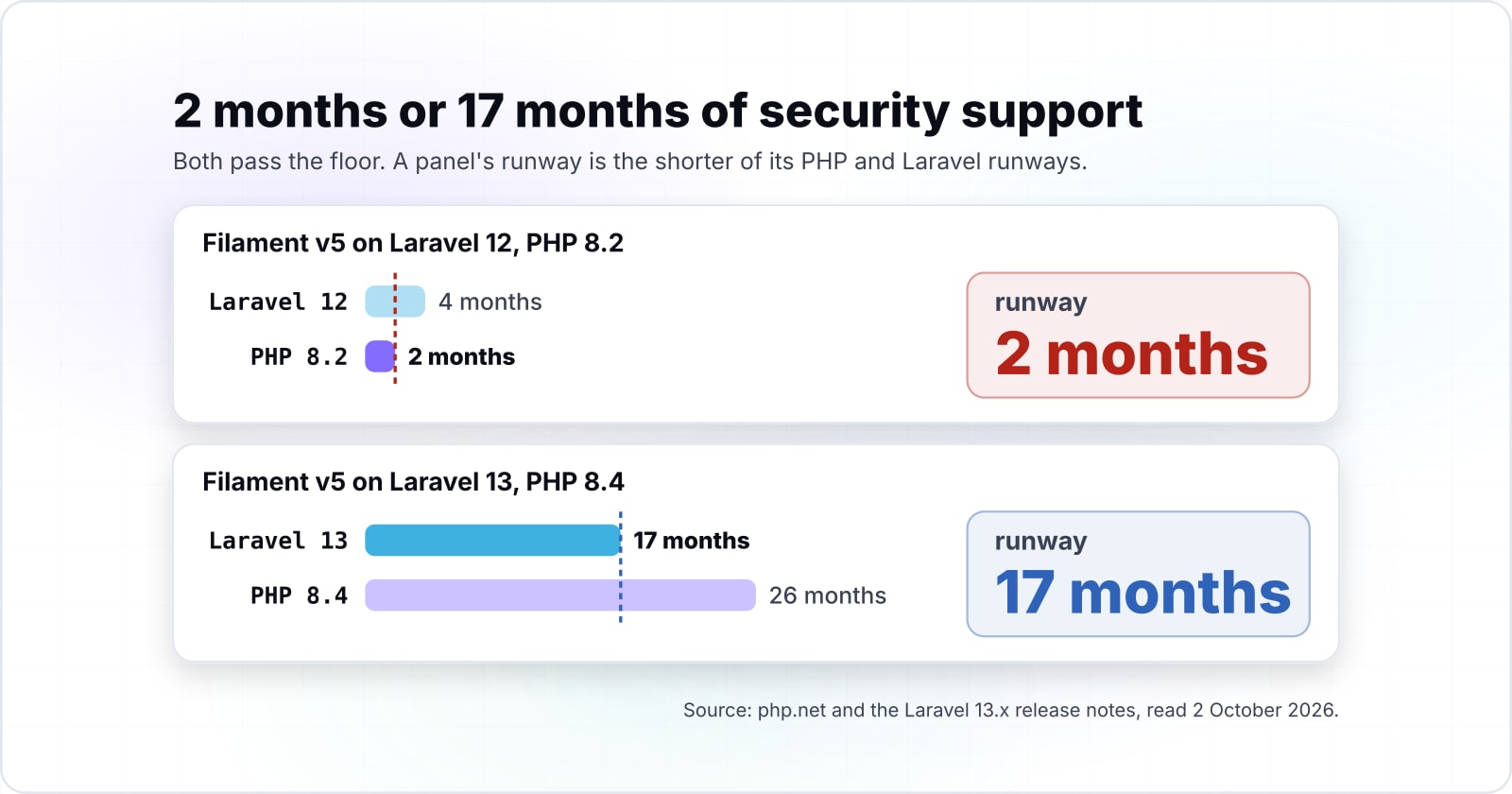
Laravel gives each release 2 years of security fixes, so from 2 October 2026 Laravel 12 has 4 months left and Laravel 13 has 17. The support policy in the Laravel 13.x release notes reads: "bug fixes are provided for 18 months and security fixes are provided for 2 years". Then the same table ends security fixes for Laravel 12 on 24 February 2027. Laravel 13 follows on 17 March 2028.
Meanwhile, Laravel 11 reached its date on 12 March 2026. So a panel on Laravel 11.28 installs and gets no security fixes. In short, a panel's runway is the shorter of its PHP and Laravel runways.
4 months
Laravel 12
17 months
Laravel 13
A panel's runway is the shorter of its PHP and Laravel runways.
Laravel 11 reached its date on 12 March 2026.
| Option | whole months of security fixes left |
|---|---|
| Laravel 12 | 4 months |
| Laravel 13 | 17 months |
Say a team on Laravel 12 and PHP 8.2 installs Filament v5, and both pass the floor. PHP 8.2 has 2 months left and Laravel 12 has 4. So the panel goes live with 2 months of security support. Instead, Laravel 13 on PHP 8.4 gives 17 months, because Laravel's date now comes first. Also, Laravel 13 requires PHP 8.3 or later, so it cannot pair with PHP 8.2.
The date your PHP branch or Laravel release stops getting security fixes, whichever comes first.
Security support ends
31 Dec 2026Months left from 2 October 2026
2Laravel 12 on PHP 8.2: 2 months left
Others end sooner3 of the 10 listed stacks have less time left. This stack still sets a date: plan the next upgrade before it ends.
| Laravel 11 on PHP 8.2 | 12 Mar 2026 | -6 |
|---|---|---|
| Laravel 11 on PHP 8.3 | 12 Mar 2026 | -6 |
| Laravel 11 on PHP 8.4 | 12 Mar 2026 | -6 |
| Laravel 12 on PHP 8.2 | 31 Dec 2026 | 2 |
| Laravel 12 on PHP 8.3 | 24 Feb 2027 | 4 |
| Laravel 12 on PHP 8.4 | 24 Feb 2027 | 4 |
| Laravel 12 on PHP 8.5 | 24 Feb 2027 | 4 |
| Laravel 13 on PHP 8.3 | 31 Dec 2027 | 14 |
| Laravel 13 on PHP 8.4 | 17 Mar 2028 | 17 |
| Laravel 13 on PHP 8.5 | 17 Mar 2028 | 17 |
Which Filament docs pages should you build from, and in what order?#
Build from 4 Filament 5.x pages in order, installation, getting started, users and deployment, with the Livewire 4 upgrade guide open if the app has custom components. Since each one assumes the step before it, keep that order.
- Installation: the requirements and the two install commands,
composer requireandfilament:install --panels. - Getting started: what a resource is and the three pages it generates.
- Users: the
FilamentUsercontract and thecanAccessPanel()method. - Deployment: production access and the
filament:optimizecommand. - Livewire 4 upgrade guide: the v4 changes, needed only when the app has its own Livewire components.
Installation
The requirements and the two install commands.
Getting started
What a resource is and the three pages it generates.
Users
The FilamentUser contract and the canAccessPanel() method.
Deployment
Production access and the filament:optimize command.
What is the smallest working Filament panel?#
The smallest working panel is 4 Artisan and Composer commands plus one interface on the User model, and each line comes from the Filament 5.x docs. The commands below assume a Laravel app that already has a Customer model and its table.
# 1. Install the package (Filament 5.x installation page)
composer require filament/filament:"^5.0"

# 2. Create and register the admin panel
php artisan filament:install --panels

# 3. Generate a resource, with its form and table built from the model's columns
php artisan make:filament-resource Customer --generate

# 4. Create a user to sign in with
php artisan make:filament-user
Then open /admin and sign in. Also, the install step creates app/. If the panel shows an error, the installation page says to check that the provider is registered in bootstrap/providers.php. The fifth step is the interface on the User model. It lets the same panel work outside local, and the next section shows it.
Why does a working panel refuse every sign-in in production?#
The fix comes from the Filament users docs:
<?php

namespace App\Models;

use Filament\Models\Contracts\FilamentUser;
use Filament\Panel;
use Illuminate\Foundation\Auth\User as Authenticatable;

class User extends Authenticatable implements FilamentUser
{
    public function canAccessPanel(Panel $panel): bool
    {
        return str_ends_with($this->email, '@yourdomain.com') && $this->hasVerifiedEmail();
    }
}
So the method does two jobs. First, it ends the lockout. Second, it decides who gets in. Returning true for everyone fixes the first job and fails the second. Any account the app creates could then open the panel. Instead, check a domain, a role or a flag that only staff hold. Finally, add php artisan filament:optimize to the deploy script, as the deployment docs advise for production.
When is Filament the wrong tool?#
Filament is the wrong tool in 3 cases its own docs name: a Vue and Inertia team wanting Nova, a content site needing Statamic, and Blade-only screens suited to Flux. In particular, the Filament overview lists these itself, and the advice is sound.
- If your team works in Vue.js and needs deep customisation, use Laravel Nova. The overview notes Nova "is built with Vue.js and Inertia.js", and it is an official Laravel project.
- If you need a CMS out of the box, use Statamic, which the overview calls "a CMS built on Laravel".
- If you want to write Blade views and handle the backend yourself, use Flux. The overview calls it "the official Livewire UI kit".
Show the three cases as a table
| Your case | Use instead |
|---|---|
| A Vue.js team that needs deep customisation | Laravel Nova |
| A CMS out of the box | Statamic |
| Blade views, with the backend handled yourself | Flux |
In each case, the better tool saves you from bending Filament into a shape it was not built for.
Where should you go next?#
Next, read how Livewire moves state between browser and server, how multi-tenant panels change the tenancy decision, and which PHP features arrived in each branch. Livewire against traditional Laravel explains what crosses the wire when a Filament screen updates. Then our Tenancy for Laravel review covers the choice a multi-tenant panel forces.
For the version questions, PHP features for developers helps you pick a branch. Also, Laravel for SaaS places the admin panel among a product's other defaults.
If you would rather have a team build the panel, we offer Laravel developers for hire and custom software development. Even so, the four Filament pages above are enough to ship a panel on your own.