How to modernize legacy code with AI without breaking business logic
The old system still earns money, and the rules that make it earn live in code nobody fully remembers. AI can help you move it forward, as long as it reads first and converts last.
How do you modernize legacy code with AI without breaking business logic?#
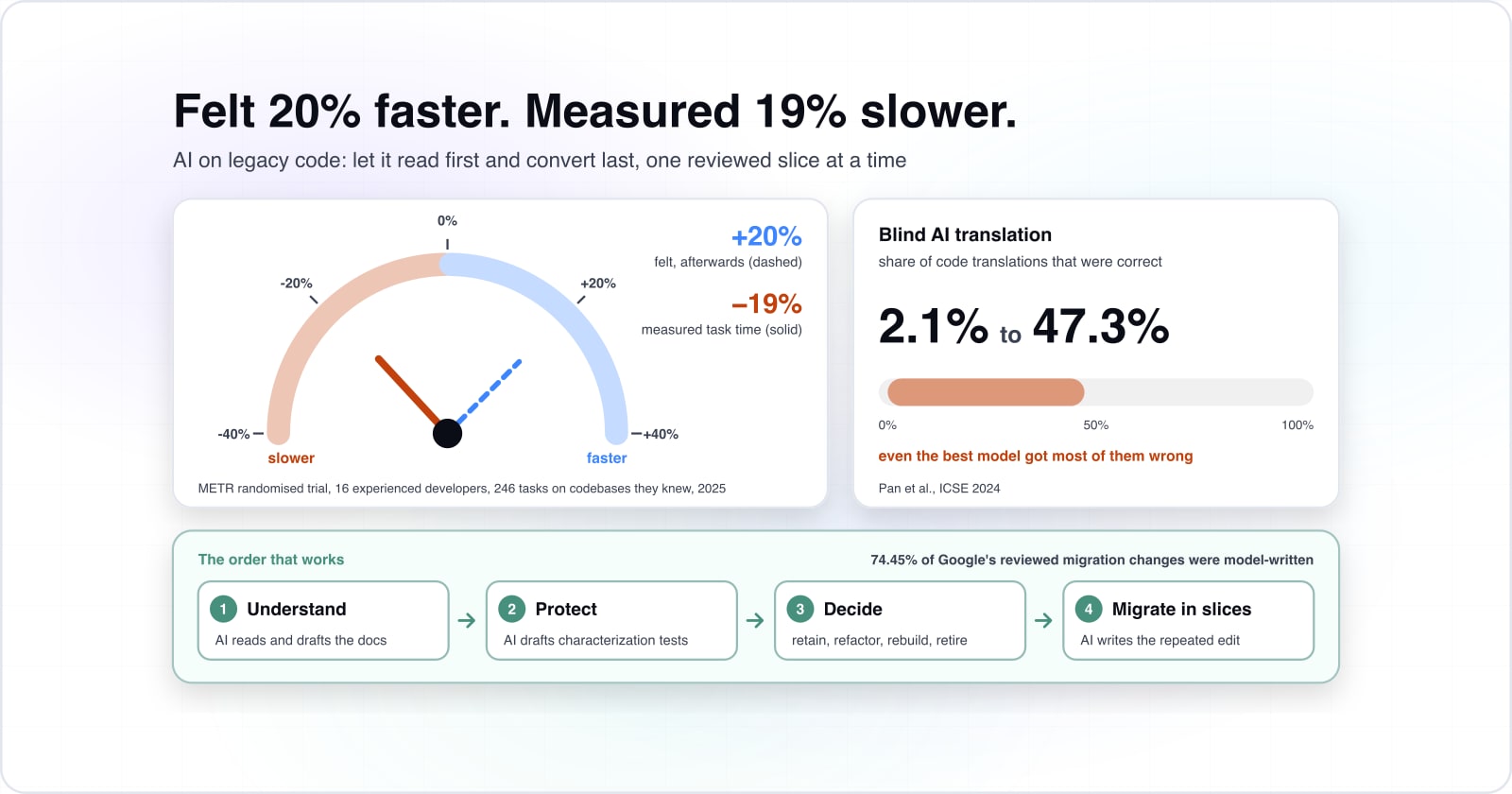
Use AI to read the system and pin its current behaviour with tests first, then change it in small reviewed slices, because blind AI translation was correct for at most 47.3% of samples. That figure comes from Pan et al., "Lost in Translation", an ICSE 2024 paper last revised on 16 January 2024. The authors concluded that "LLMs are yet to be reliably used to automate code translation".
2.1%
Lowest-scoring model studied
47.3%
Highest-scoring model studied
Even the best model studied got fewer than half of its translations right.
Show data table
| Option | percent of translations correct |
|---|---|
| Lowest-scoring model studied | 2.1% |
| Highest-scoring model studied | 47.3% |
Source: Pan et al., ICSE 2024 (arXiv 2308.03109), 16 January 2024
So the question is not whether AI can help, because it can, and a lot. Instead, the real question is where you point it. In practice, AI is strong at reading code, summing it up and repeating a known change many times. However, it cannot tell whether an odd line in an old function is a bug or a rule your finance team depends on.
That gives a four-step order. First, understand the system. Second, protect its current behaviour with tests. Then decide, part by part, what to retain, refactor, rebuild or retire. Finally, migrate in small slices that a software engineer reviews and can roll back. Then each section below takes one step and shows where AI speeds it up and where it must not decide.
How much faster does AI make work on a mature codebase?#
In a randomised trial on mature codebases, developers expected AI to cut task time by 24% and it made them 19% slower. The trial was run by METR and published on arXiv, with version 2 dated 25 July 2025. Sixteen experienced developers worked on 246 tasks in projects they had known for an average of 5 years.
Show data table
| Item | Change in task time (%) |
|---|---|
| Economics experts predicted: faster by | 39% |
| ML experts predicted: faster by | 38% |
| Developers forecast before: faster by | 24% |
| Developers estimated after: faster by | 20% |
| Measured in the trial: slower by | 19% |
Every forecast was a speed-up of 20% to 39%, and the trial measured a 19% slowdown.
The gap between feeling and fact is the part to take into a budget meeting. After the 2025 trial ended, the same developers still believed AI had saved them 20% of their time. Also, experts in economics and machine learning had predicted savings of 39% and 38%. In the paper's own words, "AI tooling slowed developers down."
This does not mean AI is useless on old code. Instead, it means a plan built on felt speed is built on the wrong number. Because a legacy system is exactly the mature, familiar codebase the trial studied, the finding applies closely. Therefore, set the budget on what a small pilot slice actually delivers. Treat any vendor multiplier as a claim to test, not a line in the plan.
Why does converting legacy code with AI break business logic?#
A study of 1,700 code samples found 15 categories of translation bugs, and a converter cannot tell which quirk is a bug and which is a business rule. In that 2024 study, Pan et al. translated code between C, C++, Go, Java and Python. The samples came from three benchmarks and two real projects, and even with tidy, well-known code, most translations failed.
However, legacy business code is harder than a benchmark. The rules that matter tend to live in edge cases. Think of a rounding step for one region, a date check added after an audit, or a status code a partner still sends. Nobody wrote them down, because at the time they were obvious. As a result, a model that converts line by line either copies the quirk or quietly drops it. Either way, it does not know which it did, and neither do you.
The same problem shows up in smaller tasks. For example, a MITRE team asked models to add comments to legacy code in their study on documenting MUMPS and mainframe assembly. With a naive prompt, "the models would often alter the code to generate documentation". A tool asked only to explain the code changed it instead.
So AI cannot modernize legacy code on its own. Conversion is not a syntax problem but a behaviour problem. As a result, you need evidence of what the code does today before anything can be trusted to change it.
What should you understand about a legacy system before you change it?#
Before any change, recover four things from the code itself: the business rules, the dependencies, the integrations and the edge cases the data actually hits. The rules are the checks and sums the business depends on. The dependencies are the libraries, frameworks and shared code each part needs. Then come the integrations: every file drop, API call, queue and shared database.
| What to recover | What it is | What AI can draft | Checked against |
|---|---|---|---|
| Business rules | The checks and sums the business depends on | A plain-words explanation of a strange function | Production logs, real data samples and the people who use the screens |
| Dependencies | The libraries, frameworks and shared code each part needs | A map of which modules call which | The running system |
| Integrations | Every file drop, API call, queue and shared database | A list of the endpoints a legacy API exposes | Production logs and the running system |
| Edge cases | The cases the data actually hits | Inputs that reach each branch | Real data samples |
This is where AI helps most, as a fast reader. For example, it can explain a strange function in plain words, draft a map of which modules call which, and list the endpoints a legacy API exposes. The same MITRE study found model-written comments on legacy code "generally hallucination-free, complete, readable, and useful" next to human ones. However, the authors also found that no automated metric reliably predicted comment quality. In short, a person still has to check the output.
That check is the real work. A software engineer tests each AI draft against the running system, using production logs, real data samples and the people who use the screens. For instance, take a draft that says "orders over a limit need approval". It is only useful once someone finds the limit, the exception for key accounts and the report that reads both.
Google's experience report on AI code migrations, published on 12 January 2025, points the same way. It says AI can "reduce barriers to get started" on a migration, while developers still own the work. As a result, this step ends in a short assessment of what the system does, what it touches and where the risky rules sit.
How do characterization tests protect working behaviour?#
A characterization test records what the code does today, right or wrong, so any change that alters behaviour fails a test before it reaches a customer. It does not ask what the code should do. Instead, it feeds real inputs through the current system and captures the outputs. Then those outputs become the expected result.
Feed real inputs through the current system.
It does not ask what the code should do.
Capture the outputs.
Right or wrong, they are what the code does today.
Make those outputs the expected result.
A known wrong answer is safer than an unknown one.
A later change alters an output and the test fails.
The change is caught before it reaches a customer.
A person decides whether the change is a fix or a break.
Without that test, you learn about it from a support ticket.
That sounds odd at first, because some of those outputs may be wrong. However, a known wrong answer is safer than an unknown one. If a later change alters it, the test fails, and then a person decides whether the change is a fix or a break. Without that test, the same change reaches a customer first, and you learn about it from a support ticket.
AI speeds up this step more than almost any other, because writing hundreds of plain tests is slow and repetitive. It can read a function, suggest inputs that reach each branch and draft the test code. Research is moving here too. For example, UnitTenX, published on 6 October 2025, is an open-source system built to "generate unit tests for legacy code". Its authors also note "the limitations of LLMs in bug detection".
So keep the roles clear. In practice, AI proposes tests and inputs, while a software engineer checks that each test pins a real behaviour and adds the edge cases found earlier. The same person decides which captured outputs are bugs to fix later. Once the pinning tests pass, every later change is something you can verify rather than trust.
Should each part be retained, refactored, rebuilt or retired?#
Decide per component, not per system: retain what is stable, refactor what is sound but hard to change, rebuild what cannot carry the business forward, and retire what nobody uses. A rewrite is one of four answers, and usually the right one for only a few parts. For a JavaScript part you refactor, the guide to adding clean code ESLint rules to an existing codebase without a rewrite shows the rollout.
| Decision | For a part that is | Typical legacy example |
|---|---|---|
| Retain | Stable | A billing batch that passes its pinning tests |
| Refactor | Sound but hard to change | An old Laravel or Java module on an unsupported framework |
| Rebuild | Unable to carry the business forward | An AngularJS front end or a tangled monolith module, behind a facade |
| Retire | Unused | Reports, screens and endpoints the logs show nobody uses |
The categories are not new. AWS's guidance on migration strategies, accessed on 29 September 2026, lists retire, retain, repurchase and refactor among its options. In particular, it defines retire as the choice for apps "that you want to decommission or archive". Also, it says you might retain an app "because it requires a detailed assessment and plan prior to migration".
Here is how the four answers look in a real estate of old systems:
- Retain a stable billing batch that passes its pinning tests. Patch it and leave it.
- Refactor an old Laravel or Java module with sound logic on an unsupported framework. Upgrade it in place.
- Rebuild an AngularJS front end or a tangled monolith module. Build the new version behind a facade.
- Retire reports, screens and endpoints the logs show nobody uses.
Because this choice needs the map from step one and the tests from step two, the assessment comes before the commitment. A team that signs up for a full rewrite first has answered the question for every part at once, usually without the evidence.
How does incremental modernization keep the business running?#
A facade routes each request to the old or the new code, so you move one slice at a time and can route back if a slice misbehaves. Microsoft's strangler fig pattern was updated on 2 June 2026. It puts it plainly: "the façade incrementally shifts requests from the legacy system to the new system."
The AWS version of the pattern, accessed on 29 September 2026, gives the reason. It warns that "a big bang migration approach is risky". With a facade, the old system keeps serving everything you have not moved yet. Meanwhile, the new one grows one route, one screen or one API at a time.
These slices are where AI speed is real, because each one is small, repeated and checked by tests you already wrote. Google reported this shape of work in a case study by Ziftci et al., published on 13 April 2025. Across 39 migrations, three developers over twelve months submitted 595 code changes with 93,574 edits.
Show data table
| Item | Share (%) |
|---|---|
| Code changes generated by the LLM | 74.45% |
| Edits generated by the LLM | 69.46% |
| Estimated time saved (developer estimate) | 50% |
The model generated most of the submitted changes, and developers still reviewed and submitted every one.
The model generated most of those changes, and the developers estimated they saved half their time. However, people still found, reviewed and submitted every change. In short, that is the model to copy: AI does the repeated edit, and a software engineer owns each slice from start to rollback.
Which support dates should set the order of the work?#
PHP 8.2 security support ends on 31 Dec 2026, about three months from now, so a Laravel application on it should start its assessment before its framework and runtime both stop receiving fixes. The date comes from PHP's supported versions page, accessed on 29 September 2026. Meanwhile, Laravel's release notes show that Laravel 11 security fixes ended on March 12th, 2026.
That is the worked example. Take a Laravel 11 app on PHP 8.2, assessed in September 2026. The framework is already out of security fixes, and the runtime has about three months left. In that window, the team maps the system, pins its behaviour and moves the first slice. Therefore, the first slice is the upgrade path, not the ugliest module.
The date your runtime or framework stops receiving security fixes.
Security support ends
31 Dec 2026Months left from 29 September 2026
3PHP 8.2: 3 months left
Can wait its turn5 of the 8 listed stacks have a shorter runway. Parts on those go ahead of this one, however messy this code is.
| AngularJS | January 2022 | -56 |
|---|---|---|
| Java SE 8 Premier Support | March 2022 | -54 |
| Laravel 11 | March 12th, 2026 | -6 |
| Node.js 20 | Mar 24, 2026 | -6 |
| .NET 8 and .NET 9 | November 10, 2026 | 1 |
| PHP 8.2 | 31 Dec 2026 | 3 |
| Laravel 12 | February 24th, 2027 | 4 |
| PHP 8.3 | 31 Dec 2027 | 15 |
What do the other legacy stacks look like?#
The same logic runs across the common stacks. The Node.js EOL page says an end-of-life version "will no longer receive updates, including security patches". Node.js 20 reached that status on Mar 24, 2026. Also, Microsoft's .NET support policy lists November 10, 2026 as the end of support for .NET 8 and .NET 9.
Older front ends are further along. The AngularJS project states: "AngularJS support has officially ended as of January 2022." Finally, Oracle's Java SE roadmap shows Premier Support for Java SE 8 ended in March 2022. Its Extended Support runs until December 2030.
In short, code quality still matters, but runway sets the order. A part on a runtime with months left goes ahead of a messier one on a supported stack. Put your own end date into the calculator, and the first slice usually picks itself.
What must software engineers keep control of?#
Architecture, business logic, validation, security and the production release stay with software engineers, because those are the decisions a wrong answer cannot be rolled back from cheaply. AI can draft all of them, but it should approve none of them.
| Decision | What it covers | Who approves |
|---|---|---|
| Architecture | The target design, the facade and the data boundaries | A software engineer signs it off |
| Business logic | Every rule recovered in step one | A software engineer, with the business owner |
| Validation | The pinning tests and the pass rules for each slice | A person decides which outputs are bugs |
| Security | Logins, secrets, dependencies and data handling in every changed file | A software engineer reviews it |
| Production release | The cutover and the rollback plan | A named person owns each release |
First, the 2025 Google result shows why this split works. The model generated 74.45% of the code changes. Yet three developers found the change sites, reviewed every diff and submitted the work themselves.
Second, the 2025 METR trial shows the other side. There, trust without measurement ran the wrong way, since "AI tooling slowed developers down" while those developers believed the opposite.
In practice, write down who approves what before the first slice moves:
- Architecture: the target design, the facade and the data boundaries. A software engineer signs it off.
- Business logic: every rule recovered in step one. A software engineer confirms it with the business owner.
- Validation: the pinning tests and the pass rules for each slice. A person decides which outputs are bugs.
- Security: logins, secrets, dependencies and data handling in every changed file. A software engineer reviews it.
- Production release: the cutover and the rollback plan. A named person owns each release.
With that list in place, AI can work fast inside a fence. It drafts, suggests and repeats, while the people who carry the risk make the calls.
When is AI-assisted incremental modernization the wrong fit?#
If a component is small, unused or about to be replaced by a product you buy, retire or replace it rather than spending AI or tests on preserving it. AWS's guidance calls the buy route repurchase, "also known as drop and shop". For plain functions like email or ticketing, it is often the cheaper path.
There are two other cases where this approach is the wrong tool. First, when nobody on the team can check the output, AI only makes changes faster than they can be reviewed. In that case, bring in someone who knows the stack to write the pinning tests by hand, then add AI once there is a reviewer.
Second, when the change is a known, repeated upgrade, a rule-based tool often beats a model. For PHP, for example, fixed refactoring rules apply the same upgrade the same way every time. The guide to Rector for PHP migrations covers that route. Since the rules are fixed, the result repeats in a way model output does not.
In short, use AI where there is real reading or repeated editing to do, and a person to check it. Where there is neither, pick the simpler tool.
What should you do before committing to a rewrite?#
Commission an assessment of the existing codebase first: the rules, the dependencies, the tests you can write today and the support dates, then decide. That assessment is the cheapest step in the whole program, and every later choice depends on it.
A good assessment answers five questions. What does the system do, including the rules nobody wrote down? What does it depend on, and what depends on it? How much of its behaviour can you pin with tests today? Which parts should you retain, refactor, rebuild or retire? And how many months of support does each runtime have left? With those answers, you know where a rewrite is right and where it is not.
To modernize legacy code with AI safely, keep this order and keep people in charge of the decisions. For the next step, the guide on how to choose a legacy modernization partner covers what to ask whoever does the work. Then agentic development in the software lifecycle shows where AI fits when people keep review and release control. Finally, the enterprise software development guide covers the wider build, buy or modernize choice.
If you would rather have help, Atyantik offers AI-augmented development with software engineers in control. It also does enterprise software work for systems that need a refactor or a rebuild. Either way, the support pages, the papers and a careful read of your own code are enough to start the assessment yourself.