AI purchase order entry for B2B: the model reads, rules match, a person sends
Most of the work in an emailed purchase order is not the typing. It is finding each product in the store, and that search is where a wrong size slips into the order.
What does AI purchase order entry for B2B actually automate?#
AI purchase order entry for B2B works when a model reads the emailed PDF into fields, plain rules match each line to the catalogue, and a person clears the flags.
That split comes from the pipeline in Atyantik's case study, published 12 October 2026. There, orders arrive three ways: the seller's own inbox address, a dashboard upload or an API (application programming interface) call. Then the model reads each order into customer, address and line fields. After that, rules match the lines: "exact SKU first, then a title similarity above 0.8, otherwise a flag for the person". Finally, a person checks the flagged fields, and one click sends a draft order to the store.
As a result, to automate purchase order entry is to automate the reading and the matching. However, the deciding part, whether the order goes to the store, stays with a person. In short, the model saves the typing and the rules save the searching, while the person keeps the right to say no.
What does retyping an emailed purchase order cost the business?#
Retyping costs a person reading every line, searching the store for each product and typing it again, and each of those steps is where a wrong size slips in.
An order platform's knowledge base, read in October 2026, describes keying a PDF order with over 100 line items. It calls the job "a tedious process that took" 30 to 40 minutes. Also, it says the work was prone to manual errors. In practice, the typing is only the visible half, and the hidden half is the search. For every line, someone looks up a product by the customer's name for it, not yours.
Automating the read and the match moves the order desk from typing every line to checking only the lines the rules could not match. In particular, that is the change an owner reports upward: less time per order, and fewer wrong lines shipped. For example, take our 14 October 2026 test on five order lines. The strictest rule matched one line by itself and sent four to a person. However, none of the lines it matched alone was wrong. Since the rule only lets through lines it can prove, the person's time goes where the risk is.
5
Retyping: every line by hand
4
Strict rule: lines flagged for a person
Under the strictest rule one line matched by itself and four went to a person, and none of the matched lines was wrong.
| Option | order lines, of five |
|---|---|
| Retyping: every line by hand | 5 |
| Strict rule: lines flagged for a person | 4 |
Source: our measurement, 14 October 2026
Which steps does the model do, and which do plain rules do?#
The model does one job, turning a PDF into order fields, and plain rules do the matching, because every match has to be traced back to a rule someone can read.
Here is the pipeline, one step per box:
- Arrive. An order comes in by inbox address, upload or API, and no model is involved yet.
- Get text. Code reads the PDF's text layer, with no model involved. A scanned page has no text layer, so it goes to OCR (optical character recognition) first.
- Read. The model turns the text into fields: customer, ship-to address, and lines with SKU, title and quantity. A field it cannot read stays empty rather than guessed.
- Match. Rules match the customer by name and address, then each line by SKU or title.
- Check. A person sees the flags beside the original PDF and fixes them.
- Send. One click sends a draft order to the store.
Why keep the model out of step 4? Because a model's pick cannot be explained when it is wrong. The case study, published 12 October 2026, turned that option down. It says "a plausible but wrong product is the most expensive mistake in this job". Also, the catalogue would have to travel with every order. Instead, a rule fails in a way you can see. Meanwhile, the reading step itself is a known pattern in order software. One commerce platform's documentation, read in October 2026, describes a feature that can "scan incoming emails with attached purchase orders".
Why can a 0.96 title match still be the wrong product?#
Against the catalogue title Stainless Steel Hex Bolt M8 x 40mm, an M10 bolt scores 0.96 on a string similarity ratio while the same M8 bolt with its words reordered scores 0.53.
A title similarity score measures shared letters, not the product. As a result, a wrong size can outscore the right part written in another order. We measured five order-line titles against one catalogue product on 14 October 2026, with the matcher in the code further down.
Show data table
| Item | Value |
|---|---|
| Stainless steel hex bolt M8 x 40 mm (same product) | 0.99 |
| Hex Bolt M8 x 40mm Stainless Steel (same product, words reordered) | 0.53 |
| SS Hex Bolt M8x40 (same product, abbreviated) | 0.67 |
| Stainless Steel Hex Bolt M10 x 40mm (wrong size) | 0.96 |
| Stainless Steel Hex Nut M8 (wrong product) | 0.8 |
The M10 bolt, the wrong size, scores 0.96 while the right bolt with its words reordered scores 0.53.
First, the wrong size wins because only two characters differ. Second, the hex nut, a different product, still scores exactly 0.8. Meanwhile, the right bolt written as "Hex Bolt M8 x 40mm Stainless Steel" falls to 0.53. That is because the ratio rewards letters in the same order. The Python Software Foundation's matcher documentation, read in October 2026, says "a ratio() value over 0.6 means the sequences are close matches". That is true for text, since it measures how alike two strings look. However, close text is not the same product, and in an order the number is the product.
Which matching rule keeps a wrong size out of the order?#
Exact SKU first, then a title similarity above 0.8 that must also agree on every number in the title, and anything else goes to a person to pick.
Adding a numbers-must-agree rule to the threshold cut wrong matches to zero in our 14 October 2026 test, at the cost of sending more lines to a person. In practice, the rule compares every run of digits in the two titles. So 8 and 40 against 8 and 40 passes, while 10 and 40 fails.
| Rule | Lines matched without a person (of 5) | Wrong matches |
|---|---|---|
| ratio above 0.6 | 4 | 2 |
| ratio above 0.6 and numbers agree | 2 | 0 |
| ratio above 0.8 | 2 | 1 |
| ratio above 0.8 and numbers agree | 1 | 0 |
The trade is plain in the table. First, a looser threshold matches more lines and lets wrong ones through. Then the numbers rule takes the wrong ones out at either threshold. However, the cost is the abbreviated title "SS Hex Bolt M8x40". At 0.67 it fails the 0.8 line and goes to a person, although it is the right product.
Still, a flagged line costs a person some picking, while a wrong size costs a return and a credit note.
1 matched, 0 wrong
No wrong product gets through. 4 of 5 lines go to a person to pick.
Catalogue title: Stainless Steel Hex Bolt M8 x 40mm
- Stainless steel hex bolt M8 x 40 mm (0.99)Matched: 0.99 is above 0.8
- Hex Bolt M8 x 40mm Stainless Steel (0.53)Flagged: 0.53 is not above 0.8
- SS Hex Bolt M8x40 (0.67)Flagged: 0.67 is not above 0.8
- Stainless Steel Hex Bolt M10 x 40mm (0.96)Flagged: the numbers do not agree
- Stainless Steel Hex Nut M8 (0.8)Flagged: 0.8 is not above 0.8
Ratios from Python difflib on five order-line titles, our measurement, 14 October 2026.
What happens when a purchase order is too long for one read?#
Past 6,000 characters the order is split with a 400-character overlap, the parts are read in parallel, and lines repeated in the overlap are dropped by rule.
That rule comes from Atyantik's case study, published 12 October 2026. So a long order becomes several parallel reads, and their count grows with the length. Then a rule, not the model, removes the duplicate lines the overlap creates.
Show data table
| Item | Value |
|---|---|
| 4,000 characters | 1 |
| 6,000 characters | 1 |
| 12,000 characters | 3 |
| 24,000 characters | 5 |
| 48,000 characters | 9 |
A 48,000-character order needs nine reads, and they run in parallel.
Why overlap the parts at all, when it means reading some text twice? Because a cut can land in the middle of a line, and a half line reads as nonsense. Since the parts share 400 characters, each line appears whole in at least one part. As a result, some lines appear whole in two parts, and the merge step drops the repeat. In our 14 October 2026 arithmetic, a 48,000-character order needs nine reads. Run in parallel, they do not wait on each other.
However, there is one edge to watch in that merge. Say a customer orders the same item twice on two lines. Then a merge that keys on the title and quantity drops one. So a production merge keys on the line number the order prints, where there is one.
What does a person check before the draft order is sent?#
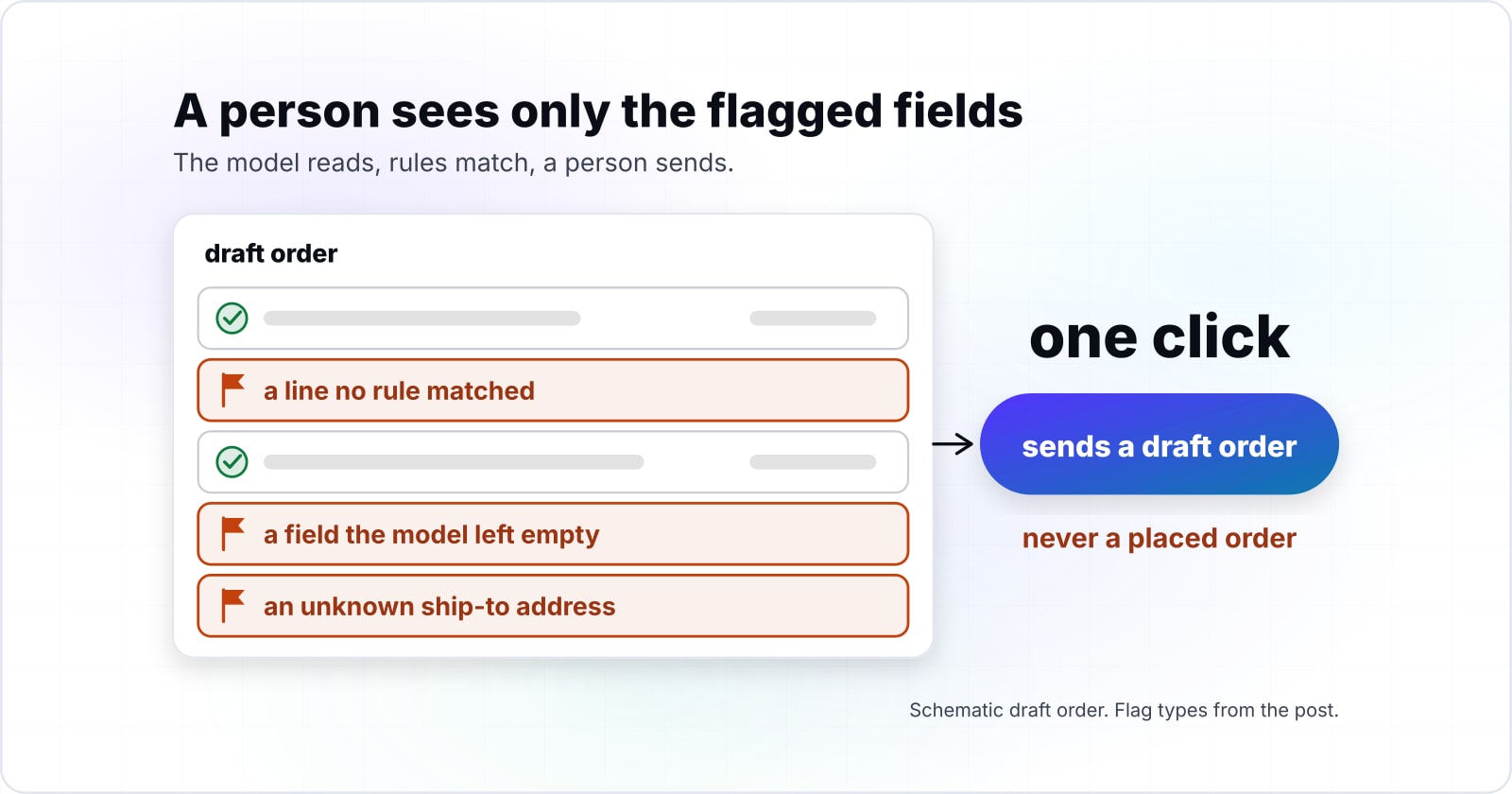
A person sees only the flagged fields, picks a product where no rule matched, and one click sends a draft order to the store, never a placed order.
In Atyantik's case study, published 12 October 2026, the order desk "checks the flagged fields next to the original document instead of typing every line". In particular, the flags are specific, so the person knows what to look at. A flag is a line no rule matched, a field the model left empty, or an unknown ship-to address. For each flag, the person sees the original PDF beside the field.
See the flag
A flag is a line no rule matched, a field the model left empty, or an unknown ship-to address.
Compare with the PDF
For each flag, the person sees the original PDF beside the field.
Pick or fix
The person picks a product where no rule matched.
Send a draft
One click sends a draft order to the store, never a placed order.
Because the person checks flags, not every line, the human step stays small. Therefore, a long order does not mean a long check. Also, the store receives a draft, not a placed order. So a mistake is still reversible after the click, because a draft is not yet an order.
Finally, this is where the time saving and the safety meet. Since the rules only pass what they can prove, everything left over is visible. In short, the person replaces a search with a decision.
Should you build it, buy it or keep retyping?#
Count your own recent orders first: how many arrive as text PDFs, how many lines carry your SKU, and how many layouts your customers send.
The build, buy or keep retyping decision comes from counts on your own orders, not from a demo on someone else's. Take your last 50 orders and count three things:
- Text PDFs versus scans. If most are scans, the OCR step decides your accuracy, so test that first.
- Lines with your SKU. If most lines carry your SKU, the exact match does most of the work. Then the title rules matter less.
- Distinct layouts. If two or three customers send most orders in fixed layouts, a template per layout may beat a model.
Then each count points somewhere, and you can take all three yourself in an afternoon. Many layouts and few SKUs point to a model read plus strict rules, built or bought. In contrast, few layouts point to templates. Meanwhile, a low order volume can mean retyping is still the cheapest answer.
Buying makes sense when a product connects to your store and ERP (enterprise resource planning) system. Its matching rules should also be ones you can read and change, because a rule you cannot change is a wrong size you cannot stop. Instead, building makes sense when the matching rules are your edge. It also fits an order flow that touches systems no product connects to. However, building means you own the OCR step, the store connections and every failure alert. Finally, keeping the desk as it is makes sense when orders are few and a person finds products quickly, although the search and the wrong-size risk stay. Also, test any product on your own orders, not on the samples in its demo. On the portal side, the B2B ecommerce AI assistant guide runs the same kind of tests.
| Route | When it wins | What to watch |
|---|---|---|
| Buy | A product connects to your store and ERP system | Its matching rules must be ones you can read and change |
| Build | The matching rules are your edge, or the order flow touches systems no product connects to | You own the OCR step, the store connections and every failure alert |
| Keep retyping | Orders are few and a person finds products quickly | The search and the wrong-size risk stay |
Which official pages do you build it from?#
The smallest version is built from official pages only: the email parser, the PDF text extractor, a JSON Schema for the fields and the string matcher.
Open these five pages in pipeline order, starting from the email. Then each line names the one thing taken from it.
- 1
Read the raw email
email.parser, from the Python Software Foundation and read in October 2026: BytesParser with policy=policy.default reads the raw email. The email package is Python's built-in mail reader.
- 2
Walk the attachments
email.message: iter_attachments() walks the attachments and get_content() returns the PDF bytes.
- 3
Read the text layer
pypdf text extraction: PdfReader and extract_text() read the text layer. pypdf is an open source Python library for PDF files. Its page also warns that it reads no scans, and for an image it says to "consider using OCR software".
- 4
Fix the fields
JSON Schema object reference: required and additionalProperties fix the fields the model may return. JSON Schema is a standard way to describe the shape of JSON data.
- 5
Score the titles
difflib: SequenceMatcher(...).ratio() gives the title similarity. difflib is Python's built-in module for comparing sequences.
The five pages, in order: email.parser, email.message, pypdf text extraction, JSON Schema object reference, difflib.
What is the smallest working version in code?#
The smallest working version is one Python file that pulls the PDF from the email, extracts its text, splits long orders and matches each line by rule.
The read is a function you plug in, and everything else is rules, in four steps. It needs Python 3 and pip install pypdf; the last lines run the matcher on its own.
import re
from email import policy
from email.parser import BytesParser
from difflib import SequenceMatcher
from pypdf import PdfReader

LIMIT, OVERLAP = 6000, 400

# Step 1: pull the PDF attachment out of the raw email
def pdf_from_email(eml_path, pdf_path):
    with open(eml_path, "rb") as f:
        msg = BytesParser(policy=policy.default).parse(f)
    for part in msg.iter_attachments():
        if part.get_content_type() == "application/pdf":
            with open(pdf_path, "wb") as out:
                out.write(part.get_content())
            return pdf_path
    return None

# Step 2: read the text layer; empty text means a scan that needs OCR first
def pdf_text(pdf_path):
    reader = PdfReader(pdf_path)
    return "\n".join(page.extract_text() or "" for page in reader.pages)

# Step 3: split a long order into overlapping parts, read them in parallel
def split_order(text):
    if len(text) <= LIMIT:
        return [text]
    step = LIMIT - OVERLAP
    return [text[i:i + LIMIT] for i in range(0, len(text) - OVERLAP, step)]

# The model's only job: return a list of lines shaped by this JSON Schema
LINE_SCHEMA = {
    "type": "object",
    "properties": {
        "sku": {"type": "string"},
        "title": {"type": "string"},
        "quantity": {"type": "number"},
    },
    "required": ["title", "quantity"],
    "additionalProperties": False,
}

def read_lines(part):
    """Plug your model call in here. Return a list of dicts matching LINE_SCHEMA."""
    raise NotImplementedError

def merge(parts):
    seen, lines = set(), []
    for part_lines in parts:
        for line in part_lines:
            key = (line.get("sku"), line["title"], line["quantity"])
            if key not in seen:  # a line repeated in the overlap is dropped by rule
                seen.add(key)
                lines.append(line)
    return lines

# Step 4: match each line by rule, never by the model
def numbers(s):
    return sorted(re.findall(r"\d+", s))

def match(line, catalogue, cutoff=0.8):
    by_sku = {p["sku"]: p for p in catalogue}
    if line.get("sku") in by_sku:
        return by_sku[line["sku"]], "sku"
    best, score = None, 0.0
    for p in catalogue:
        r = SequenceMatcher(None, line["title"].lower(), p["title"].lower()).ratio()
        if r > score:
            best, score = p, r
    if best and score > cutoff and numbers(line["title"]) == numbers(best["title"]):
        return best, "title"
    return None, "flag"

catalogue = [{"sku": "HB-M8-40", "title": "Stainless Steel Hex Bolt M8 x 40mm"}]
for title in ["Stainless steel hex bolt M8 x 40 mm", "Stainless Steel Hex Bolt M10 x 40mm"]:
    print(title, "->", match({"title": title, "quantity": 100}, catalogue)[1])
Run as written, it prints title for the first line and flag for the M10 bolt. Next, wire read_lines to your model with LINE_SCHEMA as its answer shape, and send each flagged line to a person.
When is AI the wrong tool for purchase order entry?#
When customers already send structured orders, or one customer sends one fixed layout, a parser or a template map beats a model and is easier to audit.
AI reading earns its place only when layouts vary. Here are the three cases where something else wins:
| Case | Use instead | Why |
|---|---|---|
| Structured orders: a CSV (comma-separated values) file or an EDI (electronic data interchange) message | Parse it | EDI is a fixed format, so a parser reads it the same way every time |
| One fixed layout per customer | A template that maps each field's position | Cheaper to run and easy to check; a layout change shows up as an empty field, not a guess |
| Scans with no text layer | OCR first, then the model | Judge the OCR accuracy before you judge the model |
For the scan case, the PDF library's text extraction page, read in October 2026, says to "consider using OCR software" for images.
In each case, the rules half of this design still applies, because only the reading step changes.
Where can you see this pipeline running, and what to read next?#
The anonymous case study shows this pipeline in production, and the B2B assistant post covers the customer portal side of the same store.
Read the purchase order case study for the architecture, the three decisions and what went wrong. On the portal side, see building a B2B ecommerce AI assistant. Because an AI step that worked in a demo can break later, read why retrieval-augmented generation fails in production. For the same model-drafts, person-approves shape in publishing, see an AI content workflow in WordPress. Then see where a person must still approve the draft order and what extraction costs and how accurate it is. For an order that comes as a spreadsheet or a document, read what breaks when an agent edits office files. To pick the code, see which Python libraries an agent uses to read or edit a Word or Excel order.
If you want the reading and checking pipeline built, see AI agent development. If the hard part is the store or ERP connection, see API integrations. Still, the five official pages above and the file in this guide are enough to build a first version on your own.