paper-docx vs python-docx openpyxl python-pptx AI edits: which library keeps an Office file intact?
An agent edits a customer's contract, model or deck, the file opens fine, and something in it is gone. We ran the same three edits through both library families to see which saves keep the file whole.
paper-docx vs python-docx openpyxl python-pptx AI edits: which keeps the file intact?#
For Excel, swapping openpyxl for paper-xlsx alone kept the sparkline; for Word and PowerPoint, only the forks' guarded APIs kept tracked changes, formatting and every occurrence. The paper-docx README calls it "an import-compatible hard fork of python-docx." So the swap is cheap to try.
But in our 17 October 2026 test, the Word and PowerPoint results under the swap matched upstream exactly. So the protection sits in new calls, not in the package name. Also, neither family wrote a fresh formula result into the saved workbook. So an agent that reads a value back after an edit needs a calculation step either way.
| File | Upstream code | Fork, same code | Fork's guarded API |
|---|---|---|---|
| Word | 4 runs collapsed to 1, another reviewer's tracked change deleted | Identical to python-docx | Tracked replace, still bold; unclear edits refused by name |
| Excel | 18 package parts touched, sparkline lost | 2 parts touched, sparkline kept | 2 parts touched, sparkline kept, receipt lists each removed cache |
| PowerPoint | 2 of 4 FY25 occurrences changed | Identical to python-pptx | 4 of 4 occurrences changed |
What does a silently damaged file cost a team running an agent?#
A save that deletes another reviewer's tracked change leaves a contract that opens cleanly and says something nobody agreed, and no error is raised. Because nothing fails, nothing alerts anyone, so someone has to diff every edited file by hand.
A refusal-first edit step replaces that work with a check of the refusals and receipts the library returns. For example, in our 17 October 2026 test the python-docx rewrite of clause 4.3 hit that case. It took tracked insertions and deletions from 1 each to 0. Under paper-docx, an edit across that pending change was refused. Then the source file stayed byte-identical.
How was the test run, and what can it not tell you?#
Each format got the same edits run idiomatically, as a drop-in fork swap, and through the guarded API, with every result measured from the saved package rather than in Office. First, on 17 October 2026 we tested openpyxl 3.1.5, python-docx 1.2.0 and python-pptx 1.0.2 in one Python environment. Then the forks paper-xlsx 0.2.2, paper-docx 0.2.1 and paper-pptx 0.2.1 ran in another, because they share the upstream import names.
Results come from counting XML parts and elements in each saved package, so they show what the file holds, not how Word, Excel or PowerPoint renders or repairs it. Every Office file is a zip archive of XML parts, in a format called Office Open XML. But no copy of Microsoft Office or LibreOffice ran during the test.
The fixtures came from neither family. For example, xlsxwriter, a separate Python writer, built the Excel model. It held 13 formulas, a chart, a sparkline, a table and a note. Also, the Word contract split one clause across 4 runs. And the deck for the 17 October 2026 test held the year label FY25 in a title, a split run and a table cell.
| File | Upstream library | Fork | Fixture |
|---|---|---|---|
| Word | python-docx 1.2.0 | paper-docx 0.2.1 | A contract with one clause split across 4 runs and another reviewer's tracked change |
| Excel | openpyxl 3.1.5 | paper-xlsx 0.2.2 | A model built by xlsxwriter: 13 formulas, a chart, a sparkline, a table and a note |
| PowerPoint | python-pptx 1.0.2 | paper-pptx 0.2.1 | A deck with FY25 in a title, a split run and a table cell |
What happens to a Word contract when python-docx rewrites a clause?#
Rewriting a split clause through paragraph.text collapsed 4 runs into 1, dropped the bold, and deleted another reviewer's tracked change without a warning. In our 17 October 2026 test, those two losses came from two clauses. A run is a stretch of text with one format, and clause 4.2 spread "thirty calendar days" over 4 runs.
But clause 4.3 is the worse case. When a paragraph holds a tracked insertion, python-docx's paragraph.text leaves that text out. So in the same 17 October 2026 test, clause 4.3 read "interest at per month", with the inserted rate missing. Then writing the text back removed the revision and left a clause with no rate at all.
Show data table
| Dimension | Before the edit | After the save |
|---|---|---|
| Runs, python-docx | 4 count | 1 count |
| Runs, paper-docx | 4 count | 6 count |
| Insertions, paper-docx | 1 count | 4 count |
| Deletions, paper-docx | 1 count | 3 count |
python-docx collapsed clause 4.2 to 1 run, while the guarded edits added tracked revisions.
paper-docx's additions guide says to "Use tracked=True with author=... to author a new w:ins/w:del redline". Those are Word's tracked insertion and deletion tags. In our test, that call made "thirty" a tracked deletion and "forty-five" a tracked insertion, still bold. Also, three other edits in that 17 October 2026 test were refused by name: UnsupportedStructureError, TargetNotFoundError and AmbiguousTargetError.
What does openpyxl drop from an Excel model that paper-xlsx keeps?#
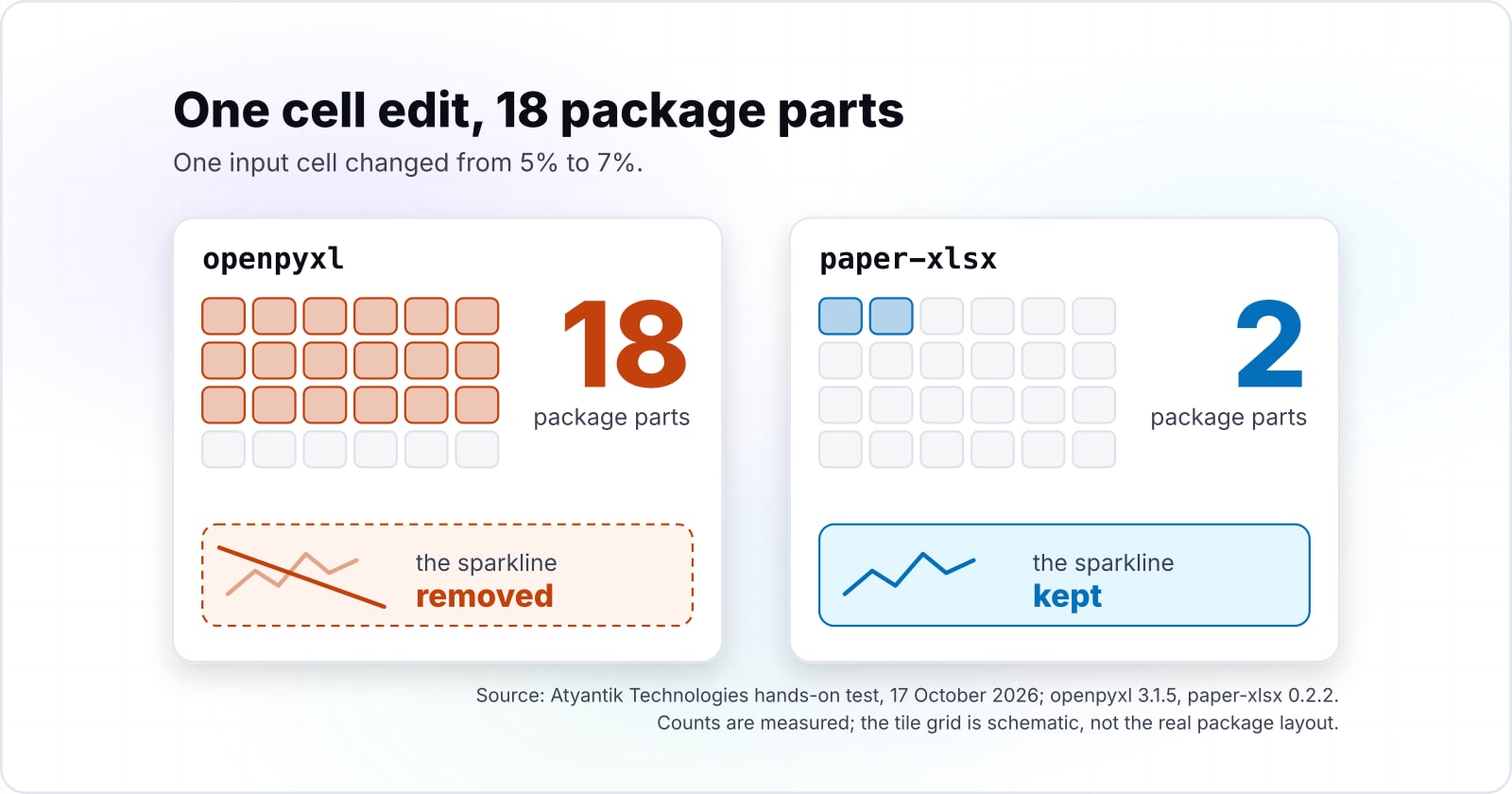
Changing one input cell made openpyxl remove, add or rewrite 18 package parts and delete the sparkline, while paper-xlsx rewrote 2 parts and kept it. In our 17 October 2026 test, openpyxl removed 3 parts, added 2 and rewrote 13. And it warned that the sparkline extension "is not supported and will be removed".
Show data table
| Item | Value |
|---|---|
| openpyxl 3.1.5 | 18 |
| paper-xlsx 0.2.2, same code | 2 |
| paper-xlsx 0.2.2, save with receipt | 2 |
The same save touched 18 parts under openpyxl and 2 under paper-xlsx.
The openpyxl tutorial gives the cause: "openpyxl does currently not read all possible items in an Excel file so" shapes are lost on save. In short, it rebuilds the package from what it understands. However, the paper-xlsx preserve mode page describes the opposite design. There, a save "patches the parts owned by supported edits and copies everything else unchanged". That held with unchanged code in our 17 October 2026 test, so the swap alone helped here.
Does either library recalculate formulas after an agent changes an input?#
Neither recalculates: all 13 cached formula values were gone after the save under both libraries, so an agent reading the result cell back got None. In our 17 October 2026 test, result cell B8 held 1215.50625 before the edit. After the save, it read as None through data_only=True on every path.
13
Before the save
0
After the save, on every path
A read with data_only=True returned None until something recalculated the file.
Counted in xl/worksheets/sheet1.xml under openpyxl 3.1.5 and paper-xlsx 0.2.2, with and without a receipt.
| Option | formulas carrying a cached value, of 13 |
|---|---|
| Before the save | 13 |
| After the save, on every path | 0 |
Source: Atyantik Technologies hands-on test, 17 October 2026, method above
The openpyxl tutorial says data_only returns "the value stored the last time Excel read the sheet". After a save without Excel, no such value exists. Meanwhile, the paper-xlsx page is explicit about this. Its save "removes affected cached formula results and requests a full recalculation on open". But only its receipt listed each removed cache in our 17 October 2026 test, while openpyxl said nothing.
Why did the python-pptx run loop miss half the FY25 occurrences?#
A run-by-run replace changed 2 of 4 slide occurrences, missing the split run and the table cell, while paper-pptx's replace_text changed all 4. In our 17 October 2026 test, one textbox held "FY2" and "5" in two runs. So no single run ever contained FY25.
Show data table
| Item | Value |
|---|---|
| python-pptx 1.0.2, run loop | 2 |
| paper-pptx 0.2.1, same code | 2 |
| paper-pptx 0.2.1, replace_text | 4 |
Only replace_text reached the split run and the table cell.
But assigning the whole paragraph's text loses formatting instead. A reply in python-pptx issue 285, opened 9 May 2017, calls Paragraph.text "a convenience property". Then it adds: "There is no general-case way to change the text while preserving the formatting". Instead, the paper-pptx guide says replace_text works "while preserving each run's formatting". Still, neither path touched the chart series name or the speaker notes in our test.
Is swapping the package enough, or does the code have to change?#
Swapping the package protected Excel content only; the Word and PowerPoint results were identical to upstream until the code called the forks' new APIs. In our 17 October 2026 test, paper-docx and paper-pptx under unchanged code repeated every upstream loss.
Runs in clause 4.2
4 → 1Tracked insertions
1 → 0python-docx 1.2.0: something did not survive the save
LostEdit made through paragraph.text rewrite.
Lost or missed
- Clause 4.2 collapsed from 4 runs to 1 and the bold was dropped
- Clause 4.3 lost the other reviewer's tracked change and now has no rate at all
| File | Path | Library | What the saved file showed |
|---|---|---|---|
| Word | Upstream code | python-docx 1.2.0 | 4 runs collapsed to 1, the other reviewer's tracked change gone, no error raised |
| Word | Fork, same code | paper-docx 0.2.1 | identical to python-docx |
| Word | Fork's guarded API | paper-docx 0.2.1 | tracked replace kept the bold and the redline; three unclear edits refused by name |
| Excel | Upstream code | openpyxl 3.1.5 | 18 parts touched, sparkline deleted, every cached result gone |
| Excel | Fork, same code | paper-xlsx 0.2.2 | 2 parts touched, sparkline kept, every cached result gone |
| Excel | Fork's guarded API | paper-xlsx 0.2.2 | 2 parts touched, sparkline kept, the receipt lists each removed cache |
| PowerPoint | Upstream code | python-pptx 1.0.2 | 2 of 4 changed; the split run and the table cell missed |
| PowerPoint | Fork, same code | paper-pptx 0.2.1 | identical to python-pptx |
| PowerPoint | Fork's guarded API | paper-pptx 0.2.1 | 4 of 4 changed; the chart series name and the notes untouched |
So the decision splits by file type. For Excel, swap the package, then add the receipt to see what each save changed. For Word and PowerPoint, rewrite the edit step around find, replace and refusal handling.
Which pages do you build an agent's edit step from?#
Build from the paper-docx additions guide for tracked edits, the paper-xlsx preserve mode page for receipts, and the paper-pptx additions guide for replace_text. Take them in this order:
- Page 1
paper-docx additions guide: find_one, Span.replace with tracked=True, and PaperRefusal.
- Page 2
paper-xlsx preserve mode page: save with receipt=True and the formula freshness rules.
- Page 3
paper-pptx additions guide: replace_text and its refusals.
- Page 4
openpyxl tutorial: the data_only flag for reading results.
The four pages: paper-docx additions guide, paper-xlsx preserve mode page, paper-pptx additions guide, openpyxl tutorial.
Also, the python-docx documentation covers the rest, since the fork keeps its object model.
What is the smallest guarded edit an agent loop can call?#
The smallest guarded edit finds one exact span, replaces it as a tracked change, and returns any refusal to the calling loop instead of guessing. Because the import name stays docx, it runs on paper-docx installed in place of python-docx.
from docx import Document
from docx.search import find_one
from docx.errors import PaperRefusal
def guarded_edit(src, dst, old, new, author="Contract agent"):
    doc = Document(src)  # Step 1: load the existing document
    try:
        span = find_one(doc, old)  # Step 2: exactly one match, or a refusal
        span.replace(new, tracked=True, author=author)  # Step 3: tracked change
    except PaperRefusal as refusal:  # Step 4: return the refusal, save nothing
        return {"ok": False, "refused": f"{type(refusal).__name__}: {refusal}"}
    doc.save(dst)
    return {"ok": True}
print(guarded_edit("contract.docx", "contract-edited.docx",
                   "thirty calendar days", "forty-five calendar days"))
For Excel, the paper-xlsx page shows the same shape: receipt = wb.save("output.xlsx", receipt=True). Then a loop reads the receipt, not the stale workbook values.
When are the paper forks the wrong tool?#
Stay on python-docx, openpyxl and python-pptx when the job only generates new files, because the guards protect existing content and the forks are young projects. Paper Instruments' repositories date paper-docx 0.2.1, paper-pptx 0.2.1 and paper-xlsx 0.2.2 to 23 September 2026. And a fresh document has no tracked change to lose.
Also, a pipeline that must read recalculated results needs Excel, LibreOffice or a formula engine, whichever library writes the file. For that, the paper-xlsx oracle module "uses headless LibreOffice". Finally, some teams cannot run a separate environment for the forks. For them, upstream plus a manual review of each file is the honest fallback.
| Case | Use instead |
|---|---|
| The job only generates new files | python-docx, openpyxl and python-pptx |
| The pipeline must read recalculated results | Excel, LibreOffice or a formula engine, whichever library writes the file |
| The team cannot run a separate environment for the forks | Upstream plus a manual review of each file |